
mmd2vsdx
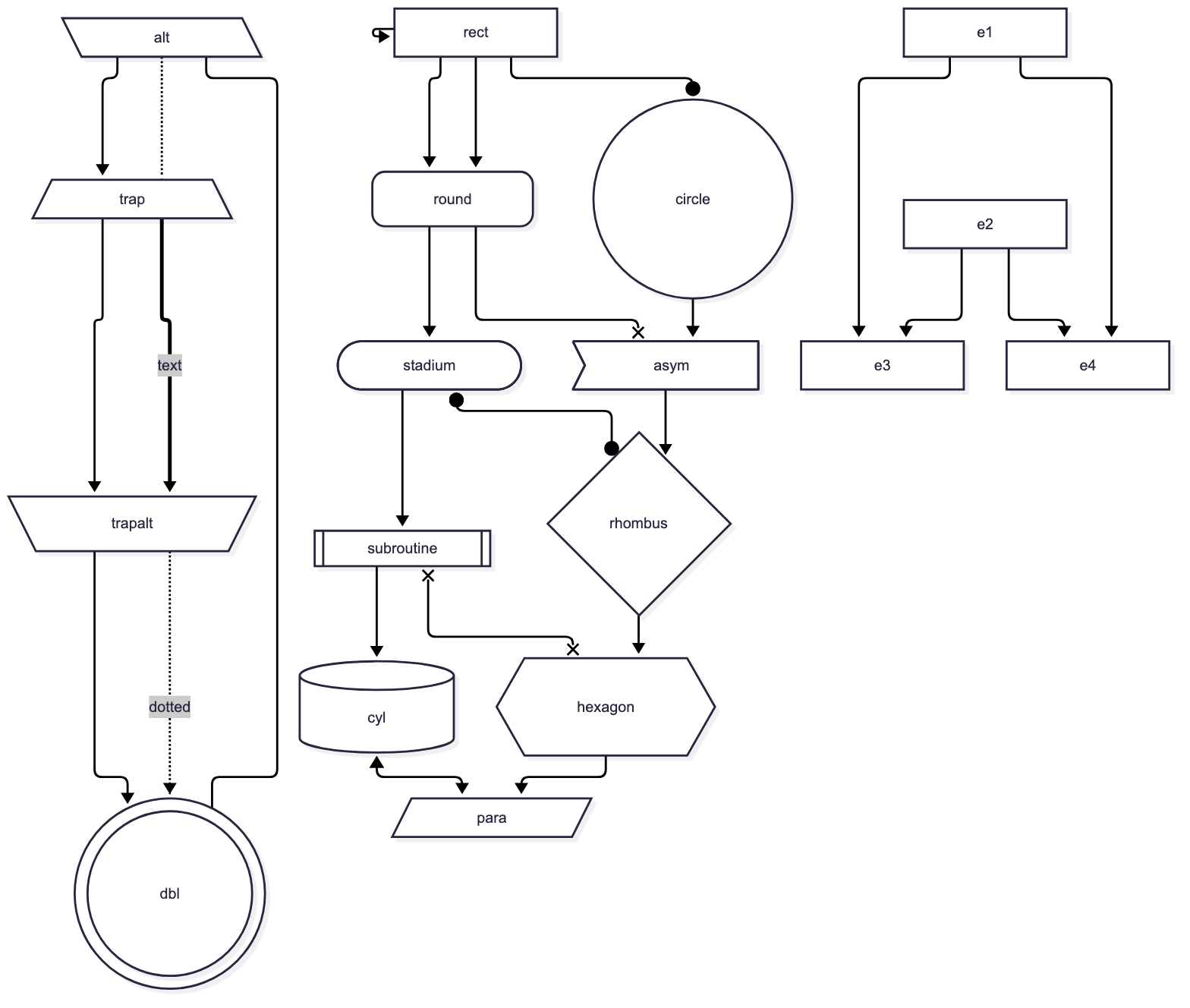
Convert Mermaid flowcharts into editable Microsoft Visio .vsdx files that look like Mermaid's own render.
| Mermaid's render | The .vsdx (libvisio preview) |
|---|---|
 |
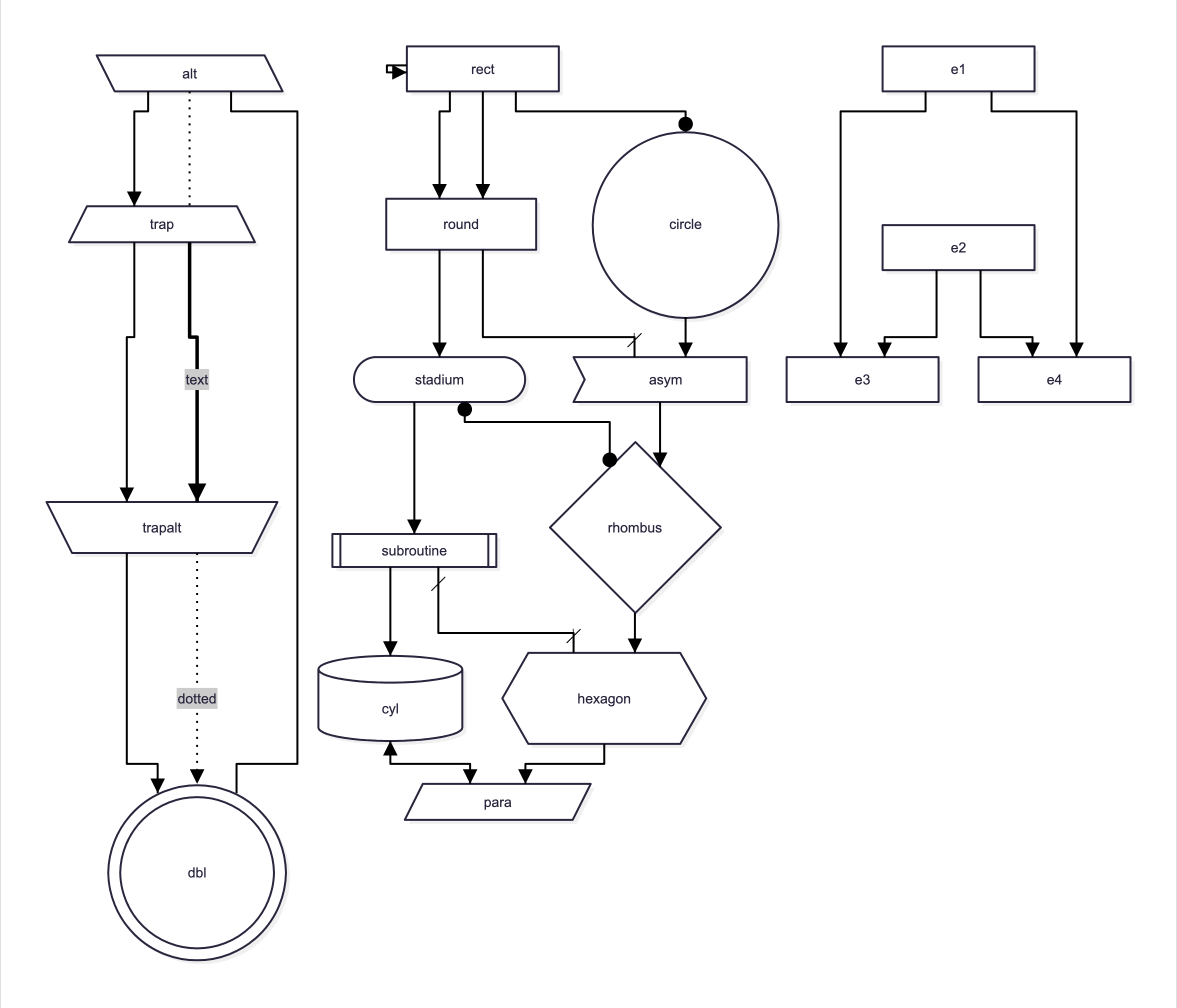 |
Mermaid computes the layout. mmd2vsdx then rebuilds the drawing as native Visio objects:
| Mermaid | Visio |
|---|---|
Nodes of any shape: classic syntax and every v11 @{ shape: … } shape |
Shapes whose outline is Mermaid's geometry, scaled with the shape; fills, strokes, rounding, neo shadow |
A@{ icon: "visio:PERIPH/Server" } |
A real Visio stencil master (any of ~9,200 from your own Visio stencil folder), glued and labelled. See docs/visio-stencils.md |
img@{ img: … } and @{ icon: … } nodes, <img>, fa:fa-… icons and $$…$$ KaTeX math inside labels |
The picture as a PNG inside the node's group (moves and scales with it); text keeps its place |
| Subgraphs (nested too) | Real Visio containers: members move with the frame |
Edges (incl. e1@--> ids, & chains, self-loops, subgraph ends) |
Visio Dynamic connectors glued to both shapes (they follow moved shapes); Mermaid's route (curves traced), rounded bends, solid/dotted/dashed/thick, animated (as dashed), triangle/circle/cross ends |
| Connector routes that would cross a subgraph title, a stencil caption or another edge's label | Re-routed just beside the text (Mermaid itself draws through them); the line stays glued and everything else is Mermaid's route |
| Edge labels | Connector text at Mermaid's position, same background |
Text, incl. Markdown strings and inline <span style> |
Chrome's exact line breaks; per-run font, size, colour, bold, italic, underline, strikethrough; same line height |
click links and tooltips |
Visio hyperlink and screen tip on the shape |
| Node ids and classes | Shape Data (Mermaid ID, Mermaid classes) |
accTitle / accDescr (or the title:) |
Document Title and Description properties |
| Looks and layouts: neo, classic, handDrawn; dagre, ELK, swimlane (rotated lane titles); all themes | Whatever Mermaid drew: a node drawn in several stroke colours (e.g. handDrawn hachure) becomes a group, one member per colour |
classDef, style, linkStyle, themes |
Resolved CSS read from Chrome, so styling carries over |
title: front-matter |
A text shape |
Install
Needs Python 3.9+, Node 18+ and Chrome, Chromium or Edge (if none is found, Chrome for Testing is downloaded). Nothing else is installed globally. The first conversion fetches the browser driver and Mermaid (about 40 MB) into your cache folder, then every run is offline.
pipx install mmd2vsdx # or: uv tool install mmd2vsdx / uvx mmd2vsdx diagram.mmd
No pipx or uv? One line, from the latest release (installs into ~/.local/share/mmd2vsdx and links ~/.local/bin/mmd2vsdx):
curl -fsSL https://raw.githubusercontent.com/high-frequensy/mmd2vsdx/main/install.sh | bash
Or from a checkout, to hack on it (everything stays in the folder; also builds .venv/ for the tests):
git clone https://github.com/high-frequensy/mmd2vsdx.git && cd mmd2vsdx && ./setup.sh
.venv/bin/python -m mmd2vsdx diagram.mmd
Where the one-time files go: the checkout folder, else ~/Library/Caches/mmd2vsdx (macOS), ~/.cache/mmd2vsdx (Linux) or
%LOCALAPPDATA%\mmd2vsdx (Windows); set MMD2VSDX_HOME to choose. Optional: brew install libvisio for previews and image tests.
Windows is supported by the code but not yet tested.
Use
mmd2vsdx diagram.mmd                 # -> diagram.vsdx + diagram.png (Mermaid's own render, for comparison)
mmd2vsdx notes.md -o out/            # every ```mermaid block -> out/notes-1.vsdx, notes-2.vsdx, ...
mmd2vsdx a.mmd b.mmd -o out/ --no-png
| Option | Meaning |
|---|---|
-o, --out |
Output .vsdx for a single diagram, or a directory |
--no-png |
Don't write Mermaid's reference PNG |
--config FILE |
Mermaid config JSON (default mermaid-config.json: Arial, which Visio has; Mermaid's default web font is not available in Visio) |
--reroute as-needed|freely|never |
How Visio may re-route connectors. Default as-needed keeps Mermaid's routes until something moves. |
--stencils DIR |
Visio stencil library for visio: icons (default stencils/ in the data folder, not included: copy it from your Visio install, see docs/visio-stencils.md) |
--find TEXT |
List stencil shapes whose name, stencil or keywords contain TEXT, as visio:STENCIL/NAME |
--wrap exact|visio |
exact (default) puts Mermaid's line breaks in as hard breaks for a 1:1 look. visio keeps only explicit <br> breaks so text re-wraps when you resize shapes. |
Check a file without Visio
python -m mmd2vsdx.validate_vsdx drawing.vsdx    # schema + glue/container consistency (needs: pip install "mmd2vsdx[check]")
python -m mmd2vsdx.vsdx_preview drawing.vsdx    # PNG of what libvisio (LibreOffice's Visio reader) parses
validate_vsdx checks every part against Microsoft's published Visio 2013 schema (mmd2vsdx/data/visio2012.xsd, from
Schema map (Visio XML)).
Four documented fixes are applied at load, because the published schema rejects files Visio itself writes; Microsoft's
own template validates clean with them. It also checks that every glue record matches the connector's glue
formula, move trigger and connection point, and that container relationships are reciprocal.
Tests
.venv/bin/python tests/run_tests.py            # all cases
.venv/bin/python tests/run_tests.py --update   # accept current output as the new golden files
Each tests/cases/<name>.mmd is converted and then validated. Its structural snapshot (shapes, text, colours,
label positions, glue, containers) is compared to tests/golden/<name>.json, and its libvisio preview to
tests/golden/<name>.png. A case can have <name>.config.json
(a Mermaid config) and <name>.args (extra CLI flags).
Golden PNGs depend on the machine's fonts and Chrome version. On a new machine, run --update once, then review.
The JSON snapshots are portable.
Pinned versions (what was tested)
Mermaid 12.1.0 (pinned in mmd2vsdx/runtime.py), puppeteer-core 25.13.0, Chrome 149, libvisio 0.1.11, xmlschema 4.2.0,
Pillow 11.3.0, Python 3.9.6. The converter reads details of Mermaid's SVG
(data-points, edge ids, CSS classes), so upgrade Mermaid deliberately and re-run the tests.
Limits
- Flowcharts only. Other diagram types (sequence, class, ER, state, Gantt, …) are rejected with a message.
- Not yet verified inside Visio itself. Everything above is checked offline (schema, libvisio). Still to confirm in Visio: thick-edge arrowhead size (Visio scales heads with line weight; one size smaller is used), rounded bends, dash spacing, group nodes, pictures and self-loops.
- Fixed attach points. Connector ends are glued to fixed points on shapes (where Mermaid drew them), not to whole shapes.
- Cross ends. Visio has no plain "X" arrowhead, so Mermaid cross ends use a slash. Arrowheads take the line's colour.
- Pictures are bitmaps. Images and icons are captured from Chrome at 4x as PNG; they are not editable vector art.
- Callbacks.
click A callback(JavaScript functions) has no Visio equivalent and is ignored; URL links are kept. - Plain-text labels and wrapping. With
htmlLabels: false, Mermaid pre-wraps labels, so--wrap visiocannot tell explicit breaks from wrapped ones and keeps all breaks.
Layout
mmd2vsdx/convert.py        converter (stdlib only)
mmd2vsdx/runtime.py        data folder, and the one-time fetch of the browser driver, Mermaid and fonts
mmd2vsdx/vsdx_preview.py   libvisio-based preview of any .vsdx
mmd2vsdx/validate_vsdx.py  schema + glue/container validator
mmd2vsdx/stencil_lib.py    finds stencil masters and copies them (styles, media, colours) into a .vsdx as instances
mmd2vsdx/data/render.cjs        Mermaid -> SVG/PNG in Chrome (puppeteer-core + Mermaid from the data folder)
mmd2vsdx/data/measure_lines.cjs asks Chrome how it laid out the SVG: line breaks, label boxes, resolved colours
mmd2vsdx/data/shot.cjs          rasterises preview SVGs with Chrome
mmd2vsdx/data/base.vsdx         base document that provides Visio's Dynamic connector master
mmd2vsdx/data/visio2012.xsd     Microsoft's published Visio schema
mmd2vsdx/data/mermaid-config.json  default Mermaid config (Arial)
tools/stencil_sweep.py     checks every master of the stencil library (import, schema, drawing, scaling)
examples/                  generic example diagrams and their .vsdx
install.sh, setup.sh       one-line installer; checkout setup
tests/              cases, golden files, runner
License and third-party material
mmd2vsdx is MIT licensed (LICENSE). It is not affiliated with or endorsed by Microsoft; Visio is a Microsoft trademark.
mmd2vsdx/data/visio2012.xsdis Microsoft's published Visio schema, copied unmodified under the permission notice inside the file (the patches described above are applied in memory at load).- Microsoft's Visio stencils are not included. Bring your own from a Visio install; see docs/visio-stencils.md.
- Runtime dependencies are installed by
mmd2vsdx/runtime.pyfrom their own sources: Mermaid and mermaid-cli's font embedder (MIT), puppeteer-core (Apache-2.0), KaTeX (MIT), Font Awesome Free (fonts OFL, icons CC BY 4.0), the Open Sans and Recursive fonts (OFL), xmlschema (MIT), Pillow (HPND).
1 maintainer

Metadata
1 maintainer
Release files for mmd2vsdx 0.2.1
For a detailed explanation of source distributions (sdists) and built distributions (wheels), please see the package formats documentation.
Source distribution (sdist)
| File | Size | Uploaded | |
|---|---|---|---|
| mmd2vsdx-0.2.1.tar.gz | 92.0 kB | Details |
Built distribution (wheel)
| File | Interpreter | ABI | Platform | Reset |
|---|---|---|---|---|
| mmd2vsdx-0.2.1-py3-none-any.whl | Python 3 | none | any | Details |
Total release size: 182.8 kB
Release files / mmd2vsdx-0.2.1.tar.gz
| Download URL | mmd2vsdx-0.2.1.tar.gz |
|---|---|
| Size | 92.0 kB |
| Tags | Source |
|
SHA-256 checksum How to use checksums |
461b0a00927ae079d13fe8a2892a66103cb8156b9dad3e5fb2804791b323098d
|
|
BLAKE2b-256 checksum How to use checksums |
02f9a1583452802dc0625df27d03e3430890a5be644752a2787bc661c8b6e059
|
| Upload date | |
|
Uploaded using Trusted Publishing? What is trusted publishing? |
Yes |
| Uploaded via |
twine/7.0.0 CPython/3.13.14
|
Provenance
Provenance describes where a file came from. On PyPI, provenance is shared via attestations, which provide a verifiable record of the build or publishing details. View details, limitations and caveats.


PyPI Publish Attestation
PyPI verified that this artifact, at this checksum, originated from the publisher listed below.
Signed by GitHub Actions, verified by PyPI on Oct 11, 2026.
Transparency logRelease files / mmd2vsdx-0.2.1-py3-none-any.whl
| Download URL | mmd2vsdx-0.2.1-py3-none-any.whl |
|---|---|
| Size | 90.7 kB |
| Tags | Python 3 |
|
SHA-256 checksum How to use checksums |
9105d77e053f2b4524ebe0b1d74d1d44d998133deedf947b9c07782d59c6d990
|
|
BLAKE2b-256 checksum How to use checksums |
f059836d64753454710da6b18e185382b9da83c1915c3b07364d2265047824c0
|
| Upload date | |
|
Uploaded using Trusted Publishing? What is trusted publishing? |
Yes |
| Uploaded via |
twine/7.0.0 CPython/3.13.14
|
Provenance
Provenance describes where a file came from. On PyPI, provenance is shared via attestations, which provide a verifiable record of the build or publishing details. View details, limitations and caveats.
PyPI Publish Attestation
PyPI verified that this artifact, at this checksum, originated from the publisher listed below.
Signed by GitHub Actions, verified by PyPI on Oct 11, 2026.
Transparency log













