
Command line interface and Python API to generate i18n documents
Verified details
These details have been verified by PyPIProject links
GitHub Statistics
Maintainers

Project description

Multilingual Markdown Generator
This package provides a command-line interface to manage multilingual contents and generate i18n markdown from a single base file.






🌏 English | Français | 한국어 | 日本語
Available in Bash, Zsh, and Windows PowerShell.
Table of Contents ⚡
Overview 🔎
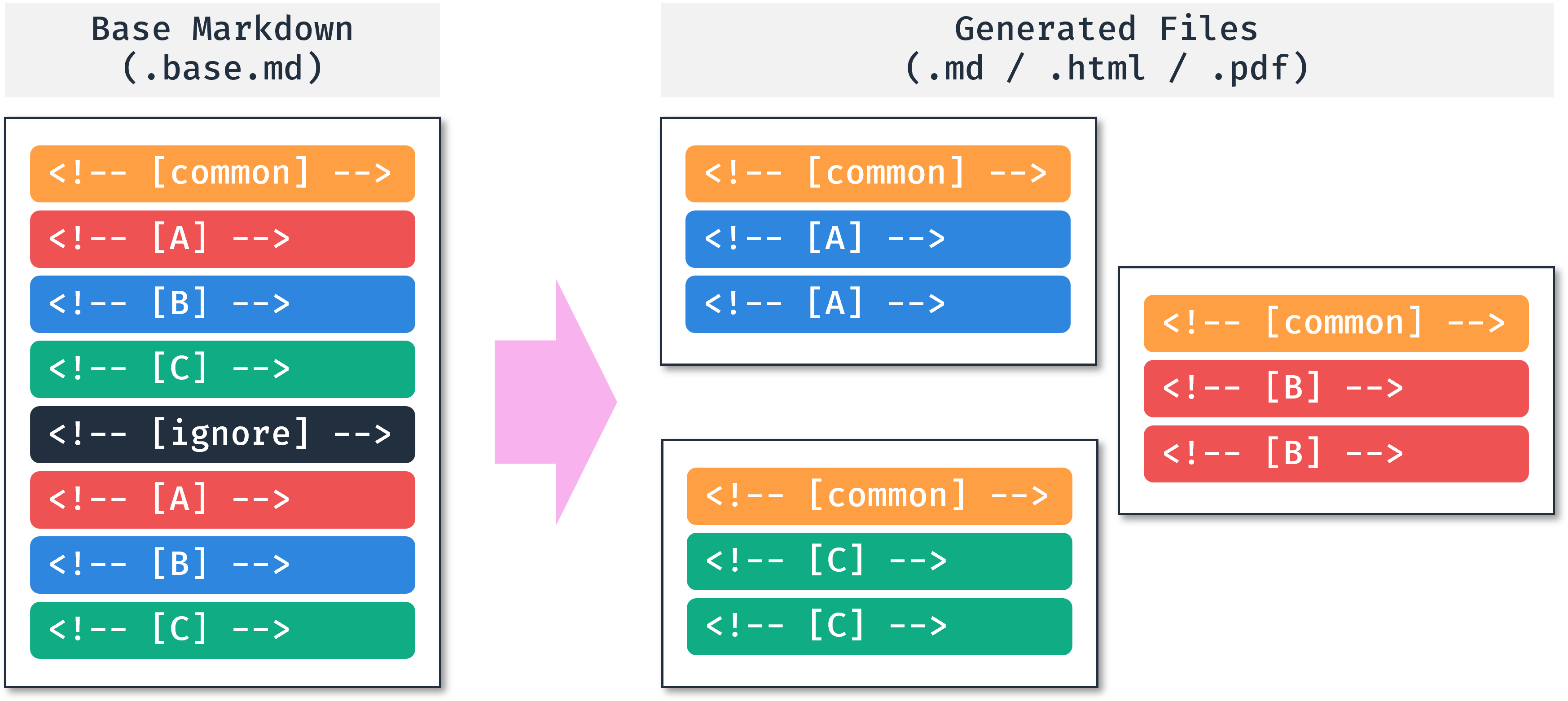
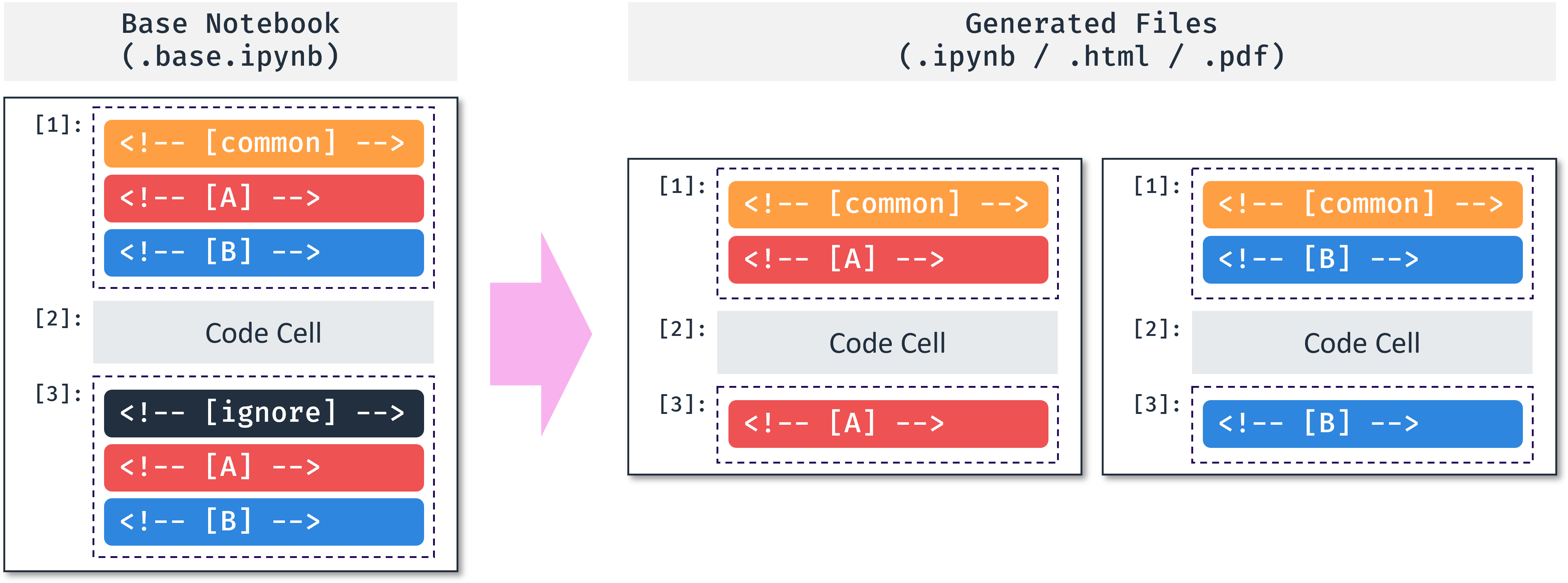
How It Works
By managing only one Base file, we can reduce the number of errors caused by missing or mismatched translations. Additionally, thanks to editing in a single file, we can expect convenient translation with the auto-completion function of AI tools such as Copilot.
Markdown:
Jupyter Notebook:
Features
Supports the following features:
- Markdown, Jupyter Notebook(
.ipynb) as input formats - As-is, HTML, PDF as ouput formats
- Command-line interface for Bash, Zsh, Windows PowerShell
- Python API
- Recursive traversal mode with
-roption (As-is, HTML, PDF are all supported) - Batch processing mode with YAML file (Only
As-isis supported) - IETF language tags
- UTF-8 encoding
- Automatic generation of table of contents with level and emoji options (Markdown and Jupyter Notebook are both supported)
- Base file validation (Check the number of tags of each language)
- Validation only mode for CI/CD (Disable file generation)
Installation 📦
Linux
pip3 install mmg
macOS
pip3 install mmg
If you have any issues with WeasyPrint, install it with the following command. WeasyPrint is only used to create PDFs.
brew install weasyprint
Windows
Python is not installed by default on Windows. Please install Python first, then install MMG using the Python package manager pip.
pip3 install mmg
If you installed Python from the Microsoft Store, you may see the following warning when installing MMG. (The displayed path may vary for each user.)
$ pip3 install mmg
...
  WARNING: The script mmg.exe is installed in 'C:\Users\...\AppData\Local\Packages\PythonSoftwareFoundation.Python.3.11_qbz5n2kfra8p0\LocalCache\local-packages\Python311\Scripts' which is not on PATH.
  Consider adding this directory to PATH or, if you prefer to suppress this warning, use --no-warn-script-location.
Successfully installed mmg-2.0.1
If you see this warning, it means the mmg command cannot be found in the terminal. Please add the path shown in the warning message to the PATH environment variable. Instructions for adding to PATH can be found in the Troubleshooting documentation.
Additionally, MMG uses WeasyPrint to create PDFs. WeasyPrint requires the GTK library, so download and run the latest GTK3 installer. If you are not interested in creating PDFs, you can skip this step. Other features of MMG are available without GTK.
How to Use 💡
Please refer to the documentation for detailed usage and examples.
$ mmg --help
Usage: mmg [OPTIONS] [FILE_NAMES]...

  FILE_NAMES: Base file names to convert.

  Supported extensions are:
      .md, .markdown, .mkd (Markdown)
      .mdx (MDX - Markdown + JSX) [experimental]
      .rmd (R Markdown) [experimental]
      .mmd (MultiMarkdown) [experimental]
      .qmd (Quarto) [experimental]
      .ipynb (Jupyter Notebook)

  Here are some examples:
      mmg *.base.md
      mmg *.base.ipynb
      mmg *.base.md *.base.ipynb -o pdf --css github-dark
      mmg --recursive
      mmg --recursive --validation-only
      mmg --batch mmg.yml

Options:
  -r, --recursive                 This will search all subfolders based on
                                  current directory.
  -b, --batch FILE                YAML file path for batch conversion.
                                  (Default: None)
  -o, --output-format [as-is|html|pdf]
                                  Output format. (Default: as-is)
  --css TEXT                      CSS file path or preset('github-
                                  light'/'github-dark'). Only for the HTML/PDF
                                  output. (Default: github-light)
  -y, --yes                       This will confirm the conversion without
                                  asking. (Default: False)
  -s, --skip-validation           Skip the health check. (Default: False)
  --validation-only               Only check the health. (Default: False)
  -v, --verbose                   Verbosity level from 0 to 2. --verbose:1,
                                  -v:1, -vv:2 (Default: 0)
  --version                       Show the current version.
  --help                          Show this message and exit.
Troubleshooting 💊
Please refer to the troubleshooting page on the website.
Changelog 📝
Contributors 🤝

Made with contrib.rocks.
If you are interested in how to contribute, please refer to the contribution guide.
Project details
Verified details
These details have been verified by PyPIProject links
GitHub Statistics
Maintainers
Release history Release notifications | RSS feed


Download files
Download the file for your platform. If you're not sure which to choose, learn more about installing packages.
Source Distribution
Built Distribution
Filter files by name, interpreter, ABI, and platform.
If you're not sure about the file name format, learn more about wheel file names.
Copy a direct link to the current filters
File details
Details for the file mmg-2.2.0.tar.gz.
File metadata
- Download URL: mmg-2.2.0.tar.gz
- Upload date:
- Size: 35.2 kB
- Tags: Source
- Uploaded using Trusted Publishing? Yes
- Uploaded via: uv/0.6.11
File hashes
| Algorithm | Hash digest | |
|---|---|---|
| SHA256 |
cd336b727595cdd2d6c7659051a2414fba24a515e4099aae467a5a1e6d81faf4
|
|
| MD5 |
81c26966cb3c7792af736d7897a4f793
|
|
| BLAKE2b-256 |
ca433e434e2ddd6fdd2b534840562a9ff8f0814631e8bac9757f2f97e4217045
|
File details
Details for the file mmg-2.2.0-py3-none-any.whl.
File metadata
- Download URL: mmg-2.2.0-py3-none-any.whl
- Upload date:
- Size: 36.6 kB
- Tags: Python 3
- Uploaded using Trusted Publishing? Yes
- Uploaded via: uv/0.6.11
File hashes
| Algorithm | Hash digest | |
|---|---|---|
| SHA256 |
d6f66517bcaa896d6e8437fe02c1e5576fb8c42fd5a30b79b2b40641b99dfbe7
|
|
| MD5 |
8c52c7227db373f5e453a2066a442f9e
|
|
| BLAKE2b-256 |
86b421b1617456b9170a66e5367deb1ef0978fbeab93d61d786b84c884937e28
|






