
Multi Model Get - A library to download files from various sources including Hugging Face and Civitai

Project description
mmget - Multi Model Get
mmget is a Python library that simplifies downloading files from various sources including regular URLs, Hugging Face, and CivitAI. It provides a unified interface for managing model downloads with support for authentication tokens and customizable download paths.
Features
- Download files from regular URLs
- Download models from Hugging Face using access tokens
- Download models from CivitAI using access tokens
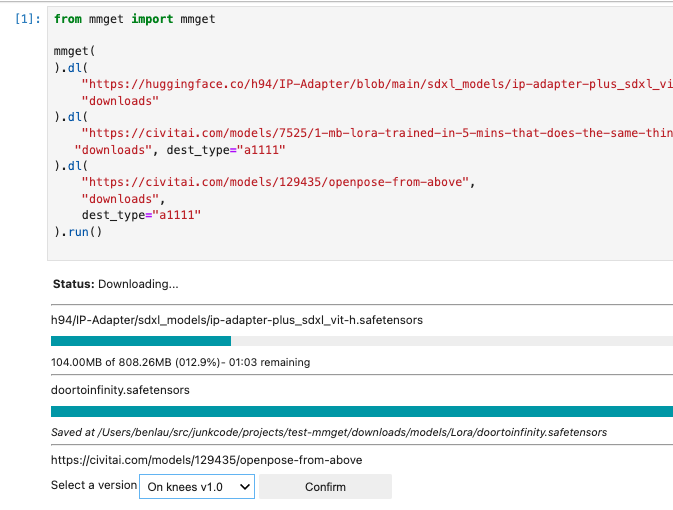
- Interactive version selection when multiple versions are available (Jupyter only)
- Customizable download paths for different software (A1111, ComfyUI) based on model types
- Jupyter notebook integration with GUI interface
- Works in console environment
Installation
You can install mmget using pip:
pip install mmget
Usage
from mmget import mmget

mmget(
  hf_token = "" # Hugging Face Access Token [Optional]
  civitai_token = "" # CivitAI Access Token [Optional]
).dl(
  # Download FLUX-1 Dev Model (Access Token Required) to "Download Paths"
  "https://huggingface.co/black-forest-labs/FLUX.1-dev/blob/main/flux1-dev.safetensors",
  "downloads"
).dl(
  # Download CivitaAI Model to ComfyUI that will be saved to downloads/comfyui/models/loras
  "https://civitai.com/models/7525/1-mb-lora-trained-in-5-mins-that-does-the-same-thing-as-25-gb-model-but-better",
  "downloads/comfyui",
  dest_type="comfyui"
).run()
CivitAI
When downloading models from CivitAI, you may encounter multiple available versions. In Jupyter notebooks, mmget will display an interactive interface allowing you to choose from the available versions. When running from the console, it will display the available versions and pause the download process until you specify a version.
Moreover, if you set the dest_type to either "a1111" or "comfyui", it will check the type of the model and determine the subfolder to be used. You can set the dest_type in two ways:
- Using the
dest_typeparameter - Adding a prefix to the destination path (e.g., "a1111:" or "comfyui:")
from mmget import mmget

mget(
  civitai_token = ""
  # It is needed if the author require download to have a civitai account
  # or you may set MMGET_CIVITAI_TOKEN environment variable
).dl(
  "https://civitai.com/models/257749/pony-diffusion-v6-xl",
  "/workspace/Comfyui",
  version="V6 (start with this one)", # Optional. If you don't provide the version, it will ask you via GUI interface
  dest_type="comfyui" # Optional. If it is set, it will save the file to /workspace/Comfyui/models/checkpoints
).dl(
  "https://civitai.com/models/618692/flux",
  "comfyui:/workspace/Comfyui" # Save to /workspace/Comfyui/models/checkpoints
).run()
Hugging Face
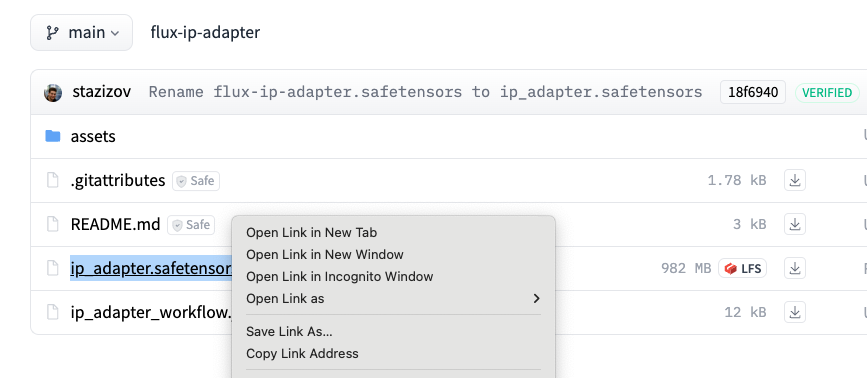
Finding the URL of a file inside hugging face is easy. Open the "Files and versions" tab, and choose the file, right click and copy link address.
mmget(
  hf_token = "" # Hugging Face Access Token [Optional]
).dl(
  # Download FLUX-1 Dev Model (Access Token Required) to "Download Paths"
  "https://huggingface.co/black-forest-labs/FLUX.1-dev/blob/main/flux1-dev.safetensors",
  "downloads"
).run()
Environment Variables
mmget reads several environment variables:
- MMGET_CIVITAI_TOKEN - CivitAI access token for downloading models that require authentication
- MMGET_HF_TOKEN - Hugging Face access token for downloading models that require authentication
- MMGET_DEST_PATH - The default distribution path for all downloads if not specified
- MMGET_DEST_TYPE - The default distribution type (e.g. "a1111" or "comfyui") for all downloads if not specified
from dotenv import load_dotenv
from mmget import mmget
load_dotenv(".env") # Load environment variable from .env

mmget(
).dl(
  # URL
).run()
Release history Release notifications | RSS feed


Download files
Download the file for your platform. If you're not sure which to choose, learn more about installing packages.
Source Distribution
Built Distribution
Filter files by name, interpreter, ABI, and platform.
If you're not sure about the file name format, learn more about wheel file names.
Copy a direct link to the current filters
File details
Details for the file mmget-0.1.1.tar.gz.
File metadata
- Download URL: mmget-0.1.1.tar.gz
- Upload date:
- Size: 17.0 kB
- Tags: Source
- Uploaded using Trusted Publishing? No
- Uploaded via: twine/4.0.2 CPython/3.11.3
File hashes
| Algorithm | Hash digest | |
|---|---|---|
| SHA256 |
06be30e6c652b21570da00a26d2c80244d47ef856510954dc469b77a7a71c878
|
|
| MD5 |
7136a088aa95edeee22803ea00e0899f
|
|
| BLAKE2b-256 |
083cf65b07abb6799ad3a37f9f44b958f642c789c28494aa87eb6b47d60fbfa2
|
File details
Details for the file mmget-0.1.1-py3-none-any.whl.
File metadata
- Download URL: mmget-0.1.1-py3-none-any.whl
- Upload date:
- Size: 22.1 kB
- Tags: Python 3
- Uploaded using Trusted Publishing? No
- Uploaded via: twine/4.0.2 CPython/3.11.3
File hashes
| Algorithm | Hash digest | |
|---|---|---|
| SHA256 |
2017c839a1ff45551f63834a85e88355e19bb20a14892e91f634173c8ea96ec5
|
|
| MD5 |
ee04f22457221b13b00d80e4e3e6dc7b
|
|
| BLAKE2b-256 |
6e0e6678e4d949af008ac038512cb1a33b230065254a251f627756addde16941
|






