
The textual user interface to multimon-ng.

Project description
mmng-ui
A TUI (text user interface) frontend for multimon-ng.
mmng-ui will listen on a chosen UDP port for raw streams from software like SDR++, use multimon-ng to decode it,
and show you POCSAG messages in a wonderful text interface.
You can also use it within a web browser!
Table of contents
Purpose
Why not? I know there are other frontends out there, but I haevn't seen any for use in a text console.
I also wanted to learn both Rich and Textual.
Installation
Normal TUI (text console) mode
The recommended way to install mmng-ui is to use pipx.
After getting pipx installed, simply run:
username@host:~$ pipx install mmng-ui
Please don't use pip system-wide.
You can of course also install it using classic virtualenvs.
Web mode
Thanks to Textual's web serving support, you can also run mmng-ui in a
web browser!
First, install mmng-ui with the web feature/extra:
username@host:~$ pipx install 'mmng-ui[web]'
Then run mmng-ui with the --serve option. Your console will show you the URL to connect to!
By default, it will bind to all interfaces (and both IPv4 and IPv6 if enabled). See the help screen for other choices.
If you supply either --serve-host or --serve-port, there's no need to specify --serve as well -- it is implied.
How to use it
See mmng-ui --help for CLI options.
Run mmng-ui, and you'll be greeted with this screen:
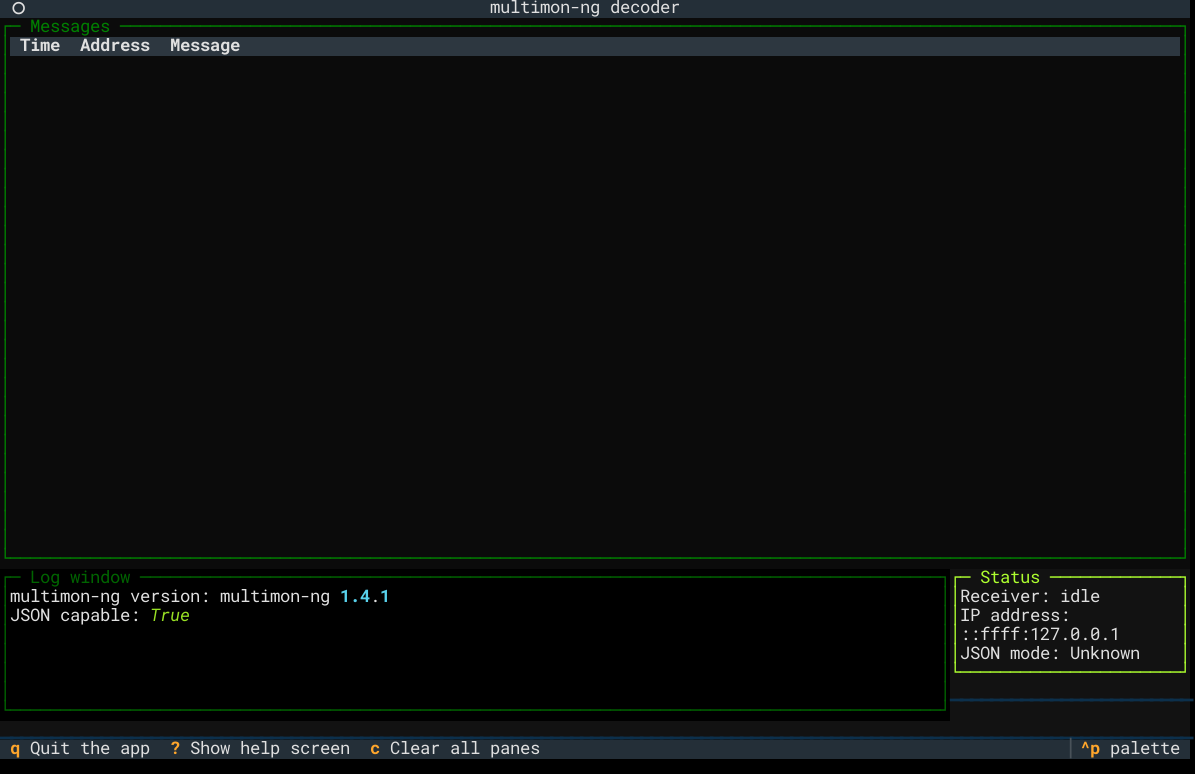
Notice in the status pane, it says "Receiver: idle" -- it is now listening for UDP packets sent to the default port of 8888.
Now go to your favourite SDR application, and send to where mmng-ui is running. Make sure it is the right sample
rate that multimon-ng likes, 22050 Hz. It probably helps to send mono too.
Alpha POCSAG messages will soon display in the top pane. The bottom pane will show the raw output from multimon-ng,
as well as any errors or issues with decoding.
The status panel shows any incoming connections. Receiver will transition between the following states:
| Receiver state | Description |
|---|---|
| idle | No UDP traffic yet seen, or seen in 5 seconds |
| receiving | Actively receiving a decode from multimon-ng |
| waiting | Traffic is coming in, but nothing to be decoded |
Just below the status panel is a sparkline -- this updates on each decode, and reflects character length of said decode.
Underneath the log window in another sparkline, and this shows messages per second, for the last minute.
The footer shows available keyboard choices to quit the app, show a help screen, and clear all logging panes.
The mouse will also work!
JSON detection
mmng-ui will attempt to auto-detect the output format from multimon-ng, and if it looks like JSON, it'll use it.
JSON output was merged into multimon-ng version 1.4.0. Support for older versions will eventually be dropped.
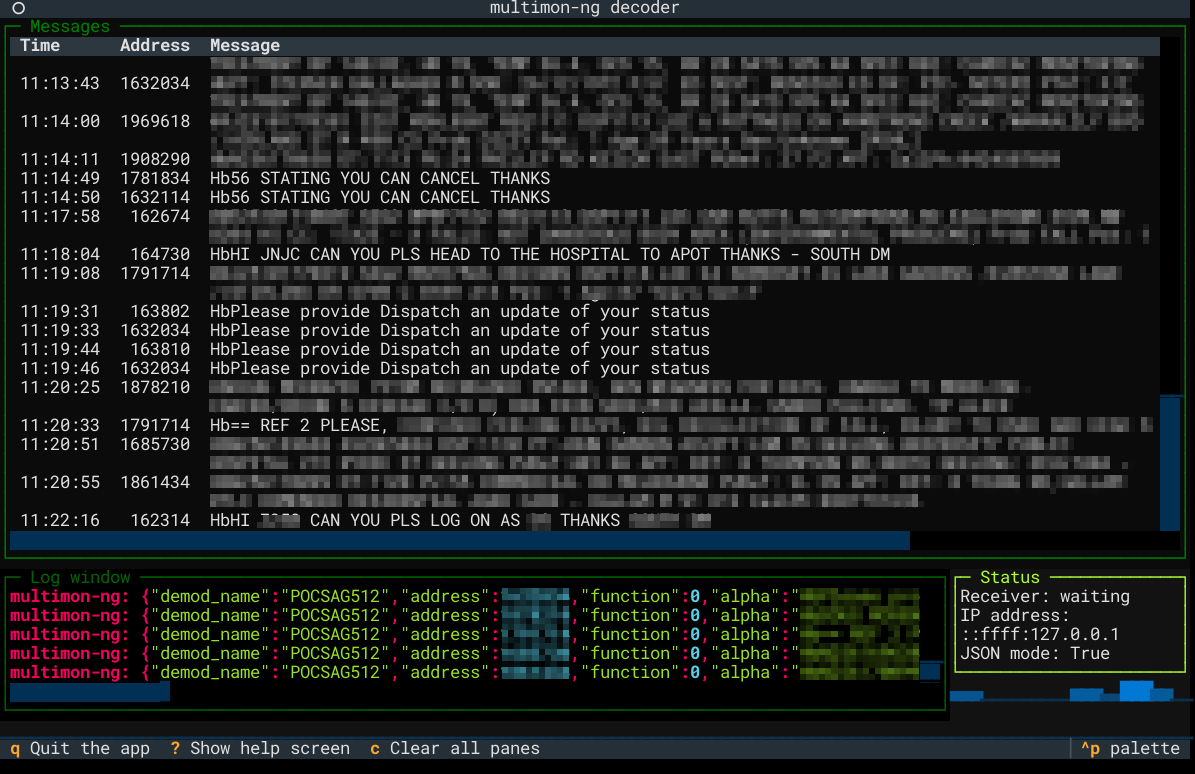
Example screenshot
Here's what a screen full of decodes might look like:
Supported Python versions
mmng-ui supports Python 3.10 and newer.
Release history Release notifications | RSS feed


Download files
Download the file for your platform. If you're not sure which to choose, learn more about installing packages.
Source Distribution
Built Distribution
Filter files by name, interpreter, ABI, and platform.
If you're not sure about the file name format, learn more about wheel file names.
Copy a direct link to the current filters
File details
Details for the file mmng_ui-1.2.0.tar.gz.
File metadata
- Download URL: mmng_ui-1.2.0.tar.gz
- Upload date:
- Size: 26.8 kB
- Tags: Source
- Uploaded using Trusted Publishing? No
- Uploaded via: python-httpx/0.28.1
File hashes
| Algorithm | Hash digest | |
|---|---|---|
| SHA256 |
b72099ca6f24ed03df2441cacf3cf2fd49fae16246de47aa550afdb60fe310ef
|
|
| MD5 |
14de1f534cef2f47e15d1e191dfa6cd8
|
|
| BLAKE2b-256 |
577c9b8fe8bd4b4bcec89c983402620bce23f6ca0a0e38c08f0c89f03e25e0eb
|
File details
Details for the file mmng_ui-1.2.0-py3-none-any.whl.
File metadata
- Download URL: mmng_ui-1.2.0-py3-none-any.whl
- Upload date:
- Size: 24.7 kB
- Tags: Python 3
- Uploaded using Trusted Publishing? No
- Uploaded via: python-httpx/0.28.1
File hashes
| Algorithm | Hash digest | |
|---|---|---|
| SHA256 |
498fd5181de5dc15de7e07c7f9965980435cc845bf6f241ed3852ef7d97d3b82
|
|
| MD5 |
2f8989a3c364d2235b1e9867b81d8c09
|
|
| BLAKE2b-256 |
54c8f881bfe5477d495795cdcdcd9e77e0ae2e27b68b59b655e20f9ea698f92f
|






