




Massive Multimodal Open RAG & Extraction
mmore is an open-source, end-to-end pipeline to ingest, process, index, and retrieve knowledge from heterogeneous files: PDFs, Office docs, spreadsheets, emails, images, audio, video, and web pages. It standardizes content into a unified multimodal format, supports distributed CPU/GPU processing, and provides hybrid dense+sparse retrieval with an integrated RAG service (CLI, APIs).
👉 Read the paper for more details (arXiv): mmore: Massive Multimodal Open RAG & Extraction
Documentation
👉 Read the full documentation here: mmore Documentation.
💡 Quickstart
Installation
🐳 Prefer Docker? Skip the steps below and pull a pre-built multi-platform image directly from GHCR, with CPU and GPU variants:
docker pull ghcr.io/EPFLiGHT/mmore:edge-gpu   # GPU (CUDA 12.6)
docker pull ghcr.io/EPFLiGHT/mmore:edge-cpu   # CPU-only
See
docker/ubuntu/README.mdfor build instructions and additional base OS variants (Arch Linux, openSUSE Leap).
(Step 0 – Install system dependencies)
Our package requires system dependencies. This snippet will take care of installing them for Linux!
sudo apt update
sudo apt install -y ffmpeg libsm6 libxext6 libnss3 \
  libxi6 libxrandr2 libxcomposite1 libxcursor1 libxdamage1 \
  libxfixes3 libxrender1 libasound2 libatk1.0-0 libgtk-3-0 libreoffice \
  libpango-1.0-0 libpangoft2-1.0-0 weasyprint
⚠️ On Ubuntu 24.04, replace libasound2 with libasound2t64. You may also need to add the repository for Ubuntu 20.04 focal to have access to a few of the sources (e.g. create /etc/apt/sources.list.d/mmore.list with the contents deb http://cz.archive.ubuntu.com/ubuntu focal main universe).
For MacOS, use instead:
brew update
brew install ffmpeg gtk+3 pango cairo \
  gobject-introspection libffi pkg-config libx11 libxi \
  libxrandr libxcomposite libxcursor libxdamage libxext \
  libxrender atk libreoffice weasyprint
If weasyprint fails to find GTK or Cairo, also run:
brew install cairo pango gdk-pixbuf libffi
uv pip install weasyprint
You can also run mmore on Windows by following our Windows setup notes.
Step 1 – Install mmore
Dependencies are split by pipeline stage. Install only what you need:
| Extra | What it includes |
|---|---|
process |
mmore's processing pipeline |
index |
mmore's indexing pipeline |
rag |
mmore's RAG pipeline (includes index) |
api |
FastAPI servers |
all |
Everything above |
websearch |
Web search pipeline (DuckDuckGo + optional Tavily) |
cpu |
PyTorch (CPU) + torchvision, for a CPU-only setup |
cu126 |
PyTorch (CUDA 12.6) + torchvision, for a GPU setup |
Full install (CPU):
uv pip install "mmore[all,cpu]"
Full install (GPU — CUDA 12.6):
uv pip install "mmore[all,cu126]"
Partial install example (processing only):
uv pip install "mmore[process,cpu]"
⚠️ This package requires many big dependencies, so it is recommended to install with
uvto handlepipinstallations. Check our tutorial on uv.
⚠️ Check the instructions for contributors directly in the documentation
for_devs.md.
Interactive TUI
Prefer a guided experience over editing YAML by hand? Install the tui extra and launch the interactive Terminal UI:
uv pip install "mmore[tui]"
mmore tui
From the launcher you can:
- run any stage (process / postprocess / index / rag / chat) interactively,
- chain the full pipeline (process → postprocess → index → chat),
- generate stage YAML configs through a guided wizard,
- pick from existing example configs without leaving the terminal.
Minimal Example
You can use our predefined CLI commands to execute parts of the pipeline. Note that you might need to prepend python -m to the command if the package does not properly create bash aliases.
# Run processing
python -m mmore process --config-file examples/process/config.yaml
python -m mmore postprocess --config-file examples/postprocessor/config.yaml --input-data examples/process/outputs/merged/merged_results.jsonl

# Run indexer
python -m mmore index --config-file examples/index/config.yaml --documents-path examples/postprocessor/outputs/merged/results.jsonl

# Run RAG
python -m mmore rag --config-file examples/rag/config.yaml
You can also use our package in python code as shown here:
from mmore.process.processors.pdf_processor import PDFProcessor
from mmore.process.processors.base import ProcessorConfig
from mmore.type import MultimodalSample

pdf_file_paths = ["/path/to/examples/sample_data/pdf/calendar.pdf"] #write here the full path, not a relative path
out_file = "/path/to/examples/process/outputs/example.jsonl"

pdf_processor_config = ProcessorConfig(custom_config={"output_path": "examples/process/outputs"})
pdf_processor = PDFProcessor(config=pdf_processor_config)
result_pdf = pdf_processor.process_batch(pdf_file_paths, False, 1) # args: file_paths, fast mode (True/False), num_workers

MultimodalSample.to_jsonl(out_file, result_pdf)
Usage
To launch the mmore pipeline, follow the specialised instructions in the docs.

-
📄 Input Documents Upload your multimodal documents (PDFs, videos, spreadsheets, and m(m)ore) into the pipeline.
-
🔍 Process Extracts and standardizes text, metadata, and multimedia content from diverse file formats. Easily extensible! You can add your own processors to handle new file types. Supports fast processing for specific types.
-
📁 Index Organizes extracted data into a hybrid retrieval-ready Vector Store DB, combining dense and sparse indexing through Milvus. Your vector DB can also be remotely hosted and then you only have to provide a standard API. There is also an HTTP Index API for adding new files on the fly with HTTP requests.
-
🤖 RAG Use the indexed documents inside a Retrieval-Augmented Generation (RAG) system that provides a LangChain interface. Plug in any LLM with a compatible interface or add new ones through an easy-to-use interface. Supports API hosting or local inference.
-
🌐 Web Search Augments RAG answers with live web search results using an iterative sub-query loop. DuckDuckGo is the default provider (free, no API key needed). Tavily is available as an optional higher-quality provider.
  # Install web search dependencies
  uv pip install "mmore[rag,websearch]"

  # Optional: use Tavily instead of DuckDuckGo
  export TAVILY_API_KEY=your_key_here
-
🎉 Evaluation Coming soon An easy way to evaluate the performance of your RAG system using Ragas.
🚧 Supported File Types
| Category | File Types | Supported Device | Fast Mode |
|---|---|---|---|
| Text Documents | DOCX, MD, PPTX, XLSX, TXT, EML | CPU | ❌ |
| PDFs | GPU/CPU | ✅ | |
| Media Files | MP4, MOV, AVI, MKV, MP3, WAV, AAC | GPU/CPU | ✅ |
| Web Content | HTML | CPU | ❌ |
License
This project is licensed under the Apache 2.0 License, see the LICENSE 🎓 file for details.
Cite mmore
If you use mmore in your research, please cite the paper:
@misc{sallinen2025mmoremassivemultimodalopen,
      title={mmore: Massive Multimodal Open RAG & Extraction},
      author={Alexandre Sallinen and Stefan Krsteski and Paul Teiletche and Marc-Antoine Allard and Baptiste Lecoeur and Michael Zhang and Fabrice Nemo and David Kalajdzic and Matthias Meyer and Mary-Anne Hartley},
      year={2025},
      eprint={2509.11937},
      archivePrefix={arXiv},
      primaryClass={cs.SE},
      url={https://arxiv.org/abs/2509.11937},
}
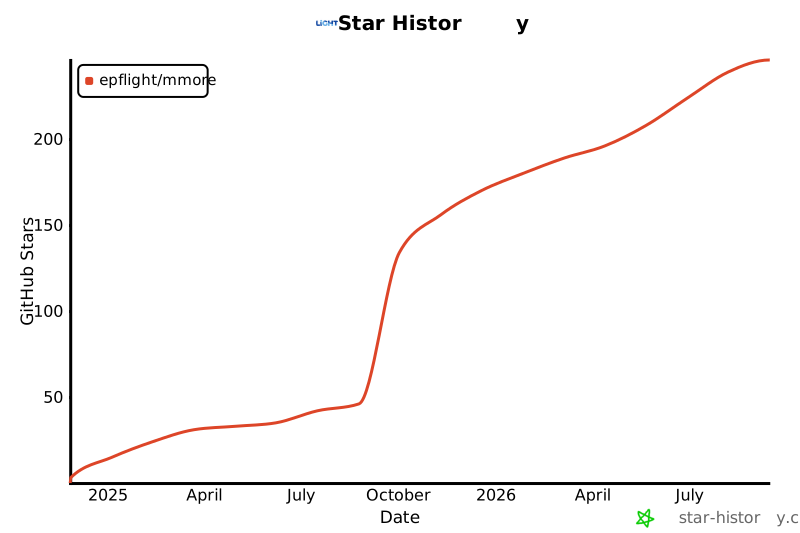
Star History


Release files for mmore 2.0.0
For a detailed explanation of source distributions (sdists) and built distributions (wheels), please see the package formats documentation.
Source distribution (sdist)
| File | Size | Uploaded | Provenance | Actions |
|---|---|---|---|---|
| mmore-2.0.0.tar.gz | 66.0 MB | With provenance | Details for mmore-2.0.0.tar.gz |
Built distribution (wheel)
| File | Interpreter | ABI | Platform | Actions Reset |
|---|---|---|---|---|
| mmore-2.0.0-py3-none-any.whl | Python 3 | none | any | Details for mmore-2.0.0-py3-none-any.whl |
Total release size: 66.3 MB
Release files / mmore-2.0.0.tar.gz
| Download URL | mmore-2.0.0.tar.gz |
|---|---|
| Size | 66.0 MB |
| Tags | Source |
|
SHA-256 checksum How to use checksums |
868c8f4e607c2bd578da0cea7d1fa64a5c942976572cf8bdde3c900285defc4a
|
|
BLAKE2b-256 checksum How to use checksums |
5f3adc72c9be25f4e6cb833dc92953c1540769e6bc075ce57d05609b2b6a4aaf
|
| Upload date | |
|
Uploaded using Trusted Publishing? What is trusted publishing? |
Yes |
| Uploaded via |
twine/6.1.0 CPython/3.13.14
|
Provenance
Provenance describes where a file came from. On PyPI, provenance is shared via attestations, which provide a verifiable record of the build or publishing details. View details, limitations and caveats.


PyPI Publish Attestation
PyPI verified that this artifact, at this checksum, originated from the publisher listed below.
Signed by GitHub Actions, verified by PyPI on Jul 24, 2026.
Transparency logRelease files / mmore-2.0.0-py3-none-any.whl
| Download URL | mmore-2.0.0-py3-none-any.whl |
|---|---|
| Size | 280.3 kB |
| Tags | Python 3 |
|
SHA-256 checksum How to use checksums |
8fee03fde1567d19e86e6284a353e31490d6accb59a40159ec2f50620ddc31d2
|
|
BLAKE2b-256 checksum How to use checksums |
00cc6dc300778ad20679f2614037edf31cf99564bf17560db3941cbd0e860e16
|
| Upload date | |
|
Uploaded using Trusted Publishing? What is trusted publishing? |
Yes |
| Uploaded via |
twine/6.1.0 CPython/3.13.14
|
Provenance
Provenance describes where a file came from. On PyPI, provenance is shared via attestations, which provide a verifiable record of the build or publishing details. View details, limitations and caveats.
PyPI Publish Attestation
PyPI verified that this artifact, at this checksum, originated from the publisher listed below.
Signed by GitHub Actions, verified by PyPI on Jul 24, 2026.
Transparency logSecurity for mmore 2.0.0
Provenance
Provenance describes where a file came from. On PyPI, provenance is shared via attestations, which provide a verifiable record of the build or publishing details. View details, limitations and caveats.
Full provenance
All 2 files in this release have been uploaded with provenance metadata.
Attestation for mmore-2.0.0.tar.gz
PyPI Publish Attestation
PyPI verified that this artifact, at this checksum, originated from the publisher listed below.
Signed by GitHub Actions, verified by PyPI on Jul 24, 2026.
Transparency logA note on package security
PyPI is a repository for distributing packages, not a service for auditing them. While third-party security researchers and our staff do their best to detect and remove malicious packages, PyPI cannot guarantee the quality, security or suitability of any given package.
To learn more about protecting yourself from malicious actors, visit our package security documentation.














