
Memory Map / Address Map SVG Visualizer — turn a JSON description of your memory layout into a publication-quality SVG diagram

Project description
mmpviz — Memory Map / Address Map Visualizer
Turn a JSON description of your memory layout into a publication-quality SVG diagram.
No coordinates. No manual box placement. Just describe the address ranges and let mmpviz compute the layout.
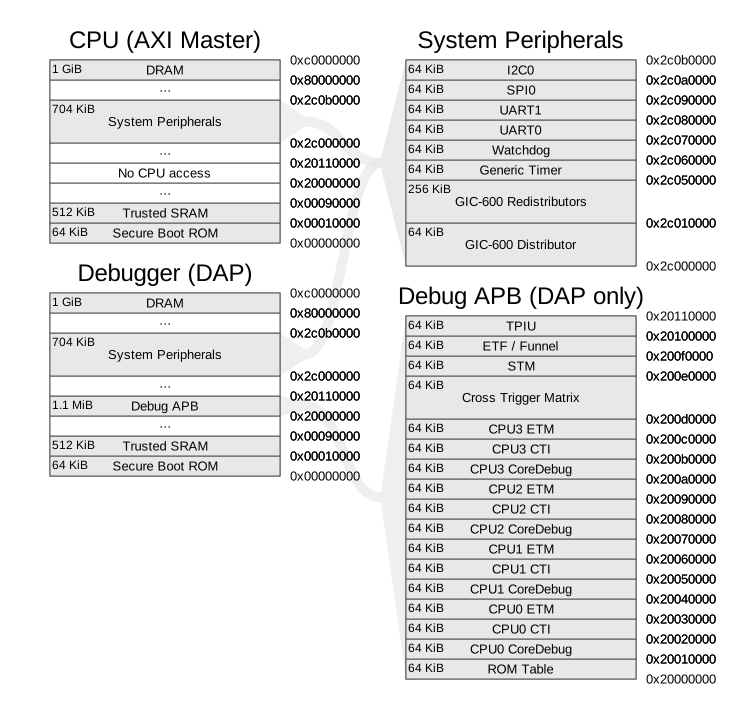
Install
pip install mmpviz
mmpviz has no runtime dependencies — stdlib only. Schema and cross-reference validation run automatically on every render.
Quick Start
1. Create diagram.json
{
  "views": [
    {
      "id": "flash",
      "bits": 32,
      "sections": [
        { "id": "bootloader", "name": "Bootloader", "address": "0x00000000", "size": "0x8000" },
        { "id": "app",        "name": "Application","address": "0x00008000", "size": "0x78000" }
      ]
    }
  ]
}
2. Render
mmpviz -d diagram.json -o map.svg
3. Choose a layout algorithm (optional)
mmpviz -d diagram.json -o map.svg --layout algo4
| Flag | Description |
|---|---|
--layout algo1 |
One column per DAG level |
--layout algo2 |
Algo-1 + height-rebalancing |
--layout algo3 |
Algo-2 + routing lanes for non-adjacent links (default) |
--layout algo4 |
Algo-3 + vertical column alignment to minimise link length |
Themes
Two built-in themes ship with mmpviz:
| Theme | Flag | Appearance |
|---|---|---|
default |
-t default |
Neutral gray fills, clean monochrome |
plantuml |
-t plantuml |
Warm yellow fills, PlantUML-style palette |
mmpviz -d diagram.json -o map.svg -t plantuml
Theme resolution — first match wins:
-t flag |
theme.json next to diagram? |
Theme used |
|---|---|---|
-t plantuml (or any name/path) |
yes or no | The -t value — sibling is ignored |
| (omit) | yes | The sibling theme.json |
| (omit) | no | Built-in default |
For a custom theme, place a theme.json next to diagram.json and extend a built-in:
{ "schema_version": 1, "extends": "plantuml" }
Features
- Zero required dependencies — pure Python stdlib
- Auto-layout — DAG-based column assignment, height rebalancing, routing lanes for crossing-free link bridges
- Multi-view diagrams — model interconnected address spaces with typed links (connector, band)
- Themes — built-in
defaultandplantuml; fully customisabletheme.json - Per-section overrides — granular fill, stroke, height floor/ceiling per section or view
- Scales from MCUs to SoCs — tested on OpenTitan Earl Grey (65+ peripherals)
More Examples
Real-world chip diagrams, theme showcases, and layout comparisons are in the examples/ directory on GitHub.
Full documentation: github.com/f33lgood/mmpviz


Download files
Download the file for your platform. If you're not sure which to choose, learn more about installing packages.
Source Distribution
Built Distribution
Filter files by name, interpreter, ABI, and platform.
If you're not sure about the file name format, learn more about wheel file names.
Copy a direct link to the current filters
File details
Details for the file mmpviz-1.0.0.tar.gz.
File metadata
- Download URL: mmpviz-1.0.0.tar.gz
- Upload date:
- Size: 107.2 kB
- Tags: Source
- Uploaded using Trusted Publishing? No
- Uploaded via: uv/0.9.18 {"installer":{"name":"uv","version":"0.9.18","subcommand":["publish"]},"python":null,"implementation":{"name":null,"version":null},"distro":{"name":"macOS","version":null,"id":null,"libc":null},"system":{"name":null,"release":null},"cpu":null,"openssl_version":null,"setuptools_version":null,"rustc_version":null,"ci":null}
File hashes
| Algorithm | Hash digest | |
|---|---|---|
| SHA256 |
6d5b63815441b72b6bdd3ee1f5f0d6927df314a4094645b57c30643390b6b3cc
|
|
| MD5 |
e3a8bafdbdaf3d0ff6842397251febe8
|
|
| BLAKE2b-256 |
7f1a2d2325f19435dc2d9f11eccec8ca6903a83b7a2a1377b6bd593a5184793f
|
File details
Details for the file mmpviz-1.0.0-py3-none-any.whl.
File metadata
- Download URL: mmpviz-1.0.0-py3-none-any.whl
- Upload date:
- Size: 84.4 kB
- Tags: Python 3
- Uploaded using Trusted Publishing? No
- Uploaded via: uv/0.9.18 {"installer":{"name":"uv","version":"0.9.18","subcommand":["publish"]},"python":null,"implementation":{"name":null,"version":null},"distro":{"name":"macOS","version":null,"id":null,"libc":null},"system":{"name":null,"release":null},"cpu":null,"openssl_version":null,"setuptools_version":null,"rustc_version":null,"ci":null}
File hashes
| Algorithm | Hash digest | |
|---|---|---|
| SHA256 |
942203da545e704a67c1bd71489fb1bb1595928baca42a7bf00e92665c02bd8b
|
|
| MD5 |
d61b0783dbff347167a15ab1024f4494
|
|
| BLAKE2b-256 |
34c22c18e0eb75bd20fe7dd96dd396bfc40808bb09e62a41d8e17a5bd3709abf
|






