
This release is a pre-release and may not be stable for production use.
MM-REACT: Prompting ChatGPT for Multimodal Reasoning and Action
🔥 News
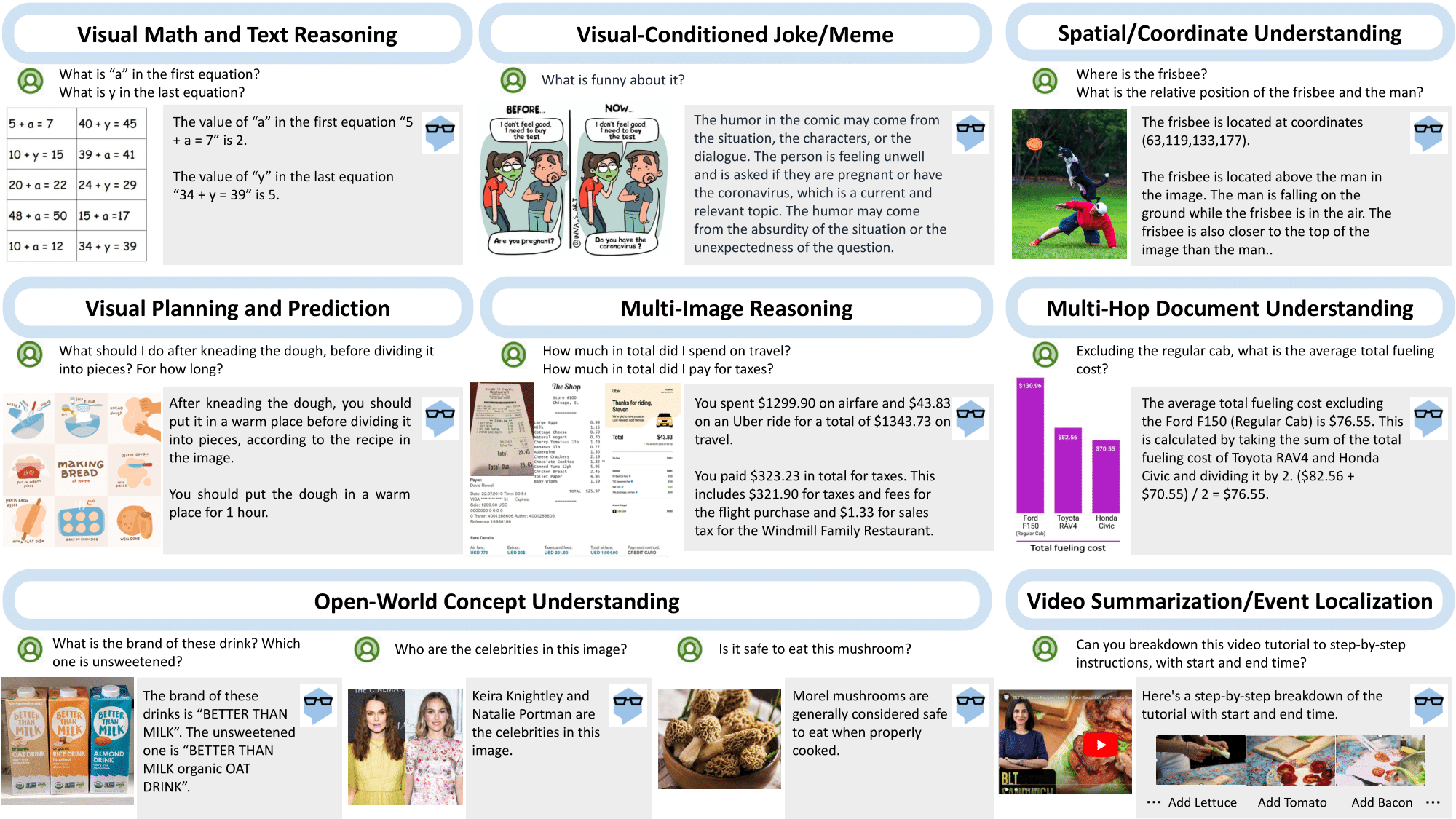
- [2023.03.21] We build MM-REACT, a system paradigm that integrates ChatGPT with a pool of vision experts to achieve multimodal reasoning and action.
- [2023.03.21] Feel free to explore various demo videos on our website!
- [2023.03.21] Try our live demo!
🎶 Introduction
MM-ReAct Design
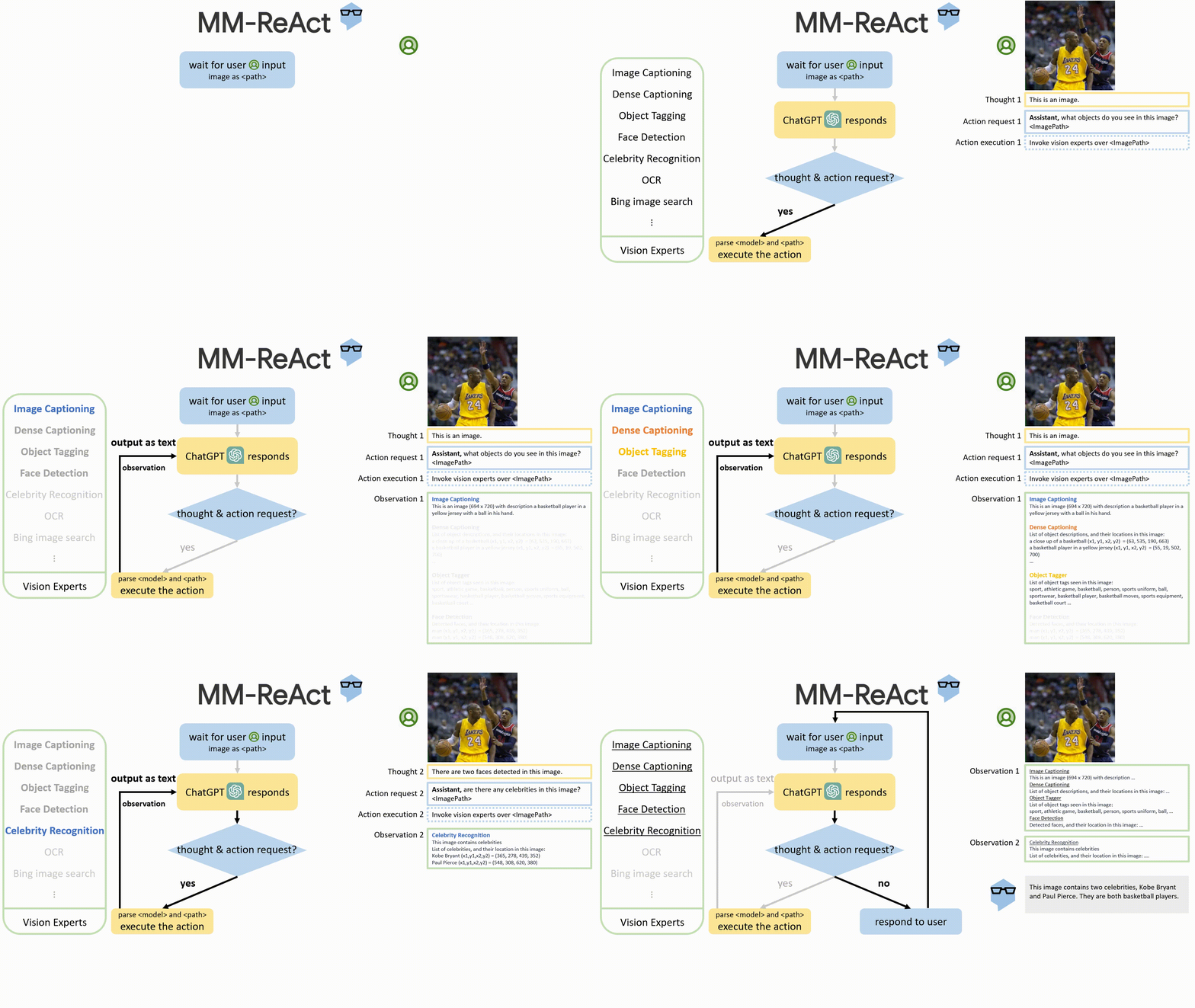
- To enable the image as input, we simply use the file path as the input to ChatGPT. The file path functions as a placeholder, allowing ChatGPT to treat it as a black box.
- Whenever a specific property, such as celebrity names or box coordinates, is required, ChatGPT is expected to seek help from a specific vision expert to identify the desired information.
- The expert output is serialized as text and combined with the input to further activate ChatGPT.
- If no external experts are needed, we directly return the response to the user.
Getting Started
MM-REACT code is bases on langchain.
Please refer to langchain for instructions on installation and documentation.
Additional packages needed for MM-REACT
pip install PIL imagesize
Here are the list of resources you need to set up in Azure and their environment variables
- Computer Vision service, for Tags, Objects, Faces and Celebrity.
export IMUN_URL="https://yourazureendpoint.cognitiveservices.azure.com/vision/v3.2/analyze"
export IMUN_PARAMS="visualFeatures=Tags,Objects,Faces"
export IMUN_CELEB_URL="https://yourazureendpoint.cognitiveservices.azure.com/vision/v3.2/models/celebrities/analyze"
export IMUN_CELEB_PARAMS=""
export IMUN_SUBSCRIPTION_KEY=
- Computer Vision service for dense captioning. With a potentially different subscription key (e.g. westus region supports this)
export IMUN_URL2="https://yourazureendpoint.cognitiveservices.azure.com/computervision/imageanalysis:analyze"
export IMUN_PARAMS2="api-version=2023-02-01-preview&model-version=latest&features=denseCaptions"
export IMUN_SUBSCRIPTION_KEY2=
- Form Recogizer (OCR) prebuilt services
export IMUN_OCR_READ_URL="https://yourazureendpoint.cognitiveservices.azure.com/formrecognizer/documentModels/prebuilt-read:analyze"
export IMUN_OCR_RECEIPT_URL="https://yourazureendpoint.cognitiveservices.azure.com/formrecognizer/documentModels/prebuilt-receipt:analyze"
export IMUN_OCR_BC_URL="https://yourazureendpoint.cognitiveservices.azure.com/formrecognizer/documentModels/prebuilt-businessCard:analyze"
export IMUN_OCR_LAYOUT_URL="https://yourazureendpoint.cognitiveservices.azure.com/formrecognizer/documentModels/prebuilt-layout:analyze"
export IMUN_OCR_PARAMS="api-version=2022-08-31"
export IMUN_OCR_SUBSCRIPTION_KEY=
- Bing search service
export BING_SEARCH_URL="https://api.bing.microsoft.com/v7.0/search"
export BING_SUBSCRIPTION_KEY=
- Bing visual search service (available on a separate pricing)
export BING_VIS_SEARCH_URL="https://api.bing.microsoft.com/v7.0/images/visualsearch"
export BING_SUBSCRIPTION_KEY_VIS=
- Azure OpenAI service
export OPENAI_API_TYPE=azure
export OPENAI_API_VERSION=2022-12-01
export OPENAI_API_BASE=https://yourazureendpoint.openai.azure.com/
export OPENAI_API_KEY=
Note: At the time of writing, we use and test against private endpoint. The public endpoint is now released and we plan to add support for it later.
- Photo editting local service
export PHOTO_EDIT_ENDPOINT_URL="http://127.0.0.1:123/"
export PHOTO_EDIT_ENDPOINT_URL_SHORT=127.0.0.1
Sample code to run conversational-assistant agent against an image
conversational-assistant sample
Acknowledgement
We are highly inspired by langchain.
Citation
@article{yang2023mmreact,
  author      = {Zhengyuan Yang* and Linjie Li* and Jianfeng Wang* and Kevin Lin* and Ehsan Azarnasab* and Faisal Ahmed* and Zicheng Liu and Ce Liu and Michael Zeng and Lijuan Wang^},
  title       = {MM-REACT: Prompting ChatGPT for Multimodal Reasoning and Action},
  publisher   = {arXiv},
  year        = {2023},
}
Contributing
This project welcomes contributions and suggestions. Most contributions require you to agree to a Contributor License Agreement (CLA) declaring that you have the right to, and actually do, grant us the rights to use your contribution. For details, visit https://cla.opensource.microsoft.com.
When you submit a pull request, a CLA bot will automatically determine whether you need to provide a CLA and decorate the PR appropriately (e.g., status check, comment). Simply follow the instructions provided by the bot. You will only need to do this once across all repos using our CLA.
This project has adopted the Microsoft Open Source Code of Conduct. For more information see the Code of Conduct FAQ or contact opencode@microsoft.com with any additional questions or comments.
Trademarks
This project may contain trademarks or logos for projects, products, or services. Authorized use of Microsoft trademarks or logos is subject to and must follow Microsoft's Trademark & Brand Guidelines. Use of Microsoft trademarks or logos in modified versions of this project must not cause confusion or imply Microsoft sponsorship. Any use of third-party trademarks or logos are subject to those third-party's policies.
1 maintainer

Metadata
1 maintainer
Release files for mmreact 0.0.1.dev0
For a detailed explanation of source distributions (sdists) and built distributions (wheels), please see the package formats documentation.
Built distribution (wheel)
| File | Interpreter | ABI | Platform | Reset |
|---|---|---|---|---|
| mmreact-0.0.1.dev0-py3-none-any.whl | Python 3 | none | any | Details |
Release files / mmreact-0.0.1.dev0-py3-none-any.whl
| Download URL | mmreact-0.0.1.dev0-py3-none-any.whl |
|---|---|
| Size | 3.7 kB |
| Tags | Python 3 |
|
SHA-256 checksum How to use checksums |
48d83b6115a1dc255f9055c9816bc412cedf079554dbc7d12d0c622a2fbc7002
|
|
BLAKE2b-256 checksum How to use checksums |
54d7f7a0b68670a49cbe5bffccadcbdb2ba3db861b30580c157ec4064aac5027
|
| Upload date | |
|
Uploaded using Trusted Publishing? What is trusted publishing? |
No |
| Uploaded via |
twine/4.0.2 CPython/3.8.16
|













