
A command-line utility for organizing media files.

Project description






mnamer
mnamer (media renamer) is an intelligent and highly configurable media organization utility. It parses media filenames for metadata, searches the web to fill in the blanks, and then renames and moves them.
Currently it has integration support with TVDb and TvMaze for television episodes and TMDb and OMDb for movies.
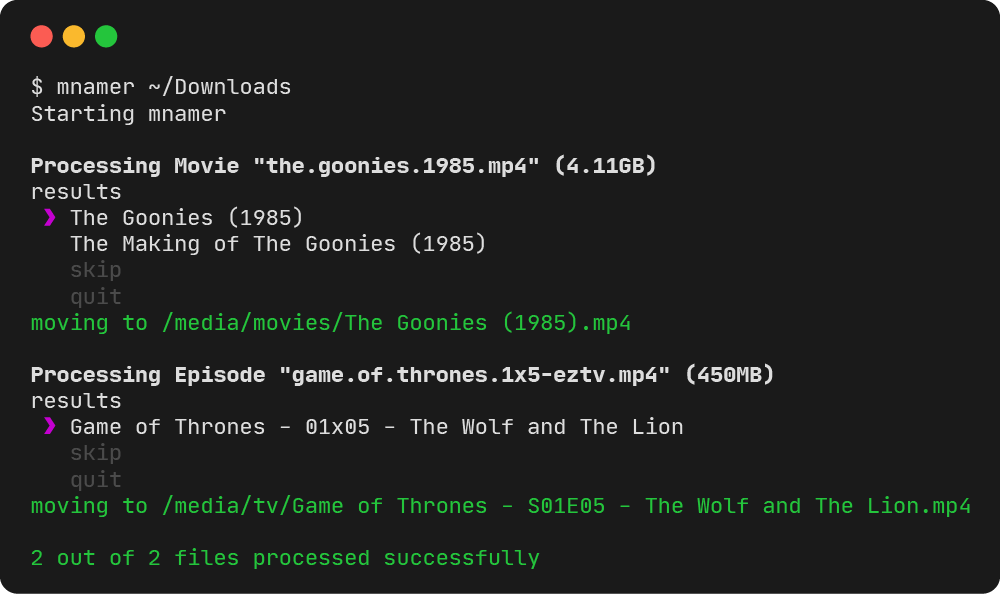
Documentation
Check out the wiki page for more details.
$ uv tool install mnamer or $ pip3 install --user mnamer
$ docker pull jkwill87/mnamer
✍️ Formatting
Using the episode-directory, episode-format, movie-directory, or movie-format settings you customize how your files are renamed. Variables wrapped in braces {} get substituted with of parsed values of template field variables.
Language is supported by the default TMDb and TVDb providers. You can use the --language setting to set the language used for templating.
mnamer also supports subtitle files (.srt, .idx, .sub). It will use the format pattern used for movie or episode media files with its extension prefixed by its 2-letter language code.
🧰 Settings
USAGE: mnamer [preferences] [directives] target [targets ...]

POSITIONAL:
  [TARGET,...]: media file file path(s) to process

PARAMETERS:
  The following flags can be used to customize mnamer's behaviour. Their long
  forms may also be set in a '.mnamer-v2.json' config file, in which case cli
  arguments will take precedence.

  -b, --batch: process automatically without interactive prompts
  -l, --lower: rename files using lowercase characters
  -r, --recurse: search for files within nested directories
  -s, --scene: use dots in place of alphanumeric chars
  -v, --verbose: increase output verbosity
  --hits=<NUMBER>: limit the maximum number of hits for each query
  --ignore=<PATTERN,...>: ignore files matching these regular expressions
  --language=<LANG>: specify the search language
  --mask=<EXTENSION,...>: only process given file types
  --no-guess: disable best guess; e.g. when no matches or network down
  --no-overwrite: prevent relocation if it would overwrite a file
  --no-style: print to stdout without using colour or unicode chars
  --movie-api={*tmdb,omdb}: set movie api provider
  --movie-directory: set movie relocation directory
  --movie-format: set movie renaming format specification
  --episode-api={tvdb,*tvmaze}: set episode api provider
  --episode-directory: set episode relocation directory
  --episode-format: set episode renaming format specification

DIRECTIVES:
  Directives are one-off arguments that are used to perform secondary tasks
  like overriding media detection. They can't be used in '.mnamer-v2.json'.

  -V, --version: display the running mnamer version number
  --clear-cache: clear request cache
  --config-dump: prints current config JSON to stdout then exits
  --config-ignore: skips loading config file for session
  --config-path=<PATH>: specifies configuration path to load
  --id-imdb=<ID>: specify an IMDb movie id override
  --id-tmdb=<ID>: specify a TMDb movie id override
  --id-tvdb=<ID>: specify a TVDb series id override
  --id-tvmaze=<ID>: specify a TvMaze series id override
  --no-cache: disable request cache
  --media={movie,episode}: override media detection
  --test: mocks the renaming and moving of files
Parameters can either by entered as command line arguments or from a config file named .mnamer-v2.json.
Contributions
Community contributions are a welcome addition to the project. In order to be merged upstream any additions will need to be formatted with ruff for consistency with the rest of the project and pass the continuous integration tests run against each PR. Before introducing any major features or changes to the configuration api please consider opening an issue to outline your proposal.
Bug reports are also welcome on the issue page. Please include any generated crash reports if applicable. Feature requests are welcome but consider checking out if it is in the works first to avoid duplication.
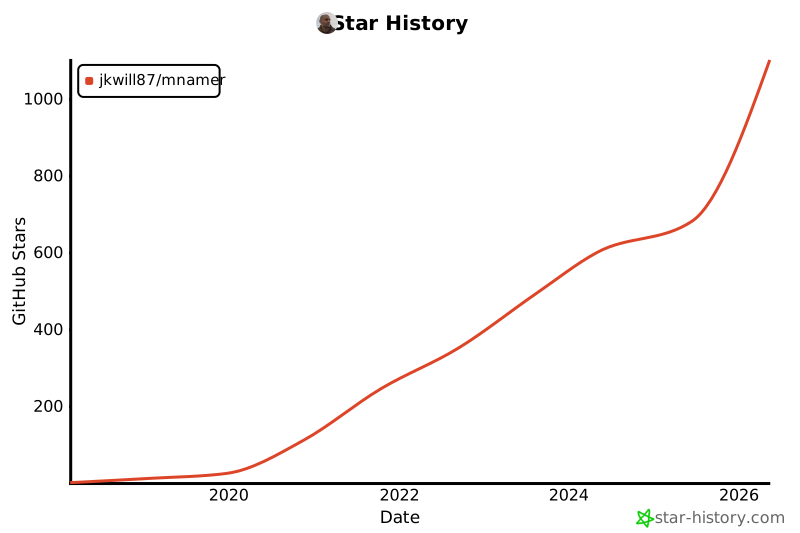
Star History
Release history Release notifications | RSS feed


Download files
Download the file for your platform. If you're not sure which to choose, learn more about installing packages.
Source Distribution
Built Distribution
Filter files by name, interpreter, ABI, and platform.
If you're not sure about the file name format, learn more about wheel file names.
Copy a direct link to the current filters
File details
Details for the file mnamer-2.7.3.dev10.tar.gz.
File metadata
- Download URL: mnamer-2.7.3.dev10.tar.gz
- Upload date:
- Size: 5.3 MB
- Tags: Source
- Uploaded using Trusted Publishing? No
- Uploaded via: uv/0.11.28 {"installer":{"name":"uv","version":"0.11.28","subcommand":["publish"]},"python":null,"implementation":{"name":null,"version":null},"distro":{"name":"Ubuntu","version":"24.04","id":"noble","libc":null},"system":{"name":null,"release":null},"cpu":null,"openssl_version":null,"setuptools_version":null,"rustc_version":null,"ci":true}
File hashes
| Algorithm | Hash digest | |
|---|---|---|
| SHA256 |
80e14c8fabb18a63c6241115fcfd1b5977067fd67c6aa3f71aa80fc9d5adb663
|
|
| MD5 |
49c4e3b8249c27d41397273a7dc6ecdc
|
|
| BLAKE2b-256 |
51e2ad86fe2cce72637545b7c15c6ac1717811c6e2831f90a8d745024b3d9fb3
|
File details
Details for the file mnamer-2.7.3.dev10-py3-none-any.whl.
File metadata
- Download URL: mnamer-2.7.3.dev10-py3-none-any.whl
- Upload date:
- Size: 37.6 kB
- Tags: Python 3
- Uploaded using Trusted Publishing? No
- Uploaded via: uv/0.11.28 {"installer":{"name":"uv","version":"0.11.28","subcommand":["publish"]},"python":null,"implementation":{"name":null,"version":null},"distro":{"name":"Ubuntu","version":"24.04","id":"noble","libc":null},"system":{"name":null,"release":null},"cpu":null,"openssl_version":null,"setuptools_version":null,"rustc_version":null,"ci":true}
File hashes
| Algorithm | Hash digest | |
|---|---|---|
| SHA256 |
69caf1aa9dc2e619b75a63b6a4dd94086be402326b2589a9251b5ca7711737e3
|
|
| MD5 |
d34284f8c14698bb2c4bb867fe11a416
|
|
| BLAKE2b-256 |
b2e6eb58be508a9a51cd88453b241c8df4aa69556c6044e66ee7f8639722f99f
|






