
Video and audio browser extension for MNE-Python's Qt data browser

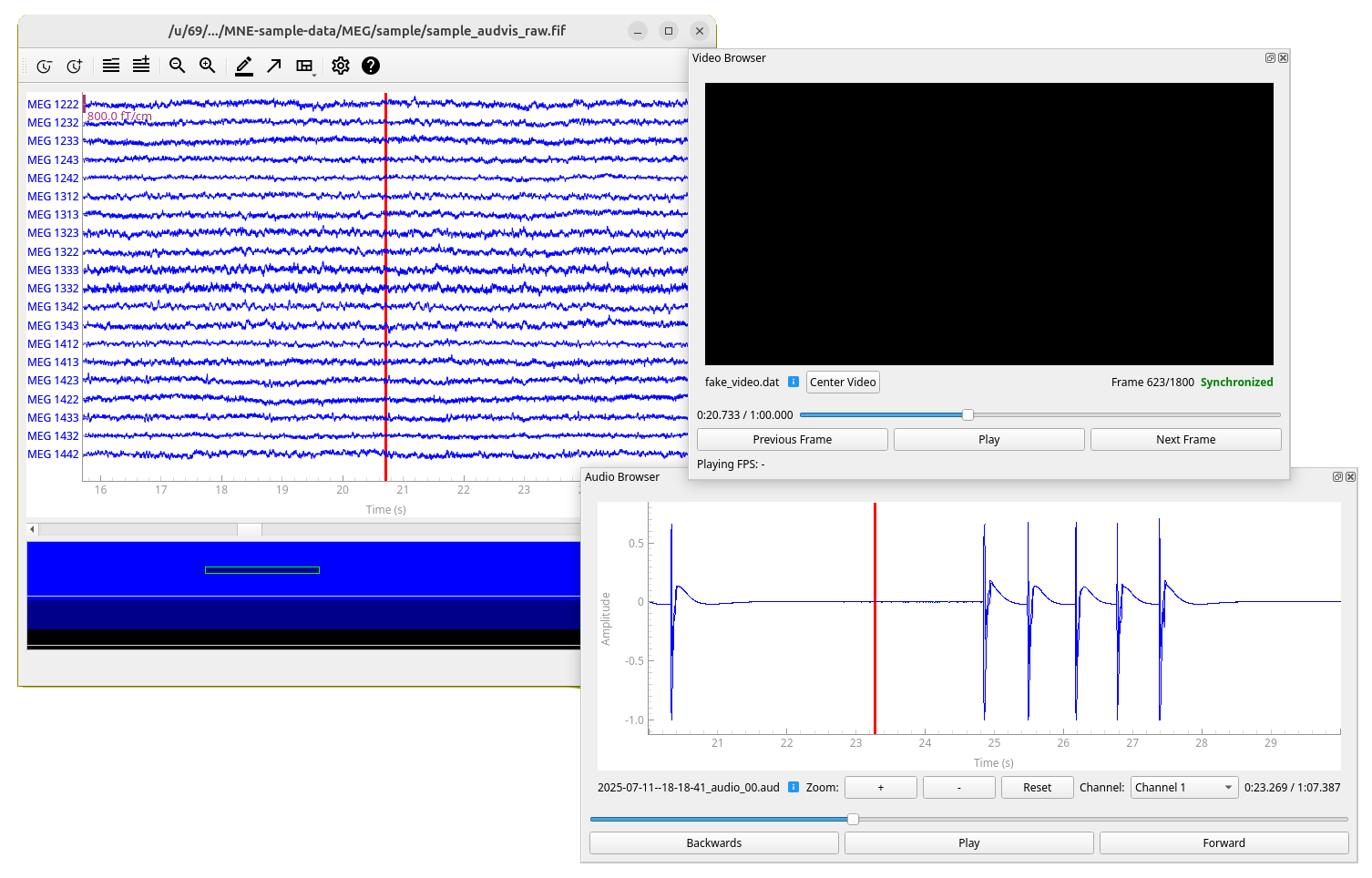
This is an open-source Python package for browsing video and audio time-synchronized to MEG/EEG data. It serves as an add-on for mne-qt-browser, which is part of MNE-Python, an open-source Python package for exploring, visualizing, and analyzing human neurophysiological data.
This project also complements Helsinki VideoMEG project by supporting video and audio files recorded with their software.
Features
- Time-synchronized video browsing and playback with MEG/EEG data
- Time-synchronized audio browsing and playback with MEG/EEG data
- Support for multiple video and MEG files simultaneously (only one audio file with multiple channels at a time)
- Support for Helsinki VideoMEG project format files
- Standard video format support (MP4, AVI, etc.) via OpenCV (for audio only Helsinki VideoMEG format is currently supported)
Documentation
Documentation contains installation instructions (same as below), public API reference, and some of the usage examples available in the GitHub. A bit of the code structure and implementation details are also documented.
Installation
In addition to MNE-Python, this project requires package OpenCV for standard video file (such as .mp4) reading
and sounddevice for audio playback. Recommended way to install MNE-Python and thus this package is using
conda.
Using conda (recommended)
-
Create a new conda environment (named
mne-videobrowser) with this package and all dependencies installed:conda create --channel=conda-forge --strict-channel-priority --name=mne-videobrowser mne-videobrowser
-
Activate the environment:
conda activate mne-videobrowser
-
Only on linux: If you do not have PortAudio library, which is dependency of
sounddeviceinstalled, install it. For example on Ubuntu/Debian:sudo apt install libportaudio2
Using pip
-
Activate your desired Python environment (documentation for virtual environments).
-
Install this package, all dependencies will be installed automatically, except for a Qt binding, so you need to specify that in the command line as well if you don't have one (we recommend PySide6):
pip install mne-videobrowser PySide6
-
Only on linux: If you do not have PortAudio library, which is dependency of
sounddeviceinstalled, install it. For example on Ubuntu/Debian:sudo apt install libportaudio2
See usage examples in GitHub.
For developers
Installation for development
-
Clone this repository and navigate to project root.
-
Run
conda env create -f environment.yml
This will create a conda environment
mne-videobrowser-dev, that has development dependencies and the package installed in editable mode, which ensures that changes in source code are reflected to the installed package. -
Activate the environment:
conda activate mne-videobrowser-dev
-
Only on linux: If you do not have PortAudio library, which is dependency of
sounddeviceinstalled, install it. For example on Ubuntu/Debian:sudo apt install libportaudio2
Running tests
Tests are located in directory tests/ and they run using package pytest (included in development dependencies).
You can run all the tests with:
pytest
You can also selectively run tests in a specific file/class/method. See pytest documentation for details.
Building documentation
Documentation source files are located in docs/source/ and built documentation in docs/build/.
Documentation is mostly automatically generated from the source code docstrings using sphinx.
To build the documentation:
cd docs
make html  # on Windows use 'make.bat html'
Then view the built html documentation by opening file docs/build/html/index.html in a web browser.
1 maintainer

Metadata
1 maintainer
Release files for mne-videobrowser 0.2.1
For a detailed explanation of source distributions (sdists) and built distributions (wheels), please see the package formats documentation.
Source distribution (sdist)
| File | Size | Uploaded | Provenance | Actions |
|---|---|---|---|---|
| mne_videobrowser-0.2.1.tar.gz | 474.1 kB | Without provenance | Details for mne_videobrowser-0.2.1.tar.gz |
Built distribution (wheel)
| File | Interpreter | ABI | Platform | Actions Reset |
|---|---|---|---|---|
| mne_videobrowser-0.2.1-py3-none-any.whl | Python 3 | none | any | Details for mne_videobrowser-0.2.1-py3-none-any.whl |
Total release size: 530.2 kB
Release files / mne_videobrowser-0.2.1.tar.gz
| Download URL | mne_videobrowser-0.2.1.tar.gz |
|---|---|
| Size | 474.1 kB |
| Tags | Source |
|
SHA-256 checksum How to use checksums |
ab8263c2fdac10bbfaa1080627ac1bd9549b65f9b3bbd0f9e2fb48135ed48b08
|
|
BLAKE2b-256 checksum How to use checksums |
c08e2d0a576336b9c0f37fb4a8c11e19da7951cc4edfb0e1af6b8ede70ad625c
|
| Upload date | |
|
Uploaded using Trusted Publishing? What is trusted publishing? |
No |
| Uploaded via |
uv/0.8.22
|
Release files / mne_videobrowser-0.2.1-py3-none-any.whl
| Download URL | mne_videobrowser-0.2.1-py3-none-any.whl |
|---|---|
| Size | 56.1 kB |
| Tags | Python 3 |
|
SHA-256 checksum How to use checksums |
6511d794c84f27ccf8b8b059a3c87acf2600a25bc318f0aac5feee183914d098
|
|
BLAKE2b-256 checksum How to use checksums |
b90bf0ef0d2be0f506147f4ffabfcb9ea11cf71ffa948367f7ac5582035bcd22
|
| Upload date | |
|
Uploaded using Trusted Publishing? What is trusted publishing? |
No |
| Uploaded via |
uv/0.8.22
|
Security for mne-videobrowser 0.2.1
Provenance
Provenance describes where a file came from. On PyPI, provenance is shared via attestations, which provide a verifiable record of the build or publishing details. View details, limitations and caveats.
No provenance found
None of the files in this release were uploaded with provenance metadata.
A note on package security
PyPI is a repository for distributing packages, not a service for auditing them. While third-party security researchers and our staff do their best to detect and remove malicious packages, PyPI cannot guarantee the quality, security or suitability of any given package.
To learn more about protecting yourself from malicious actors, visit our package security documentation.














