
Python package for browsing video and audio time-synchronized to MEG/EEG data

Project description
Video and audio browser extension for MNE-Python's Qt data browser

This is an open-source Python package for browsing video and audio time-synchronized to MEG/EEG data. It serves as an add-on for mne-qt-browser, which is part of MNE-Python, an open-source Python package for exploring, visualizing, and analyzing human neurophysiological data.
This project also complements Helsinki VideoMEG project by supporting video and audio files recorded with their software.
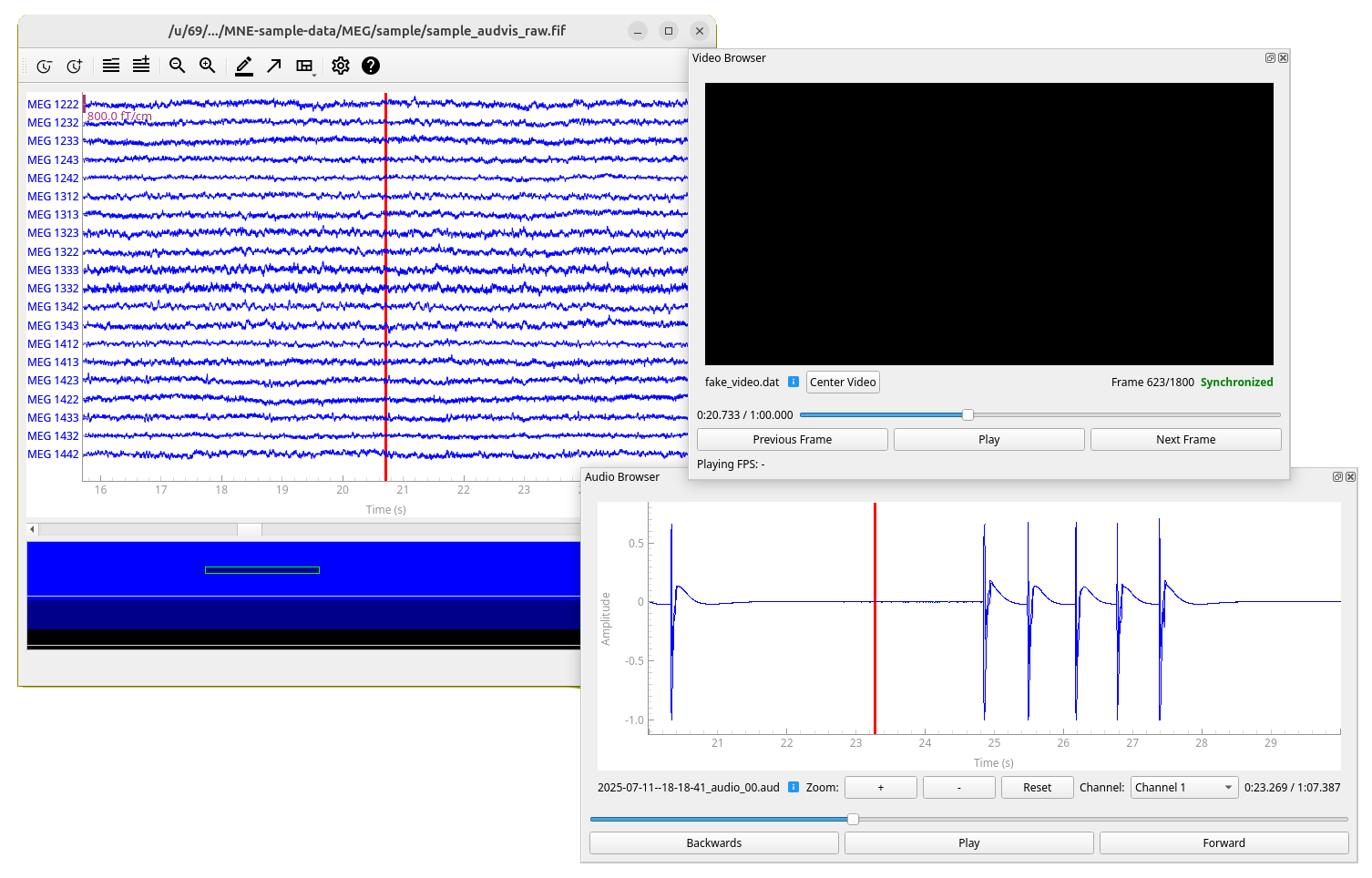
Features
- Time-synchronized video browsing and playback with MEG/EEG data
- Time-synchronized audio browsing and playback with MEG/EEG data
- Support for multiple video and MEG files simultaneously (only one audio file with multiple channels at a time)
- Support for Helsinki VideoMEG project format files
- Standard video format support (MP4, AVI, etc.) via OpenCV (for audio only Helsinki VideoMEG format is currently supported)
Documentation
Documentation contains installation instructions (same as below), public API reference, and some of the usage examples available in the GitHub. A bit of the code structure and implementation details are also documented.
Installation
In addition to MNE-Python, this project requires package OpenCV for standard video file (such as .mp4) reading
and sounddevice for audio playback. Recommended way to install MNE-Python and thus this package is using
conda.
Using conda (recommended)
-
Create a new conda environment (named
mne-videobrowser) with this package and all dependencies installed:conda create --channel=conda-forge --strict-channel-priority --name=mne-videobrowser mne-videobrowser
-
Activate the environment:
conda activate mne-videobrowser
-
Only on linux: If you do not have PortAudio library, which is dependency of
sounddeviceinstalled, install it. For example on Ubuntu/Debian:sudo apt install libportaudio2
Using pip
-
Activate your desired Python environment (documentation for virtual environments).
-
Install this package, all dependencies will be installed automatically, except for a Qt binding, so you need to specify that in the command line as well if you don't have one (we recommend PySide6):
pip install mne-videobrowser PySide6
-
Only on linux: If you do not have PortAudio library, which is dependency of
sounddeviceinstalled, install it. For example on Ubuntu/Debian:sudo apt install libportaudio2
See usage examples in GitHub.
For developers
Installation for development
-
Clone this repository and navigate to project root.
-
Run
conda env create -f environment.yml
This will create a conda environment
mne-videobrowser-dev, that has development dependencies and the package installed in editable mode, which ensures that changes in source code are reflected to the installed package. -
Activate the environment:
conda activate mne-videobrowser-dev
-
Only on linux: If you do not have PortAudio library, which is dependency of
sounddeviceinstalled, install it. For example on Ubuntu/Debian:sudo apt install libportaudio2
Running tests
Tests are located in directory tests/ and they run using package pytest (included in development dependencies).
You can run all the tests with:
pytest
You can also selectively run tests in a specific file/class/method. See pytest documentation for details.
Building documentation
Documentation source files are located in docs/source/ and built documentation in docs/build/.
Documentation is mostly automatically generated from the source code docstrings using sphinx.
To build the documentation:
cd docs
make html  # on Windows use 'make.bat html'
Then view the built html documentation by opening file docs/build/html/index.html in a web browser.
Release history Release notifications | RSS feed


Download files
Download the file for your platform. If you're not sure which to choose, learn more about installing packages.
Source Distribution
Built Distribution
Filter files by name, interpreter, ABI, and platform.
If you're not sure about the file name format, learn more about wheel file names.
Copy a direct link to the current filters
File details
Details for the file mne_videobrowser-0.2.1.tar.gz.
File metadata
- Download URL: mne_videobrowser-0.2.1.tar.gz
- Upload date:
- Size: 474.1 kB
- Tags: Source
- Uploaded using Trusted Publishing? No
- Uploaded via: uv/0.8.22
File hashes
| Algorithm | Hash digest | |
|---|---|---|
| SHA256 |
ab8263c2fdac10bbfaa1080627ac1bd9549b65f9b3bbd0f9e2fb48135ed48b08
|
|
| MD5 |
68d0b923b4e43f11b857e2a6d46c119f
|
|
| BLAKE2b-256 |
c08e2d0a576336b9c0f37fb4a8c11e19da7951cc4edfb0e1af6b8ede70ad625c
|
File details
Details for the file mne_videobrowser-0.2.1-py3-none-any.whl.
File metadata
- Download URL: mne_videobrowser-0.2.1-py3-none-any.whl
- Upload date:
- Size: 56.1 kB
- Tags: Python 3
- Uploaded using Trusted Publishing? No
- Uploaded via: uv/0.8.22
File hashes
| Algorithm | Hash digest | |
|---|---|---|
| SHA256 |
6511d794c84f27ccf8b8b059a3c87acf2600a25bc318f0aac5feee183914d098
|
|
| MD5 |
fc2b30742f4432af228bf44656d18a06
|
|
| BLAKE2b-256 |
b90bf0ef0d2be0f506147f4ffabfcb9ea11cf71ffa948367f7ac5582035bcd22
|






