
A graphical user interface for MNE
Verified details
These details have been verified by PyPIProject links
GitHub Statistics
Maintainers

Project description





MNELAB

MNELAB provides a graphical user interface for MNE-Python (the most popular Python package for EEG/MEG analysis) and ensures full transparency by recording the underlying commands for each action in its command history.
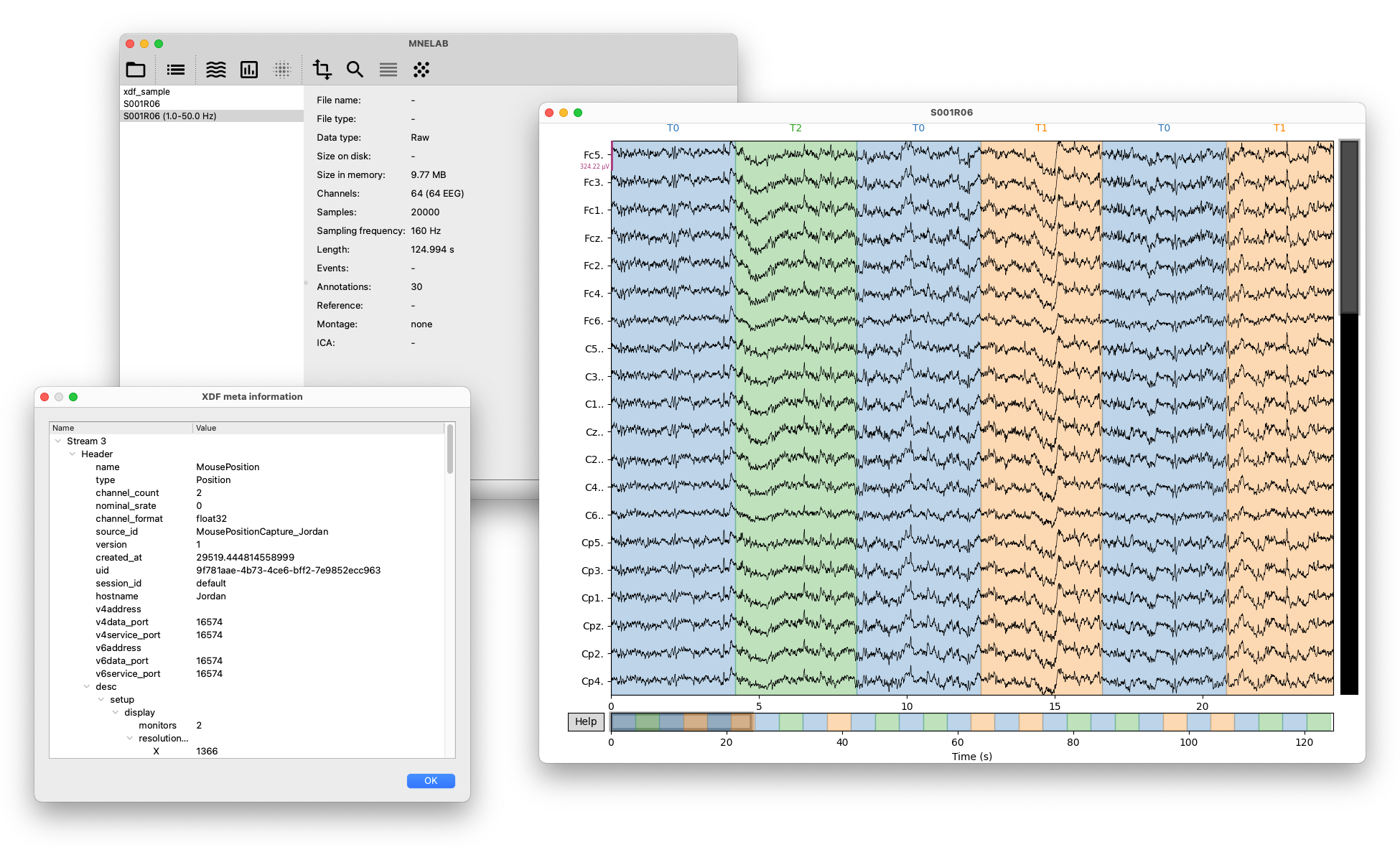
Key features include:
- Cross-platform support (Linux, macOS, Windows).
- A command history that records the underlying MNE-Python commands for each action, allowing users to learn how to use MNE-Python and to reproduce their analyses in code.
- Import data from various formats supported by MNE-Python, and some additional formats like XDF (
.xdf,.xdfz,.xdf.gz), MATLAB (.mat), NumPy (.npy), and BVRF (.bvrh,.bvrd,.bvrm,.bvri). - Export to EDF, BDF, BrainVision, EEGLAB, and FIFF formats.
- XDF-specific features such as chunk inspection (useful for debugging corrupted XDF files), stream selection, metadata inspection, resampling, gap detection and filling, and more.
- Support for various ICA algorithms, including FastICA, Infomax ICA, and PICARD.
- Automatic classification of independent components using ICLabel.
- Comprehensive tools for managing events and annotations.
- Support for channel locations (montages), rereferencing, cropping, filtering, epoching, and more.
- Plotting capabilities for raw data, epochs, evoked responses, independent components, ERD/ERS maps, and more.
Documentation
Instructions for installing and using MNELAB as well as step-by-step examples for different use cases are available in the documentation. Check out the changelog to learn what we added, changed, or fixed.
Quick start
We recommend our standalone installers currently available for macOS and Windows:
If you use Arch Linux, you can install MNELAB from the AUR (e.g., yay -S python-mnelab).
Alternatively, you can use uv to run MNELAB on all platforms:
uvx mnelab
If you want to run the latest development version, you can use the following command:
uvx --from https://github.com/cbrnr/mnelab/archive/refs/heads/main.zip mnelab
Contributing
The contributing guide contains detailed instructions on how to contribute to MNELAB.
Project details
Verified details
These details have been verified by PyPIProject links
GitHub Statistics
Maintainers
Release history Release notifications | RSS feed


Download files
Download the file for your platform. If you're not sure which to choose, learn more about installing packages.
Source Distribution
Built Distribution
Filter files by name, interpreter, ABI, and platform.
If you're not sure about the file name format, learn more about wheel file names.
Copy a direct link to the current filters
File details
Details for the file mnelab-1.4.3.tar.gz.
File metadata
- Download URL: mnelab-1.4.3.tar.gz
- Upload date:
- Size: 11.2 MB
- Tags: Source
- Uploaded using Trusted Publishing? Yes
- Uploaded via: uv/0.11.6 {"installer":{"name":"uv","version":"0.11.6","subcommand":["publish"]},"python":null,"implementation":{"name":null,"version":null},"distro":{"name":"Ubuntu","version":"24.04","id":"noble","libc":null},"system":{"name":null,"release":null},"cpu":null,"openssl_version":null,"setuptools_version":null,"rustc_version":null,"ci":true}
File hashes
| Algorithm | Hash digest | |
|---|---|---|
| SHA256 |
859c98c03a8031edee6cc3a04d80740edb34c8043284134962b170eaf77baabb
|
|
| MD5 |
da063b81c4a50120cd764b73204fb161
|
|
| BLAKE2b-256 |
8399c6cf1cd430e1bbfacebf5a0f30770f68eb4d604cf8a039cf359be490dc75
|
File details
Details for the file mnelab-1.4.3-py3-none-any.whl.
File metadata
- Download URL: mnelab-1.4.3-py3-none-any.whl
- Upload date:
- Size: 11.2 MB
- Tags: Python 3
- Uploaded using Trusted Publishing? Yes
- Uploaded via: uv/0.11.6 {"installer":{"name":"uv","version":"0.11.6","subcommand":["publish"]},"python":null,"implementation":{"name":null,"version":null},"distro":{"name":"Ubuntu","version":"24.04","id":"noble","libc":null},"system":{"name":null,"release":null},"cpu":null,"openssl_version":null,"setuptools_version":null,"rustc_version":null,"ci":true}
File hashes
| Algorithm | Hash digest | |
|---|---|---|
| SHA256 |
cb4ff0080de7ab8e2cfb805dc6cc520f43dce5c530fb70518eb62891e978d6ef
|
|
| MD5 |
d5859e7f22010e073472dffa540dec08
|
|
| BLAKE2b-256 |
b8b37bc67f90af63c87ae5f2e8e218e102a84c77cf7258277e3b720664abd599
|






