
Local-first durable checkpoint and dbt lineage context for coding agents
Verified details
These details have been verified by PyPIProject links
GitHub Statistics
Maintainers

Project description
Mnemo Memory
The problem
Coding agents start fresh sessions with no reliable knowledge of what happened before: what changed, which decision won, which approach failed, which test passed, and what should happen next. Replaying an entire transcript is expensive and noisy. Asking the agent to re-read a dbt project or a raw manifest to understand impact is slow and can still surface stale or irrelevant information.
The practical answer
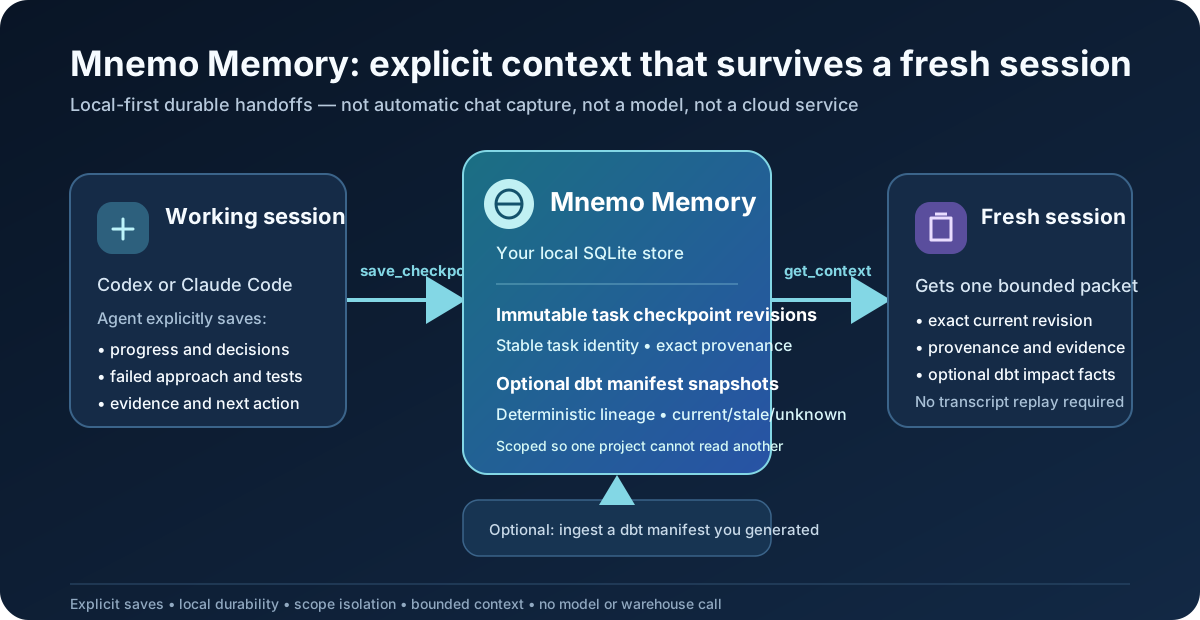
Mnemo Memory is a small local database that lets a coding agent save a compact task handoff now and retrieve it in a later, fresh session. It combines that handoff with optional, verified dbt lineage facts in one bounded context packet.
The intended workflow is simple:
Work with an agent → explicitly save a checkpoint → end the session
                                            ↓
Start a fresh Codex/Claude session → retrieve Mnemo context → continue with the exact next action
The saved handoff contains the useful parts of prior work—not a replay of everything:
- objective, current progress, accepted decisions, and why they were made;
- failed approaches, blockers, tests/verification, evidence, and the next action; and
- optional dbt upstream/downstream impact facts from a manifest you choose to ingest.
What the deterministic evidence shows
Mnemo includes model-free, reproducible synthetic benchmarks. They compare what is available to a new session; they do not claim provider-billed savings or prove a model will produce a better answer.
| Synthetic fixture comparison | Context tokens | Result |
|---|---|---|
| Full prior transcript | 2,917 | Baseline historical context. |
| Mnemo checkpoint packet | 357 | 87.8% fewer transcript-context tokens; all required handoff facts and provenance available. |
| Full dbt manifest | 2,600 | Baseline structural context. |
| Mnemo structural facts | 686 | 73.6% fewer structural-context tokens; expected lineage facts and provenance available. |
| Transcript + manifest | 5,517 | Combined baseline. |
| Unified Mnemo packet | 1,043 | 81.1% fewer combined-context tokens; checkpoint, lineage, currentness, and provenance gates pass. |
All numbers are deterministic estimates from Mnemo’s local estimator in cold fresh-session fixtures—no model request, API key, provider cache, or output tokens are involved. The fixture requires 100% required checkpoint facts, lineage precision/recall, and provenance coverage; it rejects stale decisions presented as current. See the fresh-session benchmark and unified-context benchmark for methodology and limits.
What Mnemo remembers—and what it does not
It is not a general memory of everything you type. Mnemo does not watch your terminal, read your repository automatically, capture chats, or call a model. It remembers only information an MCP client explicitly saves:
- a task checkpoint: objective, progress, decisions, a failed approach, evidence, tests run, and the next action; and
- optionally, a dbt manifest snapshot: verified upstream/downstream model relationships from
a
manifest.jsonyou deliberately ingest.
That distinction matters. A new agent session can retrieve a saved checkpoint and its current dbt facts, but it cannot recover an earlier conversation that was never saved.
What “long-term memory” means here
Imagine you ask an agent to change an orders model. Before stopping, the agent explicitly calls
Mnemo’s save_checkpoint tool with something like: “the staging model is done; the previous join
approach failed; tests passed; next update the downstream mart.” Mnemo stores that as an immutable
revision in its local SQLite database.
Later—after closing the terminal, restarting Codex or Claude Code, or starting a new MCP
process—the agent can call get_context against the same Mnemo data directory and same scope.
Mnemo returns that checkpoint, not a guessed summary or a full transcript. Later revisions retain
the same logical checkpoint identity and preserve earlier evidence.
Running mnemo-memory init does not make the current directory memorable. It only creates or
opens the local Mnemo store. The current alpha requires explicit checkpoint saves through MCP; it
does not automatically capture transcripts or conversations. An optional dbt command wrapper can
refresh a configured project's manifest snapshot after a successful dbt command; it is described
in the dbt command wrapper guide.
Mnemo is local-first. It does not proxy your provider, execute dbt, run SQL, render Jinja, contact a warehouse, or send the local database anywhere.
Status:
0.1.0a2is an early alpha. It is useful for the documented local workflow, but the project intentionally does not yet provide automatic capture, catalog/run-results ingestion, general source-code graphs, embeddings, a UI, or team workspaces.
Install
The PyPI distribution is mnemo-unified-context. The import package remains mnemo_memory, and
the command is deliberately mnemo-memory.
uv tool install mnemo-unified-context==0.1.0a2
mnemo-memory --help
mnemo-memory is a separate executable. It neither replaces nor shadows an existing mnemo
command on your machine.
For a local wheel, use uv tool install /path/to/mnemo_unified_context-0.1.0a2-py3-none-any.whl.
For development in this checkout:
uv sync --locked
uv run mnemo-memory --help
Upgrade or remove it with:
uv tool upgrade mnemo-unified-context
uv tool uninstall mnemo-unified-context
A simple first use
1. Initialize one local Mnemo store
mnemo-memory init
mnemo-memory status
This creates a local database, normally outside your repository:
- macOS:
~/Library/Application Support/Mnemo - Linux:
${XDG_DATA_HOME:-~/.local/share}/mnemo - Windows:
%LOCALAPPDATA%\Mnemo
Use an absolute --data-dir /absolute/path/to/mnemo-data or MNEMO_DATA_DIR only when you want a
separate store, for example in a test or CI job. An explicit bad location fails safely; Mnemo does
not silently create a different empty database.
2. Make the MCP tools available to your client
mnemo-memory connect codex
mnemo-memory connect claude-code
You may run both commands. They are independent registrations:
| Command | What it connects | Can it coexist with the other? |
|---|---|---|
mnemo-memory connect codex |
Codex’s MCP configuration | Yes. |
mnemo-memory connect claude-code |
Claude Code’s MCP configuration | Yes. |
mnemo-memory connect by itself does not connect anything; it shows the available client-specific
subcommands. After registering, restart the relevant client. Each client sees exactly the same two
Mnemo MCP tools: save_checkpoint and get_context.
Both clients start the same installed mnemo-memory launcher and therefore share memory when
they use the same Mnemo data directory and the same scope. If you set different MNEMO_DATA_DIR
values, you have deliberately created isolated stores. Registration does not change model
selection, credentials, provider settings, or network permissions.
To inspect or remove one registration without affecting the other:
mnemo-memory connect codex --check
mnemo-memory disconnect codex
mnemo-memory disconnect claude-code
3. Use it deliberately during work
In a compatible client session, ask the agent to save a Mnemo checkpoint before stopping. In the
next fresh session, ask it to retrieve Mnemo context before continuing. The agent uses the two MCP
tools; there is no separate “remember this directory” command. For a local terminal walkthrough,
run mnemo-memory agent (or its mnemo-memory guide alias).
For the memory to be available later, the new session must use the same Mnemo data directory and the same task/project scope. This is intentional: a checkpoint from one project is not disclosed to another project merely because both run on the same machine.
Questions people reasonably ask first
Does mnemo-memory init remember my current repository? No. It initializes one local Mnemo
database; it does not inspect or bind the current directory.
What is remembered long term? Only explicit checkpoint revisions and, if you ingest one, a dbt manifest’s structural projection. A checkpoint is a compact handoff record for one task—not a copy of your files, terminal history, or every chat message.
When does it get saved? When the connected agent/client calls save_checkpoint. In this alpha,
you should explicitly ask the agent to save a checkpoint before ending work.
How does a new agent get it? The new agent connects to the same Mnemo store and calls
get_context for the same scope. It receives the latest active checkpoint and any requested dbt
facts, with provenance. If no checkpoint was saved, it receives no hidden history.
Does changing directories create a different memory? No. The data directory selects the database. Scope selects which project/task within it can be read. Automatic per-directory binding is not implemented yet.
Scope IDs, in plain language
Mnemo never guesses which project owns a checkpoint or manifest. Stable UUIDs form the privacy boundary. The dbt CLI needs the first three; a task checkpoint additionally has a session and task UUID supplied through MCP:
| ID | Meaning in a personal setup | Example use |
|---|---|---|
owner_id |
You or the account that owns the data | Keep one UUID for yourself. |
workspace_id |
A grouping of projects | Use one UUID for your personal workspace. |
project_id |
One durable project boundary | Use a different UUID for each dbt/code project. |
session_id |
One work session | Checkpoint callers use it to identify a task session. |
task_id |
One task within that session | Checkpoint callers use it to identify the handoff. |
They are not dbt IDs, database names, secrets, or values Mnemo derives from a path or a manifest. They are simply stable labels you choose once and reuse whenever you work with that project/task. A UUID lets Mnemo reject an accidental cross-project request without revealing data from the other scope. The current alpha makes this explicit rather than pretending a filesystem path is a secure identity.
Generate three values once, then keep them in a project-local note or your team’s approved configuration system (not in a shared checkpoint payload):
python -c 'import uuid; print(uuid.uuid4())' # owner_id — once per owner
python -c 'import uuid; print(uuid.uuid4())' # workspace_id — once per workspace
python -c 'import uuid; print(uuid.uuid4())' # project_id — once per project
For the examples below, set them as shell variables. Replace the values with your own stable UUIDs; do not generate new values every invocation.
export MNEMO_OWNER_ID='11111111-1111-4111-8111-111111111111'
export MNEMO_WORKSPACE_ID='22222222-2222-4222-8222-222222222222'
export MNEMO_PROJECT_ID='33333333-3333-4333-8333-333333333333'
The UUIDs above are public examples only. They do not identify a real user, workspace, or project.
Optional: add verified dbt lineage
This step does not save task memory. It gives get_context a safe, structured answer to questions
such as “what is upstream of this dbt model?” or “what downstream models are affected?”
Run dbt yourself to create target/manifest.json, then ingest it:
Mnemo reads the JSON locally; it does not execute dbt or connect to your warehouse.
mnemo-memory dbt ingest target/manifest.json \
  --owner-id "$MNEMO_OWNER_ID" \
  --workspace-id "$MNEMO_WORKSPACE_ID" \
  --project-id "$MNEMO_PROJECT_ID"

mnemo-memory dbt status \
  --owner-id "$MNEMO_OWNER_ID" \
  --workspace-id "$MNEMO_WORKSPACE_ID" \
  --project-id "$MNEMO_PROJECT_ID"
Re-ingesting the same manifest is safe and idempotent. A changed manifest becomes a new immutable snapshot and atomically becomes active; older snapshots remain available for provenance. Mnemo stores a bounded structural projection, not raw SQL, compiled SQL, macro bodies, credentials, or the full manifest.
What the MCP tools do
Mnemo exposes exactly two local stdio MCP tools:
save_checkpointcreates, revises, completes, or abandons an explicit task checkpoint.get_contextreturns a bounded packet for an explicit scope, optionally including a structured dbt upstream/downstream request.
A checkpoint has a stable logical ID and immutable revisions. Revision, completion, and abandonment requests include the current revision ID, so two clients cannot silently overwrite one another. Completed and abandoned checkpoints are excluded from automatic active selection.
Every saved revision must include evidence/provenance supplied by the caller. Mnemo does not invent evidence, silently truncate stored checkpoint text, or replay a full transcript. The active checkpoint section defaults to 600 estimated tokens; the entire context packet has a hard budget with structured omissions when needed.
Command map
| Command | Plain-language purpose |
|---|---|
mnemo-memory init |
Create/open the local Mnemo database. It does not inspect the current repository or save a checkpoint. |
mnemo-memory status |
Show whether that local store is initialized and usable. |
mnemo-memory connect codex |
Make Mnemo’s two MCP tools available to Codex. |
mnemo-memory connect claude-code |
Make the same two MCP tools available to Claude Code. |
mnemo-memory agent |
Run a deterministic interactive setup guide; it does not use a model or change a client registration. |
mnemo-memory dbt ingest ... |
Read a manifest you already generated and save a safe lineage snapshot. |
mnemo-memory dbt status ... |
Show the active saved dbt snapshot for a project scope. |
mnemo-memory mcp serve --stdio |
Start the MCP server directly; client registration normally starts it for you. |
Understanding dbt context and freshness
Mnemo supports dbt manifest.json schema v12. Dependencies come from the manifest’s declared
depends_on.nodes relationships; parent_map and child_map are consistency checks. It can
return direct or transitive upstream/downstream facts in a deterministic order, including the
artifact snapshot and evidence for every fact.
An active snapshot is the latest successfully ingested one. That alone does not prove it still matches your files:
- current means supplied comparable digest/fingerprint evidence exactly matches;
- stale means comparable evidence differs;
- unknown means there is not enough comparable evidence.
Verified current manifest structure outranks an older checkpoint’s recollection of repository structure. Mnemo preserves such a disagreement as evidence rather than asking a model to resolve it.
Reliability, privacy, and recovery
Checkpoint revisions and dbt snapshots are immutable and scoped. SQLite writes use transactions, expected-revision/expected-active comparisons, foreign keys, and integrity checks. A new Mnemo process using the same data directory can retrieve acknowledged writes after a restart.
Back up the data directory before upgrading: migrations are forward-only. A corrupt, unavailable, or unsupported-newer database fails safely rather than switching to an empty store. Tool errors are sanitized and do not include SQL, stack traces, unrelated scope data, or private paths.
More detail
- Local MCP guide — tool lifecycle, revision conflicts, and recovery.
- Codex and Claude Code MCP guide — complete client setup, cross-client sharing, prompts to use during work, and troubleshooting.
- dbt manifest guide — schema support, deterministic lineage, evidence, and parser safety.
- dbt command wrapper guide — one-time binding, automatic post-run manifest activation, shell setup, and failure behavior.
- Command wrapper hooks — the generic safe wrapper kernel, trust boundary, and failure semantics behind the optional dbt integration.
- Implementation status — completed vertical slice and deferred milestones.
Development verification
npm ci
npm run check
uv build --no-sources
The verified package target is Python 3.12 on macOS and Linux. Built-artifact verification runs
outside the source checkout so migrations and schemas are proven to load from the installed
mnemo_memory package.
Project details
Verified details
These details have been verified by PyPIProject links
GitHub Statistics
Maintainers
Release history Release notifications | RSS feed


Download files
Download the file for your platform. If you're not sure which to choose, learn more about installing packages.
Source Distribution
Built Distribution
Filter files by name, interpreter, ABI, and platform.
If you're not sure about the file name format, learn more about wheel file names.
Copy a direct link to the current filters
File details
Details for the file mnemo_unified_context-0.1.0a2.tar.gz.
File metadata
- Download URL: mnemo_unified_context-0.1.0a2.tar.gz
- Upload date:
- Size: 72.6 kB
- Tags: Source
- Uploaded using Trusted Publishing? Yes
- Uploaded via: uv/0.9.7
File hashes
| Algorithm | Hash digest | |
|---|---|---|
| SHA256 |
7dd75aa6f5ccc45c34fa6a7f64a3fbd378d9ad0715ae22ac5589bea439fe9907
|
|
| MD5 |
6c412bb1a3c1b626a0eae7c64ded370c
|
|
| BLAKE2b-256 |
cb0fb1ad021fddefcc0835e246d788884fbe7ae9d48bec027dc2edd7a725618d
|
File details
Details for the file mnemo_unified_context-0.1.0a2-py3-none-any.whl.
File metadata
- Download URL: mnemo_unified_context-0.1.0a2-py3-none-any.whl
- Upload date:
- Size: 101.1 kB
- Tags: Python 3
- Uploaded using Trusted Publishing? Yes
- Uploaded via: uv/0.9.7
File hashes
| Algorithm | Hash digest | |
|---|---|---|
| SHA256 |
a60926a874a10ba14c4b7cb3bed1c80fb3f147cc43d09294680eaff2db8339e8
|
|
| MD5 |
1c5fe14da3471602feecdefea9395c00
|
|
| BLAKE2b-256 |
0c5e5410fbb1ed78a5707bfd836919f161c8f01110b5b5afb0c1c13eb5a6278d
|






