
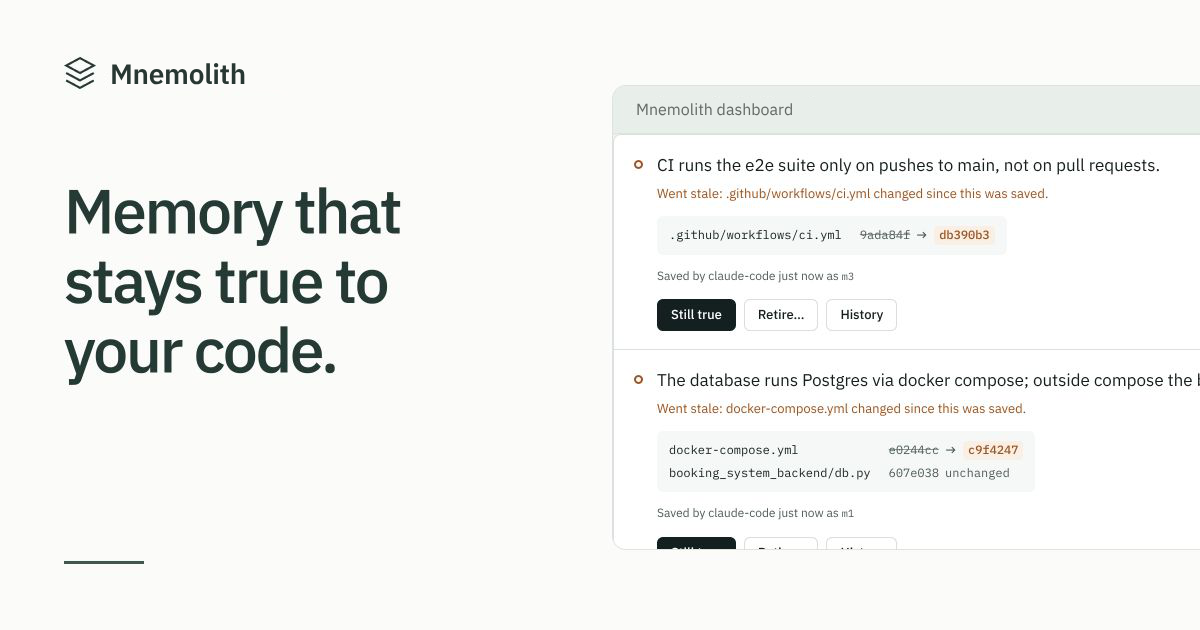
Mnemolith
Shared memory for AI coding tools that stays true to your code.

Mnemolith (NEE-mo-lith): "memory stone." What your AI learns, carved where every tool can read it. (Why the name)
Formerly Aether Cache. If you installed
aether-cache, see Moving from Aether Cache: your memories come with you.
Claude Code, Cursor, and other AI tools each forget your project between sessions, and when they do remember things, nothing checks whether those memories are still correct. Mnemolith gives every tool one shared, local memory, and keeps it honest:
- Memories go stale when the code changes. Each memory is linked to the files it's about, with a snapshot of their
git content hash. When
docker-compose.ymlchanges, the memory about it is set aside automatically and flagged for you to confirm or fix, instead of being fed to your AI forever. - Contradictions get replaced, not hoarded. "We migrated to MySQL" retires "we use Postgres" instead of sitting next to it and confusing the model. Near-identical repeats are merged.
- Every memory can explain itself. Which tool and session saved it, which file versions it was based on, and every change since: created, seen again, went stale, confirmed, replaced.
- Your team can share it. Share a memory and it becomes a small file in the repo, reviewed in a pull request like code. From the next pull, every teammate's AI knows it, and when the code it depends on changes, it's flagged for everyone. See Team memory.
- It works with the files you already use. Current memories sync into a managed section of
AGENTS.mdandCLAUDE.md, and team memories are listed inmnemolith.md, so teammates who don't run Mnemolith see them too.
It runs entirely on your machine, on top of a database engine I wrote from scratch.
Not a Redis clone
Mnemolith started as a from-scratch rebuild of Redis in Java, then kept going. Every layer here is written from scratch, and each one does something the layer beneath it can't:
| Layer | What it adds |
|---|---|
| MCP server | Claude Code, Cursor, and any MCP tool share one memory |
| Git awareness | Memories retire themselves when the code they describe changes |
| Memory layer | Status, provenance, full history, duplicate merging, and conflict review, inside the engine |
| HNSW vector index | Semantic search: 99.4% recall at 0.84 ms on 100K vectors, 22× faster than exact search |
| Redis-compatible engine | RESP protocol, 50+ commands, replication, transactions, and crash-safe persistence (0 acknowledged writes lost across 1,039,890 writes and 8 kill -9 crashes), at 88–93% of real Redis's throughput |
The bottom layer alone is a working Redis: redis-cli, redis-benchmark, and redis-py talk to it unchanged. The
memory layer, git awareness, and MCP server are things Redis doesn't do at all.
Claude Code ─┐                       ┌─────────────────────────────────────────────┐
Cursor ──────┼─ MCP ─► mnemolith ─┼─ RESP ─► Java engine (Main.java)            │
other tools ─┘   (Python: embeddings,│          memories, HNSW vector index,       │
                  git hashing, sync) │          history, append-only file on disk  │
                                     └─────────────────────────────────────────────┘
Does it help?
We tested it. Claude Code did 7 tasks in a sample codebase, 3 times each, in three setups. Every task needs something only a teammate would know: a past decision, who owns which code, a promise to a partner, a business rule. Two need a fact mentioned in an earlier session. An automatic check grades every run.
| Setup | Tasks done right | Across sessions | Avg cost per task |
|---|---|---|---|
| No memory | 43% (9 of 21) | 3 of 6 | $0.125 |
| CLAUDE.md notes, same facts | 86% (18 of 21) | 3 of 6 | $0.121 |
| Mnemolith, same facts | 100% (21 of 21) | 6 of 6 | $0.125 |
Without memory, Claude edited another team's code, changed a frozen partner API and skipped refund approval, every time. A CLAUDE.md file held the same facts but missed a database address mentioned in an earlier session every time; Mnemolith saved it on its own and used it next session. It costs about the same per task as a notes file, and the same as no memory at all (API prices). 63 runs of Mnemolith 0.3.5 on Claude Opus 5.5, November 2026. In an earlier round where every fact could also be found in the code, all three setups tied.
Run it yourself (uses your own Claude Code plan; see eval/ for what each task checks):
cd eval && python3 run.py --repeat 3 && python3 report.py
With teammates. In a third round, teammate A told their AI something and asked for the team to know it; teammate B, in their own clone and a fresh session, got a task that needed it. Team memory got 4 of 4 tasks right, a shared CLAUDE.md 3, and personal memory or no memory 2. One run per task, so it's a direction, not a final score. In three more tasks the code changed after sharing, and every setup coped: in a small repo, Claude reads the code and notices. A team memory session cost about $0.15 per task, a little more than a notes file. The full write-up includes what we changed in the evaluation along the way.
What it looks like
The dashboard (mnemolith ui): memories whose files changed wait for a decision, with the file versions side by side.
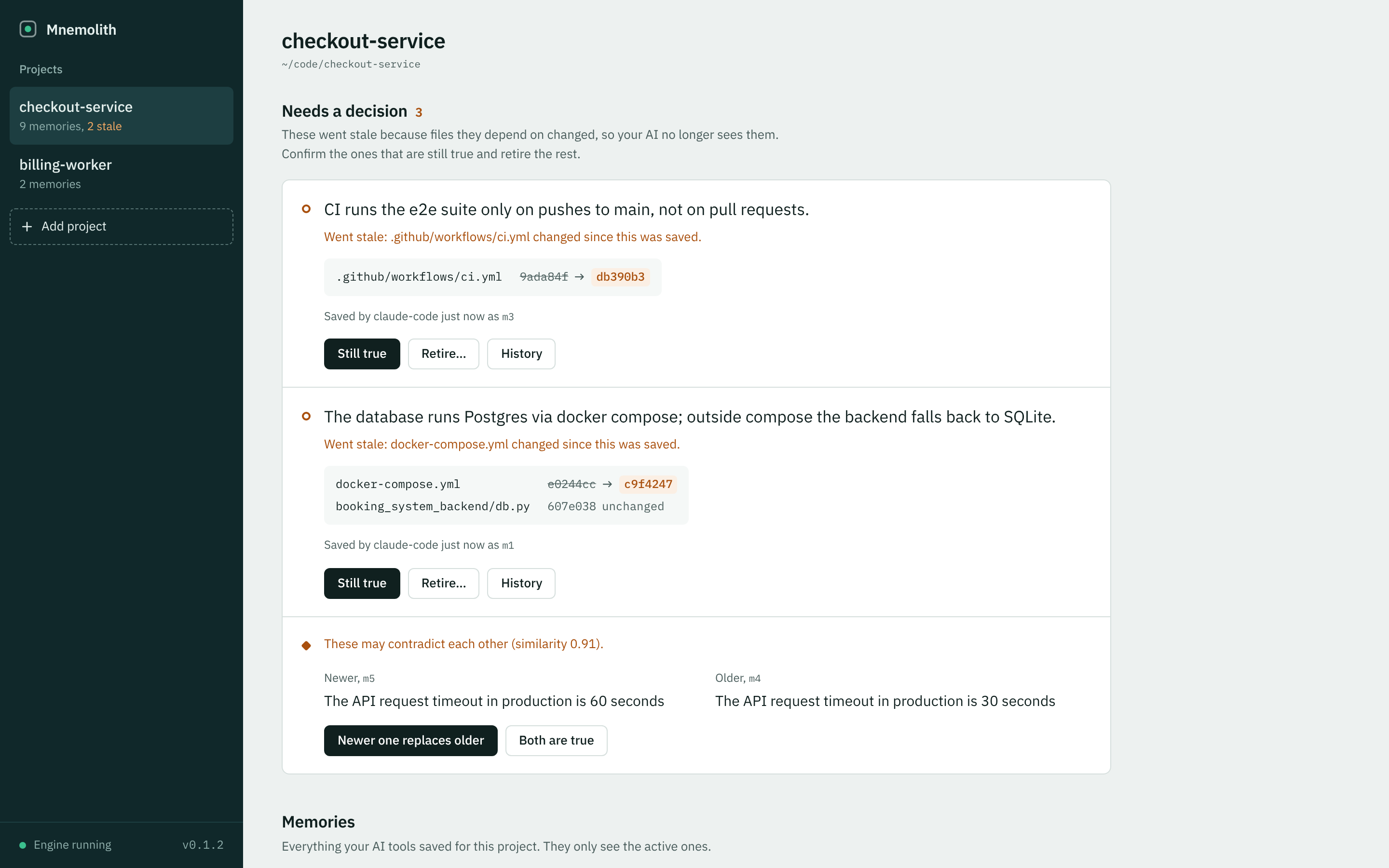
And from your AI tool's side, a memory linked to a file, the file changes, and the next lookup catches it:
> remember("The database runs Postgres via docker compose", files=["docker-compose.yml"])
Saved as m1.

        ... someone edits docker-compose.yml ...

> recall("database setup")
These memories were just retired because files they depend on changed. If one is still true,
call confirm_memory; if it's wrong, save the corrected fact with remember:
[m1] "The database runs Postgres via docker compose" is now marked outdated: docker-compose.yml changed.

> confirm_memory("m1")        # still true, so re-link it to the new version of the file
Confirmed m1; it's active again and linked to the current file versions.

> explain_memory("m1")
m1: "The database runs Postgres via docker compose"
status: active, project: demo
saved by: claude-code (session eea54b5c)
linked files: docker-compose.yml@02ea346...
history:
  19:16  created: by claude-code (session eea54b5c), linked to docker-compose.yml@87da641...
  19:16  active -> stale: docker-compose.yml changed since this was saved
  19:16  re-linked: to docker-compose.yml@02ea346... (confirmed still true)
  19:16  stale -> active: confirmed still true
A newer fact replacing an older one:
> remember("The API timeout was raised to 60 seconds")
Saved as m3.
Related existing memories:
[m1] (similarity 0.58) The API timeout is 30 seconds
If m3 makes any of these no longer true, call replace_memory(old_id, "m3"). Otherwise do nothing.

> replace_memory("m1", "m3")
m1 retired; m3 replaces it.
Quick start
One line installs everything and runs setup. On macOS or Linux:
curl -fsSL https://mnemolith.dev/install.sh | sh
On Windows (PowerShell):
powershell -ExecutionPolicy ByPass -c "irm https://mnemolith.dev/install.ps1 | iex"
The installer (install.sh, install.ps1) gets uv if you
don't have it (uv brings Python), installs Mnemolith, and runs mnemolith setup. Prefer your own tools? Any of
these works, followed by mnemolith setup:
uv tool install mnemolith
pipx install mnemolith
pip install mnemolith        # Python 3.11+
setup starts the engine in the background, downloads the embedding model once (about 90 MB), and connects every
supported AI tool it finds on your machine: Claude Code, Claude Desktop, Cursor, and Codex. That's it. Open your
AI tool in any git repo and try:
Remember that our tests need DOCKER_HOST set. It depends on docker-compose.yml.
Then start a new session and ask how to run the tests.
Only use Claude Code? You can install Mnemolith as a plugin instead, with no setup step (needs uv):
/plugin marketplace add anishchugh05/mnemolith
/plugin install mnemolith@mnemolith
The plugin (plugin/) runs the same server and adds a /mnemolith:dashboard command. Use the plugin or
setup, not both, or Claude sees the tools twice.
The engine runs on Java 11+. If you have it, it's used. If you don't, Mnemolith downloads a private copy (about
50 MB) into ~/.mnemolith/java, checks it against its published checksum, and uses it only for Mnemolith;
nothing is installed system-wide, and mnemolith uninstall removes it.
Already keep notes for your AI in CLAUDE.md, AGENTS.md, or Cursor rules? Run mnemolith import in the repo
(or use Import notes in the dashboard) to turn them into memories, linked to the files they mention.
Memories are kept per project, named after the git repo's folder, so different projects don't mix. For now, two repos
with the same folder name (say, two called backend) share one memory. Everything stays on your machine: the engine
only accepts connections from it, and your memories live in ~/.mnemolith.
The engine has no password, so any program running on your computer can read or change memories. Your AI tools treat
memories as project instructions, so review new ones in mnemolith ui the way you'd review a change to CLAUDE.md.
| Command | What it does |
|---|---|
mnemolith setup |
One-time setup: engine, model, and AI tools |
mnemolith add |
Adds the repo you're in (or a path) so the dashboard can check its files; the dashboard can also find and add repos for you |
mnemolith ui |
Opens the dashboard: see what your AI remembers, and confirm, fix or retire memories whose files changed |
mnemolith import |
Turns the notes in CLAUDE.md, AGENTS.md, and Cursor rules into memories; shows them first and asks |
mnemolith remove |
Removes a project (default: the one you're in), like Remove project in the dashboard: its memories are retired, not deleted |
mnemolith export |
Saves memories, with their linked files and history, to a JSON file (-p for one project) |
mnemolith status |
Is it running, and what's in this project's memory |
mnemolith doctor |
Checks everything and tells you how to fix what's wrong |
mnemolith list / recall "query" / explain m1 |
Look at memories from the terminal |
mnemolith sync |
Writes current memories into AGENTS.md / CLAUDE.md |
mnemolith mender on / off |
Turns Mender on or off; mnemolith mend drafts fixes for this repo now |
mnemolith connect cursor |
Connects one tool: claude-code, claude-desktop, cursor or codex (--print shows config for any other MCP tool) |
mnemolith start / stop |
Runs or stops the engine (it also starts on its own when a tool needs it) |
mnemolith uninstall |
Disconnects your AI tools, stops the engine, and asks before deleting memories |
If mnemolith isn't found after installing, run uv tool update-shell and open a new terminal. Port 7380 taken?
Set MNEMOLITH_PORT and run setup again. To uninstall: mnemolith uninstall, then uv tool uninstall mnemolith.
Mender: drafted fixes for stale memories
Flagging a stale memory is half the job: someone still has to work out what's true now and type it in. Mender, an
optional part of Mnemolith, drafts that for you. mnemolith setup asks whether to turn it on; mnemolith mender on
(or Settings in the dashboard) changes it later. It needs no API key and installs nothing extra.
- Simple changes are drafted by plain rules, on your machine. Mender compares the version of each file the memory
was saved against (from git) with the file now.
image: postgres:16becameimage: mysql:8, so "The database is Postgres (postgres:16 image)" becomes "The database is MySQL (mysql:8 image)". It handles version bumps, moved files (the path is updated, not treated as a deletion), and changes that don't touch the memory at all (only a comment, or lines it doesn't mention), which it suggests confirming as still true. - Everything else is drafted by the AI tool you already use. With Mender on, Claude Code, Cursor, and Codex get two
more tools:
list_staleshows each stale memory with what changed in its files, andpropose_fixsubmits a draft. Drafts are checked against the code: quotes in the reason and new numbers or versions must actually be in the files, or the draft is marked Unverified. - You approve every change in the dashboard, where each draft sits under the diff it came from, with what it's based on. Approve it, edit it, or dismiss it. Approving is refused if the files changed again after the draft was made (it would be based on old code), and if the memory was already settled some other way.
Changed your mind? Approving shows an Undo, and any fix can be reverted later from the memory's details in the
dashboard (Revert this fix) or with mnemolith mender revert m7: the old memory comes back for you to decide,
and Mender won't suggest the same fix again unless the files change. mnemolith status and your AI tool tell you
when fixes are waiting.
Team memories too. When a team memory is flagged, Mender drafts its fix the same way: the rules
find the version of each linked file the memory was confirmed against in git history and compare it with now, and
your AI tool sees flagged team memories in list_stale and drafts with propose_fix("team:<name>", ...). Drafts stay
on your computer. Approving one in the dashboard's Team memory section rewords or confirms the memory's file, which you
review and commit like any change; the file records that Mender suggested it.
mnemolith mend drafts fixes for the repo you're in and lists them.
Team memory
What one person teaches their AI, every teammate's AI knows. Watch the 70-second video (with sound).
Each person keeps their own memories, and each repo can have one shared team memory, kept as plain files in the repo:
.mnemolith/team/README.md               what this folder is, for reviewers
.mnemolith/team/memories/<name>.md      one memory per file
mnemolith.md                            one line per memory, for teammates without Mnemolith
.gitattributes                          one line, so mnemolith.md never causes a merge conflict
A memory file is a short header, then the fact:
---
mnemolith: 1
status: active
author: Priya Shah
created: 2026-11-10
files:
  - shop/catalog.py@3f2a9c1b04de
---
Never cache prices: they change during sales, and a cache served stale prices in March. Batch with get_prices.
Setting it up
mnemolith team init          # in the repo: starts one, or joins the one that's there
mnemolith promote m42        # share one of your memories (ids are in `mnemolith list`)
mnemolith team               # what the team knows, what's new, and what needs a look
mnemolith team edit <name> "new wording"
mnemolith team confirm <name>     # still true         mnemolith team retire <name>    # no longer true
So a new team memory doesn't start empty, team init offers three things, each only if you say yes:
- turn the notes your repo already has in
CLAUDE.md,AGENTS.mdand Cursor rules into team memories (at most 30 at a time); - have your AI tool (Claude Code or Cursor, whichever you have) read the repo and draft up to 30 starter
memories: how to build and test it, its conventions, what not to change. Mnemolith has no AI of its own, so this
runs that tool once, under your own plan, kept to reading files and adding team memories: Claude Code by a list of
allowed tools, Codex by its read-only sandbox, Cursor by its sandbox. If a tool changes any other file
anyway, Mnemolith tells you which. Claude Code and Cursor are tested; Codex is experimental and only used when
asked for.
mnemolith team draft --with cursor(orclaude,codex) does it later. With any other AI tool, runmnemolith team ai onand ask it to "draft starter team memories for this repo"; - add one line to
CLAUDE.md/AGENTS.mdpointing atmnemolith.md, since AI tools don't read that file on their own.
Review what was written, then commit .mnemolith/team/, mnemolith.md and .gitattributes like any other change;
each teammate runs mnemolith team init in their copy to use it (joining never touches the repo).
mnemolith team pr prints a description for that pull request: what the files are, what to review, and how teammates
start using it. The dashboard (mnemolith ui) has a Team memory section and a
Share with team button on each of your memories.
How it behaves
- Reviewed like code. Mnemolith writes and edits the files but never commits. Every new memory, edit and retirement goes through your normal review, and git keeps the history.
- Recall reads both. Your AI gets the team's memories first, labelled
team:<name>, then your own. A personal memory that says nearly the same as a team one is pointed out, so it can be retired or the disagreement raised. - Flagged for everyone. Each team memory stores fingerprints of what it depends on: a file, a folder (up to 500
files), or one part of a file.
shop/api/v1.py#productfollows the functionproduct,README.md#Releasinga section,config.yml#timeouta setting, so the memory is flagged when that part changes and not on every edit to a big file. Line endings don't matter, so Windows and Mac agree. A file that was renamed or moved is followed:confirmrelinks it. When one changes, every teammate's AI sees the memory as possibly outdated until someone runsmnemolith team confirm <name>(still true) ormnemolith team retire <name>, and commits it. Undo the change exactly and the flag goes away on its own, since a team memory is checked against its fingerprints each time. Your own memories are different: once one is flagged, it stays flagged until you confirm it. They can link a part of a file too (a.py#product), andconfirmfollows a file that moved. A part link follows its file when it's renamed or moved, as long as the part itself didn't change in the same edit.confirmis refused, and nothing changes, when a linked file or part is gone. For one of your own memories, retire it or save it again with the right files; for a team memory, fix thefiles:line in its file and confirm again, or retire it. Mender won't approve a fix that keeps a gone part either. - Sharing moves, it doesn't copy. A shared memory leaves your own memories, so nobody sees the same fact twice.
Sharing something the team already has is refused, and
mnemolith teampoints out two team memories that say nearly the same thing.mnemolith team unshare <name>takes one back. - One fact per memory. A team memory holds at most 2,000 characters, the same as a personal one; longer ones are refused with a hint to split them.
- A record of who and when. Each file carries who wrote it, and who last confirmed or reworded it and when.
mnemolith teammarks what arrived since you last looked. - Caught in review.
mnemolith team actionadds a GitHub workflow that comments on a pull request when it changes something a team memory depends on, unless the memory was updated in the same pull request. It keeps one comment per pull request up to date as you push.mnemolith team check --base origin/mainruns the same check locally. New in 0.4 and lightly tested. - No merge conflicts from sharing. Each memory is its own file, and the
.gitattributesline tells git to keep both sides' lines inmnemolith.md, so two people sharing on different branches merge cleanly. - Conflicts are held back. If two people change the same memory and git can't merge them,
mnemolith teamand the dashboard show both versions, and recall leaves that memory out until it's settled:mnemolith team keep <name> mine(ortheirs), then commit. A file that a hand edit broke is held back the same way, with what's wrong. - Follows branches. A memory added on a branch exists only there until it merges.
Safety
- Secrets are refused. Every memory is scanned before it reaches the repo. Anything that looks like a key, token,
password (
DB_PASSWORD=..., or "the admin password is ..."), card number or an address with a password in it is refused; something that only might be one (a long commit id, a path with your user name in it) is left for you to decide in the terminal or dashboard, and refused for AI tools. - A heads-up before every share: "This memory will be visible to everyone with access to this repo." Answer
ato stop asking; turn it back on in the dashboard's Settings. - Each person opts in. Cloning a repo doesn't feed its team memory to your AI until you run
mnemolith team init.mnemolith team removestops it for you alone; the repo's files aren't touched. - AI tools share only with permission. After
mnemolith team ai on, you can ask your AI to share something (or to draft starter memories for the repo) and it callsshare_with_team. Your AI tool may also ask you to approve that first call itself.
The secret check is a set of patterns, not a guarantee: it catches the common shapes, and review in the pull request is the second line of defence. Team memory security explains what is and isn't shared; report a way past the check privately (see SECURITY.md).
Other commands: mnemolith team sync rebuilds mnemolith.md after hand edits, mnemolith team import brings in
notes later, and mnemolith team ai off takes the AI permission back.
Moving from Aether Cache
Mnemolith used to be called Aether Cache. If you installed aether-cache, run the installer above. It installs
Mnemolith, removes aether-cache, moves your memories from ~/.aether-cache to ~/.mnemolith, and reconnects your AI
tools. Nothing is lost, and memories synced into CLAUDE.md / AGENTS.md are picked up where they are.
Installed some other way? Install mnemolith the same way, run mnemolith setup, then remove aether-cache
(uv tool uninstall aether-cache, pipx uninstall aether-cache, or pip uninstall aether-cache).
Tools the AI can call
| Tool | What it does |
|---|---|
remember(fact, files?, replaces?, new?) |
Saves a durable fact, optionally linked to files. If it looks like something already known, it says so instead of saving a copy (new=True saves it anyway); replaces="m42" saves it and retires m42 in one call. |
recall(query, limit?) |
Searches the project's memories by meaning. Checks linked files first, so it never returns a memory whose code changed underneath it. |
explain_memory(id) |
Where a memory came from and its full history. |
replace_memory(old, new) |
Retires an older memory that a newer one makes untrue. |
mark_outdated(id, reason) |
Retires a memory that turned out to be wrong. |
confirm_memory(id) |
Brings back a memory that's still true after its files changed, re-linked to the current versions. |
check_stale() |
Runs the file check on demand. |
list_conflicts() / resolve_conflict(...) |
Reviews pairs of very similar memories that may contradict each other. |
sync_to_files() |
Writes current memories into AGENTS.md / CLAUDE.md (also: mnemolith sync). |
list_stale() |
With Mender on: the stale memories, what changed in their files, and which already have a draft. |
propose_fix(id, new_text?, reason?, still_true?, files?) |
With Mender on: drafts a fix for the user to approve in the dashboard. Checked against the code before it's shown. Works for team memories too (team:<name>). |
share_with_team(memory_id? | fact?, files?) |
In a repo whose team memory you use, after mnemolith team ai on: shares a memory with the team as a file in the repo, for you to review and commit. Secret-checked. |
Design decisions, and what the measurements said
Similarity can't detect contradictions, so the AI judges
The first version flagged a new memory as a possible contradiction when it was similar to an existing one. Calibrating
with real all-MiniLM-L6-v2 embeddings showed that can't work:
| Pair | Kind | Similarity |
|---|---|---|
| "we use Postgres" / "the database is Postgres" | duplicate | 0.73 |
| "tests need DOCKER_HOST set" / "you have to set DOCKER_HOST before running tests" | duplicate | 0.92 |
| "we use Postgres" / "we migrated to MySQL" | contradiction | 0.30 |
| "API timeout is 30 seconds" / "API timeout is 60 seconds" | contradiction | 0.94 |
| "tests need DOCKER_HOST set" / "integration tests need a running Redis" | related, both true | 0.34 |
Duplicates scored 0.73 to 0.92 and contradictions 0.30 to 0.94, so no threshold separates them. A threshold low enough to merge real duplicates would silently merge "timeout is 30s" with "timeout is 60s", the worst bug this product could have. So the engine only auto-merges near-identical text (similarity ≥ 0.97). For everything else, embeddings find the related memories and the AI, which already understands the sentences, decides whether one replaces another.
Staleness compares file contents, not commits
Each linked file is stored as path@<git blob hash>, computed with git hash-object. Comparing contents rather than
commit ids catches uncommitted edits, ignores commits that didn't touch the file, and needs no git hooks: recall
re-hashes the handful of linked files before every search.
That is for a whole file. Your AI can also link a part of one, as path#symbol (a function, say). It is stored as
path#symbol@<hash of the part>, a 12-character hash of that part only, so an edit elsewhere in the file doesn't
flag the memory, and one that removes the part says `symbol` is no longer in path. A symbol that contains ,
or @ is refused. If a linked file is gone, Mnemolith looks for where it went: a file with the same contents, or the
only file with the same name. A part link is also matched by an identical part. confirm then relinks the memory.
Mender can draft a fix for a part link only when the version the memory was saved against was committed and is within
the file's last 200 commits, because it finds the old part in git history.
Memories never mutate silently
Every change is a logged event with a timestamp and a reason. The engine logs each memory with the id and timestamp it assigned, so replaying the log after a restart rebuilds the exact same memories and histories, down to the millisecond, instead of minting new ones.
The engine underneath
A Redis-compatible server written from scratch in Java. It speaks RESP, so redis-cli, redis-benchmark, and
redis-py work with it unchanged. The core was built by completing every stage and extension of the
CodeCrafters "Build Your Own Redis" challenge; the vector index,
persistence hardening, and the memory layer are my own additions.
Throughput vs. official Redis
redis-benchmark -t set,get, 100K requests, 50 parallel clients, 3-byte values, same machine:
| Mnemolith | Redis 8.10.2 | Mnemolith as % of Redis | |
|---|---|---|---|
| SET | 205.8K ops/sec | 233.6K ops/sec | 88% |
| GET | 225.7K ops/sec | 242.7K ops/sec | 93% |
| p50 latency | 0.119 ms | 0.111 ms | |
| p99 latency (SET / GET) | 0.375 / 0.231 ms | 0.359 / 0.159 ms | |
| max latency (SET) | 19.7 ms | 1.3 ms | JVM GC / JIT pauses |
Typical latency is on par with Redis. The gap is in worst-case latency, from JVM garbage collection and JIT warm-up, which Redis (written in C) doesn't have.
HNSW vector search vs. exact search
100,000 AG News headlines embedded with all-MiniLM-L6-v2 (384 dimensions, cosine similarity), 500 held-out queries,
k = 10. Recall is measured against exact brute-force search on the same data.
| Mode | Recall@10 | p50 latency | p99 latency |
|---|---|---|---|
| Exact (brute force) | 1.000 | 18.58 ms | 20.52 ms |
| HNSW, ef=10 | 0.905 | 0.49 ms | 1.38 ms |
| HNSW, ef=20 | 0.951 | 0.52 ms | 0.73 ms |
| HNSW, ef=50 | 0.985 | 0.66 ms | 0.89 ms |
| HNSW, ef=100 | 0.994 | 0.84 ms | 1.41 ms |
| HNSW, ef=200 | 0.998 | 1.24 ms | 2.19 ms |
At ef=100, HNSW returns 99.4% of the true top-10 about 22× faster than exact search. Building the index for 100K
vectors took 136 seconds (M=16, M0=32, efConstruction=200). Latencies are measured from the Python client, so they
include network and client overhead. Full setup and raw numbers: results.json.
How it works: each vector links to its nearest neighbors in a layered graph. A search starts on a sparse top layer
of long-range links, hops greedily toward the query, drops down a layer at a time, and finishes with a best-first search
on the bottom layer that keeps the ef best candidates. Neighbor selection uses the diversity heuristic from the HNSW
paper (prefer neighbors in different directions over near-duplicates), which is what keeps recall high.
Filtered search: HNSW doesn't know about memory status, so searches over-fetch candidates, drop the ones that don't match (stale or superseded), widen the search if too few survive, and fall back to an exact scan if needed. In a test with 2,000 memories where only 2% were active, filtered searches returned exactly the correct top 10 on 30/30 queries. The catch: at that selectivity, the exact fallback runs most of the time, which is the known weak spot of post-filtering on graph indexes.
Crash safety
Every write goes to an append-only file (AOF) that is replayed on startup.
kill -9 crash test (crash_test.py): a client writes as fast as it can, the server is killed at a random moment,
restarted, and every write the server acknowledged is checked.
| fsync policy | Crashes | Acknowledged writes | Lost |
|---|---|---|---|
everysec |
5 | 757,295 | 0 |
always |
3 | 282,595 | 0 |
Recovery took 0.6 seconds per restart, replaying up to ~185K writes.
Torn writes: a machine crash can cut the last write off halfway. The first version refused to start on such a file; now replay stops at the last complete command, trims the partial one, and starts normally with all earlier data intact.
Cost of each fsync policy (SET throughput, 50 clients):
| Policy | Throughput | p50 latency |
|---|---|---|
always (sync every write) |
42.9K/sec | 1.159 ms |
everysec (sync once a second) |
113.9K/sec | 0.103 ms |
no (let the OS decide) |
118.8K/sec | 0.103 ms |
everysec is 2.7× faster than always and within 4% of no, which is why it's the sensible default. On macOS, fsync
doesn't force the SSD's own cache to flush, so always looks cheaper here than it would on a Linux server.
Full command list
- Memory:
MEM.ADD,MEM.GET,MEM.SEARCH(withSTATUSfilter),MEM.STATUS,MEM.WHY,MEM.LISTMEM.FILES,MEM.SEEN,MEM.CONFLICTS,MEM.RESOLVE
- Vectors:
VADD,VSEARCH(HNSW, tunableEF,EXACTmode) - Strings:
GET,SET(EX/PX),INCR,STRLEN,TYPE,KEYS * - Lists:
RPUSH,LPUSH,LRANGE,LLEN,LPOP, blockingBLPOP - Streams:
XADD(explicit, partial, and auto IDs),XRANGE,XREAD(withBLOCKand$) - Sorted sets:
ZADD,ZRANK,ZRANGE,ZCARD,ZSCORE,ZREM - Bitmaps:
SETBIT,GETBIT,BITCOUNT,BITOP AND/OR(binary-safe strings) - Geospatial:
GEOADD,GEOPOS,GEODIST,GEOSEARCH ... FROMLONLAT ... BYRADIUS - Transactions:
MULTI,EXEC,DISCARD,WATCH,UNWATCH(optimistic locking via per-key write versions) - Pub/Sub:
SUBSCRIBE,UNSUBSCRIBE,PUBLISH - Replication:
- Master–replica handshake (
PING,REPLCONF,PSYNC) and command propagation REPLCONF GETACKoffset tracking andWAIT
- Master–replica handshake (
- Persistence: RDB loading; AOF with a manifest,
appendfsync always/everysec/no, and torn-write recovery - Auth:
AUTH,ACL WHOAMI/GETUSER/SETUSER(SHA-256 password hashes)
Running the engine on its own
java src/main/java/Main.java                                   # port 6379
java src/main/java/Main.java --bind 127.0.0.1                  # accept connections from this machine only
java src/main/java/Main.java --port 6380 --replicaof "localhost 6379"
java src/main/java/Main.java --dir /tmp/data --appendonly yes --appendfsync everysec
Reproducing the benchmarks
Each benchmark runs against the engine you've started:
redis-benchmark -p 6379 -t set,get                 # throughput; also run against redis-server to compare
python vector_bench.py                             # HNSW recall and latency (start the engine with -Xmx4g)
python crash_test.py everysec 5                    # kill -9 crash test
python memory_mcp/calibrate.py                     # embedding similarity calibration
Related work
Mnemolith is an early, open-source project. These are the production systems in the same space:
- Vector search in Redis-style stores:
- Redis 8 vector sets and valkey-search add HNSW vector search to Redis and Valkey.
- hnswlib is the reference HNSW implementation.
- Malkov & Yashunin (2016) is the paper this index follows.
- Memory for AI agents: Mem0, Zep, Letta, and the MCP reference memory server.
- Instruction files: AGENTS.md and
CLAUDE.md. Mnemolith syncs into these rather than replacing them.
Roadmap
What's coming next, roughly in order. Ideas and pushback are welcome in GitHub issues.
Now: team memory (0.4). One shared memory per repo, kept as plain files and reviewed like code. See Team memory.
Next: more help in review (December)
- The pull request check, hardened. A first version is in 0.4 (
mnemolith team action); it needs use on real repos. mnemolith.mdkept up to date after each merge, so nobody runsmnemolith team syncby hand.
Then: memory for any folder (early 2027)
- Memories for folders that aren't code, tied to PDFs, Word files and spreadsheets, and flagged when those change, so people who aren't developers can use it too.
- Later, a desktop app that installs like any other app, with no terminal needed.
Always: the local version stays free and open source.
Status and limitations
Mnemolith is v1 and early. It works end to end in automated tests and is now being tried in real Claude Code sessions.
Not done yet:
- An evaluation on real-world repos. The evaluations above use a small sample codebase built for them; real projects are bigger and messier. In that small repo, the outdated flag didn't change outcomes: Claude noticed code changes on its own.
- AOF compaction: the log only grows, and every status change adds a line.
Engine limitations:
- Threading: one OS thread per connection, not an event loop. That's fine for a local tool, but it won't scale to thousands of clients like Redis.
- Transactions:
EXECisn't isolated, so other clients' commands can interleave with a transaction's commands. - Vector index: re-adding a vector updates it without rewiring its graph links, and there's no delete. Retired memories are filtered out, not removed.
- Replication: full resync only, and a new replica assumes the master's dataset is empty.
- Smaller gaps:
KEYS *lists only string keys.GEOSEARCHscans every member.- ACL supports only the
defaultuser. HELLO(RESP3) isn't supported, so clients must use RESP2.
Project layout
src/main/java/Main.java      the engine (single file, from the CodeCrafters setup)
mnemolith/                   the Python package behind the `mnemolith` command
  server.py                  MCP server: embeddings, git staleness, AGENTS.md/CLAUDE.md sync
  engine.py                  finds Java, starts and stops the engine in the background
  javart.py                  downloads a private copy of Java when the computer has none
  connect.py                 registers Mnemolith with Claude Code, Claude Desktop, Cursor, and Codex
  cli.py                     the `mnemolith` command
  ui.py, ui/index.html       the dashboard (`mnemolith ui`): a local server, its API, and the page
  mender.py                  Mender: rule-drafted fixes, drafts from AI tools, and the guarded approve
  team.py                    team memory: the files in .mnemolith/team/, sharing, the secret check, mnemolith.md
  portability.py             import from notes files, export to JSON
  engine/mnemolith-engine.jar the prebuilt engine (rebuild with `python scripts/build_engine.py`)
tests/                       Mender's rules and team memory (`python -m pytest tests`)
eval/                        with-vs-without memory evaluation on a sample codebase (`python3 eval/run.py`)
plugin/                      the Claude Code plugin (listed through .claude-plugin/marketplace.json)
memory_mcp/calibrate.py      similarity calibration for duplicate/contradiction thresholds
vector_bench.py              HNSW benchmark (writes results.json)
crash_test.py                kill -9 crash-safety test
Releasing
Bump every version number (pyproject.toml, mnemolith/__init__.py, server.json, and the website) with
python3 scripts/bump_version.py 0.4.0, check git diff, commit, then:
git tag v0.4.4 && git push --tags
Once the release is on PyPI, point the Claude Code plugin at it: python3 scripts/bump_version.py 0.4.0 --plugin,
run uv lock in plugin/, then commit and push.
The plugin can't move first, because its lockfile needs the new release to exist.
The release workflow checks the versions match, builds and smoke-tests the package, publishes it to PyPI and the MCP Registry, and creates the GitHub Release.
License
MIT. See LICENSE.
1 maintainer

Metadata
1 maintainer
Release files for mnemolith 0.4.4
For a detailed explanation of source distributions (sdists) and built distributions (wheels), please see the package formats documentation.
Source distribution (sdist)
| File | Size | Uploaded | Provenance | Actions |
|---|---|---|---|---|
| mnemolith-0.4.4.tar.gz | 310.6 kB | With provenance | Details for mnemolith-0.4.4.tar.gz |
Built distribution (wheel)
| File | Interpreter | ABI | Platform | Actions Reset |
|---|---|---|---|---|
| mnemolith-0.4.4-py3-none-any.whl | Python 3 | none | any | Details for mnemolith-0.4.4-py3-none-any.whl |
Total release size: 610.3 kB
Release files / mnemolith-0.4.4.tar.gz
| Download URL | mnemolith-0.4.4.tar.gz |
|---|---|
| Size | 310.6 kB |
| Tags | Source |
|
SHA-256 checksum How to use checksums |
83eefe2a05fe529c85de43ea4990aeb96a39ba7a1cc8fb48a65b5954784bc39a
|
|
BLAKE2b-256 checksum How to use checksums |
fcc6c0890d5374d9cbf8e6948ad26f84330c4f62ba64cfbcf2716fe3984aaa33
|
| Upload date | |
|
Uploaded using Trusted Publishing? What is trusted publishing? |
Yes |
| Uploaded via |
twine/7.0.0 CPython/3.13.16
|
Provenance
Provenance describes where a file came from. On PyPI, provenance is shared via attestations, which provide a verifiable record of the build or publishing details. View details, limitations and caveats.


PyPI Publish Attestation
PyPI verified that this artifact, at this checksum, originated from the publisher listed below.
Signed by GitHub Actions, verified by PyPI on Nov 24, 2026.
Transparency logRelease files / mnemolith-0.4.4-py3-none-any.whl
| Download URL | mnemolith-0.4.4-py3-none-any.whl |
|---|---|
| Size | 299.7 kB |
| Tags | Python 3 |
|
SHA-256 checksum How to use checksums |
3d3bb1b6c1d13f3df6114c695b31febd21bdb95ff8d964b5b61e1404f54dd37a
|
|
BLAKE2b-256 checksum How to use checksums |
d67b29944e8efc54a16ac6150000f57a9c1855d57b369f9e2716cde96cfdf065
|
| Upload date | |
|
Uploaded using Trusted Publishing? What is trusted publishing? |
Yes |
| Uploaded via |
twine/7.0.0 CPython/3.13.16
|
Provenance
Provenance describes where a file came from. On PyPI, provenance is shared via attestations, which provide a verifiable record of the build or publishing details. View details, limitations and caveats.
PyPI Publish Attestation
PyPI verified that this artifact, at this checksum, originated from the publisher listed below.
Signed by GitHub Actions, verified by PyPI on Nov 24, 2026.
Transparency logSecurity for mnemolith 0.4.4
Provenance
Provenance describes where a file came from. On PyPI, provenance is shared via attestations, which provide a verifiable record of the build or publishing details. View details, limitations and caveats.
Full provenance
Both files in this release have been uploaded with provenance metadata.
Attestation for mnemolith-0.4.4.tar.gz
PyPI Publish Attestation
PyPI verified that this artifact, at this checksum, originated from the publisher listed below.
Signed by GitHub Actions, verified by PyPI on Nov 24, 2026.
Transparency logA note on package security
PyPI is a repository for distributing packages, not a service for auditing them. While third-party security researchers and our staff do their best to detect and remove malicious packages, PyPI cannot guarantee the quality, security or suitability of any given package.
To learn more about protecting yourself from malicious actors, visit our package security documentation.














