
mnemon





One memory vault. Every MCP client. Self-hosted.
Status: alpha — interfaces may change. Issues and PRs welcome.
Claude Code, Cursor, claude.ai web/mobile/desktop, Claude Desktop, Gemini CLI — one vault shared across all of them.
mnemon is a Model Context Protocol server with hybrid BM25 + vector search. Your data stays on your machine or your own Fly app.
Platforms: Tested on macOS 14+. Linux should work. Windows untested.
Two product lanes: local and web
| Capability | mnemon local | mnemon web |
|---|---|---|
| Claude Code (CLI) | ✅ | ✅ |
| Claude Desktop (Mac/Win app) | ✅ | ✅ |
| Cursor | ✅ | ✅ |
| Gemini CLI | ✅ | ✅ |
| Any local MCP client | ✅ | ✅ |
| claude.ai (web) | ❌ | ✅ |
| Claude mobile app | ❌ | ✅ |
| Memory shared across laptop + desktop | ❌ | ✅ |
| Durable off-machine backup | ❌ (manual file copy) | ✅ (S3) |
| External accounts required | none | Fly.io + AWS |
| Credit card required | no | yes (both free tiers) |
| First-install setup time | ~2 min | ~15 min |
| Ongoing cost | $0 | ~$0 on free tiers |
| Cold-start latency after idle | none | 2–5s |
- mnemon local — one machine, one or more MCP clients. Zero external accounts.
pip install mnemon-memory && mnemon setup. - mnemon web — memory across devices + claude.ai + mobile. Requires Fly.io + AWS.
mnemon upgrade web --app-name my-mnemon.
Start local, upgrade later — your vault rides along. mnemon downgrade local reverts. Comfortable up to ~50k memories.
Install
pip install mnemon-memory
Optional: pip install "mnemon-memory[ui]" for the Streamlit dashboard, or [llm] for the on-device 1.7B model.
From source (e.g. to try unreleased fixes on main):
git clone https://github.com/nousergon/mnemon.git
cd mnemon
pip install -e .
For contributors (adds pytest, ruff, and other test/lint tooling):
pip install -e ".[dev]"
Quick Start
mnemon's whole point is one memory vault across every client — Claude Code, claude.ai web, Claude Desktop, the mobile app, Cursor. That's the default setup below. It's a deploy of your own Fly.io app (on your keys, your data), and upgrade web makes it turnkey — including auth for both headless and browser clients.
Cross-device (the default)
Prereqs: flyctl authenticated, aws CLI configured, an S3 bucket.
pip install "mnemon-memory[server]"
export MNEMON_S3_BUCKET=my-mnemon-vault
mnemon upgrade web --app-name my-mnemon
This deploys your own mnemon to Fly, seeds the vault, and provisions auth for both client kinds:
- Headless clients (Claude Code, Cursor) — reconfigured automatically with a bearer token.
- Browser clients (claude.ai web, Claude Desktop, mobile) — a self-hosted OAuth Authorization Server is enabled for you (keypair persists on the Fly volume). In the app's Settings → Connectors, add a custom connector with a name + the URL
https://my-mnemon.fly.dev/mcp— leave Client ID / Client Secret blank (the AS self-registers via Dynamic Client Registration). When you click Connect it redirects to a login page; enter the passphrase printed at the end of the deploy there (also saved to~/.mnemon/as_passphrase). The passphrase is the OAuth login, not a connector field.
No third-party auth vendor, no manual secret-wrangling. mnemon doctor runs at the end to verify the deployment.
Local-only (quick demo)
Just trying it on one machine, with no Fly/AWS accounts? You can elect the local-only path instead — but note it's single-machine, no cross-device sharing (that's the whole feature you'd be skipping):
pip install mnemon-memory
mnemon setup
Auto-detects Claude Code, Claude Desktop, Cursor, Gemini CLI — configures each, then runs mnemon doctor. First memory_search takes ~10–20s (one-time FastEmbed model download). Move up to the full cross-device setup anytime with mnemon upgrade web.
Upgrade to a newer version (already on web)
Rerun the same command after pip install -U mnemon-memory — upgrade web is idempotent. If the Fly app already exists, it skips the first-time steps (S3 push, volume create, client reconfigure) and just redeploys with the new version pinned. Clients keep their URL and token; the new image is picked up on the next request.
pip install -U 'mnemon-memory[server]'
mnemon upgrade web --app-name my-mnemon
Upgrading from a pre-0.7.0rc10 deployment? Re-auth your browser connectors once. Apps deployed before the OAuth Authorization Server was auto-provisioned only ever had the headless bearer token. The first
upgrade webon such an app provisions a brand-new OAuth passphrase (and enables the AS) — so your existing claude.ai / Desktop / mobile connector login stops working until you re-authenticate. Grab the new passphrase from the deploy summary or~/.mnemon/as_passphraseand re-enter it on the connector's login page. This is a one-time transition: once the passphrase exists, every later redeploy leaves it untouched (it is never rotated). Headless clients (Claude Code, Cursor) are unaffected — they keep their bearer token.
Optional: deploy from CI
The commands above are the supported, fully-capable way to deploy — for self-hosting and for testing a change before trusting automation. The repo also ships an optional Deploy to Fly GitHub Actions workflow (.github/workflows/deploy-fly.yml) so you can roll merged changes without running flyctl locally. It only wraps the same flyctl deploy — it can't do anything you can't do by hand.
It's keyed to your deployment, so it's inert in a fresh fork until you wire two things:
FLY_API_TOKENrepo secret —fly tokens create deploy -a <your-app>(Settings → Secrets and variables → Actions → Secrets).FLY_APPrepo variable — your Fly app name (same page → Variables). Or pass it as theappinput on a manual run.
Once wired, it runs two ways:
- Automatically on every push to
main(e.g. a merged PR) — zero clicks. This auto-deploy fires only on the canonical, non-forked repo, so forking the project never gives you red CI on merges. - Manually — from the Actions tab, or
gh workflow run "Deploy to Fly"(this path works on forks too).
Either way it renders fly.toml from fly.toml.example for your app, runs flyctl deploy --remote-only (builds on Fly's builders), and fails the run unless /health reports status=ok afterward. A redeploy preserves your vault volume and secrets (including the OAuth passphrase, never rotated) — same as upgrade web's redeploy path. Don't want auto-deploy? Remove the push: trigger from the workflow and it reverts to manual-only.
Downgrade back to local
mnemon downgrade local --destroy-fly-app
Pulls the Fly vault back via S3, reconfigures clients to stdio, optionally destroys the Fly app. No memories lost.
Visualize your vault
pip install "mnemon-memory[ui]"
mnemon dashboard
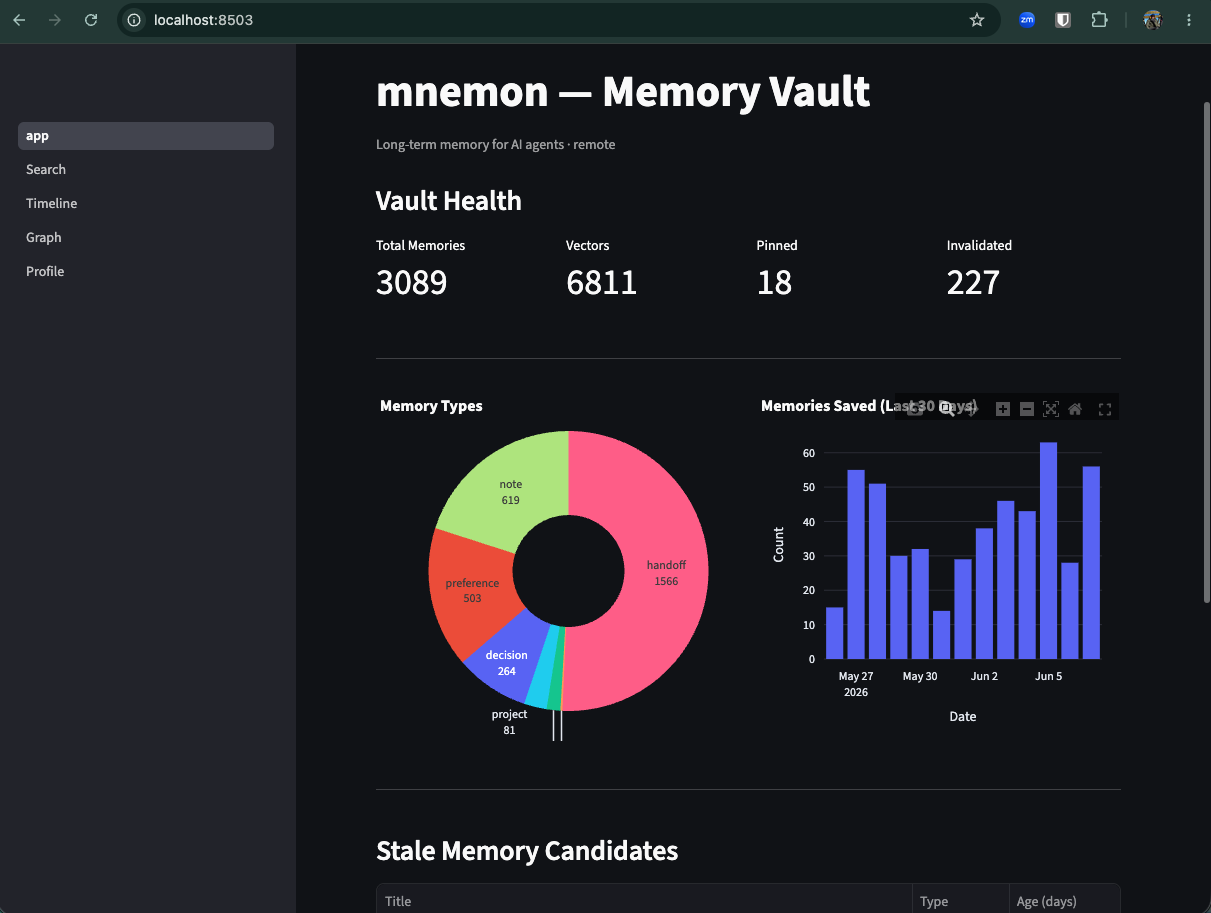
Streamlit UI at http://localhost:8503 — vault health, search, timeline, an interactive graph view, and your profile. Works against both local and remote vaults.
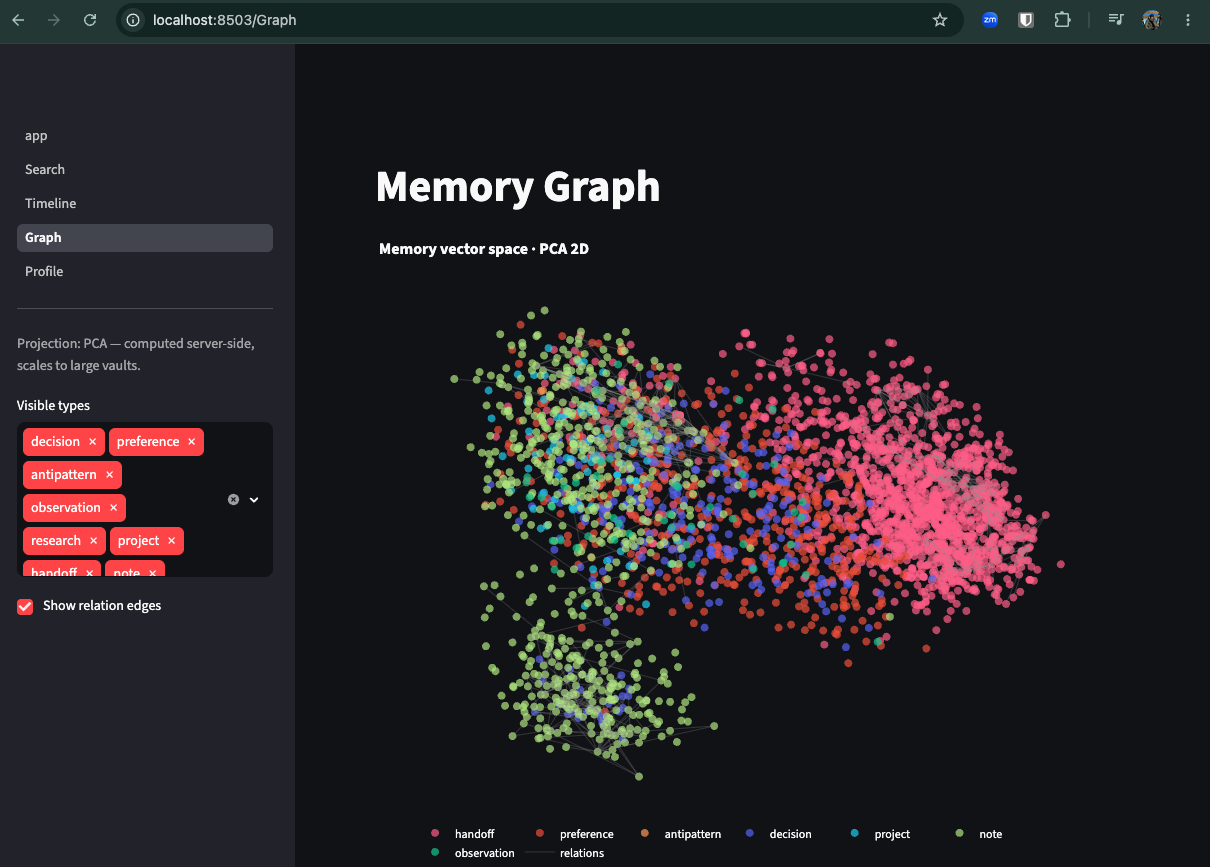
The graph view projects your embedding space to 2-D — UMAP for local vaults, and PCA computed server-side for remote vaults so it scales to thousands of memories without shipping every vector over the wire.
Use it
Once configured, mnemon works automatically — memories save and surface during your sessions. You can also interact directly:
mnemon search "deployment architecture"
mnemon save "DB migration plan" "Migrate from PostgreSQL to DynamoDB in Q3"
mnemon forget 42
mnemon status
Verify it's working
mnemon doctor            # health + auth + a real save→search→forget round-trip
mnemon verify-sharing    # prove multiple clients share one vault (web mode)
doctor auto-detects local vs web and runs the right checks (in web mode it also warns if a stale local vault is shadowing the remote). verify-sharing writes a sentinel to the remote and prints a search term to run in another client (e.g. Claude Desktop) — if it shows up there, that client is wired to the same vault. Clean up with mnemon verify-sharing --cleanup.
MCP Tools
Retrieval
| Tool | Description |
|---|---|
memory_search |
Hybrid BM25 + vector search with composite scoring (relevance + recency + confidence) |
memory_get |
Fetch a specific memory by ID with full content |
memory_timeline |
Recent memories in reverse chronological order |
memory_related |
Find memories related to a given memory via the relationship graph |
Mutation
| Tool | Description |
|---|---|
memory_save |
Store a new memory with content type classification and auto-embedding |
memory_pin |
Pin a memory to boost confidence and prevent archival |
memory_forget |
Soft-delete a memory (marked as invalidated, not physically removed) |
Standing tier (salience)
| Tool | Description |
|---|---|
memory_promote |
Promote a memory to the standing tier — always-on context, injected regardless of query |
memory_demote |
Demote a standing memory back to situational (relevance-ranked) recall |
memory_list_standing |
List the current standing-tier memories |
Lifecycle
| Tool | Description |
|---|---|
memory_status |
Vault health stats — counts by type, vectors, pinned/invalidated |
memory_sweep |
Archive stale memories past their half-life (dry-run by default) |
memory_rebuild |
Re-embed all documents (use after upgrading embedding model) |
memory_export_vectors |
Export stored embeddings (e.g. for analysis or visualization) |
memory_export_coords |
Export a 2-D PCA projection of the vault's embeddings — the dashboard Graph page's scalable path for large remote vaults |
memory_export_relations |
Export every relation edge between live documents in one call, for the Graph page's edge overlay |
Intelligence
| Tool | Description |
|---|---|
memory_check_contradictions |
Check a memory for conflicts using vector similarity + NLI classification (cross-encoder/nli-deberta-v3-xsmall) |
profile_get |
Synthesized user profile from stored preferences and decisions |
profile_update |
Manually add a fact to the user profile |
Memory Types
Each memory has a content type that determines its default confidence and decay half-life:
| Type | Default Confidence | Half-Life | Use for |
|---|---|---|---|
decision |
0.85 | Never | Architectural choices, design decisions |
preference |
0.80 | Never | User workflow habits, style preferences |
antipattern |
0.80 | Never | Things that failed, approaches to avoid |
observation |
0.70 | 90 days | Learned facts, discovered behaviors |
research |
0.70 | 90 days | Investigation results, findings |
project |
0.65 | 120 days | Project status, goals, context |
handoff |
0.60 | 30 days | Session summaries for continuity |
note |
0.50 | 60 days | General notes, default type |
Memories with access activity decay slower — each access extends the effective half-life by 10%, up to 3x the base value.
Claude Code Hooks
When configured via mnemon setup, the following hooks are installed on Claude Code:
| Hook | Event | Timeout | Mode | Description |
|---|---|---|---|---|
| Health warm-keeper | UserPromptSubmit |
40s | remote only | curl /health to wake/keep the Fly machine warm. Runs first so the MCP call below has a warm machine. |
| Context surfacing | UserPromptSubmit |
8s | both | Searches vault and injects relevant memories as context |
| Session pre-warm | SessionStart |
90s | remote only | Polls /health for up to 60s in the background so the first prompt of the session lands on a warm machine |
| Session extractor | Stop |
30s | both | Extracts decisions, preferences, and observations from the transcript |
| Handoff generator | Stop |
30s | both | Creates a session summary for the next session |
The extractor and handoff generator use LLM-based extraction when mnemon[llm] is installed, with regex/heuristic fallback otherwise.
Why a warm-keeper if Fly auto-stops?
A self-hosted mnemon Fly app with autostop enabled (fly.toml.example defaults to auto_stop_machines = "suspend" — RAM-snapshot/resume in ~1s, so the OAuth token refresh on wake stays under the connector timeout) will idle the machine after a few minutes. The warm-keeper resets Fly's idle timer on every prompt, so the machine stays warm during an active Claude Code session and only autostops once you've been idle for a while. Cost stays the same — Fly bills only running time — but you get reliable mid-session access without paying for an always-on machine. The || true ensures a slow Fly cold-start never blocks your prompt.
What if a cold-stop happens anyway?
The server persists every issued MCP session ID to <vault_dir>/mcp_sessions.sqlite (7-day TTL). When a request bearing a known-but-not-in-memory session ID arrives at a fresh process — typical after a cold-stop or redeploy — the session is transparently resumed: a new transport is spawned with the same ID, and the underlying ServerSession is born already-initialized so tool calls succeed without a re-handshake. The MCP client sees no break in continuity. This is the safety net under the warm-keeper, not a replacement for it.
Claude Desktop and other MCP clients
The Claude Code hook above gives unconditional pre-LLM retrieval — every prompt triggers a memory_search before the model sees the question, and the results are injected into context. No other MCP client supports this flow today, including Claude Desktop, claude.ai web, the Claude mobile app, Cursor, and Gemini CLI.
Why: the hook works because Claude Code exposes a UserPromptSubmit lifecycle event that runs a subprocess between the user pressing Enter and the model being invoked. Desktop and the other clients only expose the standard MCP surfaces — tools (model-decided), prompts (user-invoked via slash menu), and resources (client-pulled). None of these fire automatically on every prompt, so there is no architectural place for an MCP server to insert "always-on" recall. Aggressively rewriting the memory_search tool description to coerce the model into calling it first is rejected by design — it pollutes the tool surface for every other consumer and is still model-decided.
Closest practical workaround
Same snippet for every non-Code client — paste it into whichever custom-instructions / rules / memory surface that client exposes:
Before responding to any of my prompts, call the
memory_searchtool from the mnemon MCP server using relevant terms from my question. Use the returned memories to inform your response. Ifmemory_searchreturns nothing useful, proceed without it.
| Client | Need custom instructions? | Where to paste |
|---|---|---|
| Claude Code | No — the UserPromptSubmit hook handles it unconditionally. |
— |
| Claude Desktop | Yes | Settings → Profile → "What personal preferences should Claude consider in responses?" |
| claude.ai (web) | Yes | Same Profile field as Desktop — it's shared across your Anthropic account. Per-Project instructions also work and override the Profile within that Project. |
| Claude mobile app | Yes | Inherits from the same Profile field — set it once on Desktop or claude.ai and mobile picks it up. |
| Cursor | Yes | Settings → Rules → User Rules (global) or a .cursor/rules/*.mdc file in the project (workspace-scoped). |
| Gemini CLI | Yes | ~/.gemini/GEMINI.md (global) or a project-rooted GEMINI.md. |
In every non-Code client the call is still model-decided — it will skip on short prompts, follow-ups, or when distracted. Not a substitute for a real lifecycle hook.
When the true fix lands
Anthropic would need to add a pre-prompt lifecycle hook to Claude Desktop — the Desktop-side equivalent of Claude Code's UserPromptSubmit. Once that surface exists, mnemon's existing context_surfacing hook can be wired to it directly. Until then, Claude Code is the only client with guaranteed pre-LLM injection; everywhere else, retrieval is model-decided.
Uninstall
Remove mnemon state from this machine. Nothing user-owned in the cloud is touched.
mnemon uninstall [--yes] [--keep-vault]
What mnemon uninstall removes
~/.mnemon/— vault (SQLite + vectors), archive/, remote_url, local_token, models cache. With--keep-vault, this directory is preserved.- Claude Code MCP registration (
claude mcp remove --scope user mnemon). - mnemon hook + mcpServers entries in
~/.claude/settings.json. - mnemon entry in
~/.cursor/mcp.json. - mnemon entry in Claude Desktop's config.
What mnemon uninstall does NOT touch
- The
mnemon-memoryPython package. Usepip uninstall mnemon-memoryseparately. - Your Fly.io app. Destroy it first with
mnemon downgrade local --destroy-fly-appif you want the app gone — that pulls the remote vault back to local so no memories are lost. - Your S3 bucket contents. mnemon has no
sync delete. - claude.ai + Claude mobile MCP entries. These live in your Anthropic account.
claude mcp listshows them with aclaude.aiprefix. Remove via Settings → Connectors in the claude.ai web UI. Ifmnemon uninstalldetects one, it surfaces a⚠ REQUIREDbullet pointing you there.
Memory retention matrix
| Command | Local ~/.mnemon/default.sqlite |
Fly volume | S3 bucket contents |
|---|---|---|---|
mnemon uninstall |
deleted (unless --keep-vault) |
untouched | untouched |
mnemon uninstall --keep-vault |
untouched | untouched | untouched |
mnemon downgrade local |
replaced with Fly state (via S3 pull) | untouched (keeps running) | untouched |
mnemon downgrade local --destroy-fly-app |
replaced with Fly state | destroyed (after data was pulled to local) | untouched |
mnemon upgrade web |
archived to archive/pre-web-<date>.sqlite |
newly created, seeded from S3 | written to (push) |
mnemon sync push / mnemon sync pull |
read/write local | — | read/write |
Memories are always recoverable as long as at least one of {S3 backup, Fly volume, local vault, local archive} exists.
Common flows
Test from scratch on one machine:
mnemon uninstall --yes
pip install -e .           # or: pip install mnemon-memory
mnemon setup
Stop using mnemon entirely:
mnemon downgrade local --destroy-fly-app    # tears down Fly, preserves vault via S3 pull
mnemon uninstall --yes                      # removes local state
pip uninstall mnemon-memory                 # removes the package
# Then remove mnemon entries in claude.ai and the Claude mobile app manually.
# Delete your S3 bucket contents if you want no residual memory data.
Move to a new machine (preserve all memories):
# Old machine:
mnemon sync push
mnemon uninstall --yes

# New machine:
pip install mnemon-memory
mnemon setup claude-code --remote-url https://<your-app>.fly.dev/mcp
Install troubleshooting
Intel Mac + Python 3.12: pip install "mnemon-memory[ui]" fails building llvmlite / numba
The [ui] extra pulls in umap-learn, which requires numba + llvmlite. Starting with numba 0.63, those packages only ship macOS wheels for Apple Silicon (arm64). On an Intel Mac (x86_64), pip falls back to a source build and fails with llvmlite needs CMake tools to build.
Pin to the last versions that ship x86_64 macOS wheels:
pip install 'numba==0.62.1' 'llvmlite==0.45.1' 'mnemon-memory[ui]'
If pip then complains about NumPy, add 'numpy<2.3' to the same command.
Apple Silicon, Linux, and Windows are unaffected — prebuilt wheels exist on those platforms.
Development
pip install -e ".[dev]"
pytest
License
MIT
1 maintainer

Metadata
1 maintainer
Release files for mnemon-memory 0.7.9
For a detailed explanation of source distributions (sdists) and built distributions (wheels), please see the package formats documentation.
Source distribution (sdist)
| File | Size | Uploaded | Provenance | |
|---|---|---|---|---|
| mnemon_memory-0.7.9.tar.gz | 870.9 kB | With provenance | Details |
Built distribution (wheel)
| File | Interpreter | ABI | Platform | Reset |
|---|---|---|---|---|
| mnemon_memory-0.7.9-py3-none-any.whl | Python 3 | none | any | Details |
Total release size: 1.1 MB
Release files / mnemon_memory-0.7.9.tar.gz
| Download URL | mnemon_memory-0.7.9.tar.gz |
|---|---|
| Size | 870.9 kB |
| Tags | Source |
|
SHA-256 checksum How to use checksums |
49b625f10dd9fc4028078d0a6411cf6d18ff9184663d07798cc08da23151a3da
|
|
BLAKE2b-256 checksum How to use checksums |
4b403ea193662dba85ce5fd6aaa269f86e42b181d80a147830ada95d59639bf2
|
| Upload date | |
|
Uploaded using Trusted Publishing? What is trusted publishing? |
Yes |
| Uploaded via |
twine/6.1.0 CPython/3.13.12
|
Provenance
Provenance describes where a file came from. On PyPI, provenance is shared via attestations, which provide a verifiable record of the build or publishing details. View details, limitations and caveats.


PyPI Publish Attestation
PyPI verified that this artifact, at this checksum, originated from the publisher listed below.
Signed by GitHub Actions, verified by PyPI on Jul 13, 2026.
Transparency logRelease files / mnemon_memory-0.7.9-py3-none-any.whl
| Download URL | mnemon_memory-0.7.9-py3-none-any.whl |
|---|---|
| Size | 204.6 kB |
| Tags | Python 3 |
|
SHA-256 checksum How to use checksums |
6f912354c30898f44eec9b2d6a0607d275bc2fa10cc2aa724fa5f25043cdd182
|
|
BLAKE2b-256 checksum How to use checksums |
a25d361e9469a7a75fd79d3ee7cf2b9a536cb2d9bb387a4b0bcccddd4b7c061d
|
| Upload date | |
|
Uploaded using Trusted Publishing? What is trusted publishing? |
Yes |
| Uploaded via |
twine/6.1.0 CPython/3.13.12
|
Provenance
Provenance describes where a file came from. On PyPI, provenance is shared via attestations, which provide a verifiable record of the build or publishing details. View details, limitations and caveats.
PyPI Publish Attestation
PyPI verified that this artifact, at this checksum, originated from the publisher listed below.
Signed by GitHub Actions, verified by PyPI on Jul 13, 2026.
Transparency logSecurity for mnemon-memory 0.7.9
Provenance
Provenance describes where a file came from. On PyPI, provenance is shared via attestations, which provide a verifiable record of the build or publishing details. View details, limitations and caveats.
Full provenance
All 2 files in this release have been uploaded with provenance metadata.
Attestation for mnemon_memory-0.7.9.tar.gz
PyPI Publish Attestation
PyPI verified that this artifact, at this checksum, originated from the publisher listed below.
Signed by GitHub Actions, verified by PyPI on Jul 13, 2026.
Transparency logA note on package security
PyPI is a repository for distributing packages, not a service for auditing them. While third-party security researchers and our staff do their best to detect and remove malicious packages, PyPI cannot guarantee the quality, security or suitability of any given package.
To learn more about protecting yourself from malicious actors, visit our package security documentation.














