

Mnemonic Proxy
Like Johnny, your agent carries more than its head can hold — and keeps working for hours.



Keep a coding agent's history without keeping it all in the model's context. Mnemonic Proxy sits between an agent and an OpenAI-compatible backend: the agent sends its history as usual; the proxy manages what the model reads.
- Archive verbatim. Older tool outputs leave the prompt, not the archive: their original text stays available through recall.
- Recall on demand. A tool-calling model can search and retrieve archived text through
recall. Exact storage does not guarantee that the model finds the right evidence or answers correctly. - Resume without a full re-read. Save and restore engine state on supported backends; other backends use masking and recall without saved state.
Try it in one minute — no model or GPU needed (Python ≥ 3.10, uv):
uvx mnemonic-proxy demo
No uv yet? pip install uv (or curl -LsSf https://astral.sh/uv/install.sh | sh), or skip uv entirely and
use the three pip lines of T0.
Expected result: PASS.
The demo uses the real proxy with a scripted fake model to check archive, masking and byte-for-byte recall. It does not test a real model's tool use or saved engine state. Without uv / demo details · Connect your agent and engine.
Measured, not guaranteed — single runs on our hardware; setup and limitations at each link:
| Experiment | Result |
|---|---|
| Long coding session, one 12 GB GPU | 3 h 15 min; 448K tokens of history, at most 105K in the prompt. Archived history is not all in context. |
| AgentLongBench subset, clarified questions | 86/100 right with the proxy at 32K, vs 47 with an LLM summary and 69 with full history in a larger window; a repeat run gave 85 / 57 / 75. |
| Saved engine state | A 110K-token conversation resumed in 1.4 s instead of ≈50 s; requires a backend with save/restore support. |
What we have not proven · Project page
OpenAI Chat Completions, Anthropic Messages and OpenAI Responses; Python ≥ 3.10, standard library only. Developed and benchmarked primarily with Strata, by Niko1221 and contributors. This independently maintained project also supports llama-server, ds4-server, Ollama, LM Studio and other OpenAI-compatible backends; capabilities and test coverage vary (Engines).
Johnny's payload

Install
The first time: install, watch it work with no model, check your engine, start. No configuration file is needed to begin — these four lines are the whole first run.
python3 -m venv mnemonic-venv && . mnemonic-venv/bin/activate
pip install mnemonic-proxy
mnemonic-proxy demo      # 1 minute, no model: archive, masking, recall -> PASS
mnemonic-proxy check --upstream http://127.0.0.1:8095 --port 8096 --data ./data
mnemonic-proxy --upstream http://127.0.0.1:8095 --port 8096 --data ./data
check ends with one of three outcomes: READY (exit 0), READY with warnings (exit 2) — it works, but
something optional is off (typically saved state) — or NOT READY (exit 1), and then it says, line by line,
what to change; --live adds a real generation, a tool call and a save/restore. --upstream is the engine's
address. Then point the agent at the proxy (port 8096) instead of the engine. The engine window must be at least
16K tokens, 32K or more recommended (Requirements). Step by step with a small model on CPU:
Quick start.
No engine running yet? The package ships the fake engine the test suite uses, so check and the proxy can be
tried with nothing installed but this package:
python3 -m ctxproxy.fake_engine --flavor llama --n-ctx 32768 --port 8095 &
mnemonic-proxy check --upstream http://127.0.0.1:8095 --port 8096 --data ./data
A configuration file, when you want one (saved state, or an engine that needs explicit thresholds). It is a separate, explicit step — the proxy runs on its defaults without it:
mnemonic-proxy init-config --engine strata        # or llama-server, ds4, openai-32k
mnemonic-proxy check --upstream http://127.0.0.1:8095 --port 8096 --data ./data --config config.json
init-config writes a minimal config.json (0.3.24): only what the proxy cannot work out by itself, so the
automatic configuration keeps deciding the rest. For Strata, llama-server and
ds4-server that is nothing at all ({}) — the window comes from the engine, and the saved-state options, the
exact token count and the window-sized budgets are chosen from the engine and the machine. The exceptions are the
only two things nobody can discover: --slot-dir DIR (the engine's own --slot-save-path, for saved state) and,
for a plain OpenAI-compatible engine that reports no context, window.
mnemonic-proxy init-config --engine strata --slot-dir /path/to/sessions   # {"slot_dir": "/path/to/sessions"}
mnemonic-proxy init-config --engine strata --full                         # every field, documented
mnemonic-proxy init-config --engine strata --launcher                     # + the one-click starter, below
--full writes the complete documented example from the copy inside the package (no network, no clone) — every
field explicit, which is also what switches the automatic configuration off, so use it as a reference and delete
the lines you do not mean to pin. init-config prints which file it used and never overwrites a file you have
already edited (--force does). It never writes "auto_config": it is already the default, and writing it would
remove a protection — on a data folder that already holds conversations the automatic choices are only applied
when auto_config is explicit, so that an upgrade cannot change how a running setup behaves. The complete
examples are browsable at examples/; check
prints the full raw.githubusercontent.com URL of the one for your version whenever it suggests one. Fields:
Configuration.
One click (--launcher, 0.3.24; asked for by the first Windows user). Writes start-mnemonic-proxy.bat on
Windows and start-mnemonic-proxy.sh elsewhere, next to the config and with the values you passed baked in:
mnemonic-proxy init-config --engine strata --launcher --dir ./one-click \
  --upstream http://127.0.0.1:8095 --port 8096 --data ./data
It starts only the proxy — your engine's own command line stays yours — and in this order: it refuses to go on
if the engine does not answer, runs check once (a port already taken is reported there, with the fix), then runs
the proxy. Every value is a variable at the top of the file (UPSTREAM, PORT, DATA, CONFIG, VENV, and a
commented-out TOKENIZER unless --tokenizer was given), so it can be edited or overridden from the environment;
on Windows it ends with pause, so a console opened by a double-click does not vanish with the error in it. For
llama-server and its engine in one file, see
examples\start-windows.bat
(Platforms).
Strata in two commands
Strata already running? Then there is nothing to prepare: no folder to create, no extra engine flag, no configuration file.
pip install mnemonic-proxy
mnemonic-proxy --upstream http://127.0.0.1:8095 --port 8096 --data ./data
The proxy creates ./data itself and reads the window from Strata's /v1/status. Point your agent at
http://127.0.0.1:8096/v1 instead of 8095 and turn off its own auto-compaction (table below). Everything but
one feature is already working: masking, the verbatim archive, recall, segments with handoff notes, 📌/🗑 and
tools on demand. Run mnemonic-proxy check --upstream http://127.0.0.1:8095 --data ./data first if you want the
setup verified line by line; the startup log says in one line what is on and what is off.
Saved state (optional, and only later). Saved state buys back one thing: the fast resume of a long session (1.4 s instead of ≈50 s on a 110K-token conversation, measured). It needs Strata ≥ 0.1.40 restarted with one extra flag — this exact line, added to the Strata start command you already use:
strata --slot-save-path /path/to/sessions # plus your usual Strata options
and the same folder named in the proxy's config (the proxy creates it if it does not exist, so there is no
mkdir step) — one command writes exactly that file and nothing else:
mnemonic-proxy init-config --engine strata --slot-dir /path/to/sessions --dir ./saved-state
{
  "slot_dir": "/path/to/sessions"
}
Then start the proxy with --config config.json. slot_save, mask_anchor and autosave are not written:
the proxy switches them on by itself once slot_dir is there and the engine, the RAM and the disk allow it, and
it says so in one line at startup and in check (Automatic configuration); writing
them by hand only matters to force them, or to keep them off. check reports saved state: supported by the engine, configured in the proxy, and check --live verifies that slot_dir really is Strata's
--slot-save-path (same folder, same host) by saving and restoring a real state file. Nothing else changes.
Your engine. Start it as below. The config column is what init-config writes for that engine: minimal by
default, the complete example with --full.
examples/ holds the complete ones. slot_dir
and the engine's --slot-save-path are only for saved state: skip both to run in base mode, add them later (the
shortest Strata path is above).
| engine | engine command (minimum) | config | saved state |
|---|---|---|---|
| Strata, any version | Strata's own start | none; base mode on an engine that could save state: --engine official-strata |
no (base mode) |
| Strata ≥ 0.1.40, with saved state | Strata's own start, plus --slot-save-path DIR |
--engine strata --slot-dir DIR (one field; --full = config.example.json) |
yes |
| llama-server | llama-server -m model.gguf -c 32768 --parallel 1 --jinja --port 8095 (add --slot-save-path ./slots for saved state) |
--engine llama-server --slot-dir ./slots (--full = config.llama-server.json) |
yes with --slot-save-path |
| llama-server, router mode (several models) | llama-server --models-preset preset.ini --models-max 1 --port 8095; preset: [*] with slot-save-path and parallel = 1, a ctx-size (c) ≥ 16384 per model |
--engine llama-server-router --slot-dir ./slots + preset.router.example.ini |
yes, per model |
| ds4-server | ds4-server -m MODEL.gguf --ctx 65536 --kv-disk-dir ./kv --port 8110 |
none (--full = config.ds4.json) |
kept by ds4 itself |
| Ollama, LM Studio | engine context set to 32768 (see below); --tokenizer recommended |
none: the window is read from the engine | no (base mode) |
| any OpenAI-compatible (vLLM, online APIs) | — | --engine openai-32k at 32K (just {"window": 32768}); at 131072 none is needed |
no (base mode) |
The proxy reads the window from Strata, llama-server (n_ctx, per model in router mode), ds4-server (--ctx),
Ollama and LM Studio (the context of the loaded model, 0.3.8), and scales its thresholds to it, unless window is
written in the config. From any other engine it cannot: write the engine's real context in window, and since
0.3.24 the thresholds scale from it exactly as they would from an engine-reported one (so
{"window": 32768} is a complete 32K configuration — config.openai-32k.json spells the same numbers out).
Details per engine: Engines.
Ollama and LM Studio (tested on Linux, small model, details in Tested combinations). Both
serve an OpenAI-compatible API (Ollama http://127.0.0.1:11434/v1, LM Studio http://127.0.0.1:1234/v1;
--upstream is the same address without /v1) and the proxy runs in base mode: masking, archive, recall, segment
switches, tool calls, streaming, /v1/messages and /v1/responses worked, no saved state. What to know:
- Give the engine a context of 32768 (at least 16384). With their defaults on our machine (Ollama 4096 on CPU;
LM Studio 8192) both answer HTTP 200 to longer prompts after dropping part of them, without telling the client:
Ollama drops the oldest messages, LM Studio keeps the beginning and the end and drops the middle.
Ollama:
OLLAMA_CONTEXT_LENGTH=32768 ollama serve;ollama psshows the context in use (columnCONTEXT). LM Studio:lms load <model> --context-length 32768, thenlms server start;lms psshows it. - The proxy reads that context (0.3.8): Ollama
GET /api/ps(context_lengthof the loaded model: the context it runs with, not the training context ofPOST /api/show), LM StudioGET /api/v0/models(loaded_context_length). Ollama is recognised only whenGET /api/versionand a coherent/api/psmodels array both answer (0.3.24): a gateway such as llama-swap that exposes the version but not/api/psruns as a generic engine, and its/v1/modelscatalog is reported as model availability with the loaded state and the window unverified. It reads it again before every request (one cheap GET; a model that is not loaded is loaded first with a 1-token request), so the window follows the engine and a prompt never goes over it. Below 16384 the proxy refuses to start; awindowin the config bigger than the engine context also refuses the start and failscheck, with the command that fixes it. You can leavewindowout of the config. --tokenizeris still recommended (the model'stokenizer.json,pip install 'mnemonic-proxy[exact]'). Without it the proxy estimates chars/3.5, which was up to ~10% low on code with many digits; on generic engines the estimate now gets a 15% margin by default (window_estimate_slack0.15) andcheckwarns. With 0.3.7 the notes request at a segment switch was estimated at 31.3K tokens but was 33.4K real tokens and both engines cut it; with 0.3.8 and no tokenizer it was 27.7K real tokens on Ollama and nothing was cut (numbers in Tested combinations).- A cut prompt is reported: when the engine says (
usage.prompt_tokens) it read less than 0.8× what the proxy counted, the journal getsengine_truncatedand the log one warning per conversation;check --livesends a prompt of 0.9× the window and fails with "engine context smaller than window" if it does not come back whole. - Ollama ignores an integrated GPU by default and runs on the CPU (much slower);
OLLAMA_IGPU_ENABLE=1makes it use it. With it, Ollama chose a default context of 262144 from the shared memory: setOLLAMA_CONTEXT_LENGTHanyway.
Your agent. Turn off the agent's own auto-compaction, otherwise two context managers fight over the same history:
| agent | point it at | turn off | setup |
|---|---|---|---|
| pi, omp | http://127.0.0.1:8096/v1 (openai-completions) |
"compaction": {"enabled": false} |
T1 step 6, omp |
| opencode | http://127.0.0.1:8096/v1 (openai-compatible provider) |
"compaction": {"auto": false} |
opencode |
| Hermes Agent | http://127.0.0.1:8096/v1 (custom provider) |
compression.enabled: false |
Hermes setup and test notes |
| Continue, other Chat Completions clients | http://127.0.0.1:8096/v1 |
the client's own context compaction | Chat Completions |
| Claude Code | ANTHROPIC_BASE_URL=http://127.0.0.1:8096 (no /v1) |
DISABLE_AUTO_COMPACT=1 |
Claude Code |
| Codex | base_url = "http://127.0.0.1:8096/v1", wire_api = "responses" |
no switch: model_auto_compact_token_limit = 100000000 |
Codex |
| any MCP client (Claude Code, Codex, Hermes) | mnemonic-mcp --db ./data/archive.sqlite (read-only search of the archive) |
— | MCP |
Your OS.
- Linux: the reference; the commands on this page, and all the measured sessions.
- Windows, native: PowerShell commands and a one-click
examples\start-windows.batin Platforms (tested on the CI runner, not yet on a desktop). WSL 2: the Linux commands, with engine, proxy andslotsall inside WSL. - macOS: not tested yet; follow the Linux commands (llama.cpp from Homebrew or built with Metal), see Platforms.
- Android (Termux):
pkg install python git, thenpip install git+https://github.com/lastreload/mnemonic-proxy; tested in Waydroid (Android 13, x86_64) in front of an online API, not yet on an ARM phone, see Platforms.
How it works
Archived content stays verbatim; the model writes handoff notes at segment switches. No vector database is required.
- Hide — mask, don't summarize. Old tool outputs and reasoning leave the prompt in stable blocks and become
one-line receipts with an id. The prefix stays byte-identical between blocks, so the engine's KV cache keeps
working. A receipt says what the call did and how it ended, how big the output was (lines and bytes), the exit
code when there is one, the error type and the first error line — everything read off the archived bytes, no
model involved, so the same output always produces the same receipt:
⟪ctx-archive id=t1a2b… · output of bash "pytest -q" · this agent · hidden to save space (3120 tokens)⟫ Receipt: test: exit code 1, 412 lines/38.2 KB, passed 86, failed 1 (tests/test_a.py::test_adds). Error type: AssertionError. First error line: «E AssertionError: assert 3 == 4». Exact text: recall id=t1a2b… - Recall — structured, exact. A
recalltool searches the verbatim archive: first write of a file, its full edit timeline, command → output, the reasoning behind an edit — every hit tagged with message number and segment. The proxy runs these calls itself; the client never sees them, even when streaming. - Segment — handoff notes. When even the masked window fills up, the model writes its own notes, the segment is
sealed and a fresh one starts. Pinned lines (
!!or📌) survive every switch; lines starting with🗑(or~) mark a message as disposable once answered. A copy is labelled a copy. Several of these blocks — handoff notes, the verbatim first request, the 📌 block, an automatic-recall insertion — are themselvesrole:"user"messages, so a client's own control frame carried inside them would read as a fresh delivery. Clients mark out-of-band messages with frames the model is told to trust (Hermes:[OUT-OF-BAND USER MESSAGE … delivered once at this position] … [/OUT-OF-BAND USER MESSAGE]); in every copy the proxy writes, such a frame is relabelled[quoted OUT-OF-BAND USER MESSAGE …]— same words, whole text, visibly a quotation. The message the client actually delivered stays byte for byte as it was, in its own place (issue #61). - Save — engine state on disk. On engines that support it (llama-server, Strata with session files) the KV state is saved to disk: resuming after a pause, a restart or another client takes 1–3 s instead of a full re-read.
- Archive — deduplicated cold storage. Old state files are rebuilt bit-for-bit from content-addressed zstd blocks: −36% disk on our sessions, sha256-verified before every restore.
- Lean — tools on demand. Agents ship tens of thousands of tokens of tool definitions. The proxy keeps the core ones and loads the rest by name: 25.6K → 6.2K tokens on every request.
"In the courier business you don't read the payload. You carry it, and you give it back exactly as it was." — the design rule. Hidden content is never paraphrased; it is either in the prompt or retrievable verbatim.
Requirements
- Engine window: at least 16K tokens (16384), 32K or more (32768) recommended. Below 16K the proxy refuses to
start, and
mnemonic-proxy checkreports NOT READY, with the command to restart the engine (llama-server -c 32768,ds4-server --ctx 32768). Why: at 32K the recall trap of the ds4 runs (an error line removed from the prompt, asked for later) was answered right with both ds4 builds; at 8K it passed once, after the 0.3.0 recall fix, and failed before it. Small windows stay excluded until they are proven on more runs. Reports (Italian): DS4-QWEN-COMPARE-RESULT.md, RECALL-8K-030-RESULT.md. - Python ≥ 3.10 (
kv_archive: ≥ 3.14). An OpenAI-compatible engine. Saved state is optional: without it the proxy still masks, archives, recalls and switches segments, and only the fast resume of a long session is lost. With it: llama-server with--slot-save-path, or Strata ≥ 0.1.40 with--slot-save-path(see Engines). The proxy creates that folder itself when it is missing and the engine is on this host.
Quick start
Three levels. Each one stands on its own.
| what you see | needs | time | |
|---|---|---|---|
| T0 — see it work | archive, masking, exact recall, with a scripted fake model | Python ≥ 3.10 | 1 minute |
| T1 — real model on CPU | a real agent (pi) writing code through the proxy, masking, a recall probe (the tested 4B model did not call recall), resume after an engine restart |
+ cmake, a C++ compiler, Node.js ≥ 22.19, ~9 GB RAM (the engine at -c 32768), 3.5 GB disk |
~45 minutes |
| T2 — real use (GPU) | your own model and agent, long sessions | a GPU engine | — |
Commands are for Linux; see Platforms for macOS and Windows (native or WSL).
T0 — see it work (1 minute, no model)
python3 -m venv mnemonic-venv && . mnemonic-venv/bin/activate
pip install mnemonic-proxy
mnemonic-proxy demo
With uv, no venv to create: uvx mnemonic-proxy demo. uvx runs the command from a
temporary environment and installs nothing, so keep the prefix for the next commands (uvx mnemonic-proxy check ...)
or install the command once with uv tool install mnemonic-proxy. The development version (the
main branch, newer than the last PyPI release): pip install git+https://github.com/lastreload/mnemonic-proxy
(needs git on PATH: sudo apt install git). Its --version ends in .dev0 — a main build is not the next
release, and the examples it points at are the ones on main.
The demo starts the real proxy in a temporary folder, in front of a scripted fake model. An agent reads a long
build.log that contains one build id; the session grows until the proxy hides the log; the demo prints what the
engine receives in its place (a one-line receipt); then the user asks for the build id, the model calls recall,
the proxy answers it internally and the archived text is compared byte for byte with the original. It ends with
PASS (exit 0) or FAIL (exit 1).
It proves the proxy's own logic: archive, masking, recall. It does not prove anything about a real model, its tool calling, or saved engine state — T1 exercises those with a real model and reports its limitations.
T1 — a real model on CPU
Tested end to end in a clean Ubuntu 24.04 container (see Tested combinations). A 4B model on CPU is slow (seconds per answer) and limited: the point is to exercise the proxy with a real model, not to do real work. A successful recall is not guaranteed; see the measured Tested combinations.
0. Prerequisites (Ubuntu/Debian; other systems: Platforms):
sudo apt install git cmake build-essential python3-venv curl
and Node.js ≥ 22.19 for pi (https://nodejs.org/en/download, or your package manager).
1. Folder, proxy, example config.
mkdir mnemonic-trial && cd mnemonic-trial
git clone --depth 1 https://github.com/lastreload/mnemonic-proxy
python3 -m venv .venv && . .venv/bin/activate
pip install ./mnemonic-proxy
cp mnemonic-proxy/examples/config.llama-server-32k.json .
mkdir -p slots
2. llama.cpp, the tested release (CPU build, ~2 minutes on 12 cores).
git clone --depth 1 --branch b11430 https://github.com/ggml-org/llama.cpp
cmake -S llama.cpp -B llama.cpp/build -DCMAKE_BUILD_TYPE=Release
cmake --build llama.cpp/build --config Release -j 8 --target llama-server
3. The model: Qwen3-4B-Instruct-2507, Q4_K_M (2.5 GB). Qwen publishes no GGUF for this model (model card); this is the Unsloth conversion, pinned to the tested revision:
mkdir -p models
curl -L -o models/Qwen3-4B-Instruct-2507-Q4_K_M.gguf \
  https://huggingface.co/unsloth/Qwen3-4B-Instruct-2507-GGUF/resolve/a06e946bb6b655725eafa393f4a9745d460374c9/Qwen3-4B-Instruct-2507-Q4_K_M.gguf
sha256sum models/Qwen3-4B-Instruct-2507-Q4_K_M.gguf
# 3605803b982cb64aead44f6c1b2ae36e3acdb41d8e46c8a94c6533bc4c67e597
4. The engine (terminal 1, inside mnemonic-trial):
llama.cpp/build/bin/llama-server -m models/Qwen3-4B-Instruct-2507-Q4_K_M.gguf \
  -c 32768 --parallel 1 --jinja --slot-save-path ./slots --port 8095
Wait for the line listening on http://127.0.0.1:8095 (about 2 s once the model file is cached; curl -s localhost:8095/health answers {"status":"ok"}). --slot-save-path ./slots is what makes saved state
possible, and it must be the same folder as slot_dir in the config (./slots). --jinja is already the default in
this build; it is written out because tool calling depends on it. -c 32768 is the recommended window (the minimum
is 16384, see Requirements); the example config starts masking at 14K tokens, so the proxy is at
work after a few long tool outputs.
5. Check, then start the proxy (terminal 2, inside mnemonic-trial, venv active: . .venv/bin/activate):
mnemonic-proxy check --live --upstream http://127.0.0.1:8095 --port 8096 --data ./data --config config.llama-server-32k.json
mnemonic-proxy --upstream http://127.0.0.1:8095 --port 8096 --data ./data --config config.llama-server-32k.json
check must end with READY (exit 0): engine recognised as llama.cpp, model loaded, window taken from n_ctx
(32768) with the thresholds scaled to it, saved state supported and configured, and — because of --live — one
real generation, one tool call, one save/restore whose file appeared in ./slots. Each failing line says how to fix
it; see also Troubleshooting. The proxy then prints
[mnemonic-proxy] 127.0.0.1:8096 -> http://127.0.0.1:8095 (engine llama.cpp, saved state yes) ... window=32768.
6. pi, the coding agent (terminal 3). Install the tested version:
npm install -g --ignore-scripts @earendil-works/pi-coding-agent@1.0.3
Create ~/.pi/agent/models.json (if it exists, add the mnemonic entry to its providers):
{
  "providers": {
    "mnemonic": {
      "baseUrl": "http://127.0.0.1:8096/v1",
      "api": "openai-completions",
      "apiKey": "local",
      "compat": { "supportsDeveloperRole": false, "supportsReasoningEffort": false },
      "models": [
        { "id": "local-model", "name": "local model via mnemonic-proxy", "reasoning": false,
          "contextWindow": 131072, "maxTokens": 2048 }
      ]
    }
  }
}
and ~/.pi/agent/settings.json (if it exists, add these three keys):
{
  "defaultProvider": "mnemonic",
  "defaultModel": "local-model",
  "compaction": { "enabled": false }
}
compaction.enabled: false matters: pi's own auto-compaction would summarise the history the proxy is managing.
contextWindow is the virtual window the client sees (131072), not the engine's 32768: pi subtracts the prompt size
from it to choose max_tokens, and with the engine's real window it would ask for fewer and fewer tokens as the
history grows, down to 1. Fitting the history
into the engine's real window is the proxy's job. apiKey is a placeholder (the proxy does not check it); the model
id is any name, llama-server serves its loaded model.
7. The exercise. In terminal 3, a folder with a log whose one interesting line is buried in the middle:
mkdir -p ~/mnemonic-exercise && cd ~/mnemonic-exercise
python3 -c "for i in range(650): print('[%04d] compiling module_%03d.c ... ok (%d ms)' % (i, i, 80 + i * 7 % 61) if i != 397 else '[0397] build id: BUILD-7f3a9c-ORCHID-42')" > build.log
pi
Type these requests one at a time and wait for each answer (or non-interactively, same session:
pi -p "<request 1>", then pi -c -p "<request 2>", …):
Run python3 -c "import uuid; print(uuid.uuid4())" and tell me the value.— abashtool call; pi repeats the value.Run cat build.log and tell me whether every module compiled.— a long output (≈13K tokens; on CPU the 4B model needs a few minutes to read it).Write primes.py with a function first_primes(n) that returns the first n prime numbers, and test_primes.py with three unittest tests. Run the tests.—writecalls, thenbash. The prompt is now past the masking threshold (14K tokens with the 32K config): as soon as enough newer messages follow the log, the proxy hides it behind a receipt (here during step 4). Nothing is printed; check withgrep -c '"event": "mask"' ~/mnemonic-trial/data/journal.jsonl(≥ 1).Add a function is_prime(n) to primes.py and a test for it in test_primes.py, then run the tests.What build id is written in build.log? Do not run commands and do not read files.— the log is no longer in the prompt, only its receipt; the expected path is arecallcall answered by the proxy itself (pi never sees it):grep -c '"event": "recall"' ~/mnemonic-trial/data/journal.jsonl. Small models often skip it: see the results below.
Wait one minute (the proxy saves the engine state after 60 s idle: "event": "autosave"), then restart the engine:
Ctrl+C in terminal 1, start it again with the same command, and ask Which files did you write in this session?.
The proxy restores the conversation from ./slots instead of re-reading it:
grep '"event": "autorestore"' ~/mnemonic-trial/data/journal.jsonl shows the restored tokens and milliseconds.
What this proves and what it does not, for this model: see Tested combinations.
T2 — real use (GPU)
Use the engine and model you already have; the only requirements are an OpenAI-compatible endpoint and, for saved state, an engine that can save its KV state to disk:
llama-server -m your-model.gguf -c 131072 --parallel 1 --jinja --slot-save-path /path/to/slots --port 8095
mnemonic-proxy check --upstream http://127.0.0.1:8095 --port 8096 --data ./data --config config.json
mnemonic-proxy --upstream http://127.0.0.1:8095 --port 8096 --data ./data --config config.json
with config.json = examples/config.llama-server.json and slot_dir = the same /path/to/slots (see
Configuration for the recommended fields). With an engine that has no saved state (vLLM, online
APIs) the proxy runs in base mode (window: see Install). The measurements in
One session, measured (Qwen3.8 Flash Next IQ3_XXS, 128K window) come from
Strata (our session-files build, 0.1.38 + PR #668) on a 12 GB RTX 4070 Ti — see Engines; they say nothing about
other hardware.
The proxy recognises the engine at startup and turns off, with a warning, whatever the engine cannot do
(--engine auto|strata|llama.cpp|ds4|openai forces it). ctxproxy is kept as an alias of mnemonic-proxy.
Optional: --tokenizer (a Hugging Face tokenizer.json, or a Strata pack tokenizer/ folder; needs
pip install 'mnemonic-proxy[exact]') for exact token counts.
If --tokenizer is explicitly supplied but cannot be loaded (missing tokenizers, bad path or invalid format),
startup fails before contacting the engine; it never silently switches that run to estimated counting. Install
mnemonic-proxy[exact] in the same environment as the proxy and check the path. Omit the option only when an
estimated guard is intended. Without a tokenizer, the proxy uses a chars/3.5 estimate;
with llama-server, "engine_tokenize": true counts through its /tokenize. A
systemd user unit is in examples/mnemonic-proxy.service.
Window guard. Before every call (answer, recall rounds, handoff notes, seal, anchor and retries), the proxy
checks counted_prompt + max_tokens + window_margin ≤ window. If it does not fit, it lowers max_tokens, removes
what the recall loop added (by value per token: results become one-line receipts, old reasoning becomes its
conclusion line, recallable by id) or returns HTTP 400 instead of sending. Both output-limit aliases are kept in
sync. A prompt that cannot be counted with a loaded tokenizer is refused rather than silently estimated.
With --tokenizer, the final guard and planning total now load an adjacent chat_template.jinja
(from the pack directory, or beside a supplied HF tokenizer file). This matters for fine-tunes such as Tiel:
its Sharp template adds instructions and tool-error warnings that the built-in Qwen renderer does not write.
Install/update mnemonic-proxy[exact] for both the tokenizer and sandboxed Jinja renderer. A discovered template
that cannot load or render is never silently replaced by the built-in one. Pictures are forwarded to the engine and
budgeted, not refused: the template writes one vision marker per picture (never its bytes), and the guard counts each
marker as image_tokens tokens. That number is an upper bound, and it has to be: no engine reports the real
patch count before the request (Strata has no /tokenize, and its /v1/messages/count_tokens counts the marker
alone). The rule is image_tokens >= vision.max_tokens + 2: the reader clamps one picture's expansion to
vision.max_tokens (Strata's vision.max_tokens, 1024 on GPU and 300 on CPU by default; without it a picture once
became 93,700 tokens), while the marker itself is three special tokens of which two - <|vision_start|> and
<|vision_end|> - stay in the prompt around the expansion the allowance replaces. So a pack clamped to 300 needs
302, and Strata's GPU default clamp of 1024 needs 1026 - which is the shipped default; a round 1120 is the
same rule with a little free headroom. An over-reservation costs a little context, an under-reservation would send a
prompt over the window.
image_tokens has to be a non-negative integer (config load rejects anything else), and a request that carries a
picture while the bound is 0 is refused with image_tokens=0 in its message: a picture cannot be priced at
nothing, and the startup line says the same before the first request.
Everything else about pictures is fail-closed, because a counted prompt that is not the prompt the engine builds is
a window nobody can guarantee. The markers the template wrote must be exactly the pictures being priced - a template
without a vision branch (a fine-tune that prints content as text) cannot serve pictures and is refused, never
tolerated. A picture in a system message is refused: Strata hands that message its text parts and the pack template
raises on its images, so its bytes would never reach the model. A picture with no readable source (a file_id, an
empty url) is refused instead of turning into an empty image, and a picture carried under a content type the adapter
does not read is refused instead of disappearing from the prompt. Video and audio parts stay refused: no supported
engine reads them, so their marker would have no honest budget. window_guard events for a prompt with pictures
carry guarantee=image_bounded with images and image_allowance, text-only prompts keep guarantee=exact and
their journal lines are byte-identical to before, and a refusal carries the reason in its 400 message. The structural
part of that holds on the estimated path too: without a tokenizer the count is only guarantee=estimated, but a
picture the adapter would not read is still a lost turn, so it is refused there as well.
A marker quoted in text is not a picture. Someone pasting <|vision_start|><|image_pad|><|vision_end|> into a
message - asking about the template, or pasting a log - puts the real spelling of the marker in the prompt, and
Strata shields such spellings instead of reading a picture (#28). The guard subtracts quoted spellings before it
checks markers against pictures and before it prices them (their characters stay reserved as literal slack), and the
saved-state stamp counts only pictures, so a quote cannot steal a picture's identity. The quote still changes the
prompt's identity: it is part of the prompt.
Picture bytes never reach disk. live_dump and the KV sidecar name a picture by hash the way the journal does, and
they fold a data: URI or a long base64 run found inside text too - a tool result that prints a screenshot used to
write megabytes of base64 into live/last_request.json. The prompt forwarded to the engine is not folded: the
picture gets there whole.
Engine state (autosave checkpoints, masking anchors) is keyed by the prompt's hash, so a picture joins that identity
only where the proxy can name its bytes: a data: URI is hashed by content and stamped at the marker the template
wrote, so the same text with another picture is a different state and can never be restored under the previous
image's embeddings. A picture referenced from outside the prompt - an http(s) url or a file path - can hold
different bytes on the next turn under the same name, so a prompt carrying one records no state, restores none and
seals no anchor (anchor_skip reason=volatile_picture); its tokens are budgeted the same way. Send data: URIs
(OpenCode does) when a conversation should keep its state reuse. The proxy cannot make the engine's own prefix
cache safe for a url whose content changed under the same pad count - a second reason to prefer data:.
Without that file, the historical built-in Qwen rendering remains (template=builtin-qwen at startup);
use it only with a matching server template. Per-message planning costs remain Qwen approximations; the full
pack-rendered total and final guard are what enforce the window.
A matching tokenizer/template still does not validate hidden server settings. Recent Strata/PolyStrata encode special-token spellings
quoted inside content (for example </think>) as ordinary text, not single special tokens. The guard reserves an
additional conservative byte-BPE bound for these literals, including tool schemas and decoded call arguments;
window_guard events carry guarantee=tokenizer_bound and literal_slack when this reserve is nonzero
(guarantee=exact otherwise). This may lower the output ceiling slightly more than necessary. Arbitrary templates,
a tokenizer for another model, and server-side prompt additions are not covered by a local exact-count claim.
Without a tokenizer the count is the calibrated chars/3.5 estimate (guarantee=estimated): on text with many digits
or symbols the real count can be well above it, so use the correct --tokenizer (or raise window_estimate_slack,
e.g. 0.3) when the window is small. On generic engines (Ollama, LM Studio, any OpenAI-compatible) without
--tokenizer the slack is 0.15 by default (0.3.8); Strata, llama.cpp and ds4 keep 0. This 15% is not an extra reserve
on top of a loaded tokenizer. "window_guard": false explicitly disables the protection.
The calibration factor is learned from the usage.prompt_tokens the engine reports, with guards against a
single misleading sample: samples under 1,000 estimated tokens are ignored, a sample whose real/estimated ratio
falls outside 0.25–4.0 is rejected and journalled (calibration_rejected), and until 5 samples have been accepted
the factor may only grow, never shrink — overestimating costs a little window, underestimating masks too late. A
prompt the engine cut is already excluded (0.3.8). The clamp stays 0.5–2.0: chars/3.5 is a deliberately pessimistic
baseline for prose, so a factor below 1.0 is a legitimate correction, and window_estimate_slack is the knob for
extra prudence. Exact counting with a tokenizer is never calibrated.
Context diagnostics. The CLI prints startup/version/window/template and concise runtime events to stderr:
window_guard (including every checked call, clamp, count failure, local refusal and engine-count mismatch),
response_clamped, mask, switch, switch_skipped, and client_disconnected. No prompt/notes/error-body text
is printed by this summary. Capture it with 2> proxy-events.log (or use your service manager's journal).
The full structured log stays at <--data>/journal.jsonl; recent events are also available at
GET /v1/strata/journal. The optional dashboard reads the data directory; do not confuse its
port with the proxy's. where=answer|recall_round|final|notes|seal|anchor|answerfix identifies the upstream phase;
a client continuation is a new answer request, not a distinct server-side phase. seal and anchor deliberately
request one token to establish saved state; this differs from a client answer clamped to one token.
The prompt head is measured, not guessed (tool_heads, 0.3.24). The head — the template scaffolding, the tool
definitions and the system prompt — is the largest single occupant of an interactive prompt, and until 0.3.24 it was
recorded nowhere: the request event carries aggregate counters only, and the archive holds messages, not tools.
journal_tool_heads (on by default) writes one tool_heads line per conversation and per change of the tool
list — not per request — with the list's fingerprint, the number of tools, for every tool its name, the tokens
of the full definition and the tokens of its description alone, the counted head total (head_tokens =
defs_tokens + system_tokens + frame_tokens), and, when tools_paging is on, which tools stayed in the head
(base) and which went to the loadable catalog (catalog). counting says whether the numbers are exact (pack
tokenizer + real template) or estimated (the chars/chars_per_token fallback); the counter is the one the proxy
already uses for the window. Names and numbers only: no definition text, no description text and no system
prompt ever enter the journal — the record is built from names and integers, so it cannot carry text, and
tests/test_tool_heads.py proves it (toolheads.leaks, toolheads.unknown_strings). One line is about 450 bytes
and its size does not grow with the length of the definitions. This makes tooldefs_desc_max, tooldefs_param_max
and tools_paging measurable after the fact. Note that the pager itself journals nothing: tools_search and
tool_not_loaded only appear when the model calls tools or an unloaded tool, so before this event a journal
without them could not tell "paging never ran" from "paging ran and the model never touched the catalog" — this line
tells them apart. tool_heads is a measurement, not a decision: the prompt sent to the engine is byte-identical
with it on or off.
If PolyStrata rejects a request before generation with its explicit context/count error, the proxy records
both counts and retries once, unchanged except for lower output/reasoning limits derived from that engine
count. An engine-counted prompt with no answer room becomes a local window_guard error without a retry.
Unrelated 400s, transport errors and errors after streaming starts are not retried. This is a safety net, not
proof that the first request always fits arbitrary server-side modifications (for example restored hidden
reasoning or an effort instruction moved by the server). fit_max_tokens=true is an additional engine-side
output safety net, but cannot make an already oversized prompt fit. window_margin applies in tokenizer mode;
window_estimate_slack does not. Increasing the margin is not a substitute for the correct template.
Disable the agent's own auto-compaction in every client below, otherwise two context managers fight over the same history.
pi, Hermes, Continue, … (Chat Completions)
Point the client's OpenAI base URL at http://127.0.0.1:8096/v1. For pi, the two files of T1 step 6 (with your real
contextWindow/maxTokens). For other clients: their OpenAI-compatible provider setting, plus their own way to turn
off context compaction.
omp (oh-my-pi) — tested with 18.10.1 on Strata. omp reads YAML from
~/.omp/agent/ (or $PI_CODING_AGENT_DIR). Add the proxy as a provider in models.yml:
providers:
  mnemonic:
    baseUrl: http://127.0.0.1:8096/v1
    api: openai-completions
    apiKey: none
    auth: apiKey
    compat:
      supportsDeveloperRole: false
      supportsReasoningEffort: false
      maxTokensField: max_tokens
      thinkingFormat: qwen-chat-template   # for Qwen models; drop it for others
    models:
      - id: qwen3.8-flash-next-iq3_xxs     # the id your engine reports at /v1/models
        name: Flash Next via mnemonic-proxy
        reasoning: true
        input: [text]
        contextWindow: 131072              # the engine's real window
        maxTokens: 16384                   # leave room for reasoning (see the ds4 note below)
        cost: {input: 0, output: 0, cacheRead: 0, cacheWrite: 0}
and turn omp's own compaction off in config.yml, so the proxy manages the window:
compaction:
  enabled: false
Then omp --model mnemonic/qwen3.8-flash-next-iq3_xxs. If you use extensions that also shorten tool output (for
example SoL-Pi's ObservationPack), we have not tested them together with the proxy.
opencode (Chat Completions)
Tested with opencode 1.19.5 on Strata: one 1 h 32 min session, 554 requests, 51 masks, 44 recall calls of
which 19 returned archived text, numbers below. Put this in
$XDG_CONFIG_HOME/opencode/opencode.json
(global; $XDG_CONFIG_HOME defaults to ~/.config, so that is usually ~/.config/opencode/opencode.json)
or opencode.json in the project:
{
  "$schema": "https://opencode.ai/config.json",
  "compaction": { "auto": false },
  "autoupdate": false,
  "provider": {
    "mnemonic": {
      "npm": "@ai-sdk/openai-compatible",
      "name": "mnemonic-proxy",
      "options": {
        "baseURL": "http://127.0.0.1:8096/v1",
        "apiKey": "local",
        "timeout": false,
        "headerTimeout": false,
        "chunkTimeout": false
      },
      "models": {
        "qwen3.8-flash-next-iq3_xxs": {
          "name": "Flash Next via mnemonic-proxy",
          "tool_call": true,
          "reasoning": true,
          "limit": { "context": 131072, "output": 16384 },
          "cost": { "input": 0, "output": 0, "cache_read": 0, "cache_write": 0 }
        }
      }
    }
  },
  "model": "mnemonic/qwen3.8-flash-next-iq3_xxs"
}
The model key is the id your engine reports at /v1/models; limit.context is the engine's real window. Then
opencode (TUI) or, non-interactively, opencode run --model mnemonic/qwen3.8-flash-next-iq3_xxs --auto "…" and
opencode run -c --model … --auto "…" to continue the same session.
Auto-compaction off: "compaction": {"auto": false} is the real option (Enable automatic compaction when context is full, default true, in opencode's own config.json schema). With it off, a 537-message session
produced no summary message and no compaction event in opencode's database. Note that opencode counts tokens from
the usage the proxy returns — the physical prompt (max 108K here), not the real history (1.17 M tokens at the
end) — so it would rarely trigger compaction anyway; turn it off regardless, so only one context manager is at work.
Limits found:
- Use the
providerkey withnpm, not the newer pluralproviders+package: withprovidersthe model does not appear inopencode modelsandopencode runfails withUnknownError … Unexpected server error. - If npm blocks install scripts,
opencode-ai'spostinstalldoes not fetch the binary: runcd node_modules/opencode-ai && node postinstall.mjsonce. opencode runneeds--auto, otherwise it waits for permission approvals that never come.- Tool calls go through unchanged (669 calls:
read,bash,edit,write,grep; no empty results, no HTTP errors). The only failures were 5editcalls rejected by opencode withCould not find oldString in the file: the model rebuilt the old text from memory after its own earlier tool arguments had been masked. It recovered withwrite. recallnever appears in opencode's tool list: the proxy injects it and answers it in its own internal rounds.- The model re-reads a lot (415
rereadevents, oftenread … limit=60); in one turn that became a ~20 minute read loop before it wrote the file. That is the model, not the proxy.
Claude Code (Anthropic Messages)
Checked against Claude Code 2.1.287; a 1 h 41 min session with 2.1.284 on Strata is measured
below. Claude Code may print unrecognized_model local-model: it works
anyway.
export ANTHROPIC_BASE_URL=http://127.0.0.1:8096      # no /v1
export ANTHROPIC_AUTH_TOKEN=local                    # any value; the proxy does not check it
export ANTHROPIC_MODEL=local-model                   # any name; the engine serves its loaded model
export ANTHROPIC_DEFAULT_HAIKU_MODEL=local-model     # background tasks (replaces ANTHROPIC_SMALL_FAST_MODEL)
export CLAUDE_CODE_DISABLE_NONESSENTIAL_TRAFFIC=1    # fewer side requests competing for the engine
export DISABLE_AUTO_COMPACT=1                        # turns off auto-compaction; /compact still works
claude
ANTHROPIC_SMALL_FAST_MODEL is still read by 2.1.287 (it takes precedence), but the documented name is
ANTHROPIC_DEFAULT_HAIKU_MODEL. DISABLE_COMPACT=1 would also turn off the manual /compact.
POST /v1/messages (streaming and not) and POST /v1/messages/count_tokens are supported. Thinking blocks get a
local placeholder signature: a session started through the proxy cannot be continued on Anthropic's API.
Codex (OpenAI Responses)
Codex 0.160 speaks only the Responses API (wire_api = "chat" is rejected). In ~/.codex/config.toml (or a separate
CODEX_HOME):
model = "local-model"
model_provider = "local"
model_context_window = 131072              # the proxy's window; Codex compacts relative to this
model_auto_compact_token_limit = 100000000 # compaction threshold far above any real session

[model_providers.local]
name = "local engine via mnemonic-proxy"
base_url = "http://127.0.0.1:8096/v1"
wire_api = "responses"
env_key = "LOCAL_API_KEY"          # export LOCAL_API_KEY=local (any value)
requires_openai_auth = false
supports_websockets = false
Codex 0.160 has no setting that turns auto-compaction off: model_auto_compact_token_limit only moves the
threshold. Set it far above any session, as above, so that in practice the proxy is the only context manager.
Codex's prompt_cache_key is used as the conversation key. Stateless only (store=false, no
previous_response_id), which is what Codex sends.
MCP recall server (Claude Code, Codex, Hermes)
The archive can also be searched from any MCP client, read-only (sqlite mode=ro; the proxy can keep writing). Three
tools: recall (same search as the proxy's tool), conversations, journal.
mnemonic-mcp --db ./data/archive.sqlite                 # stdio
mnemonic-mcp --db ./data/archive.sqlite --http 8133     # streamable HTTP on 127.0.0.1:8133/mcp
claude mcp add mnemonic -- mnemonic-mcp --db /path/to/data/archive.sqlite
codex mcp add mnemonic -- mnemonic-mcp --db /path/to/data/archive.sqlite
hermes mcp add mnemonic --command mnemonic-mcp --args --db /path/to/data/archive.sqlite
python3 -m ctxproxy.mcp_server is the same program. Hermes config.yaml equivalent:
mcp_servers:
  mnemonic:
    command: mnemonic-mcp
    args: [--db, /path/to/data/archive.sqlite]
    enabled: true
Dashboard (optional; needs the git clone; UI in Italian)
The dashboard is not part of the pip package: it runs from a clone of this repository, and its interface is in Italian.
python3 mnemonic-proxy/dashboard/ctxdash.py --data ./data --strata http://127.0.0.1:8095 --proxy http://127.0.0.1:8096 --port 8097
Read-only, on 127.0.0.1:8097: engine status, physical vs. virtual context over time, masking/segment/recall events,
and the live physical prompt (with live_dump: true).
Proxy endpoints
Besides the client APIs (/v1/chat/completions, /v1/messages, /v1/responses), all other paths are passed to the
engine. The proxy's own:
| endpoint | what |
|---|---|
GET /health |
proxy + engine health: {"status": "ok" | "loading" | "engine_unreachable", "engine", "version", "upstream"}; HTTP 200 only when the engine is ready |
GET /v1/engine |
what was detected: kind, slot_save (saved state supported and on), n_ctx, model, notes. GET /v1/strata/engine is the same (0.1 name, kept) |
GET /v1/strata/conversations/<id> |
one conversation: archived messages, masks, segments |
GET /v1/strata/archive/<id> |
one archived block, verbatim |
GET /v1/strata/journal |
the last 200 journal events |
Tested combinations
opencode on Strata, measured
0.3.21, opencode 1.19.5 on Strata (2026-11-01): PC4070TI, Strata 0.2.6 / engine 0.1.50 with Qwen3.8 Flash Next
GSQ-RCO IQ3_XXS, --max-context 131072 --kv int8 --kv-resident 32768, proxy window 131072 (mask trigger ~80K,
target ~40K), --tokenizer from the pack. opencode installed in an isolated prefix with its own XDG_* dirs,
auto-compaction off, one session, eight consecutive turns driven with opencode run / run -c on a throwaway copy
of 29 Python modules (13,911 lines): write one markdown document per group of modules, then write and test a new
module, then answer questions about the session from memory.
| session | 1 h 32 min 30 s, 554 requests, 235,380 tokens generated |
| history vs prompt | real history up to 1,171,531 tokens; physical prompt median 77,027, max 108,332 |
| prefill | 1,866,843 tokens actually read, 40,031,102 reused from saved state (97.8 % reuse) |
| TTFT (proxy-side prefill), all requests | median 1,902 ms, max 30,279 ms |
| TTFT on the 51 requests where masking happens | median 7,023 ms, max 19,574 ms |
| TTFT on the 51 requests right after a mask | median 1,930 ms, max 17,188 ms |
| generation | median 49.5 tok/s, max 90.5 tok/s |
| masking | 51 masks, from 93,470 → 57,659 (3 pieces) down to 1-piece emergency batches |
| segments | 3 switches; seal 1.8–2.8 s, save 0.80–0.84 s per file |
| anchor | 39 anchor_save, 36 anchor_restore, 2 anchor_skip |
recall |
44 calls by the model; 19 returned archived text (8 by query, 11 by arguments id as 700-char excerpts), 25 returned none (21 output ids with mode=output, which by design answers only with a pointer to the arguments id; 4 path calls empty because of the filter fixed in 0.3.24). All 32 id calls asked for blocks masked inside the current turn: mode=output served them without that filter, but a plain recall(id=…) of the same blocks would have been refused by 0.3.23 (see CHANGELOG). recall_use marks 35 of 44 as used |
| tool calls | 669 (read 434, bash 190, edit 33, write 10, grep 2); 0 empty results |
| errors | 0 proxy_error, 0 upstream_error, 0 client_disconnect, 0 non-200; 5 edit calls rejected by opencode (stale oldString), 1 turn with no final answer (final_answer_missing) |
What it shows: masking costs about 5 s of extra prefill on the request where it happens (7.0 s against a 1.9 s
median) and nothing on the next one (1.93 s against 1.886 s for requests far from a mask), because the anchor is
saved and restored instead of re-prefilling the shortened prompt. The model asked for recall on its own whenever
it needed a masked tool result, and the three memory questions at the end of the session were answered correctly
after seven recall calls. What it does NOT show, and what a re-reading of this journal found later: the id calls
of this session all pointed at blocks masked inside the current turn. They all used mode=output, which in
0.3.23 skipped the archive filter: each output id got only a pointer to its arguments id, and the arguments id gave
700-char excerpts, never the verbatim text. A plain recall(id=…) of those blocks would have been refused
(idx < max_idx), and the 4 path calls came back empty for that reason. The filter is fixed in 0.3.24; these
numbers are the 0.3.23 behaviour. Also not shown: the
interactive TUI, opencode serve/web/attach, MCP servers
or sub-agents, opencode's own compaction running together with the proxy, and the client-side TTFT (we measured
the proxy's prompt_ms). One turn out of eight ended with no final answer: the model spent the whole turn reading.
0.3.8, Ollama and LM Studio: window read from the engine (2026-10-19): same machine, engines and model as the
0.3.7 run below (Ollama with the integrated GPU, OLLAMA_IGPU_ENABLE=1, context set with OLLAMA_CONTEXT_LENGTH;
LM Studio lms load … [--context-length 32768]), no --tokenizer. Report: docs/dev-notes/ENGINE-WINDOW-038-RESULT.md.
| test | Ollama | LM Studio |
|---|---|---|
context read by the proxy (/api/ps, /api/v0/models) |
4096, 32768 | 8192, 32768 |
small context, check without config / with window 32768; proxy start |
NOT READY: 4096 < 16384 / also "config window=32768 > Ollama context 4096"; start refused | same with 8192 |
| small context, proxy allowed below the minimum (development switch), prompts of 5.4K and 10.8K estimated | window 4096: segment switches, 0.97K / 0.93K sent, codeword right, nothing cut | window 8192: 6.0K and 1.1K sent, notes 6.5K, codeword right, nothing cut |
forced cut: engine hidden behind a plain /v1 forwarder, config window 32768 |
engine_truncated ×2 (11.2K counted → 3.7K read; 22.0K → 3.2K), 1 warning; check --live fails ("request (29473 tokens) exceeds … 4096") |
×2 (11.2K → 3.8K; 22.0K → 3.2K), 1 warning; check --live fails (… 8192) |
context 32768: check --live full-window probe |
29,473 tokens sent, 29,473 read | 29,473 / 29,473 |
| context 32768: the notes request that 0.3.7 cut (prompt ≈ 35.7K real) | 21 of 28 messages kept, notes request 27.7K real tokens, not cut; codeword right | 27.7K, not cut; codeword right |
context 32768, no window in the config: tool conversation (12 files) |
— | 21 requests all 200, 19/19 valid tool calls, 1 mask (21.8K → 7.3K), 1 recall served, 0 engine_truncated |
0.3.7, Ollama and LM Studio (2026-10-19): Linux, Ryzen AI Max+ 395 (Radeon 8060S integrated GPU, Vulkan), both
engines installed in user space (Ollama 0.40.6 official tarball; LM Studio headless llmster 0.0.25 with its
llama.cpp Vulkan runtime 2.41.0), same model in both: Qwen3-4B-Instruct-2507 Q4_K_M. Proxy from main with
config.openai-32k.json, one request at a time from a small Python client (no agent).
| test | Ollama | LM Studio |
|---|---|---|
check |
READY (exit 0); without a config READY with warnings: window unknown, 131072 |
READY (exit 0) |
| engine context by default | 4096 (CPU; with OLLAMA_IGPU_ENABLE=1: 262144) |
8192 |
| longer prompts at the default context (Ollama ≈ 6–36K real tokens, LM Studio ≈ 8.6–21K), straight to the engine and through the proxy | HTTP 200, prompt cut to 2.7–3.7K tokens, a codeword from the first message lost | HTTP 200, prompt cut to 2.7–3.8K tokens, beginning and end kept |
engine context 32768: tool conversation over 12 files (list_files, read_file, calc) |
23 requests, all 200; 21 tool calls, all valid; 1 mask (prompt 19.4K → 7.4K); largest prompt 19.4K; nothing cut | 23 requests, all 200; 21 tool calls, all valid; 1 mask (19.3K → 7.3K); largest prompt 21.3K; nothing cut |
| engine context 32768: one prompt of ≈ 35.7K real tokens | straight: cut to 29.8K, codeword lost; proxy: segment switch, 6.3K sent, codeword right | straight: cut to 14.8K; proxy: segment switch, 6.2K sent, codeword right |
the proxy's own notes request at that switch (no --tokenizer) |
estimated 31.3K, cut by the engine to 30.5K | estimated 31.3K, real 33.4K, cut to 15.1K; with --tokenizer: 30.8K, not cut |
streaming, /v1/messages, /v1/responses |
streamed (11 chunks), 200, 200 | streamed (11 chunks), 200, 200 |
The model stopped before reading every file (10 of 12 on Ollama, 11 of 12 on LM Studio; the sums it made were right
for the files it read) and, asked about a file that was still in view, called recall for the wrong piece and said
it could not quote it: the proxy served the piece the model asked for. These are limits of the 4B model, not of the
engines.
0.3.0, engine -c 32768 (2026-10-06): T1 run as written above, on the CPU of a Ryzen 7 5700G (16 threads, no
GPU, llama-server at nice 19), in a fresh folder with its own HOME: llama.cpp b11430 CPU build, pi 1.0.3,
Node 24.14, Python 3.14, config.llama-server-32k.json. Requests sent with pi -p / pi -c -p, one at a time.
| model | check --live |
tool calls | masking | recall (step 5) | engine restart |
|---|---|---|---|---|---|
| Qwen3-4B-Instruct-2507 Q4_K_M (Unsloth) | READY (exit 0) | yes; steps 1–4 done, 4/4 tests pass | yes: 1 mask (the 13.4K-token log, prompt 17.3K → 4.0K) | no: answered "cannot determine" instead of calling recall |
autorestore 4112 tokens in 349 ms; next prompt 4157/4176 reused |
Times on this CPU: steps 2–4 took 7, 5 and 10 minutes (reading 13K tokens of log, then generating at a 16K prompt);
the whole exercise about 25 minutes. Memory: llama-server RSS 8.9 GB at -c 32768; one saved state of 4.1K tokens
is 600 MB in ./slots. A first run with a 150-line log (≈3K tokens, the 0.2.1 exercise) never reached
the masking threshold at 32K (largest prompt 10K): step 5 was answered right from the prompt, not tested. Hence the
650-line log above.
0.2.1, engine -c 8192 (windows below 16K are refused since 0.3.0): run literally as written in T1 at the time,
in a clean ubuntu:24.04 container (12 CPU cores, no GPU, user without sudo), llama.cpp b11430 CPU build, pi
1.0.3, Node 22.23.3, Python 3.12, the 8K example config of 0.2.1 (2026-10-06).
| model | check --live |
tool calls | masking | recall (step 5) | engine restart |
|---|---|---|---|---|---|
| Qwen3-4B-Instruct-2507 Q4_K_M (Unsloth) | READY | yes | yes: 5 masks, 4 segment switches | no: answered "cannot determine" instead of calling recall |
autorestore 2450 tokens in 42 ms; next prompt 2486/2505 reused |
| Qwen2.5-Coder-7B-Instruct Q4_K_M (Qwen) | READY with warnings (no tool call) | no: writes the call as JSON text, same straight to llama-server | — | — | autorestore 3698 tokens in 17 ms |
What T1 proves: the proxy in front of a real llama-server — window read from the engine, thresholds scaled to it,
masking under a real agent (and, at 8K, segment switches), state saved when idle and restored after an engine
restart without re-reading. What it does not prove: that a 4B model uses recall reliably (it did not, at 8K or at
32K), or that the agent always finishes the task — at 8K, in step 4 the 4B model looped on read/edit until the
timeout. Those depend on the model; use T2 for real work.
Found while testing, fixed in 0.2.1: with the extended recall tool (recall_struct, recall_multi) in the tool
list, Qwen3-4B made 0/6 tool calls (4–6/6 without): the example configs keep the short recall tool.
Troubleshooting
Start with mnemonic-proxy check (add --live to exercise the engine): every failing line says what to change.
| symptom | cause | fix |
|---|---|---|
check: port … is in use |
another proxy (or another program) on that port | stop it, or pass a different --port (and change the client's base URL) |
check: engine answers 503 / GET /health says loading |
llama-server is still loading the model | wait for listening on … in its log |
check: engine not reachable |
wrong --upstream, or the engine is not running |
start the engine; curl http://127.0.0.1:8095/health must answer |
proxy exits at startup: refusing to start, the context window is too small / check: context window … minimum is 16384 |
engine started with a window below 16K (-c 8192), or "window" below 16384 in the config |
restart the engine with -c 32768 (ds4-server: --ctx 32768); remove "window" from the config (it is read from the engine). See Requirements |
llama-server: failed to allocate / killed |
not enough memory for model + context | a smaller quantisation or a smaller model; the window can go down to 16384 (-c 16384), not below |
HTTP 400 exceeds the available context size |
the client asked for more than the window | proxy started with a config whose window is larger than the engine's -c? The proxy reads n_ctx from llama-server at startup: restart the proxy after changing -c |
| the model describes the command instead of calling a tool, or says it "cannot run commands" | chat template without tools, or a model weak at tool calling | llama-server with --jinja; check --live shows whether a tool call works; try a stronger model (see Tested combinations) |
check: saved state supported by the engine, not enabled in the proxy |
config without slot_save |
nothing to fix unless you want the fast resume: it is optional, and the line says how to add it later |
check --live: the state file is not in slot_dir |
slot_dir ≠ llama-server --slot-save-path, or the engine runs on another host / in a container with another path |
the same folder, as seen from the proxy's host |
check: engine detected as openai |
llama-server too old, or another engine | saved state needs llama-server with --slot-save-path, or Strata ≥ 0.1.40 with --slot-save-path; everything else works |
| Strata has no saved state | Strata older than 0.1.40, or started without --slot-save-path |
optional: base mode keeps working. For the fast resume, update to Strata ≥ 0.1.40 and start it with --slot-save-path DIR |
check: slot_dir … does not exist and the proxy could not create it |
the path is not writable by the user running the proxy | run the mkdir command the message prints, or point slot_dir at a writable folder (the engine's --slot-save-path) |
| answers get shorter and shorter / summaries appear in the history | the client's own compaction is on as well | turn it off: pi "compaction": {"enabled": false}, opencode "compaction": {"auto": false}, Claude Code DISABLE_AUTO_COMPACT=1, Hermes compression.enabled: false, Codex: threshold |
Windows: \u27ea in the output of demo / check, or ? where · — «» should be |
before 0.3.24 a non-UTF-8 console got errors="backslashreplace" |
fixed in 0.3.24: on a console that is not UTF-8 the proxy prints ASCII stand-ins (<<, >>, --). Nothing sent to the engine or written to disk changes; chcp 65001 (UTF-8) brings the real characters back |
Codex: wire_api = "chat" rejected |
Codex ≥ 0.160 only speaks the Responses API | wire_api = "responses" |
kv_archive refused |
needs Python ≥ 3.14 (compression.zstd) |
Python 3.14, or leave kv_archive off (default) |
Platforms
-
Linux: the reference. Every tested combination below ran on Linux.
-
macOS: the proxy is plain Python and should work as on Linux (not yet tested). Build llama.cpp the same way (Metal is on by default on Apple Silicon) or install it with Homebrew (
brew install llama.cpp), then use the samellama-servercommand;sha256sumisshasum -a 256. -
Windows, native (since 0.3.2; tested on the
windows-latestCI runner, not yet on a desktop): Python ≥ 3.10 from python.org, the official llama.cpp Windows build (llama-b11430-bin-win-cpu-x64.zipor a GPU one). In PowerShell:py -m venv mnemonic-venv; .\mnemonic-venv\Scripts\Activate.ps1 pip install mnemonic-proxy mnemonic-proxy demo mkdir slots llama-server.exe -m model.gguf -c 32768 --jinja --slot-save-path .\slots --port 8095 # in a second window mnemonic-proxy check --live --upstream http://127.0.0.1:8095 --data .\data --config config.llama-server.json mnemonic-proxy --upstream http://127.0.0.1:8095 --port 8096 --data .\data --config config.llama-server.json
config.llama-server.jsonis inexamples\("slot_dir": "./slots": relative paths are resolved from the folder you start the proxy in, so start the engine and the proxy from the same folder), andmnemonic-proxy init-config --engine llama-server --slot-dir .\slotswrites the minimal version of it. One click, any engine (0.3.24):mnemonic-proxy init-config --engine strata --launcherwritesstart-mnemonic-proxy.batnext to the config, with your--upstream,--port,--data,--configand (optional)--tokenizeralready in it — start Strata yourself, then double-click the.bat. It checks that the engine answers, runscheckonce (a taken port is reported there), starts the proxy and ends withpause.examples\start-windows.batis the llama-server variant that also starts the engine: it runsllama-server.exein its own window with--slot-save-path .\slots, waits for it, runscheck, then the proxy on port 8096 (edit the four paths at the top:LLAMA,MODEL,CONFIG,VENV). What CI proves on Windows: unit tests, demo on a cp1252 console,check --liveREADY, chat through the proxy,start-windows.bat, the generatedstart-mnemonic-proxy.batagainst a fake engine, autosave and autorestore after an engine restart (3.2K tokens restored in 95 ms; the turn takes 2.3 s instead of 35.7 s),kv_archiveround trip. Not tested: real agents (pi, Claude Code, Codex) on Windows, GPU builds, the dashboard.sha256sumisGet-FileHash -Algorithm SHA256. Console: a PowerShell window whose code page is not UTF-8 cannot carry the characters the proxy prints (⟪ ⟫ · — «»). Since 0.3.24 the commands detect it and print ASCII stand-ins instead (<<ctx-archive id=… - output of bash …>>,--,"…"), so the report stays readable and nothing arrives mangled; accents in paths are folded (Projet par défaut->Projet par defaut).chcp 65001before running the command brings the real characters back. This is the console view only: the text sent to the engine, the archive, the journal andlast_request.jsonare byte for byte the same on every platform. -
Windows, WSL 2: follow the Linux commands inside WSL. Keep the engine, the proxy and the
slotsfolder all inside WSL, so thatslot_dirand--slot-save-pathare the same path. Not yet tested. -
Android (Termux) (0.3.8; tested in Waydroid 1.6.2 on Linux — Android 13, x86_64 — with Termux 0.118.3 and its Python 3.14.8; not yet on an ARM phone). The proxy is plain Python, nothing is compiled:
pkg update -y && pkg upgrade -y
pkg install -y python git
pip install git+https://github.com/lastreload/mnemonic-proxy    # 0.3.8 (about 25 s)
mnemonic-proxy demo                                              # PASS
Use case: an agent on the phone in front of an online API (no model on the phone), base mode:
curl -LO https://raw.githubusercontent.com/lastreload/mnemonic-proxy/main/examples/config.openai-32k.json
mnemonic-proxy --upstream https://openrouter.ai/api --api-key "$OPENROUTER_API_KEY" \
  --port 8096 --data ./data --config config.openai-32k.json
then point the agent at
http://127.0.0.1:8096/v1. Measured run (OpenRouter,meta/muse-spark-1.3-contributor, a small stdlib client with 3 tools reading ten ~5K-token logs, 15 turns, history 55K tokens at the end): the proxy never sent more than 24K tokens; prompt tokens 353K with the proxy (all rounds, the 9recallrounds included) vs 447K for the same 15 requests sent directly (−21%; −56% counting only the 15 client turns); 12 valid tool calls, 0 errors; the final question about the first log (masked by then) was answered right throughrecall. Prefix caching on the API side made the direct requests cheap, so in dollars the two were close (about 0.03–0.04 USD each). Limits: no saved state (online API);--api-keyis visible in the process list of the Termux user;check --livetries the first model the API lists, so do not use--liveagainst a catalogue like OpenRouter; online APIs can answer HTTP 429 (rate limit), which the proxy passes to the client unchanged (the client must retry). A proxy on a computer can also be reached from Termux withadb reverse tcp:8096 tcp:8096(tested with a fake engine).
Uninstall
pip uninstall mnemonic-proxy        # inside the venv you installed it in, or delete the venv
rm -rf ./data                       # the archive, the journal: your conversations in plaintext
rm -rf ./slots                      # saved engine state (large files), and kv-archive/ if you used kv_archive
./data and ./slots are separate on purpose: deleting the state files keeps the archive (recall still works, only
resuming without re-reading is lost); deleting ./data loses the archive and the conversations' state becomes
unreachable. Undo the client changes as well (pi models.json/settings.json, the Claude Code variables, the Codex
provider).
One session, measured
A real coding session — a canvas tower-defense game built from scratch by Qwen3.8 Flash Next (IQ3_XXS) on a single 12 GB RTX 4070 Ti — with the proxy in between.
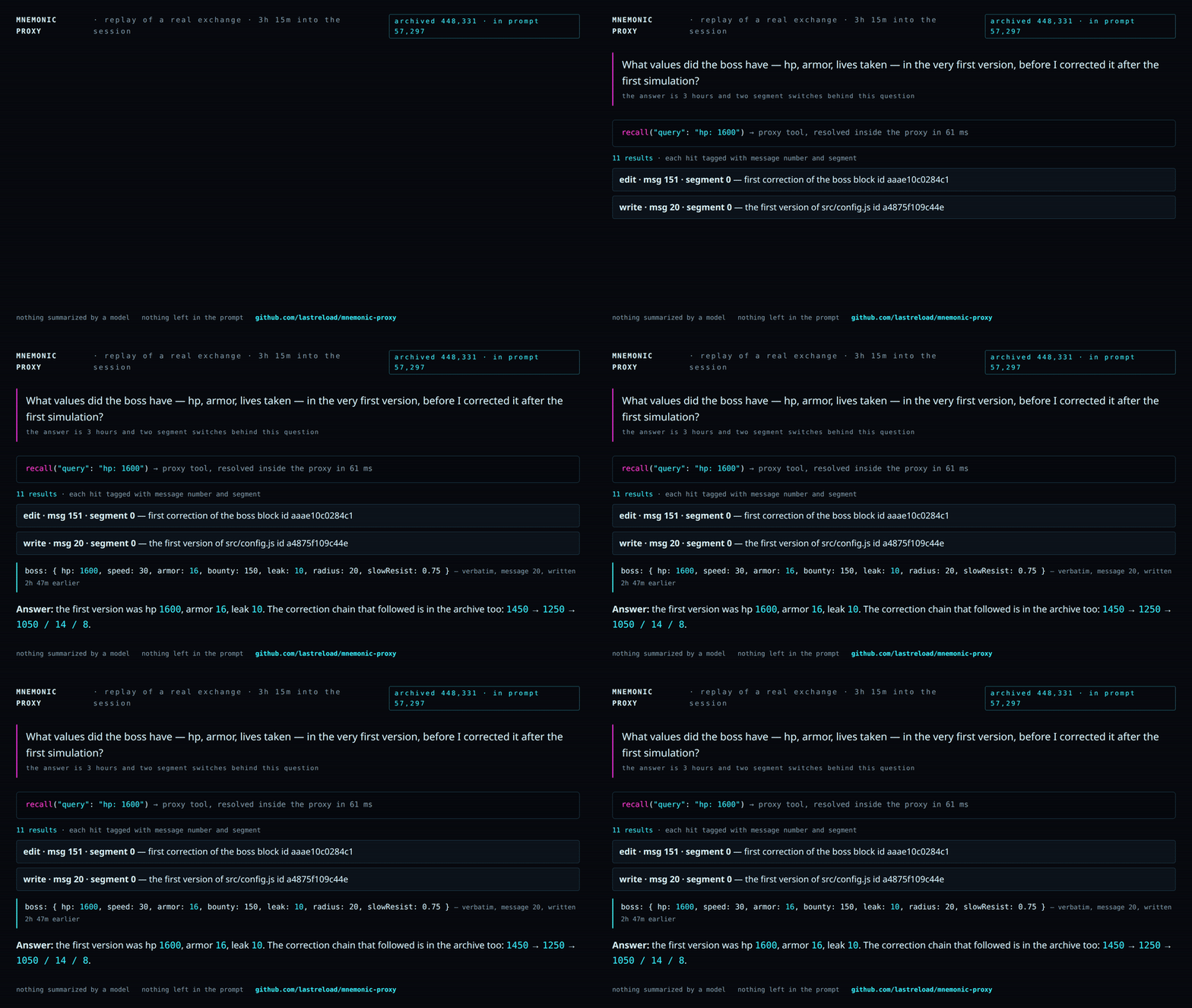
Replay of a real exchange (animated GIF; MP4).
Three hours and two segment switches into the session, one recall call — resolved inside the proxy in
61 ms — brings back the verbatim first version of the boss block, message 20. The recalled block is returned verbatim.
| 448K | tokens of history archived and recallable |
| 105K | peak tokens actually in the prompt (window: 128K) |
| 3h15 | continuous agent work · 430 requests · 0 errors |
| 1.4 s | to resume a 110K-token conversation from disk (≈50 s re-reading it) |
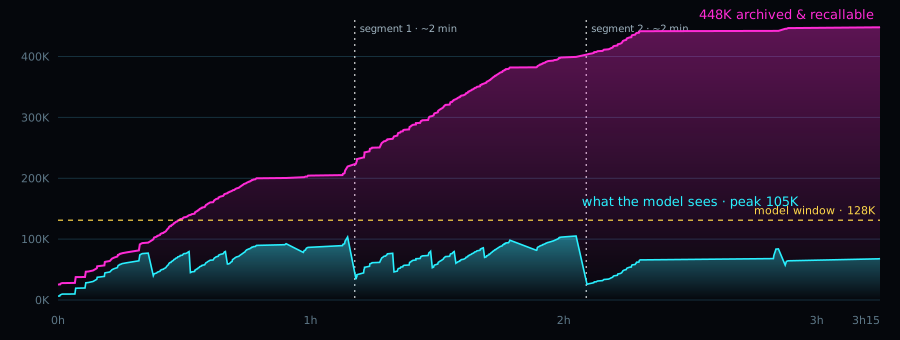
Magenta: the full history of the session. Cyan: what the model actually reads on each request. Dashed lines: the two segment switches (≈2 minutes each, written handoff notes). Data from the proxy journal, 5 Oct 2026.
Benchmark: AgentLongBench with a 32K window
AgentLongBench (kf-c, tool_response, Count Frequency and Find
Duplicates), 25 questions per type at 64k (~74K-token history) and 128k (~150K): 100 questions, official scorer.
Qwen3.8 Flash Next IQ3_XXS on Strata 0.1.40, one RTX 4070 Ti 12 GB, seed 1. Four methods: the full history in an
81,920 / 163,840-token window, and three ways to fit it into 32,768 tokens — this proxy (0.3.5, commit
b8d4920), an LLM summary of at most 2,048 tokens
written by the same model, and truncation. Preregistered test: proxy vs summary, exact McNemar. With the question
clarified (one sentence saying which tool output "round N" means; answers and scorer unchanged):
| correct | full window | proxy | summary | truncation |
|---|---|---|---|---|
| 64k (/50) | 38 | 41 | 27 | 23 |
| 128k (/50) | 31 | 45 | 20 | 26 |
| both (/100) | 69 | 86 | 47 | 49 |
| repeat, both (/100) | 75 | 85 | 57 | 62 |
Proxy vs summary: 44 questions right only with the proxy, 5 only with the summary (p = 7.6e-9). Repeat run (31 Oct 2026, proxy 0.3.19, same engine, model, questions, scorer and methods; 64k / 128k: full window 40 / 35, proxy 42 / 43, summary 32 / 25, truncation 32 / 30): proxy vs summary 35 / 7 (+28 points, p = 1.5e-5), vs truncation 30 / 7 (+23, p = 0.0002), vs full window 22 / 12 (+10, p = 0.12, not significant). The proxy stayed at 85-86 while the other three methods scored 6-13 points higher than in the first run: a single run can be off by that much, and questions from the same history are not independent. With the original, ambiguous question every method was near chance (51 / 52 / 56 / 44; answering "0 / no" every time scores 50). Limits: one model, one engine, one seed, 100 questions; the clarified run exists because of the first one; end to end the proxy took a median 136 s / 286 s per question (64k / 128k) vs 70 s / 102 s for the full window, mostly replaying the whole history through the proxy before the question. Per-question results, logs, scripts and analysis: mverde73/mnemonic-proxy-agentlongbench.
Recall, benchmarked
71 questions about past sessions, each with the known location of the evidence (including 8 with no answer in the archive). Held-out split:
| keyword search | structured recall | |
|---|---|---|
| evidence found within 5 calls | 90% | 100% |
| tokens returned per question | 5,940 | 2,737 |
| "not in the archive" recognised | 1 / 4 | 4 / 4 |
The benchmark guided development, so read it as a regression suite, not an independent score. Its archives are real
private sessions and are not in this repository: bench/ runs against your own archives (bench/data/<name>.sqlite)
with questions written for them. Details: docs/dev-notes/RECALL-RESULT.md
(Italian).
Saved state, measured
Resuming a conversation instead of re-reading it:
| case | saved | re-read |
|---|---|---|
| Strata (session-files branch), 110K tokens, RTX 4070 Ti | 1.4 s | ≈50 s |
| Strata (session-files branch), 69K tokens, after restart | 2.9 s | 33 s |
| llama-server, 8.2K tokens, CPU, Qwen3-0.6B | 1.9 s | 28.6 s |
| llama-server.exe, native Windows (CI runner), 3.2K tokens, CPU, Qwen3-0.6B | 2.3 s | 35.7 s |
Times are for restoring the conversation's context; loading the model is separate.
Why saved state matters
A long agent conversation is expensive to rebuild: every token of it has to be processed again (prefill) before the model can answer. Without saved state that cost is paid again each time the engine loses the conversation — after a restart, when another client or conversation used the engine in between, and when the proxy returns to a sealed segment. On a single 12 GB GPU that is close to a minute for 100K tokens; restoring the saved state takes a second or two, and the state lives on disk, not in VRAM.
This is not specific to the proxy: any client that keeps long conversations on a local engine benefits.
llama-server already offers it through --slot-save-path. Strata has it since
v0.1.40 (PR #668),
opt-in with --slot-save-path. The Strata numbers on this page were measured on our session-files build
(0.1.38 + PR #668, 8d8f664), before the release. The proxy has since run on Strata 0.1.40 in the
AgentLongBench benchmark and the
recall tests, but the restore times in the table above have not been
re-measured on 0.1.40; a contributor measured restore on Strata 0.1.41
(Tools).
Claude Code and Codex, live on Strata
0.2.0 in front of Strata (Qwen3.8 Flash Next IQ3_XXS, RTX 4070 Ti 12 GB, 128K window), with the real clients:
| Claude Code 2.1.284 (Anthropic Messages) | Codex 0.160 (Responses) | |
|---|---|---|
| session | 1 h 41 min, 9 steps, 339 requests, 0 proxy errors | 3 steps, 20 requests |
| prompt tokens served from the engine cache | 92.6% of 11.36M | 93.9% of 351K |
| context | 328K virtual, at most 46K in the prompt; 14 segment switches | — |
recall |
22 calls | exact: 36 tests and 8/8 error messages, word for word |
Claude Code ran on a test config with low thresholds (window 64K, masking at 36K) so that segments would switch within the session. Found live and fixed in 0.3.0: in 3 writes out of 140 the model copied the shortened form of an old tool argument into a file (see What we have not proven). Report: docs/dev-notes/LIVE020-RESULT.md (Italian).
Does the model recall on its own?
Recall only helps if the model uses it without being told. We built short scripted tasks where a value the model needs at the end exists only in an old, masked tool output — not on disk, not reproducible — and the final request never says "remember" or "earlier":
- A random output of a setup script (build id, p95, skipped migrations); re-running it gives different values;
- B a file read once, then deleted;
- C the old version of an overwritten config, no git, no backup;
- D an error from a test service that is then shut down;
- L a long session: the value appears in turn 0, followed by 12 heavy turns and several segment switches.
Qwen3.8 Flash Next IQ3_XXS on Strata 0.1.40, RTX 4070 Ti 12 GB, proxy 0.3.1 as released (no extra hints):
| client | episodes | right values | via recall the model chose to call |
|---|---|---|---|
| Claude Code 2.1.284 | A, B, C, D × 2 | 8 / 8 | 8 / 8 |
| Claude Code 2.1.284 | L: 127K virtual, 3 segment switches | 1 / 1 | yes |
| pi 0.87.1 | A, B, D | 3 / 3 | 3 / 3 |
| pi 0.87.1 | L: 231K virtual, 6 segment switches | 1 / 1 | yes (5 keyword searches) |
| omp 18.10.1 (oh-my-pi) | A, B, C, D | 4 / 4 | 4 / 4 ¹ |
| omp 18.10.1 (oh-my-pi) | L: 82K virtual, 2 segment switches | 1 / 1 | yes (6 calls) |
¹ With omp the model repeated the values in its own one-line answer in B (all three) and D (two of three), so they stayed visible: there recall was strictly needed only for D's third value. A and C are clean.
A control with the full history in the prompt (no masking) was right in every short episode. In the long one it re-ran the setup script and wrote the new, wrong values — the proxy run did better. Each episode was checked for the true values in the final prompt (none were there, except the omp cases in ¹); one file per configuration was also checked by hand.
Across 8 real sessions (4 pi, 3 Claude Code, 1 Codex; 18 journals counting 10 replays) the need is rare: 5 spontaneous recalls against 108 after a question about the past; 30 re-reads of a masked, unchanged file (≈37K tokens; ≈46K counting the replays); 4 edits out of 505 failed because the model misremembered a masked file. When a file can be re-read, the model re-reads it — which is right when it has changed.
Limits: one model, one run of each long session, scaled-down thresholds (32K window) for the long sessions; Cline not measured (it cannot resume a session headless without a Cline account). Report: docs/dev-notes/RECALL-NEED-RESULT.md (Italian).
Long context on Strata, without the proxy
16 name=number facts scattered in a generated Italian story, question at the end, temperature 0, two seeds, from
16K to 122K tokens of prompt: 151/160 exact, 0 wrong — every miss is an omitted line, all at 64K and above.
Prefill stays at ~2.5K tok/s up to 122K, VRAM flat at 11.6 GB. Same report, section 4.
User reports
Numbers measured by users on their own hardware and shared with permission. Not reproduced by us.
| u/Swimming-Farmer7815 | |
|---|---|
| hardware | RTX 5060 Ti 16 GB, Xeon E5-2699 v3, 64 GB DDR4 ECC |
| engine / model | Strata, Swift-Qwen3.8-Flash-Next IQ3_XXS, 128K window |
| client | Cline, with its automatic context compaction disabled |
| session | 13 h; ~280K tokens of total history, ~77K in the last request |
| saved state | ~58K tokens restored in under 4 s (about 1 min 15 s to re-read at the measured prefill rate) |
recall |
8 calls, all 8 results used by the model |
The user reports no compaction pauses during the session. All 8 recalls happened in the last two minutes of the
session, when the user asked for a summary of the day: during normal work the model never called recall on its
own. In our tests with Claude Code, pi and omp the model did call recall by itself when the value could not be re-read
from disk (Does the model recall on its own?); with Cline we could not test it.
Share your numbers. If you run the proxy on your own hardware, a report helps — especially with clients and models
we have not tested (Cline, other models). Useful: GPU/RAM, engine and model, client, session length (total
history and tokens in the last request), restore time, how many recall calls and whether the model made them on its
own. data/journal.jsonl holds most of it; check it before sharing, it contains your recall queries. Open an issue
with the user report template.
Written about it
- Radyz.cz (Czech, 25 Oct 2026): "AI si nepamatuje. Jen si vede spis." ("AI doesn't remember. It just keeps a file."). An independent review of how the proxy works, the session and benchmark numbers with their limits, and the privacy side. It points out that there is no command yet to delete a conversation; that is tracked in #19.
Engines
| client \ engine | Strata | llama-server | ds4-server | any OpenAI-compatible |
|---|---|---|---|---|
| Chat Completions (pi, omp, Hermes, Continue…) | tested · full | tested on CPU · full | tested with pi (GLM 5.3, Qwen3.8) · engine keeps its own state | base (no saved state) |
| opencode (Chat Completions) | tested (1 h 32 min live session, 554 requests) | experimental | experimental | experimental |
| Claude Code (Anthropic Messages) | tested (1 h 41 min live session) | experimental | experimental | experimental |
| Codex (Responses) | tested (live, exact recall) | experimental | experimental | experimental |
| MCP recall server (Claude Code, Codex, Hermes) | tested read-only on a real archive |
"Tested": real client, real engine, measured; reports in docs/dev-notes/. "Experimental": tested end to end
against a mock engine and with short real client runs, not yet on long real sessions.
- llama.cpp — start
llama-serverwith--slot-save-path DIRfor saved state (masking anchor, segment saved before a switch, autosave/autorestore,kv_archive). The window comes from the server'sn_ctxunlesswindowis set; with--parallel Nthe proxy pins one slot (slot_id, default 0). Without--slot-save-paththe proxy runs in base mode. - llama.cpp in router mode (0.3.7, llama-server started without
-m, models from--models-presetor--models-dir, loaded on demand) — detected automatically. The client'smodelpicks the model; the proxy reads that model's n_ctx (its slot,GET /slots?model=…, loading the model if needed) before building the prompt, so the window always fits the model that will run it (thresholds scale with it). If the n_ctx cannot be read the request is refused with a clear error; it is never sent with the config window. Saved files are bound to the model that wrote them: a file is never restored into another model. Start every model with--slot-save-path(put it in the[*]section of the preset) andparallel = 1, and give each model actx-sizeof at least 16K. Loading takes time (on AI395 a 35B-A3B Q4 model took ~73 s from a USB disk, 12 s from the page cache): withstream: truethe proxy sends an SSE comment (: loading model <id>; Anthropic API: apingevent) everyrouter_keepalive_s(10 s) until the model is loaded and its n_ctx read, so a client with a read timeout does not give up; if the client has gone away the request is dropped before anything is generated (journalrouter_client_gone). Non-stream requests get nothing until the answer: the client's timeout must be longer than the model's load time (plus the answer).router_load_timeout_s(600) bounds the wait on the proxy side. One history per conversation: when a smaller model needs masking to fit, the masked history is what the bigger model gets afterwards too (it can read the masked results again with its tools; its earlier saved file no longer matches). The disk check before an autosave uses the bytes/token measured on the last save of the same model (×1.25; 20000 until the model has saved once). Tested on CPU with tiny models and on AI395 (Radeon 8060S, Vulkan) with Qwen3.6-35B-A3B and Gemma 4 E2B (docs/dev-notes/ROUTER-MODE-RESULT.md). Ready to copy:examples/preset.router.example.ini(start withllama-server --models-preset preset.router.example.ini --models-max 1 --port 8095) andexamples/config.llama-server-router.json. - Strata — works in base mode on any version. Saved state: Strata ≥ 0.1.40
(PR #668, released in
v0.1.40), started with
--slot-save-path DIR. Session files must be trusted: the hashes detect corruption, not tampering. Our measurements are from the session-files build (0.1.38 + PR #668,8d8f664); on 0.1.40 the proxy ran the AgentLongBench benchmark and the recall tests, but restore times were not re-measured there (see Saved state, measured). Saved state that the engine does not support. After a reply that means "not supported", the proxy stops saved-state work for that model only (anchors and their one-token calls, segment seal/save, SAVE/RESTORE, autosave/autorestore, kv_archive). Masking, the text archive,recalland notes keep working.
| Reply to a slot call | What the proxy does |
|---|---|
HTTP 500 "the engine answered a session … the server ended the engine" (PolyStrata strata-poly) |
suspended until restart or reset |
HTTP 501 with a documented permanent text (no --slot-save-path, parallel requests, strata-poly on PolyStrata v0.1.45-poly.7 or later) |
suspended until restart or reset |
| any other HTTP 501 | paused for 15 minutes, then one call retries |
| 404, 400, 409, 503, 507, generic 500, timeouts | not a refusal |
GET /v1/strata/saved-state lists the suspended models. POST /v1/strata/saved-state/reset with {} (all models)
or {"model": "<exact id>"} clears them; it answers {"cleared": [...]}, 400 for a bad body, and 403 unless the
request comes from this machine (the proxy has no client authentication). The check looks at the direct TCP
peer: a local reverse proxy can make remote requests look local, so block this endpoint at that proxy if remote
access must be denied. After a reset the next save is sent again, so on a strata-poly model with a PolyStrata
release older than v0.1.45-poly.7 it ends the engine once more.
The proxy warns once per suspension: after a reset or a successful retry, a new refusal is reported again. The
retry after the 15-minute pause happens only when the proxy next needs saved state, so GET may show
retry_after_s: 0 until then. The suspension adds no new requests to the engine's status endpoint.
PolyStrata v0.1.45-poly.7 and later answer a save or restore on a strata-poly model with HTTP 501 and keep the
engine running (VecSzn/PolyStrata#114): update with UPDATE.bat / ./update.sh and restart PolyStrata. The proxy
recognises that 501 as permanent and suspends saved state for that model on the first reply. On older PolyStrata
releases the first SAVE to a strata-poly model still ends the engine (the proxy then suspends saved state for
that model); to avoid even that, set mask_anchor, slot_save, autosave, autorestore, seal_experimental and
kv_archive to false for that model.
setup.sh and run-strata-proxy.sh in the repository root (a venv, then the proxy in front of a running
Strata, slot_dir read from the Strata config) were contributed and are covered by unit tests; they are not yet
tested by the maintainer on a real Strata install.
examples/config.example.json is the configuration used with session files;
examples/config.official-strata.json the one for Strata without --slot-save-path (or older than 0.1.40).
- Generic OpenAI-compatible (vLLM, online APIs, …) — base mode: masking, archive +
recall, segments with handoff notes, 📌/🗑, streaming. No engine state, no saved files. Not tested on vLLM itself. - ds4-server (antirez/ds4) — automatic detection, tool-call ids untouched, no
duplicate saving (ds4 has
--kv-disk-dir). Tested with pi, see below.
ds4-server
ds4-server keeps its own state: with --kv-disk-dir DIR it checkpoints the KV cache to disk by text prefix and
resumes a conversation after a tool call by recognising the tool-call id (exact replay of the sampled call). So the
proxy does less than with other engines:
./ds4-server -m MODEL.gguf --ctx 65536 --port 8110 --kv-disk-dir ./kv
mnemonic-proxy --upstream http://127.0.0.1:8110 --port 8096 --data ./data --config examples/config.ds4.json
- Detection:
GET /v1/modelswithowned_by: "ds4.c"; the window is taken fromcontext_length(=--ctx).engine: "ds4"forces it. - The proxy does not save, restore or archive engine state (
slot_save,mask_anchor,autosave,kv_archiveare turned off): ds4 does it itself. mask_tool_argsis turned off: ds4 re-inserts the sampled call text by id, so shortened arguments would not reach the model. Setds4_exact_tool_replay: falseonly if ds4-server runs with--disable-exact-dsml-tool-replay.- Tool-call ids pass through unchanged in all three protocols (the id the engine generated reaches the client and
comes back identical); internal
recallcalls keep the engine's id and are re-inserted identically next turn. - Old reasoning is masked as usual; the last turn with tool calls keeps its reasoning.
checkpoint_align_tokens(off by default): when set to ds4's checkpoint interval (by default 10240 tokens,--kv-cache-continued-interval-tokensrounded to--kv-cache-boundary-align-tokens), a masking block starts just after a multiple of it, so fewer tokens are re-read after the last disk checkpoint. Needs an exact--tokenizerto be meaningful. In one long session at 32K (below) it changed no masking decision.- Not proven: Claude Code and Codex in front of ds4; parallel sessions (
--batched-session N) — the proxy still serialises requests.
mnemonic-proxy is a separate tool, compatible with ds4-server and tested with it; it is not part of the ds4 project.
Measured with pi (4 tasks in one session on a 140-line server.log; the last one asks, without re-running
anything, for the request id and shard of the third error, whose output the proxy had already removed from the
prompt). Hardware: Ryzen AI Max+ 395 "Strix Halo", 128 GB unified memory, ROCm gfx1151.
| model, engine | window | tasks 1–3 | third error (rq-2290, shard 3) | recall |
time |
|---|---|---|---|---|---|
GLM 5.3 Flash Q2, ds4 0aaea5a, SSD streaming, MTP |
8K | ok | right, plus an invented timestamp | 5, by id + offset | 10 min 34 s |
| Qwen3.8 Flash Next Q2, ds4 local ROCm port | 8K | ok | not found; said so, invented nothing (0.2 recall budget: fixed in 0.3.0) | 5 | 6 min 05 s |
| Qwen3.8 Flash Next Q2, ds4 local ROCm port | 32K | ok | right (still in the prompt, no masking) | 0 | 3 min 30 s |
same, proxy 0.3.0, first prompt forcing a plain cat server.log |
8K | ok | right, exact line (no invented detail) | 1 (id + query) | 7 min 07 s |
The 8K rows were measured to stress recall; since 0.3.0 the proxy refuses windows below 16K (see Requirements).
- GLM: after each
recallds4 read only the new tokens (614–634), never the whole prompt again: it resumes by tool-call id. Prompt reading 24–29 tok/s, generation ~6 tok/s — enough to verify the mechanism, too slow for work. - Qwen3.8 at 8K: the model used
recallcorrectly (by id, then by offset), but 0.2's proxy cut the 2nd–4th results to almost nothing (room< 0) and the third error, at character 6,183 of 9,282, never arrived. 0.3.0 fixes the two causes (see the changelog). With 0.3.0 onerecallby id + query brought the line back (360 tokens). One successful live run, with a stricter first prompt: in two runs with the original prompt the model rancat server.log | grep -c ERRORinstead, never saw the lines, and said so. - Qwen3.8 runs on a local ROCm port of ds4's Qwen path (not the ds4 release, which supports Qwen3.8 on Metal/CUDA only); prompt reading ~81 tok/s and generation 16–19 tok/s at 1.6K–7.8K tokens without MTP.
Reports (Italian): DS4-GLM-RESULT.md, DS4-QWEN-COMPARE-RESULT.md (also Qwen3.8 quality on ds4 vs Strata), RECALL-8K-030-RESULT.md (the 0.3.0 run), DS4-RESULT.md (the adapter).
Long sessions on ds4: proxy vs pi's own compaction
Same hardware, ds4 fc80bd6 (+ the local ROCm port for Qwen3.8), proxy 0.3.2, pi 1.0.3, window 32K, one run per
side. Without the proxy pi compacts by itself (reserveTokens 8192, keepRecentTokens 8000: our choice for 32K).
Every answer below is graded by tests and regexes written before the runs.
| task, model | with proxy | pi alone | |
|---|---|---|---|
16 steps (farmastock), Qwen3.8 Flash Next Q2 |
steps done (2 h limit) | 16/16 in 85 min | 14/16 |
| re-reads from token 0 | 0 | 23 | |
| tokens read by the engine | 167K | 267K (with fewer steps) | |
| early facts recalled at the end | 5/5 | 4/5, one "I don't know" (asked after the limit) | |
29 steps (salepren), same model |
steps done (4 h limit) | 29/29 | 10/29 |
| re-reads from token 0 | 1 | 38 | |
| tokens read / prefill time | 362K / 4,447 s | 511K / 6,368 s | |
| memory probes at steps 8, 14, 20 | 17/18 | 5/6 (only step 8 reached) | |
| hidden tests on the final code | 87/87 ⚠ | 59/87 | |
| 16 steps, DeepSeek V4 Flash Q2 (official ds4, no patches) | steps / re-reads / facts | 16/16 in 61 min / 0 / 7 of 8, one "I don't know" | not run |
Prompt reading (~82 tok/s) and generation (~19 tok/s) were the same with and without the proxy.
⚠ The 29-step run is not a clean quality result. Both sides ran with pi's maxTokens 4096, and that limit
includes the model's reasoning. Qwen3.8 often thought for more than 4,096 tokens before acting, so the answer was
cut before the tool call (finish_reason: length): 26 times with the proxy, 8 without. pi stores a cut answer
without an action and sends the next step, so unanswered requests pile up. With the proxy they reached 13 in a
row; the model tried to do all of them in one turn, ran out of tokens again, and kept looping. It wrote no code
from step 2 to step 25, then rewrote the whole package from memory at step 26 (which passes all 87 tests). Without
the proxy, pi's summaries happened to clear the backlog. The first cut came before the proxy had changed anything,
and it also happened without the proxy: the cause is the limit, but the proxy keeps the history faithfully and so
does not break the loop.
What this means in practice:
- give reasoning models room: set the client's max output tokens well above their usual reasoning length (8192 or more for Qwen3.8 with reasoning on);
- the 16-step runs did not show this loop (with the proxy all 16 steps produced code; 57 of the agent's own tests passed at the end, 40 without the proxy) and are the cleaner comparison;
- a rerun of the 29-step task with 8192, and a proxy note when the last answer was cut, are planned.
Other findings: once (16-step run with checkpoint_align_tokens) a recall found the right chunk but the result
was cut for lack of room in the window, and the model answered "never discussed" — a weak point seen once, not yet
reproduced. With DeepSeek V4 Flash, ds4's default q8→f16 cache left only ~9 GB of free RAM on a 128 GB machine;
the run used DS4_CUDA_NO_Q8_F16_CACHE=1.
Reports (Italian): DS4-LONG-RESULT.md (16 steps, Qwen3.8), DS4-LONG2-RESULT.md (29 steps, Qwen3.8), DS4-FLASH-RESULT.md (16 steps, DeepSeek V4 Flash).
GET /v1/strata/engine shows what was detected. Measurements: docs/dev-notes/ENGINES-RESULT.md (Italian).
Configuration
Output limits in managed mode: max_completion_tokens takes precedence over max_tokens when both are supplied;
without either field, default_response is used (16384 by default). These values are ceilings, not a reason to
switch segments. After masking and any necessary switch, the proxy caps the response to
window - estimated_prompt - reserve - 8 and sends the reduced limit to the engine (both fields are synchronized
when present). The final window guard may reduce it further for its margin and estimate slack; it refuses a
prompt with no space for even one generated token. Tokenizer-based bounds require the current model's tokenizer
and matching template/settings (see Window guard above); estimates are not proof of actual engine token usage.
A genuinely large prompt still triggers a segment switch when there is not enough room for a useful response:
max(response_floor, min(requested_output, default_response)), bounded to at least one token and at most a quarter
of the window. A floor never raises the actual output ceiling requested by the client. Every reduction produces
response_clamped in journal.jsonl (requested and sent limits, prompt estimate, window and reserve), plus one
warning per conversation in the process log, remembered across restarts. No new option is required; for example,
a client ceiling of 120000 in a 131072 window no longer causes a switch on every short turn.
Small windows (including Strata/PolyStrata at 32K). Unset thresholds scale when window is read from the
engine's /v1/status (context.native / max_positions). Oversized explicit response_floor and
notes_max_tokens are capped at one quarter of the window at startup, with warnings also shown by check.
With masking anchors enabled below 128K, anchor_min_tokens is capped at 24000 * window / 131072 (6000 at 32K)
so a 128K anchor threshold does not prevent useful anchors on a small window. A Strata window override larger
than its reported context is lowered to that context with a warning (check reports the mismatch).
These are budget/threshold adaptations, not token-count repairs; the final guard still handles every call.
For 32K, prefer removing these three overrides to get scaled defaults, or start conservatively with
"response_floor": 4096, "notes_max_tokens": 2048, "anchor_min_tokens": 6000. Keep window unset when discovery
works, and check the startup log for window from engine n_ctx: 32768. The 128K recommendations below are not
32K settings. Existing values within these bounds are unchanged.
Automatic configuration
"Why is the default config not the recommended config? It would be so nice if it could detect the engine version, context size, VRAM + RAM and apply the best settings by itself." — a user on r/LocalLLM, who had turned saved state on by hand and then found a 2 GB state file eating the RAM he needed for the model.
Since 0.3.23 the proxy looks, decides, and says what it decided. At startup (and in check, without starting
anything) it reads the engine and the machine, then sets the options that depend on them. A field written in
the config file or on the command line always wins and is never touched.
What is read — all of it from endpoints and files the proxy already uses, no new dependency, no telemetry:
| read | where from |
|---|---|
| engine kind, context window, saved-state support | /v1/status (Strata: context.native), /props + /slots (llama-server), as before |
| engine version | Strata /v1/status → engine (e.g. 0.1.51); llama-server /props → build_info |
| requests served at once | Strata /v1/status → concurrency; llama-server /props → total_slots |
| local or remote engine | the --upstream URL |
| RAM, total and available | Linux /proc/meminfo, macOS sysctl hw.memsize + vm_stat, Windows GlobalMemoryStatusEx |
free disk of slot_dir |
shutil.disk_usage |
| VRAM (optional, never required) | the GPU figures Strata already reports in /v1/status, otherwise nvidia-smi if it happens to be on PATH |
What is decided, and the rule behind it:
| field | chosen when | why that rule |
|---|---|---|
slot_save, mask_anchor, autosave |
the engine offers saved state, it runs on this host, slot_dir is set, and one state file fits in the available RAM |
these three only move engine state files: they never change a byte of the prompt. slot_dir is required because without it old anchors and autosaves could never be cleaned up; autosave also needs state_file + autosave_min_free_gb of free disk |
response_floor |
the window is 16384 or more: window / 8 (16384 at 131072, 4096 at 32768 — the values this README already suggested) |
the recommended value, scaled. Below 16384 the proxy already refuses to start without an explicit opt-in and the documented choice there is the scaled defaults, so nothing is decided |
notes_max_tokens |
same range: window * 3 / 32 (12288 at 131072) |
same |
engine_tokenize |
the engine has /tokenize and no --tokenizer was given |
an exact count from the engine beats the chars_per_token estimate; a local tokenizer, when present, beats both |
The size rule has one number: a saved state file costs about 19.5 KB per token of window
(state_kb_per_token), so a 131072-token window is roughly 2.4 GiB of engine state. That default is the
20000 bytes/token autosave.py already uses for its own disk check, so the two parts of the proxy agree; the
measured spread is wide — 37–73 KB/token for Qwen3.5 35B-A3B and 7.6–9 KB/token for gemma E2B
(dev note), ~115 KB/token for llama-server with Qwen3-0.6B
(dev note) — which is why it is a field and why this is a floor, not a
promise. With 1 GiB available the saved-state options stay off and say so, instead of filling the RAM the model
needs. Nothing is decided from VRAM: it is printed as evidence, because no rule here has a defensible
VRAM threshold yet.
check --explain-config prints the whole picture — what was read, what was chosen, what was left alone, and
how to force each one otherwise — without starting the proxy:
$ mnemonic-proxy check --explain-config --upstream http://127.0.0.1:8095 --config config.json
...
ℹ️  auto config        chosen for this engine and this machine: slot_save=true, mask_anchor=true, autosave=true,
                      response_floor=16384, notes_max_tokens=12288 (RAM 31.3 GiB total, 19.4 GiB available;
                      VRAM 12.0 GiB total, 4.0 GiB free [ram: /proc/meminfo, vram: engine /v1/status machine.gpu])
✅ saved state        supported by the engine, configured in the proxy (slot_save, mask_anchor, autosave)

automatic configuration (a field written in the config always wins):
  engine: strata 0.1.51, window 131072, saved state available, on this host
  machine: RAM 31.3 GiB total, 19.4 GiB available; VRAM 12.0 GiB total, 4.0 GiB free
  data folder: new data folder: the automatic choices are applied and recorded in autoconfig.json (the data
      folder does not exist yet)
  auto slot_save = true: the engine saves its state, slot_dir is on this host, and the estimated session file
      (2.4 GiB at 19.5 KB/token, the 20000 bytes/token of autosave.py) fits: 19.4 GiB available
      -> set the saved-state options to false in the config to keep them off
  auto response_floor = 16384: an eighth of the 131072-token window: a short replay no longer forces a
      segment switch (16384 at 131072, the README value)
      -> set "response_floor" in the config (0 = no floor)

READY (exit 0)
The same lines appear in the startup log as [mnemonic-proxy] auto config: …, and in journal.jsonl as one
auto_config event (its data_folder field carries the case below). "auto_config": false turns the whole
mechanism off: every default is then used exactly as written in the table below.
Upgrades keep what was running; a restart keeps what this installation chose. What the automatic
configuration does depends on where the data folder comes from, which is recorded in the folder itself
(autoconfig.json) and is kept apart from the presence of conversations. check and the startup log always
name the case in one line (data folder origin):
| the data folder | what happens | the line |
|---|---|---|
| new — not there yet, or empty | the choices are applied, and autoconfig.json records this version, the window and the values applied |
new data folder: the automatic choices are applied and recorded in autoconfig.json |
created with the automatic configuration — it carries autoconfig.json, or its journal shows that its first start was a 0.3.23 start that applied the choices (0.3.23 wrote no mark; the next start writes it) |
the choices keep being applied at every start, conversations or not | data folder created with the automatic configuration: the choices stay applied |
from an earlier setup — it holds files but no autoconfig.json, or the mark cannot be read |
the choices are only reported, marked kept, with the value the proxy would pick and why; nothing changes |
data folder from an earlier setup: the automatic choices are reported, not applied |
Write "auto_config": true in the config to apply them on an earlier folder as well; delete autoconfig.json
to have a folder treated as an earlier one. The reason an earlier folder is protected: the proxy cannot tell
every engine apart (a PolyStrata release before v0.1.45-poly.7 ends the engine at the first save on a
strata-poly model, and it answers like Strata), so an upgrade must never turn saved state on by itself.
That is a statement about installations that predate the automatic configuration, so it is now decided by the
provenance of the folder and not by "does this folder have conversations?" — up to 0.3.23 the second question
made the proxy apply response_floor = 14375 on a brand-new folder and then go back to 0 after the first
archived conversation, so the same installation ran with different values at every restart (reported by the
first Windows user, window 115000).
Three details worth knowing:
- An old folder whose archive happens to be empty is treated as an earlier folder, not as a new one: the
question is where the folder comes from, and an empty archive does not answer it. Same for a folder that
cannot be listed and for an
autoconfig.jsonthat cannot be read — the conservative case wins. Anauto_configevent in an oldjournal.jsonlis not a consent either. checkonly reads the provenance. It never writesautoconfig.json, so runningcheckbefore the first start cannot make an earlier folder look automatic.- The choices are recomputed at every start, and may change — on an "automatic" folder they are then
applied. Every gate is re-evaluated (engine support and version, local or remote, parallel slots, free RAM,
free disk), so a machine that has less RAM available than it had yesterday makes
slot_save/autosavego back tofalse: switching off is always safe, it only costs the saved-state speed-up. The opposite direction — switching saved state on where it was off — is only ever done on a new folder or on a folder this mechanism created itself, never on an earlier one, which is exactly the PolyStrata guarantee above; on such a folder it is the same decision the first start already took, with the same gates. The mark records the values that were applied, soautoconfig.jsonalso tells you what the previous start chose. If your engine is one the gates cannot recognise,"slot_save": false(or"auto_config": false) in the config wins over all of this, at every start.
The measured output of all of this, engine by engine, is in the dev note.
Why the rest of the recommended config is still not the default. The proxy guarantees that an old
conversation is replayed byte for byte: the receipts, the tool names and prompt_language are stored per
conversation at first use precisely so that a new default cannot rewrite history. Every remaining
recommendation changes what the proxy writes into the prompt, so flipping its default would change the
prompt of conversations that already exist. These stay opt-in on purpose, and the reason is now in the table:
mask_reasoning,mask_tool_args,recall_struct,recall_flex,recall_multi,tools_paging: they change the prompt the engine sees. Turn them on when you start a new conversation (that is what the benchmarks above use); they need the same per-conversation storage as the receipts before they can become defaults.seal_experimental,kv_archive,live_dump: no prompt effect, but each one spends something the proxy should not spend without being asked — an experimental save trick, a background compression thread, and the full prompt written to disk for the dashboard.
--config takes a JSON object with any field of ctxproxy.core.Config. Defaults below are the real ones in the
code. The last column is what we recommend with an engine that has saved state
(examples/config.example.json plus the options the benchmarks above support); chosen automatically marks
the ones the proxy now picks for you when the engine and the machine allow it.
| field | default | meaning | recommended |
|---|---|---|---|
window |
131072 | physical context of the engine (llama-server, ds4, Strata, Ollama, LM Studio: taken from the engine if unset; Ollama / LM Studio: a bigger value refuses the start) | 131072 |
window_margin, window_estimate_slack |
64, 0 (0.15 on generic engines without --tokenizer) |
window guard: tokens kept free; inflation of the estimated prompt count | default |
image_tokens |
1026 | tokens charged for one picture: the guard budgets each vision marker with this upper bound, because the engine expands it afterwards and reports the real number only in usage.prompt_tokens. Must satisfy image_tokens >= vision.max_tokens + 2 (two of the marker's three special tokens stay in the prompt). A non-negative integer, checked when the configuration is loaded; 0 means "no pictures": a request carrying one is refused, and the startup says so |
vision.max_tokens + 2 (Strata clamp 300 → 302; the default 1026 covers the GPU clamp of 1024) |
mask_trigger / mask_target |
80000 / 40000 | start a masking block above trigger, mask oldest-first down to target | default |
min_batch_tokens |
16000 | a block runs only if it frees at least this much | default |
keep_recent_tokens / min_age_turns |
16000 / 2 | protected tail, never masked | default |
mask_reasoning / mask_tool_args |
false / false | also mask old reasoning / large old tool-call arguments | true / true (opt-in: they change the prompt, see Automatic configuration) |
mask_anchor, anchor_min_tokens |
false, 24000 | save/restore engine state at the masking frontier (saved state) | chosen automatically, 24000 |
slot_dir |
"" | the engine's --slot-save-path folder, same host (anchor cleanup, autosave, kv_archive) |
set (one field: the saved-state options then follow by themselves) |
segments_enabled, tail_max, notes_max_tokens |
true, 24000, 8192 | segment switch with handoff notes | true, 24000, chosen automatically (window * 3 / 32) |
slot_save / seal_experimental |
false / false | save the old segment to disk before switching (saved state) | chosen automatically / true (opt-in: experimental) |
response_floor |
0 | minimum useful response budget for segment switching (bounded to a quarter of the window) | chosen automatically (window / 8) |
auto_config, state_kb_per_token |
true, 19.5 | choose the engine/machine-dependent options at startup and print every choice with its reason (check --explain-config); KB of engine state per token of window (the 20000 bytes/token of autosave.py), used to check a state file fits in the available RAM |
default |
inject_recall, max_recall_rounds, recall_max_tokens |
true, 4, 6000 | the recall tool |
default |
recall_tool_name / tools_tool_name |
"recall" / "tools" | names of the proxy's tools for new conversations | default |
prompt_language |
"en" | language of the texts the proxy writes into the prompt, for NEW conversations: "en" or "it"; stored per conversation at first use; conversations from before 0.3.1 stay Italian |
default |
rich_receipts |
false | opt-in (benefit not yet measured): richer receipt for a hidden tool output, for NEW conversations: output size in lines/bytes, error type and the FIRST error line (160 characters), plus a receipt for outputs whose kind is not recognised; stored per conversation at first use, so a conversation from before 0.3.22 keeps the receipts it was masked with | default |
recall_struct, recall_flex, recall_multi |
false, false, false | structured recall: file timelines, links, flexible words, several queries per call (the benchmark above) | true, true, true (opt-in: they change the prompt) |
auto_recall / auto_recall_hint |
false / false | auto_recall enables automatic retrieval on new user messages; auto_recall_hint only selects a one-line hint with ids instead of pieces and requires auto_recall: true |
false / false (automatic retrieval off) |
recall_leaf_select |
false | on structured outputs (yaml/toml (Python ≥ 3.11)/xml/json, tables, diffs, logs, git log, pytest) recall returns only the matching record and the key lines of its ancestors, verbatim, with ⋮ markers and offsets for the gaps; falls back to the normal recall when unsure (dev note) |
default (experimental) |
answer_thinking_after_recall, answer_thinking_budget |
false, 512 | turn thinking on only for the answer that follows a recall (fixes answers cut in the middle of a value) | default (experimental) |
truncation_guard |
false | replay once, with thinking, a short answer that ends on a prefix of a recalled token | default (experimental) |
tools_paging, tools_core |
false, read/bash/edit/write/grep/find/ls + read_file/write_file/patch/search_files/terminal | tools on demand: only core tools + recall + tools in the prompt. The second group is Hermes' base names (0.3.24): without them the whole Hermes tool list went to the catalog and only recall and tools stayed in the head. A name the client does not have changes nothing |
true (opt-in: it changes the prompt) |
typed_receipts, receipt_guard |
true, true | typed one-line receipts for hidden outputs; block write/edit/shell calls (pi, Claude Code, Codex names) that copy a receipt or the shortened form of an old argument | default |
pins_max_tokens |
8192 | cap of the carried-over 📌 block | default |
autosave, autosave_idle_s, autosave_keep, autosave_max_gb, autosave_min_free_gb |
false, 180, 10, 25, 8 | save engine state when the conversation is idle (saved state) | chosen automatically, 180, 10, 25, 8 |
autorestore, autorestore_min_gain |
true, 8192 | restore before forwarding when it saves at least this many tokens | default |
kv_archive, kv_archive_idle_s, kv_archive_min_age_s |
false, 600, 1800 | cold archive of state files (needs Python ≥ 3.14 for compression.zstd) |
true (opt-in: a background compression thread) |
engine, slot_id, engine_tokenize |
"auto", 0, false | engine type, slot, token counting via the engine's /tokenize |
auto, 0, chosen automatically |
router_model, router_load_timeout_s, router_keepalive_s |
"", 600, 10 | llama-server router mode: model used when the client's model is not served (empty = refuse), how long a model may take to load, seconds between two SSE comments to a streaming client while the model loads |
default |
live_dump |
false | write data/live/last_request.json for the dashboard |
true (opt-in: it writes the full prompt to disk) |
A config for llama-server with saved state, as recommended above:
{
  "mask_reasoning": true, "mask_tool_args": true,
  "mask_anchor": true, "slot_dir": "/path/to/slots",
  "slot_save": true, "seal_experimental": true,
  "notes_max_tokens": 12288, "response_floor": 16384,
  "recall_struct": true, "recall_flex": true, "recall_multi": true,
  "auto_recall": false,
  "tools_paging": true,
  "autosave": true
}
The recommended config above and examples/config.ds4.json keep automatic retrieval off
(auto_recall: false). The 100-question AgentLongBench confirmation run also used no automatic
retrieval: its journals contain 379 model-requested recall calls and zero auto_recall events.
auto_recall_hint: true alone does not enable hints: it only changes the mode when
auto_recall: true is also set. To opt into automatic hints, set both options to true.
The previously listed hint setting was inert and has been removed from the recommended examples;
this documentation correction does not enable automatic retrieval or change their effective behavior.
On a generic OpenAI engine drop the saved-state fields (mask_anchor, slot_dir, slot_save,
seal_experimental, autosave, kv_archive); the proxy turns them off anyway, with a warning.
Every command-line option
Three commands are installed: mnemonic-proxy (the proxy, with its demo, check, init-config
and forget subcommands; ctxproxy is a 0.1 alias of the same program) and mnemonic-mcp (the
read-only MCP recall server). tests/test_readme_coverage.py fails if an option exists in the code
and is not listed here.
| command | option | what |
|---|---|---|
mnemonic-proxy |
--upstream URL |
the engine's address (default http://127.0.0.1:8095) |
--host ADDR |
bind address (default 127.0.0.1, local only) |
|
--port N |
listen port (default 8096) |
|
--data DIR |
archive, journal and lock (default ./data) |
|
--config FILE |
JSON file with the Config fields below |
|
--mode tools|off |
tools = managed context (default); off = plain pass-through, nothing archived or masked, useful to compare a session with and without the proxy |
|
--tokenizer PATH |
Hugging Face tokenizer.json (or a Strata pack tokenizer/ folder) for exact token counts; needs pip install 'mnemonic-proxy[exact]' |
|
--api-key KEY |
key sent to the upstream engine | |
--engine auto|strata|llama.cpp|ds4|openai |
force the engine type instead of detecting it | |
--version |
print the version and exit | |
mnemonic-proxy demo |
--keep DIR |
keep the demo's archive in DIR (archive.sqlite, journal.jsonl) instead of a temporary folder, to look at it afterwards or to point mnemonic-mcp --db at it |
mnemonic-proxy check |
all the server options | check reads the configuration the server would run with |
--live |
also run a real generation, a tool call and a save/restore on the engine | |
--json |
machine-readable report: {"ready", "exit_code", "checks": [...], "auto_config": {...}}, for a script or a health probe |
|
--explain-config |
print the automatic configuration in full: what was read about the engine and the machine, every option chosen (and every one left alone) with its reason and how to force it otherwise (Automatic configuration) | |
mnemonic-proxy init-config |
--engine NAME |
which engine the configuration is for: strata, llama-server, ds4, openai-32k, official-strata, llama-server-32k or llama-server-router (required; --help lists what each one is for) |
--dir DIR |
folder to write the file in, created when missing (default .) |
|
--name FILE |
file name to write (default config.json) |
|
--force |
overwrite an existing file; without it nothing is written and the exit code is 1 | |
mnemonic-proxy forget |
--data DIR |
the data folder to delete from (required) |
--list |
list conversation ids, logical sizes and UTC timestamps | |
--conv ID |
the conversation to remove | |
--dry-run |
report what would be removed, change nothing (requires --conv) |
|
--slot-dir DIR, --kv-archive DIR |
saved-state and cold-archive folders, when they are not in the config | |
--config FILE |
the proxy's config; defaults to $MNEMONIC_CONFIG |
|
mnemonic-mcp |
--db FILE |
the proxy's archive.sqlite, opened read-only (required) |
--journal FILE |
journal.jsonl; by default the one next to the database |
|
--max-tokens N |
token cap of one recall result (default 6000) |
|
--tokenizer PATH |
tokenizer for those token counts | |
--http PORT |
streamable HTTP on /mcp instead of stdio |
|
--host ADDR |
bind address for --http (default 127.0.0.1) |
Every configuration field
The table above covers what most setups need. These are the remaining fields of
ctxproxy.core.Config, with their real defaults; they exist for tuning and for reproducing our
measurements, and changing them is rarely necessary.
The remaining configuration fields
| field | default | meaning |
|---|---|---|
mask_enabled |
true | level 1 on/off: with false nothing is ever masked (the archive still records everything) |
min_mask_tokens |
200 | outputs shorter than this always stay in clear text |
data_dir |
"" | where the physical prompt of the outgoing segment is written when slot_save is on; empty = the --data folder |
index_max_tokens |
2000 | cap of the segment index block |
keep_first_user |
true | carry the first user message over to a new segment |
recall_max_chars |
24000 | character cap of one recall result (the token cap applies as well) |
recall_struct_max_tokens |
3500 | token cap of a structured recall result (recall_struct) |
truncation_guard_max_tokens |
16 | only answers up to this many tokens are replayed by truncation_guard |
truncation_guard_budget |
512 | reasoning cap of that replay (0 = no cap) |
answer_thinking_strip |
true | the reasoning of those replays is not returned to the client |
tooldefs_desc_max |
0 | shorten each tool's description to this many characters (0 = off) |
tooldefs_param_max |
0 | the same for every parameter description, nested ones included |
tooldefs_keep |
recall, read, bash, edit, write, grep, find, ls |
tools whose definitions are never shortened |
tools_load_max |
5 | how many tool definitions one tools call may load (tools_paging) |
journal_tool_heads |
true | journal one tool_heads line per conversation and per tool-list change: names and token weight of the definitions in the prompt head (names and numbers only, never text) |
auto_recall_on_error |
false | automatic retrieval also after a failed tool result |
auto_recall_k |
4 | pieces at most per injection |
auto_recall_max_tokens |
4000 | cap of the injected message |
auto_recall_piece_tokens |
1200 | cap of each piece |
auto_recall_min_score |
8.0 | threshold on the FTS5 bm25 score |
auto_recall_min_terms |
2 | distinct query terms a piece must contain (common ones excluded) |
auto_recall_common_frac |
0.4 | a term appearing in more than this share of the hits counts as common |
auto_recall_max_args |
1 | tool-call arguments at most per injection |
auto_recall_hint_k |
5 | candidates named in a hint (auto_recall_hint) |
chars_per_token |
3.5 | characters per token when there is no tokenizer |
msg_overhead |
6 | tokens the chat template adds per message |
image_tokens |
1026 | tokens assumed for one image (vision.max_tokens + 2) |
reasoning_last_turn_only |
false | Strata template: keep only the last turn's reasoning |
autosave_min_tokens |
16384 | below this a re-read is cheaper than a state file: no save |
autosave_min_free_gb |
8.0 | no save when the slot disk has less free space than this |
autosave_poll_s |
10.0 | how often the autosaver looks at the engine |
kv_archive_min_bytes |
67108864 | smaller state files are left where they are |
kv_archive_poll_s |
60.0 | how often the cold archiver looks |
kv_archive_level |
3 | zstd compression level |
kv_archive_threads |
4 | zstd threads |
checkpoint_align_slack |
0.25 | accepted waste after a checkpoint multiple (checkpoint_align_tokens) |
answer_min_tokens |
512 | a thinking budget always leaves at least this much room for the answer |
recall_removal |
"value" | what the recall loop gives up first when space runs out: value | reasoning | age |
final_drop_internal_tools |
true | a final call made for lack of space goes without the proxy's own tools |
notes_thinking |
"auto" | thinking while writing handoff notes: auto (on when the engine leaves room) | off | on |
Tool names and older conversations
The proxy's own tools are called recall and tools (0.1 called them strata_recall and strata_tools). The tool
list is part of the prompt prefix, so conversations already in the archive from 0.1 keep the old names — renaming
them would force a full re-read and break saved state. New conversations get the new names. A call to the old names
is always resolved. If the client already declares a tool called recall (or tools), the client's tool is left
alone and the proxy uses history_recall (or load_tools) instead.
What we have not proven
- Engine windows below 16K: refused since 0.3.0. At 8K the recall trap passed once (Qwen3.8 on ds4, after the 0.3.0 fix) and failed in the runs before it; small windows stay excluded until they are proven on more runs.
- Long-range quality is not free. Of six questions about the first hour of a 3-hour session, four were answered exactly, two partially (one value missed, one timeline mixed up). None were invented.
- The model does not attend to 448K tokens. It sees at most one window; the rest is recallable, not "in context".
- Segment switches cost ≈2 minutes of note-writing on a 12 GB GPU.
- Saved state on Strata: restore times measured on our 0.1.38 + PR #668 build; on the released Strata 0.1.40 (which includes it) the proxy ran the AgentLongBench benchmark and the recall tests, but restore times were not re-measured.
- Claude Code and Codex are tested live only on Strata; on llama-server and ds4-server only against mock engines.
- Copied shortened arguments (found live with Claude Code: 3 writes out of 140 ended with the
…line of a masked old argument, one caused a realNameError). Since 0.3.0 the proxy blocks a write/edit/shell call whose text contains a line made only of…and answers the model with an error pointing torecall; tested on a mock engine, not yet live. Still possible: a copy that drops the…line (only the first 160 characters of the old argument) passes, and a real file whose content has a line made only of…is blocked. - Old reasoning is masked. On questions whose answer was only in the model's reasoning ("what had you estimated?"), a replayed real session went from 3 exact + 1 partial out of 5 (reasoning kept) to 2 out of 5 (reasoning removed) — and the model did not say it did not know: it took the final values from the files and presented them as the original estimate. Questions about visible content: 7/7 either way. Measured without the proxy's recall loop.
- Facts scattered in a long prompt: 0 wrong out of 160 on Strata, but 9 omissions, all from 64K up (two seeds).
- Recall search is lexical (FTS5 + structure), not semantic: a paraphrase with no shared words can miss.
- Unprompted recall is measured with Claude Code, pi and omp on one model; with Cline a user saw recall only when asking about the past, and we could not reproduce that setup.
- One sequence: the proxy serialises requests and assumes it is the engine's only client; another client on the same engine costs re-reads.
- llama-server router mode: tested on CPU with two tiny models (stories260K, stories15M) and on AI395 (Vulkan) with
Qwen3.6-35B-A3B (64K) and Gemma 4 E2B (32K),
--models-max 1, one slot per model. Not tested:--parallel> 1,--models-max> 1 with evictions under load,--sleep-idle-seconds,/models/sse(not used: the proxy reads/modelsat every request),check --live. A client that goes away while a model loads frees the proxy only when the load ends (the proxy does not stop a load in progress). - Numbers come from single runs on one machine and one kind of workload; treat them as indicative.
Security & privacy
-
Everything stays local. The proxy talks only to the
--upstreamyou give it; no telemetry, no update checks, no other network access. The dashboard and the MCP server bind to127.0.0.1and are read-only. -
The archive is plaintext.
data/archive.sqliteholds everything the agent saw — file contents, command outputs, reasoning — secrets included.data/journal.jsonlholds request metadata and recall queries; tool names and token counts as well (tool_heads), but never the text of a tool definition or of the system prompt.data/live/last_request.json(withlive_dump) the whole last prompt - pictures named by hash, never as base64. Saved engine state files (slot_dir) andkv-archive/hold the conversation's tokens. -
The proxy binds to
127.0.0.1by default and has no authentication; do not expose it (--host) on a shared network. The MCP server's HTTP mode also binds to127.0.0.1. -
Protect the folders:
chmod 700 ./data /path/to/slots. -
Forget one conversation: stop the proxy, then run:
mnemonic-proxy forget --data ./data --list
mnemonic-proxy forget --data ./data --config config.json --conv <id> --dry-run
mnemonic-proxy forget --data ./data --config config.json --conv <id>
--listshows ids, logical SQLite row sizes and first/last UTC timestamps.--dry-runlists table rows, files and bytes without changing stored data.--slot-dir DIRand--kv-archive DIRoverride the config; otherwise they are resolved by the same loader as the proxy (--config, thenMNEMONIC_CONFIG, then Config defaults; relative paths are relative to the working directory). The command prints the paths and their source. With aslot_dirbut nokv_archive_dir, the cold archive defaults to its siblingkv-archive/, even if cold archiving is currently disabled. Supply the directories actually used by the engine, including remote state mounted locally: the command does not contact the engine or discover unknown directories.It removes conversation rows from every table with a
convcolumn, namespacedkventries and the tracker state if owned by that conversation; drops the derived structured-recall index (rebuilt on demand for survivors), rebuilds archive FTS, enables SQLitesecure_delete, runsVACUUMand truncates the WAL. It also deletes segment, anchor and autosave files, full-prompt.bin.jsonsidecars, cold manifests and unreferenced blocks (shared blocks survive), filters the journal atomically, clears a matching live dump, and filters router slot ownership metadata. The cold archive cleanup needs no compression module, so forgetting works on Python 3.10 too.The server and maintenance command hold the same non-blocking, canonical-data-directory lock: on POSIX it locks the directory inode without creating a file; on Windows it locks a persistent sibling
.mnemonic-proxy-<sha256-of-canonical-data-path>.lock(control metadata only, never deleted).forget, including listing/previewing, refuses while a proxy or another maintenance command owns the lock. Older proxy versions do not take this lock: stop them first. Stop other writers too (including engine clients and archive CLI commands); a read-only MCP/dashboard process can retain already-read content in memory, so close it when that matters.Exit status is 0 on success, 1 for an unknown id, busy folder, unreadable/corrupt data or incomplete removal, and 2 for invalid arguments. A filesystem failure may leave a partial deletion: the report names the errors; fix them and retry the same command (orphan state/journal data can be removed even after SQLite rows are gone). Backups, snapshots, engine memory and copies outside the selected folders are not erased.
VACUUM/unlink are not a secure-wipe guarantee on SSDs, copy-on-write filesystems or backups. For reference only: manual deletion checklist.
Tools: audit the archive and measure restore
Two stand-alone tools, Strata-only for now. Both are read-only against the archive and
never restart the engine; run them with the Python that has the archive support
(.venv314).
tools/check_kv_archive.py — is the cold archive healthy, and what is it saving?
.venv314/bin/python tools/check_kv_archive.py                 # snapshot now
.venv314/bin/python tools/check_kv_archive.py --restore-check  # rebuild each archive, compare sha256
.venv314/bin/python tools/check_kv_archive.py --watch          # follow until it archives
It reports the sessions/ files, the kv-archive/ usage with dedup, and how far the
archiver is from firing (engine idle, file age, file size). It never creates the archive
directories and never writes to disk: --restore-check restores into a private temp dir.
Exit code 0 when everything is fine, 1 on a problem (a corrupt block, a failed restore,
a --watch that never archived), 2 on a usage error.
tools/measure_restore.py — how much does the automatic restore save?
.venv314/bin/python tools/measure_restore.py --allow-shared-engine
It sends the same request twice, each time after B has evicted A from the engine:
control (autorestore off) gives the real re-read, restore (autorestore on)
gives restore_ms plus the few new tokens — both read from the journal, so the speed-up
is control_ms / (restore_ms + new_ms), not an extrapolation. --two-phases is the
earlier method: it runs a whole A/B cycle per phase and re-sends A with one extra
message, so its restore path also carries those new tokens — a slightly different
question, measured with the same journal timings.
Measured with Strata 0.1.41 and swift-1.5-iq3_xxs (window 131072, prompt ~31.4K tokens) on an RTX 5060 Ti 16 GB (PCIe 3.0 x8), an Intel Xeon E5-2699 v3 and 64 GB DDR4-2667 running at 2133 MT/s (the CPU's memory limit), with three runs of each method (six runs in total): the same request gave ~10–12× (median 11.6×) — re-read ~30 s vs restore + new tokens ~2.7 s — and the two-phase method gave ~6.7× under the same conditions.
It needs --allow-shared-engine because filling the engine with conversation B evicts
other sessions; it removes only the files it created itself. Exit code 0 when a restore
was measured, 1 when nothing was restored, 2 on a usage error.
Tests
python3 -m unittest discover -s tests -t .
Uses a fake OpenAI-compatible engine (ctxproxy/fake_engine.py, shipped with the package and runnable stand-alone
with python3 -m ctxproxy.fake_engine --port 18095; tests/fake_engine.py is a one-line import shim kept for
older command lines). Optional groups are skipped unless their inputs are present: exact
counting (a tokenizer in ./tok or CTX_TOKDIR, plus tokenizers), Strata mock integration (STRATA_DIR, plus
jinja2), and kv_archive (Python ≥ 3.14). tools/replay_dry.py and tools/replay_exact.py replay a pi session
through the context manager offline. tools/state_e2e.py --server PATH/llama-server --model M.gguf --work DIR
checks saved state end to end with a real llama-server on any OS (restart, restore from disk vs re-read, and
kv_archive with --kv-archive). CI runs the unit tests on Linux and on native Windows.
The two Strata tools have their own tests: tests/test_kv_archive.py and
tests/test_check_kv_archive.py build a real archive with the same in-memory helper (no engine
needed) and check that the audit detects a corrupt block, exits non-zero, and touches nothing;
tests/test_measure_restore.py covers the pure logic (journal filtering, the speed-up from
prompt_ms / restore_ms, the CLI guards). The kv_archive group needs Python ≥ 3.14.
This README is tested
The document you are reading is under test, on three levels, because a command
that no longer exists is a worse bug than a missing feature: mnemonic-proxy check was once
written here before the subcommand existed.
Every fenced block carries an invisible label (an HTML comment above the fence) that says how
it is tested: ci (executed for real), windows, real-engine (needs a model, an engine or a
third-party program) or illustrative (nothing to run). python3 tools/readme_blocks.py lists
them.
| level | what it checks | where |
|---|---|---|
| 1, static | every block is labeled; every documented mnemonic-proxy / mnemonic-mcp command line parses with the parser the program really builds; every configuration example uses only real Config fields; every #anchor link resolves |
tests/test_readme_static.py, part of the normal suite |
| 2, executed | the ci blocks are run against the fake engine: demo prints PASS, check says READY, check without an engine says NOT READY and start the engine first, the proxy answers a Chat Completions request, forget --list works, mnemonic-mcp lists its tools |
tests/test_readme_run.py, run by tools/readme_run.sh and by the readme-run CI job, from the built wheel in a clean venv |
| 3, exhaustive | no subcommand, option or Config field exists in the code without being documented here or declared internal in tools/readme_internal.txt, with a reason |
tests/test_readme_coverage.py, part of the normal suite |
Levels 1 and 3 need nothing but the standard library and take under a second.
tools/readme_run.sh does level 2 the way a new user meets the package: it builds the wheel,
installs it in a fresh virtual environment and runs the README's own commands from a folder
with no source tree in it, so import ctxproxy can only resolve to the installed package
(tools/readme_run.sh --source skips the build and uses the working tree).
Partly in Italian: code comments, the dashboard UI and the developer notes in docs/dev-notes/. Since 0.3.1 every
text the proxy writes into the model's prompt — receipts and placeholders of hidden content, the handoff-note
request, the segment and pinned-points blocks, automatic recall, recall results, guard and limit messages — is in
English for new conversations (prompt_language, default "en"). Conversations that already existed before 0.3.1
keep the Italian texts they were born with: those strings are part of their stable prompt prefix (archive, session
files, KV cache), so changing them would invalidate saved sessions. The language is stored per conversation at its
first request; the proxy recognizes its own markers in both languages in every conversation.
Credits & license
MIT — see LICENSE. Built by Maurizio Verde — LastReload.
Thanks to Niko1221 and the Strata contributors for the inference engine that made our large-model measurements possible on a single 12 GB GPU; to the llama.cpp contributors for llama-server and its slot save/restore API; and to the authors of pi for the coding agent used in our experiments.
The name is a nod to William Gibson's courier, not affiliated with the story or the film.
@software{verde2026mnemonicproxy,
  author = {Verde, Maurizio},
  title  = {Mnemonic Proxy: long-running local coding agents with a verbatim archive},
  year   = {2026},
  url    = {https://github.com/lastreload/mnemonic-proxy}
}
1 maintainer

Metadata
1 maintainer
Release files for mnemonic-proxy 0.3.24
For a detailed explanation of source distributions (sdists) and built distributions (wheels), please see the package formats documentation.
Source distribution (sdist)
| File | Size | Uploaded | Provenance | Actions |
|---|---|---|---|---|
| mnemonic_proxy-0.3.24.tar.gz | 661.4 kB | With provenance | Details for mnemonic_proxy-0.3.24.tar.gz |
Built distribution (wheel)
| File | Interpreter | ABI | Platform | Actions Reset |
|---|---|---|---|---|
| mnemonic_proxy-0.3.24-py3-none-any.whl | Python 3 | none | any | Details for mnemonic_proxy-0.3.24-py3-none-any.whl |
Total release size: 999.9 kB
Release files / mnemonic_proxy-0.3.24.tar.gz
| Download URL | mnemonic_proxy-0.3.24.tar.gz |
|---|---|
| Size | 661.4 kB |
| Tags | Source |
|
SHA-256 checksum How to use checksums |
a4c1b3207df086029b231fcf02008b4b522def797d82ad348aecaaa78909345a
|
|
BLAKE2b-256 checksum How to use checksums |
16ecbe3203d03e564d8b78a8bf7efa2e8695132c3410a65308dab9e3ab0d6bde
|
| Upload date | |
|
Uploaded using Trusted Publishing? What is trusted publishing? |
Yes |
| Uploaded via |
twine/7.0.0 CPython/3.13.16
|
Provenance
Provenance describes where a file came from. On PyPI, provenance is shared via attestations, which provide a verifiable record of the build or publishing details. View details, limitations and caveats.


PyPI Publish Attestation
PyPI verified that this artifact, at this checksum, originated from the publisher listed below.
Signed by GitHub Actions, verified by PyPI on Nov 3, 2026.
Transparency logRelease files / mnemonic_proxy-0.3.24-py3-none-any.whl
| Download URL | mnemonic_proxy-0.3.24-py3-none-any.whl |
|---|---|
| Size | 338.5 kB |
| Tags | Python 3 |
|
SHA-256 checksum How to use checksums |
d0abbf9b576702959a8101891089ebb2345cd1d31be246184b215d0ac700ae71
|
|
BLAKE2b-256 checksum How to use checksums |
90ae82ddd37d7428723542a1f874fe6fce6f2d038eb5af4ad97feacf1b815ed6
|
| Upload date | |
|
Uploaded using Trusted Publishing? What is trusted publishing? |
Yes |
| Uploaded via |
twine/7.0.0 CPython/3.13.16
|
Provenance
Provenance describes where a file came from. On PyPI, provenance is shared via attestations, which provide a verifiable record of the build or publishing details. View details, limitations and caveats.
PyPI Publish Attestation
PyPI verified that this artifact, at this checksum, originated from the publisher listed below.
Signed by GitHub Actions, verified by PyPI on Nov 3, 2026.
Transparency logSecurity for mnemonic-proxy 0.3.24
Provenance
Provenance describes where a file came from. On PyPI, provenance is shared via attestations, which provide a verifiable record of the build or publishing details. View details, limitations and caveats.
Full provenance
All 2 files in this release have been uploaded with provenance metadata.
Attestation for mnemonic_proxy-0.3.24.tar.gz
PyPI Publish Attestation
PyPI verified that this artifact, at this checksum, originated from the publisher listed below.
Signed by GitHub Actions, verified by PyPI on Nov 3, 2026.
Transparency logA note on package security
PyPI is a repository for distributing packages, not a service for auditing them. While third-party security researchers and our staff do their best to detect and remove malicious packages, PyPI cannot guarantee the quality, security or suitability of any given package.
To learn more about protecting yourself from malicious actors, visit our package security documentation.














