
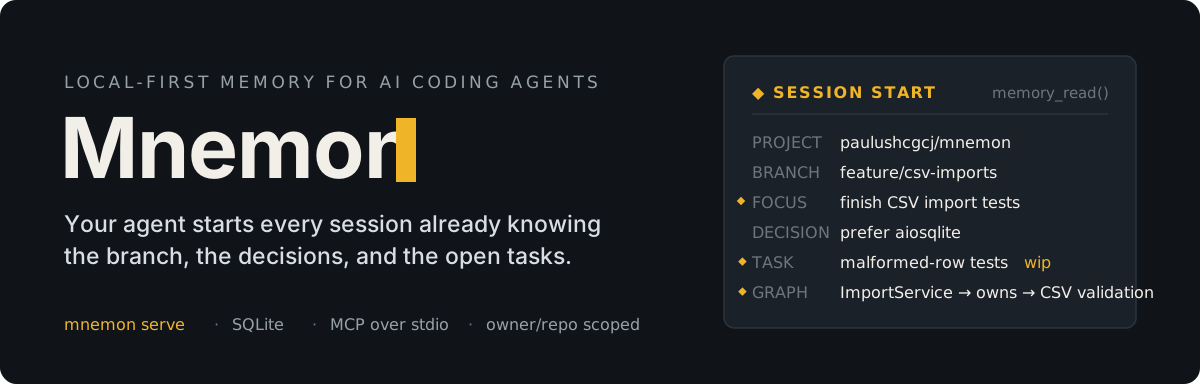




Persistent project memory and a scoped knowledge graph for AI coding agents.
AI coding sessions lose the thread. Every new session re-asks for the branch goal, the plan, the constraints, the decision history, the half-finished task. Mnemon fixes this with a small, local-first memory layer: the agent reads a context block at session start and writes back what it learned, so the next session starts already oriented.
There is no hosted service and no vector database. Mnemon runs as an MCP server, stores everything in one SQLite file, and scopes memory by project and branch — the way software work actually happens.

Get started
Install the CLI, initialize your repository, and connect the MCP server.
Mac / Linux
curl -fsSL https://raw.githubusercontent.com/paulushcgcj/mnemon/main/install.sh | bash
Windows (PowerShell)
irm https://raw.githubusercontent.com/paulushcgcj/mnemon/main/install.ps1 | iex
Via uv (all platforms)
uv tool install mnemonn
macOS note: if you see a security warning on first run, clear the quarantine flag once:
xattr -d com.apple.quarantine /usr/local/bin/mnemon
One-off usage — run without installing:
uvx mnemonn read --help
From source (development):
git clone https://github.com/paulushcgcj/mnemon.git
cd mnemon
uv sync
uv tool install -e .
Connect your agent
Configure your MCP client to run Mnemon over stdio:
{
  "command": "mnemon",
  "args": ["serve"]
}
Initialize a repository
cd /path/to/your/repo
mnemon init
This detects the project id from git remote get-url origin and generates .github/copilot-instructions.md, which tells the agent to call Mnemon at session start and session end. Use --force to overwrite an existing file.
Your first session
- Start — the agent calls
memory_read(project_id, branch)and receives project context, branch focus, decisions, tasks, graph entities, and recent history. - Work — the agent updates task status, records decisions, and stores components and relations in the knowledge graph as they come up.
- Close — the agent calls
memory_summarize(...)with the session summary, current focus, and next steps.
The next session starts with all of it already available.

How it works
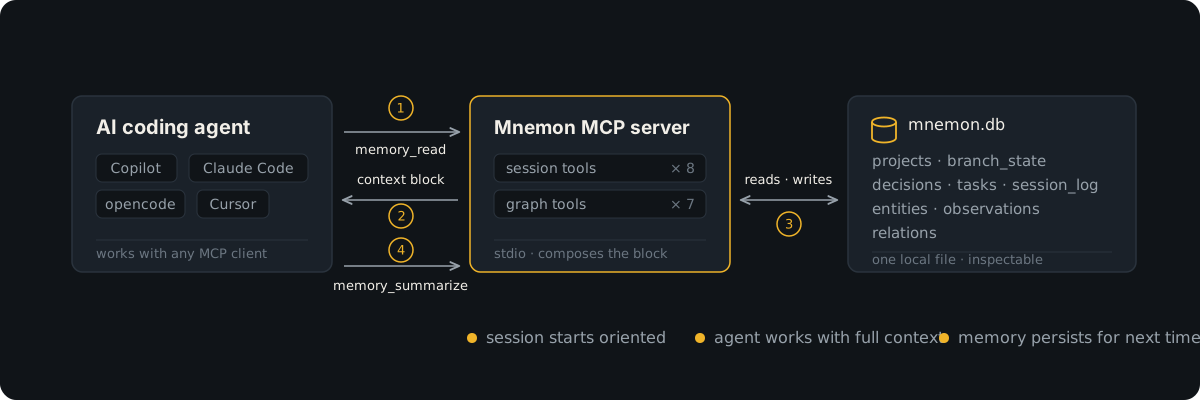
Mnemon keeps two complementary memory layers behind one MCP server.
Session memory
Answers "where are we right now?" — per project and per branch:
- project-wide context: stack, conventions, architecture notes
- branch-specific focus and next steps
- decisions, global or branch-scoped
- tasks with
todo,in-progress,blocked, ordonestatus - recent session summaries and commit entries logged through
memory_log_commit
Knowledge graph
Answers "what do we know about the important things here?":
- entities — components, concepts, files, people, systems, or custom types
- observations — factual notes attached to entities
- relations — typed connections such as
calls,implements,depends_on,owns - importance scores from
0.0to1.0
High-importance entities are included automatically in the session-start context, so architectural knowledge becomes working memory without a separate search step.
A session in practice
memory_read(project_id="owner/repo", branch="feature/imports")
Returns the full context block. During the session:
memory_task_update(task_id="a1b2c3d4", status="in-progress")

graph_entity_upsert(
  project_id="owner/repo",
  name="ImportService",
  entity_type="component",
  observations=["owns CSV validation"],
  importance=0.7
)
At the end:
memory_summarize(
  project_id="owner/repo",
  branch="feature/imports",
  summary="Implemented CSV validation path and added error handling.",
  current_focus="Finishing import validation edge cases.",
  next_steps="Add tests for malformed rows and empty files."
)

Tools & commands
MCP tools — session
| Tool | Purpose |
|---|---|
memory_read |
Full session-start context block for a project and branch |
memory_summarize |
Store end-of-session summary, focus, next steps, decisions, tasks |
memory_task_create |
Add a task during the session |
memory_task_update |
Change a task's status or notes |
memory_search |
Search across entities, decisions, session log, and tasks |
memory_project_set_context |
Set the global project context |
memory_project_list |
List known projects |
memory_log_commit |
Log a commit into session history |
MCP tools — graph
| Tool | Purpose |
|---|---|
graph_entity_upsert |
Create or update an entity, optionally with observations |
graph_observe |
Add a fact to an existing entity |
graph_relate |
Connect two entities with a typed relation |
graph_search |
Search by entity name or observation content |
graph_read |
Read the graph, optionally filtered by importance |
graph_forget |
Delete an entity or a single observation |
graph_prune |
Remove stale, low-importance entities |
CLI
| Command | Purpose |
|---|---|
mnemon serve |
Start the MCP server over stdio |
mnemon init |
Generate .github/copilot-instructions.md (--force to overwrite) |
mnemon read |
Print the context block an agent receives (--project, --branch) |
mnemon graph |
Inspect the knowledge graph (--project, --min, --type) |
mnemon prune |
Remove stale entities (--below, --days, --dry-run) |
mnemon projects |
List projects known to the local store |
mnemon project-tree |
Show the project hierarchy |
mnemon project-children |
List child projects (--recursive) |
mnemon project-set-parent |
Attach or detach a parent project |
mnemon update |
Check for a newer release (--apply to upgrade via uv) |
Every command accepts --format text|json and --out, and mnemon --version prints the installed version. Commands also perform a cached daily update check: a notice goes to stderr when a newer release exists, network failures are ignored, and MNEMON_NO_UPDATE_CHECK=1 disables it.

Storage & data model
Everything lives in one inspectable SQLite file:
~/.agent-memory/mnemon.db
Nine tables: projects, project_state, branch_state, decisions, tasks, session_log, entities, observations, relations.
The project id is inferred from the git remote, so each repository gets a stable namespace and each branch keeps its own focus:
git@github.com:owner/repo.git  ─┐
https://github.com/owner/repo.git ─┴─▶  owner/repo
Current state is overwritten; history is appended. Session logs, decisions, and observations accumulate while branch focus and task statuses stay current.

Development
Mnemon is a Python 3.12+ package managed with uv:
uv sync                  # install dependencies
uv run mnemon --help     # run the CLI locally
uv run mnemon serve      # start the MCP server
uv run pytest            # run the test suite
uv run mypy src          # strict type checking
uv run ruff check .      # lint
The package entry point lives in pyproject.toml:
[project.scripts]
mnemon = "mnemon.cli:cli"
Design principles
- Continuity over retrieval tricks. Mnemon focuses on what an agent needs to resume work, not on building a general-purpose RAG stack.
- Project and branch scope by default. Memory follows the way software work actually happens.
- Append history, overwrite state. Logs and observations accumulate; current focus stays current.
- Local and inspectable. Memory is SQLite, and the CLI reads the same data the server does.
- Small surface area. Easy to install, understand, and remove.
Status & roadmap
Mnemon is early software and usable today: install it, initialize a repository, connect an MCP client, and let the agent keep project memory as work progresses. See CHANGELOG.md for release history — v1.2.0 ships the opt-in PyPI update check and removes the old git-hook setup in favor of MCP-only commit logging.
Next up, in rough order: export/import for portability, richer graph inspection, and client-specific setup guides.
License
Distributed under the MIT License. See LICENSE for details.
1 maintainer

Metadata
1 maintainer
Release files for mnemonn 1.3.4
For a detailed explanation of source distributions (sdists) and built distributions (wheels), please see the package formats documentation.
Source distribution (sdist)
| File | Size | Uploaded | |
|---|---|---|---|
| mnemonn-1.3.4.tar.gz | 133.1 kB | Details |
Built distribution (wheel)
| File | Interpreter | ABI | Platform | Reset |
|---|---|---|---|---|
| mnemonn-1.3.4-py3-none-any.whl | Python 3 | none | any | Details |
Total release size: 189.1 kB
Release files / mnemonn-1.3.4.tar.gz
| Download URL | mnemonn-1.3.4.tar.gz |
|---|---|
| Size | 133.1 kB |
| Tags | Source |
|
SHA-256 checksum How to use checksums |
2f922372a1cb04b4ba7a5bd9473311228c452be10a4c46f34f63de8ab74f59a8
|
|
BLAKE2b-256 checksum How to use checksums |
a3b42f63b1deb3a7c30503ae7c0ee9e34ed9b789a1b3d30df244a805b7ccd3f1
|
| Upload date | |
|
Uploaded using Trusted Publishing? What is trusted publishing? |
Yes |
| Uploaded via |
uv/0.12.5 {"installer":{"name":"uv","version":"0.12.5","subcommand":["publish"]},"python":null,"implementation":{"name":null,"version":null},"distro":{"name":"Ubuntu","version":"24.04","id":"noble","libc":null},"system":{"name":null,"release":null},"cpu":null,"openssl_version":null,"setuptools_version":null,"rustc_version":null,"ci":true}
|
Release files / mnemonn-1.3.4-py3-none-any.whl
| Download URL | mnemonn-1.3.4-py3-none-any.whl |
|---|---|
| Size | 56.0 kB |
| Tags | Python 3 |
|
SHA-256 checksum How to use checksums |
e5d4361ebe0477e23c4c1222afd81dbed50ffc91a89b511b60b2b716f47f73fb
|
|
BLAKE2b-256 checksum How to use checksums |
86628f4d9fd9e675a464e91a9761b26473bb45c780b000bcbf0d25a95e907ff7
|
| Upload date | |
|
Uploaded using Trusted Publishing? What is trusted publishing? |
Yes |
| Uploaded via |
uv/0.12.5 {"installer":{"name":"uv","version":"0.12.5","subcommand":["publish"]},"python":null,"implementation":{"name":null,"version":null},"distro":{"name":"Ubuntu","version":"24.04","id":"noble","libc":null},"system":{"name":null,"release":null},"cpu":null,"openssl_version":null,"setuptools_version":null,"rustc_version":null,"ci":true}
|














