
Mnemosyne
 __  __ _  _ ___ __  __  ___  ___ _  _ _  _ ___
|  \/  | \| | __|  \/  |/ _ \/ __| || | \| | __|
| |\/| | .` | _|| |\/| | (_) \__ \ \/ | .` | _|
|_|  |_|_|\_|___|_|  |_|\___/|___/\__/|_|\_|___|
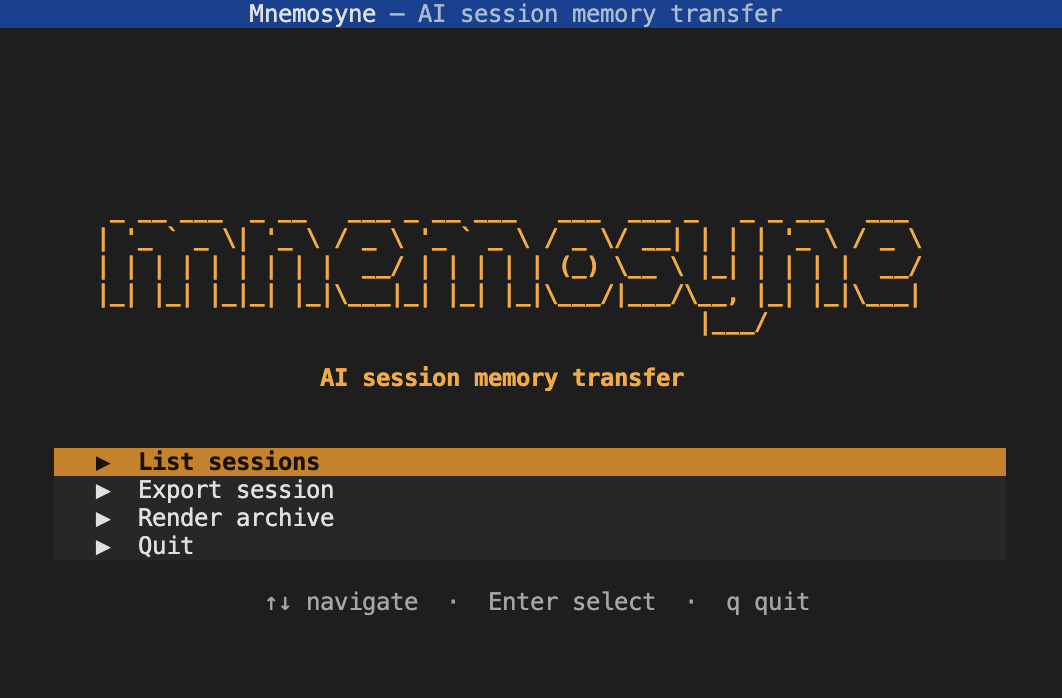
AI session memory transfer — Export AI coding-assistant chat sessions into a portable, tool-agnostic format so you can carry context from one tool or IDE into another.
Supports: Claude Code, GitHub Copilot, Cursor, Windsurf, Aider, Continue, Open WebUI / Ollama, Jan, ChatGPT (web export) — and more via the provider registry.
Read this before you rely on it: there is no supported way to make one AI tool "resume" a conversation that happened in a different tool. What this tool actually does is:
- Parse each tool's own local session storage into one shared schema.
- Render that into a full JSON archive and a condensed Markdown transcript.
- You paste the Markdown into a new chat, or save it as a context file the
tool auto-loads —
.github/copilot-instructions.mdfor Copilot,CLAUDE.md/AGENTS.mdfor Claude Code — to seed a fresh session.
That's a real, working way to carry context across. It's a "seed the next conversation with a summary", not "transplant conversation state", because the latter doesn't exist as a capability on either side.
Full documentation: docs/reference.md Adding a new provider: docs/adding-a-provider.md
Why this matters
AI coding assistants have become core to how many developers work — but they are siloed. Each tool stores its conversation history in a proprietary, undocumented format that no other tool can read. In practice this means:
- You switch from Copilot to Claude Code mid-project and lose all the context about decisions, constraints, and dead ends you already explored.
- You hit a token limit or rate limit and open a new session, but the model has no memory of what you were doing.
- You want to try a different tool for a day, but the activation cost of re-explaining everything is too high, so you don't.
- A long Aider or Continue session gets stale and you can't easily review what was agreed or attempted before starting a new one.
Context is the expensive part of working with AI. Every time you lose it you pay with time, repeated explanations, and the model making choices that contradict earlier decisions it was already guided away from.
mnemosyne solves this by treating every tool's internal storage as
a data source and normalising it into a single portable schema. The output
is a condensed Markdown transcript that any LLM can read — no proprietary
formats, no vendor lock-in, no context loss when you switch tools.
Install
Global install from PyPI (recommended)
Install globally with pipx — this keeps the tool isolated so it never conflicts with other projects:
pipx install mnemosyne-chat
mnemosyne           # interactive UI, available anywhere
mnemosyne-cli       # CLI for scripting
Or with plain pip (Python 3.10+ required):
pip install mnemosyne-chat
mnemosyne
From source (development)
With uv (fastest):
brew install uv
git clone <this repo> && cd mnemosyne
uv venv && source .venv/bin/activate
uv pip install -e .
mnemosyne
With Poetry:
brew install poetry
git clone <this repo> && cd mnemosyne
poetry install
poetry run mnemosyne
With standard venv:
git clone <this repo> && cd mnemosyne
python3 -m venv venv && source venv/bin/activate
pip install -e .
mnemosyne
Quick Start
After installing, run the interactive UI:
mnemosyne
Or if using python -m:
python3 -m mnemosyne
This opens a menu-driven terminal interface where you can:
- List Sessions — Browse available Claude Code or Copilot Chat sessions with session ID, last modified time, size, and project
- Export Session — Select a session and configure export options (output directory, tail length to keep only recent turns)
- Render Archive — Re-render a previously exported JSON archive back to Markdown (useful if you edit the archive or update the rendering logic)
All navigation is keyboard-driven:
- Arrow keys / Tab — Move between options
- Enter — Select
- Escape — Go back to previous menu
Usage
Interactive Terminal UI (recommended)
The interactive UI is the primary way to use this tool:
mnemosyne
Features:
- Menu-driven interface for listing sessions, exporting, and rendering
- Browse sessions with session ID, last modified time, size, and project
- Configure export options interactively (output directory, tail length)
- Real-time progress during export
- All keyboard-driven (arrow keys, Tab, Enter, Escape)
Command-Line Interface (scripting)
For automation or scripting, use the CLI:
# See what's available
mnemosyne-cli list claude
mnemosyne-cli list claude --project /path/to/project
mnemosyne-cli list copilot
mnemosyne-cli list copilot --project /path/to/project

# Export the most recent matching session (add --session <id> for a specific one)
mnemosyne-cli export claude --project /path/to/project --out ./chat-exports
mnemosyne-cli export copilot --project /path/to/project --out ./chat-exports

# Long session? Keep just the tail so the Markdown doc is small enough to
# actually paste into a fresh chat (every tool call/result is its own turn,
# so full exports of long sessions get big fast).
mnemosyne-cli export claude --project /path/to/project --tail 60

# Re-render the Markdown from a saved JSON archive (e.g. after editing it,
# or after a render.py change) without re-parsing the original session
mnemosyne-cli render --from ./chat-exports/claude_<id>.json
Each export produces two files in --out:
<source>_<session-id>.json— full-fidelity archive<source>_<session-id>.md— condensed transcript, meant for pasting into another chat or a context file
How the schema works
All parsers normalise into the same shape — see docs/reference.md for the full schema and output format documentation.
Transcript
  source: "claude-code" | "copilot" | "aider" | "chatgpt" | ...
  session_id, project_path, title, exported_at
  turns: [
    Turn
      role: "user" | "assistant"
      text: str
      tool_calls: [ToolCall(tool, summary, detail)]
  ]
Development
After setting up your virtual environment (see Install section above):
# Run tests
python3 -m unittest discover -s tests -v

# Or with uv:
uv run python -m unittest discover -s tests -v

# Or with Poetry:
poetry run python -m unittest discover -s tests -v
Tests use small synthetic fixtures, not real session data — don't add
tests that read from ~/.claude/projects or VS Code's workspaceStorage
directly; that's real (possibly private) user data, not something to
depend on in a test suite.
License
GNU Affero General Public License v3.0 — see LICENSE for details.
In short: you can use, modify, and distribute this software freely, but if you run a modified version as a service (including over a network), you must share the source code with your users. See LICENSE for the full text.
1 maintainer

Download files
Download the file for your platform. If you're not sure which to choose, learn more about installing packages.
Source Distribution
Built Distribution
Filter files by name, interpreter, ABI, and platform.
If you're not sure about the file name format, learn more about wheel file names.
Copy a direct link to the current filters
File details
Details for the file mnemosyne_chat-1.1.0.tar.gz.
File metadata
- Download URL: mnemosyne_chat-1.1.0.tar.gz
- Upload date:
- Size: 50.4 kB
- Tags: Source
- Uploaded using Trusted Publishing? No
- Uploaded via:
poetry/2.2.1 CPython/3.13.0 Darwin/25.2.0
File hashes
| Algorithm | Hash digest | |
|---|---|---|
| SHA256 |
d8ef32dadadf0a50fcc6b7df2a55bce17bf8dbf8ddbad3fab8e5ef889d97616c
|
|
| MD5 |
d1c0aba6cab9840ac4223454527561ff
|
|
| BLAKE2b-256 |
42e3f4c5ac7bb63afff932740f6f28fb7a5b78ffd4f0f40f64f403f9596e11bb
|
File details
Details for the file mnemosyne_chat-1.1.0-py3-none-any.whl.
File metadata
- Download URL: mnemosyne_chat-1.1.0-py3-none-any.whl
- Upload date:
- Size: 55.9 kB
- Tags: Python 3
- Uploaded using Trusted Publishing? No
- Uploaded via:
poetry/2.2.1 CPython/3.13.0 Darwin/25.2.0
File hashes
| Algorithm | Hash digest | |
|---|---|---|
| SHA256 |
d2ca6b6959edf55ba8e8e0a7ffab4d629150020d40c3de49dbaf941dcbd35527
|
|
| MD5 |
1c952a8bb33406d75f22637776f0dd34
|
|
| BLAKE2b-256 |
e6afc04ce4ca482e054149885fb4d7a6786911f7b6f4bd40955190d174f36e0d
|







