




NanoPlaceR: Reinforcement-learning placement and routing for FCN

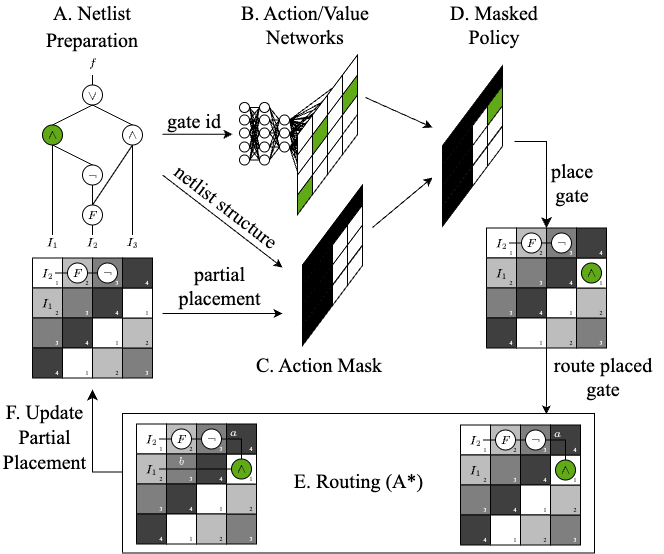
NanoPlaceR is an open-source physical-design tool for field-coupled nanocomputing (FCN). It uses masked Proximal Policy Optimization to place logic elements and routes each partial placement with A* search. It can generate layouts for logic networks of roughly 200 gates while using about 50% less area than the state-of-the-art heuristic approach described in the publications below.
Installation
NanoPlaceR supports Python 3.11 through 3.14 and requires mnt.pyfiction 0.8 or newer. The CI suite covers both ends of that range.
python -m venv .venv
source .venv/bin/activate
python -m pip install mnt.nanoplacer
On Windows, activate the environment with .venv\Scripts\activate.
Usage
Use NanoPlaceR from Python:
from mnt.nanoplacer import create_layout

create_layout(
    benchmark="trindade16",
    function="mux21",
    clocking_scheme="2DDWave",
    technology="QCA",
    minimal_layout_dimension=False,
    layout_width=3,
    layout_height=4,
    time_steps=10_000,
    reset_model=True,
    verbose=1,
    optimize=True,
)
Or use the command-line interface:
mnt.nanoplacer --help
mnt.nanoplacer --benchmark trindade16 --function mux21 \
  --clocking-scheme 2DDWave --technology Gate-level \
  --minimal-layout-dimension --time-steps 10000 --verbose 1
Runs store generated layouts in layouts/, trained agents in models/, and TensorBoard data in tensorboard/. By default, the CLI resumes a matching saved model when one exists; pass --reset-model to train from scratch.
Browser interface
Install the optional standalone GUI and launch it locally:
python -m pip install "mnt.nanoplacer[gui]"
mnt.nanoplacer.gui
The interface opens at http://127.0.0.1:5056. Use --port 5057 to choose another port, --no-browser to suppress automatic opening, or --runs-dir PATH to choose where experiments are saved.
Choose a bundled circuit, technology and clocking scheme, then configure its grid, random seed and training budget. The canvas shows the best partial placement, including the actual clock phases; completed solutions are identified separately. SiDB uses 2DDWave during training and converts its output to a hexagonal layout. Optimization is available for 2DDWave only. Predefined minimum dimensions are experimental targets, not a guarantee that every seed or budget will find a solution.
Training runs in a separate process, one run at a time per GUI instance. Reloading the page restores its current progress. The training statistics panel plots the mean return of the latest 100 completed episodes (fewer at the start), with sampled history and timesteps relative to the current run. It shows the agent's training reward, not an independent layout-quality score. Cancel requests a graceful stop and checkpoint save; if a native operation prevents that, the worker is terminated after a short grace period. Earlier run folders are preserved. A finished training budget without a solution is reported honestly as such. PPO may finish its current rollout beyond the requested timestep budget.
Each run has its own folder under nanoplacer-runs/, with configuration, log, previews, generated layouts and a saved agent. Downloads become available when the worker stops writing its outputs. The resume option copies the latest compatible agent into a new run; circuit, technology, clocking scheme and grid size must match. Only checkpoints in local run folders are accepted; never add untrusted model files to them. Gate-level FGL output is also kept for complete solutions alongside the selected technology's usual output. Downloaded layouts can be opened in other MNT tools where their topology and clocking scheme are supported.
This is a local workstation interface, bound to loopback, not a multi-user hosted service. It supports bundled benchmarks, grids up to 128 × 128, and budgets up to 10 million timesteps. The Python API and original CLI remain available without the GUI dependency.
Repository structure
src/mnt/nanoplacer/
├── benchmarks/                  Verilog benchmark circuits
├── main.py                      Python and command-line entry point
└── placement_envs/
    ├── nano_placement_env.py    Gymnasium placement environment
    └── utils/
        ├── layout_dimensions.py Predefined minimal dimensions
        └── placement_utils.py   Network and action helpers
tests/                           Unit and integration tests
References
If you use NanoPlaceR in your work, please cite the following publications:
- Late Breaking Results From Hybrid Design Automation for Field-coupled Nanotechnologies (DAC 2023)
- Thinking Outside the Clock: Physical Design for Field-coupled Nanocomputing with Deep Reinforcement Learning (ISQED 2024)
@INPROCEEDINGS{hofmann2023nanoplacer,
  author        = {S. Hofmann and M. Walter and L. Servadei and R. Wille},
  title         = {{Late Breaking Results From Hybrid Design Automation for Field-coupled Nanotechnologies}},
  booktitle     = {{2023 60th ACM/IEEE Design Automation Conference (DAC)}},
  year          = {2023},
}
@INPROCEEDINGS{hofmann2024nanoplacer,
  author        = {S. Hofmann and M. Walter and L. Servadei and R. Wille},
  title         = {{Thinking Outside the Clock: Physical Design for Field-coupled Nanocomputing with Deep Reinforcement Learning}},
  booktitle     = {{2024 25th International Symposium on Quality Electronic Design (ISQED)}},
  year          = {2024},
}
1 maintainer

Metadata
1 maintainer
Release files for mnt.nanoplacer 0.3.0
For a detailed explanation of source distributions (sdists) and built distributions (wheels), please see the package formats documentation.
Source distribution (sdist)
| File | Size | Uploaded | |
|---|---|---|---|
| mnt_nanoplacer-0.3.0.tar.gz | 4.3 MB | Details |
Built distribution (wheel)
| File | Interpreter | ABI | Platform | Reset |
|---|---|---|---|---|
| mnt_nanoplacer-0.3.0-py3-none-any.whl | Python 3 | none | any | Details |
Total release size: 8.6 MB
Release files / mnt_nanoplacer-0.3.0.tar.gz
| Download URL | mnt_nanoplacer-0.3.0.tar.gz |
|---|---|
| Size | 4.3 MB |
| Tags | Source |
|
SHA-256 checksum How to use checksums |
fc2ca89580c083328ea2caeef311d310ef49c1631c96f7afc6e264757b059675
|
|
BLAKE2b-256 checksum How to use checksums |
1cd2c7b62fa763b2d84716cc924059a83ce8d46bbb6f7c4633b7bfdef2c08d0f
|
| Upload date | |
|
Uploaded using Trusted Publishing? What is trusted publishing? |
Yes |
| Uploaded via |
twine/7.0.0 CPython/3.13.14
|
Provenance
Provenance describes where a file came from. On PyPI, provenance is shared via attestations, which provide a verifiable record of the build or publishing details. View details, limitations and caveats.


PyPI Publish Attestation
PyPI verified that this artifact, at this checksum, originated from the publisher listed below.
Signed by GitHub Actions, verified by PyPI on Sep 8, 2026.
Transparency logRelease files / mnt_nanoplacer-0.3.0-py3-none-any.whl
| Download URL | mnt_nanoplacer-0.3.0-py3-none-any.whl |
|---|---|
| Size | 4.3 MB |
| Tags | Python 3 |
|
SHA-256 checksum How to use checksums |
7f48cc9db09b0ef948a69a7caebb4fdd5b7a058c64c7d560b0d9a736db7af231
|
|
BLAKE2b-256 checksum How to use checksums |
feec9052719690b493f6392e48146beb9600b90c34abb3cc31443df999a61dc8
|
| Upload date | |
|
Uploaded using Trusted Publishing? What is trusted publishing? |
Yes |
| Uploaded via |
twine/7.0.0 CPython/3.13.14
|
Provenance
Provenance describes where a file came from. On PyPI, provenance is shared via attestations, which provide a verifiable record of the build or publishing details. View details, limitations and caveats.
PyPI Publish Attestation
PyPI verified that this artifact, at this checksum, originated from the publisher listed below.
Signed by GitHub Actions, verified by PyPI on Sep 8, 2026.
Transparency log













