



mobile-env: An Open Environment for Autonomous Coordination in Mobile Networks
mobile-env is an open, minimalist environment for training and evaluating coordination algorithms in wireless mobile networks. The environment allows modeling users moving around an area and can connect to one or multiple base stations. Using the Gymnasium (previously Gym) interface, the environment can be used with any reinforcement learning framework (e.g., stable-baselines or Ray RLlib) or any custom (even non-RL) coordination approach. The environment is highly configurable and can be easily extended (e.g., regarding users, movement patterns, channel models, etc.).
mobile-env supports multi-agent and centralized reinforcement learning policies. It provides various choices for rewards and observations. mobile-env is also easily extendable, so that anyone may add another channel models (e.g. path loss), movement patterns, utility functions, etc.
As an example, mobile-env can be used to study multi-cell selection in coordinated multipoint. Here, it must be decided what connections should be established among user equipments (UEs) and base stations (BSs) in order to maximize Quality of Experience (QoE) globally. To maximize the QoE of single UEs, the UE intends to connect to as many BSs as possible, which yields higher (macro) data rates. However, BSs multiplex resources among connected UEs (e.g. schedule physical resource blocks) and, therefore, UEs compete for limited resources (conflicting goals). To maximize QoE globally, the policy must recognize that (1) the data rate of any connection is governed by the channel (e.g. SNR) between UE and BS and (2) QoE of single UEs not necessarily grows linearly with increasing data rate.
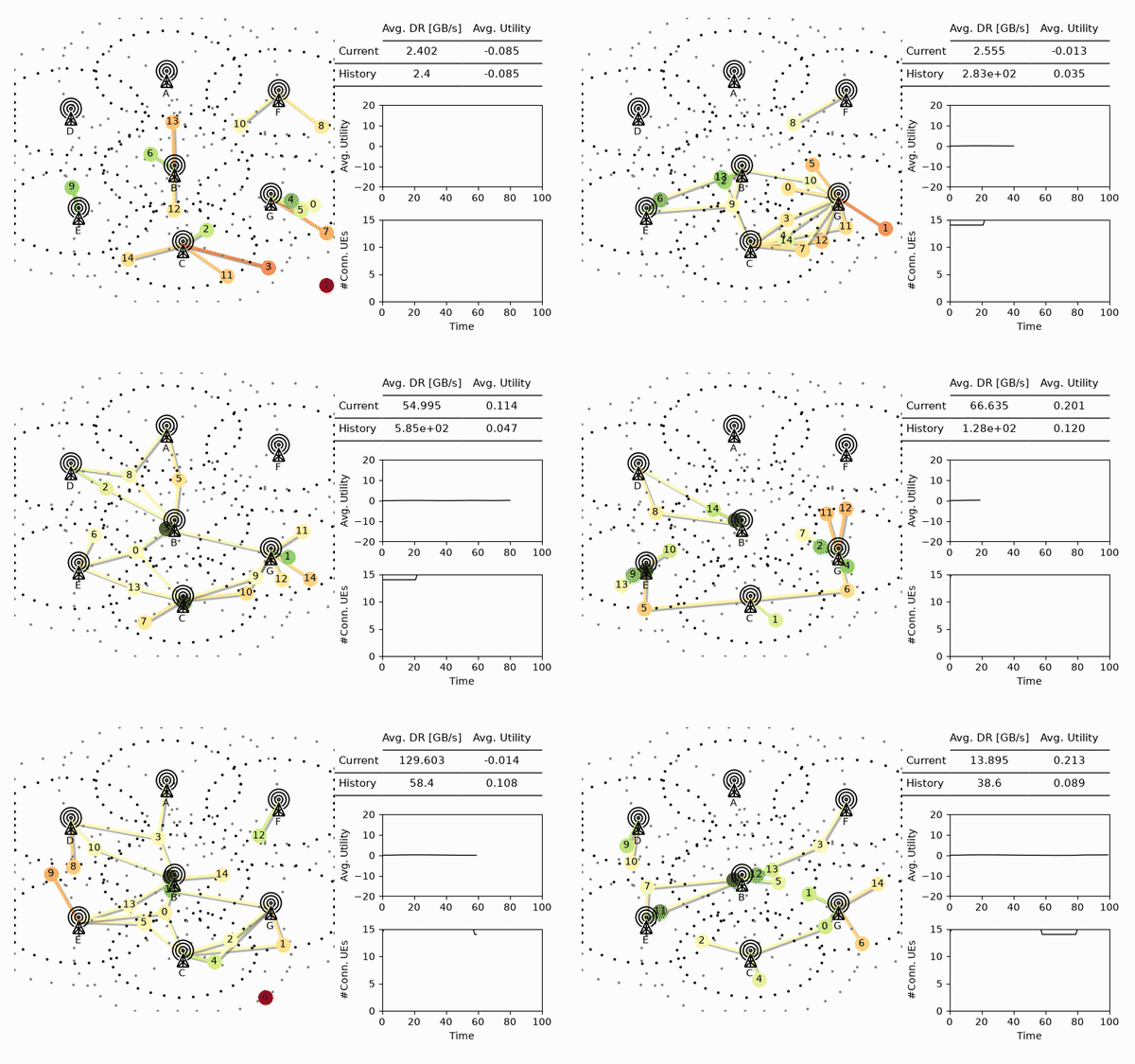
A multi-agent PPO policy (trained with Ray RLlib; see docs/scripts/) coordinating cell selection on the medium scenario. Base station icon by Clea Doltz from the Noun Project
Try mobile-env:
- Part I: Customizing mobile-env and single-agent RL with stable-baselines3:
- Part II: Multi-agent RL on mobile-env with Ray RLlib:
Documentation and API: ReadTheDocs
Citation
If you use mobile-env in your work, please cite our paper (author PDF):
@inproceedings{schneider2022mobileenv,
  author = {Schneider, Stefan and Werner, Stefan and Khalili, Ramin and Hecker, Artur and Karl, Holger},
  title = {mobile-env: An Open Platform for Reinforcement Learning in Wireless Mobile Networks},
  booktitle={Network Operations and Management Symposium (NOMS)},
  year = {2022},
  publisher = {IEEE/IFIP},
}
mobile-env is based on the underlying environment using in DeepCoMP, which is a combination of reinforcement learning approaches for dynamic multi-cell selection. mobile-env provides this underlying environment as open, stand-alone environment.
Installation
From PyPI (Recommended)
The simplest option is to install the latest release of mobile-env from PyPI using pip:
pip install mobile-env
This is recommended for most users. mobile-env is tested on Ubuntu, Windows, and MacOS.
From Source (Development)
Alternatively, for development, you can clone mobile-env from GitHub and install it from source.
We recommend uv for setting up a development environment
(see installation instructions); plain
pip works the same way, just drop the uv prefix.
After cloning, create a virtual environment and install mobile-env in "editable" mode (-e):
uv venv
source .venv/bin/activate
uv pip install -e .
This is equivalent to running uv pip install -r requirements.txt.
If you want to run tests or example notebooks, also install the requirements in tests:
uv pip install -r tests/requirements.txt
For dependencies for building docs, install the requirements in docs.
Example Usage
import gymnasium
import mobile_env

env = gymnasium.make("mobile-medium-central-v0")
obs, info = env.reset()
done = False

while not done:
    action = ... # Your agent code here
    obs, reward, terminated, truncated, info = env.step(action)
    done = terminated or truncated
    env.render()
Customization
mobile-env supports custom channel models, movement patterns, arrival & departure models, resource multiplexing schemes and utility functions. For example, replacing the default Okumura–Hata channel model by a (simplified) path loss model can be as easy as this:
import gymnasium
import numpy as np
from mobile_env.core.base import MComCore
from mobile_env.core.channel import Channel


class PathLoss(Channel):
    def __init__(self, gamma, **kwargs):
        super().__init__(**kwargs)
        # path loss exponent
        self.gamma = gamma

    def power_loss(self, bs, ue):
        """Computes power loss between BS and UE."""
        dist = bs.point.distance(ue.point)
        loss = 10 * self.gamma * np.log10(4 * np.pi * dist * bs.frequency)
        return loss


# replace default channel model in configuration
config = MComCore.default_config()
config['channel'] = PathLoss

# pass init parameters to custom channel class!
config['channel_params'].update({'gamma': 2.0})

# create environment with custom channel model
env = gymnasium.make('mobile-small-central-v0', config=config)
# ...
Projects Using mobile-env
If you are using movile-env, please let us know and we are happy to link to your project from the readme. You can also open a pull request yourself.
- Mir Riyanul Islam, Shaibal Barua, Mobyen Uddin Ahmed, Shahina Begum, "Explaining Agents' Interactions Through their Causal Behavior and Counterfactuals", 2026
- Zeyu Fang, Shu Hong, Huu Trung Thieu, Nakjung Choi, Tian Lan, "ZODIAC: Zero-shot Offline Diffusion for Inferring Multi-xApps Conflicts in Open Radio Access Networks", 2026
- Nicolas Helson, Pegah Alizadeh, Anastasios Giovanidis, "Selecting Offline Reinforcement Learning Algorithms for Stochastic Network Control", 2026
- Weijun Huang, Chen-Khong Tham, "Transformer-based Reinforcement Learning for Base Station Selection", 2025
- Boikobo Nokane, Bassey Isong, Moshe T. Masonta, "Evaluating Reinforcement Learning-Based Xapps for User-Centric Resource Allocation in Open RAN", 2025
- Konrad Nowosadko, Franco Ruggeri, Ahmad Terra, "Self-Explaining Reinforcement Learning for Mobile Network Resource Allocation", 2025
- Ziyang Zhang, Yiming Liu, Zheng Jiang, Bei Yang, Jianchi Zhu, "An Intelligent Energy-Efficient Handover Scheme Based on CoMP for Heterogeneous Network", 2024
- Harun Ur Rashid, Seong Ho Jeong, "Resource Allocation in Multi-Cell Networks: A Deep Reinforcement Learning Approach", 2023
- Mohammadreza Kouchaki and Vuk Marojevic, "Actor-Critic Network for O-RAN Resource Allocation: xApp Design, Deployment, and Analysis", 2022
- Stefan Schneider, Ramin Khalili, Artur Hecker, Holger Karl, "DeepCoMP: Self-Learning Dynamic Multi-Cell Selection for Coordinated Multipoint (CoMP)", 2021
Contributing
Development: @stefanbschneider and @stwerner97
We happy if you find mobile-env useful. If you have feedback or want to report bugs, feel free to open an issue. Also, we are happy to link to your projects if you use mobile-env.
We also welcome contributions: Whether you implement a new channel model, fix a bug, or just make a minor addition elsewhere, feel free to open a pull request!
1 maintainer

Metadata
1 maintainer
Release files for mobile-env 2.1.0
For a detailed explanation of source distributions (sdists) and built distributions (wheels), please see the package formats documentation.
Source distribution (sdist)
| File | Size | Uploaded | |
|---|---|---|---|
| mobile_env-2.1.0.tar.gz | 31.3 kB | Details |
Built distribution (wheel)
| File | Interpreter | ABI | Platform | Reset |
|---|---|---|---|---|
| mobile_env-2.1.0-py3-none-any.whl | Python 3 | none | any | Details |
Total release size: 65.8 kB
Release files / mobile_env-2.1.0.tar.gz
| Download URL | mobile_env-2.1.0.tar.gz |
|---|---|
| Size | 31.3 kB |
| Tags | Source |
|
SHA-256 checksum How to use checksums |
e9cb9b439ecbd7d046e6389d72dabdd28840ea5c279321a0a2c846bc2719146c
|
|
BLAKE2b-256 checksum How to use checksums |
f66eba08b5e47bf4538ec780571650768980a06ddcb42a1718c29e500ef593dd
|
| Upload date | |
|
Uploaded using Trusted Publishing? What is trusted publishing? |
Yes |
| Uploaded via |
twine/7.0.0 CPython/3.13.14
|
Provenance
Provenance describes where a file came from. On PyPI, provenance is shared via attestations, which provide a verifiable record of the build or publishing details. View details, limitations and caveats.


PyPI Publish Attestation
PyPI verified that this artifact, at this checksum, originated from the publisher listed below.
Signed by GitHub Actions, verified by PyPI on Aug 15, 2026.
Transparency logRelease files / mobile_env-2.1.0-py3-none-any.whl
| Download URL | mobile_env-2.1.0-py3-none-any.whl |
|---|---|
| Size | 34.4 kB |
| Tags | Python 3 |
|
SHA-256 checksum How to use checksums |
f1c6b6a4167b5844c193f663e604288ecc5f95620c97f594f55e5469c042efb1
|
|
BLAKE2b-256 checksum How to use checksums |
d41418a76b7db1c59742ca9683f528437b6097805851a7f7b2863caf7bd4c07b
|
| Upload date | |
|
Uploaded using Trusted Publishing? What is trusted publishing? |
Yes |
| Uploaded via |
twine/7.0.0 CPython/3.13.14
|
Provenance
Provenance describes where a file came from. On PyPI, provenance is shared via attestations, which provide a verifiable record of the build or publishing details. View details, limitations and caveats.
PyPI Publish Attestation
PyPI verified that this artifact, at this checksum, originated from the publisher listed below.
Signed by GitHub Actions, verified by PyPI on Aug 15, 2026.
Transparency log













