
The API mocking server for microservice environments

Project description
Mockintosh





Quick Links
About
You've just found a new way of mocking microservices!
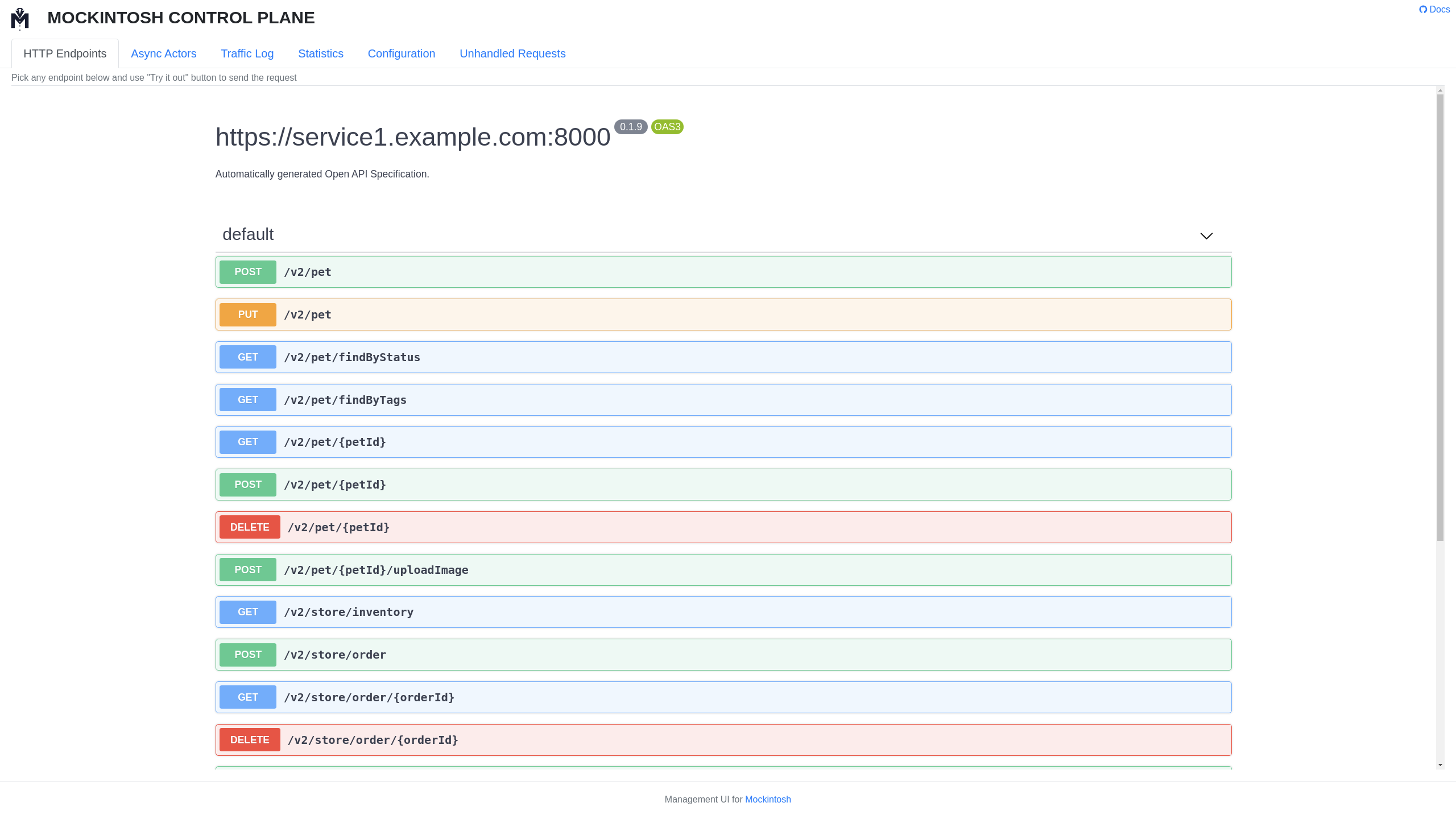
An example config that demonstrates the common features of Mockintosh:
services:
  - name: Mock for Service1
    hostname: localhost
    port: 8000
    managementRoot: __admin  # open http://localhost:8001/__admin it in browser to see the UI
    endpoints:

      - path: "/"  # simplest mock

      - path: "/api/users/{{param}}"  # parameterized URLs
        response: "simple string response with {{param}} included"

      - path: /comprehensive-matching-and-response
        method: POST
        queryString:
          qName1: qValue  # will only match if query string parameter exists
          qName2: "{{regEx '\\d+'}}"  # will require numeric value
        headers:
          x-required-header: someval  # will cause only requests with specific header to work
        body:
          text: "{{regEx '.+'}}"  # will require non-empty POST body
        response: # the mocked response specification goes below
          status: 202
          body: "It worked"
          headers:
            x-response-header: "{{random.uuid4}}"  # a selection of random/dynamic functions is available
            x-query-string-value: "{{request.queryString.qName2}}"  # request parts can be referenced in response
Mockintosh is a service virtualization tool that's capable to generate mocks for RESTful APIs and communicate with message queues to either mimic asynchronous tasks or to simulate microservice architectures in a blink of an eye.
The state-of-the-art mocking capabilities of Mockintosh enables software development teams to work independently while building and maintaining a complicated microservice architecture.
Key features:
- Multiple services mocked by a single instance of Mockintosh
- Lenient configuration syntax
- Remote management UI+API
- Request scenarios support with multi-response endpoints and tags
- Mock Actor pattern for Kafka, RabbitMQ, Redis and some other message bus protocols
- GraphQL queries recognizing
In this article we explain how and why Mockintosh was born as a new way of mocking microservices.
Quick Start
Install on MacOS
Install Mockintosh app on Mac using Homebrew package manager:
$ brew install up9inc/repo/mockintosh
Install on Windows
Download an installer from releases section and launch it. Follow the steps in wizard to install Mockintosh.
Install on Linux
Install Mockintosh Python package using pip (or pip3 on some machines):
$ pip install -U mockintosh
Use Demo Sample Config
Run following command to generate example.yaml file in the current directory:
$ mockintosh --sample-config example.yaml
then, run that config with Mockintosh:
$ mockintosh example.yaml
And open http://localhost:9999 in your web browser.
You can also issue some CURL requests against it:
curl -v http://localhost:8888/

curl -v http://localhost:8888/api/myURLParamValue123/action

curl -v "http://localhost:8888/someMoreFields?qName1=qValue&qName2=12345" -X POST -H"X-Required-Header: someval" --data "payload"
Command-line Arguments
The list of command-line arguments can be seen by running mockintosh --help.
If you don't want to listen all of the services in a configuration file then you can specify a list of service
names (name is a string attribute you can set per service):
$ mockintosh example.yaml 'Mock for Service1' 'Mock for Service2'
Using --quiet and --verbose options the logging level can be changed.
Using --bind option the bind address for the mock server can be specified, e.g. mockintosh --bind 0.0.0.0
Using --enable-tags option the tags in the configuration file can be enabled in startup time,
e.g. mockintosh --enable-tags first,second
OpenAPI Specification to Mockintosh Config Conversion (experimental)
Note: This feature is experimental. One-to-one transpilation of OAS documents is not guaranteed.
It could be a good kickstart if you have already an OpenAPI Specification for your API. Mockintosh is able to transpile an OpenAPI Specification to its own config format in two different ways:
CLI Option --convert
Using the --convert one can convert an OpenAPI Specification to Mockintosh config.
JSON output example:
$ wget https://petstore.swagger.io/v2/swagger.json
$ mockintosh swagger.json -c new_config.json json
YAML example:
$ mockintosh swagger.json -c new_config.yaml yaml
Automatic Conversion
If you start Mockintosh with a valid OpenAPI Specification file then it automatically detects that the input is an OpenAPI Specification file:
$ mockintosh swagger.json
and automatically starts itself from that file. Without producing any new files. So you can start to edit this file through the management UI without even restarting Mockintosh.
Build the Docs
Single-command from /docs to review docs locally:
docker run -p 8080:4000 -v $(pwd):/site bretfisher/jekyll-serve
Or manual:
$ gem install jekyll bundler
Install the gems:
$ cd docs/
$ bundle config set --local path 'vendor/bundle'
$ bundle install
Run the server:
$ bundle exec jekyll serve
Release history Release notifications | RSS feed


Download files
Download the file for your platform. If you're not sure which to choose, learn more about installing packages.
Source Distribution
Built Distribution
Filter files by name, interpreter, ABI, and platform.
If you're not sure about the file name format, learn more about wheel file names.
Copy a direct link to the current filters
File details
Details for the file mockintosh-0.13.3.tar.gz.
File metadata
- Download URL: mockintosh-0.13.3.tar.gz
- Upload date:
- Size: 99.2 kB
- Tags: Source
- Uploaded using Trusted Publishing? No
- Uploaded via: twine/3.4.2 importlib_metadata/4.8.1 pkginfo/1.7.1 requests/2.26.0 requests-toolbelt/0.9.1 tqdm/4.62.3 CPython/3.8.7
File hashes
| Algorithm | Hash digest | |
|---|---|---|
| SHA256 |
9653e373aa280490c1dab0243eada4258cc2ecccc48575a78ab963aeb8f18f05
|
|
| MD5 |
f3bea47a4a69d24135c137c4ed240be6
|
|
| BLAKE2b-256 |
d7fdd9b573fce8b99dd1adb1eed9752385ea1d8ecf5712a05097a54515a5405b
|
File details
Details for the file mockintosh-0.13.3-py3-none-any.whl.
File metadata
- Download URL: mockintosh-0.13.3-py3-none-any.whl
- Upload date:
- Size: 109.9 kB
- Tags: Python 3
- Uploaded using Trusted Publishing? No
- Uploaded via: twine/3.4.2 importlib_metadata/4.8.1 pkginfo/1.7.1 requests/2.26.0 requests-toolbelt/0.9.1 tqdm/4.62.3 CPython/3.8.7
File hashes
| Algorithm | Hash digest | |
|---|---|---|
| SHA256 |
893e2596a7ccfbc8d926a9afbe108c16477cbab46497ffe840a770bf4d6f6726
|
|
| MD5 |
bec739fb3dc4e5a5f3132c617e8f799e
|
|
| BLAKE2b-256 |
107bc5e5ffc16942e6cdeca5cb508267d75bf8d9f9bbeeb6700390b44413ddbd
|






