
mocktcl
mocktcl checks that your Tcl code does what you expect.
You write small Tcl procedures called tests. Each test runs a piece of your code and checks the answer. mocktcl runs all your tests, tells you which ones passed and which failed, and shows you which parts of your code were never run by any test.
You don't need to know Python to use mocktcl, and you don't need any testing experience. This guide explains everything step by step.
Contents
- The words you'll see
- What you need first: Tcl
- Installing mocktcl
- Your first test, step by step
- Writing tests
- Checks you can use (assertions)
- Replacing commands during a test (mocks)
- Setting up and cleaning up (hooks)
- Sharing code between tests (helpers and fixtures)
- Running tests
- Reading the results
- Coverage: what did my tests miss?
- Saving your settings (configuration file)
- Troubleshooting
- For people working on mocktcl itself
- License
1. The words you'll see
| Word | What it means |
|---|---|
| Terminal | The window where you type commands, also called the command line or shell. On macOS it is the Terminal app. On Linux it is usually called Terminal too. Commands in this guide are typed there, followed by the Enter key. |
| Test | A small Tcl procedure, whose name starts with test_, that runs some of your code and checks the result. |
| Test file | A .tcl file whose name starts with test_, holding one or more tests. |
| Assertion | A check inside a test, such as "the answer should be 3". In mocktcl, assertions are commands that start with expect. If an assertion is wrong, the test fails. |
| Pass / Fail | A test passes when all its checks are right, and fails when a check is wrong. |
| Error | A test has an error when something broke before the checks could finish, such as a typo in a command name or a missing file. |
| Skip | A test you have asked mocktcl not to run for now. |
| Test runner | The program that finds your tests, runs them and reports the results. Here, that is mocktcl. |
| Mock | A pretend version of a command, used only during a test. For example, you can make clock seconds always return the same time, so a test gets the same answer every time. |
| Fixture | Ready-made test data, or a ready-made setup, that several tests share. |
| Helper | A Tcl file of handy procedures that your tests use. A helper isn't a test itself. |
| Coverage | A measurement of which parts of your code were run by your tests. Line coverage asks "was this line run?". Branch coverage asks "did the tests try every way through each if and switch?". |
| Report | A summary of the results. mocktcl can print one in the terminal, or write it as a web page or file. |
2. What you need first: Tcl
mocktcl runs your tests with Tcl 8.6, so Tcl must be installed.
Check whether you already have it. Open a terminal and type:
echo 'puts [info patchlevel]' | tclsh
- If you see a number such as
8.6.14, you're ready. Go to step 3. - If you see
command not found, or a number starting with8.5or lower, install Tcl as shown below.
Linux (Ubuntu or Debian):
sudo apt-get update
sudo apt-get install tcl
(sudo runs the command as the computer's administrator, so it may ask for your password.)
Linux (Fedora):
sudo dnf install tcl
macOS: the Tcl that comes with macOS is too old. Install a newer one with Homebrew, a free tool for installing software on a Mac:
brew install tcl-tk@8
Homebrew puts this Tcl in a folder of its own. Find out where by typing:
echo "$(brew --prefix tcl-tk@8)/bin/tclsh8.6"
Write down the path it prints, for example /opt/homebrew/opt/tcl-tk@8/bin/tclsh8.6.
Section 13 shows how to tell mocktcl to use it.
Windows: not supported yet.
3. Installing mocktcl
mocktcl is a single file that you download and run. It needs nothing besides Tcl.
Step 1: Find out what kind of computer you have
In a terminal, type:
uname -sm
| It prints | The file to download |
|---|---|
Linux x86_64 |
mocktcl-linux-x86_64 |
Linux aarch64 |
mocktcl-linux-arm64 |
Darwin arm64 (a Mac with an Apple M chip) |
mocktcl-macos-arm64 |
Step 2: Download it
Run these commands, changing mocktcl-linux-x86_64 to the file name from the table above:
mkdir -p ~/.local/bin
curl -L -o ~/.local/bin/mocktcl https://github.com/drummondj/mocktcl/releases/latest/download/mocktcl-linux-x86_64
chmod +x ~/.local/bin/mocktcl
What these commands do:
mkdir -p ~/.local/binmakes a folder called.local/binin your home folder, if it doesn't already exist.curl ...downloads the newest mocktcl and saves it in that folder asmocktcl.chmod +x ...marks the file as a program you're allowed to run.
You can also download the file from the Releases page
in your web browser. If you do, move it to ~/.local/bin, rename it to mocktcl, and then run the chmod command.
On a Mac only: macOS blocks programs downloaded from the internet that aren't from the App Store. To allow mocktcl, run:
xattr -d com.apple.quarantine ~/.local/bin/mocktcl
Step 3: Make sure your terminal can find it
When you type a command, your terminal looks for it in a list of folders called the PATH.
Check whether ~/.local/bin is on that list:
mocktcl --version
If it prints something like mocktcl 0.1.0, you're done.
If it says command not found, add the folder to your PATH, then close the terminal and open a new one:
# Linux (bash):
echo 'export PATH="$HOME/.local/bin:$PATH"' >> ~/.bashrc
# macOS (zsh, the default on Macs):
echo 'export PATH="$HOME/.local/bin:$PATH"' >> ~/.zshrc
Step 4 (optional): Check that the download isn't damaged
Each release has a file called SHA256SUMS.txt, which lists a unique fingerprint (a
"checksum") for each download. To compare your copy with it:
sha256sum ~/.local/bin/mocktcl      # on Linux
shasum -a 256 ~/.local/bin/mocktcl  # on macOS
The long string of letters and numbers it prints should match the line for your file in SHA256SUMS.txt.
Another way: install with Python
If your computer isn't in the table in step 1 (for example, an Intel Mac), or you already use
Python, you can install mocktcl from PyPI, the public
library of Python programs. You need Python 3.11 or newer; check with python3 --version.
The easiest tool for this is pipx, which installs a Python program in its own private folder so it can't clash with anything else on your computer:
# Install pipx (pick the line for your system):
sudo apt-get install pipx      # Debian, Ubuntu
sudo dnf install pipx          # Fedora, Red Hat
brew install pipx              # macOS
pipx ensurepath                # puts pipx's program folder on your PATH

# Then close the terminal, open a new one, and install mocktcl:
pipx install mocktcl
Check it with mocktcl --version. To move to a newer version later, run pipx upgrade mocktcl.
4. Your first test, step by step
This walkthrough builds a tiny project from nothing. Type the commands and create the files as shown.
Step 1: Make a project folder
mkdir my-project
cd my-project
mkdir src tests
You now have this layout:
my-project/
   src/      <- your Tcl code goes here
   tests/    <- your tests go here
The src folder name is only a habit. Your code can live anywhere. The tests folder
name matters, because mocktcl looks there by default.
Step 2: Write some code to test
Create a file called src/greet.tcl containing:
proc greet {name} {
    if {$name eq ""} {
        return "Hello, stranger!"
    }
    return "Hello, $name!"
}
Step 3: Write a test
Create a file called tests/test_greet.tcl containing:
source src/greet.tcl

proc test_greet_with_a_name {} {
    expect [greet "Ada"] "Hello, Ada!"
}
What this means:
source src/greet.tclloads the code you want to test.proc test_greet_with_a_name {}creates a test. Its name must start withtest_.expect A Bis a check: "A should equal B". Here it runsgreet "Ada"and checks that the answer isHello, Ada!.
Step 4: Run it
Make sure you're in the my-project folder, then type:
mocktcl
You'll see:
mocktcl: tclsh 8.6.14, 1 test file
tests/test_greet.tcl .
1 passed in 0.01s

File           Lines  Miss  Line%  Branches  BrMiss  Branch%  Missing
---------------------------------------------------------------------
src/greet.tcl      4     1  75.0%         2       1    50.0%  3
---------------------------------------------------------------------
TOTAL              4     1  75.0%         2       1    50.0%
- The
.after the file name means one test passed. 1 passedis the summary.- The table underneath is the coverage report. It says line 3 of
src/greet.tclnever ran, because no test calledgreetwith an empty name. Section 12 explains the table.
Step 5: See what a failure looks like
Add a second test to the end of tests/test_greet.tcl. It has a deliberate mistake:
proc test_greet_without_a_name {} {
    expect [greet ""] "Hello, nobody!"
}
Run mocktcl again:
mocktcl: tclsh 8.6.14, 1 test file
tests/test_greet.tcl .F

========================= FAILURES =========================
___ tests/test_greet.tcl::test_greet_without_a_name (line 8) ___
expect failed: expected "Hello, nobody!" but got "Hello, stranger!"

1 passed, 1 failed in 0.01s
.Fmeans the first test passed (.) and the second one failed (F).- The FAILURES section names the test that failed, gives the line in the test file, and shows what was expected next to what actually came back.
Step 6: Fix it
Change "Hello, nobody!" to "Hello, stranger!" and run mocktcl again. Both tests pass, and the
coverage report shows 100.0%, which means every line and every branch of greet was tested.
You've written and run your first tests. The rest of this guide covers each feature in more detail.
5. Writing tests
Rules:
- Test files go in the
testsfolder (or any folder inside it), and their names start withtest_and end with.tcl. For example:tests/test_orders.tcl,tests/billing/test_invoices.tcl. - A test is a
procwhose name starts withtest_and that takes no arguments:proc test_something {} { ... }. - Tests run in the order they appear in the file.
- Each test file runs separately, in a fresh Tcl, so files can't interfere with each other. Tests in the same file do share global variables, so reset anything a test depends on. Hooks are a convenient place to do that.
Organising tests into folders. Folders inside tests are called test suites. They are only a way
to group related tests, and mocktcl searches all of them automatically:
tests/
   test_my_app.tcl
   test_my_package.tcl
   billing/                 <- a test suite
      test_invoices.tcl
      test_refunds.tcl
   fixtures/
      sample_orders.tcl     <- not a test (no test_ prefix)
   helpers.tcl              <- not a test (no test_ prefix)
Good habits:
- Give tests names that say what they check, for example
test_refund_is_rejected_after_30_days. - Keep each test small and focused on one behaviour.
- A test should give the same result every time it runs. If your code uses the time, random numbers, files or the network, use a mock.
6. Checks you can use (assertions)
| Command | The test passes when... | Example |
|---|---|---|
expect A B |
A equals B. Numbers are compared as numbers, so 2 equals 2.0, and tiny rounding errors in decimals are ignored (see below). |
expect [add 1 2] 3 |
expect_not A B |
A does not equal B | expect_not [new_id] "" |
expect_near A B T |
the number A is within T of the number B | expect_near $slack 0.12 0.001 |
expect_contains A B |
the text B appears somewhere inside A | expect_contains [greet Ada] "Ada" |
expect_list A B |
lists A and B hold the same items, in any order | expect_list [colors] {red green blue} |
expect_list_contains A B |
list A holds every item in list B (A may hold more) | expect_list_contains [colors] {red} |
expect_error {script} pattern |
running the script causes an error, and the message matches the pattern. * means "any text". |
expect_error {divide 1 0} "*divide by zero*" |
expect_called name N |
the mock called name ran exactly N times in this test (see mocks) |
expect_called send_email 1 |
Comparing decimal numbers
Computers store most decimal numbers slightly inaccurately. In Tcl, expr 10 * 0.66
gives 6.6000000000000005, not 6.6. This isn't a bug in your code. It's how
every programming language handles decimals.
expect and expect_not allow for this automatically. When either value is a decimal number,
the two count as equal if they differ by less than one part in a billion. So this passes:
expect [expr 10 * 0.66] 6.6
A real mistake still fails: 6.0 is never treated as equal to 6.6. Whole numbers and text are always
compared exactly.
When the answer should be zero. "One part in a billion" of zero is zero, so comparisons with zero use a
separate, fixed allowance instead: any number within 1e-12 (0.000000000001) of zero counts as zero. So this
passes, even though Tcl gives 5.551115123125783e-17 rather than 0:
expect [expr {0.1 + 0.2 - 0.3}] 0
1e-12 is far smaller than any real value in the units EDA tools use, such as ns, ps, pF or um, so it only
ever hides rounding noise. You can change it in your configuration file:
- If your values are in base units such as seconds or farads,
1e-12is a normal value (one picosecond, or one picofarad). Setfloat_zero_tolerance = 0so comparisons with zero are exact. - Rounding noise grows with the size of the numbers in the calculation.
1e-12covers calculations with values up to a few thousand. Calculations with larger values, such as die coordinates in um, can leave bigger noise.
When a comparison with zero fails by a tiny amount, the message points this out:
expect failed: expected "0" but got "-2.3283069916502086e-11"
(if this is floating-point rounding noise, use "expect_near <value> 0 <tolerance>", or change float_zero_tolerance in mocktcl.toml, currently 1e-12)
To allow a bigger difference for one check only, use expect_near, for example expect_near $offset 0 1e-9.
When "close enough" has a real meaning, such as a timing value that only needs to be correct to the
nearest picosecond, use expect_near and give the allowed difference:
expect_near $delay 6.6 0.001 ;# delay in ns: passes for anything from 6.599 to 6.601
Adding your own failure message. Every check accepts an extra last argument: a message that's shown if the check fails. This helps explain why the value matters:
expect [account_balance] 0 "a new account should start empty"
If it fails, you'll see:
expect failed: a new account should start empty
expected "0" but got "10"
Skipping a test. Use skip to stop a test early and mark it as skipped instead of passed or failed:
proc test_upload_to_server {} {
    skip "server not available on this machine yet"
}
7. Replacing commands during a test (mocks)
Sometimes the code you're testing calls something you don't want to run for real in a test:
- something slow (a network request)
- something that changes every time (the clock, random numbers)
- something with side effects (sending an email, deleting a file)
A mock swaps that command for a pretend version for the current test only. Afterwards, mocktcl puts the real command back automatically.
mock command_name {arguments} {
    body of the pretend version
}
It looks just like proc, and it works the same way.
Example: freeze the clock.
# src/report.tcl
proc report_year {} {
    return [clock format [clock seconds] -format %Y]
}
# tests/test_report.tcl
source src/report.tcl

proc test_report_year {} {
    mock clock {args} {
        if {[lindex $args 0] eq "seconds"} { return 0 }
        return 1970
    }
    expect [report_year] 1970
}
You can mock Tcl's own commands (clock, open, exec, after...), your own procedures, procedures
inside a namespace (mock ::shop::send_email ...), and even commands that don't exist yet.
Checking that something was called. Mocks count how many times they were called:
proc test_order_sends_one_email {} {
    mock ::shop::send_email {to subject} { return ok }
    ::shop::place_order "ada@example.com"
    expect_called ::shop::send_email 1
}
To see the arguments each call received, use mock_calls:
expect [mock_calls ::shop::send_email] {{ada@example.com {Order received}}}
How long a mock lasts:
- A mock created inside a test, or in
before_each, lasts until that test ends. - A mock created at the top of a test file, or in
before_all, lasts for every test in that file. - Call counts start again from zero at the beginning of every test.
Commands you can't mock: proc, rename, namespace, uplevel, info, source and catch.
mocktcl relies on these itself.
8. Setting up and cleaning up (hooks)
Hooks are optional procedures with special names. mocktcl runs them automatically around your tests:
| Name | When it runs |
|---|---|
before_all |
once, before the first test in the file |
before_each |
before every test in the file |
after_each |
after every test in the file, even when the test failed |
after_all |
once, after the last test in the file |
Example: start every test with an empty shopping cart.
source src/cart.tcl

proc before_each {} {
    cart::empty
}

proc test_add_item {} {
    cart::add "apple"
    expect [cart::count] 1
}

proc test_starts_empty {} {
    expect [cart::count] 0
}
9. Sharing code between tests (helpers and fixtures)
Any .tcl file in tests whose name does not start with test_ is ignored by mocktcl,
unless a test file loads it with source. Use these files for code that many tests share.
# tests/helpers.tcl
proc make_customer {name} {
    return [dict create name $name balance 0]
}
# tests/test_customers.tcl
source [file join [file dirname [info script]] helpers.tcl]

proc test_new_customer_has_no_balance {} {
    set c [make_customer "Ada"]
    expect [dict get $c balance] 0
}
[file join [file dirname [info script]] helpers.tcl] means "the file helpers.tcl in the same
folder as this test file". It keeps working even when you run mocktcl from a different folder.
Where to load your own code from. mocktcl runs from your project folder, so in a test file
source src/greet.tcl refers to my-project/src/greet.tcl.
10. Running tests
Run these from your project folder.
| What you want | Command |
|---|---|
| Run every test | mocktcl |
| Run one folder of tests | mocktcl tests/billing |
| Run one test file | mocktcl tests/test_greet.tcl |
| Run a single test | mocktcl tests/test_greet.tcl::test_greet_with_a_name |
| Run tests whose name contains a word | mocktcl -k refund |
| Show one line per test | mocktcl -v |
| Show less | mocktcl -q |
| Stop at the first file with a failure | mocktcl -x |
| Run 4 test files at the same time (faster) | mocktcl -j 4 |
Show puts output as the tests run |
mocktcl -s |
| Give up on a test file that takes longer than 60 seconds | mocktcl --timeout 60 |
| Use a particular Tcl | mocktcl --tclsh /path/to/tclsh8.6 |
| Compare with zero exactly, instead of allowing for rounding noise (why) | mocktcl --float-zero-tolerance 0 |
| See every option | mocktcl --help |
By default mocktcl captures anything your tests print with puts, and shows it only for
test files that failed. This keeps the output tidy.
11. Reading the results
While tests run, each test file gets one line, with one symbol per test:
| Symbol | Meaning |
|---|---|
. |
passed |
F |
failed: a check was wrong |
E |
error: something broke, such as an unknown command or a missing file |
s |
skipped |
After that comes a FAILURES section, with details of every failed test and every error, then a
summary line such as 5 passed, 1 failed, 1 skipped in 0.12s.
When something has an error, mocktcl shows Tcl's own explanation of where it happened (the "error trace"). Read it from the top: the first lines are where the problem started.
Exit code. When mocktcl finishes it reports a number to the computer, called the "exit code". You only need this if you run mocktcl from a script or an automated build system:
| Code | Meaning |
|---|---|
0 |
everything passed |
1 |
at least one test failed or had an error, or coverage was below your target |
2 |
mocktcl couldn't start (for example, Tcl wasn't found, or an option was mistyped) |
5 |
no tests were found |
12. Coverage: what did my tests miss?
After the tests, mocktcl prints a coverage table:
File           Lines  Miss  Line%  Branches  BrMiss  Branch%  Missing
---------------------------------------------------------------------
src/greet.tcl      4     1  75.0%         2       1    50.0%  3
| Column | Meaning |
|---|---|
| Lines | how many lines of this file hold code that can run (blank lines and comments don't count) |
| Miss | how many of those lines never ran during the tests |
| Line% | the percentage of lines that ran |
| Branches | the number of different paths through the file's if and switch commands, plus the true and false results of each part of an &&, ` |
| BrMiss | how many of those paths no test took |
| Branch% | the percentage of paths taken |
| Missing | the line numbers that never ran |
Why branches matter. Look at this code:
if {$amount > 100} {
    set discount 10
}
A test with amount = 150 runs every line, so line coverage is 100%. But no test checked what
happens when the amount is 100 or less. That's a second path through the if, and branch coverage
reports it as missed. An if without an else still has two paths: "the condition was true" and
"the condition was false".
Conditions with && and ||. A condition can be made of several smaller ones:
if {$amount > 100 && $member} {
    set discount 10
}
Two tests, one with amount = 150, member = 1 and one with amount = 50, take both paths through the
if. But no test ever had a big amount from someone who isn't a member, so $member was never false.
mocktcl counts each part of the condition on its own: $amount > 100 was true and false, $member was
only ever true. That missing "false" shows up as a missed branch.
This works for each part joined by && (and) or || (or), and for the test before the ? in
? : (a short way to write if/else inside an expression). It covers the conditions of if, elseif,
while and for, and the expr command, as long as the condition is written inside { } braces.
Remember that Tcl stops early: in $a && $b, when $a is false, $b is never looked at, so it counts
as neither true nor false for that test.
To count only whole if and switch paths, as older versions of mocktcl did, use
mocktcl --no-cov-conditions or set cov_conditions = false in the configuration file.
Seeing it in a web page. For an easier view, with the untested lines highlighted in red, run:
mocktcl --cov-report html
Then open the file coverage_html/index.html in your web browser. Click a file name to see its code:
- green lines ran
- red lines never ran
- yellow lines ran, but at least one path through an
if/switchstarting there was never taken, or a part of an&&/||/? :condition there was never true (or never false)
Here is the report for the calculator in examples/calculator. The number next
to each line number says how many times that line ran:
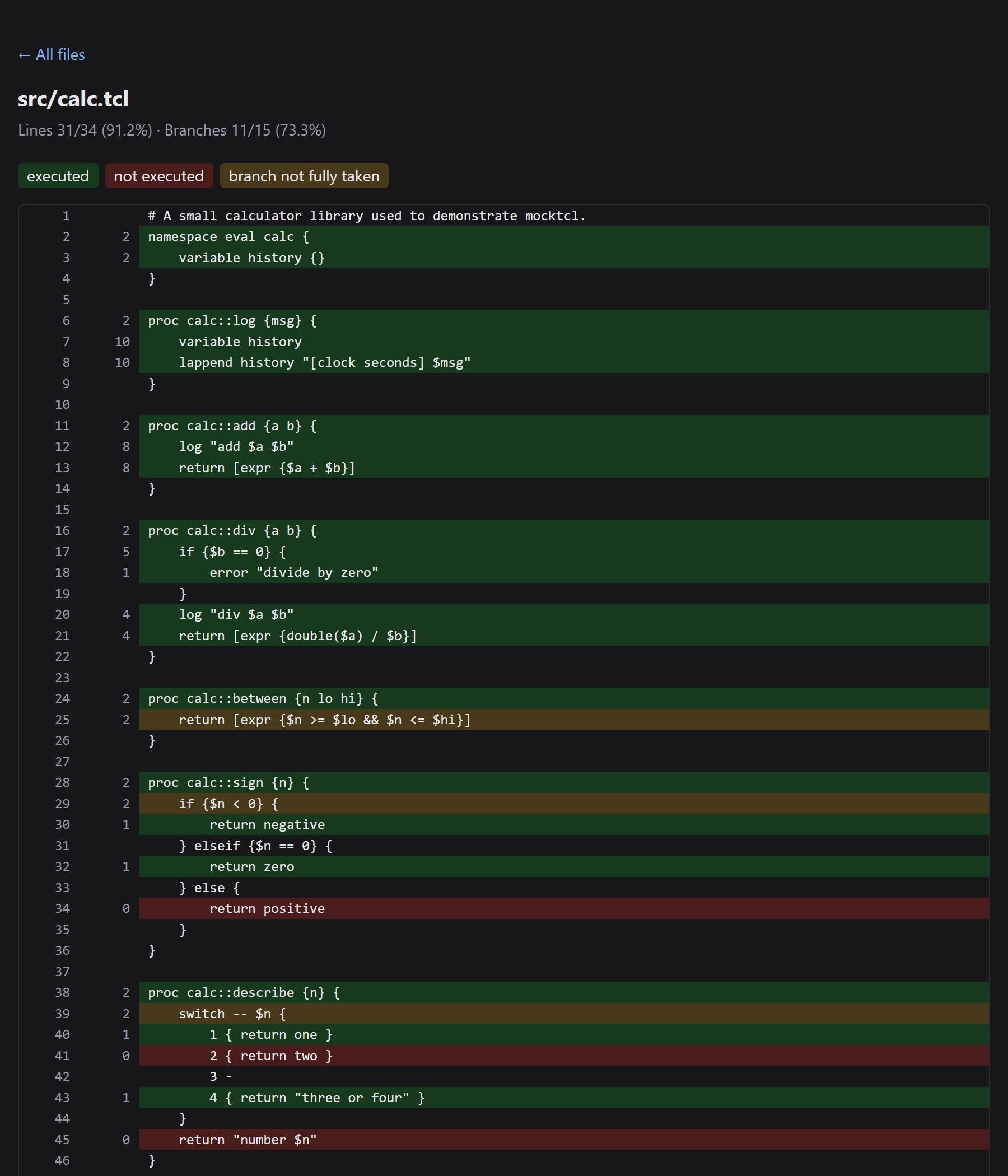
In this example, line 34 (return positive) is red because no test passed a number above zero to
calc::sign. Line 29, where that if starts, is yellow for the same reason: of its three paths
(if, elseif, else), the else path was never taken. Line 25 is yellow because no test passed a
number above hi, so $n <= $hi was never false.
Other report formats:
| Command | What you get |
|---|---|
mocktcl --cov-report text |
the table in the terminal (the default) |
mocktcl --cov-report html |
web pages in coverage_html/ |
mocktcl --cov-report html:docs/coverage |
web pages in a folder you choose |
mocktcl --cov-report lcov |
a file called lcov.info, the standard format read by code editors and websites that display coverage |
mocktcl --cov-report text --cov-report html |
several reports at once |
Choosing which files are measured. By default mocktcl measures every .tcl and .tm file in your
project folder, except the files in tests. A file that no test ever loads is shown at 0%, so
untested files are easy to spot.
mocktcl --cov src                    # only measure files in src/
mocktcl --cov-omit "src/vendor/*"    # measure everything except src/vendor/
mocktcl --no-cov                     # don't measure coverage at all
Setting a target. To make mocktcl fail when coverage drops below a percentage:
mocktcl --fail-under 80
What coverage can't see. Code that your program builds as text and then runs with eval isn't
measured. The parts of a condition that isn't inside { } (such as if $ok ... or expr $a && $b)
aren't counted separately, because Tcl changes that text before the condition is worked out.
13. Saving your settings (configuration file)
Instead of typing the same options every time, you can save them in a file called mocktcl.toml in
your project folder:
# mocktcl.toml
cov = ["src"]                      # measure only src/
cov_omit = ["src/vendor/*"]        # but not src/vendor/
cov_report = ["text", "html"]      # print the table and write web pages
fail_under = 80                    # fail if line coverage is below 80%
cov_conditions = false             # don't count && / || / ? : parts separately (default: true)
jobs = 4                           # run 4 test files at once
timeout = 60                       # give up on a test file after 60 seconds
tests_dir = "tests"                # where the tests live
tclsh = "/opt/homebrew/opt/tcl-tk@8/bin/tclsh8.6"   # which Tcl to use (handy on a Mac)
float_zero_tolerance = 1e-12       # numbers this close to zero count as zero (the default; 0 = exact)
Every line is optional. Anything you type on the command line overrides the file.
(If your project already has a pyproject.toml, you can put the same settings under a
[tool.mocktcl] heading there instead.)
14. Troubleshooting
mocktcl: command not found
Your terminal can't find the program. Repeat step 3 of the installation,
and open a new terminal window afterwards.
Permission denied when running mocktcl
The file isn't marked as a program yet. Run chmod +x ~/.local/bin/mocktcl.
macOS says mocktcl "cannot be opened" or "is damaged"
Run xattr -d com.apple.quarantine ~/.local/bin/mocktcl (see installation step 2).
cannot run 'tclsh'; install Tcl or pass --tclsh
Tcl isn't installed, or it has a different name on your computer. Follow section 2,
then use --tclsh or the tclsh setting in mocktcl.toml to point mocktcl at it.
My test doesn't run
Check that the file name starts with test_ and ends with .tcl, that the file is inside tests, and that the
procedure name starts with test_.
no tests ran / exit code 5
mocktcl found no tests. Check the names as above, and check that you ran mocktcl from your project folder.
couldn't read file "src/...": no such file or directory
Paths in source are relative to the folder you run mocktcl from. Run mocktcl from your project folder,
or use the [file dirname [info script]] pattern from section 9.
A file says not instrumented in the coverage report
mocktcl couldn't read that file's Tcl, usually because of an unmatched { or ". The file still runs
in your tests, but it isn't measured. Check the line number in the message.
exit 1 called
The code you're testing called exit. mocktcl stops this from ending the whole test run, and reports it
as an error in that test instead.
15. For people working on mocktcl itself
mocktcl is written in Python. To work on it you need Python 3.11 or newer and Tcl 8.6.
git clone https://github.com/drummondj/mocktcl.git
cd mocktcl
python3 -m venv .venv               # a private Python environment for this project
.venv/bin/pip install -e '.[dev]'   # install mocktcl and its development tools into it
.venv/bin/pytest                    # run mocktcl's own tests
The test suite requires 100% line and branch coverage of mocktcl's code. If any line or path isn't tested, the run fails.
The plan and design notes are in plans/, and CLAUDE.md has a short
guide to the code.
Making a release. Update __version__ in src/mocktcl/__init__.py (the Python package reads
its version from there too), merge to main, then tag the commit and push the tag:
git tag v0.2.0
git push origin v0.2.0
GitHub Actions then tests the code, builds the Linux and macOS programs, tries each one on the example
project, and publishes them to the Releases page
together with SHA256SUMS.txt and LICENSE. It also builds the Python package and uploads it to
PyPI. To build a program on your own computer:
.venv/bin/pip install pyinstaller && PYTHON=.venv/bin/python packaging/build.sh.
16. License
mocktcl is free to use, change and share, including at work and in commercial projects, under the MIT License. The only condition is that you keep the copyright notice and license text when you pass on copies of mocktcl itself. Your own Tcl code and tests are not affected: they stay yours, under whatever license you choose.
1 maintainer

Metadata
1 maintainer
Release files for mocktcl 0.3.0
For a detailed explanation of source distributions (sdists) and built distributions (wheels), please see the package formats documentation.
Source distribution (sdist)
| File | Size | Uploaded | |
|---|---|---|---|
| mocktcl-0.3.0.tar.gz | 76.7 kB | Details |
Built distribution (wheel)
| File | Interpreter | ABI | Platform | Reset |
|---|---|---|---|---|
| mocktcl-0.3.0-py3-none-any.whl | Python 3 | none | any | Details |
Total release size: 122.6 kB
Release files / mocktcl-0.3.0.tar.gz
| Download URL | mocktcl-0.3.0.tar.gz |
|---|---|
| Size | 76.7 kB |
| Tags | Source |
|
SHA-256 checksum How to use checksums |
e50f4c47621e274d8525cd9b880992d108c74864edce337ff906517abd5584c7
|
|
BLAKE2b-256 checksum How to use checksums |
100fdcf56accec800ef34cd2085d64902601ce3b20ccee28e4998a4c64fa91a9
|
| Upload date | |
|
Uploaded using Trusted Publishing? What is trusted publishing? |
Yes |
| Uploaded via |
twine/7.0.0 CPython/3.13.14
|
Provenance
Provenance describes where a file came from. On PyPI, provenance is shared via attestations, which provide a verifiable record of the build or publishing details. View details, limitations and caveats.


PyPI Publish Attestation
PyPI verified that this artifact, at this checksum, originated from the publisher listed below.
Signed by GitHub Actions, verified by PyPI on Oct 11, 2026.
Transparency logRelease files / mocktcl-0.3.0-py3-none-any.whl
| Download URL | mocktcl-0.3.0-py3-none-any.whl |
|---|---|
| Size | 45.8 kB |
| Tags | Python 3 |
|
SHA-256 checksum How to use checksums |
770d7cd46257ccc092c024de912ce3702a95ee8ea4213d41fa6defbf2f013d45
|
|
BLAKE2b-256 checksum How to use checksums |
d2f4264a3e94f10c422d9b0b1fe65555fb25dfef010e2638c81f47cf8ef78a2b
|
| Upload date | |
|
Uploaded using Trusted Publishing? What is trusted publishing? |
Yes |
| Uploaded via |
twine/7.0.0 CPython/3.13.14
|
Provenance
Provenance describes where a file came from. On PyPI, provenance is shared via attestations, which provide a verifiable record of the build or publishing details. View details, limitations and caveats.
PyPI Publish Attestation
PyPI verified that this artifact, at this checksum, originated from the publisher listed below.
Signed by GitHub Actions, verified by PyPI on Oct 11, 2026.
Transparency log












