
modal-computer-use
modal-computer-use turns a Modal Sandbox into a remotely controllable Linux desktop through a
typed, provider-neutral Python SDK and an in-Sandbox daemon.
This is an independent project using Modal.
Quick start
Use Python 3.12 or later and uv. Install the Modal extra from PyPI:
uv add "modal-computer-use[modal]"
The Modal extra supports the Modal 1.5 line and requires Modal 1.5.2 or later.
Save this as quickstart.py:
from modal_computer_use import (
    BrowserConfig,
    ComputerConfig,
    ComputerSandbox,
    ResourceConfig,
)

config = ComputerConfig(
    resources=ResourceConfig(profile="browser"),
    browser=BrowserConfig(kind="chromium"),
)

with ComputerSandbox.create(config=config) as computer:
    computer.browser.open_url("https://example.com")
    computer.mouse.move(320, 240)
    screenshot = computer.screenshots.full()
    screenshot.save("screenshot.png")
    print(screenshot.width, screenshot.height, screenshot.sha256)
Run it:
uv run python quickstart.py
When the with block ends, the SDK terminates the Sandbox and closes the connection.
Core API
ComputerSandbox is the primary synchronous entry point. AsyncComputerSandbox provides native
async Modal creation, attachment, and named acquisition with the same ownership rules; see the
async owner example.
AsyncDaemonClient connects to an existing daemon without blocking the event loop.
| Task | Representative API |
|---|---|
| Create or attach | ComputerSandbox.create(), ComputerSandbox.attach(), AsyncComputerSandbox.create(), AsyncComputerSandbox.attach() |
| Acquire by name | ComputerSandbox.attach_or_create(name=...), AsyncComputerSandbox.attach_or_create(name=...) |
| Input | computer.mouse.move(), computer.keyboard.type(), computer.clipboard.get_text() |
| Observe | computer.screenshots.full(), computer.display.info(), computer.windows.list() |
| Browser and apps | computer.browser.open_url(), computer.apps.launch() |
| Execute | computer.actions.run(), computer.commands.run() |
| Files and recordings | computer.artifacts.download(), computer.recordings.start() |
| Operate | computer.lifecycle.status(), computer.processes.logs(name) |
Action batches validate the full request before execution. They stop on the first error by default,
can opt into continue_on_error, and can capture a trailing screenshot in the same request.
Inside an active ComputerSandbox:
batch = computer.actions.run(
    [
        {"type": "move", "x": 320, "y": 240},
        {"type": "click", "x": 320, "y": 240},
    ],
    screenshot_after=True,
)
batch.screenshot contains the trailing observation when the batch succeeds.
See the API guide for namespace semantics and the generated OpenAPI schema for HTTP request and response shapes.
How it works
ComputerSandbox.create() starts a new Modal Sandbox. If you use it in a with block, the SDK
terminates the Sandbox automatically when the block ends. ComputerSandbox.attach() connects to an
existing Sandbox. Leaving an attached with block closes the SDK connection but keeps the Sandbox
running.
ComputerSandbox.attach_or_create(name=...) and its async counterpart acquire a compatible live
Sandbox with that app-scoped name, or create one if it is missing. If the call creates the Sandbox,
leaving the block terminates it. If the Sandbox already existed, leaving the block keeps it running.
A daemon inside the Sandbox executes desktop actions, captures screenshots and recordings, runs
commands, and reads or writes files through computer.artifacts.
Performance
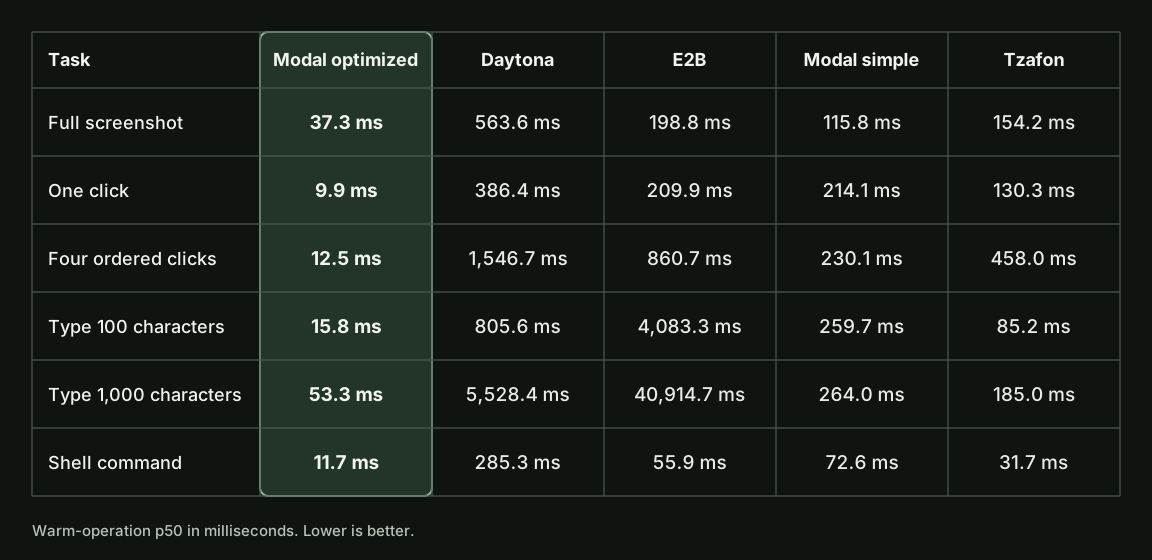
The figure shows July 2026 p50 latency for six computer-use cases, based on 30 successful samples per cell. Lower is better. Note that warm-operation latency starts after the desktop and client connection are ready.
The detailed report gives p95 results and explains how each path was configured and measured.
Examples
| Workflow | Example |
|---|---|
| Configure and prewarm a browser | browser_profile.py |
| Acquire one named desktop from async code | async_named_desktop.py |
| Attach without taking lifecycle ownership | attach_existing_sandbox.py |
| Capture and download a recording | recording_lifecycle.py |
| Persist artifacts with a Modal Volume | volume_artifacts.py |
| Hand a desktop to a Modal Function | modal_function_session_handoff.py |
| Run an application-owned model loop | OpenAI · Anthropic |
Documentation
| Guide | What it covers |
|---|---|
| Documentation map | Every maintained guide, grouped by task. |
| Modal deployment | Sandbox lifecycle, readiness, Function handoff, warm capacity, and cleanup. |
| Modal optimization | Production guidance for caller placement, connection reuse, async orchestration, and per-turn work. |
| Performance and benchmarking | Latency mechanisms, tuning evidence, benchmark commands, and publication rules. |
| OpenAI adapter and Anthropic adapter | Provider action and screenshot translation for application-owned model loops. |
| Contributing | Development setup, required checks, and pull request expectations. |
Local development
See the local development guide for daemon startup, mock and X11 backends, synchronous and async clients, authentication, and repository checks.
Security
The daemon can control the desktop and access clipboard contents, screenshots, recordings, and artifacts. Do not expose it without authentication.
See the security policy for reporting vulnerabilities and the runtime security guide for deployment guidance.
1 maintainer

Metadata
1 maintainer
Release files for modal-computer-use 1.1.0
For a detailed explanation of source distributions (sdists) and built distributions (wheels), please see the package formats documentation.
Source distribution (sdist)
| File | Size | Uploaded | |
|---|---|---|---|
| modal_computer_use-1.1.0.tar.gz | 386.6 kB | Details |
Built distribution (wheel)
| File | Interpreter | ABI | Platform | Reset |
|---|---|---|---|---|
| modal_computer_use-1.1.0-py3-none-any.whl | Python 3 | none | any | Details |
Total release size: 863.0 kB
Release files / modal_computer_use-1.1.0.tar.gz
| Download URL | modal_computer_use-1.1.0.tar.gz |
|---|---|
| Size | 386.6 kB |
| Tags | Source |
|
SHA-256 checksum How to use checksums |
cdf420ea6895c18191c8bb6485672c2bae95b898c7fa0d8ebfd075a356124e8f
|
|
BLAKE2b-256 checksum How to use checksums |
5b64af6073796b55b912a2616f130cca916fdec471f2610b133aa606410e0765
|
| Upload date | |
|
Uploaded using Trusted Publishing? What is trusted publishing? |
Yes |
| Uploaded via |
twine/6.1.0 CPython/3.13.13
|
Provenance
Provenance describes where a file came from. On PyPI, provenance is shared via attestations, which provide a verifiable record of the build or publishing details. View details, limitations and caveats.


PyPI Publish Attestation
PyPI verified that this artifact, at this checksum, originated from the publisher listed below.
Signed by GitHub Actions, verified by PyPI on Aug 3, 2026.
Transparency logRelease files / modal_computer_use-1.1.0-py3-none-any.whl
| Download URL | modal_computer_use-1.1.0-py3-none-any.whl |
|---|---|
| Size | 476.4 kB |
| Tags | Python 3 |
|
SHA-256 checksum How to use checksums |
75423a7cfdcdbb9b3ee1fdd9196103cc38f5e4c26e05f04c257f179b1c6d94b3
|
|
BLAKE2b-256 checksum How to use checksums |
707371073d92058278c954ccac28b842f5bc65dbf9831a2ff5eeecff52536824
|
| Upload date | |
|
Uploaded using Trusted Publishing? What is trusted publishing? |
Yes |
| Uploaded via |
twine/6.1.0 CPython/3.13.13
|
Provenance
Provenance describes where a file came from. On PyPI, provenance is shared via attestations, which provide a verifiable record of the build or publishing details. View details, limitations and caveats.
PyPI Publish Attestation
PyPI verified that this artifact, at this checksum, originated from the publisher listed below.
Signed by GitHub Actions, verified by PyPI on Aug 3, 2026.
Transparency log













