
Model Card Toolkit
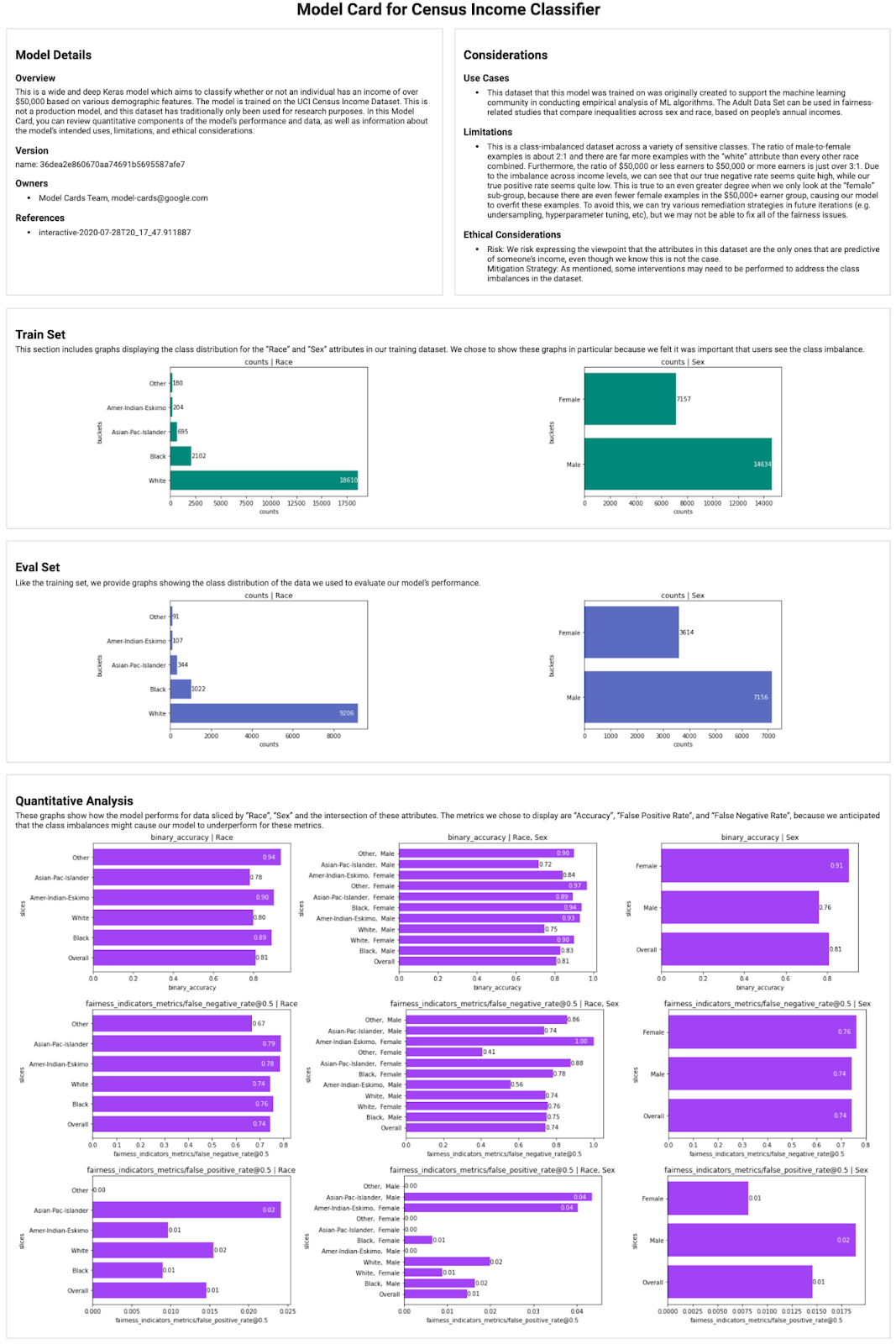
The Model Card Toolkit (MCT) streamlines and automates generation of Model Cards [1], machine learning documents that provide context and transparency into a model's development and performance. Integrating the MCT into your ML pipeline enables the sharing model metadata and metrics with researchers, developers, reporters, and more.
Some use cases of model cards include:
- Facilitating the exchange of information between model builders and product developers.
- Informing users of ML models to make better-informed decisions about how to use them (or how not to use them).
- Providing model information required for effective public oversight and accountability.
Installation
The Model Card Toolkit is hosted on PyPI, and can be installed with pip install model-card-toolkit (or pip install model-card-toolkit --use-deprecated=legacy-resolver for pip20.3). See the installation guide for more details.
Getting Started
import model_card_toolkit

# Initialize the Model Card Toolkit with a path to store generate assets
model_card_output_path = ...
mct = model_card_toolkit.ModelCardToolkit(model_card_output_path)

# Initialize the model_card_toolkit.ModelCard, which can be freely populated
model_card = mct.scaffold_assets()
model_card.model_details.name = 'My Model'

# Write the model card data to a JSON file
mct.update_model_card_json(model_card)

# Return the model card document as an HTML page
html = mct.export_format()
Automatic Model Card Generation
If your machine learning pipeline uses the TensorFlow Extended (TFX) platform or ML Metadata, you can automate model card generation. See this demo notebook for a demonstration of how to integrate the MCT into your pipeline.
Schema
Model cards are stored in JSON as an intermediate format. You can see the model card JSON schema in the schema directory. Note that this is not a finalized path and may be hosted elsewhere in the future.
References
1 maintainer

Metadata
1 maintainer
Release files for model-card 0.1.3
For a detailed explanation of source distributions (sdists) and built distributions (wheels), please see the package formats documentation.
Source distribution (sdist)
| File | Size | Uploaded | Provenance | Actions |
|---|---|---|---|---|
| model-card-0.1.3.tar.gz | 25.1 kB | Without provenance | Details for model-card-0.1.3.tar.gz |
Built distribution (wheel)
| File | Interpreter | ABI | Platform | Actions Reset |
|---|---|---|---|---|
| model_card-0.1.3-py3-none-any.whl | Python 3 | none | any | Details for model_card-0.1.3-py3-none-any.whl |
Total release size: 69.0 kB
Release files / model-card-0.1.3.tar.gz
| Download URL | model-card-0.1.3.tar.gz |
|---|---|
| Size | 25.1 kB |
| Tags | Source |
|
SHA-256 checksum How to use checksums |
281e3b7acf52ab7e4da34fc0ad103fa47e67f28e650fdcdb566bc88f09c4a19b
|
|
BLAKE2b-256 checksum How to use checksums |
fc4722c4b5369a66a52dd8fa27fe7a6ec32a74f2aa6d6a9aa25d4eccd6cb6381
|
| Upload date | |
|
Uploaded using Trusted Publishing? What is trusted publishing? |
No |
| Uploaded via |
twine/3.3.0 pkginfo/1.7.0 requests/2.25.1 setuptools/49.6.0.post20210108 requests-toolbelt/0.9.1 tqdm/4.58.0 CPython/3.8.8
|
Release files / model_card-0.1.3-py3-none-any.whl
| Download URL | model_card-0.1.3-py3-none-any.whl |
|---|---|
| Size | 43.9 kB |
| Tags | Python 3 |
|
SHA-256 checksum How to use checksums |
e5b0f9aaf704362eca49e3b31a90ca74270f449779b3a9a418de0ff184b93a42
|
|
BLAKE2b-256 checksum How to use checksums |
84066bf6180c32ee7cfc698b0999bae9a8eab6ca37685cfa026f6114caaf6289
|
| Upload date | |
|
Uploaded using Trusted Publishing? What is trusted publishing? |
No |
| Uploaded via |
twine/3.3.0 pkginfo/1.7.0 requests/2.25.1 setuptools/49.6.0.post20210108 requests-toolbelt/0.9.1 tqdm/4.58.0 CPython/3.8.8
|
Security for model-card 0.1.3
Provenance
Provenance describes where a file came from. On PyPI, provenance is shared via attestations, which provide a verifiable record of the build or publishing details. View details, limitations and caveats.
No provenance found
None of the files in this release were uploaded with provenance metadata.
A note on package security
PyPI is a repository for distributing packages, not a service for auditing them. While third-party security researchers and our staff do their best to detect and remove malicious packages, PyPI cannot guarantee the quality, security or suitability of any given package.
To learn more about protecting yourself from malicious actors, visit our package security documentation.













