



Model
A minimal Python ORM for MariaDB/MySQL and SQLite. Explicit, predictable, and made for humans.
Motivation
Many ORMs try to abstract SQL away entirely, introducing their own query languages and complex concepts that force you to spend time learning “their way” before getting productive.
Model takes a different approach: it embraces native type definitions and SQL instead of hiding them behind unnecessary abstractions.
Features
- Intuitive and simple to use.

- Advanced static type checking for fool-proof schema definition. (Fun fact: the
Columnmethod has 73 typing @overloads.) - Fast and predictable performance, with no hidden bloated queries slowing down your app.
- One command for automatic schema updates. Safe, rapid and versionless schema evolution.
- One command to automatically generate models from your existing tables.
- Primarily written by hand.

Installation
python -m pip install model-py
Note: You import the package as
model
Documentation
Read the documentation at https://model.elis.cc
Quickstart
1. Define a model
A model represents a database table. You just need to define the database instance, table name and columns.
Create example file: ./models/user.py
from model import Model
from model.database import SQLiteDatabase

db = SQLiteDatabase("./example.db") # this could be MySQLDatabase

class User(Model):
    table = "user"
    db = db

    id: int = Model.Column(
        type="INT",
        index="PRIMARY",
        auto_increment=True,
    )
    email: str = Model.Column(
        type="VARCHAR",
        length=255,
        index="UNIQUE",
        can_be_null=False,
    )
    age: int | None = Model.Column(type="INT")
2. Configure model discovery
Create model.config.yaml in the project root:
include_dirs:
  - ./models
3. Create the table
The model sync CLI is the easiest way to 'sync' models with the database. It automatically generates SQL diffs based on your model definitions. To keep it safe, there are some restrictions in place for column deletion and renaming.
Run CLI commands from your project root so Model can find the configuration.
Preview the generated schema change:
model sync check
If the SQL looks correct, apply it:
model sync apply
Run model sync check once more. It should report nothing left to apply.
That's it!
Now we can use the model
Model instances always represent persisted database records. Loading, inserting, updating, and querying are explicit operations, so it's easy to understand exactly what your code is doing - no complex object lifecycle, no ambiguous save().
Insert
insert() creates the row and returns a loaded model instance.
from models.user import User

user = User.insert({
    "email": "john.doe@example.com",
    "age": 30
})

print(user.id, user.email)
# prints: 1, john.doe@example.com
Load by the primary key
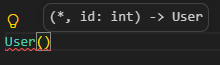
Constructing a model loads an existing row.
The primary key is automatically inferred for the model class initialization:
from models.user import User

user = User(id=1)

print(user.id, user.email)
# prints: 1, john.doe@example.com
It raises ModelRecordNotFoundError when no row matches.
Query
Find records with SQL conditions. SQLite uses ?
for parameter placeholders (while MySQL uses %s):
from models.user import User

user = User.find_one("email = ?", ["john.doe@example.com"])
assert user is not None

print(user.id, user.email) # prints: 1, john.doe@example.com

all_users = User.find_all("age > 24 ORDER BY age")
count = User.count("email LIKE ?", ["%@example.com"])

print(all_users) # prints: [User(...)]
print(count) # prints: 1
find_one() returns None when there is no match, while find_all() returns
an empty list.
Update
Records are updated explicitly; assign new values through update().
from models.user import User

user = User(id=1)

print(user.email)
# prints: john.doe@example.com

user.update({
    "email": "johnny@example.com"
})

print(user.email)
# prints: johnny@example.com
Delete
user.delete()
This deletes the row in the database. After deletion, that instance can no longer be used for record operations.
1 maintainer

Download files
Download the file for your platform. If you're not sure which to choose, learn more about installing packages.
Source Distribution
Built Distribution
Filter files by name, interpreter, ABI, and platform.
If you're not sure about the file name format, learn more about wheel file names.
Copy a direct link to the current filters
File details
Details for the file model_py-1.0.0.tar.gz.
File metadata
- Download URL: model_py-1.0.0.tar.gz
- Upload date:
- Size: 84.5 kB
- Tags: Source
- Uploaded using Trusted Publishing? No
- Uploaded via:
twine/7.0.0 CPython/3.12.4
File hashes
| Algorithm | Hash digest | |
|---|---|---|
| SHA256 |
d4b394a9a3dd176624707eef205f355aecdba17afaf92b12e5a569266e31260e
|
|
| MD5 |
15a4668c48f0856ff1d37d517668adcd
|
|
| BLAKE2b-256 |
3aee28b329809e9991a58634fe2dab638ad44be22ac86627eb97ec06af5273d3
|
File details
Details for the file model_py-1.0.0-py3-none-any.whl.
File metadata
- Download URL: model_py-1.0.0-py3-none-any.whl
- Upload date:
- Size: 98.6 kB
- Tags: Python 3
- Uploaded using Trusted Publishing? No
- Uploaded via:
twine/7.0.0 CPython/3.12.4
File hashes
| Algorithm | Hash digest | |
|---|---|---|
| SHA256 |
75da5dd2ee1ba9b5dc26bb4b584f590d85c55e08c594870ab846000887f5fd5b
|
|
| MD5 |
c37696fc55bbbeae1d25fd1f663894f8
|
|
| BLAKE2b-256 |
c22c3a64ab1ccd6a391bf7784b1b76c14babf218d01def77211e6901796bf1b7
|














