
ModelMark
ModelMark is a CLI benchmarking tool for comparing neural-network models. It runs your models on one or more datasets, records performance and efficiency statistics, and generates an easy-to-embed HTML/PNG report.
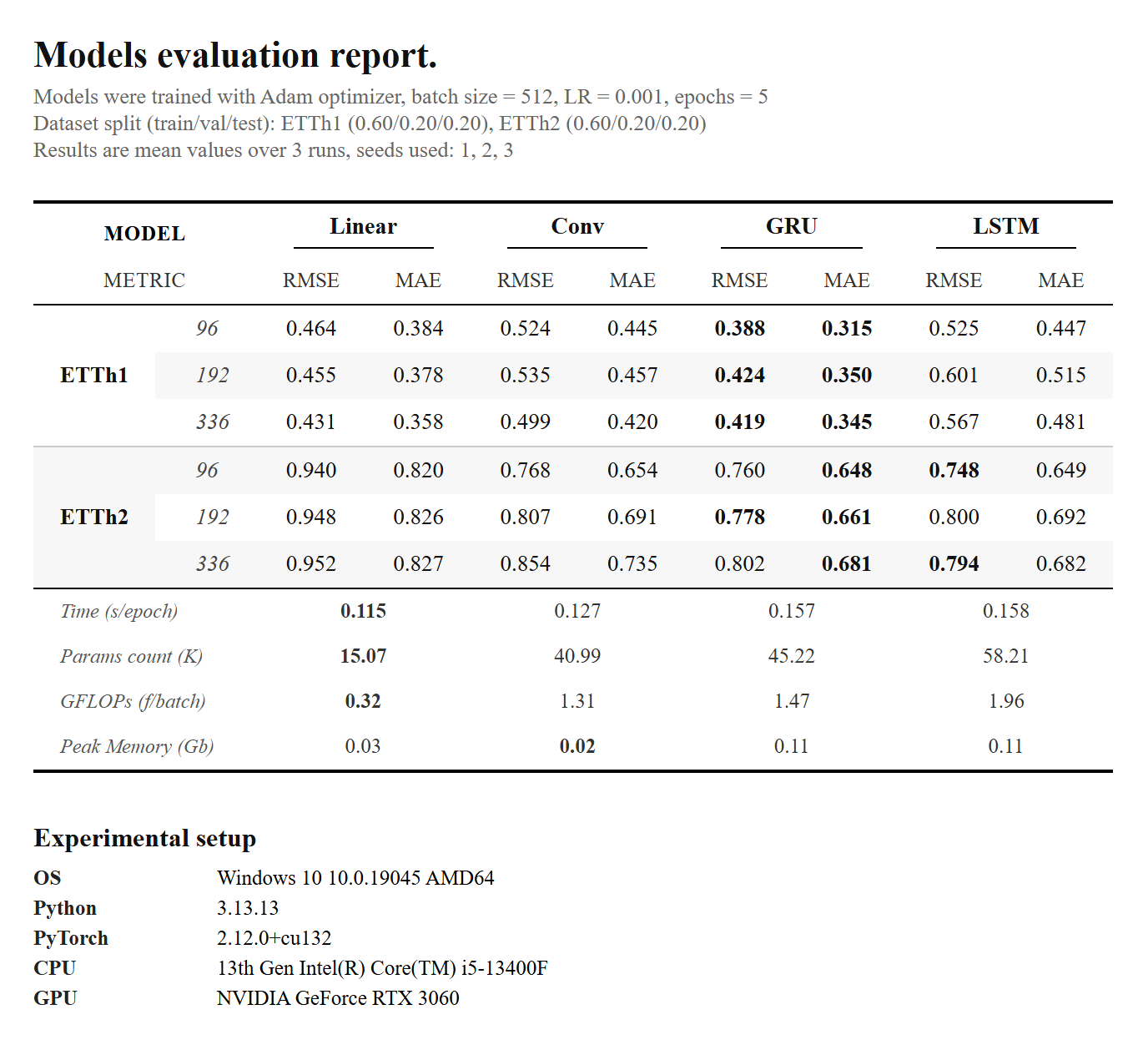
Table of Contents
- About
- Requirements
- Installation
- Quick Start
- Configuration
- How the Benchmark Works
- Reported Metrics
- Examples
- Troubleshooting
About
For each benchmark run, ModelMark:
- Selects the next combination of dataset, input/output size, model, and seed.
- Seeds the random generators for reproducibility.
- Creates the data loader, model, and tester objects.
- Trains the model for the configured number of epochs and restores the checkpoint with the lowest validation loss.
- Records runtime and efficiency statistics.
- Evaluates the model on the dataset using the metrics from the configuration file.
After all runs finish, ModelMark aggregates the results and generates a report containing testing results, training statistics, and your machine metadata.
Requirements
- OS: Windows or Linux
- Python: 3.12 or newer
- Git: required for installation from GitHub
Installation
Install ModelMark from PyPI:
pip install modelmark
Quick Start
-
Run initialization in an empty folder:
modelmark initThis creates two folders:
modelmark_files/— configuration and log filesmodels/— your model files
-
Edit the configuration file:
modelmark_files/config.pyIt contains three main configuration blocks:
model_config— model hyperparameters such as number of layers, hidden dimension, kernel size, etc.data_config— dataset parameters such as file path, input/output features, train/val ratios, etc.test_config— testing options such as optimizer, loss criterion, metrics, learning rate, etc.
-
Put the testing models to the
models/folder.Make sure to import model's class definitions to the
config.py.Configure
config.model_configaccording to your task. -
Download the dataset files (ETT by default):
modelmark load -
Run the benchmark:
modelmark run -
View the generated report:
result.htmlresult.png
Configuration
You can adjust the configuration and add your own model files in the models/ directory to match your benchmarking needs.
Make sure your model implementation is compatible with the keys and settings used in your configuration.
A detailed configuration example is available at: src/modelmark/config.py
A detailed example model is available at: src/modelmark/models/linear.py
How the Benchmark Works
The benchmark consists of:
F × O × M × S
where:
| Symbol | Meaning | Example |
|---|---|---|
F |
Number of dataset files in the configuration | {"ETTh1": ..., "Weather": ...} → F = 2 |
O |
Number of input/output size configurations | [32, 64, 128] → O = 3 |
M |
Number of models | {"Linear": ..., "LSTM": ...} → M = 2 |
S |
Number of seeds | [42, 43, 44] → S = 3 |
ModelMark repeats the training/evaluation process for each combination and stores the mean result over S runs. Using more seeds generally makes the comparison more fair and statistically stable.
Reported Metrics
The report includes statistics such as:
| Metric | Description |
|---|---|
| Time | Average training time per epoch |
| Params | Total number of model parameters |
| GFLOPs | Average GFLOPs per batch |
| Peak Memory | Maximum memory observed during a training iteration |
The report also includes the evaluation metrics configured in test_config and your machine metadata.
Examples
Run modelmark init, it will create config at modelmark_files/config.py and model's example folder at models/ with Linear model file inside:
- Configuration example: src/modelmark/config.py
- Linear model example: src/modelmark/models/linear.py
Troubleshooting
If something does not work:
-
Check the application log:
modelmark_files/modelmark.log -
Try restarting ModelMark:
modelmark restart -
If the issue persists, delete the
modelmark_filesfolder and run:modelmark init
When opening an issue on GitHub, please include the relevant part of your log file.
If you have questions or want to inspect the source code, see the ModelMark GitHub repository.
1 maintainer

Download files
Download the file for your platform. If you're not sure which to choose, learn more about installing packages.
Source Distribution
Built Distribution
Filter files by name, interpreter, ABI, and platform.
If you're not sure about the file name format, learn more about wheel file names.
Copy a direct link to the current filters
File details
Details for the file modelmark-0.1.2.tar.gz.
File metadata
- Download URL: modelmark-0.1.2.tar.gz
- Upload date:
- Size: 24.6 kB
- Tags: Source
- Uploaded using Trusted Publishing? Yes
- Uploaded via:
twine/7.0.0 CPython/3.13.14
File hashes
| Algorithm | Hash digest | |
|---|---|---|
| SHA256 |
29628929eedebabda7505f908dfbe0aa49f75c6ae7af7a22b8017d533136bc28
|
|
| MD5 |
61086d3fe3e63a59a360fa3ca839229e
|
|
| BLAKE2b-256 |
3d7301b5630cfa7e62632813da0106a6274dcfee2a9626e4f0bac059eaedf31c
|
Provenance
The following attestation bundles were made for modelmark-0.1.2.tar.gz:
Publisher:
release.yml on gloptim77/ModelMark
-
Statement:
-
Statement type:
https://in-toto.io/Statement/v1 -
Predicate type:
https://docs.pypi.org/attestations/publish/v1 -
Subject name:
modelmark-0.1.2.tar.gz -
Subject digest:
29628929eedebabda7505f908dfbe0aa49f75c6ae7af7a22b8017d533136bc28 - Sigstore transparency entry: 2724719089
- Sigstore integration time:
-
Permalink:
gloptim77/ModelMark@9739dfc5068c9258bb6b4fcbbb7c2acf62d66f35 -
Branch / Tag:
refs/tags/v0.1.2 - Owner: https://github.com/gloptim77
-
Access:
public
-
Token Issuer:
https://token.actions.githubusercontent.com -
Runner Environment:
github-hosted -
Publication workflow:
release.yml@9739dfc5068c9258bb6b4fcbbb7c2acf62d66f35 -
Trigger Event:
release
-
Statement type:
File details
Details for the file modelmark-0.1.2-py3-none-any.whl.
File metadata
- Download URL: modelmark-0.1.2-py3-none-any.whl
- Upload date:
- Size: 29.0 kB
- Tags: Python 3
- Uploaded using Trusted Publishing? Yes
- Uploaded via:
twine/7.0.0 CPython/3.13.14
File hashes
| Algorithm | Hash digest | |
|---|---|---|
| SHA256 |
3120834c6306f27c682a3fdc47472944b5eeb925cef8878ecd0a51e3bfa74d17
|
|
| MD5 |
03f58f256eb4f2b3b1a742cde2dc7397
|
|
| BLAKE2b-256 |
7b13aa92bf36e4bf1eb8d7f203c72d29049f787eaeeb5db355fc5b3e2db01c98
|
Provenance
The following attestation bundles were made for modelmark-0.1.2-py3-none-any.whl:
Publisher:
release.yml on gloptim77/ModelMark
-
Statement:
-
Statement type:
https://in-toto.io/Statement/v1 -
Predicate type:
https://docs.pypi.org/attestations/publish/v1 -
Subject name:
modelmark-0.1.2-py3-none-any.whl -
Subject digest:
3120834c6306f27c682a3fdc47472944b5eeb925cef8878ecd0a51e3bfa74d17 - Sigstore transparency entry: 2724719335
- Sigstore integration time:
-
Permalink:
gloptim77/ModelMark@9739dfc5068c9258bb6b4fcbbb7c2acf62d66f35 -
Branch / Tag:
refs/tags/v0.1.2 - Owner: https://github.com/gloptim77
-
Access:
public
-
Token Issuer:
https://token.actions.githubusercontent.com -
Runner Environment:
github-hosted -
Publication workflow:
release.yml@9739dfc5068c9258bb6b4fcbbb7c2acf62d66f35 -
Trigger Event:
release
-
Statement type:














