




Static analysis for AI infrastructure security in Terraform. It reads your .tf
files and finds the misconfigurations that show up specifically when teams ship
Bedrock, SageMaker, and vector databases: blanket bedrock:* grants, model
artifact buckets open to the internet, embedding stores without encryption, and
inference traffic that never touches your private network.
[!TIP] modelmoat only reads local files. It parses the
.tffiles you point it at and never contacts your AWS account, reads Terraform state, or touches credentials. There is nothing to configure and nothing to authenticate.
General IaC scanners check hundreds of AWS resource types and cover some of this ground. modelmoat is the one that treats AI infrastructure as its own category, with checks written around how these services actually fail rather than a generic encryption rule applied to every database in the account.
Findings run against the whole project at once, not file by file, because
Terraform spreads related resources across files. A bucket in s3.tf and its
public access block in security.tf are one decision, and modelmoat reads them
that way.
Contents
- Install
- Usage
- Checks
- Exit codes and CI
- Adopting on an existing codebase
- How severity is decided
- Design notes
- Limitations
- Roadmap
- Security
- Contributing
- License
Install
pipx install modelmoat
Or with pip:
pip install modelmoat
Python 3.10 or newer.
Usage
modelmoat scan .
modelmoat scan infra/ modules/ --min-severity HIGH
modelmoat scan . --json > findings.json
modelmoat scan . --sarif > modelmoat.sarif
modelmoat scan . --baseline .modelmoat-baseline.json
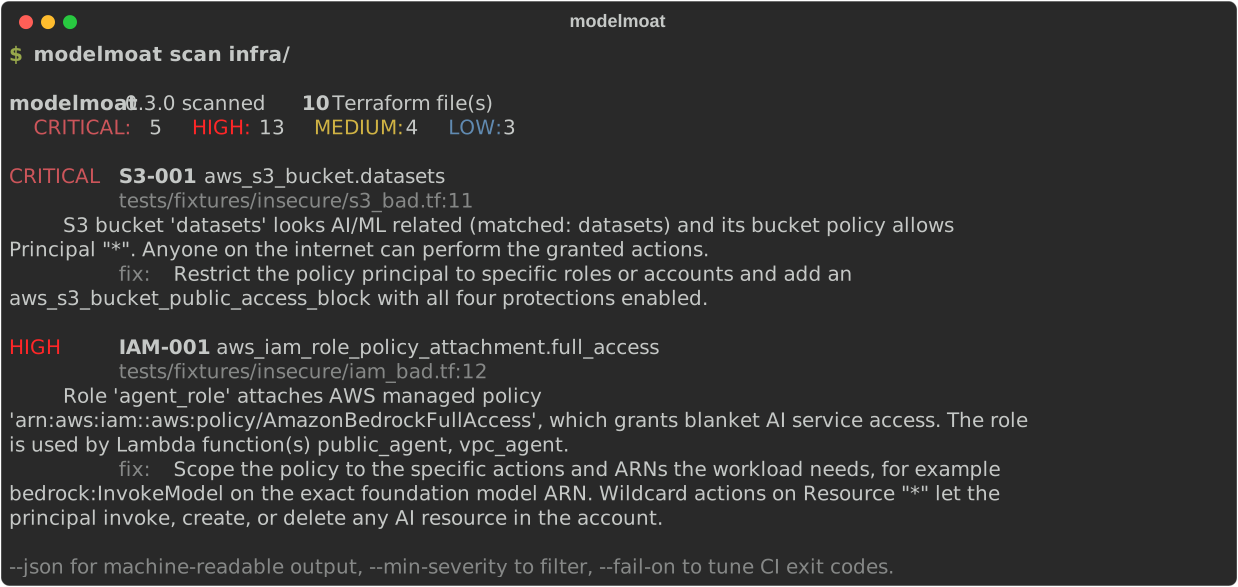
Real output from the test fixtures in this repo:
modelmoat 0.5.0 scanned 16 Terraform file(s)
  CRITICAL: 12  HIGH: 24  MEDIUM: 7  LOW: 4

CRITICAL S3-001  aws_s3_bucket.datasets
         tests/fixtures/insecure/s3_bad.tf:11
         S3 bucket 'datasets' looks AI/ML related (matched: datasets) and its
         bucket policy allows Principal "*". Anyone on the internet can perform
         the granted actions.
         fix: Restrict the policy principal to specific roles or accounts and
         add an aws_s3_bucket_public_access_block with all four protections
         enabled.

HIGH     IAM-001  aws_iam_role_policy_attachment.full_access
         tests/fixtures/insecure/iam_bad.tf:12
         Role 'agent_role' attaches AWS managed policy
         'arn:aws:iam::aws:policy/AmazonBedrockFullAccess', which grants blanket
         AI service access. The role is used by Lambda function(s) public_agent,
         vpc_agent.
Checks
| ID | What it finds | Severity range |
|---|---|---|
| SMK-001 | SageMaker models or training jobs with no vpc_config, distributed training jobs leaving inter-instance traffic unencrypted, Studio domains defaulting to public network access for app traffic, or notebook instances defaulting to direct internet access or root access |
HIGH to LOW |
| IAM-001 | Wildcard AI grants (bedrock:*, sagemaker:* on Resource "*") in inline policies, customer managed policies, policy documents, or attached AWS FullAccess policies |
HIGH |
| S3-001 | AI-related buckets exposed by a public ACL or a Principal "*" policy, plus weakened or missing public access blocks. A bucket backing a Bedrock Knowledge Base counts even with a name that gives no keyword hint |
CRITICAL to LOW |
| VPC-001 | Lambda functions or ECS Fargate tasks calling Bedrock or SageMaker with no matching interface VPC endpoint in the project | MEDIUM to LOW |
| VEC-001 | OpenSearch (including Serverless), pgvector-capable Postgres, and AI-named ElastiCache missing encryption or network isolation | CRITICAL to LOW |
| VEC-002 | Self-hosted Weaviate accepting unauthenticated requests, via a helm_release value or a container environment variable |
HIGH |
| VEC-003 | Self-hosted vector databases (Qdrant, Weaviate, Milvus) publicly reachable on ECS Fargate | HIGH |
| PIN-001 | Pinecone OrgOwner granted at organization scope to a service account or API key |
HIGH |
| AZR-001 | Azure OpenAI / AI Services accounts reachable from the public internet, via public_network_access_enabled or a missing network_acls deny rule |
HIGH |
| BRK-001 | Bedrock AgentCore gateways with authorizer_type = "NONE", so any caller can invoke every tool the gateway exposes |
CRITICAL |
| GCP-001 | Vertex AI Reasoning Engines with no Private Service Connect network attachment or no CMEK encryption_spec |
HIGH |
| AGW-001 | API Gateway REST methods with no authorization, proxying directly to a Bedrock or SageMaker runtime invocation | CRITICAL |
| SMK-002 | SageMaker Model Package Group resource policies granting Principal "*", removing the account-scoping cross-account model sharing is supposed to have |
HIGH |
Exit codes and CI
modelmoat scan exits 1 when findings at or above --fail-on exist, and 0
otherwise. The default is HIGH, so hygiene findings do not break builds.
Exit code 2 means bad arguments.
[!NOTE] A file modelmoat cannot parse is reported as a warning on stderr and does not fail the build by default, so HCL the parser does not support cannot break your pipeline. That does mean a corrupt file and clean infrastructure produce the same exit code unless you opt in. Add
--fail-on-parse-errorif you would rather know.
- name: Scan AI infrastructure
  run: |
    pip install modelmoat
    modelmoat scan infra/ --fail-on HIGH
Tighten with --fail-on MEDIUM once your baseline is clean, or loosen to
CRITICAL while you work through a backlog. --min-severity controls what gets
printed and is separate from what fails the build, so you can see everything
while only blocking on the serious findings.
GitHub code scanning
--sarif emits SARIF 2.1.0, so findings land in the repository Security tab
with the file and line annotated on the pull request.
permissions:
  contents: read
  security-events: write

steps:
  - uses: actions/checkout@v4

  - name: Scan AI infrastructure
    run: |
      pip install modelmoat
      modelmoat scan infra/ --sarif > modelmoat.sarif

  - name: Upload to code scanning
    if: always()
    uses: github/codeql-action/upload-sarif@v3
    with:
      sarif_file: modelmoat.sarif
The if: always() matters. The scan exits non-zero when it finds something, and
without it the upload is skipped exactly when there is something to upload. The
job still fails on findings, and the alerts still reach the Security tab.
CRITICAL and HIGH arrive as errors, MEDIUM as a warning, LOW as a note. Each finding carries a fingerprint built from the check and the resource rather than the line number, so an alert survives edits made above it.
Adopting on an existing codebase
Turning a scanner on for the first time usually produces a wall of findings nobody has time to fix that day, which is how tools get switched back off. A baseline records what already exists so CI reports only what gets added afterwards.
modelmoat scan infra/ --write-baseline .modelmoat-baseline.json
Commit that file, then scan against it:
modelmoat scan infra/ --baseline .modelmoat-baseline.json
Writing a baseline exits 0 even when findings exist, so adopting the tool does not break the same build. Scans that use one report how many findings were suppressed, because a security tool that hides things without saying so is worse than no tool.
The file is deliberately readable rather than a list of opaque hashes. A baseline is a record of accepted risk and belongs in code review:
{
  "fingerprint": "1ce76cc02f5b...",
  "check_id": "S3-001",
  "severity": "CRITICAL",
  "resource": "aws_s3_bucket.datasets",
  "file_path": "infra/s3.tf"
}
Findings are matched on the check and the resource, not the line number, so edits above a finding do not silently drop it out of the baseline. Two things still get through: a problem the baseline never recorded, and a suppressed finding that has since become more severe, which is reported as a warning rather than hidden. Entries that no longer match anything are reported as prunable.
How severity is decided
- CRITICAL: the configuration itself proves internet reachability with weak
or absent authentication. A bucket policy granting
Principal "*"qualifies. A SageMaker model outside a VPC does not, because invoking it still requires a SigV4-signed IAM request, and modelmoat says exactly that in the finding rather than claiming anyone with the URL can hit your model. - HIGH: missing encryption, or permissions broad enough to reach any AI resource in the account.
- MEDIUM / LOW: hygiene. A missing public access block is LOW, since account defaults have blocked public access on new buckets since April 2023, and calling it CRITICAL would be wrong.
Design notes
- Values that come from variables or expressions are unknown, and modelmoat
does not flag what it cannot prove.
storage_encrypted = var.encrypt_storageproduces no finding either way. - Keyword matching is on whole tokens, never substrings. A bucket named
email-archivedoes not matchai, andhtml-assetsdoes not matchml. Both appear in the test suite as negative controls that must stay silent. - The test suite has one rule above all others: the secure fixture must produce zero findings. A scanner that fires on correct infrastructure trains people to ignore it, so CI runs both directions on every push, requiring a clean pass on ten files of best-practice Terraform and a failing exit code on the insecure fixture.

Limitations
modelmoat reads HCL statically. It does not evaluate modules, resolve variable
files, expand for_each, or read remote state, so a security control defined in
a module that this project only calls will not be seen.
[!NOTE] That limit has teeth for VEC-002. The Weaviate Helm chart ships anonymous access enabled by default, so the deployments most likely to be insecure are the ones that never mention the setting at all. modelmoat stays silent on those, because the value legitimately arrives through a values.yaml file, a ConfigMap, or a Secret that a static scanner cannot read. Firing on absence would flag correct deployments, and that trade is not available here. Self-hosted vector stores in
aws_ecs_task_definitionare not read yet either.
PIN-001 checks Pinecone identity rather than network isolation. That is not an oversight: the official Pinecone provider exposes no network attribute on any of its eight resources, so private endpoint posture cannot be proven from Terraform however the service is actually configured.
Static analysis cannot tell you whether a security group actually permits the traffic you fear, or whether an IAM permission is used. Treat findings as places to look, not verdicts.
Roadmap

A GitHub App for native pull request comments, as an alternative to wiring up
the --sarif upload step by hand.
Pinecone and Weaviate were on this list as "providers" and shipped as something
else, because that framing did not survive contact with the registry. There is
no Terraform provider for Weaviate at all: Weaviate Cloud has no public cluster
provisioning API, so there is no control plane for a provider to wrap. VEC-002
therefore reads helm_release and kubernetes_deployment instead. Pinecone does
have an official provider, but it exposes no network configuration on any of its
eight resources, so PIN-001 checks identity rather than network isolation.
Security
[!IMPORTANT] Please do not open a public issue for a security vulnerability in modelmoat itself. See SECURITY.md for how to report one privately. A false positive or false negative in a check is a normal GitHub issue, not a security report.
Contributing
False positive reports are as welcome as new checks and get the same priority. See CONTRIBUTING.md for the rules every check follows.
License
Apache-2.0.
1 maintainer

Release files for modelmoat 0.5.0
For a detailed explanation of source distributions (sdists) and built distributions (wheels), please see the package formats documentation.
Source distribution (sdist)
| File | Size | Uploaded | |
|---|---|---|---|
| modelmoat-0.5.0.tar.gz | 219.5 kB | Details |
Built distribution (wheel)
| File | Interpreter | ABI | Platform | Reset |
|---|---|---|---|---|
| modelmoat-0.5.0-py3-none-any.whl | Python 3 | none | any | Details |
Total release size: 291.7 kB
Release files / modelmoat-0.5.0.tar.gz
| Download URL | modelmoat-0.5.0.tar.gz |
|---|---|
| Size | 219.5 kB |
| Tags | Source |
|
SHA-256 checksum How to use checksums |
e315902b263cbe30cd75d86858a7a3f9c747c80926a76e9d0b967d91786ea6df
|
|
BLAKE2b-256 checksum How to use checksums |
fe41389f0c1fadaefbe8c26d8a326a6d56b91890e69e505c0a5175c913cd6a81
|
| Upload date | |
|
Uploaded using Trusted Publishing? What is trusted publishing? |
Yes |
| Uploaded via |
twine/7.0.0 CPython/3.13.14
|
Provenance
Provenance describes where a file came from. On PyPI, provenance is shared via attestations, which provide a verifiable record of the build or publishing details. View details, limitations and caveats.


PyPI Publish Attestation
PyPI verified that this artifact, at this checksum, originated from the publisher listed below.
Signed by GitHub Actions, verified by PyPI on Sep 7, 2026.
Transparency logRelease files / modelmoat-0.5.0-py3-none-any.whl
| Download URL | modelmoat-0.5.0-py3-none-any.whl |
|---|---|
| Size | 72.2 kB |
| Tags | Python 3 |
|
SHA-256 checksum How to use checksums |
5f5e499264fe669f9183afb403c2a876539fdfe094924cb327cdb708d249842e
|
|
BLAKE2b-256 checksum How to use checksums |
b918d56f5606198b62aa9682be20df8922613f21453af83aa75c93e76c17a7df
|
| Upload date | |
|
Uploaded using Trusted Publishing? What is trusted publishing? |
Yes |
| Uploaded via |
twine/7.0.0 CPython/3.13.14
|
Provenance
Provenance describes where a file came from. On PyPI, provenance is shared via attestations, which provide a verifiable record of the build or publishing details. View details, limitations and caveats.
PyPI Publish Attestation
PyPI verified that this artifact, at this checksum, originated from the publisher listed below.
Signed by GitHub Actions, verified by PyPI on Sep 7, 2026.
Transparency log













