
modern-yolonas
A clean, minimal reimplementation of YOLO-NAS — no factories, no registries, no OmegaConf. Just PyTorch.






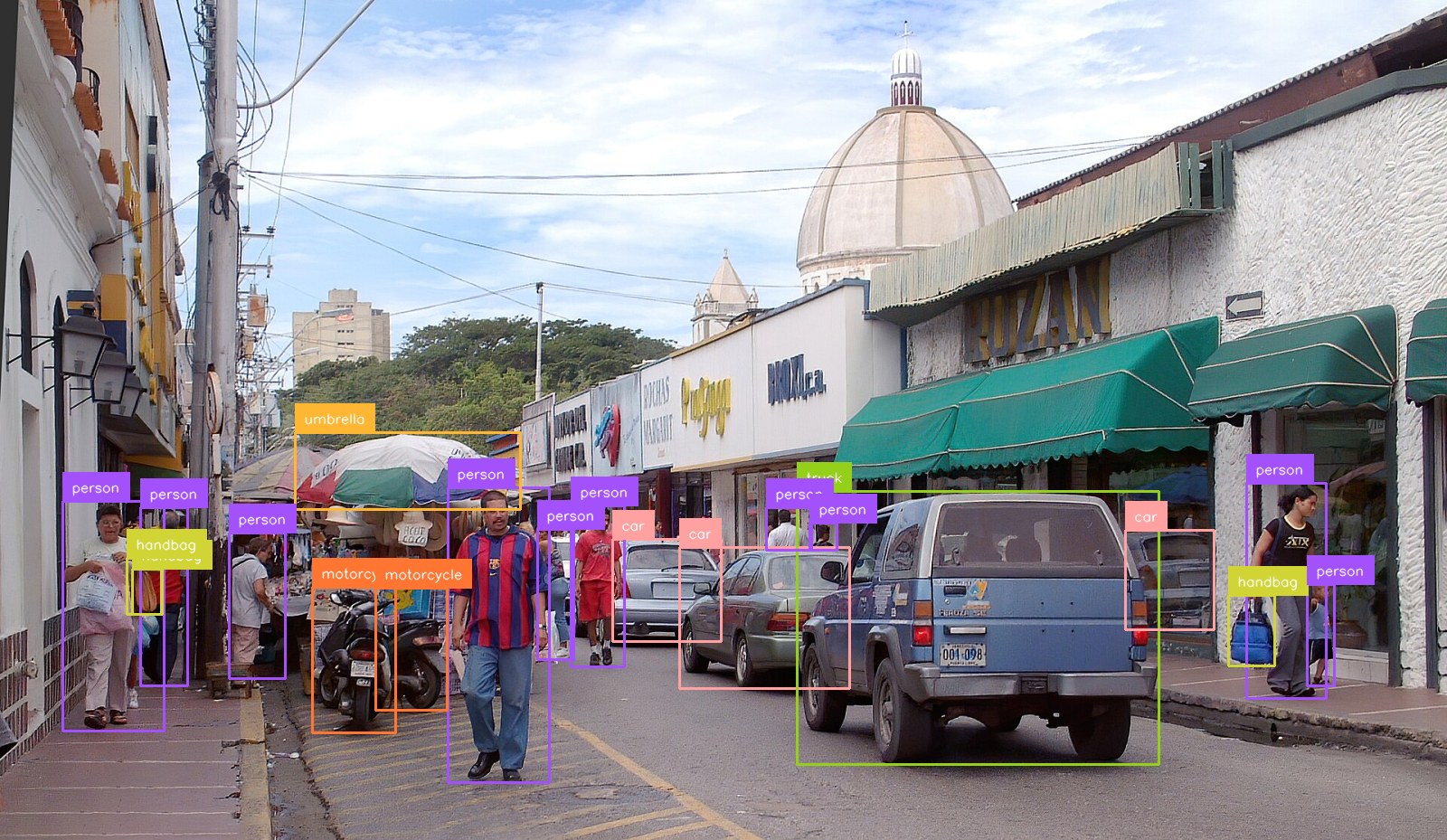
YOLO-NAS-L, confidence 0.40. Source photo by Wilfredor, CC0.
Live demo · Documentation · Changelog · Contributing · Issues
modern-yolonas is YOLO-NAS object detection rewritten so you can read the whole thing:
a model variant is a function, a config is a dataclass, and there is no layer of indirection
that exists only to be configurable. state_dict keys match
super-gradients exactly, so the original
pretrained COCO checkpoints load with strict=True.
Detections come back as supervision Detections,
so every annotator, tracker, zone and metric in that ecosystem works on them out of the box.
Training runs on Lightning, and the model exports to ONNX and OpenVINO — including a
self-contained graph for Frigate.
🚀 Updates
- [2026-10-30]
v0.6.0— export to ONNX, OpenVINO (INT8 now compiles) and TensorRT from one graph, with an end-to-end graph that has NMS baked in for Frigate; a TensorRT stream-ordering bug that returned plausible boxes at 31.4 AP instead of 47.3 is fixed;yolonas trackwith ByteTrack as the default tracker (53.7 HOTA on SportsMOT; needs thetrackingextra); every figure in the model table below is measured by this project. - [2026-09-18]
v0.5.0— training moved to PyTorch Lightning; quantization (yolonas quantizefor PTQ,yolonas qatfor QAT) ontorch.ao.quantizationFX graph mode; accuracy is now measured by this project rather than quoted; two mAP bugs and a mosaic bug fixed; license changed from MIT to Apache-2.0 for the source. - [2026-09-18]
v0.4.0—YoloNASDetectorreturnssupervision.Detections, so results slice and plug into the supervision ecosystem directly. - [2026-02-05]
v0.1— initial release: S/M/L architectures, pretrained weight loading, training, COCO evaluation, and ONNX export.
🏆 Model Zoo
Box AP on COCO val2017, all 5000 images, and latency on the hardware named below. There is
nothing to download by hand — yolo_nas_s(pretrained=True) and YoloNASDetector("yolo_nas_s")
fetch and cache Deci's COCO checkpoints on first use (they carry Deci's own non-commercial
terms — see License below). Pre-exported ONNX, OpenVINO IR and TensorRT engines are on
the Hub.
| Model | Input | Params | GFLOPs | AP | AP50 | dGPU TensorRT FP16 |
CPU OpenVINO INT8 |
iGPU OpenVINO INT8 |
|---|---|---|---|---|---|---|---|---|
| YOLO-NAS-S | 320 | 19.05M | 8.5 | 38.4 | 53.9 | 1.17 ms 855 FPS |
5.19 ms 193 FPS |
6.83 ms 146 FPS |
| YOLO-NAS-S | 640 | 19.05M | 33.9 | 47.3 | 64.4 | 2.12 ms 472 FPS |
19.87 ms 50 FPS |
12.04 ms 83 FPS |
| YOLO-NAS-M | 320 | 51.18M | 23.5 | 43.1 | 59.1 | 1.50 ms 666 FPS |
12.03 ms 83 FPS |
9.45 ms 106 FPS |
| YOLO-NAS-M | 640 | 51.18M | 94.2 | 51.3 | 68.3 | 4.19 ms 239 FPS |
47.47 ms 21 FPS |
25.49 ms 39 FPS |
| YOLO-NAS-L | 320 | 66.98M | 32.2 | 43.8 | 59.9 | 1.94 ms 515 FPS |
15.56 ms 64 FPS |
10.38 ms 96 FPS |
| YOLO-NAS-L | 640 | 66.98M | 129.0 | 52.0 | 69.1 | 5.41 ms 185 FPS |
63.00 ms 16 FPS |
32.07 ms 31 FPS |
Every column is measured here, not quoted — regenerate the whole table with
uv run examples/model_table.py and uv run examples/render_model_table.py. The full grid,
across PyTorch / ONNX Runtime / OpenVINO / TensorRT and CPU / iGPU / dGPU, is in
the runtime matrix.
How these numbers were measured, and what they do and do not mean
Latency is model forward only — no preprocessing, no NMS — batch 1, median of 30 runs
after 8 discarded. FPS is its reciprocal on a single synchronous stream, not throughput:
a pipeline that overlaps decode, transfer and inference reports more on the same hardware,
and one that counts whole frames reports less, because preprocessing is excluded. Measured on an RTX 3060 Laptop / i7-12700H / Iris Xe, on mains power. The dGPU
column is a TensorRT engine built natively on that card; an --hardware-compatible engine,
which is the kind worth publishing, costs 16% at 320 and 8% at 640. Leaderboards that publish
T4 TensorRT latency are not measuring the same thing, so those columns should not be read side
by side.
320 costs about 9 AP, consistently across all three variants (−8.9 / −8.2 / −8.2), for roughly a quarter of the FLOPs. Worth knowing before choosing it: these weights were trained at 640, so this measures the resolution drop and not a model designed for 320. It also rules out an obvious-looking trade — YOLO-NAS-L at 320 is faster than YOLO-NAS-S at 640 on a CPU (15.6 ms against 19.9) and 3.5 AP worse, so the bigger model at lower resolution is not the free win the latency column alone suggests.
Accuracy is measured in FP32 with NMS at IoU 0.70, which a sweep found to be the optimum.
postprocess still defaults to 0.65 for interactive use, where fewer overlapping boxes
matters more than a tenth of AP.
The weights are Deci's pretrained COCO checkpoints, so this measures the architecture as reimplemented here, not weights trained by this project. Deci publishes 47.5 / 51.5 / 52.2, so roughly 0.2 is unaccounted for — the model table lists the protocol differences that were tested and ruled out, and does not guess at the rest. Numeric agreement with super-gradients is verified far more tightly: class scores are bit-identical.
📦 Installation
uv add modern-yolonas
# or
pip install modern-yolonas
Optional extras: [tracking], [onnx], [onnx-gpu], [openvino], [tensorrt], [fiftyone], [benchmark], [mot], [serve], [demo], [tensorboard], [wandb], [ssl], [distill].
⚡ Quick Start
YoloNASDetector picks CUDA when it is available and falls back to CPU, so the examples below run
anywhere. Pass device="cuda", "cpu" or a torch.device to choose explicitly.
Detect objects in an image
import cv2
from modern_yolonas import YoloNASDetector

det = YoloNASDetector("yolo_nas_s")

image = cv2.imread("image.jpg")
detections = det(image)  # an sv.Detections

for box, score, name in zip(detections.xyxy, detections.confidence, detections.data["class_name"]):
    x1, y1, x2, y2 = box
    print(f"{name}: {score:.2f} [{x1:.0f}, {y1:.0f}, {x2:.0f}, {y2:.0f}]")

# Save annotated image
cv2.imwrite("output.jpg", det.annotate(image, detections))
Because the result is a supervision container, filtering is slicing:
from modern_yolonas import COCOClass

people = detections[detections.class_id == COCOClass.PERSON]
confident = detections[detections.confidence > 0.5]
big = detections[detections.box_area > 5000]
COCOClass is an IntEnum, so its members are ordinary ints — they just say which class
they are. The ids describe the COCO taxonomy, so they apply to the pretrained checkpoints,
not to a model fine-tuned on your own classes.
and it plugs straight into the rest of the ecosystem:
import supervision as sv

zone = sv.PolygonZone(polygon=my_polygon)
inside = detections[zone.trigger(detections)]

heatmap_annotator = sv.HeatMapAnnotator()
frame = heatmap_annotator.annotate(frame, detections)
Detect objects in a video
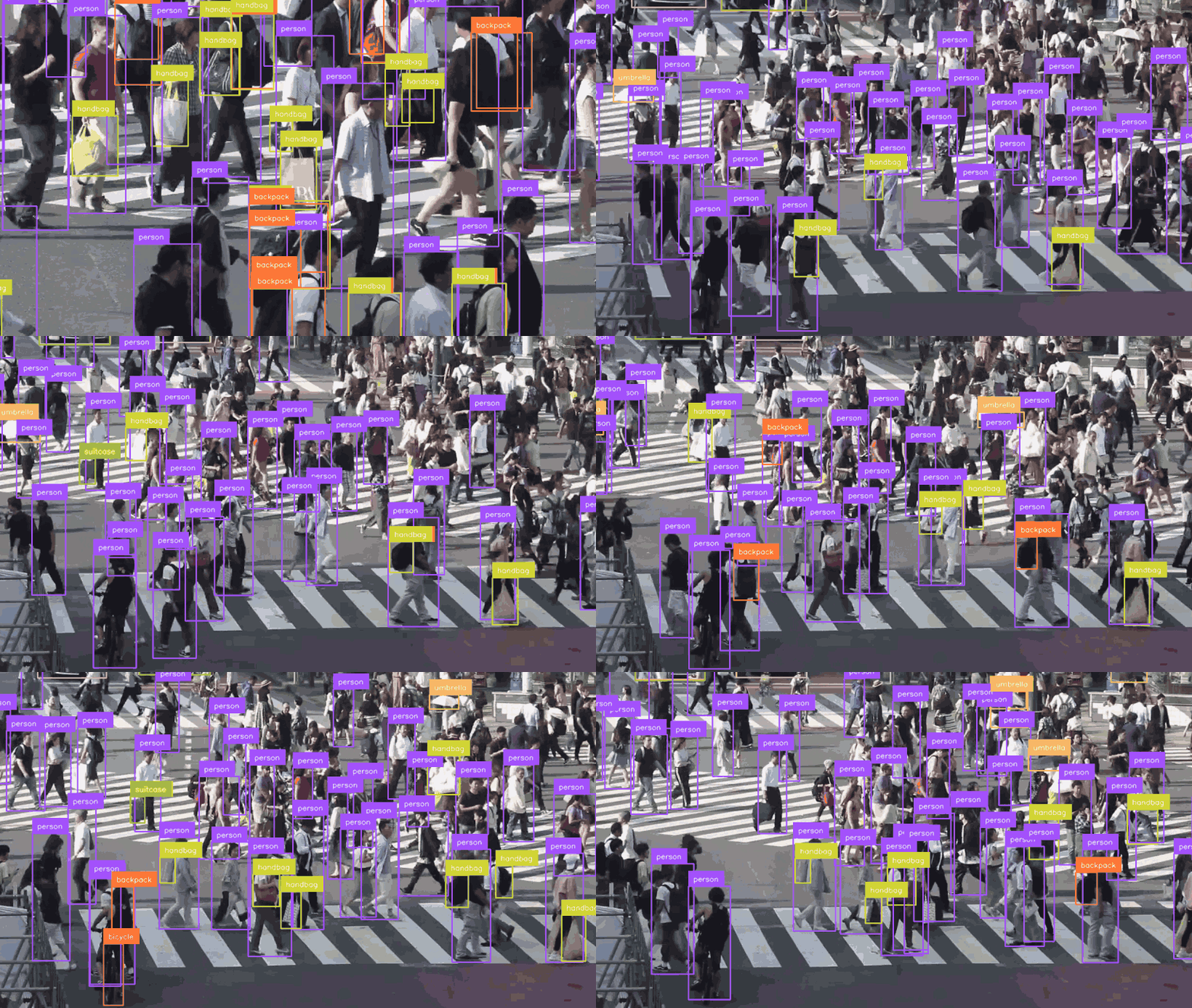
YOLO-NAS-L at confidence 0.25, ~70 detections per frame. Clip by Basile Morin, CC BY-SA 4.0 — so this clip, unlike the rest of the repository, is CC BY-SA rather than Apache-2.0.
from modern_yolonas import YoloNASDetector

det = YoloNASDetector("yolo_nas_s")

# Option 1: Write annotated video directly
stats = det.detect_video_to_file("input.mp4", "output.mp4")
print(f"{stats['total_detections']} detections across {stats['total_frames']} frames")

# Option 2: Iterate frames for custom logic
for frame_idx, frame, detections in det.detect_video("input.mp4"):
    print(f"Frame {frame_idx}: {len(detections)} objects")
    # detections.xyxy, .confidence, .class_id are numpy arrays
    # det.annotate(frame, detections) returns the annotated BGR frame
Live webcam detection
import cv2
from modern_yolonas import YoloNASDetector

det = YoloNASDetector("yolo_nas_s")

for frame_idx, frame, detections in det.detect_video(source=0):  # 0 = default camera
    cv2.imshow("YOLO-NAS", det.annotate(frame, detections))
    if cv2.waitKey(1) & 0xFF == ord("q"):
        break
cv2.destroyAllWindows()
Feature embeddings
The detector throws the backbone's representation away and keeps four numbers per object.
YoloNASEmbedder keeps the representation — for image retrieval, near-duplicate search,
clustering and re-identification. Nothing extra is trained: same weights, read one stage earlier.
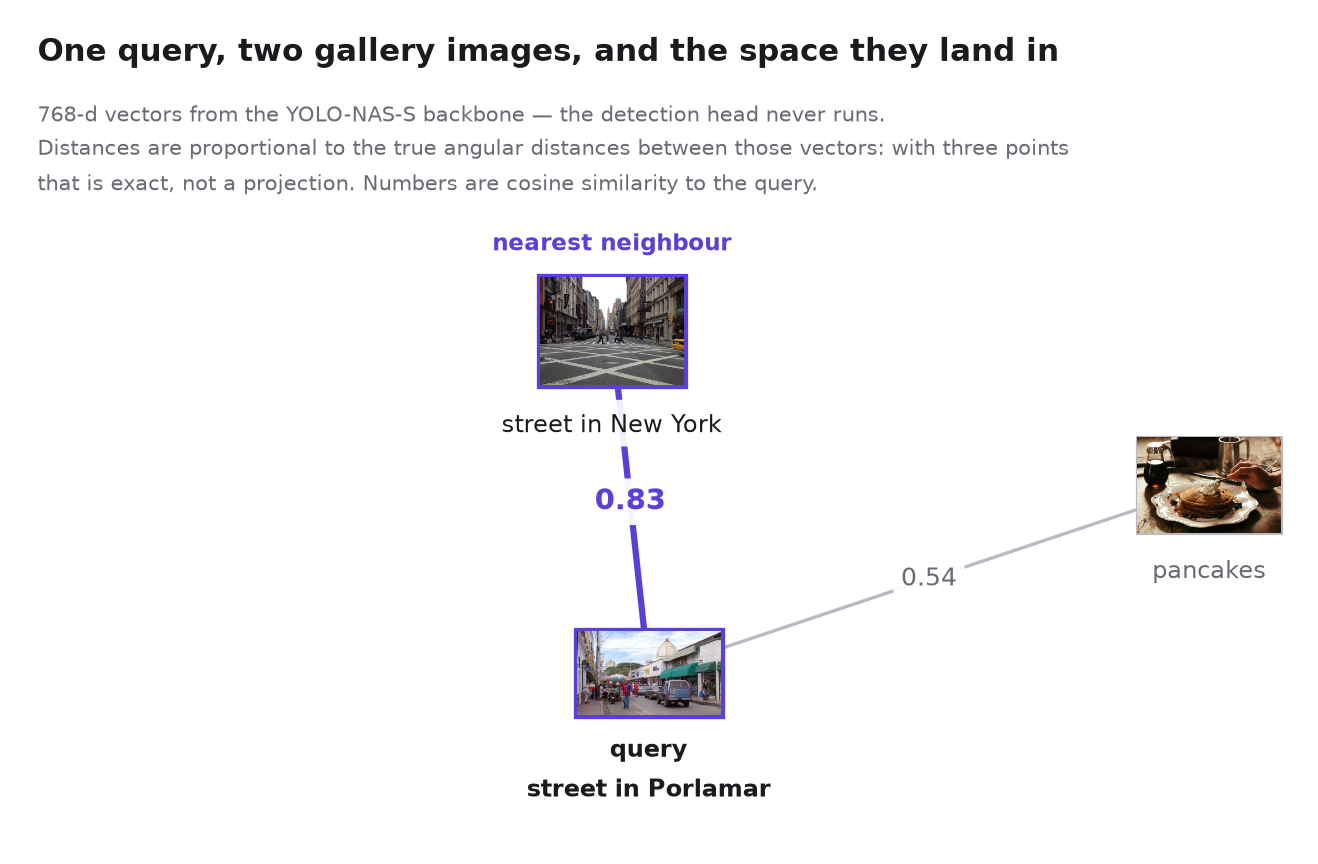
Regenerate with uv run examples/embedding_space_figure.py. Gallery photos by
Mike Petrucci and
Gabriel Gurrola, CC0.
import numpy as np
from modern_yolonas import YoloNASEmbedder

embedder = YoloNASEmbedder("yolo_nas_s")

vector = embedder("image.jpg")                     # (768,) L2-normalized
gallery = embedder.embed_batch(["a.jpg", "b.jpg"]) # (2, 768)

# Both sides are normalized, so a dot product is the cosine similarity.
ranking = np.argsort(-(gallery @ vector))
Detections and embeddings in one pass
Detection and embedding share the whole network up to the head, so there is no reason to
run the backbone twice. predict takes Task flags and gives you both:
from modern_yolonas import COCOClass, Task, YoloNASDetector

detector = YoloNASDetector("yolo_nas_s")
result = detector.predict(image, Task.DETECT | Task.EMBED | Task.EMBED_OBJECTS)

result.detections                       # sv.Detections
result.embedding                        # (768,) whole-image vector
result.detections.data["embedding"]     # (N, 768), one row per detection

# The per-object vectors live in `data`, so they follow the boxes through slicing:
people = result.detections[result.detections.class_id == COCOClass.PERSON]
people.data["embedding"]                # rows still aligned with people.xyxy
Task.EMBED_OBJECTS implies Task.DETECT; fields you did not ask for come back None.
detector(image) still works — it is shorthand for predict(image, Task.DETECT).detections.
Raw feature maps, if you want to pool them yourself:
features = model.forward_features(x) # c2 c3 c4 c5 (backbone) + p3 p4 p5 (neck)
All three shapes export to ONNX — --target embedding, --target combined, and
--target objects, the last a self-contained graph with NMS inside it that emits
detections [D, 7] and one vector per detection.
See the embeddings guide
for layer choice and why the letterbox padding is excluded from pooling, and the
export guide for the
valid_region input the exported graphs take.
Track objects across a video

Deep HM-SORT, boxes coloured by track id so an ID-swap shows as a colour change. 48 frames, 14 ids, 10 of them alive for at least half the clip.
The default tracker is ByteTrack, from roboflow/trackers.
It is the optional tracking extra, because it pulls in opencv-python over the headless
build this package uses:
pip install "modern-yolonas[tracking]"
yolonas track --source match.mp4 --classes 0
from modern_yolonas import YoloNASDetector

detector = YoloNASDetector("yolo_nas_s")

for frame_index, frame, detections in detector.track_video("match.mp4"):
    detections.tracker_id          # (N,) stable ids

# Or straight to a file, with ids drawn on
stats = detector.track_video_to_file("match.mp4", "tracked.mp4")
stats["unique_ids"]                # distinct objects the tracker believes it saw
ByteTrack is the default because it measured best. On all 45 SportsMOT validation sequences, with YOLO-NAS-L detections, it scores 53.7 HOTA against 47.6 for Deep HM-SORT, the tracker this package also ships, with 1,885 ID switches against 3,172 (tracking benchmark).
Deep HM-SORT needs no extra dependency and associates on appearance as well as motion, reusing the per-object embeddings from the detection pass. On clean, ground-truth boxes its motion-only mode beats ByteTrack (89.7 against 87.5 HOTA); its appearance cue does not help with these embeddings, which barely separate one player from another:
from modern_yolonas.tracking import DeepHMSort

for frame_index, frame, detections in detector.track_video("match.mp4", DeepHMSort()):
    detections.data["embedding"]   # (N, 768) the vectors it associated on
Any (N, D) array in detections.data["embedding"] is associated on, so a purpose-trained
re-identification model drops straight in — see the tracking guide.
Low-level model API
import torch
from modern_yolonas import yolo_nas_s

model = yolo_nas_s(pretrained=True).eval().cuda()
x = torch.randn(1, 3, 640, 640).cuda()
pred_bboxes, pred_scores = model(x)
# pred_bboxes: [1, 8400, 4] — x1y1x2y2 pixel coordinates
# pred_scores: [1, 8400, 80] — class probabilities
🖥️ CLI
Full reference: CLI docs.
# Detect in images
yolonas detect --model yolo_nas_s --source image.jpg --conf 0.25
yolonas detect --model yolo_nas_l --source images/ --output results/

# Detect in video
yolonas detect --model yolo_nas_s --source video.mp4 --output results/
yolonas detect --model yolo_nas_m --source video.mp4 --skip-frames 2 --conf 0.3

# Track objects across a video (Deep HM-SORT)
yolonas track --source match.mp4 --classes 0
yolonas track --source match.mp4 --fusion min                  # the Deep-EIoU baseline
yolonas track --source lobby.mp4 --max-lost-seconds 10          # remember people for longer

# Training
yolonas train --model yolo_nas_s --data /path/to/dataset --format yolo --epochs 100

# Evaluation
yolonas eval --model yolo_nas_s --data /path/to/coco --split val2017

# Export (needs the extras: pip install "modern-yolonas[onnx]" / [openvino])
yolonas export --model yolo_nas_s --format onnx --output model.onnx
yolonas export --model yolo_nas_s --format openvino --output model.xml

# Export feature embeddings, alone or beside the detections
yolonas export --model yolo_nas_s --target embedding --output embedding.onnx
yolonas export --model yolo_nas_s --target combined --output combined.onnx
yolonas export --model yolo_nas_s --target objects --output objects.onnx

# Export for Frigate (embeds preprocessing + NMS in the graph)
yolonas export --model yolo_nas_s --format onnx --target frigate
yolonas export --model yolo_nas_s --format openvino --target frigate --input-size 320
Frigate integration
The --target frigate export produces a self-contained model that accepts raw uint8 BGR
input and outputs a flat [D, 7] tensor with [batch, x1, y1, x2, y2, confidence, class_id].
detectors:
  ov:
    type: openvino
    device: GPU

model:
  model_type: yolonas
  width: 320
  height: 320
  input_tensor: nchw
  input_pixel_format: bgr
  path: /config/model_frigate.xml
📚 Tutorials
Step-by-step notebooks in tutorials/:
| Topic | Notebook | Description |
|---|---|---|
| Roboflow | roboflow/01_explore_dataset.ipynb |
Download from Roboflow + explore |
roboflow/02_finetune.ipynb |
Fine-tune + evaluate + visualize | |
| FiftyOne | fiftyone/01_explore_dataset.ipynb |
Load from FiftyOne Zoo + explore |
fiftyone/02_finetune.ipynb |
Fine-tune + evaluate + visualize | |
fiftyone/03_embedding_space.ipynb |
Explore a YOLO-NAS embedding space + find duplicates | |
| Export | export_onnx.ipynb |
ONNX export from any checkpoint |
| Quantization | quantization_ptq.ipynb |
Post-Training Quantization |
quantization_qat.ipynb |
Quantization-Aware Training | |
| Inference | inference_onnx.ipynb |
ONNX Runtime inference |
Examples
Start with the notebook — install, detect, visualize, and inspect the raw model output in one pass:
Or the standalone scripts in examples/:
parity_check.py— verify this implementation matches super-gradients (writesdocs/benchmarks/parity.md)runtime_matrix.py— latency across PyTorch / ONNX Runtime / OpenVINO / TensorRT, CPU / Intel iGPU / NVIDIA dGPU, FP32 / FP16 / INT8 and every input size (writesdocs/benchmarks/runtime_matrix.md)runtime_accuracy.py— COCO AP for an exported artifact, so an INT8 file's accuracy is measured rather than assumedexport_zoo.py— pre-export every variant to every runtime and size, with a manifestdetect_image.py— run detection on a single imagedetect_video.py— run detection on a video filedetect_webcam.py— live webcam detectiontrack_video.py— track a video with Deep HM-SORT and report whether the ids are fragmenting
🛠️ Development
uv sync --dev
uv run pre-commit install

uv run pytest tests/ -v
uv run ruff check src/ tests/
Contributions are welcome. Please read CONTRIBUTING.md — it lists the API design principles a change is reviewed against — and the Code of Conduct.
📄 License
Apache-2.0 — applies to the source code only. See LICENSE.
Pretrained weights notice: the pretrained COCO weights downloaded by this library (via
pretrained=True) are provided by Deci AI and are subject to
Deci's YOLO-NAS license,
which restricts commercial use and redistribution. The Apache-2.0 license of this repository
does not cover them. If you train your own weights from scratch, those are entirely yours.
🙏 Acknowledgments
This project is a clean-room reimplementation of the YOLO-NAS architecture originally
developed by Deci AI and published in their
super-gradients library (Apache-2.0). The model
architecture, module structure and state_dict key naming were derived from the
super-gradients source to enable pretrained weight compatibility.
It also builds directly on supervision, PyTorch Lightning and OpenVINO.
Thanks to everyone who has contributed — in particular Alan Neves, whose work on augmentations, metrics, gradient accumulation, the ONNX export path and super-gradients parity shaped much of the training stack.
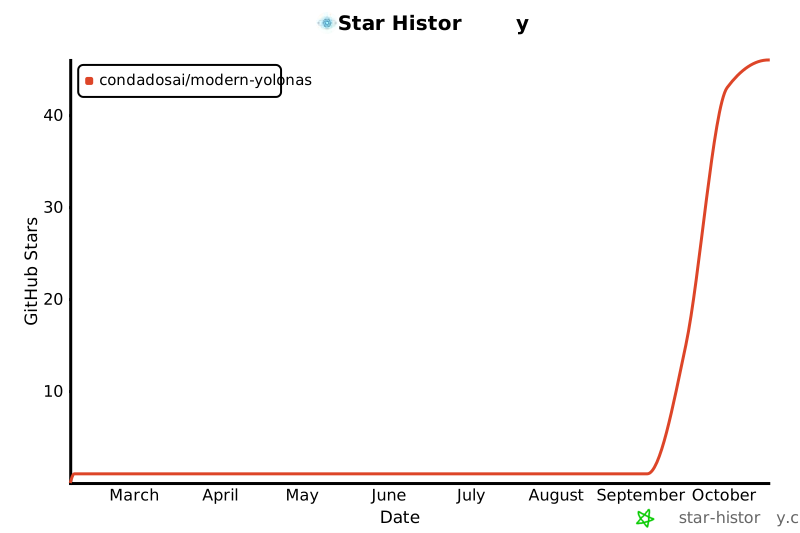
⭐ Star History
📖 Citation
If you use modern-yolonas in your research or project, please cite it:
@software{condados2026modernyolonas,
  author       = {Condados, Luis and Neves, Alan},
  title        = {modern-yolonas: A Clean Reimplementation of YOLO-NAS},
  year         = {2026},
  url          = {https://github.com/CondadosAI/modern-yolonas},
  license      = {Apache-2.0}
}
1 maintainer

Metadata
1 maintainer
Release files for modern-yolonas 0.6.0
For a detailed explanation of source distributions (sdists) and built distributions (wheels), please see the package formats documentation.
Source distribution (sdist)
| File | Size | Uploaded | Provenance | Actions |
|---|---|---|---|---|
| modern_yolonas-0.6.0.tar.gz | 10.9 MB | With provenance | Details for modern_yolonas-0.6.0.tar.gz |
Built distribution (wheel)
| File | Interpreter | ABI | Platform | Actions Reset |
|---|---|---|---|---|
| modern_yolonas-0.6.0-py3-none-any.whl | Python 3 | none | any | Details for modern_yolonas-0.6.0-py3-none-any.whl |
Total release size: 11.1 MB
Release files / modern_yolonas-0.6.0.tar.gz
| Download URL | modern_yolonas-0.6.0.tar.gz |
|---|---|
| Size | 10.9 MB |
| Tags | Source |
|
SHA-256 checksum How to use checksums |
793b847df4e1fd34acea6661e806a529ad4e7737efdedf81400c79fbfe98d77f
|
|
BLAKE2b-256 checksum How to use checksums |
65a322ed5071ee2462002d055da0e80011cc95999a8e2657da203a33c82cb232
|
| Upload date | |
|
Uploaded using Trusted Publishing? What is trusted publishing? |
Yes |
| Uploaded via |
twine/7.0.0 CPython/3.13.16
|
Provenance
Provenance describes where a file came from. On PyPI, provenance is shared via attestations, which provide a verifiable record of the build or publishing details. View details, limitations and caveats.


PyPI Publish Attestation
PyPI verified that this artifact, at this checksum, originated from the publisher listed below.
Signed by GitHub Actions, verified by PyPI on Oct 30, 2026.
Transparency logRelease files / modern_yolonas-0.6.0-py3-none-any.whl
| Download URL | modern_yolonas-0.6.0-py3-none-any.whl |
|---|---|
| Size | 210.8 kB |
| Tags | Python 3 |
|
SHA-256 checksum How to use checksums |
661f500e4ca2a22ac3859d3ca29083e4b512c26e6f3befefeee0a1a526746b4c
|
|
BLAKE2b-256 checksum How to use checksums |
81ca9d5ae2c51223e04e9ec0a4936d47101e1db7f99693bc56613786612482f2
|
| Upload date | |
|
Uploaded using Trusted Publishing? What is trusted publishing? |
Yes |
| Uploaded via |
twine/7.0.0 CPython/3.13.16
|
Provenance
Provenance describes where a file came from. On PyPI, provenance is shared via attestations, which provide a verifiable record of the build or publishing details. View details, limitations and caveats.
PyPI Publish Attestation
PyPI verified that this artifact, at this checksum, originated from the publisher listed below.
Signed by GitHub Actions, verified by PyPI on Oct 30, 2026.
Transparency logSecurity for modern-yolonas 0.6.0
Provenance
Provenance describes where a file came from. On PyPI, provenance is shared via attestations, which provide a verifiable record of the build or publishing details. View details, limitations and caveats.
Full provenance
All 2 files in this release have been uploaded with provenance metadata.
Attestation for modern_yolonas-0.6.0.tar.gz
PyPI Publish Attestation
PyPI verified that this artifact, at this checksum, originated from the publisher listed below.
Signed by GitHub Actions, verified by PyPI on Oct 30, 2026.
Transparency logA note on package security
PyPI is a repository for distributing packages, not a service for auditing them. While third-party security researchers and our staff do their best to detect and remove malicious packages, PyPI cannot guarantee the quality, security or suitability of any given package.
To learn more about protecting yourself from malicious actors, visit our package security documentation.














