
modist
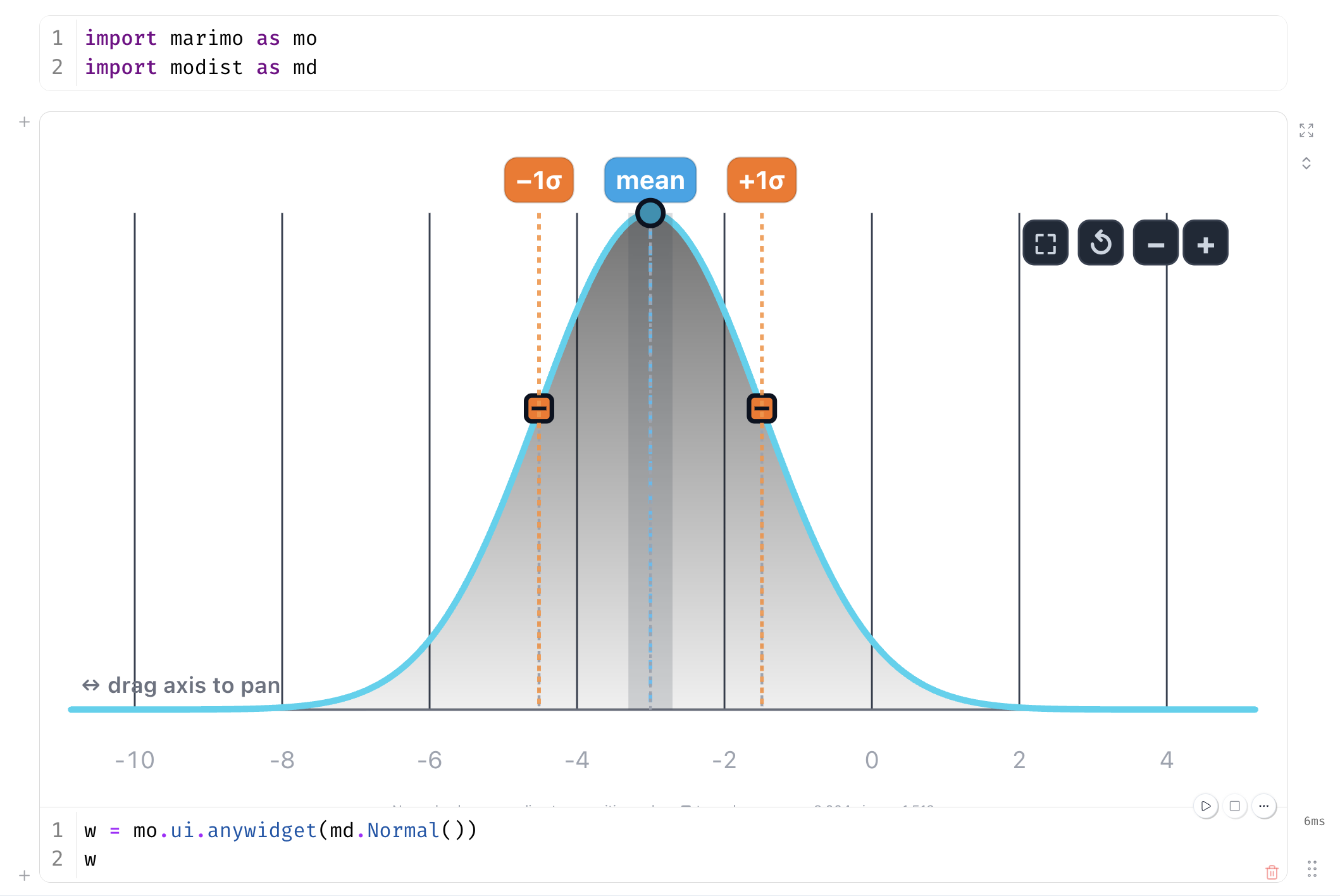
Interactive distribution widgets for marimo, in the style
of koaning/wigglystuff. Drag the
density curve to shape a distribution, then feed the params straight into a
distribution constructor with a single splat.
Install
uv add modist # or: uv pip install modist (pip install modist)
The grouped-priors UI (md.ui) additionally requires marimo:
uv add 'modist[marimo]' (or pip install modist[marimo]). The
priors-from-model helpers (md.pymc) additionally require pymc:
uv add 'modist[marimo,pymc]'.
Quickstart
import marimo as mo
import modist as md

w = mo.ui.anywidget(md.Normal())
w
params = w.value # {'mu': ..., 'sigma': ...}
import pymc as pm
dist = pm.Normal.dist(**params)   # or pm.Beta / pm.Gamma / pm.StudentT
Priors UI
Allocate a whole set of priors at once with a tabbed panel — one draggable distribution per prior:
import modist as md

priors = {"intercept": md.Normal(), "slope": md.Normal(), "sigma": md.Gamma()}
ui = md.ui.create_tabs(priors)
ui
ui.value # {'intercept': {'mu': ..., 'sigma': ...}, 'sigma': {'alpha': ..., 'beta': ...}, ...}
ui.value re-runs live as you drag, and each prior splats straight into its
constructor: pm.Normal.dist(**ui.value["intercept"]). Use
md.ui.create_tabs(priors, orientation="vertical") for a vertical tab bar,
md.ui.create_tabs(priors, height=260) for shorter panels (the widgets size by
aspect ratio, so a smaller height just narrows them), or
md.ui.create_stack(priors) to show every prior at once.
ui.priors maps each name to a pymc_extras.Prior
object (pip install pymc-extras). Your original distribution instances stay
live as you drag, so symbolic flows built off them
(w.create_variable(...), w.params, w.scipy) keep working.
Requires marimo (modist[marimo]). import modist itself stays marimo-free —
md.ui is imported lazily on first access.
Priors from a PyMC model
Requires
modist[marimo,pymc].md.pymcis imported lazily, so plainimport modistdoesn't pull in pymc.
The same idea, lifted from a built model. md.pymc.create_priors(model)
finds the model's root priors — distributions whose parameters don't depend
on other distributions — replaces each with a draggable widget, compiles a
sampler once, and bundles everything into a Priors panel you can drag, draw
from, and hand straight to inference. The whole loop, from model to
pm.sample, is one short session:
import numpy as np, pymc as pm, modist as md
x = np.random.default_rng(0).normal(size=(50, 3))
y = x @ [1.0, -0.5, 2.0] + np.random.default_rng(1).normal(size=50)

with pm.Model(coords={"covariate": ["retention", "content", "price"]}) as model:
    alpha = pm.Normal("alpha", mu=pm.Normal("alpha_mu", sigma=5), sigma=2)
    beta = pm.Normal("beta", dims="covariate")          # one widget per covariate
    sigma = pm.HalfNormal("sigma")                      # auto-mapped to a Gamma widget
    pm.Normal("obs", mu=alpha + x @ beta, sigma=sigma, observed=y)

ui = md.pymc.create_priors(model)   # tabs: alpha_mu, sigma, and a per-covariate beta group
ui                                    # drag the density curves to reshape the priors
Then use for prior predictive, etc:
ui.value                              # live params, ready to splat into pm.*.dist(**p)
ui.draw(1_000)                         # draws of every model RV, driven by the widgets
ui.draw(1_000, beta_price_mu=1.5)       # ... with a named per-parameter override
ui.sample_prior_predictive(1_000)       # -> xr.DataTree: prior / prior_predictive groups
Use the set_distributions method in order to define a new PyMC model.
new_model = ui.set_distributions()    # the widget families replace the priors
idata = pm.sample(model=new_model)    # ordinary pm.sample, ready for arviz
Families
| Widget | Params | Domain | Drag affordances |
|---|---|---|---|
Normal |
mu, sigma |
free | mean line → mu, ±1σ squares → sigma |
Beta |
alpha, beta |
fixed [0, 1] |
mean line → translate, q25/q75 squares → concentrate |
Gamma |
alpha, beta |
edge pinned at 0 | mean line → translate, q25/q75 squares → reshape |
StudentT |
mu, sigma, nu |
free | mean line → mu, q75 square → sigma, tails dial → nu |
StudentT's third parameter is a tails dial: drag it up for fatter tails
(lower nu) or down for thinner tails (higher nu). Because nu has no
natural on-curve landmark, its drag is a separate 1-D slider rather than a
point you move on the density curve.
alpha/beta follow the PyMC / statistics convention
(Gamma's beta is the rate, not scipy's scale). The lazy .scipy and
.pymc adapters map to the right parametrization automatically:
n = md.Normal(mu=2.0, sigma=3.0)
n.scipy   # <scipy.stats.norm> via loc=/scale=
n.pymc    # pm.Normal.dist(mu=2.0, sigma=3.0)

g = md.Gamma(alpha=2.0, beta=3.0)
g.scipy   # scipy.stats.gamma(a=2.0, scale=1/3)  -- rate handled for you
w.value is a plain dict of the synced traits, so pm.X.dist(**w.value) works
with no conversion.
Jupyter
The widgets are anywidget/ipywidgets under the hood, so they run in plain
Jupyter too — no marimo required. Just display() the widget and read its
.params (or .scipy) instead of wrapping it in mo.ui.anywidget(...):
import modist as md
from IPython.display import display

w = md.Normal(mu=0, sigma=1)
display(w)          # drag the curve to reshape it

w.params            # {'mu': ..., 'sigma': ...}
A full walkthrough notebook — all five families, live scipy stats, and a
beta-prior combination example — lives at
demos/jupyter_example.ipynb.
From a checkout:
uv sync --extra dev --extra scipy   # installs jupyter, ipykernel, jupytext
make jupyter                        # opens demos/jupyter_example.ipynb in JupyterLab
make jupyter registers the repo's .venv as a modist kernel, so the
notebook uses exactly the installed packages. Requires a local
JupyterLab (installed alongside jupyter via the
dev extras).
How it works
Each family is its own anywidget class with a small set of synced parameter
traits (no x_min/x_max/n_points). The view — SVG scaffold, pan/zoom,
draggable hit lines, and per-family math — lives in a self-contained ESM module.
Source JS lives in js/ (js/base.js shared scaffold + one family file,
all importing a vendored copy of jStat for
pdf/cdf/quantile math). Anywidget delivers _esm as a Blob URL, which
cannot resolve relative imports, so esbuild
bundles each family (jStat inlined) into the committed src/modist/static/*.js
files — the same pattern wigglystuff uses for its JS-heavy widgets.
Rebuilding the JS
make js          # esbuild js/*.js -> src/modist/static/*.js
make js-watch    # rebuild on every edit (for anywidget hot-reload dev)
Requires a local esbuild (npm install --no-save esbuild).
Development
make venv        # creates .venv with dev deps + esbuild
make test        # pytest
npm run test:js  # Playwright JS integration probes (headless Chromium)
Acknowledgements
- jStat — JavaScript statistics library (MIT), vendored and bundled for the pdf/cdf/quantile math.
- wigglystuff — the interaction and architecture model (one class per family, prebuilt ESM per class).
1 maintainer

Download files
Download the file for your platform. If you're not sure which to choose, learn more about installing packages.
Source Distribution
Built Distribution
Filter files by name, interpreter, ABI, and platform.
If you're not sure about the file name format, learn more about wheel file names.
Copy a direct link to the current filters
File details
Details for the file modist-0.3.0.tar.gz.
File metadata
- Download URL: modist-0.3.0.tar.gz
- Upload date:
- Size: 131.8 kB
- Tags: Source
- Uploaded using Trusted Publishing? Yes
- Uploaded via:
uv/0.12.9 {"installer":{"name":"uv","version":"0.12.9","subcommand":["publish"]},"python":null,"implementation":{"name":null,"version":null},"distro":{"name":"Ubuntu","version":"24.04","id":"noble","libc":null},"system":{"name":null,"release":null},"cpu":null,"openssl_version":null,"setuptools_version":null,"rustc_version":null,"ci":true}
File hashes
| Algorithm | Hash digest | |
|---|---|---|
| SHA256 |
60458436862c00b2c1b98f7e39e4b6911e4ad077fa3472eafab653408f7b50cb
|
|
| MD5 |
9aefeedd16e33bf13c56bfe867486e19
|
|
| BLAKE2b-256 |
58887666ac316a3ef3f307bc40befc6a89f2563a72e3a1a250bddf72107a9a4f
|
File details
Details for the file modist-0.3.0-py3-none-any.whl.
File metadata
- Download URL: modist-0.3.0-py3-none-any.whl
- Upload date:
- Size: 136.7 kB
- Tags: Python 3
- Uploaded using Trusted Publishing? Yes
- Uploaded via:
uv/0.12.9 {"installer":{"name":"uv","version":"0.12.9","subcommand":["publish"]},"python":null,"implementation":{"name":null,"version":null},"distro":{"name":"Ubuntu","version":"24.04","id":"noble","libc":null},"system":{"name":null,"release":null},"cpu":null,"openssl_version":null,"setuptools_version":null,"rustc_version":null,"ci":true}
File hashes
| Algorithm | Hash digest | |
|---|---|---|
| SHA256 |
f8624121bffedba825f9ecfd5dfa83bf0bcbc641990a50b1085864e6e985187a
|
|
| MD5 |
b4380a532e5d30c6d4c758706f747aca
|
|
| BLAKE2b-256 |
98b2a2f3152de7dc90610328160887a4c55f4fee2a0b491aabaca59c2816c940
|














