

Quickstart with Modlee
Welcome to Modlee! This guide will help you get up and running quickly with Modlee, whether you're new to machine learning or just new to our platform.
Account Setup
Sign up for a Modlee account if you haven’t already or sign in to access your account.
Python Setup
1. Install Python
To use the Modlee package, you'll need to have Python installed on your computer. To download Python, visit the official Python website and download the latest version. To use the Modlee package, you need at least Python 3.10 or newer. If this is your first time downloading Python, please refer to the official Python installation guide for beginners.
2. Set Up a Virtual Environment (Optional but Recommended)
Creating a virtual environment helps to manage project-specific dependencies and avoid conflicts between different projects.
-
Creating a Virtual Environment: To create a virtual environment, open your terminal or command prompt and navigate to your project directory. Run the following command:
python -m venv myenv
This command creates a directory named myenv (you can choose any name) in your project folder, containing a copy of the Python interpreter and a fresh set of libraries.
-
Activate the Virtual Environment: Once the virtual environment is created, you need to activate it.
- On Windows:
myenv\Scripts\activate
- On macOS/Linux:
source myenv/bin/activate
- On Windows:
Install the Modlee Package
PyPI
Once you have Python installed and activated a virtual environment, you can install the Modlee package from PyPI. Run this command from the terminal/command line:
pip install modlee

Our package is built on top of PyTorch, PyTorch-lightning, MLFlow, and more to ensure you can continue developing ML with frameworks that you are familiar with.
Source
Alternatively, you can build the package from the source by cloning this repository and installing it from the pyproject.toml configuration file:
git clone https://github.com/modlee-ai/modlee
cd modlee
pip install .

Set API Key
Navigate to the dashboard and generate an API key. Either save your API key to an environment variable:
export MODLEE_API_KEY="my-api-key"
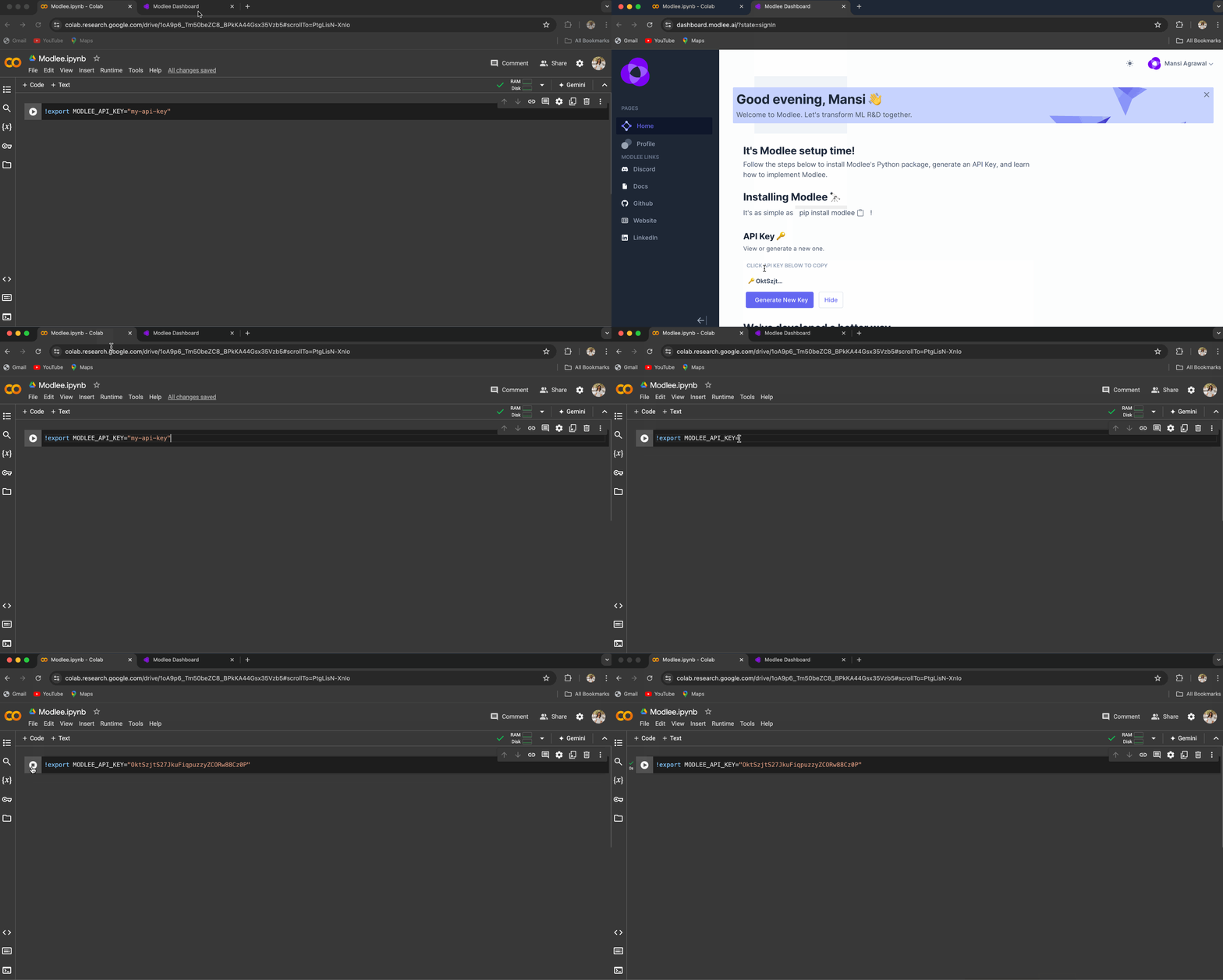
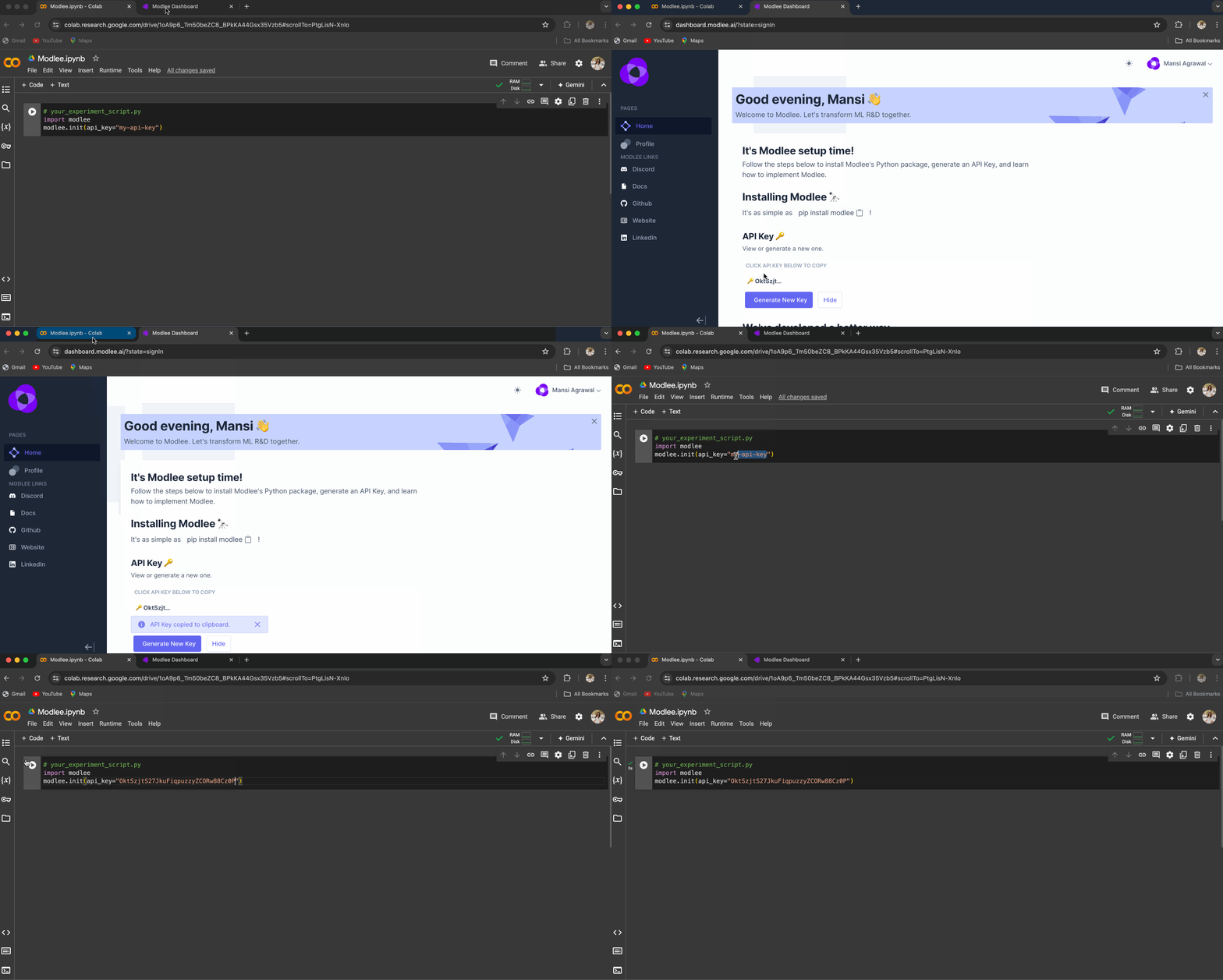
Or pass directly to the modlee.init function (less recommended):
# your_experiment_script.py
import modlee
modlee.init(api_key="my-api-key")
How to Use Modlee - Quick Example
Get started with Modlee by following these steps to set up and train a model using our recommender system. This guide will walk you through the process with a simple end-to-end example.
pip install modlee
import modlee
import lightning.pytorch as pl
import torch
import torchvision
from torch.utils.data import DataLoader
from torchvision import datasets, transforms

# Initialize Modlee with your API key
modlee.init(api_key="your-api-key")

transform = transforms.Compose([
    transforms.Grayscale(num_output_channels=1),
    transforms.ToTensor(),
    transforms.Normalize((0.5,), (0.5,))
])

# Load the Fashion MNIST dataset
train_dataset = datasets.FashionMNIST(root='./data', train=True, download=True, transform=transform)
test_dataset = datasets.FashionMNIST(root='./data', train=False, download=True, transform=transform)

# Create DataLoaders for training and testing
training_loader = DataLoader(train_dataset, batch_size=16, shuffle=True)
test_loader = DataLoader(test_dataset, batch_size=16, shuffle=False)

# Create a recommender for image classification tasks
recommender = modlee.recommender.ImageClassificationRecommender(
    num_classes=10
)

# Fit the recommender with the training DataLoader
recommender.fit(training_loader)

# Retrieve the recommended model from the recommender
modlee_model = recommender.model
print(f"\nRecommended model: \n{modlee_model}")

# Train the recommended model
with modlee.start_run() as run:
    trainer = pl.Trainer(max_epochs=1)
    trainer.fit(
        model=modlee_model,
        train_dataloaders=training_loader,
        val_dataloaders=test_loader
    )
You should see a recommended model as an output. If you are running into issues, please refer to our Troubleshooting Page for more help.
Supported Use Cases
At the moment we support modalities of images, tabular, time-series, and text, and tasks of classification and segmentation, with more coming soon. As with recommendation, use Discord to let us know which modalities and tasks you'd prefer or help make these changes on our GitHub.
Recommended Next Steps
To further develop your expertise, explore the following:
-
Visit the Projects Page: Browse our projects page for guided examples and step-by-step instructions. These projects are designed to help you get hands-on experience with Modlee and apply it effectively.
-
Dive into the Guides: Explore Modlee’s in-depth guides to discover advanced features and capabilities. These resources offer detailed instructions and practical examples to enhance your proficiency.
-
Explore the Examples: Check out our collection of examples to see how Modlee is used across various tasks. These examples can spark ideas and show you how to implement Modlee in your projects.
-
Join the Community: Participate in discussions and forums to connect with other users, seek advice, and share your experiences. Engaging with the community can provide additional support and insights.
4 maintainers


Metadata
4 maintainers
Release files for modlee 0.0.3.post33
For a detailed explanation of source distributions (sdists) and built distributions (wheels), please see the package formats documentation.
Source distribution (sdist)
| File | Size | Uploaded | Provenance | Actions |
|---|---|---|---|---|
| modlee-0.0.3.post33.tar.gz | 65.6 kB | Without provenance | Details for modlee-0.0.3.post33.tar.gz |
Built distribution (wheel)
| File | Interpreter | ABI | Platform | Actions Reset |
|---|---|---|---|---|
| modlee-0.0.3.post33-py3-none-any.whl | Python 3 | none | any | Details for modlee-0.0.3.post33-py3-none-any.whl |
Total release size: 130.6 kB
Release files / modlee-0.0.3.post33.tar.gz
| Download URL | modlee-0.0.3.post33.tar.gz |
|---|---|
| Size | 65.6 kB |
| Tags | Source |
|
SHA-256 checksum How to use checksums |
0781060914592faf2716e9a36d1ea08fa44f4e474ab7d3af22f1d8af8d05cabb
|
|
BLAKE2b-256 checksum How to use checksums |
52530796c6c09507be36b52e00eb3c36e552ef1f52679febcbf66447c1aa58a1
|
| Upload date | |
|
Uploaded using Trusted Publishing? What is trusted publishing? |
No |
| Uploaded via |
twine/5.1.1 CPython/3.12.4
|
Release files / modlee-0.0.3.post33-py3-none-any.whl
| Download URL | modlee-0.0.3.post33-py3-none-any.whl |
|---|---|
| Size | 64.9 kB |
| Tags | Python 3 |
|
SHA-256 checksum How to use checksums |
5c9ba256fe2c0cf76572be55b0da0f12069592727926a3b9dd8c848229071f2e
|
|
BLAKE2b-256 checksum How to use checksums |
c3c61ac76e50132bb92f01c59008a2bef8ead38dea0c49f54c5491c2289032d8
|
| Upload date | |
|
Uploaded using Trusted Publishing? What is trusted publishing? |
No |
| Uploaded via |
twine/5.1.1 CPython/3.12.4
|
Security for modlee 0.0.3.post33
Provenance
Provenance describes where a file came from. On PyPI, provenance is shared via attestations, which provide a verifiable record of the build or publishing details. View details, limitations and caveats.
No provenance found
None of the files in this release were uploaded with provenance metadata.
A note on package security
PyPI is a repository for distributing packages, not a service for auditing them. While third-party security researchers and our staff do their best to detect and remove malicious packages, PyPI cannot guarantee the quality, security or suitability of any given package.
To learn more about protecting yourself from malicious actors, visit our package security documentation.














