
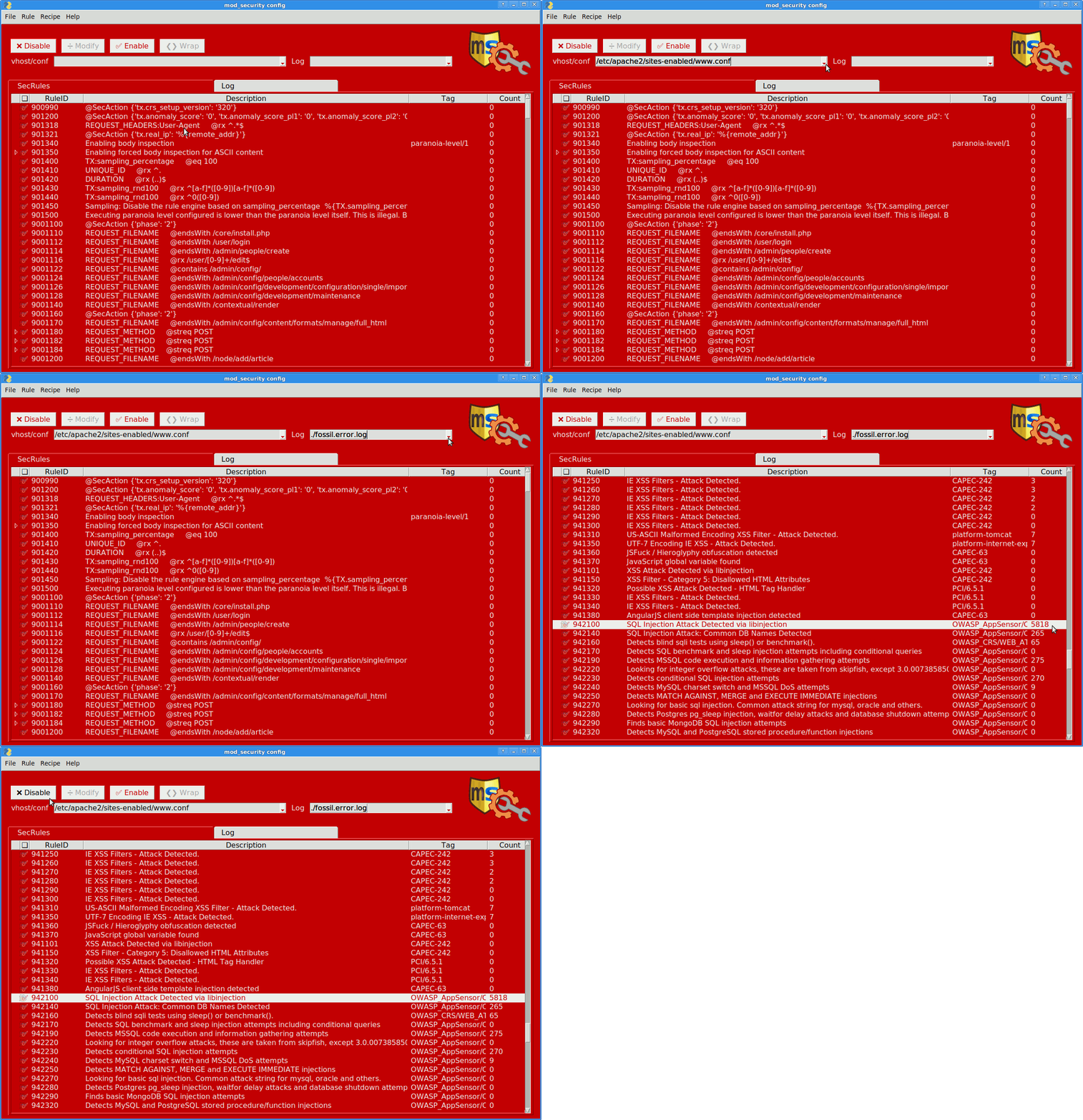
mod_security config GUI
- GUI to define SecRuleRemoveById settings on a vhost-basis
- Tries to suggest false positives from error and audit logs
- And configure mod_security and CoreRuleSet variables.
- Runs locally, via
ssh -Xforwarding, or permodseccfg ssh:/remoting.
Installation
-
You can install this package locally or on a server:
pip3 install modseccfg -
And your distro must provide a full Python installaton and mod_security:
sudo apt install python3-tk ttf-unifont libapache2-mod-security2
Start options
-
To run the GUI locally / on test setups:
modseccfg -
Or with sshfs remoting directly to the servers filesystem:
modseccfg root@vps5:/A little slower on startup, but allows live log inspection. Requires preconfigured ssh hosts and automatic pubkey authorization. Be aware of the implicit
~/mnt/point, if connecting as root.
Alternatively there's also slow X11 forwarding (ssh -X vps modseccfg) or
xpra --start ssh:vps5 --start=modseccfg to run it on
on the server.
Usage
You obviously should have Apache + mod_security + CRS set up and running already (in DetectionOnly mode initially), to allow for log inspection and adapting rules.
- Start modseccfg (
python3 -m modseccfg) - Select a configuration/vhost file to inspect + work on.
- Pick the according error.log
- Inspect the rules with a high error count (→[info] button to see docs).
- [Disable] offending rules
- Don't just go by the error count however!
- Make sure you don't disable essential or heuristic rules.
- Compare error with access log details.
- Else craft an exception rule ([Modify] or →Recipes).
- Thenceforth restart Apache (after testing changes:
apache2ctl -t).
See also: usage remoting, or preconf/recipe setup, or the "FAQ".
Notes
- Preferrably do not edit default
/etc/apache*files - Work on separated
/srv/web/conf.d/*configuration, if available - And keep vhost settings in e.g.
vhost.*.dirfiles, rather than multiple<VirtualHost>in one*.conf(else only the first section will be augmented). - Requires some setup for the recipes (notably *.preconf includes for vhosts), but not for basic rule disabling/modifications.
- File→Install packages are Debian-only
- Reporting scripts also require Ruby
from project import meta
| meta | info |
|---|---|
| depends | python:pysimplegui, python:pluginconf, python:tkinter, sys:mod-security, bin:sshfs |
| compat | Python ≥3.6, Apache 2.x, mod_security 2.9.x, CRS 3.x, BSD/Linux |
| compliancy | xdg, pluginspec, !pep8, logfmt, !desktop, !xdnd, mallard, man, sshrc, !netrc, !http_proxy, !nobackup, !releases.json, !doap, !packfile |
| system usage | opportune shell invokes (sshfs, find, cat, dpkg, xdg-open) |
| paths | ~/mnt/, ~/backup-config/, ~/.config/modseccfg/ |
| testing | few data-driven assertions, only manual UI and usage tests |
| docs | minimal wiki, yelp, news |
| activity | burst, temporary |
| state | beta |
| support | None |
| contrib | mail, fossil DVCS (create an account or send bundles) |
| announce | freshcode.club, pypi.org |
1 maintainer

Metadata
1 maintainer
Release files for modseccfg 0.7.3.post2
For a detailed explanation of source distributions (sdists) and built distributions (wheels), please see the package formats documentation.
Built distribution (wheel)
| File | Interpreter | ABI | Platform | Actions Reset |
|---|---|---|---|---|
| modseccfg-0.7.3.post2-py3-none-any.whl | Python 3 | none | any | Details for modseccfg-0.7.3.post2-py3-none-any.whl |
Release files / modseccfg-0.7.3.post2-py3-none-any.whl
| Download URL | modseccfg-0.7.3.post2-py3-none-any.whl |
|---|---|
| Size | 201.9 kB |
| Tags | Python 3 |
|
SHA-256 checksum How to use checksums |
f6579ac98c5fcafadc0a69511691b16ee7f5812ef28b67be88cf79b9e2ea27de
|
|
BLAKE2b-256 checksum How to use checksums |
09bde9b7a5713a69cbee28ac5b810010c220203ca6e5a4972e8b343a9257e4c2
|
| Upload date | |
|
Uploaded using Trusted Publishing? What is trusted publishing? |
No |
| Uploaded via |
twine/3.3.0 pkginfo/1.7.0 requests/2.27.1 setuptools/62.3.2 requests-toolbelt/0.9.1 tqdm/4.58.0 CPython/3.8.2
|
Security for modseccfg 0.7.3.post2
Provenance
Provenance describes where a file came from. On PyPI, provenance is shared via attestations, which provide a verifiable record of the build or publishing details. View details, limitations and caveats.
No provenance found
None of the files in this release were uploaded with provenance metadata.
A note on package security
PyPI is a repository for distributing packages, not a service for auditing them. While third-party security researchers and our staff do their best to detect and remove malicious packages, PyPI cannot guarantee the quality, security or suitability of any given package.
To learn more about protecting yourself from malicious actors, visit our package security documentation.














