
Modular Diffusion



Modular Diffusion provides an easy-to-use modular API to design and train custom Diffusion Models with PyTorch. Whether you're an enthusiast exploring Diffusion Models or a hardcore ML researcher, this framework is for you.
Features
- ⚙️ Highly Modular Design: Effortlessly swap different components of the diffusion process, including noise type, schedule type, denoising network, and loss function.
- 📚 Growing Library of Pre-built Modules: Get started right away with our comprehensive selection of pre-built modules.
- 🔨 Custom Module Creation Made Easy: Craft your own original modules by inheriting from a base class and implementing the required methods.
- 🤝 Integration with PyTorch: Built on top of PyTorch, Modular Diffusion enables you to develop custom modules using a familiar syntax.
- 🌈 Broad Range of Applications: From generating high-quality images to implementing non-autoregressive text synthesis pipelines, the possiblities are endless.
Installation
Modular Diffusion officially supports Python 3.10+ and is available on PyPI:
pip install modular-diffusion
You also need to install the correct PyTorch distribution for your system.
Note: Although Modular Diffusion works with later Python versions, we currently recommend using Python 3.10. This is because
torch.compile, which significantly improves the speed of the models, is not currently available for versions above Python 3.10.
Usage
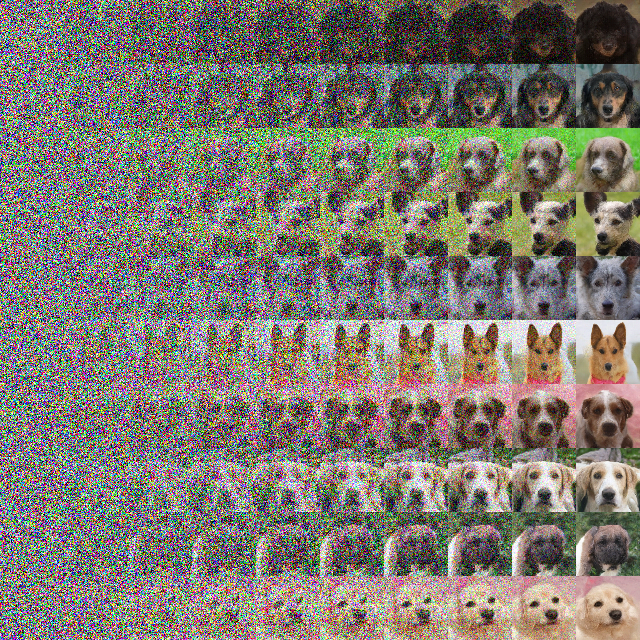
With Modular Diffusion, you can build and train a custom Diffusion Model in just a few lines. First, load and normalize your dataset. We are using the dog pictures from AFHQ.
x, _ = zip(*ImageFolder("afhq", ToTensor()))
x = resize(x, [h, w], antialias=False)
x = torch.stack(x) * 2 - 1
Next, build your custom model using either Modular Diffusion's prebuilt modules or your custom modules.
model = diffusion.Model(
   data=Identity(x, batch=128, shuffle=True),
   schedule=Cosine(steps=1000),
   noise=Gaussian(parameter="epsilon", variance="fixed"),
   net=UNet(channels=(1, 64, 128, 256)),
   loss=Simple(parameter="epsilon"),
)
Now, train and sample from the model.
losses = [*model.train(epochs=400)]
z = model.sample(batch=10)
z = z[torch.linspace(0, z.shape[0] - 1, 10).long()]
z = rearrange(z, "t b c h w -> c (b h) (t w)")
save_image((z + 1) / 2, "output.png")
Finally, marvel at the results.
Check out more examples here.
Contributing
We appreciate your support and welcome your contributions! Please fell free to submit pull requests if you found a bug or typo you want to fix. If you want to contribute a new prebuilt module or feature, please start by opening an issue and discussing it with us. If you don't know where to begin, take a look at the open issues.
License
This project is licensed under the MIT License.
1 maintainer

Metadata
1 maintainer
Release files for modular-diffusion 0.0.3
For a detailed explanation of source distributions (sdists) and built distributions (wheels), please see the package formats documentation.
Source distribution (sdist)
| File | Size | Uploaded | |
|---|---|---|---|
| modular_diffusion-0.0.3.tar.gz | 37.7 MB | Details |
Built distribution (wheel)
| File | Interpreter | ABI | Platform | Reset |
|---|---|---|---|---|
| modular_diffusion-0.0.3-py3-none-any.whl | Python 3 | none | any | Details |
Total release size: 37.7 MB
Release files / modular_diffusion-0.0.3.tar.gz
| Download URL | modular_diffusion-0.0.3.tar.gz |
|---|---|
| Size | 37.7 MB |
| Tags | Source |
|
SHA-256 checksum How to use checksums |
c02211d29ab3b5d7697bf8e6895cf92cb0775d2d8c5011a9288b90628481a8ee
|
|
BLAKE2b-256 checksum How to use checksums |
e51f55c41c86c7ea28532059b0cd7fc182ede560496bd60809256067ce38546f
|
| Upload date | |
|
Uploaded using Trusted Publishing? What is trusted publishing? |
No |
| Uploaded via |
twine/4.0.2 CPython/3.10.10
|
Release files / modular_diffusion-0.0.3-py3-none-any.whl
| Download URL | modular_diffusion-0.0.3-py3-none-any.whl |
|---|---|
| Size | 27.1 kB |
| Tags | Python 3 |
|
SHA-256 checksum How to use checksums |
8d219df947e79babb97c5826fee9fe2cc4d3a42741c9f17816b753aa3967414d
|
|
BLAKE2b-256 checksum How to use checksums |
136155f085ef1d95ab6ea323adbaff6d6d3259103506b5bb0c55e6d2e15a2dba
|
| Upload date | |
|
Uploaded using Trusted Publishing? What is trusted publishing? |
No |
| Uploaded via |
twine/4.0.2 CPython/3.10.10
|














