
MoFA is a software framework for building AI agents through a composition-based approach.

Project description
MoFA 开发框架




官网 | 快速入门 | GitHub | 比赛 | 社区
1. 设计理念
MoFA 是一个用于构建可组合 AI 智能体的软件框架。通过 MoFA,开发者可以通过模板创建智能体(Agent),并以堆叠方式组合形成更强大的超级智能体(Super Agent)。
1.1 核心设计哲学
- 让普通人做非凡事:AI 不应是精英专属,MoFA 让每个人都能开发和应用 AI,将不可能变为可能。
- 组合式 AI:受 Unix 哲学启发,以"组合"为核心,像搭积木一样构建、连接智能体与工具,让 AI 简单、灵活且强大。
- 万物皆智能体:在 MoFA 生态中,智能体是 AI 时代的应用载体——不仅是大语言模型,还可以是代码、脚本、API 甚至 MoFA 本身。
- 数据流驱动:摒弃复杂工作流,采用更直观的数据流模式,使智能体可自由组合、拆解与复用。
1.2 技术架构图

2. 核心特性
- composable AI 架构:通过模块化 Agent 堆叠组合,快速构建复杂智能体系统,支持多模型、多工具协同工作。
- 数据流驱动:采用直观的数据流(DataFlow)模式替代传统工作流(Workflow),实现 Agent 间灵活解耦与动态重组。
- 全栈 Python 支持:从 Agent 开发到数据流配置均提供 Python 友好接口,同时兼容 Rust 高性能节点扩展。
- 丰富的节点生态:内置终端交互、LLM 调用、工具集成等基础节点,支持自定义节点快速接入。
- 多框架兼容:基于 Dora-rs runtime 构建,支持与 ROS2、OpenTelemetry 等系统无缝集成。
- MoFA Stage 可视化工具:提供图形化界面,支持 Dataflow 和 Node 的可视化创建、管理与调试。
3. 支持矩阵
| 特性 | 支持程度 |
|---|---|
| API 支持 | Python 3.10+ [完全支持] Rust 扩展 [实验性] |
| 操作系统 | Linux (Ubuntu 22.04) [完全支持] macOS (ARM/x86) [完全支持] WSL2 [完全支持] Windows [暂不支持] |
| 通信方式 | 共享内存(本地)[完全支持] TCP 网络(分布式)[实验性] |
| 消息格式 | JSON [完全支持] Apache Arrow [实验性] |
| LLM 集成 | OpenAI 系列 [完全支持] Qwen 系列 [完全支持] 本地模型(llama.cpp)[实验性] |
| 配置方式 | YAML 数据流定义 [完全支持] Python 代码生成 [实验性] MoFA Stage 图形化配置 [完全支持] |
| 包管理 | pip(Python 节点)[完全支持] cargo(Rust 节点)[实验性] |
说明:
- [完全支持] = 稳定可用的功能
- [实验性] = 实验性支持(欢迎贡献)
- [暂不支持] = 尚未支持
4. 快速开始
4.1 环境要求
必需环境:
- Python 3.10 或 3.11
- 操作系统:WSL(Ubuntu 22.04)、macOS、Linux
- 暂不支持 Windows 系统
可选环境(用于 Rust 节点开发):
- Rust 工具链(rustc、cargo)
4.2 安装 MoFA
方式 1:使用 pip 安装
# 创建虚拟环境(推荐)
python3 -m venv .mofa
source .mofa/bin/activate

# 从 PyPI 安装
pip install mofa-core

# 验证安装
mofa --help
方式 2:使用 uv 安装(更快)
# 在虚拟环境中安装
uv venv .mofa
source .mofa/bin/activate
uv pip install mofa-core

# 或全局安装为独立工具
uv tool install mofa-core

# 验证安装
mofa --help
提示:uv 是更快的 Python 包管理器。安装方法:github.com/astral-sh/uv
方式 3:从源码安装
pip install git+https://github.com/mofa-org/mofa.git
4.3 运行 Hello World 示例
# 克隆代码仓库
git clone https://github.com/mofa-org/mofa.git
cd mofa/dataflows/hello_world

# 运行数据流
mofa run-flow hello_world_dataflow.yml
示例输出:
Send Your Task: 你好
-------------hello_world_result---------------
你好
4.4 可选:安装 Rust 环境
如果需要开发或使用 Rust 节点:
# 安装 Rust 工具链
curl --proto '=https' --tlsv1.2 -sSf https://sh.rustup.rs | sh
# 安装过程中保持默认配置(直接按 Enter)

# 验证安装
rustc --version
cargo --version
5. MoFA Stage 可视化工具
MoFA Stage 是 MoFA 生态的图形化控制中心,支持在可视化界面中快速创建、管理和调试 Dataflow 与 Node。
5.1 核心功能
- node/dataflow 模板库:提供丰富的智能体模板,一键生成 node 项目
- Dataflow 可视化创建:通过拖拽式界面定义数据流,直观配置节点间的消息传递关系
- Node 管理:统一管理自定义节点与官方节点,支持快速接入新功能
- 智能体生命周期管理:在图形化界面中启动、停止、监控智能体运行状态
5.2 界面预览

Node Hub 界面

Dataflow 界面
6. 开发指南
6.1 快速开发指南
参考 6分钟开发指南,快速构建基于大语言模型的智能体,包含环境变量配置、项目初始化、逻辑实现、数据流定义全流程。
6.2 示例与文档
| 类型 | 名称 | 描述 | 最后更新 |
|---|---|---|---|
| 入门 | Hello World | 基础数据流交互示例 |  |
| LLM | Qwen 智能体 | 调用 Qwen API 的对话智能体 |  |
| 工具集成 | 天气查询 | 查询 IP 所在地天气的智能体 |  |
更多文档请参考 MoFA 官方文档。
7. 常见问题
7.1 mofa 命令找不到
问题描述:安装 mofa-core 后,运行 mofa 命令提示找不到命令。
$ mofa --help
Command 'mofa' not found
原因分析:当使用 pip install --user 或系统 Python 进行用户级安装时,可执行文件会被安装到 ~/.local/bin 目录,但该目录可能不在系统的 PATH 环境变量中。
解决方法:
方案 1:添加 ~/.local/bin 到 PATH(推荐)
Bash 用户:
echo 'export PATH="$HOME/.local/bin:$PATH"' >> ~/.bashrc
source ~/.bashrc
Zsh 用户:
echo 'export PATH="$HOME/.local/bin:$PATH"' >> ~/.zshrc
source ~/.zshrc
方案 2:使用完整路径运行
~/.local/bin/mofa --help
方案 3:在虚拟环境中安装(推荐)
使用 venv:
python3 -m venv .mofa
source .mofa/bin/activate
pip install mofa-core
mofa --help
使用 uv(更快):
uv venv .mofa
source .mofa/bin/activate
uv pip install mofa-core
mofa --help
验证 PATH 配置
# 检查 ~/.local/bin 是否在 PATH 中
echo $PATH | grep ".local/bin"

# 确认 mofa 安装位置
which mofa
7.2 依赖安装缓慢
问题描述:pip install mofa-core 下载速度很慢或超时。
解决方法:
使用国内镜像源加速安装:
# 使用清华镜像源
pip install -i https://pypi.tuna.tsinghua.edu.cn/simple mofa-core

# 或使用阿里云镜像源
pip install -i https://mirrors.aliyun.com/pypi/simple/ mofa-core
永久配置镜像源:
pip config set global.index-url https://pypi.tuna.tsinghua.edu.cn/simple
8. 贡献指南
我们欢迎所有开发者参与贡献,无论您的经验水平如何。请参考贡献指南了解如何参与项目开发。
9. 社区交流
10. 许可证
本项目采用 Apache-2.0 许可证,详情参见 LICENSE。
11. 相关资源
12. 星标历史
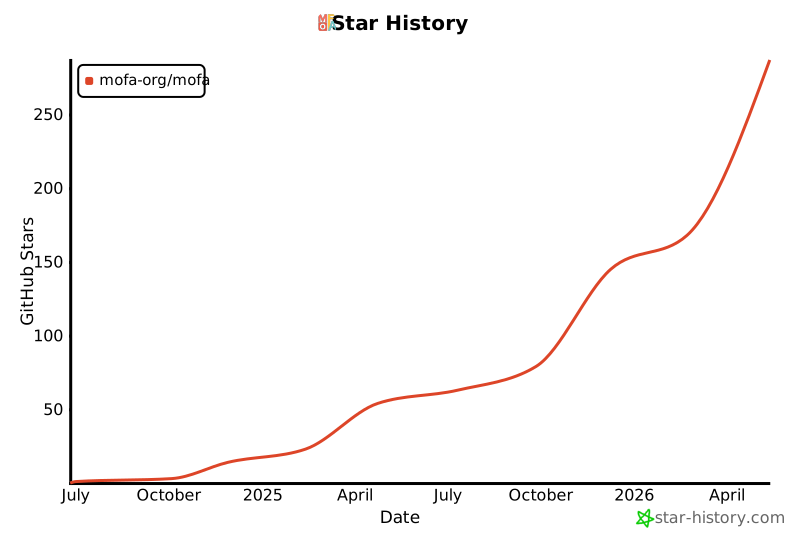
======= History
0.1.35 (2025-11-07)
- Auto-release: Merge pull request #102 from BH3GEI/main
0.1.34 (2025-11-07)
- Auto-release: docs: update
0.1.33 (2025-11-06)
- Auto-release: Merge pull request #100 from mofa-org/codex/create-test-plan-for-project
0.1.32 (2025-11-06)
- Auto-release: Merge pull request #99 from BH3GEI/main
0.1.31 (2025-11-06)
- Auto-release: fix
0.1.30 (2025-11-05)
- Auto-release: Merge pull request #98 from BH3GEI/main
0.1.29 (2025-11-05)
- Auto-release: feat: allow user to vibe based on existing agents
0.1.28 (2025-11-05)
- Auto-release: fix: docs outdated
0.1.27 (2025-11-05)
- Auto-release: fix: ubuntu not found command
0.1.25 (2025-11-05)
- Auto-release: Merge remote changes, use version 0.1.24
0.1.24 (2025-11-03)
- Auto-release: fix: fix mofa-run for .env loading
0.1.23 (2025-11-03)
- Auto-release: add: mofa version of dora voice
0.1.22 (2025-10-30)
- Auto-release: enhancement: optimize prompt to mention llm api
0.1.21 (2025-10-30)
- Auto-release: fix: fix yolo crash
0.1.20 (2025-10-30)
- Auto-release: feat: huge improvements on mofa vibe
0.1.19 (2025-10-30)
- Auto-release: enhance: optimize mofa-run command, allow user to run without install
0.1.18 (2025-10-29)
- Auto-release: Merge pull request #93 from yangrudan/enhance/mofa-unit-test
0.1.17 (2025-10-28)
- Auto-release: fix: run-flow
0.1.16 (2025-10-28)
- Auto-release: fix: run-flow
0.1.15 (2025-10-28)
- Auto-release: fix: run-flow
0.1.14 (2025-10-28)
- Auto-release: fix: run-flow
0.1.13 (2025-10-28)
- Auto-release: fix: run
0.1.12 (2025-10-28)
- Auto-release: fix: run-agent on ubnutu
0.1.11 (2025-10-28)
- Auto-release: fix: path
0.1.10 (2025-10-28)
- Auto-release: fix: ubuntu dependency error
0.1.9 (2025-10-28)
- Auto-release: fix: packaging
0.1.8 (2025-10-28)
- Auto-release: fix: init
0.1.7 (2025-10-28)
- Auto-release: fix: run-agent
0.1.6 (2025-10-27)
- Auto-release: fix: rust install
0.1.5 (2025-10-27)
- Auto-release: update: readme.md
0.1.4 (2025-10-27)
- Auto-release: fix: dir error
0.1.3 (2025-10-27)
- Auto-release: Fix: mofa vibe
0.1.2 (2025-10-27)
- Auto-release: feat: major update on cli
0.1.1 (2025-10-27)
- Auto-release: Fix: HEREDOC
0.1.0 (2025-10-27)
- First release of mofa-core (renamed from mofa-ai)
- mofa vibe command - AI-powered agent generator with automatic testing and optimization
- mofa debug command - Unit testing and debugging for individual nodes with test case support
- mofa run command - Run dataflows in isolated virtual environments with automatic dependency management
- mofa new-agent command - Create new agents from templates
- Interactive input support for better user experience
- Optimized package installation with uv support
- Python 3.10, 3.11, and 3.12 support
- Full integration with dora-rs dataflow runtime
Release history Release notifications | RSS feed


Download files
Download the file for your platform. If you're not sure which to choose, learn more about installing packages.
Source Distribution
Built Distribution
Filter files by name, interpreter, ABI, and platform.
If you're not sure about the file name format, learn more about wheel file names.
Copy a direct link to the current filters
File details
Details for the file mofa_core-0.1.35.tar.gz.
File metadata
- Download URL: mofa_core-0.1.35.tar.gz
- Upload date:
- Size: 6.9 MB
- Tags: Source
- Uploaded using Trusted Publishing? No
- Uploaded via: twine/6.1.0 CPython/3.13.7
File hashes
| Algorithm | Hash digest | |
|---|---|---|
| SHA256 |
038d5f84876905d20b9a0aabfc637282f766a46df20ac7c3a43ee8cb3f2e0988
|
|
| MD5 |
8e9d044a3809915b3a55110d04aaf88c
|
|
| BLAKE2b-256 |
369588205a36148112ccaef51d09e094c65b5709cd752c991b3503a5c89d0871
|
File details
Details for the file mofa_core-0.1.35-py3-none-any.whl.
File metadata
- Download URL: mofa_core-0.1.35-py3-none-any.whl
- Upload date:
- Size: 7.2 MB
- Tags: Python 3
- Uploaded using Trusted Publishing? No
- Uploaded via: twine/6.1.0 CPython/3.13.7
File hashes
| Algorithm | Hash digest | |
|---|---|---|
| SHA256 |
3c76333779d45ea7d810f6b2149de3c307b8c94106dc5632afdba3c39e4a3a01
|
|
| MD5 |
da96527fb0d5b71f93890d708e3253c8
|
|
| BLAKE2b-256 |
fb8730cc16fa18f6f18fdef6071acaac7c10b4234e3fcc55af8cd87708ce71f0
|






