
A Python package to perform pre- and post-processing of molecular simulations

Project description
Welcome to Use Xponge!
Introduction
Xponge is a lightweight and easy to customize python package to perform pre- and post-processing of molecular simulations.
What can Xponge do?
Xponge includes three major categories of functionality, namely, the simulation system construction, simulation data transformation and analysis, and automated workflows for complex simulations. Xponge is mainly designed for the molecular dynamics (MD) program SPONGE[1], but it can also output some general format files such as mol2 and PDB, so it may help the other molecular modelling programs too.
Installation
Xponge can be used on all operating systems (Windows/Linux/MacOS). Some functions (See here for the detailed list) to do the quantum chemistry calculations can not be used on Windows because pyscf is not available on Windows.
1. pip install
pip install Xponge
2. source setup
-
2.1 Download or clone the source from the gitee or github repository
The gitee repository is here. The github repository is here.
git clone http://gitee.com/gao_hyp_xyj_admin/xponge.git git clone http://github.com/xia-yijie/xponge.git -
2.2 Open the directory where you download or clone the repository
-
2.3 (Optional) Configure the environment
It is recommended to use
condato configure the environment. Twoymlfiles namedinstall_requirements.ymlandextras_requirements.ymlare provided in the repository.It is recommanded to use the file
install_requirements.ymlto configure the environment. The file will only install the basic dependent packages. If aModuleNotFoundErroris raised when you are usingXponge, then install the module. This allows you to avoid installing many modules that you will never use, and also makesXpongemore cross-platform compatible. Here are the commands to useinstall_requirements.yml.conda env create -f install_requirements.yml conda activate Xponge
All the dependent packages are listed in the dependencies section. If you don't want to install the dependent packages one by one (which can be really annoying), the file
extras_requirements.ymlcan help you with the environment configuration except the packagesmindsporeandmindsponge. The two packages should be installed according to your device (e.g. whether the backend is CPU, GPU or Huawei Ascend Processors) and can not be simply installed by conda. Here are the commands to useextras_requirements.yml.conda env create -f extras_requirements.yml conda activate Xponge
It is worth noting that
extras_requirements.ymlcan not be used on Windows becausepyscfis not available on Windows. -
2.4 Run the command
python setup.py install
Installation check
There are some unit tests in Xponge. You can do the basic test to check whether the installation is successful like this:
Xponge test --do base -o test --verbose 1
Here, Xponge can be replaced to python -m Xponge, python3 -m Xponge and so on according to your settings of the environmental variables. Some files will be generated after the test is finished.
Quickstart
Here is a simple example.
import Xponge
# Import the force field you need
import Xponge.forcefield.amber.ff14sb
# Build the molecule like this
peptide = ACE + ALA + NME
# or like this
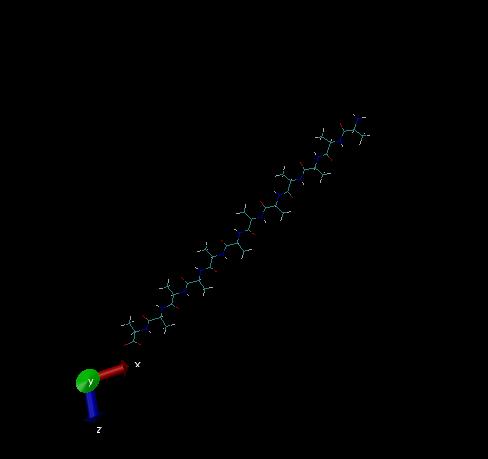
peptide2 = NALA + ALA * 10 + CALA
# or like this
peptide3 = Xponge.Get_Peptide_From_Sequence("AAAAA")
# See the documentation for more usage!
# Save them as your favorite format
Xponge.save_pdb(peptide, "ala.pdb")
Xponge.save_mol2(peptide2, "ala12.mol2")
Xponge.save_sponge_input(peptide3, "ala5")
Then we can see ala12.mol2 in VMD:
Here is another simple example.
import Xponge
import Xponge.forcefield.amber.tip3p

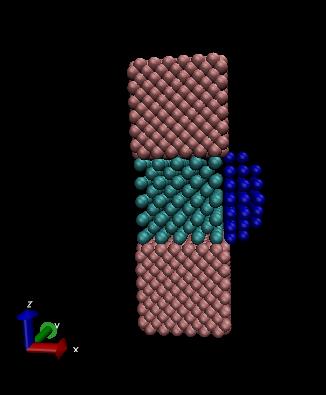
box = Xponge.BlockRegion(0, 0, 0, 60, 60, 60)
region_1 = Xponge.BlockRegion(0, 0, 20, 20, 20, 40)
region_2 = Xponge.BlockRegion(0, 0, 40, 20, 20, 60)
region_3 = Xponge.BlockRegion(0, 0, 0, 20, 20, 20)
region_4 = Xponge.SphereRegion(20, 10, 30, 10)
region_5 = Xponge.BlockRegion(20, 0, 20, 60, 60, 60)
region_2or3 = Xponge.UnionRegion(region_2, region_3)
region_4and5 = Xponge.IntersectRegion(region_4, region_5)
t = Xponge.Lattice("bcc", basis_molecule=CL, scale=4)
t2 = Xponge.Lattice("fcc", basis_molecule=K, scale=3)
t3 = Xponge.Lattice("sc", basis_molecule=NA, scale=3)
mol = t.Create(box, region_1)
mol = t2.create(box, region_2or3, mol)
mol = t3.create(box, region_4and5, mol)
Xponge.Save_PDB(mol, "out.pdb")
Then we can see out.pdb in VMD:
Detailed usage and API documentation
All can be seen here.
CLI quick start (trajectory analysis)
The Xponge traj subcommand provides cpptraj-like post-analysis for SPONGE trajectories.
Basic syntax:
Xponge traj -p TOPO -c TRAJ [-c TRAJ ...] -b BOX [-b BOX ...] [--traj-mode {separate,concat}] -o OUTDIR <analysis> [options]
Notes:
-c/--trajand-b/--boxare repeatable; use-bonce for a single box file or repeat it to match each trajectory.--traj-mode separatemeans multiple-cinputs are analyzed independently, with outputs written to per-trajectory subfolders.--traj-mode concatmeans multiple-cinputs are treated as successive segments of one trajectory and analyzed together in the given order.- In
-i/--inputcommand files,traj=/box=accept comma-separated lists. - In
-i/--inputcommand files,traj_mode=acceptsseparateorconcatand defaults to the command-line--traj-modevalue.
Common analyses:
# RMSD
Xponge traj -p top.txt -c mdcrd.dat -b mdbox.txt -o out rmsd -s "backbone" --dt-ps 1

# RMSF
Xponge traj -p top.txt -c mdcrd.dat -b mdbox.txt -o out rmsf -s "backbone and name CA"

# Radius of gyration
Xponge traj -p top.txt -c mdcrd.dat -b mdbox.txt -o out rgyr -s "protein and backbone" --dt-ps 1

# Hydrogen bonds
Xponge traj -p top.txt -c mdcrd.dat -b mdbox.txt -o out hbond --between "protein,resname SOL" --dt-ps 1

# PCA
Xponge traj -p top.txt -c mdcrd.dat -b mdbox.txt -o out pca -n 2 -s "backbone"

# Free energy surface (CVs: rmsd:SELECTION, rgyr:SELECTION)
Xponge traj -p top.txt -c mdcrd.dat -b mdbox.txt -o out fes --cv1 "rmsd:backbone" --cv2 "rgyr:protein and backbone" --bins 20 --temperature 300

# Extract PDBs at specific times (ns)
Xponge traj -p top.txt -c mdcrd.dat -b mdbox.txt -o out extract_pdb --times 0 0.1 0.2 --dt-ps 1 -s "all"

# multiple trajectories analyzed separately
Xponge traj -p top.txt -c mdcrd_1.dat -c mdcrd_2.dat -b mdbox_1.txt -b mdbox_2.txt -o out rmsd -s "backbone" --dt-ps 1 --traj-mode separate

# successive trajectory segments concatenated into one analysis
Xponge traj -p top.txt -c md_0_100.dat -c md_100_200.dat -c md_200_300.dat -b box_0_100.txt -b box_100_200.txt -b box_200_300.txt -o out rmsd -s "backbone" --dt-ps 1 --traj-mode concat
cpptraj-like command file:
# analysis.in
rmsd selection="backbone" dt_ps=1
rmsf selection="backbone and name CA"
rgyr selection="protein and backbone" dt_ps=1
hbond between="protein,resname SOL" dt_ps=1
pca n=2 selection="backbone"
fes cv1="rmsd:backbone" cv2="rgyr:protein and backbone" bins=20 temp=300
extract_pdb times=0,0.1,0.2 selection="all" dt_ps=1

# Optional per-line trajectory/box override (comma-separated for multiple)
rmsd selection="backbone" dt_ps=1 traj="mdcrd_1.dat,mdcrd_2.dat" box="mdbox_1.txt,mdbox_2.txt" traj_mode=concat

Xponge traj -p top.txt -c mdcrd.dat -b mdbox.txt -o out -i analysis.in
Outputs are written as PNG figures and JSON data files in OUTDIR.
Convert JSON outputs to CSV for tools such as gnuplot:
# convert one analysis result
Xponge json2csv -i out/rmsd_xxxxxx.json

# choose the output CSV path explicitly
Xponge json2csv -i out/free_energy_surface.json -o out/free_energy_surface.csv

# convert every JSON file in a result directory
Xponge json2csv -i out -o out_csv -r
Supported JSON schemas currently include line-series results with x/y, extract_pdb time-file tables,
free-energy surfaces, PCA outputs, and extra sidecar CSVs for fields such as RMSD statistics or raw hydrogen-bond lists.
Contribution Guideline
If you want to contribute to the main codebase or report some issues, see here for the guides.
Dependencies
Xponge does not depend on other packages except numpy for its basic use.
However, there are some complicated functions that depend on some other packages. If you do not install the dependent package, you can not use the related functions.
Here is the list of all packages which may be uesd:
| package name | description | how to install |
|---|---|---|
| XpongeLib | c/c++ compiled library for Xponge | pip install XpongeLib |
| pyscf [2-4] | quantum chemistry | pip install pyscf |
| geometric[5] | geometry optimization | pip install geometric |
| rdkit[6] | cheminformatics | pip install rdkit |
| MDAnalysis[7-8] | trajectory analysis | pip install MDAnalysis |
| matplotlib | plot and visualization | pip install matplotlib |
| mindspore[9] | AI framework for machine learning | See the official website |
| mindsponge[1] | end-to-end differentiable MD | See the official website |
References
[0] Y. Xia, Y. Q. Gao, J. Open Source Softw. (2022) DOI:10.21105/joss.04467
[1] Y.-P. Huang, et al. Chinese J. Chem. (2022) DOI: 10.1002/cjoc.202100456
[2] Q. Sun, et al. J. Chem. Phys. (2020) DOI: 10.1063/5.0006074
[3] Q. Sun, et al. Wiley Interdiscip. Rev. Comput. Mol. Sci. (2018) DOI: 10.1002/wcms.1340
[4] Q. Sun, J. Comp. Chem. (2015) DOI: 10.1002/jcc.23981
[5] L.-P. Wang, C.C. Song, J. Chem. Phys. (2016) DOI: 10.1063/1.4952956
[6] RDKit: Open-source cheminformatics. https://www.rdkit.org
[7] R. J. Gowers, et al. Proceedings of the 15th Python in Science Conference (2016) DOI: 10.25080/majora-629e541a-00e
[8] N. Michaud-Agrawal, et al. J. Comput. Chem. (2011) DOI: 10.1002/jcc.21787
[9] MindSpore: An Open AI Framwork. https://www.mindspore.cn/
Release history Release notifications | RSS feed


Download files
Download the file for your platform. If you're not sure which to choose, learn more about installing packages.
Source Distribution
Built Distribution
Filter files by name, interpreter, ABI, and platform.
If you're not sure about the file name format, learn more about wheel file names.
Copy a direct link to the current filters
File details
Details for the file mokda_xponge-1.5b5.tar.gz.
File metadata
- Download URL: mokda_xponge-1.5b5.tar.gz
- Upload date:
- Size: 5.3 MB
- Tags: Source
- Uploaded using Trusted Publishing? Yes
- Uploaded via: twine/6.1.0 CPython/3.13.12
File hashes
| Algorithm | Hash digest | |
|---|---|---|
| SHA256 |
9df4d63b7de80de719be8ed456db413b808192907a81ceffa58442fa69d3f41b
|
|
| MD5 |
dbe6dc2b3988e0da9fe665527f22c8ee
|
|
| BLAKE2b-256 |
ae70a2a0fc776428e01c01b9269437f918c3195ed505b2262c117a99c1ddea2b
|
Provenance
The following attestation bundles were made for mokda_xponge-1.5b5.tar.gz:
Publisher:
build-wheel.yml on SPONGEMM/XPONGE
-
Statement:
-
Statement type:
https://in-toto.io/Statement/v1 -
Predicate type:
https://docs.pypi.org/attestations/publish/v1 -
Subject name:
mokda_xponge-1.5b5.tar.gz -
Subject digest:
9df4d63b7de80de719be8ed456db413b808192907a81ceffa58442fa69d3f41b - Sigstore transparency entry: 1718688237
- Sigstore integration time:
-
Permalink:
SPONGEMM/XPONGE@82fdd3b2f61548e8df184c5ccc701b5619ba8e0c -
Branch / Tag:
refs/tags/v1.5b5 - Owner: https://github.com/SPONGEMM
-
Access:
public
-
Token Issuer:
https://token.actions.githubusercontent.com -
Runner Environment:
github-hosted -
Publication workflow:
build-wheel.yml@82fdd3b2f61548e8df184c5ccc701b5619ba8e0c -
Trigger Event:
push
-
Statement type:
File details
Details for the file mokda_xponge-1.5b5-py3-none-any.whl.
File metadata
- Download URL: mokda_xponge-1.5b5-py3-none-any.whl
- Upload date:
- Size: 5.6 MB
- Tags: Python 3
- Uploaded using Trusted Publishing? Yes
- Uploaded via: twine/6.1.0 CPython/3.13.12
File hashes
| Algorithm | Hash digest | |
|---|---|---|
| SHA256 |
7095001a9e2a30ee5eef2ab5eaa9613a34efe436453ccd586cbe6e6b92f43627
|
|
| MD5 |
daf3ba33d7814bffd0b015098387006b
|
|
| BLAKE2b-256 |
4740af5cb34a4e3c2571295a2325bd31d03720fe7015a5b1ef9bcca76b7e029c
|
Provenance
The following attestation bundles were made for mokda_xponge-1.5b5-py3-none-any.whl:
Publisher:
build-wheel.yml on SPONGEMM/XPONGE
-
Statement:
-
Statement type:
https://in-toto.io/Statement/v1 -
Predicate type:
https://docs.pypi.org/attestations/publish/v1 -
Subject name:
mokda_xponge-1.5b5-py3-none-any.whl -
Subject digest:
7095001a9e2a30ee5eef2ab5eaa9613a34efe436453ccd586cbe6e6b92f43627 - Sigstore transparency entry: 1718688454
- Sigstore integration time:
-
Permalink:
SPONGEMM/XPONGE@82fdd3b2f61548e8df184c5ccc701b5619ba8e0c -
Branch / Tag:
refs/tags/v1.5b5 - Owner: https://github.com/SPONGEMM
-
Access:
public
-
Token Issuer:
https://token.actions.githubusercontent.com -
Runner Environment:
github-hosted -
Publication workflow:
build-wheel.yml@82fdd3b2f61548e8df184c5ccc701b5619ba8e0c -
Trigger Event:
push
-
Statement type:






