
mokuro-bridge




Turn a folder of page images into a mokuro-reader library, locally or in the cloud.
mokuro-bridge is an independent local service in the mokuro ecosystem. It runs mokuro OCR on finished pages, assembles the files reader.mokuro.app expects, and delivers them to a folder on this computer or to a cloud destination. It is useful on its own for any set of page images, and it speaks one plain HTTP protocol, so a browser, a script or the bundled command-line tool can hand it work.
✨ What it gives you
| A finished volume, not a pile of images | Every capture becomes a .mokuro file with text and block data, a .cbz of the pages and a .webp cover, under a per-series folder with the reader's series.json. A destination managed by mokuro-bunko is the exception: Bunko compiles the index itself |
| OCR while the pages arrive | Pages are read in small batches as they are received, so a long volume is not a capture followed by a long wait |
| Delivery where you want it | A local folder by default, or MEGA, Google Drive, OneDrive, any WebDAV server, or any other rclone remote. Accounts are named, so several destinations of one kind can coexist |
| One small service to drive | A self-contained dashboard for setup and live status, a terminal display for a background service, and a documented HTTP API for everything else |
| No storefront knowledge | The bridge begins at the image. It holds no store account, no cookie and no store protocol, so a store redesign cannot break it |
🚀 Quick start
Install the service, then start it:
pipx install mokuro-bridge
mokuro-bridge
The bridge prints its address and, on an interactive first run, opens the dashboard at http://127.0.0.1:62642/. Add a destination there, or keep everything local, then hand over a folder of pages:
mokuro-bridge-ocr ./my-volume/ --title "Volume title"
mokuro-bridge-ocr hands the folder to the running bridge and follows the finalize stream to the end. You can do the same from any HTTP client:
curl -X POST http://127.0.0.1:62642/session/start -F title="Volume title"
curl -X POST http://127.0.0.1:62642/session/<id>/page -F page=@page_0001.webp -F filename=page_0001.webp -F page_num=1
curl -N -X POST http://127.0.0.1:62642/session/<id>/finalize -F upload_method=local
The last call answers NDJSON: progress frames, then a terminal done or error frame. docs/endpoints.md is the full reference.
📦 What you get
<output>/<series>/
  <volume>.cbz       page images
  <volume>.mokuro    OCR text and block data
  <volume>.webp      cover
  series.json        the reader's per-series index, shared by the series
A completed volume is a folder reader.mokuro.app can open, a cloud library another device can sync, or a .cbz and .mokuro pair a reader can load directly. When mokuro-bunko manages a destination, it compiles the index and the library catalog instead of the bridge.
🖼️ Screenshots
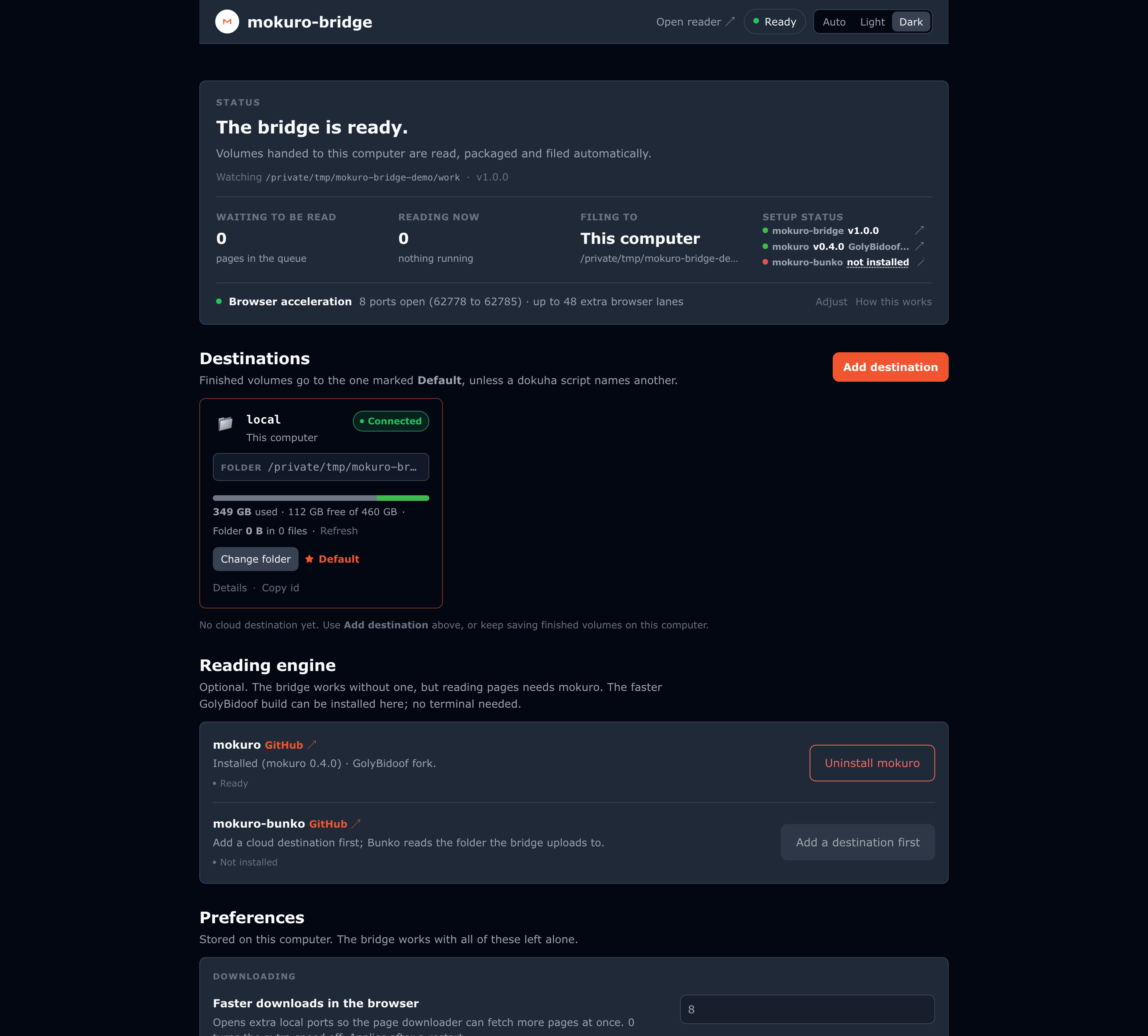
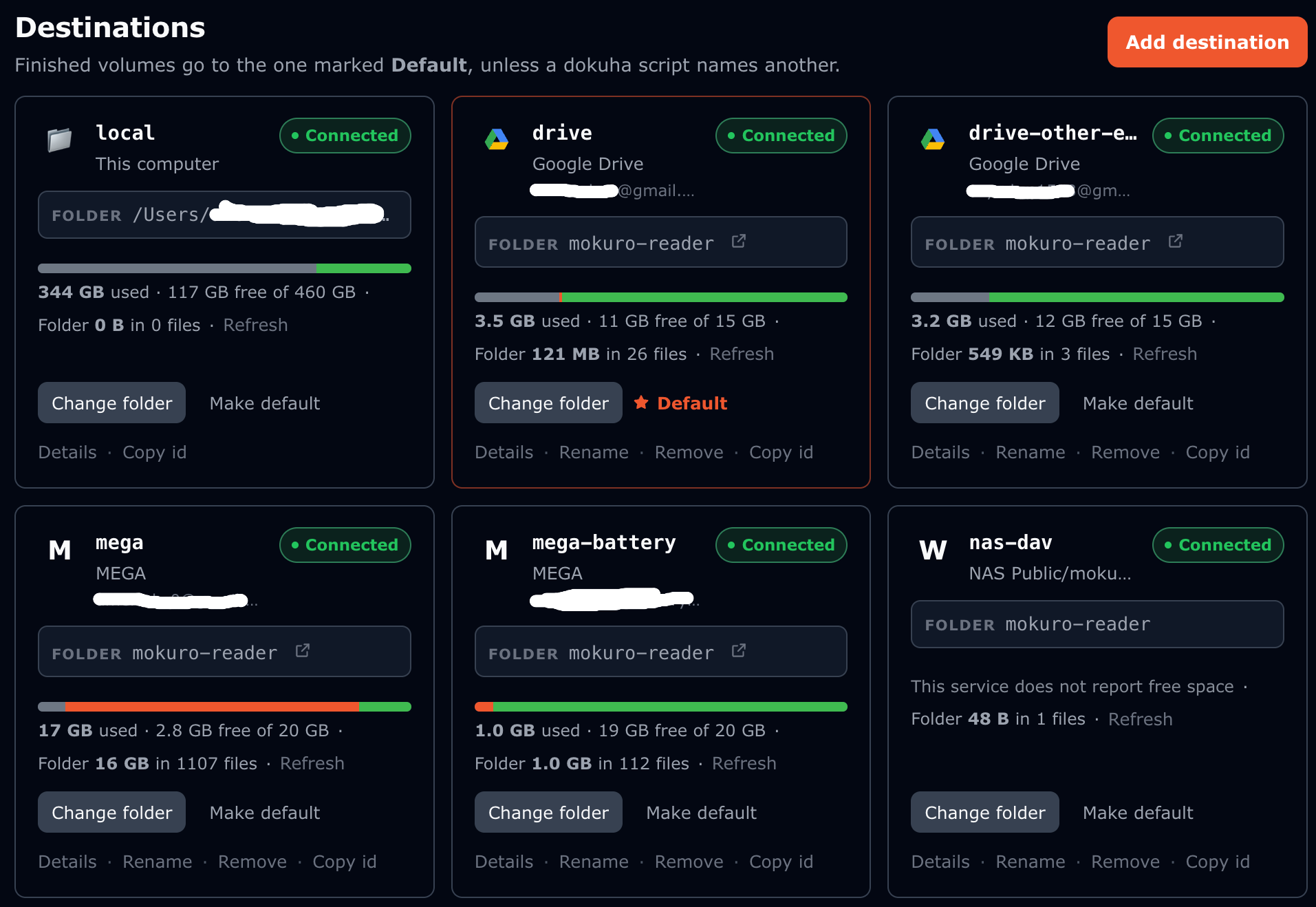
The dashboard and mokuro-bridge --status read the same /health, so the terminal shows the same picture without a browser. Each destination is one card with its own alias, folder and live usage, and several accounts of the same service can coexist.
⚙️ How it works
mokuro-bridge is a FastAPI service on loopback. A session owns one volume: pages arrive one at a time or as a folder, OCR reads them as they land, and finalize waits for the queue, assembles the volume, packs the archive and cover, publishes the series index and uploads or saves the result. Session state is persisted, so a restart does not lose a volume in flight.
Blocking work runs on four bounded lanes (control, data, finalize and upload), which is why a busy upload cannot starve the health check or the next capture. The terminal frame of a finalize is a stream, not a request, so a client reads progress on the connection that is doing the work. Delivery goes through a provider layer: MEGA, Google Drive, OneDrive and WebDAV have native backends, rclone is an additional destination for those services and for the ones it supports, and the browser setup performs those four sign-ins through rclone. Only rclone-backed accounts share one rclone sign-in, through a loopback WebDAV gateway that mokuro-bunko can also use. docs/architecture.md explains the whole path.
☁️ Destinations
Choose a local folder, or connect an account: MEGA, Google Drive, OneDrive, WebDAV or an rclone remote. Each account has an alias such as mega, mega-2 or drive-next, its own folder and its own credentials. A client selects one with upload_method=<alias>, and the last explicit choice becomes the sticky default until another replaces it. The dashboard adds, reconnects, renames and removes accounts, and browses each provider's folders. docs/destinations.md covers the account model, the credential stores and the per-provider behaviour.
🧩 Works with the rest of the ecosystem
- reader.mokuro.app reads the result. The bridge publishes the
series.jsonindex the reader needs for a library it did not fill itself. - mokuro-bunko can take over the compiled metadata for a destination. The bridge then uploads the volume files and leaves
series.jsonandcatalog.jsonto Bunko. - Any HTTP client that can produce page images can drive the bridge. The protocol is the contract, and no client library is required.
- dokuha-cli and dokuha-userscript are two downloaders that can hand volumes over if you already run them. They are examples of the protocol, not a dependency in either direction.
📥 Install
Install with pipx or uv tool install, or from a checkout:
git clone https://github.com/GolyBidoof/mokuro-bridge && cd mokuro-bridge
python3 -m venv .venv && source .venv/bin/activate
pip install -r requirements.txt
./run.sh
The base install is small and runs without any OCR engine. Install an engine when you want OCR:
pip install "mokuro @ git+https://github.com/GolyBidoof/mokuro"   # the batched fork
pip install -r requirements-ocr.txt                               # upstream mokuro
mokuro-bridge --install-mokuro performs the fork install in the environment that runs the service and verifies the import; docs/mokuro.md has the per-environment details. Without an engine the service still starts, /health reports mokuro_installed: false, and only OCR is unavailable. The browser setup signs MEGA, Google Drive, OneDrive and WebDAV in through rclone, so it needs that binary; the terminal wizards create the native accounts and install their provider SDK when it is missing. An optional macOS launch agent, ./install-launchd.sh, starts the bridge at login.
📚 Docs
| docs/architecture.md | The service, sessions, the OCR worker and cache, packing, the four lanes, the finalize stream, providers and the gateway |
| docs/endpoints.md | Every HTTP route: fields, response shapes, error codes and test coverage |
| docs/clients.md | How any client talks to the bridge, with the dokuha downloaders as one worked example |
| docs/integrating.md | Plug your own app in: the two delivery models, the finalize contract, retries and a minimal client loop |
| docs/destinations.md | Destinations, accounts and aliases, credential stores, the sticky default and the provider contract |
| docs/bunko.md | Running mokuro-bunko beside the bridge so it owns the compiled metadata |
| docs/mokuro.md | The faster mokuro fork, the one install command and the way back to upstream |
| docs/series-json.md | The series.json sidecar: its format, why the uploader writes it and the pin on upstream |
| docs/browser-acceleration.md | The fetch-proxy ports for browser clients, the browser limits behind them and when to change the count |
| docs/dashboard.md | The dashboard, browser account setup, settings and the terminal status display |
| docs/troubleshooting.md | Install, OCR, dashboard, sign-in and delivery problems |
| CHANGELOG.md | What changed, release by release |
🛠️ Development
pip install -r requirements-dev.txt
python3 -m pytest
python3 -m ruff check .
The suite is hermetic: no internet, no real credentials and no OCR model. It covers the capture routes, the finalize stream, the provider seams, the dashboard API, the settings file, the terminal display and the packaging contract. The one exception to "no network" is WebDAV: those tests run against a small stdlib server in this repository over a local socket.
📄 Credits and licence
MIT, see LICENSE.
OCR runs on the mokuro fork, which adds batched recognition and is the recommended engine, or on kha-white's original mokuro as the slower fallback, each under its own licence. Cloud delivery uses the native MEGA, Google Drive, OneDrive and WebDAV backends, or rclone for those and for the services it supports, each under its own terms. The series.json format belongs to Gnathonic's mokuro-reader (GPL-3.0) and is implemented a second time by mokuro-bunko (MPL-2.0); this project pins the upstream files and ports the contract rather than copying either codebase.
The code was written by DeepSeek V4.1 Flash.
1 maintainer

Metadata
1 maintainer
Release files for mokuro-bridge 1.0.2
For a detailed explanation of source distributions (sdists) and built distributions (wheels), please see the package formats documentation.
Source distribution (sdist)
| File | Size | Uploaded | Provenance | |
|---|---|---|---|---|
| mokuro_bridge-1.0.2.tar.gz | 1.4 MB | With provenance | Details |
Built distribution (wheel)
| File | Interpreter | ABI | Platform | Reset |
|---|---|---|---|---|
| mokuro_bridge-1.0.2-py3-none-any.whl | Python 3 | none | any | Details |
Total release size: 1.7 MB
Release files / mokuro_bridge-1.0.2.tar.gz
| Download URL | mokuro_bridge-1.0.2.tar.gz |
|---|---|
| Size | 1.4 MB |
| Tags | Source |
|
SHA-256 checksum How to use checksums |
03b05b207fa6ad54cd063501a6100ddc76387b62f7a025bbb8e0bc85e5bf2c34
|
|
BLAKE2b-256 checksum How to use checksums |
c591a016945d70d1e8f55b391562931063cb6d94e7d4a546f8bd3c16661403eb
|
| Upload date | |
|
Uploaded using Trusted Publishing? What is trusted publishing? |
Yes |
| Uploaded via |
twine/7.0.0 CPython/3.13.14
|
Provenance
Provenance describes where a file came from. On PyPI, provenance is shared via attestations, which provide a verifiable record of the build or publishing details. View details, limitations and caveats.


PyPI Publish Attestation
PyPI verified that this artifact, at this checksum, originated from the publisher listed below.
Signed by GitHub Actions, verified by PyPI on Oct 20, 2026.
Transparency logRelease files / mokuro_bridge-1.0.2-py3-none-any.whl
| Download URL | mokuro_bridge-1.0.2-py3-none-any.whl |
|---|---|
| Size | 296.2 kB |
| Tags | Python 3 |
|
SHA-256 checksum How to use checksums |
42a37ff1ef9f16d10857ddde1d58398278e112ed9fd544d2c207b584eda2b743
|
|
BLAKE2b-256 checksum How to use checksums |
1df03b99b042d77c9b672553d6d0164c89e4bc9090b7fb9823d6524969a427e0
|
| Upload date | |
|
Uploaded using Trusted Publishing? What is trusted publishing? |
Yes |
| Uploaded via |
twine/7.0.0 CPython/3.13.14
|
Provenance
Provenance describes where a file came from. On PyPI, provenance is shared via attestations, which provide a verifiable record of the build or publishing details. View details, limitations and caveats.
PyPI Publish Attestation
PyPI verified that this artifact, at this checksum, originated from the publisher listed below.
Signed by GitHub Actions, verified by PyPI on Oct 20, 2026.
Transparency logSecurity for mokuro-bridge 1.0.2
Provenance
Provenance describes where a file came from. On PyPI, provenance is shared via attestations, which provide a verifiable record of the build or publishing details. View details, limitations and caveats.
Full provenance
All 2 files in this release have been uploaded with provenance metadata.
Attestation for mokuro_bridge-1.0.2.tar.gz
PyPI Publish Attestation
PyPI verified that this artifact, at this checksum, originated from the publisher listed below.
Signed by GitHub Actions, verified by PyPI on Oct 20, 2026.
Transparency logA note on package security
PyPI is a repository for distributing packages, not a service for auditing them. While third-party security researchers and our staff do their best to detect and remove malicious packages, PyPI cannot guarantee the quality, security or suitability of any given package.














