
Convert molecular structures into 3D meshes

Project description
About
Mol2Mesh generates a 3D model of any molecule from its chemical table file
Input (Chemical table file)
Example: Dopamine.sdf
681
  -OEChem-05142402263D

 22 22  0     0  0  0  0  0  0999 V2000
   -2.2392    1.9626    0.0548 O   0  0  0  0  0  0  0  0  0  0  0  0
   -3.3557   -0.5612    0.3868 O   0  0  0  0  0  0  0  0  0  0  0  0
    4.4081    0.2624    0.3445 N   0  0  0  0  0  0  0  0  0  0  0  0
    2.1628   -0.0212   -0.6613 C   0  0  0  0  0  0  0  0  0  0  0  0
    0.7040   -0.1603   -0.3850 C   0  0  0  0  0  0  0  0  0  0  0  0
    2.9862    0.1008    0.6289 C   0  0  0  0  0  0  0  0  0  0  0  0
Output (3D model)

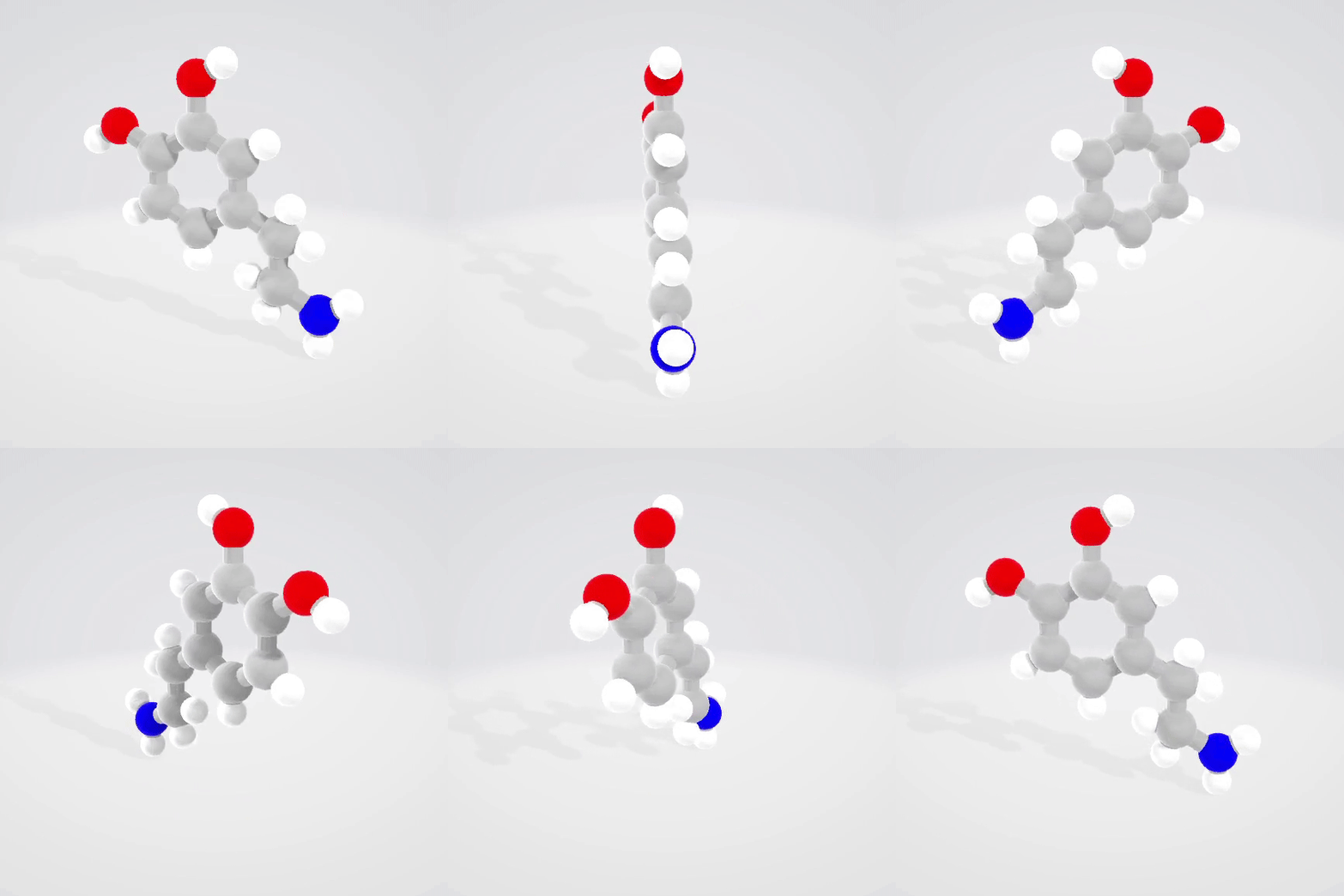
3D models of dopamine .stl (left) and .glb (right) viewed in 3D viewer
Basic usage
Quick Start
# Installation
pip install mol2mesh

from mol2mesh import Mol2Mesh

#open chemical table file (.sdf, .mol, or .gjf)
input_file = 'sample_files/Dopamine.sdf' #path to file
molecule = Mol2Mesh(input_file)

#check the resulting 3D model of the molecule
molecule.show()

#save 3D model
molecule.save_mesh('Dopamine.stl')
Parameters
Mol2Mesh(file_path, style='BallStick', res_a=25, res_b=15, multicov=False, name=None)
-
file_path: Path to the chemical table file (sdf, mol, or gjf). -
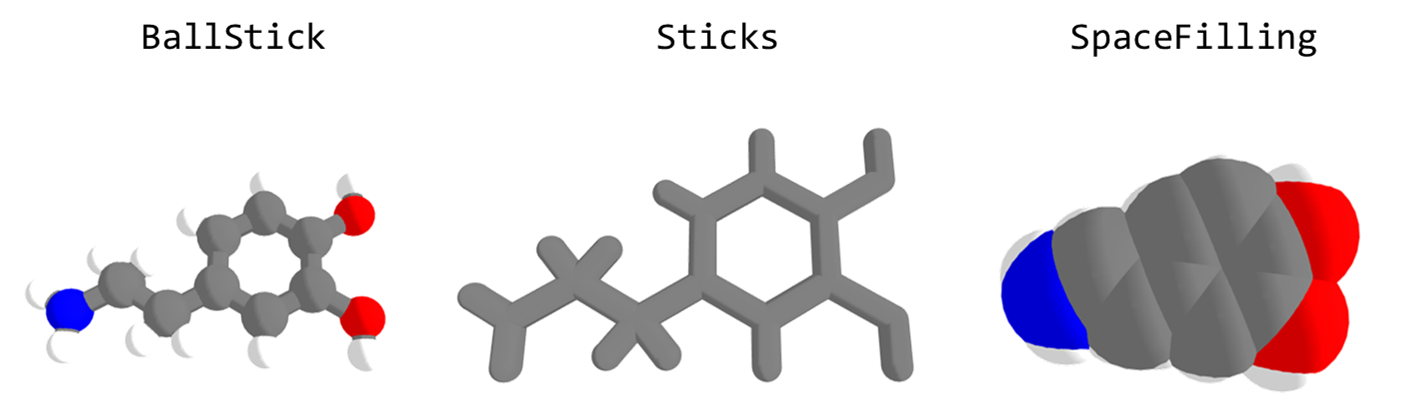
style: Style configuration defining the radii and colors of atoms and bonds. It can be a configuration class or a string from the defined styles ['BallStick', 'Sticks', 'SpaceFilling']. -
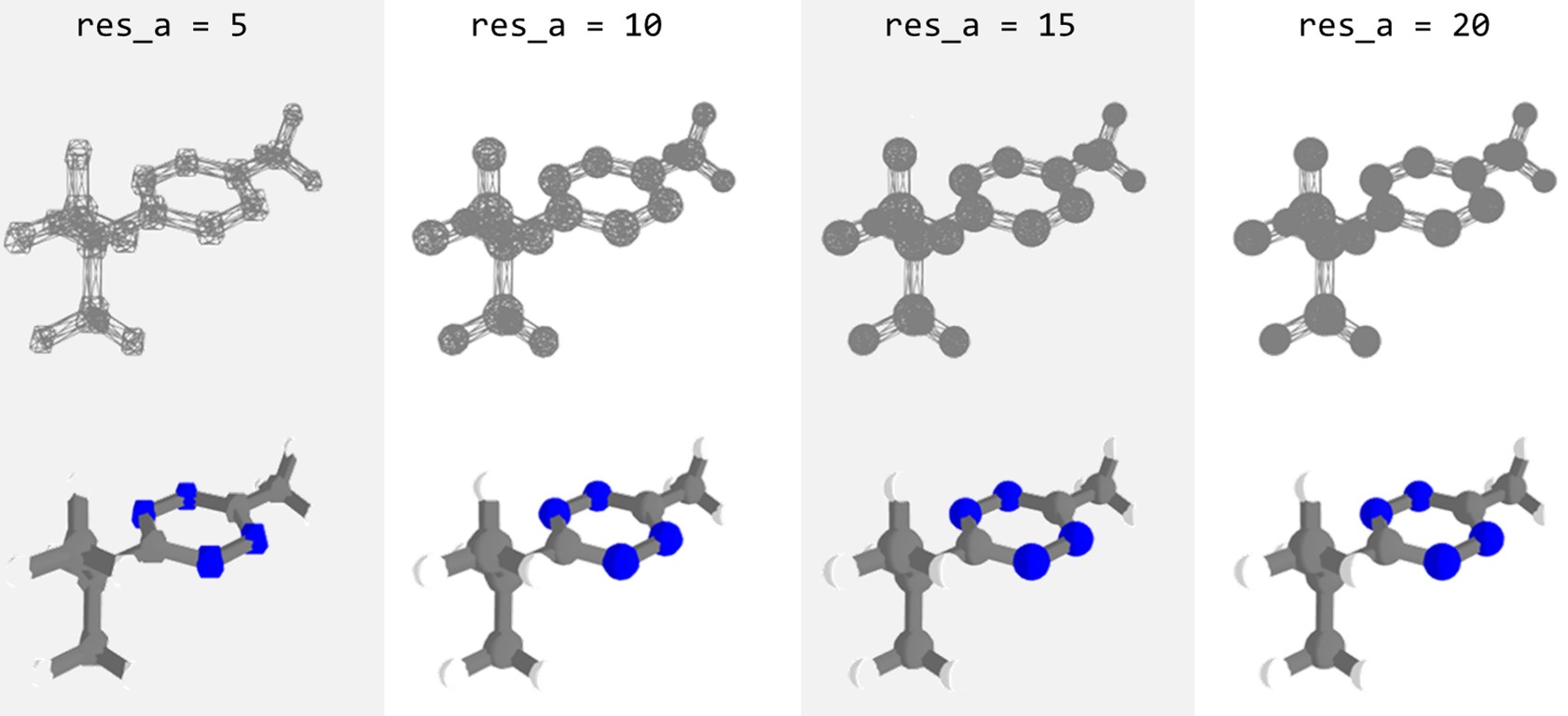
res_aandres_b: Resolution of an atom sphere and bond cylinder, i.e., the number of points defining each circle forming the sphere or cylinder. Increase the value for a smoother surface and decrease for a smaller file size. -
multicov: Visibility of multiple covalent bonds * -
name: The name of the molecule to be stored in the resulting 3D model.stlfile.
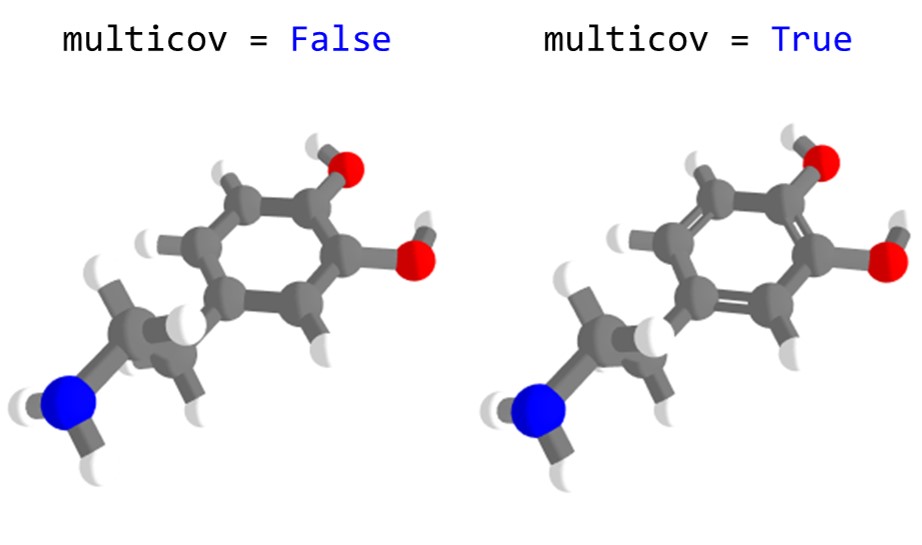
Methods
show(): Visualizes the molecule in 3D using Plotly.save_mesh(): Saves the molecule mesh as an.stlfile. The resulting file can be used for 3D printing..stlfiles do not store color.get_mesh(): Returns a combined array of meshes as np.arrayshow_mesh(): Displays molecule meshes (vertices and edges) as wireframes using Plotly.save_glb(): Saves the molecule as a 3D model with colors in.glbformat. Relies on trimesh library.
Chemical table files
Chemical table file (CT file) is a text file that describes a molecule. A CT file can store many information, but at the very least it should contain xyz coordinates of atoms that make up a molecule. There are many different formats, but the most common one is molfile which can have .mol or .sdf file extension.
Getting chemical table files for known compounds
-
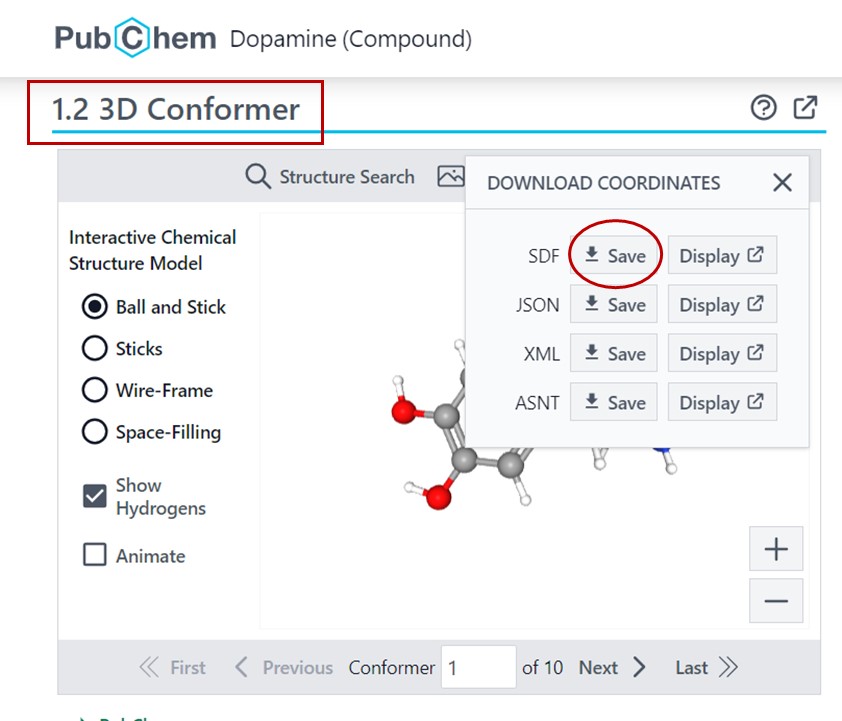
PubChem: Most known small-molecule compounds are registered in PubChem. To get the sdf file, search for the molecule by name, and on its molecule page, go to
3D conformersection to download the sdf file. -
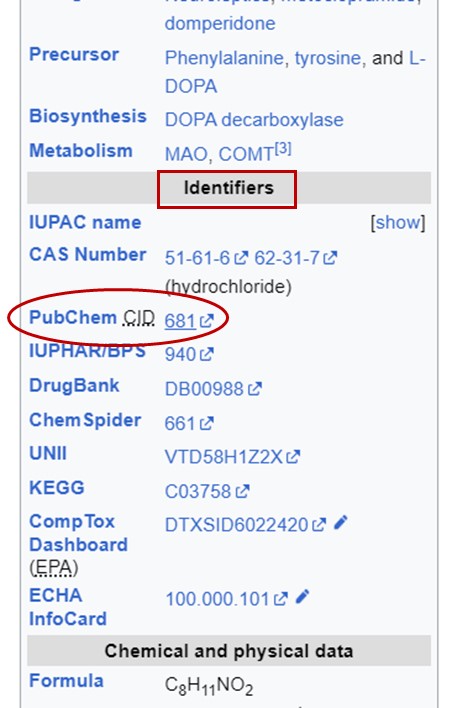
Wikipedia: If you don't know the exact name of the molecule, you can google the molecule and check whether it has a wikipedia page. In the identifier section (usually located beneath the molecule's structure on the right side of the page), you'll find the PubChem CID, which will redirect you to the molecule's page on PubChem.
Creating chemical table files
For custom molecules, you can use any 3D molecular visualization software. The most simple and acessible one is MolView which allows you to download the .mol file of the molecule, however it doesn't offer energy minimization, so the 3D conformer for unknown compounds might look strange. Alternatively, you can use well-known software such as Avogadro, Chem3D, MarvinView, etc., and save the molecule as .mol, .sdf, or .gjf.
3D models
Types
.stlfile is a human-readable file of a 3D mesh that contains triangles (xyz coordinates) and their facet normals..glbfile is a representation of a 3D model written by GL Transmission Format (glTF).
Usage
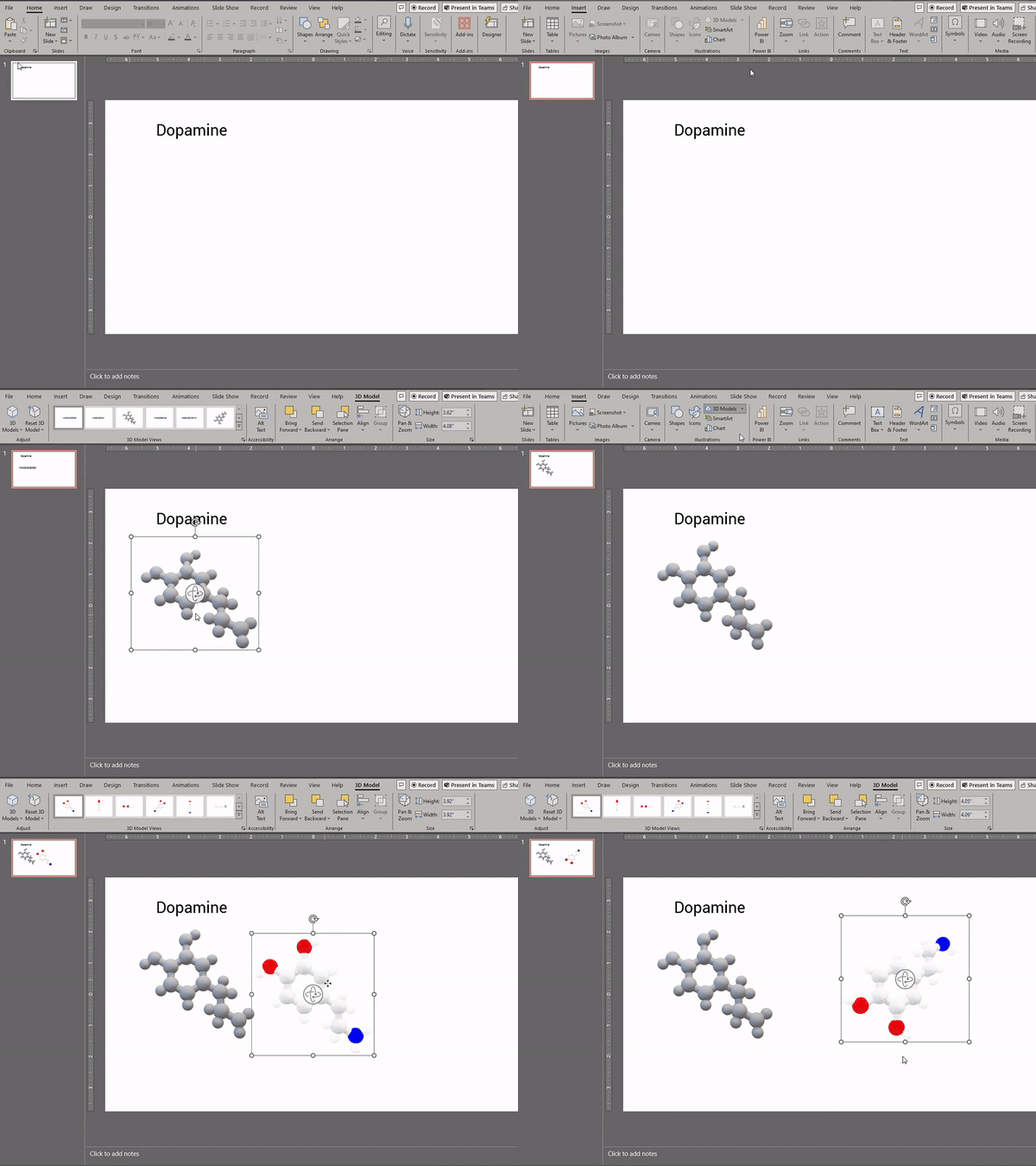
The resulting file can be used for educative or personal purposes, such as making a real 3D model by 3D printing or just for molecule visualization. Additionally, both .stl and .glb files can be imported into PowerPoint slides.
Acknowledgement
The approach for multicov is a contribution from @mziele1
Release history Release notifications | RSS feed


Download files
Download the file for your platform. If you're not sure which to choose, learn more about installing packages.
Source Distribution
Built Distribution
Filter files by name, interpreter, ABI, and platform.
If you're not sure about the file name format, learn more about wheel file names.
Copy a direct link to the current filters
File details
Details for the file mol2mesh-0.1.1.tar.gz.
File metadata
- Download URL: mol2mesh-0.1.1.tar.gz
- Upload date:
- Size: 12.4 kB
- Tags: Source
- Uploaded using Trusted Publishing? No
- Uploaded via: twine/6.1.0 CPython/3.10.11
File hashes
| Algorithm | Hash digest | |
|---|---|---|
| SHA256 |
48766dfa5c1ad4c9672be596ffae1e32051badce9089a06db9f7387f8342e5b2
|
|
| MD5 |
ec7877f0a47bce2a9b93c7c183d0b067
|
|
| BLAKE2b-256 |
1da47e8ec96b6110b94562640e563e344141099f8c1063d4b00e2bbf0252627e
|
File details
Details for the file mol2mesh-0.1.1-py3-none-any.whl.
File metadata
- Download URL: mol2mesh-0.1.1-py3-none-any.whl
- Upload date:
- Size: 11.6 kB
- Tags: Python 3
- Uploaded using Trusted Publishing? No
- Uploaded via: twine/6.1.0 CPython/3.10.11
File hashes
| Algorithm | Hash digest | |
|---|---|---|
| SHA256 |
4a84461b94f4f11448a665d3d543b4dd2517d096334797851135bec7ab37503c
|
|
| MD5 |
339adf7cceb9a919c1f285c02bd75f39
|
|
| BLAKE2b-256 |
b279f1761c9c038c2b7f5b0f7218abe423339f31bc7b10d5ee056121eea3c8de
|






