
molabel
A simple annotation widget for labeling examples with speech recognition support.
For an interactive demo check GitHub pages here.
Features
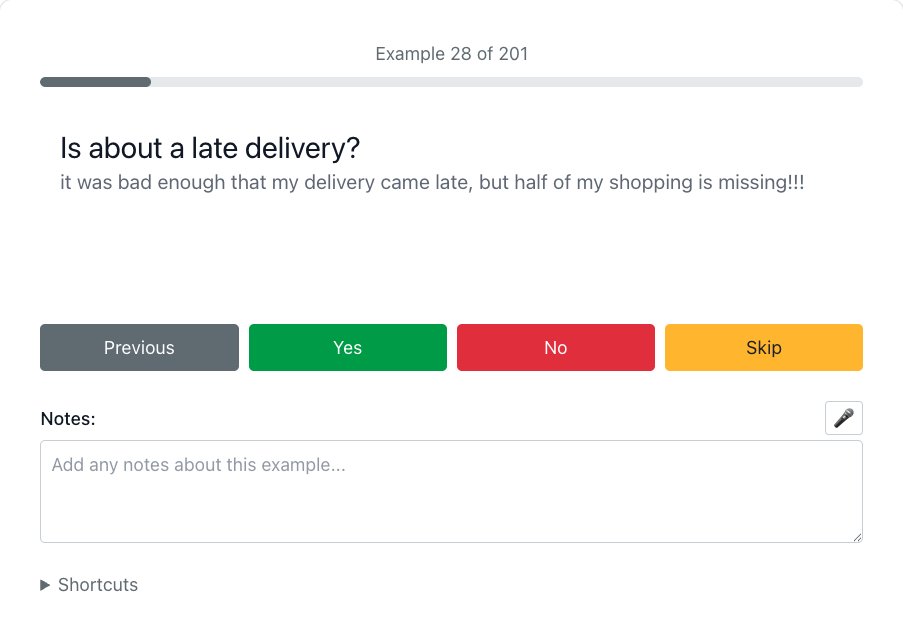
- Interactive annotation: Yes/No/Skip buttons with Previous navigation
- Keyboard shortcuts: Alt+1-6 for quick navigation and actions
- Gamepad support: Controller input with push-to-talk speech
- Notes field: Text annotations with live speech transcription
Installation
uv pip install molabel
Usage
from molabel import SimpleLabel

def render_example(example):
    return f"<p>{example['text']}</p>"

# Create annotation widget
widget = SimpleLabel(
    examples=[{"text": "example 1"}, {"text": "example 2"}],
    render=render_example,
    notes=True
)

# Display in notebook
widget

# Get annotations after labeling
annotations = widget.get_annotations()
Custom Shortcuts
widget = SimpleLabel(
    examples=examples,
    render=render_example,
    shortcuts={"Alt+Q": "prev", "Alt+W": "yes"},  # Custom keyboard
    gamepad_shortcuts={"button_7": "yes"}  # Custom gamepad
)
If you're keen to understand your gamepad better and how to map the buttons to actions, you can check this notebook. It will show every name of every button that you press in real time via the browser gamepad API.
Controls
- Mouse: Click buttons or microphone icon
- Keyboard: Alt+1 (prev), Alt+2 (yes), Alt+3 (no), Alt+4 (skip), Alt+5 (focus notes), Alt+6 (speech toggle)
- Gamepad: Button mappings with push-to-talk speech on left trigger
You can assign keyboard/gamepad shortcuts to the widget for all the possible actions:
prev- go to the previous exampleyes- label the example as yesno- label the example as noskip- skip the examplefocus_notes- focus the notes fieldspeech_notes- start/stop speech recognition
Requirements
- Modern web browser for Speech Recognition/Gamepad API support
- Microphone access for speech features
1 maintainer

Download files
Download the file for your platform. If you're not sure which to choose, learn more about installing packages.
Source Distribution
Built Distribution
Filter files by name, interpreter, ABI, and platform.
If you're not sure about the file name format, learn more about wheel file names.
Copy a direct link to the current filters
File details
Details for the file molabel-0.1.5.tar.gz.
File metadata
- Download URL: molabel-0.1.5.tar.gz
- Upload date:
- Size: 62.5 kB
- Tags: Source
- Uploaded using Trusted Publishing? No
- Uploaded via:
uv/0.7.13
File hashes
| Algorithm | Hash digest | |
|---|---|---|
| SHA256 |
834f991a0ddda88480a3ef8c6cbfc12dc51ae5c2d270657ae8faa3db0aca2216
|
|
| MD5 |
60c1fd9d666091f2c21e5a301e0f9030
|
|
| BLAKE2b-256 |
1ab57b71752323b6841fc05d69bc5c7876f53be37751809ff48550f5a434f2ed
|
File details
Details for the file molabel-0.1.5-py3-none-any.whl.
File metadata
- Download URL: molabel-0.1.5-py3-none-any.whl
- Upload date:
- Size: 62.9 kB
- Tags: Python 3
- Uploaded using Trusted Publishing? No
- Uploaded via:
uv/0.7.13
File hashes
| Algorithm | Hash digest | |
|---|---|---|
| SHA256 |
534b5372d793dfed3b2fc6a50a372522fced42368bba4630744ef54576f41067
|
|
| MD5 |
57f8a32cb67456bb01b2f2dca8cac23e
|
|
| BLAKE2b-256 |
909e8a1e2380fa5ad1ab63efbaa2f4d4e9613e65b6318e4eabd30ee7ce578852
|














