
MoleditPy Installer



This package is a helper utility that automatically installs the correct version of moleditpy or moleditpy-linux for your OS, creates an application menu shortcut, and registers the .pmeprj double-click file association on Windows, macOS, and Linux.
How to Use
-
Install
pip install moleditpy-installer
This will automatically install the correct
moleditpypackage (for Windows/macOS) ormoleditpy-linux(for Linux) as a dependency. -
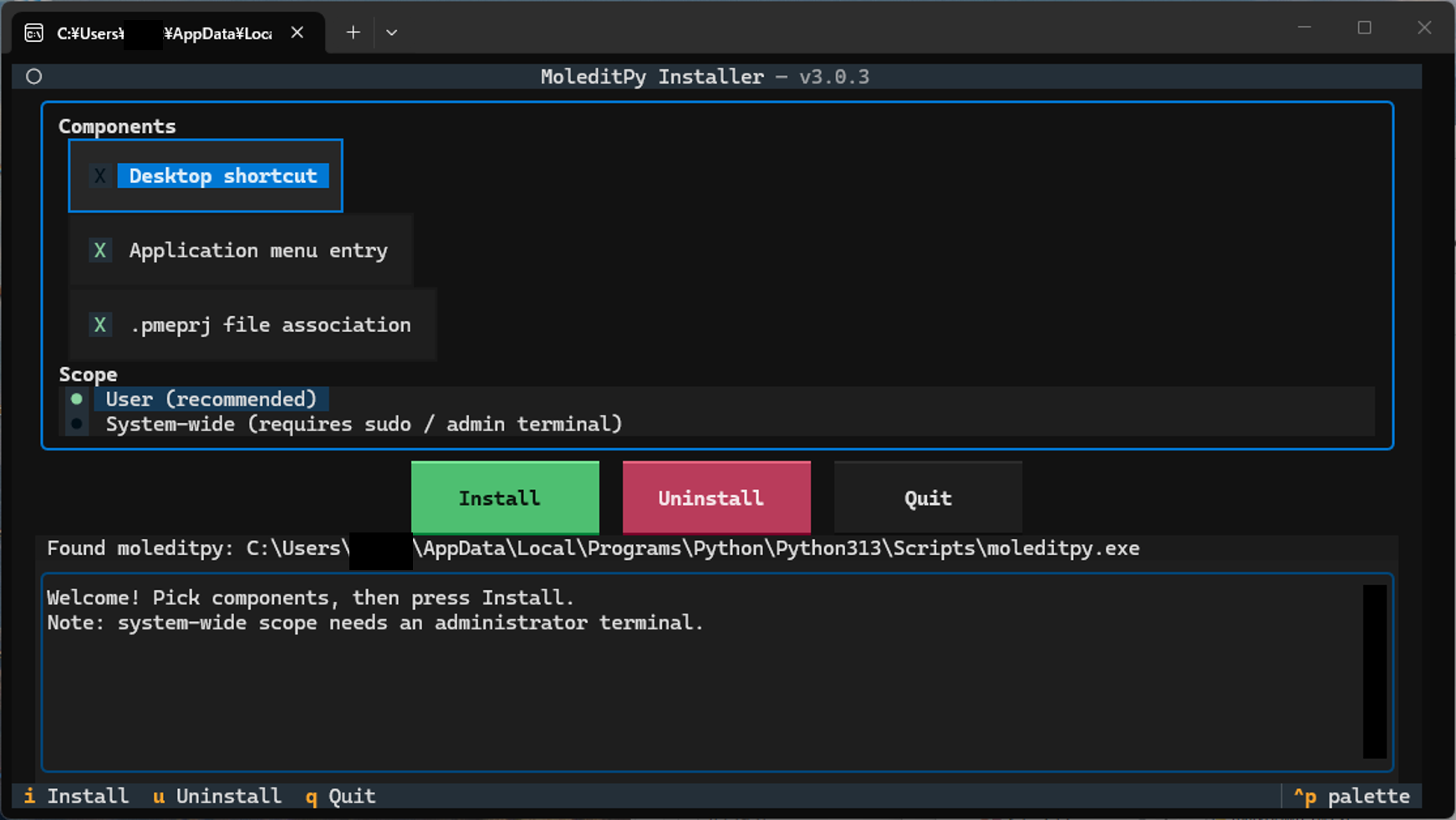
Run the interactive installer (TUI) Run the following command in your terminal. In an interactive terminal this opens a TUI where you pick the components 窶・Desktop shortcut, application-menu entry,
.pmeprjfile association 窶・and the scope (per-user or system-wide), then press Install:moleditpy-installer
Defaults: Desktop shortcut off, application menu on, file association on, per-user scope. The Install button is focused on start, so pressing Enter immediately installs with the defaults. Move between widgets with Tab / Shift+Tab (the arrow keys also switch between the Install / Uninstall / Quit buttons). After a successful install or uninstall the TUI stays open for two seconds, then exits and replays the full log in the terminal.
Non-interactive / scripted use (also what runs automatically when there is no terminal):
moleditpy-installer --no-tui                 # install with the defaults
moleditpy-installer --desktop                # also create a Desktop shortcut
moleditpy-installer --no-file-assoc          # skip the .pmeprj association
sudo moleditpy-installer --system            # system-wide (admin terminal on Windows)
Any explicit option skips the TUI.
Security Note: File associations for
.pmerawfiles have been intentionally removed. Opening.pmerawfiles downloaded from the internet can be potentially unsecure, so they are no longer automatically associated with the application.You can also invoke it as a Python module (use an underscore, not a hyphen):
python -m moleditpy_installer
Note:
python -m moleditpy-installer(with a hyphen) is invalid Python syntax and will not work. Always use the underscore form (moleditpy_installer) with-m.Tip: Run the installer from the Python environment where
moleditpyis installed (e.g. afterconda activate <env>). The installer verifies the launch command and warns you if the pairing cannot start MoleditPy. -
Uninstall To remove the shortcuts, unregister file associations, and clean up extracted icon files, run (add
--systemfor a system-wide install;--removeremains as a deprecated alias):moleditpy-installer --uninstall # or python -m moleditpy_installer --uninstall
Note: this removes the shortcuts and file associations only. To fully remove MoleditPy itself, also run
pip uninstall moleditpy(orpip uninstall moleditpy-linuxon Linux). -
Check Executable Location To search for the
moleditpyexecutable in the search paths and print the located path:moleditpy-installer --checkThis command returns exit code
0if the executable is found, and1otherwise. On macOS it additionally verifies that the launcher's interpreter/script pairing can actually start MoleditPy.For the complete list of directories scanned on Windows, macOS, and Linux, see docs/path.md.
-
Print Version To show the version of the installer:
moleditpy-installer --version -
Help To see all available options, run:
moleditpy-installer --help
What the installer sets up
Windows
- Start Menu shortcut (icon included); Desktop shortcut when enabled (
--desktopor the TUI checkbox). With--system(admin) the shortcuts go to the all-users locations and the association to HKLM. .pmeprjfiles open MoleditPy on double-click (per-user registry, no admin rights needed).- Icons are stored under
%LOCALAPPDATA%\MoleditPy\installerso they survive temp-folder cleanup.
macOS
- A
MoleditPy.applauncher in~/Applications(or/Applicationswith--system), plus a Desktop copy when enabled, with the MoleditPy icon. - The launcher pairs the
moleditpyscript with the Python interpreter of its own environment (detected from the adjacent interpreter or the script's shebang), so it keeps working even when the installer runs from a different environment. - MoleditPy always opens inside a Terminal window, so Python output and any errors stay visible. The first launch shows a one-time macOS consent prompt ("MoleditPy wants access to control Terminal") 窶・click OK.
- Double-clicking
.pmeprjfiles opens MoleditPy: the app bundle declares thecom.moleditpy.pmeprjdocument type (exported UTI) and is registered with Launch Services..pmeprjdocuments get their own file icon, matching the Windows behavior. - The bundle is ad-hoc code-signed after configuration; required on Apple Silicon.
Linux
- Application-menu
.desktopentry (icon included; Desktop copy when enabled), launched in a terminal so output stays visible (matching macOS). With--systemthe entry goes to/usr/share/applications. .pmeprjfiles open MoleditPy on double-click: a per-userapplication/x-moleditpy-projectMIME type is registered (freedesktop shared-mime-info, no root needed) and set as the default handler..pmeprjdocuments get their own file icon in file managers, matching Windows and macOS.
moleditpy-installer --uninstall undoes all of the above for the current user (add --system for system-wide installs).
Version 3.0 highlights
- New: interactive Textual TUI 窶・pick components and scope, watch the log, press Install/Remove.
- New: component selection (
--desktop,--app-menu,--file-assoc) with safer defaults (no Desktop shortcut unless requested). - New: system-wide scope on Linux (
/usr/share), macOS (/Applications), and Windows (HKLM + all-users Start Menu; admin terminal) 窶・all requiring sudo/admin. - Per-user Linux paths now honor
XDG_DATA_HOME. - End-to-end smoke tests on all three OSes in CI, including the sudo/system path.
Version 2.0 highlights
- Fixed: silent launch failures on macOS caused by an invalidated app-bundle code signature (Apple Silicon refused to start the app and ignored its icon).
- Fixed:
ModuleNotFoundError: No module named 'moleditpy'when the installer ran in a different Python environment than the one holdingmoleditpy窶・the launcher now uses the script's own interpreter and the command is verified at install time. - New: MoleditPy launches in a visible Terminal window on macOS.
- New:
.pmeprjdouble-click support on macOS via a proper exported UTI + Launch Services registration. - New:
.pmeprjdouble-click support and document icon on Linux (per-user MIME registration). - New:
--checkverifies launchability on macOS;--removealso unregisters the bundle from Launch Services and removes extracted icons. - Icons no longer live in the temp folder (Windows shortcut/registry icons no longer break after cleanup).
1 maintainer

Download files
Download the file for your platform. If you're not sure which to choose, learn more about installing packages.
Source Distribution
Built Distribution
Filter files by name, interpreter, ABI, and platform.
If you're not sure about the file name format, learn more about wheel file names.
Copy a direct link to the current filters
File details
Details for the file moleditpy_installer-3.0.4.tar.gz.
File metadata
- Download URL: moleditpy_installer-3.0.4.tar.gz
- Upload date:
- Size: 995.2 kB
- Tags: Source
- Uploaded using Trusted Publishing? Yes
- Uploaded via:
twine/6.1.0 CPython/3.13.12
File hashes
| Algorithm | Hash digest | |
|---|---|---|
| SHA256 |
9fe4035e932dba7fb3d70033e2e5eb18e3f2a31d9548992b210fb1fb974709bd
|
|
| MD5 |
58cb59e27bcfe5d59dc2d5d5e8145746
|
|
| BLAKE2b-256 |
b08402c10a04f5e1972a1637fafa011d5691daca64edeafb75ab749a5d85e6f0
|
Provenance
The following attestation bundles were made for moleditpy_installer-3.0.4.tar.gz:
Publisher:
release.yml on HiroYokoyama/python_molecular_editor_installer
-
Statement:
-
Statement type:
https://in-toto.io/Statement/v1 -
Predicate type:
https://docs.pypi.org/attestations/publish/v1 -
Subject name:
moleditpy_installer-3.0.4.tar.gz -
Subject digest:
9fe4035e932dba7fb3d70033e2e5eb18e3f2a31d9548992b210fb1fb974709bd - Sigstore transparency entry: 2171205404
- Sigstore integration time:
-
Permalink:
HiroYokoyama/python_molecular_editor_installer@bdffa86343fe0b4c4563bbd28ec9ce5a169c41c6 -
Branch / Tag:
refs/tags/v3.0.4 - Owner: https://github.com/HiroYokoyama
-
Access:
public
-
Token Issuer:
https://token.actions.githubusercontent.com -
Runner Environment:
github-hosted -
Publication workflow:
release.yml@bdffa86343fe0b4c4563bbd28ec9ce5a169c41c6 -
Trigger Event:
push
-
Statement type:
File details
Details for the file moleditpy_installer-3.0.4-py3-none-any.whl.
File metadata
- Download URL: moleditpy_installer-3.0.4-py3-none-any.whl
- Upload date:
- Size: 980.5 kB
- Tags: Python 3
- Uploaded using Trusted Publishing? Yes
- Uploaded via:
twine/6.1.0 CPython/3.13.12
File hashes
| Algorithm | Hash digest | |
|---|---|---|
| SHA256 |
f9f3c9388df8798770acf44bc66523d84c4c3d7f27841b7d19d0cc2632c71f21
|
|
| MD5 |
745f3e35d714936ef35ca4a8988d7db3
|
|
| BLAKE2b-256 |
10172db56ad940f80cce7436f7bc4611c6f045eb8d8810c2bf18dc7bbad7b2fd
|
Provenance
The following attestation bundles were made for moleditpy_installer-3.0.4-py3-none-any.whl:
Publisher:
release.yml on HiroYokoyama/python_molecular_editor_installer
-
Statement:
-
Statement type:
https://in-toto.io/Statement/v1 -
Predicate type:
https://docs.pypi.org/attestations/publish/v1 -
Subject name:
moleditpy_installer-3.0.4-py3-none-any.whl -
Subject digest:
f9f3c9388df8798770acf44bc66523d84c4c3d7f27841b7d19d0cc2632c71f21 - Sigstore transparency entry: 2171205421
- Sigstore integration time:
-
Permalink:
HiroYokoyama/python_molecular_editor_installer@bdffa86343fe0b4c4563bbd28ec9ce5a169c41c6 -
Branch / Tag:
refs/tags/v3.0.4 - Owner: https://github.com/HiroYokoyama
-
Access:
public
-
Token Issuer:
https://token.actions.githubusercontent.com -
Runner Environment:
github-hosted -
Publication workflow:
release.yml@bdffa86343fe0b4c4563bbd28ec9ce5a169c41c6 -
Trigger Event:
push
-
Statement type:














