
title: README author: Jan-Michael Rye
Synopsis
MolPred is a Hydronaut-based framework for building machine- and deep-learning predictors for molecular characteristics using Chemfeat. It has the advantages of both along with several others:
- All hyperparameters are managed via YAML configuration files, including selection of user-supplied models, molecular feature sets and metrics, with full support for command-line overrides.
- Hyperparameters can be explored using systematic sweeps or optimizing algorithms. In particular, optimization can be tracked in real time with Optuna Dashboard when using Hydra's Optuna sweeper plugin.
- All parameters, metrics, models and other artifacts are tracked with MLflow.
- Tests and predictions can be performed by retrieving models and feature-set configurations from previous MLflow runs.
- Models can be easily added by registering user-supplied subclasses of a provided class. Registered classes can be selected by name from the configuration file.
- Custom metrics can also be define and registered for selection from the configuration file.
- New chemical/molecular feature-set calculators can be added and registered via simple subclasses.
- Feature calculations are cached in a local database to avoid redundant calculations.
- Numeric and categoric features are automatically plotted and further optional plots are supported via the model subclasses. These plots are automatically logged as MLflow artifacts.
Links
Related
Usage
The framework can train user-supplied models to predict features of molecules. To train a model, the user should provide a set of International Chemical Identifiers (InChIs) representing the molecules of the training set along with one or more features associated with these molecules. The user should then customize the example configuration file to select their model and chemical feature sets.
All results are logged with MLflow and any trained model can be re-used for testing or prediction by altering the configuration file to set the operation mode (train, test or predict) and a previous MLflow run ID for reloading the model and feature set.
Model
To create a model, the user must define a subclass of molpred.model.base.ModelBase. Some methods such as train and predict are required while others such as visualize_data and visualize_prediction_metrics are optional.
Once the model has been defined, it can be registered using the class's register method and then selected by name from the configuration file (experiment.params.model.name).
Examples
- A model to predict of a molecule will pass the blood-brain barrier (BBB). Internally the model uses sklearn.ensemble.HistGradientBoostingClassifier.
Scoring
molpred.model.scoring.register_scorer can be used to register custom scikit-learn scorers created with make_scorer. These scorers can then be used by name in the configuration file (experiment.params.model.scorers) to calculate and log metrics for the model during training and testing.
Visualization
All features calculated by Chemfeat are automatically plotted and logged for each run to provide insights into the correlation between the features and the target characteristics.
Numeric Features
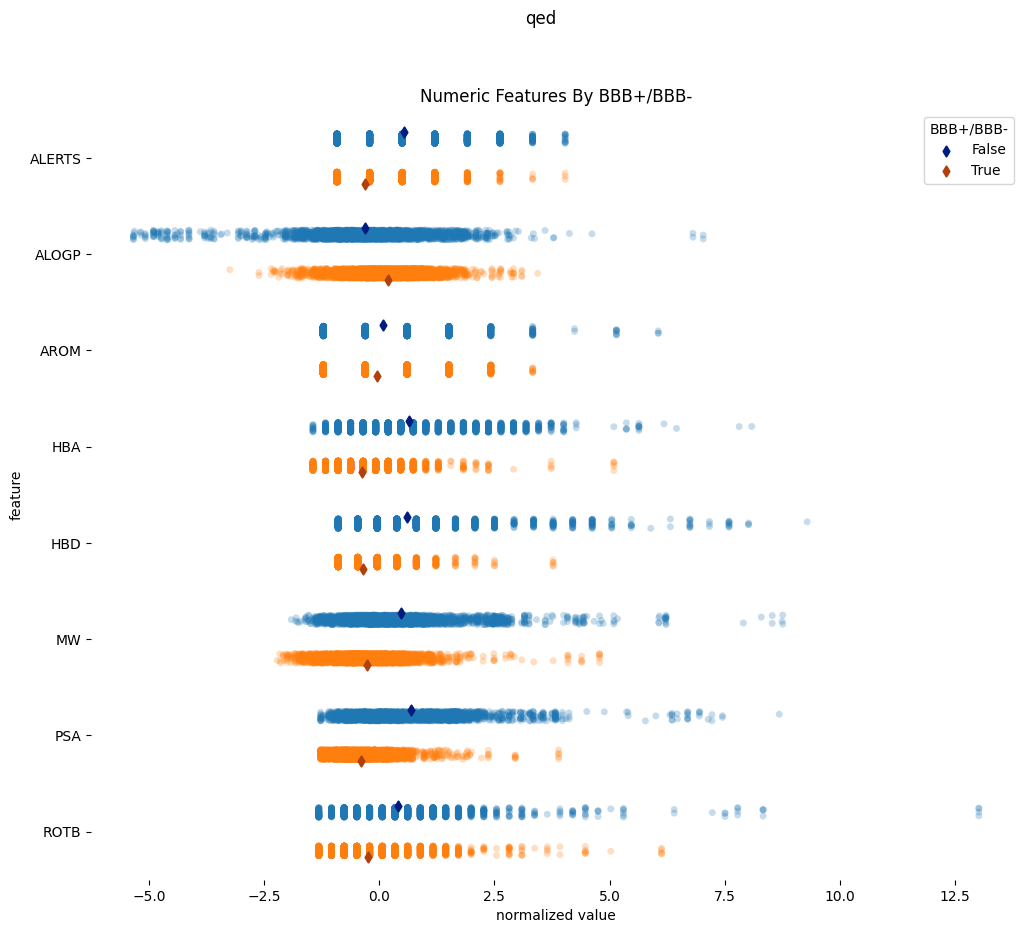
All numeric features for a feature set are plotted together using a Seaborn stripplot after normalization.
Categoric Features
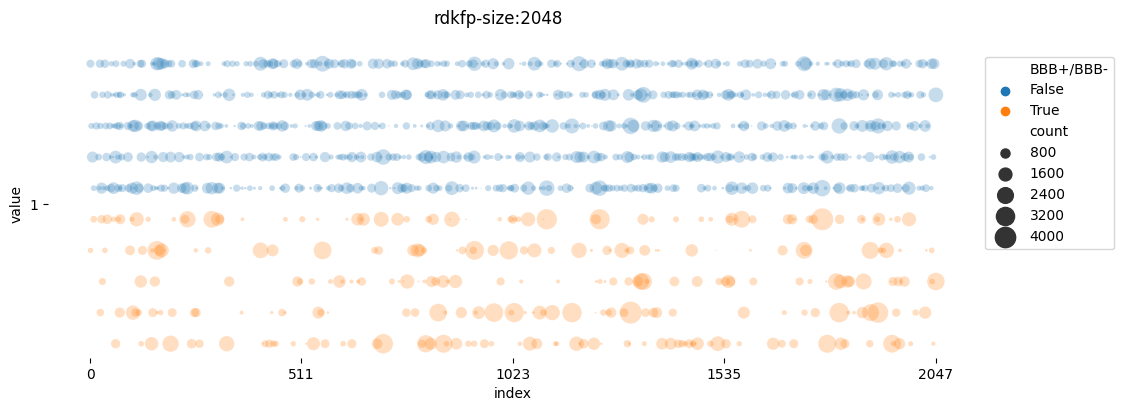
Categoric features with common prefixes that only vary by a numeric suffix are grouped together and displayed as differential counts of each categoric value per target category. The data is displayed using a customized scatterplot that can visually separate data even for fingerprint features of up to 4096 bits. These plots attempt to highlight the indices of features that significantly vary per target category.
1 maintainer

Release files for molpred 2023.7
For a detailed explanation of source distributions (sdists) and built distributions (wheels), please see the package formats documentation.
Source distribution (sdist)
| File | Size | Uploaded | |
|---|---|---|---|
| molpred-2023.7.tar.gz | 200.9 kB | Details |
Built distribution (wheel)
| File | Interpreter | ABI | Platform | Reset |
|---|---|---|---|---|
| molpred-2023.7-py3-none-any.whl | Python 3 | none | any | Details |
Total release size: 225.8 kB
Release files / molpred-2023.7.tar.gz
| Download URL | molpred-2023.7.tar.gz |
|---|---|
| Size | 200.9 kB |
| Tags | Source |
|
SHA-256 checksum How to use checksums |
b6164276c4b502f3f78f42993b5d210af44245016e42aff44e6c19fe0a7929db
|
|
BLAKE2b-256 checksum How to use checksums |
04707a394f9b7572dd0f7224f3d8c6f549c49c754547b28f668c42aa1ea5e5f0
|
| Upload date | |
|
Uploaded using Trusted Publishing? What is trusted publishing? |
No |
| Uploaded via |
twine/4.0.2 CPython/3.11.5
|
Release files / molpred-2023.7-py3-none-any.whl
| Download URL | molpred-2023.7-py3-none-any.whl |
|---|---|
| Size | 24.9 kB |
| Tags | Python 3 |
|
SHA-256 checksum How to use checksums |
c179247af75f510ce81065a3ea39c97a789872ea9e18764391ad61e4b27879fb
|
|
BLAKE2b-256 checksum How to use checksums |
4c0cc05c2ad3a29858fc4f5ffe418f00065ba22d67494a4494c9726ba1ca63ca
|
| Upload date | |
|
Uploaded using Trusted Publishing? What is trusted publishing? |
No |
| Uploaded via |
twine/4.0.2 CPython/3.11.5
|














