
MolSelector
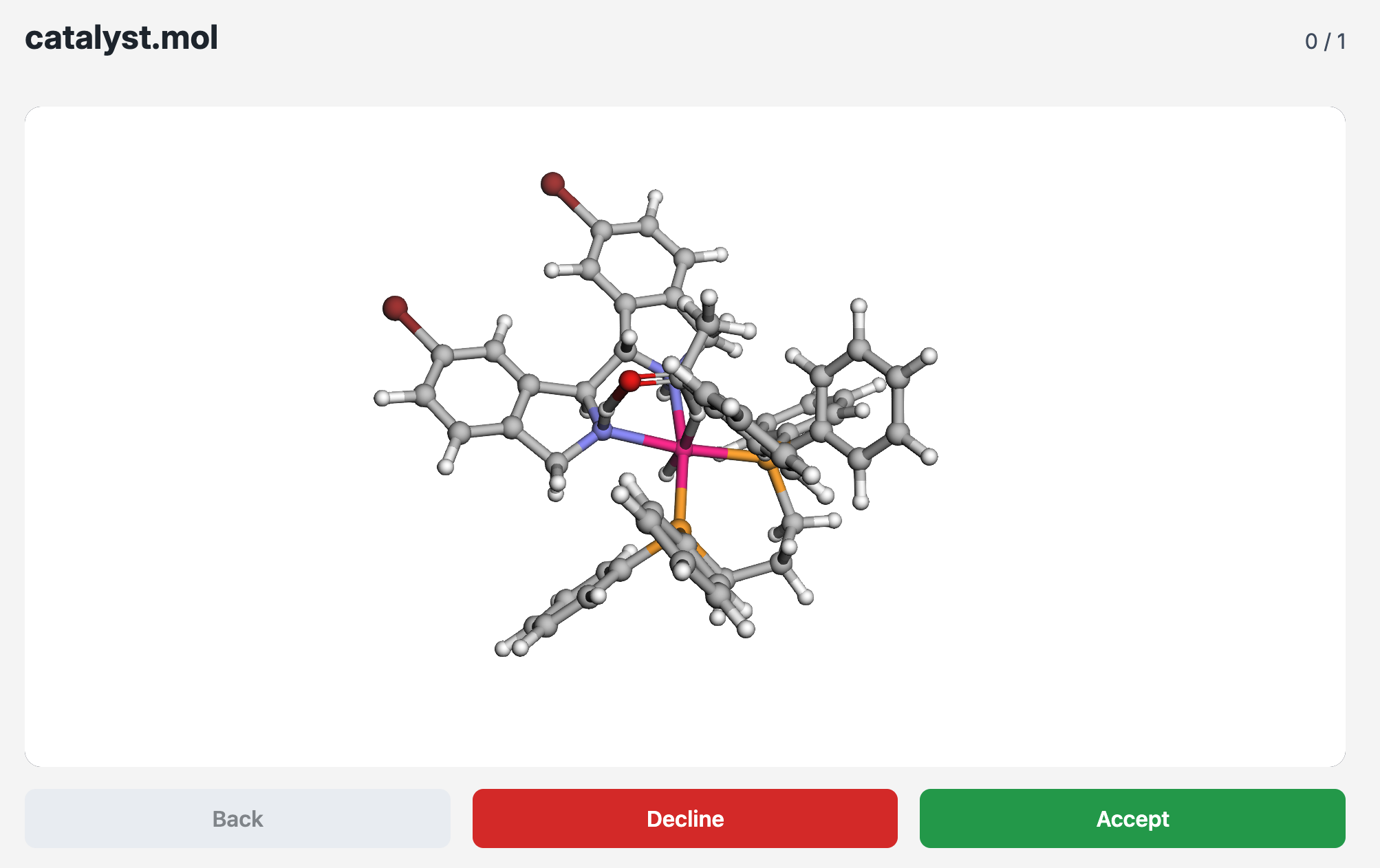
MolSelector is a lightweight web app for triaging molecular structures (.xyz, .mol, .mol2). Point the app at a folder of files, explore each molecule in an interactive 3D viewer powered by 3Dmol.js, and rapidly tag it as accept or decline. Decisions are written to selection_results.csv in the chosen folder so they can be versioned or analyzed later.
Requirements
- Python 3.12+
- A modern browser with WebGL support (Chrome, Firefox, Safari, Edge)
Installation
pip install molselector
Running the app
Start a local server with the built-in CLI:
molselector launch
Open your browser to http://127.0.0.1:8000 and MolSelector will be ready. The CLI exposes options such as --host, --port, and --log-level; use molselector launch --help to view them. You can still start the app manually with uvicorn molselector.app:app if you prefer.
To preload a folder of molecules (skipping the manual selection step), supply the --xyz-folder option:
molselector launch --xyz-folder /path/to/molecules
Usage
Keyboard shortcuts
Enter,A, or→: accept the current moleculeDor←: decline the current moleculeBackspace,B, or↑: go back to the previous molecule
Output format
The CSV file (selection_results.csv) contains three columns:
| column | description |
|---|---|
file |
Relative path to the molecule inside the selected folder |
decision |
Either accept or decline |
timestamp |
UTC timestamp recorded at the decision moment |
License
MIT License
Copyright (c) 2025 Nicholas Hadler
Permission is hereby granted, free of charge, to any person obtaining a copy of this software and associated documentation files (the "Software"), to deal in the Software without restriction, including without limitation the rights to use, copy, modify, merge, publish, distribute, sublicense, and/or sell copies of the Software, and to permit persons to whom the Software is furnished to do so, subject to the following conditions:
The above copyright notice and this permission notice shall be included in all copies or substantial portions of the Software.
THE SOFTWARE IS PROVIDED "AS IS", WITHOUT WARRANTY OF ANY KIND, EXPRESS OR IMPLIED, INCLUDING BUT NOT LIMITED TO THE WARRANTIES OF MERCHANTABILITY, FITNESS FOR A PARTICULAR PURPOSE AND NONINFRINGEMENT. IN NO EVENT SHALL THE AUTHORS OR COPYRIGHT HOLDERS BE LIABLE FOR ANY CLAIM, DAMAGES OR OTHER LIABILITY, WHETHER IN AN ACTION OF CONTRACT, TORT OR OTHERWISE, ARISING FROM, OUT OF OR IN CONNECTION WITH THE SOFTWARE OR THE USE OR OTHER DEALINGS IN THE SOFTWARE.
1 maintainer

Metadata
1 maintainer
Release files for molselector 1.2.1
For a detailed explanation of source distributions (sdists) and built distributions (wheels), please see the package formats documentation.
Source distribution (sdist)
| File | Size | Uploaded | Provenance | Actions |
|---|---|---|---|---|
| molselector-1.2.1.tar.gz | 15.2 kB | Without provenance | Details for molselector-1.2.1.tar.gz |
Built distribution (wheel)
| File | Interpreter | ABI | Platform | Actions Reset |
|---|---|---|---|---|
| molselector-1.2.1-py3-none-any.whl | Python 3 | none | any | Details for molselector-1.2.1-py3-none-any.whl |
Total release size: 29.7 kB
Release files / molselector-1.2.1.tar.gz
| Download URL | molselector-1.2.1.tar.gz |
|---|---|
| Size | 15.2 kB |
| Tags | Source |
|
SHA-256 checksum How to use checksums |
db6a5183ba19fc9268d19900b493790a51b860ef6c13409fecbe64ea5fadbc32
|
|
BLAKE2b-256 checksum How to use checksums |
80e1ca6e7f7f2683a70e287a3b6f26eced61f269f9da7614fc7ade5af299cd61
|
| Upload date | |
|
Uploaded using Trusted Publishing? What is trusted publishing? |
Yes |
| Uploaded via |
uv/0.11.10 {"installer":{"name":"uv","version":"0.11.10","subcommand":["publish"]},"python":null,"implementation":{"name":null,"version":null},"distro":{"name":"Ubuntu","version":"24.04","id":"noble","libc":null},"system":{"name":null,"release":null},"cpu":null,"openssl_version":null,"setuptools_version":null,"rustc_version":null,"ci":true}
|
Release files / molselector-1.2.1-py3-none-any.whl
| Download URL | molselector-1.2.1-py3-none-any.whl |
|---|---|
| Size | 14.5 kB |
| Tags | Python 3 |
|
SHA-256 checksum How to use checksums |
5ba60571a8452b0f6d87191ddc2a333b3355f9ed917bc84c8e269159cf32df8f
|
|
BLAKE2b-256 checksum How to use checksums |
3ba0df0a33dd44aee818dd654448ef3624c2b00ad48bc925aa8cdcb246e5029d
|
| Upload date | |
|
Uploaded using Trusted Publishing? What is trusted publishing? |
Yes |
| Uploaded via |
uv/0.11.10 {"installer":{"name":"uv","version":"0.11.10","subcommand":["publish"]},"python":null,"implementation":{"name":null,"version":null},"distro":{"name":"Ubuntu","version":"24.04","id":"noble","libc":null},"system":{"name":null,"release":null},"cpu":null,"openssl_version":null,"setuptools_version":null,"rustc_version":null,"ci":true}
|
Security for molselector 1.2.1
Provenance
Provenance describes where a file came from. On PyPI, provenance is shared via attestations, which provide a verifiable record of the build or publishing details. View details, limitations and caveats.
No provenance found
None of the files in this release were uploaded with provenance metadata.
A note on package security
PyPI is a repository for distributing packages, not a service for auditing them. While third-party security researchers and our staff do their best to detect and remove malicious packages, PyPI cannot guarantee the quality, security or suitability of any given package.
To learn more about protecting yourself from malicious actors, visit our package security documentation.














