

Monarch Money Amazon Connector (MMAC)
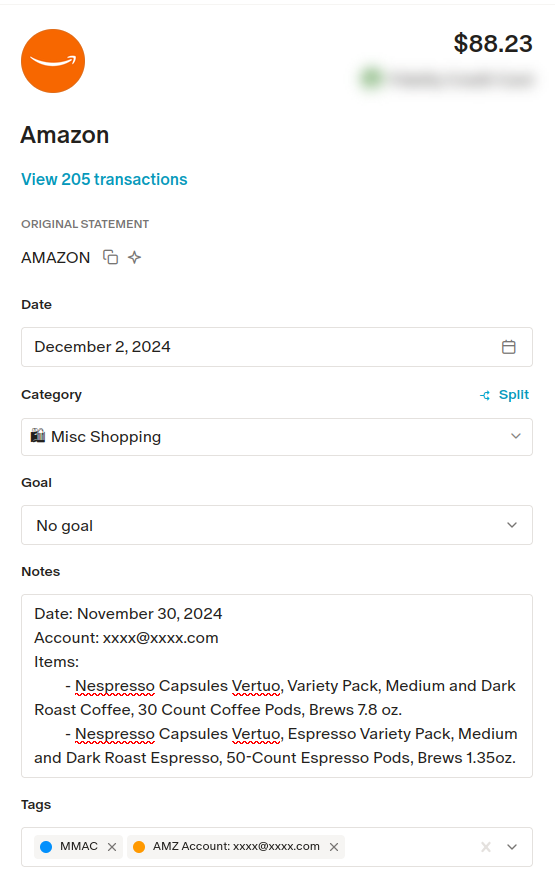
Monarch Money Amazon Connector automatically adds a note to each Amazon transaction in Monarch Money containing the list of items ordered.
Why?
To make it easier to categorize Amazon transactions, eliminating the need to go order-by-order to find the matching transaction in your Amazon Account.
Under the hood, MMAC uses the monarchmoney python package.
[!Warning]
⚠️ MMAC IS IN BETA
I'm making this repo public early to solicit feedback on the functionality, and to provide opportunities for collaboration.
No warranty is provided, and the documentation is incomplete at this point.
[!Note] Monarch recently released their browser extension which provides very similar functionality to MMAC.
I will continue to support this project for now, as I don't personally want to provide Monarch access to my browser via an extension. However, for most people, the extension is probably the way to go.
For those who are technically-inclined, and may also want to auto-sync Amazon transactions without leaving a browser window open, MMAC is still the best available option.
Screenshot
The description and the tags were automatically inserted by MMAC!
Quick Start
Install MMAC using pip:
pip install monarch-money-amazon-connector
Create Configuration File
Create a file called mmac.toml. This file
will contain configuration values needed to run MMAC.
# mmac.toml

# Replace with your Monarch account credentials.
monarch_account.email = "example@example.com"
monarch_account.password = "password"
# (Optional) Automatically generate MFA codes using your MFA secret key (seed).
# You can
# monarch_account.mfa_secret_key = "XXXXXXXXXXXXXXXXXXXXXXXXXX"

# Your amazon account credentials
[[amazon_accounts]]
email = "test@example.com"
password = "password"

# (Optional): If you have multiple amazon accounts,
# you can define them by duplicating the first section
# with the additional credentials.
# [[amazon_accounts]]
# email = "test2@example.com"
# password = "password"

# (Optional): Use all transactions from a given year.
# By default, only the Amazon transactions from the last 3 months
# will be considered for matching to Monarch transactions.
#
# You can use this filter to pull all transactions from the specified year.
# This can be especially useful around the New Year if you want to annotate
# transactions from the past year.
[amazon_filter]
year = "2025"

# (Optional): Use the OpenAI API to *attempt* to
# auto solve captcha images. This is NOT very reliable,
# but may work with simpler captchas.
[llm]
# Whether to use the LLM captcha solver
enable_llm_captcha_solver = true
# Your OpenAI API Key
api_key = "sk-********"
# (Optional): The OpenAI Project ID
# project = "proj_**********"

# (Optional): Specify whether to show the browser
# window while scraping, or not (headless).
# headless = true
Run MMAC
mmac
A Note About SemVer
MMAC is committed to using Semantic Versioning for its codebase. This means we are going to increment major versions relatively quickly, as strictly adhering to SemVer requires a major version increment for every breaking change.
There is a lot of discussion about whether, for this reason, SemVer is "bad". In my opinion, SemVer is bad, but only for user-facing application versions.
Why?
Technical breaking changes (changes that break backwards compatibility in the codebase, but do not change the user experience/release a feature) are essential to track for the developer. However, the user of an application would be forgiven if they were confused when their app bumped from v1.0.0 to v2.0.0 without any notable changes.
So, what's the solution?
I don't know. Maintaining two versions is messy and complicated, a hybrid concatenation of SemVer and AppVer is also messy and potentially confusing to the user, and choosing one or the other is an imperfect solution. Please - let me know if you've figured this out!
As for MMAC, we're going to stick to SemVer. Let's face it: If you're popping open your terminal
to pip install this package, you can handle reading the release notes to figure out what's new
between v1.0.0 and v2.0.0.
You're smart, I'm lazy. Let's just use SemVer.
Thanks!
This project wouldn't be possible without the community Monarch Money Library!
Head over there and give that project some love!
Further thanks to abrahamw88 for their contributions to MMAC!
1 maintainer

Metadata
1 maintainer
Release files for monarch-money-amazon-connector 2.3.3
For a detailed explanation of source distributions (sdists) and built distributions (wheels), please see the package formats documentation.
Source distribution (sdist)
| File | Size | Uploaded | |
|---|---|---|---|
| monarch_money_amazon_connector-2.3.3.tar.gz | 31.5 kB | Details |
Built distribution (wheel)
| File | Interpreter | ABI | Platform | Reset |
|---|---|---|---|---|
| monarch_money_amazon_connector-2.3.3-py3-none-any.whl | Python 3 | none | any | Details |
Total release size: 64.5 kB
Release files / monarch_money_amazon_connector-2.3.3.tar.gz
| Download URL | monarch_money_amazon_connector-2.3.3.tar.gz |
|---|---|
| Size | 31.5 kB |
| Tags | Source |
|
SHA-256 checksum How to use checksums |
cd9532f4b59621bf02fcac5bcadde03eec66b11d4348600416b40bf23311c23a
|
|
BLAKE2b-256 checksum How to use checksums |
7ba16f66840433dba9a367f5825b9858a68119dc86839fedd0207f886746ddb9
|
| Upload date | |
|
Uploaded using Trusted Publishing? What is trusted publishing? |
No |
| Uploaded via |
twine/6.1.0 CPython/3.13.7
|
Release files / monarch_money_amazon_connector-2.3.3-py3-none-any.whl
| Download URL | monarch_money_amazon_connector-2.3.3-py3-none-any.whl |
|---|---|
| Size | 33.0 kB |
| Tags | Python 3 |
|
SHA-256 checksum How to use checksums |
de9dcdb461ea99cf1becc64a17b8116292439e2785108d1880f397ebd8352d70
|
|
BLAKE2b-256 checksum How to use checksums |
a8a1c36495b4141a313c0071c0d5be9f3bc00d418945d56afc73cf24dbc499f8
|
| Upload date | |
|
Uploaded using Trusted Publishing? What is trusted publishing? |
No |
| Uploaded via |
twine/6.1.0 CPython/3.13.7
|














