
moneyflow


Track your moneyflow from the terminal.
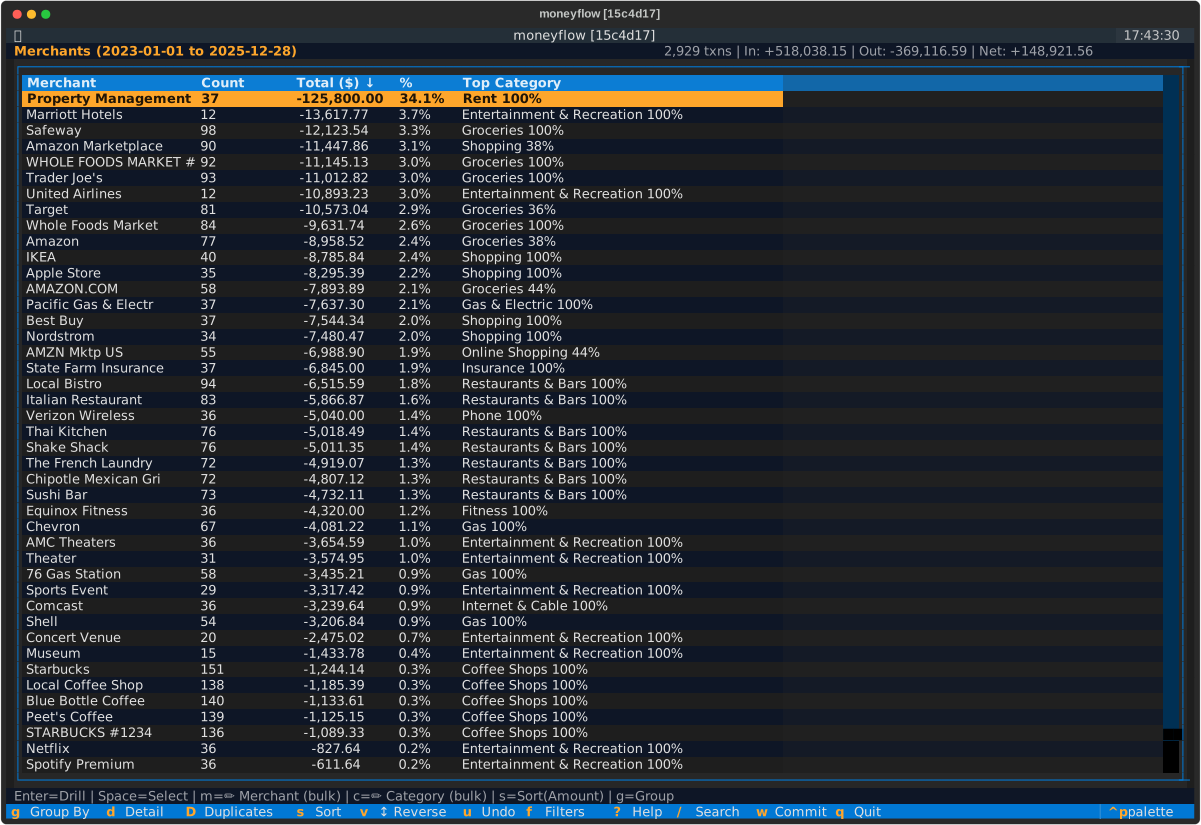
A keyboard-driven terminal UI for managing personal finance transactions. Built for users who prefer efficiency and direct control over their financial data.
Supported Platforms:
- ✅ Monarch Money - Full integration with editing and sync
- ✅ YNAB - Full integration with editing and sync
- ✅ Amazon Purchases - Import and analyze purchase history
- ✅ SimpleFIN - Import read-only account and transaction data; edits remain local
- ✅ Demo Mode - Try it without an account
Documentation: moneyflow.dev
Installation
# Install with pip
pip install moneyflow

# Or run without installing (recommended)
uvx moneyflow

# Or use pipx
pipx install moneyflow
Quick Start
# Try demo mode first (no account needed)
moneyflow --demo

# Connect to Monarch Money or YNAB
moneyflow

# Analyze Amazon purchase history
moneyflow amazon import ~/Downloads/"Your Orders"
moneyflow amazon

# Fetch only recent data from API (Monarch/YNAB only - for faster loading)
moneyflow --year 2025  # Fetch from 2025-01-01 onwards
moneyflow --since 2024-06-01  # Fetch from specific date
First-time Monarch Money setup: You'll need your 2FA secret key. See the Monarch Money setup guide.
First-time YNAB setup: You'll need a Personal Access Token from your YNAB account settings. If you have multiple budgets, you'll be prompted to select one. See the YNAB setup guide.
Key Features
- Keyboard-driven - Navigate with
gto cycle views,Enterto drill down,Escapeto go back - Multi-select bulk editing - Select with
Space, edit withm/c/h, commit withw - Multiple aggregation dimensions - Merchants, Categories, Groups, Accounts, Time (by year/month)
- Drill-down and sub-grouping - Analyze spending from multiple angles, combine dimensions
- Type-to-search - Filter transactions as you type with
/ - Review before commit - Preview all changes before syncing to backend
- Encrypted credentials - AES-128 with PBKDF2 (100,000 iterations)
Full keyboard shortcuts and tutorials: moneyflow.dev
Common Workflows
Clean up merchant names:
- Press
guntil Merchant view - Press
mon a merchant to rename all transactions - Press
wto review and commit
Recategorize transactions:
- Press
dfor detail view - Press
Spaceto multi-select transactions - Press
cto change category - Press
wto review and commit
Analyze spending:
- Press
gto cycle views (Merchants → Categories → Groups → Accounts → Time) - In Time view: Press
tto cycle granularity (Year → Month → Day),Enterto drill into a period - In any aggregate view: Press
Enterto drill down - Press
gto cycle sub-groupings (including by Time) - Press
ato clear time drill-down,Escapeto go back
Learn more: Navigation & Search Guide
Amazon Mode
Import and analyze your Amazon purchase history:
- Request "Your Orders" export from Amazon (Account Settings → Privacy)
- Download and unzip "Your Orders.zip"
- Import:
moneyflow amazon import ~/Downloads/"Your Orders" - Launch:
moneyflow amazon
See Amazon Mode Guide for details.
Troubleshooting
Login fails with "Incorrect password"
- Enter your encryption password (for moneyflow), not your backend password
- If forgotten: Click "Reset Credentials" or delete
~/.moneyflow/
Monarch Money - 2FA not working
- Copy the BASE32 secret (long string), not the QR code
- Get fresh secret: Disable and re-enable 2FA in Monarch Money
YNAB - Connection fails
- Verify your Personal Access Token is correct
- Token may have expired - generate a new one from YNAB Developer Settings
- Make sure you copied the entire token (no spaces before/after)
- Token is only shown once - if lost, generate a new one
Terminal displays weird characters
- Use a modern terminal with Unicode support (iTerm2, GNOME Terminal, Windows Terminal)
Complete reset
rm -rf ~/.moneyflow/
pip install --upgrade --force-reinstall moneyflow
moneyflow
More help: Troubleshooting Guide
Themes
moneyflow includes multiple color themes for different aesthetic preferences:
- default - Original moneyflow dark theme
- berg - Orange on black (inspired by Bloomberg Terminal) - nostalgic 1980s financial terminal aesthetic
- nord - Nord (arctic blue tones) - popular among developers for eye-friendly cool colors
- gruvbox - Gruvbox (retro warm colors) - vintage aesthetic beloved by vim users
- dracula - Dracula (modern purple) - vibrant high-contrast dark theme
- solarized-dark - Solarized Dark (precision colors) - scientifically designed for reduced eye strain
- monokai - Monokai (Sublime Text classic) - the iconic editor theme
Configuring Themes
Set your preferred theme in ~/.moneyflow/config.yaml:
version: 1

settings:
  theme: berg  # or nord, gruvbox, dracula, solarized-dark, monokai
Restart moneyflow for the theme to take effect.
Documentation
Full documentation available at moneyflow.dev
- Installation
- Quick Start Tutorial
- Navigation & Search
- Editing Transactions
- Keyboard Shortcuts
- Monarch Money Setup
- YNAB Setup
- SimpleFIN Setup
- Amazon Mode
Security
- Credentials encrypted with AES-128 using PBKDF2 key derivation (100,000 iterations)
- Encryption password never leaves your machine
- Stored in
~/.moneyflow/credentials.encwith 600 permissions - See SECURITY.md for full details
Contributing
Contributions welcome! See Contributing Guide.
Development setup:
git clone https://github.com/wesm/moneyflow.git
cd moneyflow
uv sync
uv run pytest -v
Code quality checks:
uv run pytest -v                          # Tests
uv run pyright moneyflow/                 # Type checking
uv run ruff format moneyflow/ tests/      # Formatting
uv run ruff check moneyflow/ tests/       # Linting
See Developing moneyflow for details.
Acknowledgments
Monarch Money Integration
This project's Monarch Money backend uses code derived from the monarchmoney Python client library by hammem, used under the MIT License. See licenses/monarchmoney-LICENSE for details.
Monarch Money® is a trademark of Monarch Money, Inc. This project is independent and not affiliated with, endorsed by, or officially connected to Monarch Money, Inc.
License
MIT License - see LICENSE file for details.
Disclaimer: Independent open-source project. Not affiliated with or endorsed by Monarch Money, Inc. or YNAB LLC.
1 maintainer

Release files for moneyflow 0.11.1
For a detailed explanation of source distributions (sdists) and built distributions (wheels), please see the package formats documentation.
Source distribution (sdist)
| File | Size | Uploaded | |
|---|---|---|---|
| moneyflow-0.11.1.tar.gz | 895.3 kB | Details |
Built distribution (wheel)
| File | Interpreter | ABI | Platform | Reset |
|---|---|---|---|---|
| moneyflow-0.11.1-py3-none-any.whl | Python 3 | none | any | Details |
Total release size: 1.2 MB
Release files / moneyflow-0.11.1.tar.gz
| Download URL | moneyflow-0.11.1.tar.gz |
|---|---|
| Size | 895.3 kB |
| Tags | Source |
|
SHA-256 checksum How to use checksums |
007615a87f89262f8607d61123e510086fac3a5e0ba3edfa2065dcf07054bda7
|
|
BLAKE2b-256 checksum How to use checksums |
96e98a1f7b60eb909ec3bb0e23a31e490351138907c7d24cdba2ea3b88bdcff8
|
| Upload date | |
|
Uploaded using Trusted Publishing? What is trusted publishing? |
No |
| Uploaded via |
twine/6.2.0 CPython/3.14.0
|
Release files / moneyflow-0.11.1-py3-none-any.whl
| Download URL | moneyflow-0.11.1-py3-none-any.whl |
|---|---|
| Size | 281.2 kB |
| Tags | Python 3 |
|
SHA-256 checksum How to use checksums |
1da695696f4bcb611d7982700ec36364f3339c29117232904e645e198b9045be
|
|
BLAKE2b-256 checksum How to use checksums |
2244f9092d48784ec6ef7bf86aacd617b93a9c77a20a8d32f496f94b3b2c74c4
|
| Upload date | |
|
Uploaded using Trusted Publishing? What is trusted publishing? |
No |
| Uploaded via |
twine/6.2.0 CPython/3.14.0
|














