
One of the best practices for interacting with MongoDB in a Django REST environment

Project description
mongoserializer
mongoserializer is a Django REST package that introduces one of the best simple practices for interacting with MongoDB while using pymongo and Django REST Framework. it supports complex nested fields singular/list during the update and create phases. for django fields (ModelSerializer) it supports add operation by id in creation and update phase. for update phase only main fields (not nested). see example 1.
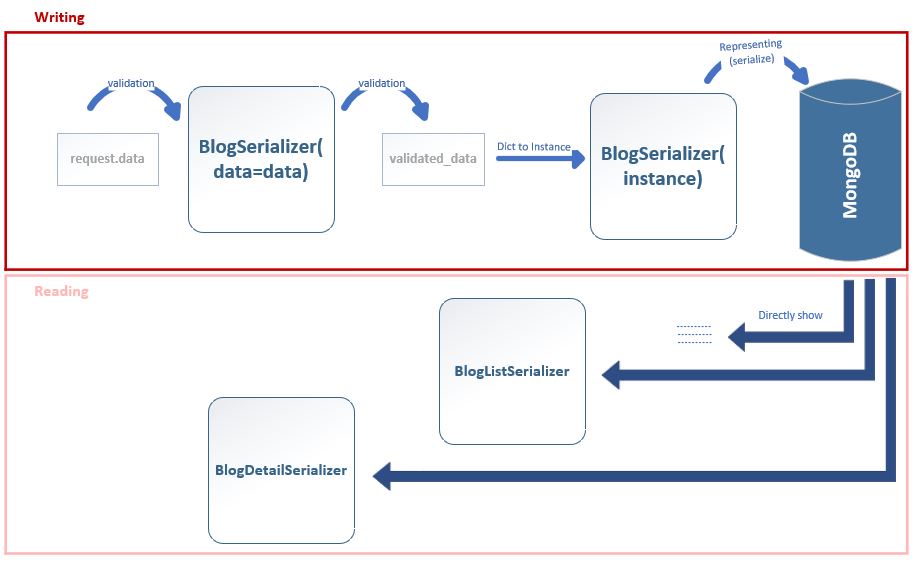
Whole workflow:
Installation
- Run:
pip install mongoserializer[jalali]
To install mongoserializer with Jalali date support, add the [jalali] part.
MongoSerializer
MongoSerializer is used only in the writing phase to write data in MongoDB, in a nice and clean format. for reading phase it's recommended using separate serializer like check here. conflicts may occur when using both of read/write in same serializer here.
MongoSerializer arguments:
-
_id: Used in updating. Assign the MongoDB document's
_idto update the document. -
data: data for create/update the document in the MongoDB.
-
many: single dict or list of data like
manyin DRF serializer -
request: Optional. If your implementation requires 'request' (for validation, etc.), you can pass and use it like self.request inside your serializer. or use self.context['request'] in any subclass of the class to access the original request (described in example 2 below).
-
partial: Required to be True in updating.
MongoSerializer methods:
-
is_valid(raise_exception=False):
Same as DRF is_valid(). returns boolean (True or False) -
**save(kwargs):
Create/Ppdate the document. **kwargs are additional data if want to save in the document. -
**Meta.model: Used to specify the collection to save. see below example.
-
serialize_and_filter(validated_data):
Convertvalidated_datato a serialized format ready to save in MongoDB. You can call serialize_and_filter() to directly save validated data to MongoDB.
Example 1 (creation):
from mongoserializer.serializer import MongoSerializer
from mongoserializer.methods import ResponseMongo

mongo_db = pymongo.MongoClient("mongodb://localhost:27017/")['my_db']


class UserNameSerializer(serializers.ModelSerializer):
    class Meta:
        model = User
        fields = ['id', 'username']


class CommentSerializer(MongoSerializer):
    content = serializers.CharField(max_length=255)


class PostMongoSerializer(MongoSerializer):
    title = serializers.CharField(max_length=255)
    author = UserNameSerializer(required=False)
    comment = CommentSerializer(required=False)

    class Meta:
        model = mongo_db.file

serializer = PostMongoSerializer(data={"title": 'Post1', 'author': 1, 'comment': {'content': 'comment 1'}}, request=request)
if serializer.is_valid():
    data = serializer.save()
    return ResponseMongo(data)
return ResponseMongo(serializer.errors)
data returned from .save() and saved in MongoDB:
{'_id': ObjectId('6760ea0f4c1a2508d8aa5c08'), 'title': 'Post1', 'author': {'id': 1, 'username': 'akh'}, 'comment': {'_id': ObjectId('6760ea0f4c1a2508d8aa5c09'), 'content': 'comment 1'}}
In more practical example 2 we have used TimestampField provided by the package and customizing 'to_internal_value' method for more real world use cases.
Example 2 (creation):
from mongoserializer.serializer import MongoSerializer
from mongoserializer.fields import TimestampField
from mongoserializer.methods import ResponseMongo, MongoUniqueValidator

mongo_db = pymongo.MongoClient("mongodb://localhost:27017/")['my_db']


class BlogMongoSerializer(MongoSerializer):
    title = serializers.CharField(validators=[MongoUniqueValidator(mongo_db.blog, 'title')], max_length=255)
    slug = serializers.SlugField(required=False)  # Slug generates from title (in to_internal_value)
    published_date = TimestampField(auto_now_add=True, required=False)
    updated = TimestampField(auto_now=True, required=False)
    visible = serializers.BooleanField(default=True)
    author = UserNameSerializer(required=False)

    class Meta:
        model = mongo_db.file

    def to_internal_value(self, data):  # This method fills validated_data directly, after calling is_valid()
        if not data.get('slug') and data.get('title'):
            data['slug'] = slugify(data['title'], allow_unicode=True)
        internal_value = super().to_internal_value(data)

        if self.request:   # if you have pass request kwargs (like BlogMongoSerializer(..., request=reqeust))
            if self.request.user:
                internal_value['author'] = self.request.user
            else:
                raise ValidationError({'author': 'Please login to fill blog.author'})
        elif data.get('author'):  # otherwise author's id should provide explicitly in request.data
            internal_value['author'] = get_object_or_404(User, id=data['author'])
        else:
            raise ValidationError({'author': "Please login and pass 'request' parameter or add user's id manually"})
        return internal_value

mongo_db = pymongo.MongoClient("mongodb://localhost:27017/")['my_db']
serializer = BlogMongoSerializer(data={"title": 'Hello', 'brief_description': 'about world'}, request=request)
if serializer.is_valid():
    data = serializer.save()
    return ResponseMongo(data)
validated_data look like:
{'title': 'Hello', 'slug': 'hello', 'published_date': datetime.datetime(2024, 5, 28, 9, 36, 54, 970462), 'updated': datetime.datetime(2024, 5, 28, 9, 36, 54, 970462), 'brief_description': 'about world', 'visible': True, 'author': <SimpleLazyObject: <User: user1>>}
while we only input 'title' and 'brief_description', the following keys are additionally assigned to validated_data based on our setup:
- 'published_date' (because of
auto_now_addargument) - 'updated' (because of
auto_nowargument) - 'slug' (generates inside
to_internal_valuebased on 'title') - 'visible' (default=True)
- 'user' (assigned inside
to_internal_value)
data returned from .save() is serialized version of validated_data and looks like:
{"title": "Hello", "slug": "hello", "published_date": 1716878401, "updated": 1716878401, "brief_description": "about world", "visible": true, "author": {"id": 1, "url": "/users/profile/admin/1/", "user_name": "user1"}, "_id": ObjectId("66557c4188cc1acc1d1e0334")}
Note: ResponseMongo is similar to REST Framework's Response, but it converts any nested ObjectId to it's str, so it's recommended to use it instead of Response.
Example 3 (updating):
serializer = BlogMongoSerializer(_id='66557c4188cc1acc1d1e0334', data={"title": 'Hi'}, request=request, partial=True)
if serializer.is_valid():
    data = serializer.save()
    return ResponseMongo(data)        # data == {"title": "Hi", "slug": "hi", "updated": 1716956932}
Now the mongo's document with _id='66557c4188cc1acc1d1e0334' updated. also 'updated' field was updated too (because of auto_now argument).
Example 4 (complex nested):
from mongoserializer.fields import TimestampField
from mongoserializer.methods import ResponseMongo, MongoUniqueValidator
from mongoserializer.serializer import MongoSerializer, MongoListSerializer

mongo_db = pymongo.MongoClient("mongodb://localhost:27017/")['my_db']


class CommentListSerializer(MongoListSerializer):  # used in updating of multple comments at same time
    def update(self, _id, serialized):  # _id and serialized are both list

        updates = []
        for comment_id, comment_data in zip(_id, serialized):
            update_set = {f'comments.$.{key}': comment_data[key] for key in comment_data}
            updates.append(pymongo.UpdateOne(
                {'_id': ObjectId(self.child.father_id), 'comments._id': comment_id},
                {'$set': update_set}
            ))

        self.child.mongo_collection.bulk_write(updates)
        return serialized


class CommentSerializer(MongoSerializer):
    # _id field will auto created by MongoSerializer
    email = serializers.EmailField(required=False)
    published_date = TimestampField(jalali=True, auto_now_add=True, required=False)
    content = serializers.CharField(validators=[MaxLengthValidator(500)])


class BlogListMongoSerializer(MongoListSerializer):
    def update(self, _id, validated_data):  # for better performance we used bulk_write to update all instances at once
        # update fields
        list_of_serialized = super().update(_id, validated_data)
        updates = []
        for _id, data in zip(_id, list_of_serialized):  # nested fields updated in their own classes
            update_set = {key: value for key, value in data.items()}
            updates.append(pymongo.UpdateOne({'_id': ObjectId(_id)}, {"$set": update_set}))
        self.mongo_collection.bulk_write(updates)
        return list_of_serialized


class BlogMongoSerializer(MongoSerializer):
    title = serializers.CharField(validators=[MongoUniqueValidator(mongo_db.blog, 'title')], max_length=255)
    slug = serializers.SlugField(required=False)  # Slug generates from title (in to_internal_value)
    published_date = TimestampField(auto_now_add=True, required=False)
    updated = TimestampField(auto_now=True, required=False)
    visible = serializers.BooleanField(default=True)
    author = UserNameSerializer(required=False)
    comments = CommentSerializer(many=True, required=False)  # list auto handles by 'MongoListSerializer'

    class Meta:
        model = mongo_db.file
        list_serializer_class = BlogListMongoSerializer  # handles list for customize purpose

    def to_internal_value(self, data):  # This method fills validated_data directly, after calling is_valid()
        if not data.get('slug') and data.get('title'):
            data['slug'] = slugify(data['title'], allow_unicode=True)
        internal_value = super().to_internal_value(data)

        if self.request:   # if you have pass request kwargs (like BlogMongoSerializer(..., request=reqeust))
            if self.request.user:
                internal_value['author'] = self.request.user
            else:
                raise ValidationError({'author': 'Please login to fill blog.author'})
        elif data.get('author'):  # otherwise author's id should provide explicitly in request.data
            internal_value['author'] = get_object_or_404(User, id=data['author'])
        else:
            raise ValidationError({'author': "Please login and pass 'request' parameter or add user's id manually"})
        return internal_value


item1 = {"title": 'Blog1', 'brief_description': 'about world', 'comments': [{'email': 'a@gmail.com', 'content': 'test1'}, {'email': 'b@gmail.com', 'content': 'test2'}]}
item2 = {"title": 'Blog2', 'brief_description': 'about galaxy', 'comments': [{'email': 'c@gmail.com', 'content': 'test3'}, {'email': 'd@gmail.com', 'content': 'test4'}]}
data = [item1, item2]
serializer = BlogMongoSerializer(data=data, many=True, request=request)
if serializer.is_valid():
    data = serializer.save()
    return ResponseMongo(data)
return ResponseMongo(serializer.errors)
data returned from .save() is serialized version of validated_data and list (because of many=True):
[OrderedDict([('_id', ObjectId('1234adgt...')), ('title', 'Blog1'), ('slug', 'blog1'), ('published_date', datetime.datetime(2024, 10, 18, 22, 40, 51, 394497)), ('updated', datetime.datetime(2024, 10, 18, 22, 40, 51, 395472)), ('comments', [OrderedDict([('_id', ObjectId('...')), ('email', 'a@gmail.com'), ('published_date', jdatetime.datetime(1403, 7, 27, 22, 40, 51, 399376)), ('content', 'test1')]), OrderedDict([('_id', ObjectId('...')), ('email', 'b@gmail.com'), ('published_date', jdatetime.datetime(1403, 7, 27, 22, 40, 51, 400352)), ('content', 'test2')])]), ('author', <django.contrib.auth.models.AnonymousUser object at 0x0000017A34F64970>)]), OrderedDict([('_id', ObjectId('...')), ('title', 'Blog2'), ('slug', 'blog2'), ('published_date', datetime.datetime(2024, 10, 18, 22, 40, 51, 402305)), ('updated', datetime.datetime(2024, 10, 18, 22, 40, 51, 402305)), ('comments', [OrderedDict([('_id', ObjectId('...')), ('email', 'c@gmail.com'), ('published_date', jdatetime.datetime(1403, 7, 27, 22, 40, 51, 402305)), ('content', 'test3')]), OrderedDict([('_id', ObjectId('...')), ('email', 'd@gmail.com'), ('published_date', jdatetime.datetime(1403, 7, 27, 22, 40, 51, 403281)), ('content', 'test4')])]), ('author', <django.contrib.auth.models.AnonymousUser object at 0x0000017A34F64970>)])]
Example 4 (updating):
ids = ['671b8ab3437203dcfab4ebda', '671b8ab3437203dcfab4ebdd']
u_item1 = {"title": 'Blog5', 'comments': [{'_id': '671b8ab3437203dcfab4ebdb', 'email': 'a@gmail.com'}]}
u_item2 = {"title": 'Blog6', 'comments': [{'_id': '671b8ab3437203dcfab4ebde', 'email': 'cc@gmail.com'}, {'_id': '671b8ab3437203dcfab4ebdf', 'email': 'dd@gmail.com'}]}
serializer = BlogMongoSerializer(_id=ids, data=[u_item1, u_item2], many=True, partial=True, request=request)
if serializer.is_valid():
    data = serializer.save()
    return ResponseMongo(data)
else:
    return ResponseMongo(serializer.errors)
Now the mongo's documents with _id='671b8ab3437203dcfab4ebda' and _id='671b8ab3437203dcfab4ebdd' along all nested fields (like comment's documents which points via _id) updated.
Example 5 (directly save to mongo):
serializer = BlogMongoSerializer(_id="66557c4188cc1acc1d1e0334", data={"author": {'id': 1}}, request=request, partial=True)
if serializer.is_valid():
    serialized = serializer.serialize_and_filter(serializer.validated_data)
    serialized['author']['user_name'] = serialized['author']['user_name'].replace('1', '_one')  # change 'user1' to 'user_one'
    mongo_db.blog.update_one({'_id': ObjectId("66557c4188cc1acc1d1e0334")}, {"$set": {'author.user_name': serialized['author']['user_name']}})
    return ResponseMongo(serialized)
Here we obtained final data ready to save, by serialize_and_filter() method. after that, the author's user_name is changed to 'user_one' and directly saved it to the document.
Reading phase
Now after using MongoSerializer for writing blogs in MongoDB, you can show it directly or via serializers.
Directly:
from bson import ObjectId

class PostDetail(views.APIView):
    def get(self, request, *args, **kwargs):
        post = blog_col.find_one({"_id": ObjectId(kwargs['_id'])})
        return ResponseMongo(post)
Serializers:
For blog list you can create BlogListSerializer and for blog detail (page) BlogDetailSerializer.
from mongoserializer.serializer import MongoSerializer
from mongoserializer.fields import TimestampField
from mongoserializer.methods import ResponseMongo, MongoUniqueValidator

class BlogListSerializer(MongoSerializer):
    title = serializers.CharField(validators=[MongoUniqueValidator(mongo_db.blog, 'title')], max_length=255)
    slug = serializers.SlugField(required=False)  # Slug generates from title (in to_internal_value)


class BlogDetailSerializer(MongoSerializer):
    title = serializers.CharField(validators=[MongoUniqueValidator(mongo_db.blog, 'title')], max_length=255)
    slug = serializers.SlugField(required=False)  # Slug generates from title (in to_internal_value)
    published_date = TimestampField(auto_now_add=True, required=False)
    updated = TimestampField(auto_now=True, required=False)
    ...
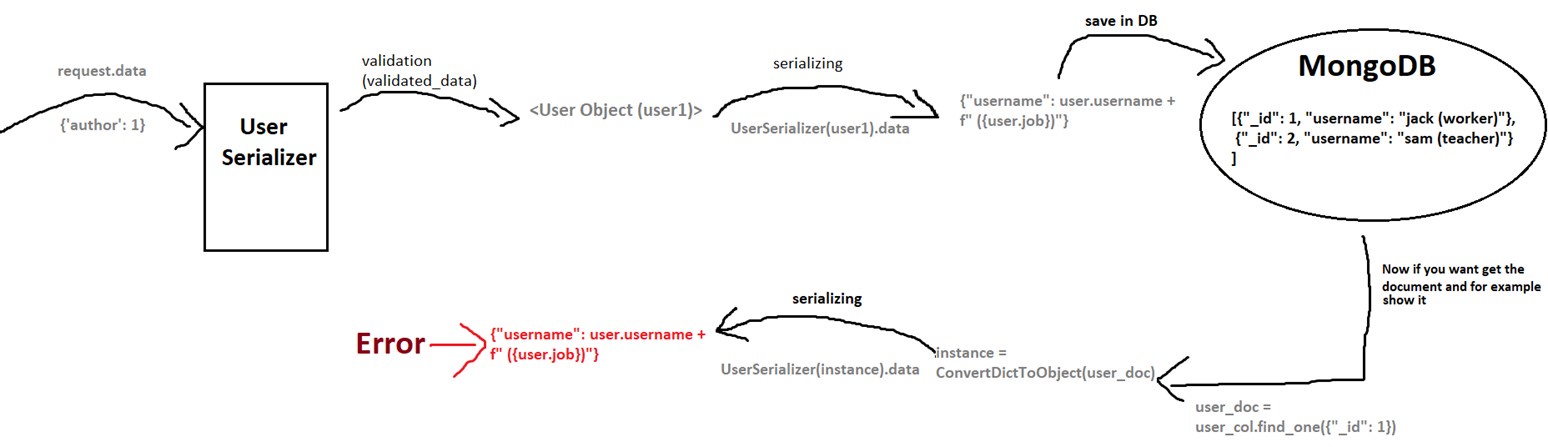
Read Write conflicts in a serializer
If you use MongoSerializer class in read/write operations, as is conventional in DRF, you may face serious conflicts.
suppose a UserSerializer, used to save user model in MongoDB and show it again:
Fields
TimestampField
Accept a python datatime/jdatetime object or timestamp and returns an integer timestamp.
arguments:
-
jalali: Set this to
Trueif you work with 'jalali' datetime. The default isFalseNote: timestamp of jalali or gregorian datetimes is same (timestamp is universal), so jalali argument here only uses in validation to returns jdatetime object instead of datetime. -
auto_now: Similar to 'auto_now' in django, sets a new timestamp in updating.
-
auto_now_add: Similar to 'auto_now_add' in django, sets a new timestamp only in creation.
DateTimeFieldMongo
DateTimeFieldMongo is subclass of DateTimeField from the Django Rest Framework.
Accepts a python datatime/jdatetime object and returns a datetime string.
arguments:
-
jalali: Set this to
Trueto return 'jalali' datetime. The default isFalse. -
auto_now: Similar to 'auto_now' in django, if
True, sets a new datetime in updating. -
auto_now_add: Similar to 'auto_now_add' in django, if
True, sets a new datetime only in creation.
Example:
from mongoserializer.fields import TimestampField, DateTimeFieldMongo
from datetime import datetime

class MyTime(serializers.Serializer):
    timestamp = TimestampField()
    datetime = DateTimeFieldMongo(jalali=True)

class TestInstance:
  timestamp = 1719208899
  datetime = datetime.now()  # or jdatetime.now(), doesn't difference
MyTimes({'timestamp': 1719208899, 'datetime': ''})

MyTimes(TestInstance).data
{'timestamp': 1719208899, 'datetime': '1403-04-04T09:34:43.031895'}

data = {'timestamp': 1719208899, 'datetime': '2024-06-24 09:17:46'}
serializer = MyTimes(data=data)
serializer.is_valid()
serializer.validated_data
{'timestamp': datetime.datetime(2024, 6, 24, 9, 31, 39), 'datetime': jdatetime.datetime(1403, 4, 4, 9, 17, 46)}


Download files
Download the file for your platform. If you're not sure which to choose, learn more about installing packages.
Source Distribution
Built Distribution
Filter files by name, interpreter, ABI, and platform.
If you're not sure about the file name format, learn more about wheel file names.
Copy a direct link to the current filters
File details
Details for the file mongoserializer-1.0.2.tar.gz.
File metadata
- Download URL: mongoserializer-1.0.2.tar.gz
- Upload date:
- Size: 20.2 kB
- Tags: Source
- Uploaded using Trusted Publishing? No
- Uploaded via: twine/6.1.0 CPython/3.13.2
File hashes
| Algorithm | Hash digest | |
|---|---|---|
| SHA256 |
dabc891bcd739463bbf1e712b3f92b3ee1cc458b072f61533bdd8d1156d35da8
|
|
| MD5 |
e046f23fcbc243340c19732ce3a0c5bc
|
|
| BLAKE2b-256 |
4ddc6b8b00efef33f4603a9e8f608a0c399e7446b6512fade5183b5a1705040b
|
File details
Details for the file mongoserializer-1.0.2-py3-none-any.whl.
File metadata
- Download URL: mongoserializer-1.0.2-py3-none-any.whl
- Upload date:
- Size: 16.6 kB
- Tags: Python 3
- Uploaded using Trusted Publishing? No
- Uploaded via: twine/6.1.0 CPython/3.13.2
File hashes
| Algorithm | Hash digest | |
|---|---|---|
| SHA256 |
20622d72cde659965b1a496d46a451d93f8f2e06173a7f89697160403c8e1fe3
|
|
| MD5 |
76309f7caa9045f4c6062f6a97b408b0
|
|
| BLAKE2b-256 |
9baf1115bfc2f9055c11ad31cebead0a0cff37b8e165f344a4a288f83bf837eb
|






