
MONitor Integrated QUick Editor — graphical monitor configurator for Hyprland and Sway with drag-and-drop and auto-profile daemon

Project description
Monique
MONitor Integrated QUick Editor
Graphical monitor configurator for Hyprland, Sway and Niri









Screenshots
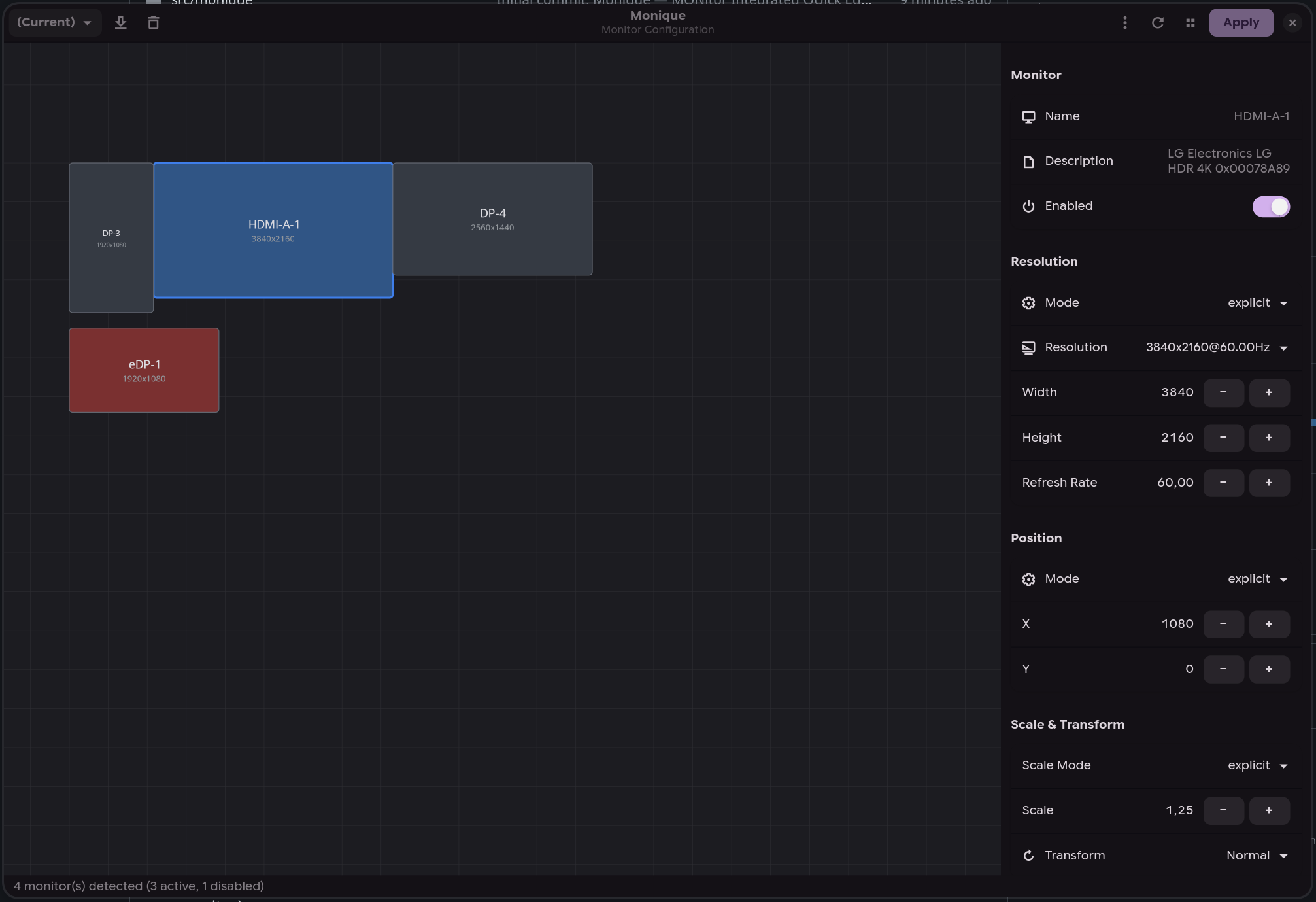
Layout editor |
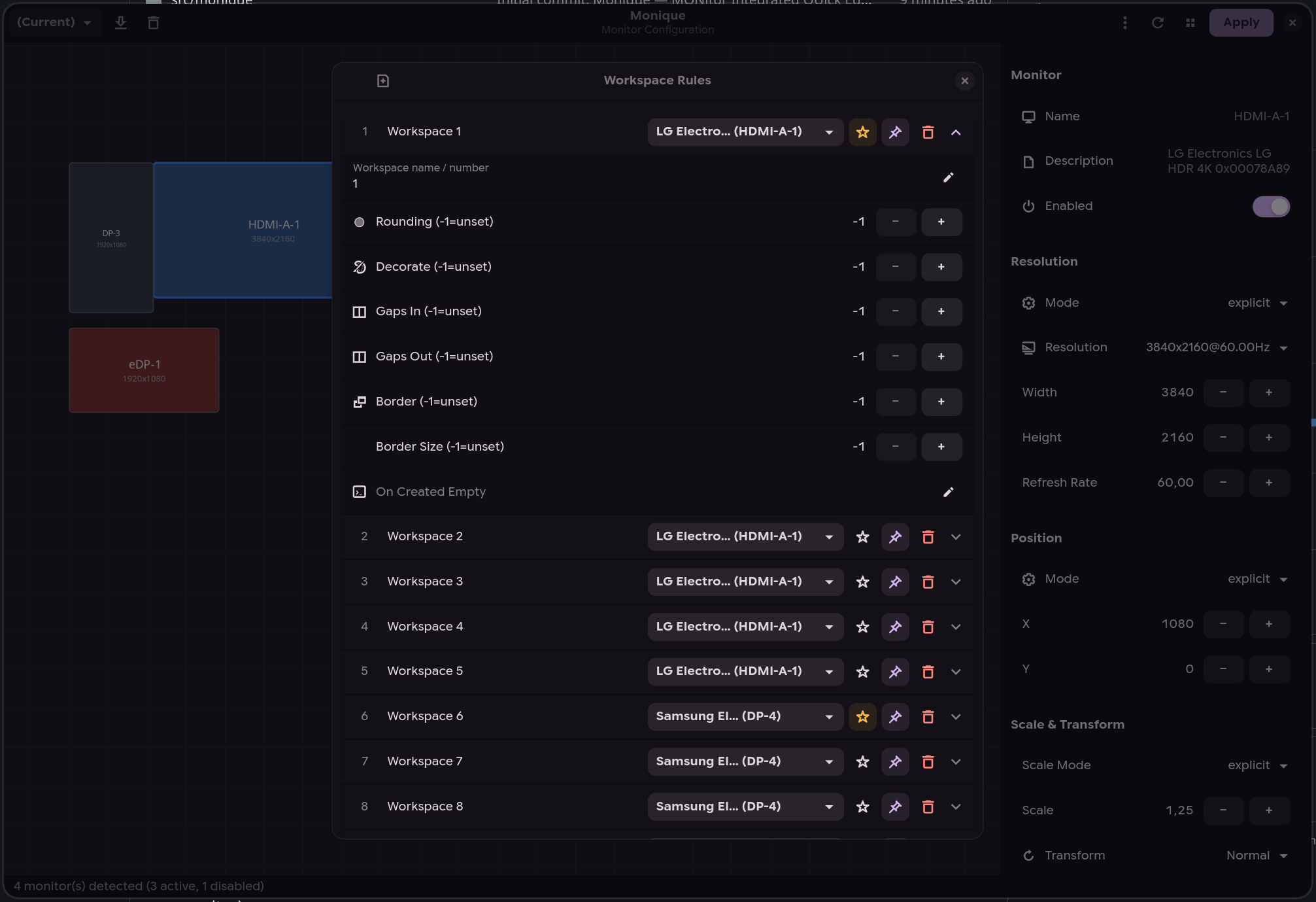
Workspace rules |
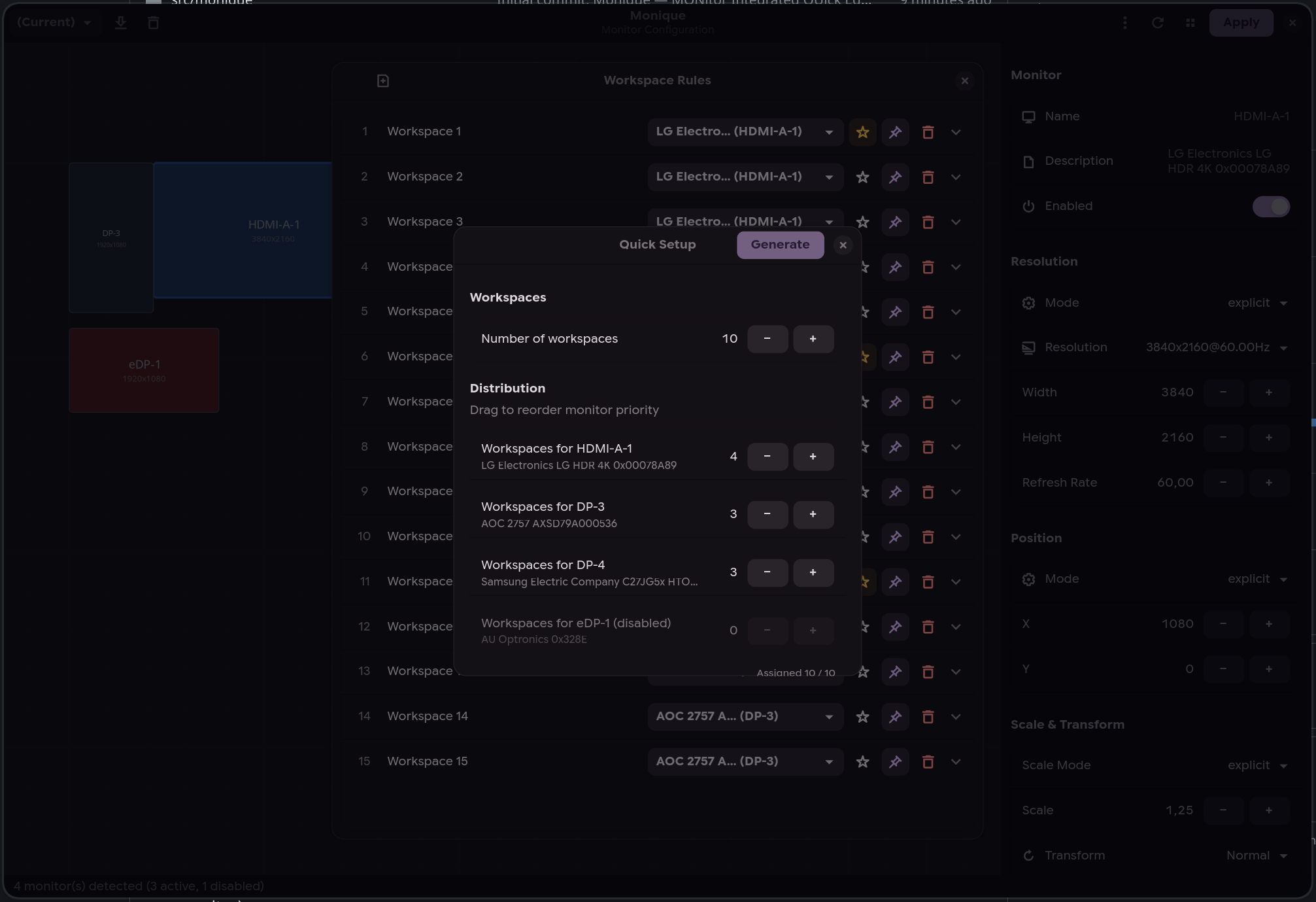
Quick setup |
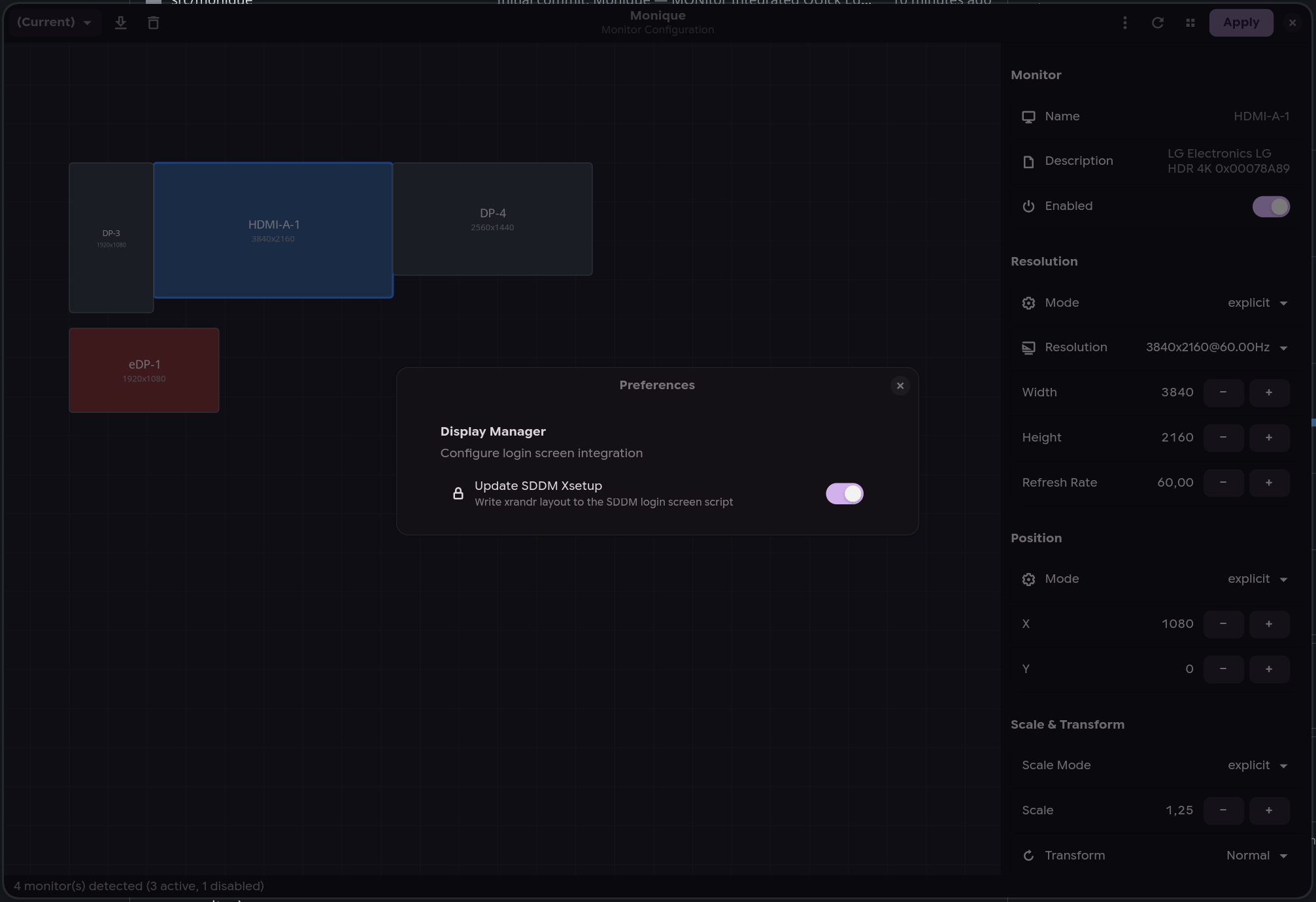
SDDM integration |
Features
- Drag-and-drop layout — arrange monitors visually on an interactive canvas
- Multi-backend — auto-detects Hyprland, Sway, or Niri from the environment
- Cross-write — save a profile in any compositor and automatically generate config files for the others (e.g. configure in Hyprland → get Sway and Niri configs for free)
- Profile system — save, load, and switch between monitor configurations
- Hotplug daemon (
moniqued) — automatically applies the best matching profile when monitors are connected or disconnected - Display manager integration — syncs your layout to the login screen for SDDM (xrandr) and greetd (sway), with polkit rule for passwordless writes
- Workspace rules — configure workspace-to-monitor assignments (Hyprland/Sway)
- Live preview — OSD overlay to identify monitors (double-click)
- Workspace migration — automatically moves workspaces to the primary monitor when their monitor is disabled or unplugged (reverted if you click "Revert")
- Clamshell mode — disable the internal laptop display when external monitors are connected (manual toggle in the toolbar or automatic via daemon preferences); the daemon also monitors the lid state via UPower D-Bus
- Confirm-or-revert — 10-second countdown after applying, auto-reverts if display is unusable
- CLI interface — list, query, and switch profiles from the terminal (
--list-profiles,--current-profile,--switch-profile), perfect for hotkey bindings - Custom config directory — write generated monitor config files to a custom path instead of the compositor default (via Preferences or
--config-dir) - Active profile tracking — the last applied profile is persisted across GUI, CLI, and daemon, queryable via
--current-profile
Installation
AUR (Arch Linux / CachyOS)
yay -S monique
Or manually:
git clone https://aur.archlinux.org/monique.git
cd monique
makepkg -si
NixOS / Nix
With flake (recommended) -- add it as an input and use the NixOS module:
# flake.nix
inputs.monique.url = "github:ToRvaLDz/monique";

# configuration.nix (via module)
{ inputs, ... }: {
  imports = [ inputs.monique.nixosModules.default ];
  programs.monique.enable = true;
}
Run without installing:
nix run github:ToRvaLDz/monique
Install to user profile:
nix profile install github:ToRvaLDz/monique
With overlay:
nixpkgs.overlays = [ inputs.monique.overlays.default ];
environment.systemPackages = [ pkgs.monique ];
Polkit note: the NixOS module automatically installs the polkit rule for passwordless SDDM/greetd writes. Disable with
programs.monique.enablePolkit = false.
PyPI
pip install monique
From source
git clone https://github.com/ToRvaLDz/monique.git
cd monique
pip install .
Runtime dependencies:
| Distro | Packages |
|---|---|
| Arch / CachyOS | python python-gobject gtk4 libadwaita |
| Fedora | python3 python3-gobject gtk4 libadwaita |
| openSUSE | python3 python3-gobject gtk4 libadwaita typelib-1_0-Adw-1 typelib-1_0-Gtk-4_0 |
| Ubuntu / Debian | python3 python3-gi gir1.2-gtk-4.0 gir1.2-adw-1 libadwaita-1-0 |
| NixOS | gestito automaticamente dal flake |
Optional: python-pyudev (hardware hotplug detection for Niri)
Usage
GUI
monique
Open the graphical editor to arrange monitors, set resolutions, scale, rotation, and manage profiles.
CLI
# List all saved profiles (JSON array)
monique --list-profiles

# Get the currently active profile
monique --current-profile

# Switch to a profile
monique --switch-profile "Office"

# Switch with a custom config output directory
monique --config-dir ~/my-hypr-config --switch-profile "Office"
Bind monique --switch-profile <name> to any compositor hotkey for quick profile switching.
Daemon
moniqued
Or enable the systemd user service:
systemctl --user enable --now moniqued
The daemon auto-detects the active compositor and listens for monitor hotplug events. When a monitor is connected or disconnected, it waits 500ms (debounce) then applies the best matching profile. On Niri, the daemon uses udev DRM events (via pyudev) for reliable hardware hotplug detection. Orphaned workspaces are automatically migrated to the primary monitor on Hyprland/Sway (configurable via Preferences > Migrate workspaces).
Clamshell mode
On laptops, the daemon can automatically disable the internal display when external monitors are connected. Enable it from the GUI: Menu > Preferences > Clamshell Mode.
The daemon also monitors the laptop lid state via UPower D-Bus: closing the lid disables the internal display, opening it re-enables it. On desktop PCs (no lid detected), clamshell mode simply disables any internal-type output (eDP, LVDS) whenever external monitors are present.
Note: if your system suspends on lid close, set
HandleLidSwitch=ignorein/etc/systemd/logind.confso the daemon can handle it instead.
Behavior per environment
| Environment | Detection | Events |
|---|---|---|
| Hyprland | $HYPRLAND_INSTANCE_SIGNATURE |
monitoradded / monitorremoved via socket2 |
| Sway | $SWAYSOCK |
output events via i3-ipc subscribe |
| Niri | $NIRI_SOCKET |
udev DRM subsystem (with pyudev), IPC fallback |
| Neither | Warning, retry every 5s | — |
Display manager integration
Monique can sync your monitor layout to the login screen for supported display managers.
| Display Manager | Method | Config path |
|---|---|---|
| SDDM | xrandr via Xsetup script |
/usr/share/sddm/scripts/Xsetup |
| greetd (sway) | sway output commands |
/etc/greetd/monique-monitors.conf |
A polkit rule is included to allow passwordless writes:
# Installed automatically by the PKGBUILD to:
# /usr/share/polkit-1/rules.d/60-com.github.monique.rules
Toggle from the GUI: Menu > Preferences > Update SDDM Xsetup or Update greetd config.
Configuration
All configuration is stored in ~/.config/monique/:
~/.config/monique/
├── profiles/
│   ├── Home.json
│   └── Office.json
└── settings.json
Monitor config files are written to the compositor's config directory:
- Hyprland:
~/.config/hypr/monitors.confand~/.config/hypr/monitors.lua - Sway:
~/.config/sway/monitors.conf - Niri:
~/.config/niri/monitors.kdl
For Hyprland's legacy hyprlang config, add source = ~/.config/hypr/monitors.conf to hyprland.conf.
For Hyprland 0.55+ Lua config, add require("monitors") to hyprland.lua.
To use a custom output directory, set it in Preferences → Config Output or pass --config-dir on the command line.
Project structure
src/monique/
├── app.py               # Application entry point
├── window.py            # Main GTK4/Adwaita window
├── canvas.py            # Monitor layout canvas
├── properties_panel.py  # Monitor properties sidebar
├── workspace_panel.py   # Workspace rules dialog
├── models.py            # MonitorConfig, Profile, WorkspaceRule
├── hyprland.py          # Hyprland IPC client
├── sway.py              # Sway IPC client (binary i3-ipc)
├── niri.py              # Niri IPC client (JSON socket)
├── daemon.py            # Hotplug daemon (moniqued)
├── profile_manager.py   # Profile save/load/match
└── utils.py             # Paths, file I/O, helpers
Contributors
Thanks to everyone who has contributed to Monique!

License
Release history Release notifications | RSS feed


Download files
Download the file for your platform. If you're not sure which to choose, learn more about installing packages.
Source Distribution
Built Distribution
Filter files by name, interpreter, ABI, and platform.
If you're not sure about the file name format, learn more about wheel file names.
Copy a direct link to the current filters
File details
Details for the file monique-0.6.7.tar.gz.
File metadata
- Download URL: monique-0.6.7.tar.gz
- Upload date:
- Size: 75.5 kB
- Tags: Source
- Uploaded using Trusted Publishing? Yes
- Uploaded via: twine/6.1.0 CPython/3.13.12
File hashes
| Algorithm | Hash digest | |
|---|---|---|
| SHA256 |
8008df8070bfac998b019884a1f9fb667ac2eae979b985dd9edcc963c2a3642f
|
|
| MD5 |
2cbe42fd91b8cf3a67574b8d75c91d7f
|
|
| BLAKE2b-256 |
5aa10f578b01bc72a39dfc036f0cf27901cfe17830c02a1418e28bcc0cc0d8f7
|
Provenance
The following attestation bundles were made for monique-0.6.7.tar.gz:
Publisher:
release.yml on ToRvaLDz/monique
-
Statement:
-
Statement type:
https://in-toto.io/Statement/v1 -
Predicate type:
https://docs.pypi.org/attestations/publish/v1 -
Subject name:
monique-0.6.7.tar.gz -
Subject digest:
8008df8070bfac998b019884a1f9fb667ac2eae979b985dd9edcc963c2a3642f - Sigstore transparency entry: 1788707783
- Sigstore integration time:
-
Permalink:
ToRvaLDz/monique@196a22320856482be7abbda76aacaecb259c8218 -
Branch / Tag:
refs/tags/v0.6.7 - Owner: https://github.com/ToRvaLDz
-
Access:
public
-
Token Issuer:
https://token.actions.githubusercontent.com -
Runner Environment:
github-hosted -
Publication workflow:
release.yml@196a22320856482be7abbda76aacaecb259c8218 -
Trigger Event:
push
-
Statement type:
File details
Details for the file monique-0.6.7-py3-none-any.whl.
File metadata
- Download URL: monique-0.6.7-py3-none-any.whl
- Upload date:
- Size: 77.1 kB
- Tags: Python 3
- Uploaded using Trusted Publishing? Yes
- Uploaded via: twine/6.1.0 CPython/3.13.12
File hashes
| Algorithm | Hash digest | |
|---|---|---|
| SHA256 |
dde41d76ee17234666a49e2e0655e0a9e60e3308de4ce24d757a948edcf484e0
|
|
| MD5 |
26b830f3acb6e0acd1ef4c90719f41e6
|
|
| BLAKE2b-256 |
ac1cbd289974fa4de127577bd467273f7ebce7475d86ff5495cccaec9046572a
|
Provenance
The following attestation bundles were made for monique-0.6.7-py3-none-any.whl:
Publisher:
release.yml on ToRvaLDz/monique
-
Statement:
-
Statement type:
https://in-toto.io/Statement/v1 -
Predicate type:
https://docs.pypi.org/attestations/publish/v1 -
Subject name:
monique-0.6.7-py3-none-any.whl -
Subject digest:
dde41d76ee17234666a49e2e0655e0a9e60e3308de4ce24d757a948edcf484e0 - Sigstore transparency entry: 1788707887
- Sigstore integration time:
-
Permalink:
ToRvaLDz/monique@196a22320856482be7abbda76aacaecb259c8218 -
Branch / Tag:
refs/tags/v0.6.7 - Owner: https://github.com/ToRvaLDz
-
Access:
public
-
Token Issuer:
https://token.actions.githubusercontent.com -
Runner Environment:
github-hosted -
Publication workflow:
release.yml@196a22320856482be7abbda76aacaecb259c8218 -
Trigger Event:
push
-
Statement type:






