
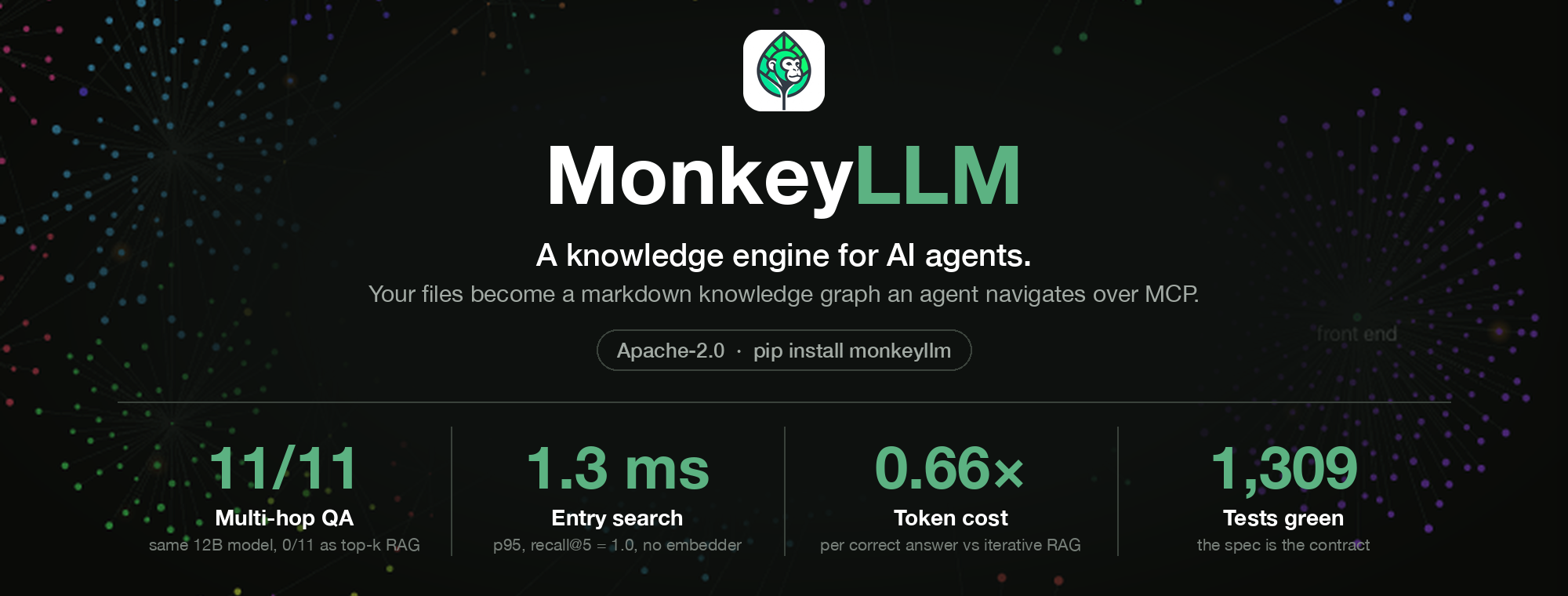
MonkeyLLM
A knowledge engine for AI agents: a new way to query your data. Your documents become a git-versioned markdown knowledge graph an agent navigates over MCP: curated summaries, typed edges, cited answers, SQL over your spreadsheets, nothing chunked into anonymous fragments.
This repository is not an application. Knowledge lives in a forest: a git-versioned tree of markdown nodes, each carrying a curated, scent-bearing passport. An AI does not get handed a retrieval dump. It navigates: drops in through search, follows typed edges, reads exactly the node it needs, and plants what it learns. Successful hunts deposit pheromone and mint shortcut links, so the corpus itself learns from use.
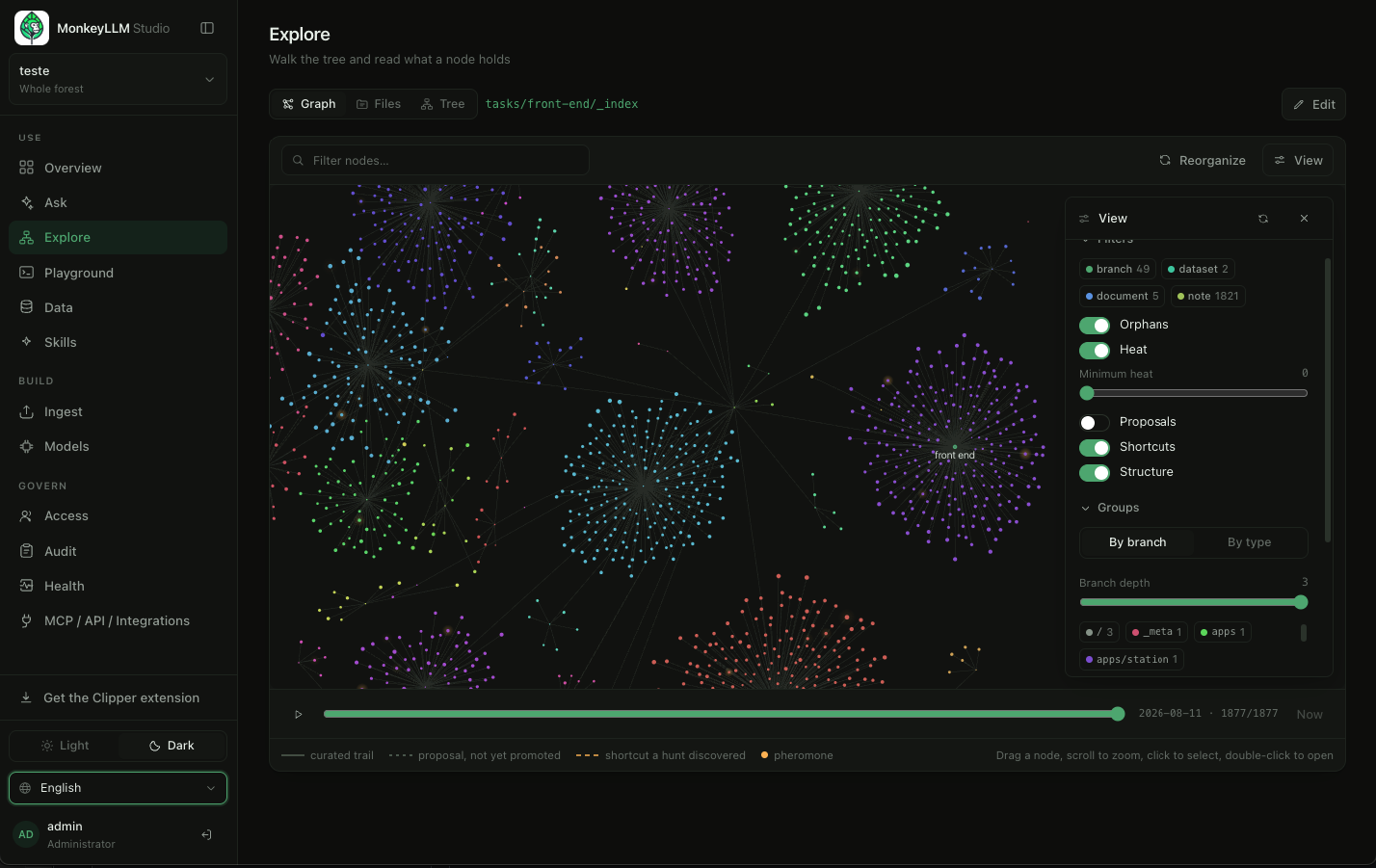
A real forest: 1,877 nodes across 49 branches. Every cluster is a branch, every dot a node; solid lines are curated trails, dashed ones are shortcuts a hunt discovered, and the glow is pheromone left by use.
The number that made us write it down: on a benchmark where every question needs ≥3 chained hops, the same 12B local model scores 0 / 11 as a classic top-k RAG reader and 11 / 11 (100%) as a forest navigator, at 0.66× the token cost per correct answer of an iterative-RAG baseline, on a single consumer GPU. If your first reaction is "I need to test whether this actually serves my case", good. Every number is reproducible from committed scripts, and the whole design is written down in the paper.
Everything else in this repository exists around that engine. The Studio console you see in the screenshots is not the product. It is the management layer: the window where people watch, govern and teach what the engine serves.
The spec is the truth: the latest docs/monkeyllm-spec-v*.md is
normative; code follows it, never the other way around.
The engine, inside your own code
The engine is a plain Python package (Apache-2.0) with no host, no server and no UI attached. Point it at a folder and you have a forest; operate it from your own Python:
pip install monkeyllm                           # the monkeyllm package + vine CLI
vine init --forest ./brain --title "My brain"   # an empty forest, git and all
Straight from source, without waiting for a release:
pip install "git+https://github.com/JimmyWesley/MonkeyLLM.git". Python
3.11+; the file converters of Part G are an extra
(pip install "monkeyllm[ingest]"), and contributors want the editable
install further down.
from monkeyllm import Vine
from monkeyllm.harvest import harvest

vine = Vine("./brain")
vine.plant({"id": "inbox/_index", "type": "branch", "parent": "_index",
            "title": "Inbox", "summary": "Loose notes before they find a branch."})
vine.plant({"id": "inbox/first-note", "type": "note", "parent": "inbox/_index",
            "title": "First note", "summary": "Where this brain begins.",
            "body": "Planted from my own code."})

vine.locate("where does this brain begin?")   # ranked entry points, BM25, zero embeddings
harvest(vine, "first note")                   # one-shot retrieval: evidence + snippets, zero LLM
Every primitive an agent uses rides that same object (locate, look,
move, pick, scan, sniff, query, plant, graft, tend), each
token-budgeted, each truncation explicit. The Gardener (vine adopt /
vine sync) mirrors an existing document tree into a forest, and the
Ranger (vine ranger) keeps it healthy over time.
And the same forest speaks MCP to any agent, straight from the CLI:
vine serve --forest ./brain                    # stdio MCP server
vine serve --forest ./brain --transport http   # or over HTTP
Claude Code, or any MCP-capable runtime, then holds the forest's tools: no host, no accounts, your machine, your ecosystem.
Anything you feed it becomes navigable
You do not prepare your files for the engine. You hand them over and the
Gardener converts, summarises and commits each one, through the same
pipeline whether it runs from the command line (vine adopt), from the
console, or from your browser:
| What you drop in | What it becomes |
|---|---|
.md, .markdown, .txt |
a note; the text is already the body |
.docx |
a document: headings and paragraphs as markdown |
.pdf |
a document, through a one-line converter hook, using any CLI extractor you trust (how) |
.csv |
a dataset: a real SQLite table, queried with read-only SQL |
.json |
a dataset when it is a flat table, otherwise a document holding the JSON |
.xlsx, .xls |
a dataset per sheet, with types inferred |
.db, .sqlite, .sqlite3 |
adopted whole: the database itself becomes the payload, with a generated query manual and sample rows |
.png, .jpg, .jpeg, .gif, .webp |
a media node; on a Station with a vision model bound, it also gets a written description that search can find |
.mp3, .wav, .m4a, .ogg, .flac |
a media node carrying its passport |
| anything else | listed as unsupported in the report, by name, so you can see exactly what did not land |
Tabular files stop being documents: a spreadsheet becomes a table an
agent queries in SQL, with a ## Query manual and sample rows written
into its passport, so a model knows which tables and columns exist before
it asks. What they mean is the one thing a machine cannot infer, so a
person writes it in a ## Notes section that travels with the dataset
everywhere it is read.
.docx, .xlsx and .xls need the optional ingest extra
(pip install -e ".[ingest]"). PDFs need a converter hook, because a good
extractor is a heavyweight (often copyleft) dependency this project will
not force on you: name the tool in _meta/gardener.yaml and it joins the
pipeline. Everything else in the table works out of the box.
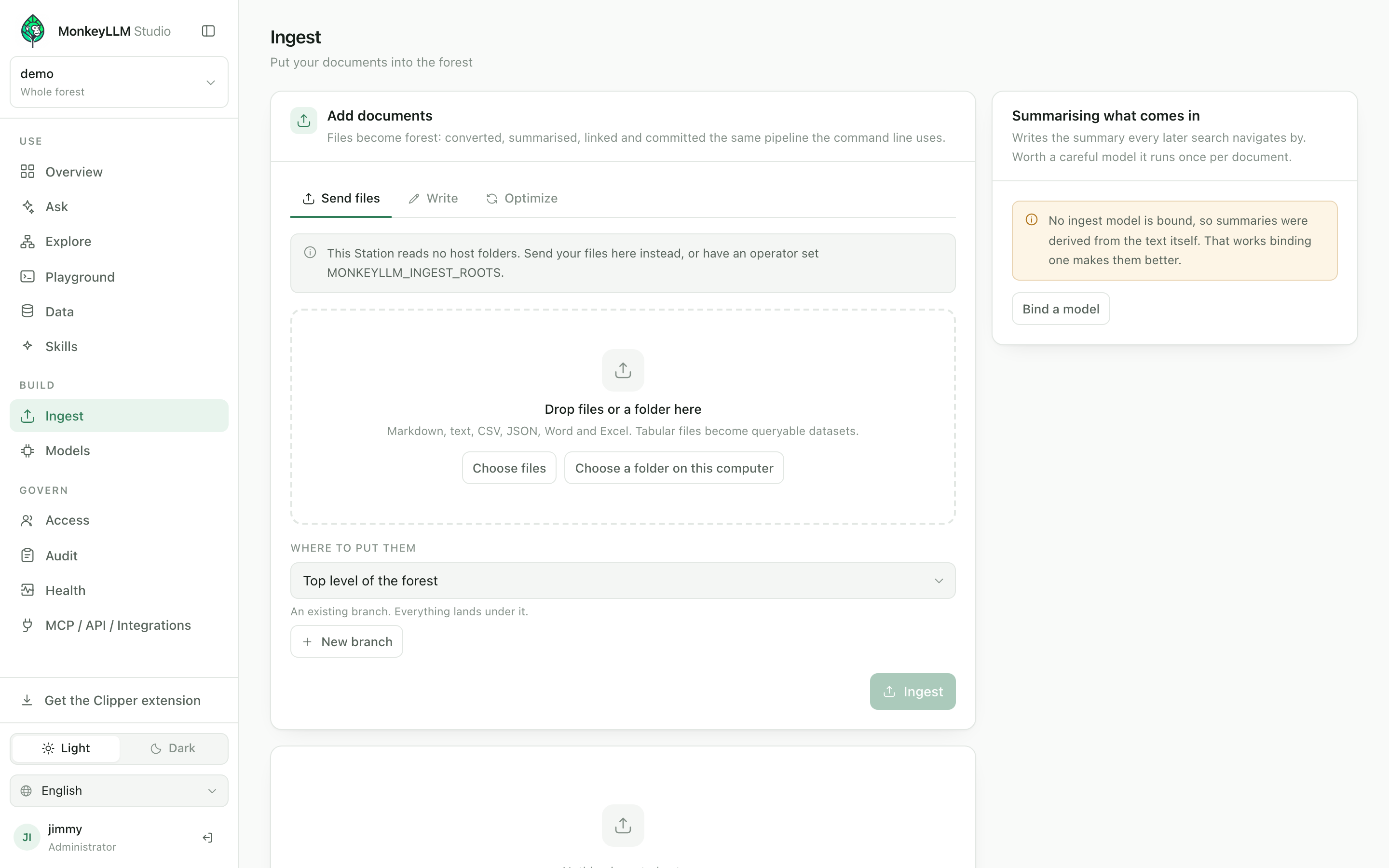
Drop files, mirror a whole folder the host can read, or write a document in place: each one arrives with a curated passport, and a batch is a job you can watch. Nothing is chunked and forgotten. Every document becomes a node with a name, a summary and edges.
And from the browser
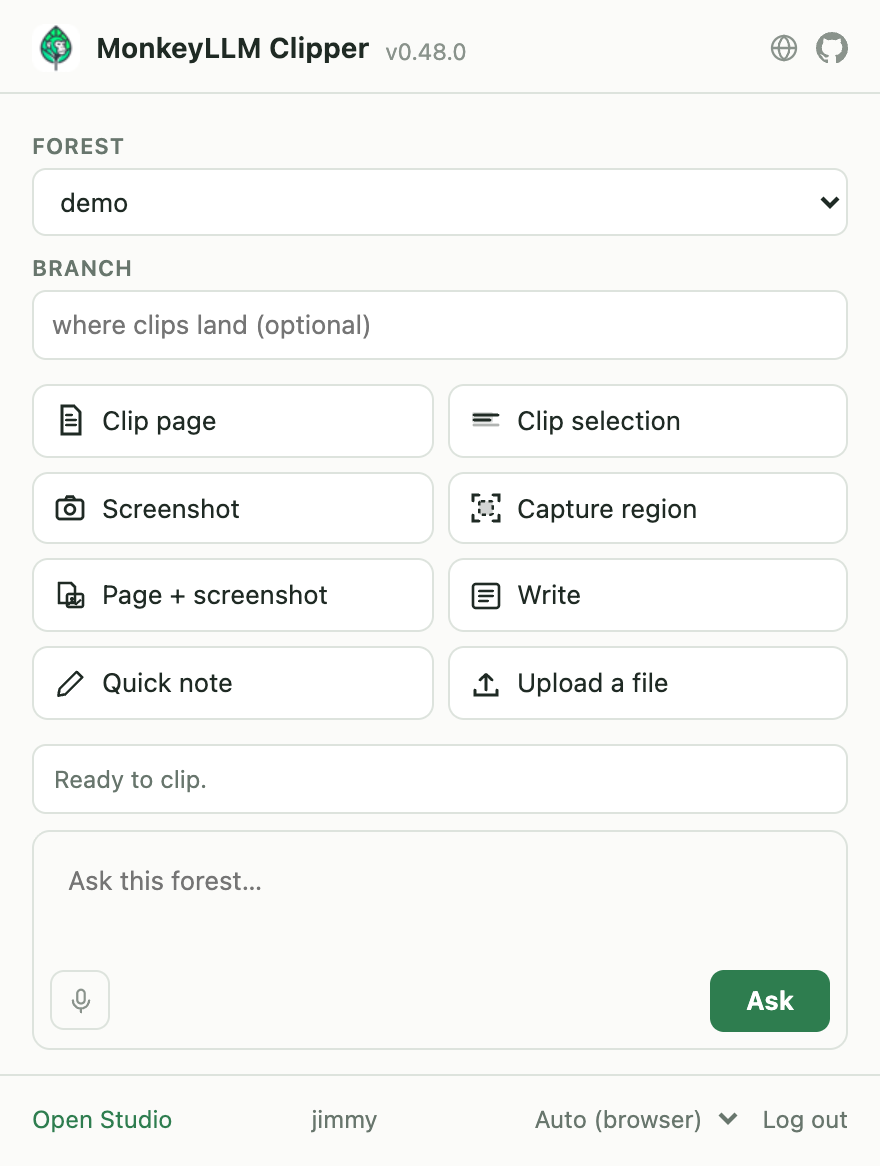
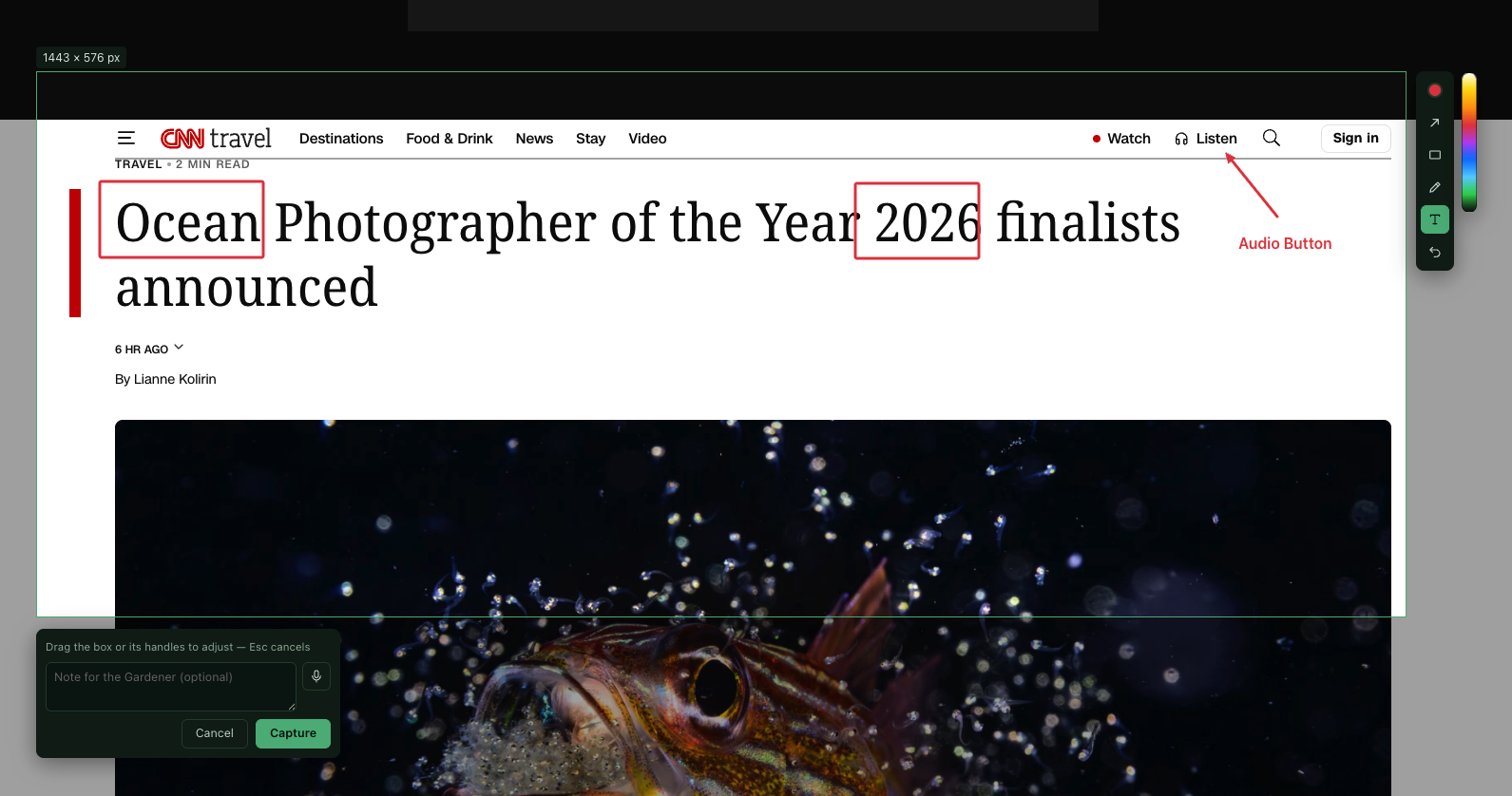
The Clipper (apps/clipper/) is a Chrome/Edge/Brave extension that
turns the page you are reading into a forest: the readable article or just
your selection as markdown, a screenshot or a dragged region as a media
node. Drag the region, adjust it by its handles, mark it up (arrow, box,
pen, text label) and leave a note for the Gardener, typed or dictated. The
clip lands with the page's address attached, so it can always be traced
back.
|
|
| One click: clip, capture, write, or ask the forest. | Drag a region, annotate it, leave a note, then capture. |
It holds a paired key of its own, never your password, and the Station
serves the build at /clipper.zip, offered on the console's own rail: a
key that can only narrow your access is self-service, so getting the
extension is too.
Quick start (development)
pip install -e ".[dev]" && pip install -e apps/station
python -m pytest -q
python forests/scripts/build_fixture.py
python -m monkeyllm.cli validate --forest forests/forest-fixture
The management layer (Station + Studio)
When a forest must be a shared, governed asset instead of a personal
directory, the Station (spec Part J) wraps the untouched engine with
identity, per-forest policy, audit and model bindings, serving REST under
/v1 and MCP under /mcp. It also serves the Studio, the web console:
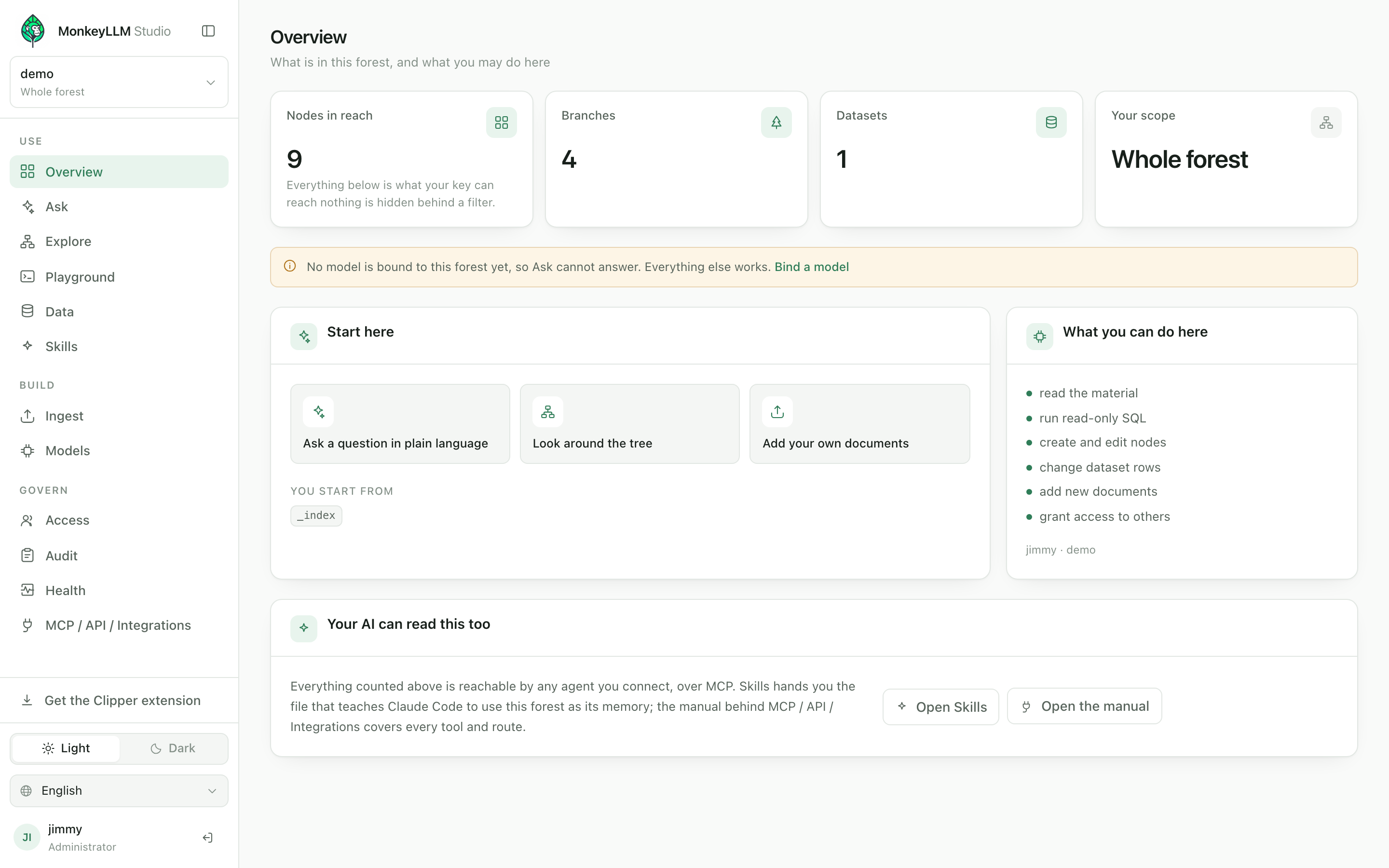
Ask questions that arrive with their sources, walk the tree as a living graph, query datasets in SQL, feed the forest from uploads and the browser Clipper, grant scoped access, and hand your own AI the skill that makes the forest its persistent memory. The console is where the engine's possibilities become visible, but whatever it shows, an API client holding the same key could fetch: there is no privileged path.
Documentation
The MonkeyLLM Handbook: install it, sign in for the first time, use and feed the forest, connect your own AI over MCP (including the Claude Code skill the Studio generates), and govern the deployment. English, Português and Español, with screenshots.
The paper
MonkeyLLM: Stigmergic Navigation of Knowledge Forests, replacing retrieval-augmented generation with agentic foraging by small language models. The forest, the scent contract, the ten budgeted primitives, the pheromone economy, and the Forest Principle (spend intelligence on the environment so you can spend less on the model), with every benchmark number reproducible from this repository.
Roadmap
The engine, the Station, the Studio and the Clipper are built and
measured; the phases below are what comes next. The full plan, with exit
criteria per phase, is docs/monkeyllm-roadmap.md;
the working backlog is tasks/.
| Next | What it means | Where it stands |
|---|---|---|
| Monkey Bench, officially | The full benchmark run published with its traces, against top-k and iterative RAG baselines | 3 of 4 exit criteria met; the fourth re-measured as tokens-per-correct (0.66×) |
| Convergence curve | Proving hops-to-answer drops as a forest is used: the pheromone economy paying off, and the paper's signature chart | measured once; the criterion is not met yet, and the findings (floor effect, pheromone cross-talk) are themselves results |
| The Troop | Parallel foragers with a judge: today an accuracy amplifier, not yet a speed one | 8/8 accuracy on both arms; the wall-clock criterion needs a deeper corpus |
| Entities and typed edges at ingest | The Gardener extracting people, places and relations, beyond today's summaries and related-to proposals |
designed (Part G), needs a spec bump |
| Station hardening | OIDC sign-in, per-principal quotas | the rest of Part J ships today |
| Publication | The paper deposited with a DOI (Zenodo / arXiv) | written; deposit pending |
| Phase 3: a faster core (conditional) | Rust for Catalog + Canopy behind the same contracts, only if telemetry proves the bottleneck | deliberately not started; the SLM dominates the cost today |
The rule the project holds itself to: no phase starts before the previous one passes its exit criteria, and no optimization happens without a measurement that justifies it. The benchmark is the judge, not intuition, which is why a criterion that did not pass is written down above instead of quietly dropped.
Layout
| Path | What lives there |
|---|---|
src/monkeyllm/ |
the engine: vine CLI, 10 primitives, harvest, Gardener (ingest), Ranger (maintenance), catalog, Canopy |
apps/station/ |
the deployable host: REST /v1, MCP /mcp, serves the Studio |
apps/studio/ |
the web console (React/Vite, built into the Station image) |
apps/clipper/ |
the browser extension: clip the page you are reading into a forest |
paper/ |
the paper: design, vocabulary, benchmarks, authorship |
forests/ |
generated forests (gitignored except forests/scripts/); rebuild, never edit |
bench/ |
Monkey Bench: chunker, RAG baselines, runner |
scripts/ |
infra + measurement (local models, bench, curation metrics) |
docs/ |
the spec, the handbook (docs/guide/) and design notes |
tasks/ |
backlog, one file per task |
Run the whole environment (Docker)
One container serves frontend and backend; data persists in named volumes:
cp .env.example .env   # fill in what you use
docker compose up --build -d
See deploy/README.md for the full walkthrough, including Dokploy and optional local llama.cpp inference.
License
Two licenses, split along the line the architecture already draws:
- Engine (
src/monkeyllm/, the spec, the benchmark, the tooling): Apache-2.0. The MCP contract is meant to spread. - Host (
apps/station/,apps/studio/,apps/clipper/): AGPL-3.0-only. Self-hosting is free and unrestricted; offering it as a managed service means opening your stack.
See LICENSING.md for the full map, the commercial option and the DCO requirement for contributions.
1 maintainer

Metadata
1 maintainer
Release files for monkeyllm 0.83.0
For a detailed explanation of source distributions (sdists) and built distributions (wheels), please see the package formats documentation.
Source distribution (sdist)
| File | Size | Uploaded | |
|---|---|---|---|
| monkeyllm-0.83.0.tar.gz | 586.8 kB | Details |
Built distribution (wheel)
| File | Interpreter | ABI | Platform | Reset |
|---|---|---|---|---|
| monkeyllm-0.83.0-py3-none-any.whl | Python 3 | none | any | Details |
Total release size: 839.3 kB
Release files / monkeyllm-0.83.0.tar.gz
| Download URL | monkeyllm-0.83.0.tar.gz |
|---|---|
| Size | 586.8 kB |
| Tags | Source |
|
SHA-256 checksum How to use checksums |
aa330d29addeb270380867cb409b09cf12b6ac49d53f5631568a603469f2589f
|
|
BLAKE2b-256 checksum How to use checksums |
8bd919a79263491049759416fa29f154e0f9f9af899b9d4826fa106a19bd36d0
|
| Upload date | |
|
Uploaded using Trusted Publishing? What is trusted publishing? |
Yes |
| Uploaded via |
twine/7.0.0 CPython/3.13.14
|
Provenance
Provenance describes where a file came from. On PyPI, provenance is shared via attestations, which provide a verifiable record of the build or publishing details. View details, limitations and caveats.


PyPI Publish Attestation
PyPI verified that this artifact, at this checksum, originated from the publisher listed below.
Signed by GitHub Actions, verified by PyPI on Sep 16, 2026.
Transparency logRelease files / monkeyllm-0.83.0-py3-none-any.whl
| Download URL | monkeyllm-0.83.0-py3-none-any.whl |
|---|---|
| Size | 252.5 kB |
| Tags | Python 3 |
|
SHA-256 checksum How to use checksums |
1439c9aedd9a3d9423299d8eec233a66167b034272fedd58983f86c7bc387906
|
|
BLAKE2b-256 checksum How to use checksums |
d88a780f0f27dd6f7041c88c1622c90f61b7e1b9049126ebb00990593d3df8a6
|
| Upload date | |
|
Uploaded using Trusted Publishing? What is trusted publishing? |
Yes |
| Uploaded via |
twine/7.0.0 CPython/3.13.14
|
Provenance
Provenance describes where a file came from. On PyPI, provenance is shared via attestations, which provide a verifiable record of the build or publishing details. View details, limitations and caveats.
PyPI Publish Attestation
PyPI verified that this artifact, at this checksum, originated from the publisher listed below.
Signed by GitHub Actions, verified by PyPI on Sep 16, 2026.
Transparency log













