
Mono: Embeddable Terminal Emulator
[!IMPORTANT] See PR #4 on new output parser under development
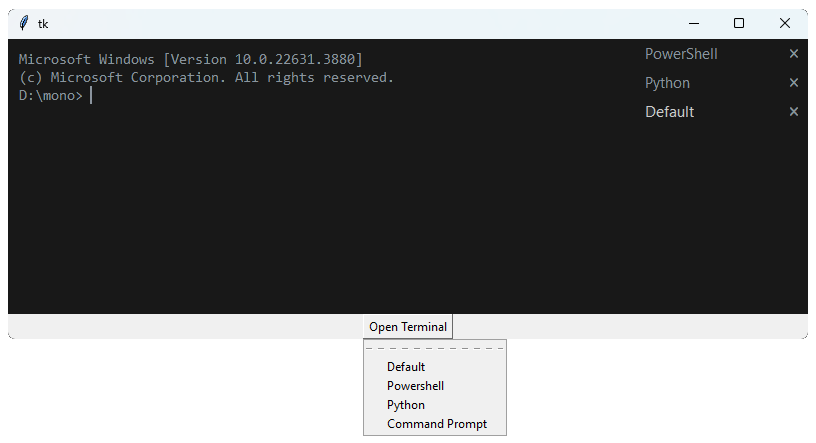
Mono is a terminal emulator that can be embedded in tkinter applications. See examples to see mono in action. The codebase was extracted from the Biscuit project and published as an embeddable widget library.
- Supports handling multiple instances of terminals of different shells running simultaneously.
- Comes as a standalone terminal widget & a tabbed widget as well, for handling different terminal instances.
- Custom terminals can be made; most shells available on the platform are detected by mono.
- Themes are fully customizable by the user.
import tkinter as tk

from mono import Terminals, get_available_shells, get_shell_from_name

root = tk.Tk()
root.geometry('800x300')

terminals = Terminals(root)
terminals.add_default_terminal()
terminals.pack(fill='both', expand=True)

# A menu for opening terminals
mbtn = tk.Menubutton(root, text="Open Terminal", relief=tk.RAISED)
menu = tk.Menu(mbtn)
for i in get_available_shells():
    menu.add_command(label=i, command=lambda i=i: terminals.open_shell(get_shell_from_name(i)))

mbtn.config(menu=menu)
mbtn.pack()
root.mainloop()
Terminals is a container for multiple terminals. It provides a simple interface for managing multiple terminals in a tabbed interface.
All the shells detected for the platform can be accessed with get_available_shells(). The get_shell_from_name() function returns a shell object from the name of the shell.
Custom Terminals
Following example demonstrates how to create a NodeJS standalone terminal with mono.
# NOTE: Due to the missing additional ANSI handling, NodeJS shell
# might not work as expected. The issue is being fixed, see pr #4

import tkinter as tk
from mono import Terminal

class NodeJS(Terminal):
    name = "NodeJS"
    shell = "node"

root = tk.Tk()
terminal = NodeJS(root)
terminal.start_service()
terminal.pack(fill='both', expand=True)

root.mainloop()
Custom Theming
Following example implements a custom light theme for mono terminals
import tkinter as tk
from mono import Terminals, Theme

class Light(Theme):
    bg = "#FFFFFF"
    fg = "#000000"
    abg = "#CCCCCC"
    afg = "#000000"
    border = "#DDDDDD"

    # further overriding the __init__ will give more control over specific widgets:
    #
    #    def __init__(self, master=None, **kwargs):
    #        super().__init__(master, **kwargs)
    #        self.tabs = (self.bg, 'red')


root = tk.Tk()
root.geometry("800x300")

terminals = Terminals(root, theme=Light())
terminals.pack(fill="both", expand=True)

terminals.open_python()             # open a python console
terminals.open_another_terminal()   # open another instance of active

root.mainloop()
Further...
- Shells can be run standalone or in a tabbed interface, see examples/standalone.
- Custom terminals can be made by subclassing the
Terminalclass, see examples/customshell. - Custom themes can be passed to the
Terminal,Terminalsclasses, see examples/customtheme. - High resolution text rendering can be enabled for windows, see examples/highres.
For more examples, see the examples directory.
1 maintainer

Metadata
1 maintainer
Release files for mono-term 0.36.0
For a detailed explanation of source distributions (sdists) and built distributions (wheels), please see the package formats documentation.
Source distribution (sdist)
| File | Size | Uploaded | |
|---|---|---|---|
| mono_term-0.36.0.tar.gz | 10.3 kB | Details |
Built distribution (wheel)
| File | Interpreter | ABI | Platform | Reset |
|---|---|---|---|---|
| mono_term-0.36.0-py3-none-any.whl | Python 3 | none | any | Details |
Total release size: 24.9 kB
Release files / mono_term-0.36.0.tar.gz
| Download URL | mono_term-0.36.0.tar.gz |
|---|---|
| Size | 10.3 kB |
| Tags | Source |
|
SHA-256 checksum How to use checksums |
4c135c42596c5080b141722d33ab2371569ea59c5a1d0571a0c1738243063e97
|
|
BLAKE2b-256 checksum How to use checksums |
ae1d6f16cae95d05c9673b14611835a7ae495de156fde9d04d0932a2beb2a626
|
| Upload date | |
|
Uploaded using Trusted Publishing? What is trusted publishing? |
No |
| Uploaded via |
poetry/1.7.1 CPython/3.12.1 Windows/11
|
Release files / mono_term-0.36.0-py3-none-any.whl
| Download URL | mono_term-0.36.0-py3-none-any.whl |
|---|---|
| Size | 14.6 kB |
| Tags | Python 3 |
|
SHA-256 checksum How to use checksums |
69834b427555533e11c39a3c67468a60b4d841eca6e9af5664584f2ecde6afe9
|
|
BLAKE2b-256 checksum How to use checksums |
425511e8ceb1c23b79a9462c696c6e6555b5396f284255aadf52cb5d504d1cde
|
| Upload date | |
|
Uploaded using Trusted Publishing? What is trusted publishing? |
No |
| Uploaded via |
poetry/1.7.1 CPython/3.12.1 Windows/11
|













