
Monochrome: Viewer for Monochromatic Video Data




Monochrome is a lightweight and fast viewer for scientific imaging and video data with a focus on monochromatic data and high-dynamic range data. It is designed to be fast and lightweight, i.e. it uses memory-mapping to load video files to avoid copying the data into RAM.
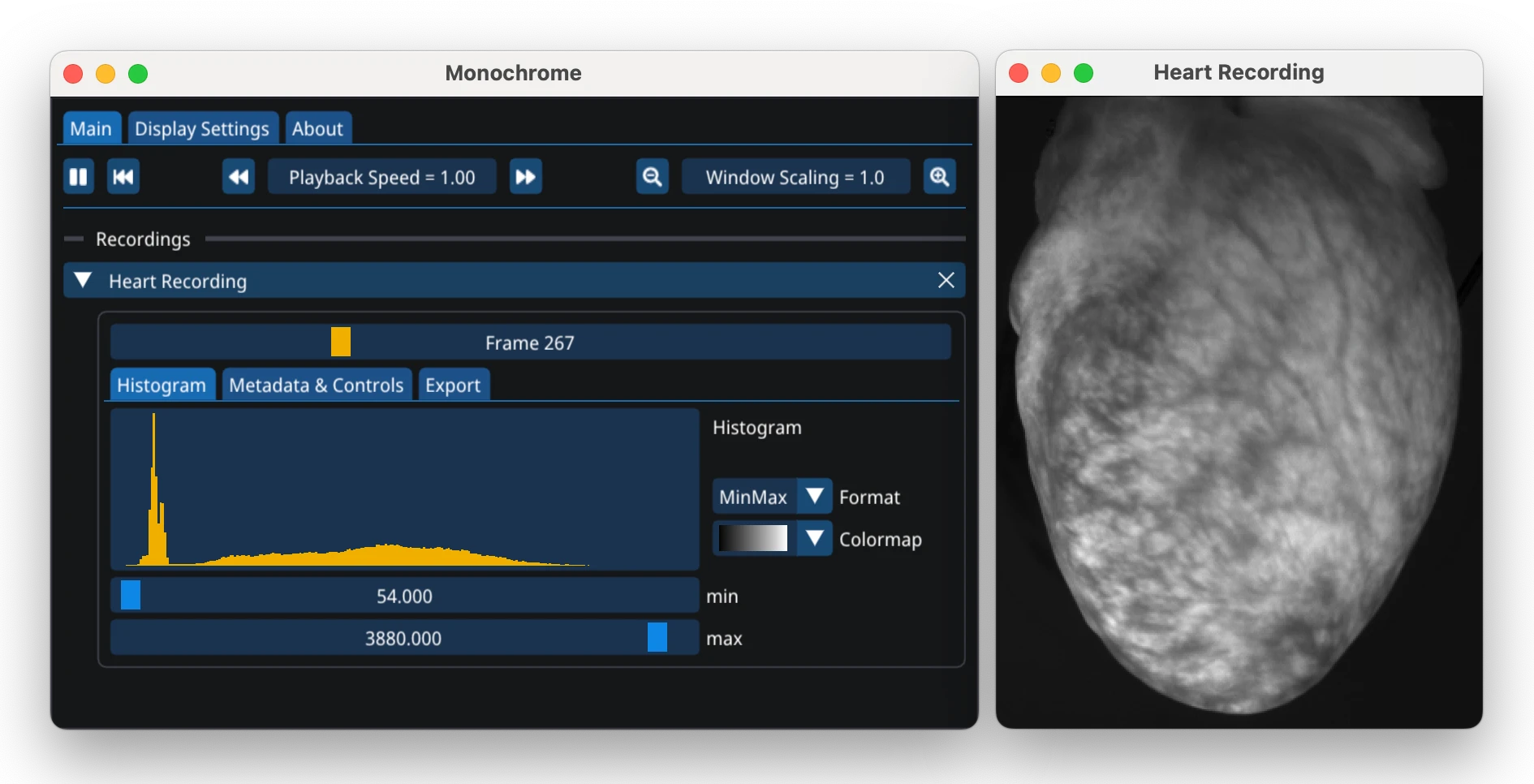
It is designed for viewing high-speed monochromatic fluorescence video data from scientific cameras and meet our specific needs for cardiac optical mapping data (together with optimap):
- Support for high-dynamic range (uint16, 32-bit float) data with sliders to adjust intensity range
- Playback of multiple videos in sync
- High-speed playback with precise frame-rate control
- Viewing of optical traces (average intensity in a region of interest over time)
- Rendering of layers on top of videos with transparency
- Rendering of point positions over time (e.g. for tracking or optical flow visualization)
- Exporting videos as a sequence of PNG images or MP4 videos with control over frame rate and frame skipping
- Cross-platform (Linux, Windows, MacOS)
It is designed to be fast and lightweight, i.e. it uses memory-mapping to load video files to avoid copying the data into RAM.
Installation
There are two ways to install Monochrome: as a standalone application and/or with its Python interface through pip.
In the standalone application, supported video files can be loaded by drag & drop them into the window or by associating the file extension with Monochrome to open them with a double-click. The Python interface allows to load and play videos from Python scripts and Jupyter notebooks.
Standalone Application
Download the relevant executable (Windows, macOS, or Linux) from the latest release page. See the installation instructions for details.
Python Library
The Python library includes all necessary files and does not require the installation of the standalone Monochrome application. Open a terminal window and run the following command:
python -m pip install monochrome
See the Python installation guide for further details. To start the viewer in standalone mode, run:
python -m monochrome
See the tutorial for an introduction to the Python library, here is a brief overview:
import monochrome as mc
import numpy as np

# Create some video with shape (time, height, width) as a numpy array
video = np.random.rand(500, 256, 256)

# Display the video, see the tutorial for more details and options.
# Monochrome should automatically start and show the video in a loop.
mc.show_video(video, name="First Video", cmap='viridis', vmin=0, vmax=1)

# Play second video in sync with the first (note that the videos should have the same length)
video2 = (np.random.rand(500, 256, 256) * 65535).astype(dtype=np.uint16)
mc.show_video(video2, name="Second Video", comment="This is a uint16 video", bitrange="uint16")
# `bitrange` argument is optional, Monochrome will auto-detect the data type

# Layers can be added on top of video
overlay = np.random.rand(500, 256, 256)
overlay[:, 64:192, :] = np.nan # NaN values will be transparent pixels, see tutorial
mc.show_layer(overlay, parent="Second Video", cmap='PRGn', opacity='centered')

# List of functions:
# mc.show() is a shortcut for mc.show_video()/show_layer()/show_image()/show_file(),
#           it will try to auto-detect the input type and call the appropriate function.
# mc.show_video() to show videos
# mc.show_image() to show single images
# mc.show_layer() to show layers on top of videos/images
# mc.show_points() to visualize point positions over time over videos
# mc.show_flow() to visualize optical flow fields over time
# mc.show_file() to load videos from file in Monochrome
# mc.set_playback_speed() to set the playback speed for all videos
# mc.close_video() to close a video/layer/image
# mc.close_all_videos() to close all currently open videos
# mc.export_video() export a window (video+layers+...) as a MP4 video
# mc.launch() to start Monochrome from Python
# mc.quit() to close Monochrome
Supported File Formats
Monochrome supports a wide range of file formats through both native handlers and a plugin system.
Native File Handlers
.tif,.tiff- TIFF image files (single or multi-page)- Directory of TIFF files - Loads a directory containing TIFF images as a single video
.npy- NumPy array with shape (time, height, width). The data type can be float (np.float32, np.float64), integer (uint8, uint16, etc.), or boolean..dat- Raw binary file with shape (time, height, width) and data type float32 or MultiRecorder file format (used in the cardiac optical mapping community)
Plugin-Based File Handlers
Monochrome uses a plugin system to support additional file formats:
- Image Formats:
.png,.jpg,.jpeg,.webp,.bmp,.pgm - TIFF Variants:
.tf8,.ptif,.ptiff,.lsm(ZEISS LSM),.btf,.bif(Roche Digital Pathology),.gel,.ndpi(Hamamatsu Slide Scanner),.stk,.qptiff(Perkin Elmer Vectra) - Medical Imaging:
.dcm,.dicom,.gdcm,.gipl,.hdf5,.hdr,.ipl,.img,.img.nz,.mgh,.mha,.mhd,.mnc,.mnc2,.nhdr,.nia,.nii,.nii.gz,.nrrd,.vtk - Video Formats:
.mp4,.avi,.webm,.mov,.mkv,.gif,.wmv,.m4v - MATLAB:
.mat - MiCAM Formats:
.gsd,.gsh,.rsh,.rsm,.rsd(MiCAM camera formats)
Drag & drop files into the window or associate the file extension with Monochrome to open them with a double-click. Required plugin dependencies will be downloaded automatically when opening files that need them.
Usage & Key Bindings
Adjust settings for each video in the main control window. To view optical traces (average intensity in a region of interest over time), click in a video. Click and drag to move the region of interest. Right-click to remove the region of interest.
Keyboard shortcuts:
| Keybinding | Action |
|---|---|
Ctrl + q |
Quit Monochrome |
Esc or q |
Close focused recording |
Ctrl + o |
Open media file |
Ctrl + Shift + o |
Open png/tiff/dcm file folder |
Space |
Play/Pause |
Up |
Increase playback speed (frame skip) |
Down |
Decrease playback speed (frame skip) |
0 or r |
Reset playback to beginning |
Left |
Skip to next frame |
Right |
Skip to previous frame |
Shift + Left |
10x previous frame |
Shift + Right |
10x next frame |
Ctrl + Left |
Previous frame in focused recording only |
Ctrl + Right |
Next frame in focused recording only |
Ctrl + Left + Shift |
10x previous frame in focused recording only |
Ctrl + Right + Shift |
10x next frame in focused recording only |
p |
Save screenshot of focused recording |
s |
Sync playback of all recordings |
Additional Resources
License
Monochrome is licensed under the MIT License.
1 maintainer

Metadata
1 maintainer
Release files for monochrome 2026.2.16
For a detailed explanation of source distributions (sdists) and built distributions (wheels), please see the package formats documentation.
Source distribution (sdist)
| File | Size | Uploaded | |
|---|---|---|---|
| monochrome-2026.2.16.tar.gz | 10.6 MB | Details |
Built distributions (wheels)
| File | Reset | |||
|---|---|---|---|---|
| monochrome-2026.2.16-py3-none-win_amd64.whl | Python 3 | none | Windows x86-64 | Details |
| monochrome-2026.2.16-py3-none-manylinux_2_27_x86_64.manylinux_2_28_x86_64.whl | Python 3 | none | Linux glibc 2.27+ x86-64, Linux glibc 2.28+ x86-64 | Details |
| monochrome-2026.2.16-py3-none-macosx_11_0_arm64.whl | Python 3 | none | macOS 11.0+ ARM64 | Details |
| monochrome-2026.2.16-py3-none-macosx_10_9_x86_64.whl | Python 3 | none | macOS 10.9+ x86-64 | Details |
Total release size: 23.2 MB
Release files / monochrome-2026.2.16.tar.gz
| Download URL | monochrome-2026.2.16.tar.gz |
|---|---|
| Size | 10.6 MB |
| Tags | Source |
|
SHA-256 checksum How to use checksums |
2454bf1a88913e4f3b1351ea77ab5f2649e64dcbe1ab4aee493af5361f20a42f
|
|
BLAKE2b-256 checksum How to use checksums |
8561184a62f904b4b76760c6ac1cceb6e6c88e8ce61ce44379baeb88f1fadc4b
|
| Upload date | |
|
Uploaded using Trusted Publishing? What is trusted publishing? |
Yes |
| Uploaded via |
twine/6.1.0 CPython/3.13.7
|
Provenance
Provenance describes where a file came from. On PyPI, provenance is shared via attestations, which provide a verifiable record of the build or publishing details. View details, limitations and caveats.


PyPI Publish Attestation
PyPI verified that this artifact, at this checksum, originated from the publisher listed below.
Signed by GitHub Actions, verified by PyPI on Feb 17, 2026.
Transparency logRelease files / monochrome-2026.2.16-py3-none-win_amd64.whl
| Download URL | monochrome-2026.2.16-py3-none-win_amd64.whl |
|---|---|
| Size | 2.5 MB |
| Tags | Python 3 Windows x86-64 |
|
SHA-256 checksum How to use checksums |
0d0e8612376dcb36c916f66ba0076fc472f88b47c40d09199df3fcbd947e736f
|
|
BLAKE2b-256 checksum How to use checksums |
01f64f878f259bed42c3177f08bcbad2c50beea5d12af35a6f282a1578e81375
|
| Upload date | |
|
Uploaded using Trusted Publishing? What is trusted publishing? |
Yes |
| Uploaded via |
twine/6.1.0 CPython/3.13.7
|
Provenance
Provenance describes where a file came from. On PyPI, provenance is shared via attestations, which provide a verifiable record of the build or publishing details. View details, limitations and caveats.
PyPI Publish Attestation
PyPI verified that this artifact, at this checksum, originated from the publisher listed below.
Signed by GitHub Actions, verified by PyPI on Feb 17, 2026.
Transparency logRelease files / monochrome-2026.2.16-py3-none-manylinux_2_27_x86_64.manylinux_2_28_x86_64.whl
| Download URL | monochrome-2026.2.16-py3-none-manylinux_2_27_x86_64.manylinux_2_28_x86_64.whl |
|---|---|
| Size | 3.7 MB |
| Tags | Linux glibc 2.27+ x86-64 Linux glibc 2.28+ x86-64 Python 3 |
|
SHA-256 checksum How to use checksums |
be4bd7c60f6b8e383ae704a83d32d4f731b5b61c2c1f8128dee78d2579880991
|
|
BLAKE2b-256 checksum How to use checksums |
c4f5bb4e0bccf2ded0830e8d143b6860cc067a9a646e32a2ba80f34fecabdcb2
|
| Upload date | |
|
Uploaded using Trusted Publishing? What is trusted publishing? |
Yes |
| Uploaded via |
twine/6.1.0 CPython/3.13.7
|
Provenance
Provenance describes where a file came from. On PyPI, provenance is shared via attestations, which provide a verifiable record of the build or publishing details. View details, limitations and caveats.
PyPI Publish Attestation
PyPI verified that this artifact, at this checksum, originated from the publisher listed below.
Signed by GitHub Actions, verified by PyPI on Feb 17, 2026.
Transparency logRelease files / monochrome-2026.2.16-py3-none-macosx_11_0_arm64.whl
| Download URL | monochrome-2026.2.16-py3-none-macosx_11_0_arm64.whl |
|---|---|
| Size | 3.0 MB |
| Tags | Python 3 macOS 11.0+ ARM64 |
|
SHA-256 checksum How to use checksums |
5f22c7f087bc190e40e64fc2985a8f20f68461c00ebd4f2fd15c827c391c4451
|
|
BLAKE2b-256 checksum How to use checksums |
5c5ce978b8b80226e45df67ddbe5bc29c2ed671cde81f2ede4fc02d9a8c034f2
|
| Upload date | |
|
Uploaded using Trusted Publishing? What is trusted publishing? |
Yes |
| Uploaded via |
twine/6.1.0 CPython/3.13.7
|
Provenance
Provenance describes where a file came from. On PyPI, provenance is shared via attestations, which provide a verifiable record of the build or publishing details. View details, limitations and caveats.
PyPI Publish Attestation
PyPI verified that this artifact, at this checksum, originated from the publisher listed below.
Signed by GitHub Actions, verified by PyPI on Feb 17, 2026.
Transparency logRelease files / monochrome-2026.2.16-py3-none-macosx_10_9_x86_64.whl
| Download URL | monochrome-2026.2.16-py3-none-macosx_10_9_x86_64.whl |
|---|---|
| Size | 3.3 MB |
| Tags | Python 3 macOS 10.9+ x86-64 |
|
SHA-256 checksum How to use checksums |
a63f1e258307c402926006a261ca827871621d7498834858f82069e595596578
|
|
BLAKE2b-256 checksum How to use checksums |
8ff9d64f440af4bafaf6b963b6c880ef636054670f57f7bda1ef9d37414eea82
|
| Upload date | |
|
Uploaded using Trusted Publishing? What is trusted publishing? |
Yes |
| Uploaded via |
twine/6.1.0 CPython/3.13.7
|
Provenance
Provenance describes where a file came from. On PyPI, provenance is shared via attestations, which provide a verifiable record of the build or publishing details. View details, limitations and caveats.
PyPI Publish Attestation
PyPI verified that this artifact, at this checksum, originated from the publisher listed below.
Signed by GitHub Actions, verified by PyPI on Feb 17, 2026.
Transparency log













