





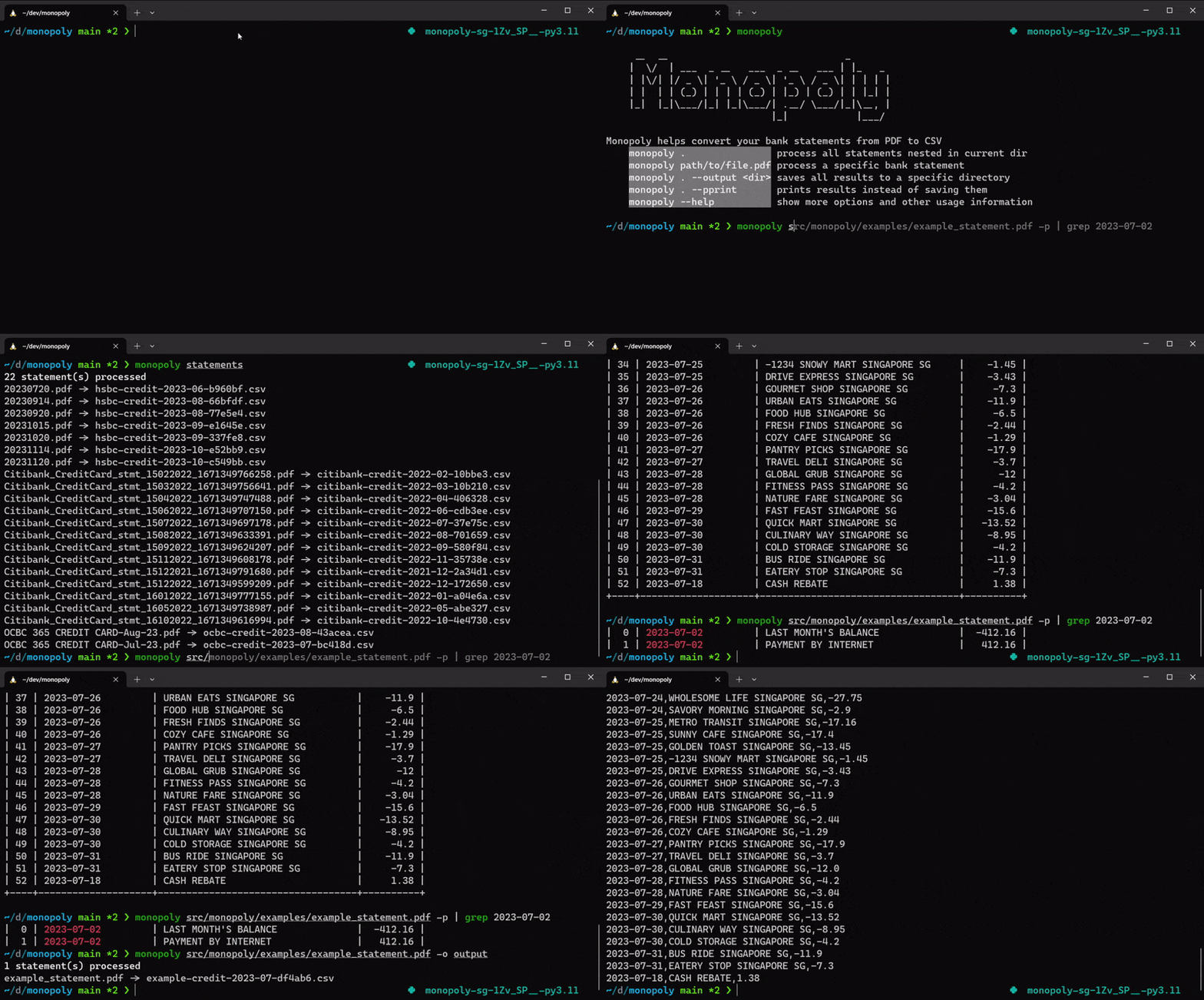
Monopoly is a Python library & CLI that converts bank statement PDFs to CSV.
Supported banks:
| Bank | Credit Statement | Debit Statement |
|---|---|---|
| Bank of America | ✅ | ✅ |
| Bank of Montreal (BMO) | ✅ | ✅ |
| Canadian Imperial Bank of Commerce (CIBC) | ✅ | ✅ |
| Canadian Tire Bank | ✅ | ❌ |
| Capital One Canada | ✅ | ❌ |
| Chase | ✅ | ❌ |
| Citibank | ✅ | ❌ |
| DBS/POSB | ✅ | ✅ |
| HSBC | ✅ | ❌ |
| Maybank | ✅ | ✅ |
| OCBC | ✅ | ✅ |
| Royal Bank of Canada (RBC) | ✅ | ✅ |
| Schwab Bank | N/A | ✅ |
| Scotiabank | ✅ | ✅ |
| Standard Chartered | ✅ | ❌ |
| TD Canada Trust | ✅ | ✅ |
| Trust | ✅ | ❌ |
| UOB | ✅ | ✅ |
| US Bank | ✅ | ❌ |
| Zürcher Kantonalbank | ❌ | ✅ |
Install
Monopoly is a pip-installable Python package on PyPI under the name monopoly-core.
Since Monopoly uses pdftotext, you'll need to install additional dependencies:
apt-get install build-essential libpoppler-cpp-dev pkg-config ocrmypdf
or
brew install gcc@11 pkg-config poppler ocrmypdf
Then install with pipx:
pipx install monopoly-core
For additional OCR support:
pipx install 'monopoly-core[ocr]'
Usage
Monopoly runs in your terminal, allowing you to extract, transform and write bank statements to a CSV file.
To list commands and options:
monopoly --help
You can run it on a single statement
monopoly src/monopoly/examples/example_statement.pdf
or multiple statements
monopoly ./statements
To keep the output filename the same as the input (with a .csv extension), pass:
monopoly path/to/file.pdf --output ./out --preserve-filename
By default Monopoly writes a 4-column CSV. Pass --format json for a richer,
versioned schema (schema_version, statement metadata, payment summary, and a
stable per-transaction id):
monopoly path/to/file.pdf --output ./out --format json
Each transaction also carries currency (the statement's settlement currency),
posting_date, a normalized direction ("credit"/"debit"), and a nullable
account slot. Per-transaction FX/original-currency and account last-4 extraction
are a planned follow-up (currently null).
If you need to run monopoly on a password protected file, ensure that passwords are set in the .env file:
cp .env.template .env
PDF_PASSWORDS=["password1","password2"]
Monopoly can also be run as a Python library:
python3 src/monopoly/examples/single_statement.py
Features
- Parses PDFs using predefined configuration classes per bank.
- Handles locked PDFs with credentials passed via environment variables.
- Supports adding OCR for image-based bank statements.
- Provides a generic parser that can be used without any predefined configuration (caveat emptor).
- Includes a safety check (enabled by default) that validates totals for debit or credit statements.
Development
Want to add a bank but can't share a real statement? See
CONTRIBUTING.md for the redacted text-fixture path
(monopoly-fixture dump / build).
Clone the repo
git clone https://github.com/benjamin-awd/monopoly.git
Install dependencies using Homebrew
brew install make
make setup
brew bundle
1 maintainer

Metadata
1 maintainer
Release files for monopoly-core 0.23.1
For a detailed explanation of source distributions (sdists) and built distributions (wheels), please see the package formats documentation.
Source distribution (sdist)
| File | Size | Uploaded | |
|---|---|---|---|
| monopoly_core-0.23.1.tar.gz | 344.1 kB | Details |
Built distribution (wheel)
| File | Interpreter | ABI | Platform | Reset |
|---|---|---|---|---|
| monopoly_core-0.23.1-py3-none-any.whl | Python 3 | none | any | Details |
Total release size: 640.3 kB
Release files / monopoly_core-0.23.1.tar.gz
| Download URL | monopoly_core-0.23.1.tar.gz |
|---|---|
| Size | 344.1 kB |
| Tags | Source |
|
SHA-256 checksum How to use checksums |
257031537b9ca8053c1404e191ff1c472489428fc1e754cb768481797e9df76c
|
|
BLAKE2b-256 checksum How to use checksums |
3690626ea31efed7e577ee19765d1f9fccf3d5688b668dcaf2d9fe57b7ba9eaa
|
| Upload date | |
|
Uploaded using Trusted Publishing? What is trusted publishing? |
Yes |
| Uploaded via |
uv/0.12.10 {"installer":{"name":"uv","version":"0.12.10","subcommand":["publish"]},"python":null,"implementation":{"name":null,"version":null},"distro":{"name":"Ubuntu","version":"24.04","id":"noble","libc":null},"system":{"name":null,"release":null},"cpu":null,"openssl_version":null,"setuptools_version":null,"rustc_version":null,"ci":true}
|
Release files / monopoly_core-0.23.1-py3-none-any.whl
| Download URL | monopoly_core-0.23.1-py3-none-any.whl |
|---|---|
| Size | 296.1 kB |
| Tags | Python 3 |
|
SHA-256 checksum How to use checksums |
26fcefebecb11cbec7a570f4048993ec8b03e82b88affc205033f9df47548e69
|
|
BLAKE2b-256 checksum How to use checksums |
65d57fe9b27f72dc31b9b962b4b9d3ed4ac321726623e4eb070e5c8303b8430b
|
| Upload date | |
|
Uploaded using Trusted Publishing? What is trusted publishing? |
Yes |
| Uploaded via |
uv/0.12.10 {"installer":{"name":"uv","version":"0.12.10","subcommand":["publish"]},"python":null,"implementation":{"name":null,"version":null},"distro":{"name":"Ubuntu","version":"24.04","id":"noble","libc":null},"system":{"name":null,"release":null},"cpu":null,"openssl_version":null,"setuptools_version":null,"rustc_version":null,"ci":true}
|














