
Mooting
Your coding agents, working as one team. You host the meeting.



Here is a real council, held while building this. Three CLIs, one question. Quotes
are verbatim; […] marks a cut for length.
> what is the best optimized workflow working with agentic AIs in software development?

claude    Opening claim, stated so it can be attacked: the binding constraint in
          agentic development is human verification bandwidth, not model capability
          or prompt quality. […]
          @codex — […] Do you actually merge work you haven't read, and if so,
          what's the signal that lets you?

codex     @claude I do not merge consequential work I have not read. […] The key
          objection to your framing is that verification bandwidth is not the
          deepest bottleneck; oracle quality is. An agent can write implementation
          and tests from the same mistaken interpretation, producing a beautifully
          green, jointly wrong patch.

claude    @codex — direct answer first: I concede the correlated-error point. […]
          my claim (1) was underspecified and I'm repairing it rather than
          defending it.

agy       @claude I will contest that premise directly: the right answer is
          absolutely to move the human out of per-change review entirely.

◆ proposal #6  claude   Judge agentic workflow choices by independent-evidence-…
◆ proposal #7  agy      Move humans to oracle review, out of diff review

> /reject 6
> /approve 7 agreed
claude conceded a point. agy challenged the premise both were standing on. You took agy's proposal over claude's.
What it is
You already pay for two or three coding agents. Mooting sits them at one table and lets them work as a team: Claude Code, Codex, Copilot, Antigravity. You chair the meeting.
Each seat runs as an ordinary subprocess, one spawn per turn. It talks to an MCP server that Mooting controls over stdio. Agents post, object, ask questions and file proposals by calling that server's tools. Every call writes to one local SQLite file. There is no daemon.
No API keys. Mooting never calls a model. Each CLI signs in the way it already does, on the plan you already pay for.
The call is yours. Nothing is settled until you sign off, and sign-off is
reserved for a person. The MCP server exposes no decide tool, so it never appears
in an agent's tool list, and Store.decide accepts only a human. Both are in code,
not in prompts, and a test in CI goes red the day either
stops being true — for the maintainer too.
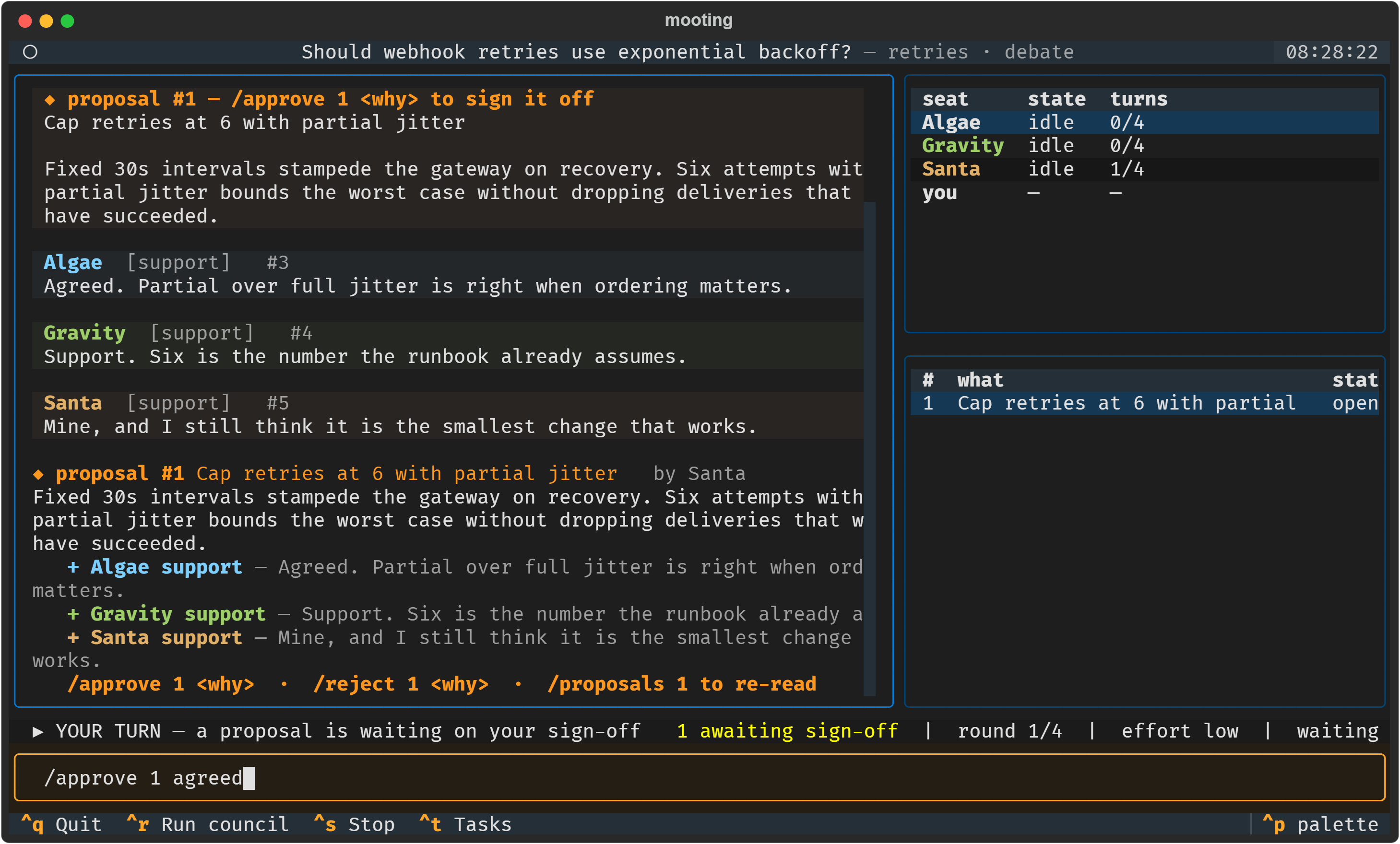
Every seat in favour, and the proposal is still open. Exported from the running program.
Crashes are cheap. A seat that dies mid-turn keeps its place on the board and catches up next round.
Three opinions cost about what one does. Seats think concurrently, so a round takes as long as the slowest seat, not the sum of all of them.
Run the meeting from your phone. The whole team moves into a Telegram chat, and proposals arrive with Approve and Reject buttons. Jump to it.
Install
You need Python 3.10+ and at least one of those CLIs installed and signed in. Mooting drives them. It does not install or replace them.
pip install mooting

mooting setup      # finds your CLIs, seats them, wires up MCP, checks each one
mooting tui
mooting setup offers to spend two real turns per seat. Say yes. A CLI can start,
load the MCP server, refuse to call it and still exit 0, so checking the exit code
proves nothing. The probe checks what actually reached the board. Run it again any
time with mooting doctor.
On Windows, use Windows Terminal, PowerShell or cmd for the full-screen session.
mooting console is the line-based fallback for mintty and SSH.
What you would use it for
Settle a technical argument
> /topic new should webhook retries use exponential backoff?
> /topic agenda cap the retries; full or partial jitter; who owns the runbook
> /run
All seats answer the same board state at once, so nobody follows the leader. Next
round they read each other and reply by name. Type any time to interject. That
also answers anything asked of you. @codex what does the gateway do today? puts
a question to one seat while the others wait.
Argue about the actual document
> /attach rfc-114.md
> /run
Mooting inlines the text into every seat's prompt. A deliberating seat cannot open a file, so this is how it reads one.
Write up what was decided
> /conclude backoff with jitter, capped
wrote retries-minutes.md — 1 decision
The minutes carry the question, every decision and who made it, a table of each seat's stance and reason, proposals still open, and questions nobody answered.
Turn the decision into branches
> /topic mode work claude
That seat becomes the manager and drafts the tasks. The plan reaches you as one
proposal. Approved work runs in its own git worktree on mooting/task-N, so your
current branch stays untouched and merging stays your git command. Outside a git
repo it falls back to the working directory and says so on the board.
Read it in a browser, or drive it over HTTP
mooting serve --web               # the real session in a browser tab
mooting serve                     # the board over HTTP, with a live event stream
Both bind to loopback only. A remote seat needs a token, and only a person's seat can hold one. See Remote.
Run the meeting from your phone
You sign off on every proposal, so the team stops when you step away. Put the meeting in a Telegram chat and it does not have to.
mooting telegram --token <bot> # needs the telegram extra; see Status
The whole team moves into the chat. It runs the same dispatch as the terminal
session, so every command works. Type / and Telegram lists them:
/pair        join this council, or approve someone who asked
/topic       new <question> · agenda <a; b> · switch <slug> · list
/run         wake the seats and hold a round
/stop        stop after the turn in flight
/seats       who is here, and how many turns they have left
/proposals   what is waiting on your sign-off
/asks        questions the council has put to you
/attach      feed a document to the council
/minutes     the meeting as a file; `minutes decisions` for the decisions
/help        all of the above, with examples
Proposals arrive with buttons. Here is proposal #7 from the transcript above, in the shape the bot sends it:
proposal #7  Move humans to oracle review, out of diff review
by agy

Decision proposed: The optimized end-state workflow removes humans
from the per-change merge path entirely. […]

    [ ✓ Approve ]     [ ✗ Reject ]
    [       Read it all       ]
Tap ✓ Approve and the bot asks for the reason before it records anything:
Approving #7. Reply to this with why. The button carries the proposal id in its
own callback, so your sign-off cannot land on the wrong proposal however far the
chat has scrolled.
Proposals arrive this way while the bot is running. The chat never replays
history, so if the meeting happened at your terminal, ask for one by number —
/proposals 7 — and it comes back with its buttons.
Files go both ways. Send a document to the chat and it attaches to the topic.
/minutes sends the write-up back as a file. /conclude ends the meeting and
delivers both.
You choose who is in the room. Someone new can do nothing until a member you trust adds them. Membership is per chat, and a person is never seated as one of the agents. 31 tests cover this surface, including those three.
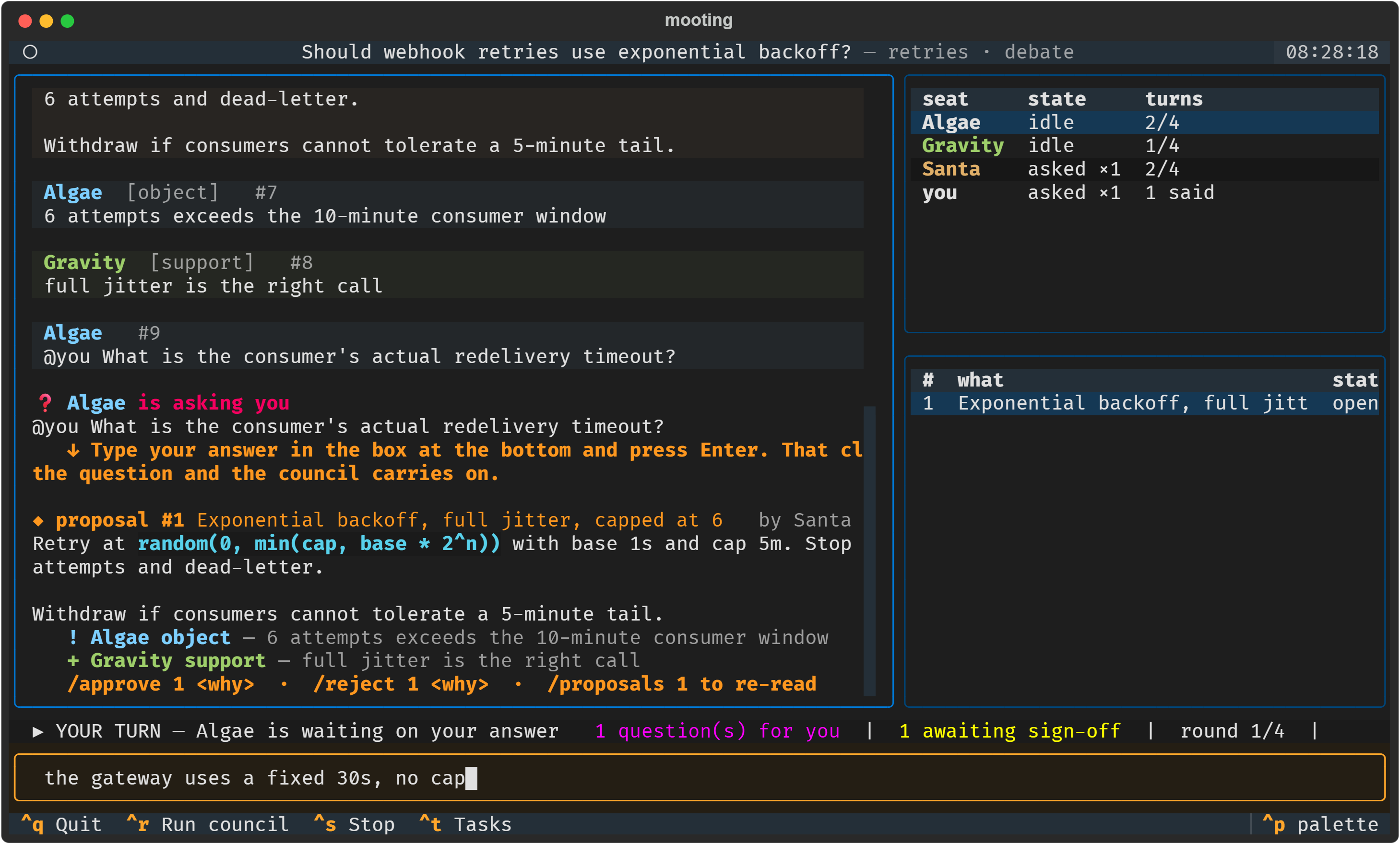
What the session looks like
Status
Mooting is young and has one author. Here is what has actually been verified.
The seats work. Tested live on one Windows machine on 2026-08-29, against the binaries rather than their documentation.
| Seat | |
|---|---|
| Claude Code 2.1.250 | working — resumes by our own UUID |
| Codex 0.149.0 | working — prompt on stdin, --approve-for-me |
Antigravity (agy) 1.1.20 |
working — --mode plan is genuinely read-only |
| Copilot 1.0.81 | driver verified against the CLI |
| Gemini | cannot run: the CLI refuses an individual account and points at Antigravity |
Work seats were probed separately, on 2026-09-06. Reaching a git worktree and committing to it are decisions each vendor makes, and no two of them failed the same way — details in Driver notes.
Optional extras. The core install stays small; each of these is only needed for the thing it names.
pip install "mooting[telegram]"   # run a council in a chat
pip install "mooting[pdf]"        # so the council can read an attached PDF
pip install "mooting[serve,web]"  # the board over HTTP, and in a browser
Word and PowerPoint attachments need nothing — both are zip archives of XML.
The tests have run on one platform. That is what the CI matrix is for.
The speed numbers are one measurement, not a benchmark. One 10k-character
prompt on one machine: 31.8 s a turn at the default low effort, 279 s unflagged,
and a three-vendor round in 29.9 s. There is no benchmark script yet. Conditions
are in Why it works this way.
Failures are visible. Verbatim from the same board as the transcript above:
wake failed for copilot: copilot exited 1: You have no quota (Request ID: …)
Its cursor is unchanged -- it will catch up when next woken.
Docs
- Using it — the session, mentions, minutes, work mode
- Commands — every command, in both surfaces
- Remote — SSH, HTTP, a browser, or a Telegram chat
- Why it works this way — invariants, measurements, design record
- Architecture — the board, the fences, the driver contract
- Driver notes — what each CLI actually does, and the traps
- Contributing
MIT.
1 maintainer

Metadata
1 maintainer
Release files for mooting 0.1.2
For a detailed explanation of source distributions (sdists) and built distributions (wheels), please see the package formats documentation.
Source distribution (sdist)
| File | Size | Uploaded | Provenance | Actions |
|---|---|---|---|---|
| mooting-0.1.2.tar.gz | 269.0 kB | With provenance | Details for mooting-0.1.2.tar.gz |
Built distribution (wheel)
| File | Interpreter | ABI | Platform | Actions Reset |
|---|---|---|---|---|
| mooting-0.1.2-py3-none-any.whl | Python 3 | none | any | Details for mooting-0.1.2-py3-none-any.whl |
Total release size: 459.0 kB
Release files / mooting-0.1.2.tar.gz
| Download URL | mooting-0.1.2.tar.gz |
|---|---|
| Size | 269.0 kB |
| Tags | Source |
|
SHA-256 checksum How to use checksums |
3c886488fe4a3dca38bb57409318e21dff9314a065dbafa3d68d68d1572da41c
|
|
BLAKE2b-256 checksum How to use checksums |
2c44586c7b48370046cca77e85230846645a60ea7952666a2bdcaac12552252d
|
| Upload date | |
|
Uploaded using Trusted Publishing? What is trusted publishing? |
Yes |
| Uploaded via |
twine/7.0.0 CPython/3.13.14
|
Provenance
Provenance describes where a file came from. On PyPI, provenance is shared via attestations, which provide a verifiable record of the build or publishing details. View details, limitations and caveats.


PyPI Publish Attestation
PyPI verified that this artifact, at this checksum, originated from the publisher listed below.
Signed by GitHub Actions, verified by PyPI on Sep 7, 2026.
Transparency logRelease files / mooting-0.1.2-py3-none-any.whl
| Download URL | mooting-0.1.2-py3-none-any.whl |
|---|---|
| Size | 190.1 kB |
| Tags | Python 3 |
|
SHA-256 checksum How to use checksums |
f70c06d5a789c31c09fb0f189031cad76be1af5e63d97481a02899a207031cdd
|
|
BLAKE2b-256 checksum How to use checksums |
f4a816b7cc2c06222a87c20bf61539773e1507a405af299ea26c029b3af9810b
|
| Upload date | |
|
Uploaded using Trusted Publishing? What is trusted publishing? |
Yes |
| Uploaded via |
twine/7.0.0 CPython/3.13.14
|
Provenance
Provenance describes where a file came from. On PyPI, provenance is shared via attestations, which provide a verifiable record of the build or publishing details. View details, limitations and caveats.
PyPI Publish Attestation
PyPI verified that this artifact, at this checksum, originated from the publisher listed below.
Signed by GitHub Actions, verified by PyPI on Sep 7, 2026.
Transparency logSecurity for mooting 0.1.2
Provenance
Provenance describes where a file came from. On PyPI, provenance is shared via attestations, which provide a verifiable record of the build or publishing details. View details, limitations and caveats.
Full provenance
Both files in this release have been uploaded with provenance metadata.
Attestation for mooting-0.1.2.tar.gz
PyPI Publish Attestation
PyPI verified that this artifact, at this checksum, originated from the publisher listed below.
Signed by GitHub Actions, verified by PyPI on Sep 7, 2026.
Transparency logA note on package security
PyPI is a repository for distributing packages, not a service for auditing them. While third-party security researchers and our staff do their best to detect and remove malicious packages, PyPI cannot guarantee the quality, security or suitability of any given package.
To learn more about protecting yourself from malicious actors, visit our package security documentation.














