
🎵 Mooze





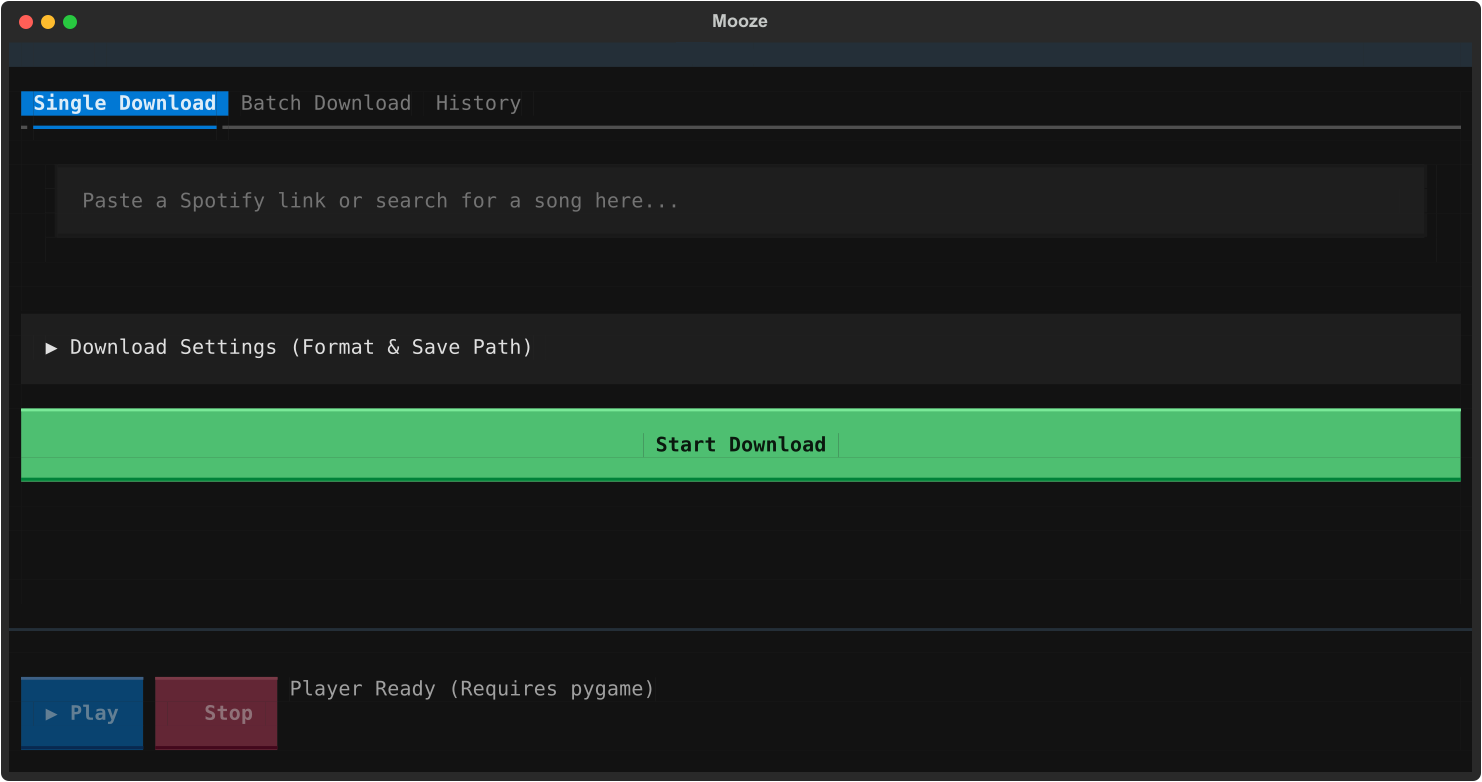
✨ Features
- Zero-Config FFmpeg: Automatically detects global FFmpeg installations or safely downloads a bundled binary via
imageio-ffmpegif missing. No manual system configuration required. - Tabbed Workspace Navigation: Seamless switching between dedicated single-track queries, high-volume batch input feeds, and persistent download history.
- Smart Spotify Playlist & Album Scraper: Paste a single Spotify Playlist or Album link and Mooze will automatically expand and queue every track in the list.
- Live Queue Sidebar: Real-time visual tracking of batch progress with dynamic status indicators (⏳ Pending, ▶ Downloading, ✅ Finished, ❌ Failed).
- Built-in Terminal Audio Player: Preview finished downloads directly inside the terminal dashboard powered by
pygame. - Persistent Download History: Automatically logs past downloads to a local history ledger accessible from the UI.
- Self-Healing Updates: Use the built-in upgrade command to automatically patch Mooze,
yt-dlp, and FFmpeg binaries to their latest releases. - Power-User Syntax Parser: Replaces rigid dropdown selections with a strict text-based format specification engine, parsing raw target extensions and custom bitrates on the fly.
- Collapsible Environment Control: A clean, expandable contextual parameter drawer housing environment variables like destination paths and custom format syntax.
🚀 Installation
Install Mooze directly from PyPI or editable local development mode:
1. Direct Installation via PyPI
pip install mooze
2. From Source Tree
git clone [https://github.com/X0fx/mooze.git](https://github.com/X0fx/mooze.git)
cd mooze
pip install -e .
📖 User Manual
Once installed, simply type mooze in any terminal to launch the dashboard.
🎛️ Audio Format Syntax Matrix
Open Download Settings and define your target format using the syntax input (.[ext], [bitrate]). Bitrates are bounded between 92 kbps and 320 kbps .
| Syntax Input | Extracted Codec | Output Fidelity | Metadata Embedding |
|---|---|---|---|
.mp3, 320 |
MP3 | High-Bitrate Master | Enabled (Cover Art + Tags) |
.mp3, 128 |
MP3 | Standard Compressed | Enabled (Cover Art + Tags) |
.m4a, 192 |
M4A | AAC Container Stream | Enabled (Cover Art + Tags) |
.flac, 256 |
FLAC | Compressed Lossless | Metadata Tags Only |
.wav, 192 |
WAV | PCM Uncompressed Linear | Metadata Tags Only |
.opus, 160 |
OPUS | Low-latency Interactive | Metadata Tags Only |
📥 Execution Modes
-
Single Track / Playlist Query
- Select the Single Download tab.
- Paste a track name, raw Spotify track link, or a Spotify Playlist / Album link .
- Click Start Download . The Live Queue sidebar will expand automatically if processing multiple songs!
-
Batch Links
- Select the Batch Download tab.
- Paste multiple Spotify links (one per line).
- Click Start Download . Multi-song batches are automatically zipped into
Mooze_Batch_Archive.zip.
-
Live Preview & Audio Player
- Once a track completes, the ▶ Play button on the bottom Audio Bar will unlock.
- Click ▶ Play to preview your downloaded song instantly. Click ⏹ Stop to halt audio.
- Visit the History tab to review previous downloads.
[!WARNING] This tool is for educational purposes and personal use only. It relies on publicly available APIs and YouTube search mechanisms. Please respect digital rights and support the artists you listen to.
1 maintainer

Release files for mooze 1.0.2
For a detailed explanation of source distributions (sdists) and built distributions (wheels), please see the package formats documentation.
Source distribution (sdist)
| File | Size | Uploaded | |
|---|---|---|---|
| mooze-1.0.2.tar.gz | 14.5 kB | Details |
Built distribution (wheel)
| File | Interpreter | ABI | Platform | Reset |
|---|---|---|---|---|
| mooze-1.0.2-py3-none-any.whl | Python 3 | none | any | Details |
Total release size: 27.6 kB
Release files / mooze-1.0.2.tar.gz
| Download URL | mooze-1.0.2.tar.gz |
|---|---|
| Size | 14.5 kB |
| Tags | Source |
|
SHA-256 checksum How to use checksums |
485b5a27bc4d23620e5e51223b76c53546b26fc1a819b0ccd9821283103e2155
|
|
BLAKE2b-256 checksum How to use checksums |
c90a026915817ec9d94bc46436c91632baeeced61b8beb22300aa2d4d537175c
|
| Upload date | |
|
Uploaded using Trusted Publishing? What is trusted publishing? |
No |
| Uploaded via |
twine/7.0.0 CPython/3.13.14
|
Release files / mooze-1.0.2-py3-none-any.whl
| Download URL | mooze-1.0.2-py3-none-any.whl |
|---|---|
| Size | 13.1 kB |
| Tags | Python 3 |
|
SHA-256 checksum How to use checksums |
f5ce9ff0f0a98d1c778f3be2cc4e3f107384218c82be34671e0f64577e7e0d1e
|
|
BLAKE2b-256 checksum How to use checksums |
e00b6f17a1893c9adccfaaa3359756598b9762ff2914b7a962e253b3da5258b3
|
| Upload date | |
|
Uploaded using Trusted Publishing? What is trusted publishing? |
No |
| Uploaded via |
twine/7.0.0 CPython/3.13.14
|














