
Offline push-to-talk voice-to-text CLI powered by whisper.cpp
Verified details
These details have been verified by PyPIProject links
GitHub Statistics
Maintainers

Project description
morvox
An awesome push-to-talk-style voice-to-text widget for everyone.
One command (morvox) that toggles:
- First press → starts recording from the default mic, remembers the currently focused window/app, and shows a "Recording…" widget.
- Second press → stops the recorder, transcribes the clip with
whisper-cli(whisper.cpp), and types the transcription into your target app.
On first use, morvox auto-downloads its built-in base Whisper model if it is
missing: English uses ggml-base.en.bin, while non-English languages such as
--lang es use the multilingual ggml-base.bin.
Note: Windows 11 has a built-in dictation tool — press
Win+Hto open it. macOS has System Dictation built in too, accessible via System Settings → Keyboard → Dictation (typically triggered by double-pressingFn). morvox is an alternative: it runs a local whisper.cpp model entirely offline, gives you a visual VU-meter widget, and wires into any hotkey manager you already use.
morvox auto-selects a platform backend:
- Linux — uses
parecordfor capture andxdotoolfor window control + keystroke injection. We also support wayland. - macOS — uses
ffmpeg(avfoundation) for capture andosascript(System Events) for window focus + keystrokes. - Windows 11 — uses
ffmpeg(WASAPI) for capture and Win32 APIs for keystroke injection. On Windows, morvox inserts into the window that is focused when transcription finishes: it tries several automatic clipboard paste methods first, then direct Unicode typing, and only leaves the transcript on the clipboard if all insertion methods are blocked.
You can force a backend with MORVOX_BACKEND=x11, MORVOX_BACKEND=macos,
or MORVOX_BACKEND=windows.
Table of Contents
Epistemology
The name is based on morhook and voice. mor-vox. I know, if I explain the joke, it's not funny. Don't judge me.
Screenshots
What it does
- It wraps whisper-cli and shows a VU meter on the user interface. You need to add the hotkey configuration on your OS/Desktop Environment.
- The built-in default model is cached under
$XDG_CACHE_HOME/morvox/models/or~/.cache/morvox/models/and is downloaded automatically on first use.enusesggml-base.en.bin; other languages useggml-base.bin.
Setup & installation
Setup, dependencies, install steps, and hotkey configuration are in
INSTALLATION.md.
Usage
# toggle (start, then stop+transcribe+type)
morvox

# fallback if you prefer module execution
python -m morvox

# status (for i3blocks / polybar)
morvox --status        # prints "recording" or "idle"

# abort an in-flight recording without transcribing
morvox --cancel

# keep the wav/txt around for debugging
morvox --keep-temp

# use a different model / source / typing speed
morvox --model /path/to/ggml-tiny.en.bin
morvox --lang es
morvox --source alsa_input.usb-Maono_Maonocaster…
morvox --threads 8
morvox --type-delay 5

# disable the floating widget (headless / SSH / debugging)
morvox --no-widget
When you use toggle-time options such as --lang es, invoke morvox with the
same flags on both presses.
From a source checkout, you can still run ./morvox before installing.
If you use the built-in managed model, morvox downloads it on first use to
$XDG_CACHE_HOME/morvox/models/ or ~/.cache/morvox/models/.
English uses ggml-base.en.bin; non-English languages such as --lang es
use ggml-base.bin. Custom --model paths are not auto-downloaded and must
already exist.
State files live in $XDG_RUNTIME_DIR/morvox/ on Linux, falling back to
/tmp/morvox-$UID/ when $XDG_RUNTIME_DIR is unset;
~/Library/Caches/morvox/ on macOS; and %LOCALAPPDATA%\morvox\ on
Windows. Override with the MORVOX_STATE_DIR env var:
rec.pid— recorder PIDtarget_window— saved focused window idrec.wav/rec.txt— audio + transcriptparecord.log/whisper.log— diagnostic logs
By default these are deleted after a successful type. Pass --keep-temp
to keep them.
The widget
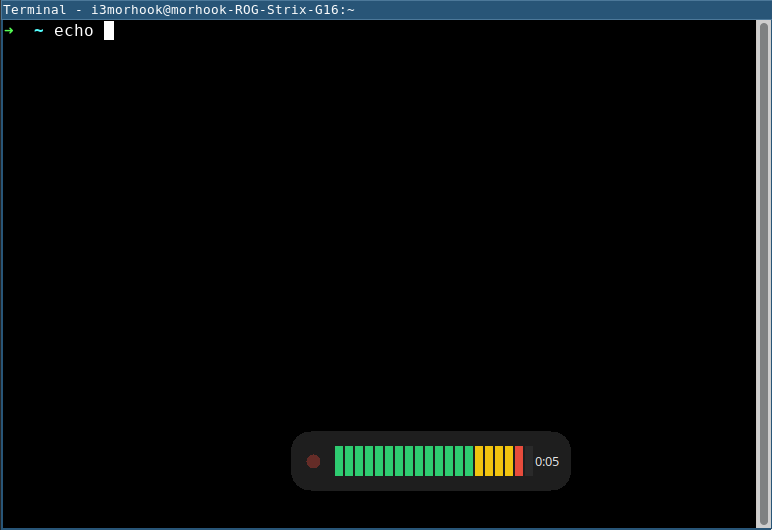
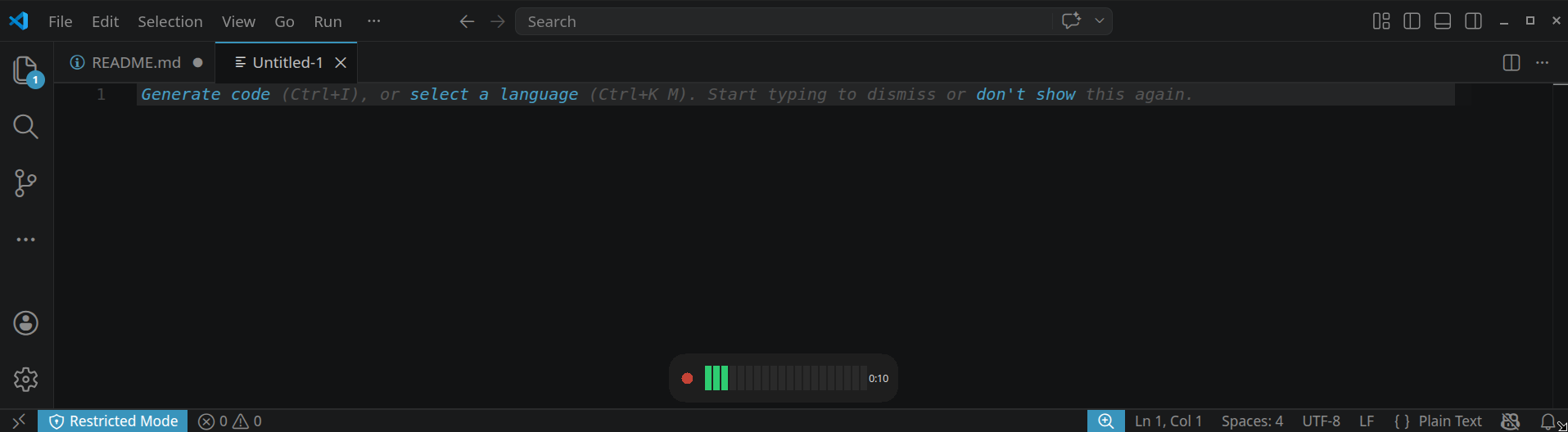
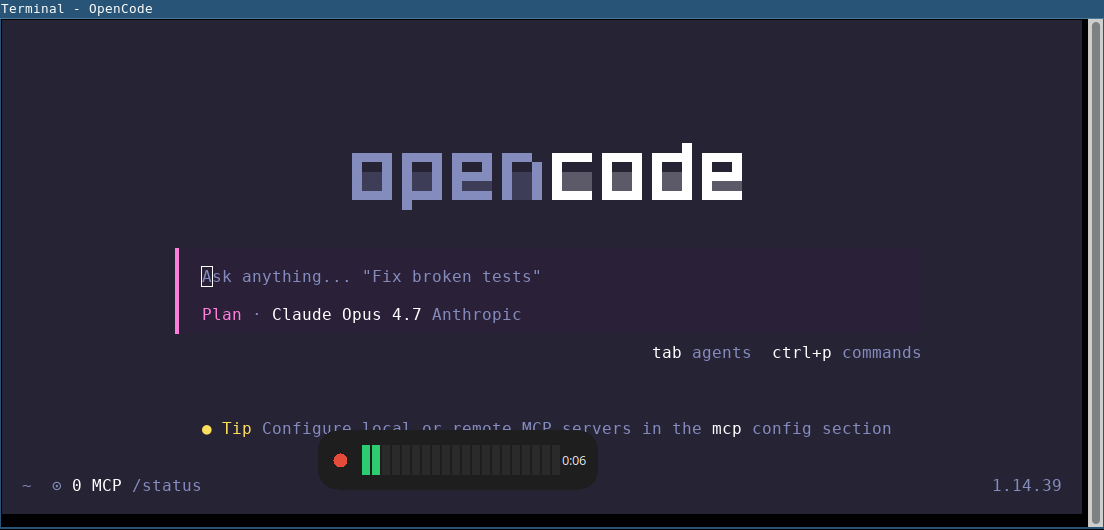
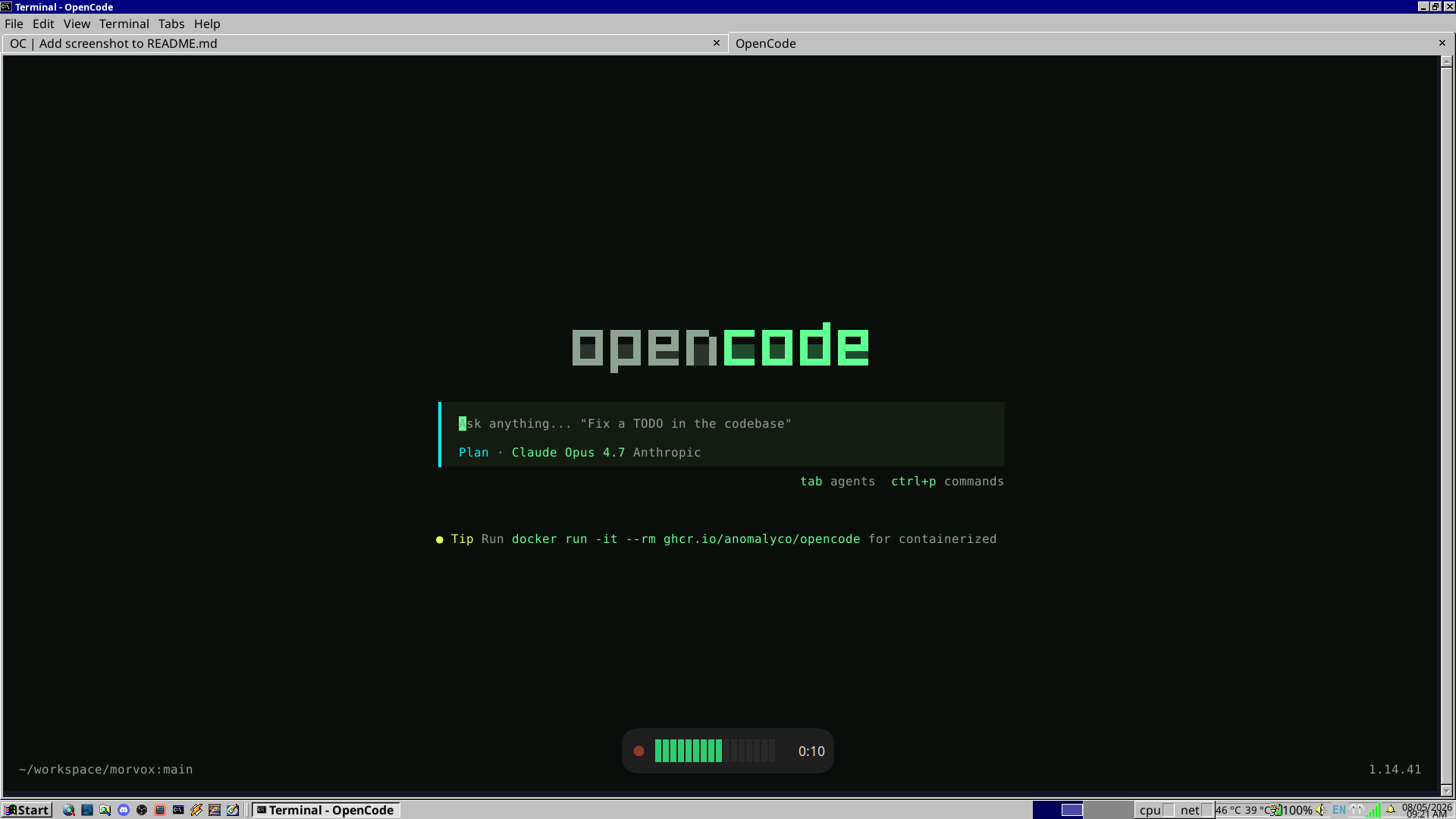
While recording, morvox shows a small borderless window centred near the bottom of the screen. It contains:
- a pulsing red dot (recording indicator),
- a live VU meter that reacts to your microphone level,
- an elapsed-time counter.
When you stop recording, the meter is replaced by a "Transcribing…" spinner that stays visible until whisper finishes and the transcript has been typed. If whisper produced only silence the widget briefly shows "No speech detected" instead.
The widget is a self-spawned subprocess of morvox (uses Python's
stdlib tkinter). Its stderr is written to the platform state dir's
widget.log for debugging. On Linux/X11 it uses
_NET_WM_WINDOW_TYPE_DOCK so i3 won't try to tile it. On Wayland-only
sessions without XWayland, or on hosts without $DISPLAY, the widget is
skipped silently.
To disable the widget entirely (e.g. on a headless machine or over SSH),
pass --no-widget.
Troubleshooting
-
No audio recorded / empty wav (Linux) Check the active sources:
pactl list short sources. Pass an explicit source with--source <NAME>. Inspect$XDG_RUNTIME_DIR/morvox/parecord.logor/tmp/morvox-$UID/parecord.log. -
No audio recorded / empty wav (macOS) List devices with
ffmpeg -f avfoundation -list_devices true -i ""and pass an explicit--source :<idx>. Inspect~/Library/Caches/morvox/parecord.log. If ffmpeg complains about permissions, grant the terminal Microphone access. -
No audio recorded / empty wav (Windows) List audio devices with
ffmpeg -list_devices true -f wasapi -i dummy(orffmpeg -list_devices true -f dshow -i dummyif your ffmpeg build lacks WASAPI) and pass an explicit--source "<device name>". Inspect%LOCALAPPDATA%\morvox\parecord.log. If ffmpeg cannot access the microphone, check Settings -> Privacy & security -> Microphone. -
Text typed into wrong window On Linux and macOS, the originally focused window/app may have been destroyed before you stopped recording. morvox falls back to typing into whatever is currently focused and prints a warning to stderr. On Windows, morvox intentionally types into the window that is focused when transcription finishes.
-
Linux Wayland: nothing is typed (GNOME/Ubuntu) GNOME/Mutter doesn't implement the
wtypekeyboard protocol andxdotoolis a no-op against native Wayland windows. Either set upydotoold(sudo systemctl enable --now ydotooldand add your user to theinputgroup), or installwl-clipboardso the transcript lands on your clipboard for manual Ctrl+Shift+V. If you launch morvox from a GNOME custom shortcut, prefer/bin/sh -lc 'morvox >/dev/null 2>/dev/null'to avoid occasional transcription hangups; replacemorvoxwith your checkout path if needed. SeeINSTALLATION.md(Linux / Wayland). -
Linux: widget never appears (asdf/pyenv/conda Python) The widget runs as a Python subprocess and needs
tkinter. Many third-party Python builds ship without it. Check$XDG_RUNTIME_DIR/morvox/widget.logor/tmp/morvox-$UID/widget.logforNo module named 'tkinter'. Installpython3-tkand run morvox under the system Python, rebuild your managed Python with Tk support, or use--no-widgetto silence the warning. -
macOS: keystrokes silently do nothing Accessibility permission isn't granted. System Settings → Privacy & Security → Accessibility → enable your terminal app.
-
Windows: text does not type into an elevated app Windows blocks lower-integrity processes from injecting keystrokes into elevated/admin windows. Run morvox from an elevated terminal too, or type into a non-elevated app.
-
Windows: transcript only appears on the clipboard On Windows 11, morvox first tries several automatic paste methods into the currently focused window and then falls back to direct typing. If all of those are blocked by the app or OS policy, morvox leaves the transcript on the clipboard so you can paste it manually. Inspect
%LOCALAPPDATA%\morvox\whisper.logfor awindows-insert:trace showing which insertion path ran and what failed. -
Whisper too slow Use a smaller model —
ggml-tiny.en.binis roughly 5× faster thanbase.enwith a small accuracy hit. Increase--threadsup to your physical core count. -
Default model keeps re-downloading unexpectedly The built-in model cache lives under
$XDG_CACHE_HOME/morvox/models/or~/.cache/morvox/models/. If your environment setsXDG_CACHE_HOMEto a temporary location, point it at a persistent cache directory. -
Nothing is typed and notification says "Empty recording" Whisper produced only a noise token (e.g.
[BLANK_AUDIO]). Speak closer to the mic or check input gain.
License
MIT — see LICENSE.
Project details
Verified details
These details have been verified by PyPIProject links
GitHub Statistics
Maintainers


Download files
Download the file for your platform. If you're not sure which to choose, learn more about installing packages.
Source Distribution
Built Distribution
Filter files by name, interpreter, ABI, and platform.
If you're not sure about the file name format, learn more about wheel file names.
Copy a direct link to the current filters
File details
Details for the file morvox-1.3.1.tar.gz.
File metadata
- Download URL: morvox-1.3.1.tar.gz
- Upload date:
- Size: 40.7 kB
- Tags: Source
- Uploaded using Trusted Publishing? Yes
- Uploaded via: twine/6.1.0 CPython/3.13.12
File hashes
| Algorithm | Hash digest | |
|---|---|---|
| SHA256 |
e22268bd70278fa2864faa63a8aa698f006b12bf378990f9345cd5157c8959bc
|
|
| MD5 |
f3ee03aff43041ac205c31de7f5fbb53
|
|
| BLAKE2b-256 |
1347c299a22bd14923d0eb9614f02a3385c62c5be3fb40409ba2a6ab8bf92215
|
Provenance
The following attestation bundles were made for morvox-1.3.1.tar.gz:
Publisher:
release.yml on morhook/morvox
-
Statement:
-
Statement type:
https://in-toto.io/Statement/v1 -
Predicate type:
https://docs.pypi.org/attestations/publish/v1 -
Subject name:
morvox-1.3.1.tar.gz -
Subject digest:
e22268bd70278fa2864faa63a8aa698f006b12bf378990f9345cd5157c8959bc - Sigstore transparency entry: 1554133486
- Sigstore integration time:
-
Permalink:
morhook/morvox@af169a88e2a014a6c89ca31cdaf40360ba2eca86 -
Branch / Tag:
refs/tags/v1.3.1 - Owner: https://github.com/morhook
-
Access:
public
-
Token Issuer:
https://token.actions.githubusercontent.com -
Runner Environment:
github-hosted -
Publication workflow:
release.yml@af169a88e2a014a6c89ca31cdaf40360ba2eca86 -
Trigger Event:
push
-
Statement type:
File details
Details for the file morvox-1.3.1-py3-none-any.whl.
File metadata
- Download URL: morvox-1.3.1-py3-none-any.whl
- Upload date:
- Size: 41.6 kB
- Tags: Python 3
- Uploaded using Trusted Publishing? Yes
- Uploaded via: twine/6.1.0 CPython/3.13.12
File hashes
| Algorithm | Hash digest | |
|---|---|---|
| SHA256 |
86c4b4134e2b39846fdab718cce6c795f3e15dabedb68abf72c4c280c0e5a9a5
|
|
| MD5 |
47c37af7fd684182ef7e4754d28f3802
|
|
| BLAKE2b-256 |
9653a06e2ca77a8291dc2f5afc2e5853c6f001f19b40f400bfdd63e25bdec1a7
|
Provenance
The following attestation bundles were made for morvox-1.3.1-py3-none-any.whl:
Publisher:
release.yml on morhook/morvox
-
Statement:
-
Statement type:
https://in-toto.io/Statement/v1 -
Predicate type:
https://docs.pypi.org/attestations/publish/v1 -
Subject name:
morvox-1.3.1-py3-none-any.whl -
Subject digest:
86c4b4134e2b39846fdab718cce6c795f3e15dabedb68abf72c4c280c0e5a9a5 - Sigstore transparency entry: 1554133500
- Sigstore integration time:
-
Permalink:
morhook/morvox@af169a88e2a014a6c89ca31cdaf40360ba2eca86 -
Branch / Tag:
refs/tags/v1.3.1 - Owner: https://github.com/morhook
-
Access:
public
-
Token Issuer:
https://token.actions.githubusercontent.com -
Runner Environment:
github-hosted -
Publication workflow:
release.yml@af169a88e2a014a6c89ca31cdaf40360ba2eca86 -
Trigger Event:
push
-
Statement type:






